caura-build-fleet
Health Pass
- License — License: Apache-2.0
- Description — Repository has a description
- Active repo — Last push 0 days ago
- Community trust — 36 GitHub stars
Code Warn
- network request — Outbound network request in pipeline/mcp_client.py
Permissions Pass
- Permissions — No dangerous permissions requested
No AI report is available for this listing yet.
A runnable reference implementation of multi-agent constraint propagation using Caura. 5 specialists share memory via MCP so decisions made upstream automatically govern downstream agents.

MemClaw Fleet: 5-Agent Pipeline with Shared Memory
A runnable reference implementation of multi-agent constraint propagation using MemClaw.
Each agent recalls what the previous one decided before acting. Clone it, run it, adapt it to any domain.




What is MemClaw? · Why Multi-Agent? · Quickstart · New Fleet · Query Memories · Add an Agent
What Is MemClaw?
MemClaw is a governed shared memory platform built for AI agent fleets. It's not a vector database bolted onto your pipeline; it's a memory layer designed from the ground up for multi-agent coordination.
New to MCP? MCP (Model Context Protocol) is an open standard that lets LLMs call external tools via a consistent interface. MemClaw exposes its memory operations as MCP tools, so any MCP-compatible agent or IDE (Claude Code, Cursor, OpenClaw) can read and write fleet memory without custom integration code. Learn more →
Core Features
| Feature | What it means in practice |
|---|---|
| Hybrid recall | Vector similarity + keyword match + knowledge graph traversal in one call. Agents find relevant memories even when they paraphrase the original query. |
| Fleet namespacing | Every memory is scoped to a fleet_id. Multiple fleets share one tenant without bleeding into each other. |
| Row-level security | scope_agent flag makes a memory readable only by the writing agent. Per-row ACL enforced at the storage layer. |
| Contradiction detection | memclaw_insights scans the fleet for conflicting rules across stored memories and surfaces them post-commit for agent review. |
| Audit trail | Writes and deletes are audit-logged on OSS; per-recall logging and dashboard querying are Prism-managed features. |
| PII detection | Sensitive content is auto-detected and stamped with a PII flag; use scope_agent=true to restrict access to the writing agent. |
| Prism dashboard | Live view of all fleet memories, memory types, and agent activity at memclaw.net/prism. |
| Knowledge graph | Entities and relationships extracted from memories, queryable as a graph via memclaw_entity_get. |
MCP Tools Used in This Pipeline
This repo connects to the MemClaw MCP server over Streamable HTTP. pipeline/mcp_client.py initializes an MCP session, calls tools/list to get live schemas, and executes model-selected tools with tools/call. A REST compatibility mode is available for tests and debugging by setting MEMCLAW_TRANSPORT=rest.
| Tool | MCP method | What it does |
|---|---|---|
memclaw_write |
tools/call |
Persist a decision, rule, fact, or insight |
memclaw_recall |
tools/call |
Hybrid semantic + keyword search across fleet memories |
memclaw_insights |
tools/call |
Contradiction detection and pattern analysis |
memclaw_list |
tools/call |
List memories filtered by agent, type, or cursor |
memclaw_stats |
tools/call |
Aggregate counts by memory type, agent, and status |
memclaw_entity_get |
tools/call |
Query the knowledge graph for extracted entities |
memclaw_keystones |
tools/call |
Read mandatory governance rules (policy, not knowledge graph) |
Get your free API key at memclaw.net. Prism dashboard is at memclaw.net/prism.
Why Multi-Agent?
Single agents hit a wall when complexity grows. They lose context, contradict their earlier decisions, and have no way to enforce rules across a long task.
Multi-agent pipelines solve this by dividing work across specialists. But they introduce a new problem: agents that can't see each other's decisions make contradictory choices. Agent A bans external JavaScript. Agent B loads a schema library from a CDN. Nobody catches it.
MemClaw fixes this with shared fleet memory. Every agent writes its decisions before finishing. Every downstream agent recalls those decisions before acting. Constraints propagate automatically not because the code hard-wires them, but because agents read each other's memory.
This repo demonstrates that pattern end-to-end:
| What's proven | How |
|---|---|
| Constraint propagation | Performance writes "zero external JS" → SEO recalls it → chooses inline JSON-LD |
| Cross-agent citation | Code Review cites Performance + SEO memory IDs in its LGTM verdict |
| Data isolation | Manager agent has no write access; confirms zero writes every run |
| Hybrid recall | Vector + keyword + knowledge graph; agents find relevant memories even with paraphrased queries |
Pipeline Flow
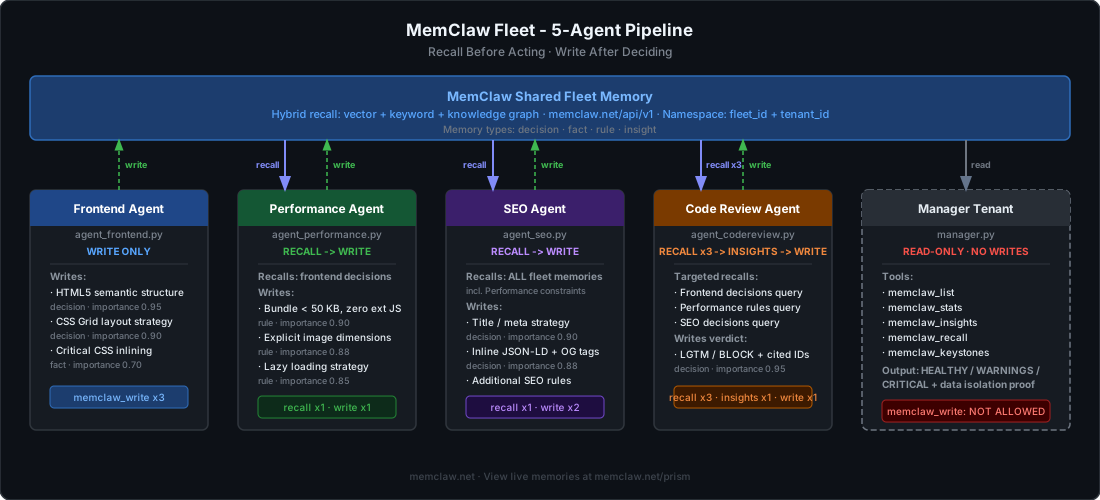
System Architecture
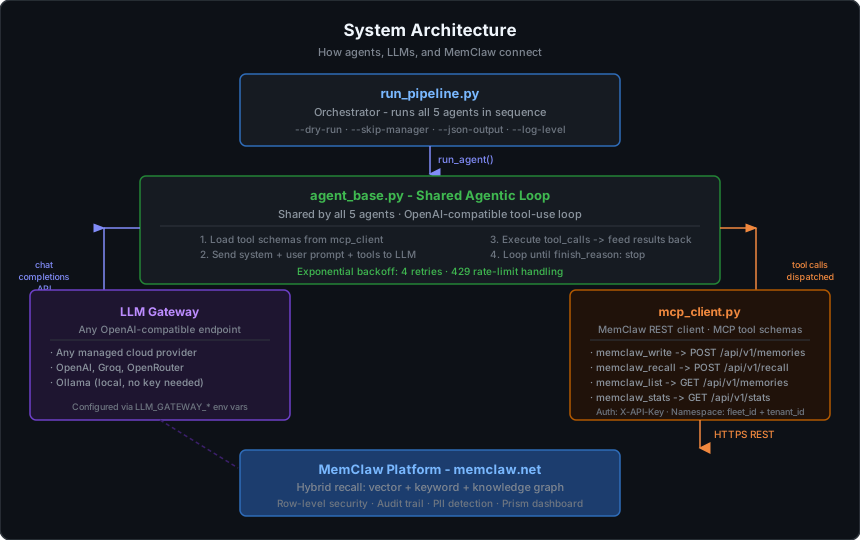
Constraint Propagation
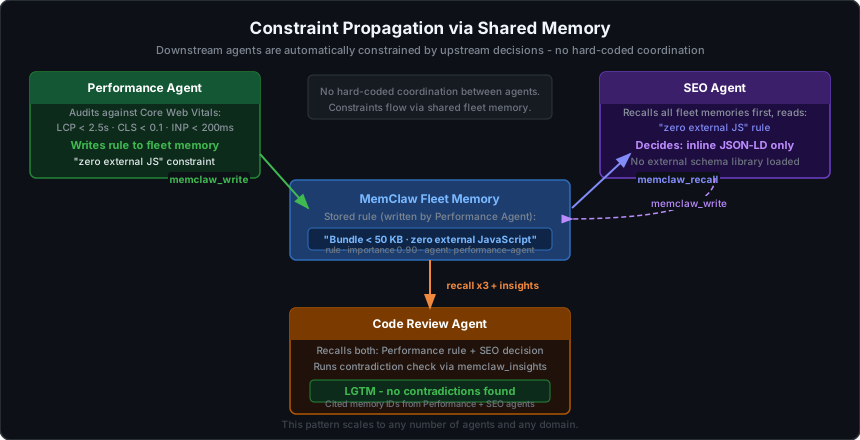
MCP Tool Access Per Agent
Each agent receives an explicit allowlist of MCP tools. Agents cannot call tools outside their allowlist; this enforces least-privilege and makes the data flow auditable.
| Agent | Role | write |
recall |
insights |
list |
stats |
keystones |
entity_get |
|---|---|---|---|---|---|---|---|---|
| Frontend | First in chain; nothing to recall yet. Architects the page and writes all structural decisions. | ✓ | ||||||
| Performance | Recalls frontend decisions, audits Core Web Vitals, writes bundle and image rules. | ✓ | ✓ | |||||
| SEO | Recalls all fleet memories so schema choices respect Performance's bundle constraints. | ✓ | ✓ | |||||
| Code Review | Recalls full fleet, runs contradiction detection, issues LGTM/BLOCK with cited memory IDs. | ✓ | ✓ | ✓ | ||||
| Manager | Read-only audit across the configured fleet. Proves data isolation; no writes allowed. | ✓ | ✓ | ✓ | ✓ | ✓ | ✓ |
Why restrict tools? Giving every agent every tool is a common mistake. The Manager agent's inability to call
memclaw_writeis enforced at the tool-schema level; it simply never receives that tool definition. At the end of every run it reports zero write operations, which is the read-only isolation proof.
What the Manager actually audits: Before the Manager's
run()is called, the orchestrator writes two lightweight bootstrap seed memories under the Manager's agent ID to register its identity in MemClaw (required for trust elevation). Those 2 writes happen in the orchestrator pre-flight; the Manager's own audit phase makes zero writes. When you seememclaw_statsreturntotal: 2, that reflects those seeds scoped to the Manager agent, not the full fleet. The full fleet memory list comes frommemclaw_list, which enumerates all memories across all agents in the fleet.
memclaw_insightsandmemclaw_statsscope note: At default trust level, bothmemclaw_insightsandmemclaw_statsoperate on the calling agent's own memories only. This meansmemclaw_statswill return a count scoped to the Manager agent (the 2 bootstrap seeds), not the full fleet; don't be surprised if you seetotal: 2rather than the ~20+ memories the other agents wrote. The complete fleet memory list comes frommemclaw_list, which does enumerate all agents. Cross-agent contradiction detection works because Code Review first recalls all fleet memories and the model reasons over them directly;insightsadds automated pattern/staleness analysis on top. For full cross-agentinsightsandstats, elevated trust is required; available on managed MemClaw accounts.
Memory Isolation Layers
MemClaw provides three levels of isolation that can be combined. This pipeline uses fleet-level namespacing as the default.
| Layer | Granularity | How it works | Example value | This repo |
|---|---|---|---|---|
| Tenant | Coarsest | Hard structural boundary enforced at the storage layer via row-level security + API key binding. Tenants cannot see each other's data under any circumstances. | MEMCLAW_TENANT_ID=acme-corp |
One tenant per team |
fleet_id namespace |
Mid-level | Every memory is tagged with a fleet_id. Reads and writes are scoped to that tag; multiple fleets coexist inside one tenant without bleeding into each other. |
MEMCLAW_FLEET_ID=payments-audit-fleet |
Default used here |
scope_agent |
Finest | Per-row server-side ACL flag. When set, only the agent that wrote the memory can recall it. Other agents in the same fleet are blocked. | scope_agent=true in memclaw_write |
Not set in this repo |
Recommended defaults:
- One tenant per organisation or compliance boundary
- One
fleet_idper pipeline run or project - Use
scope_agentonly for sensitive per-agent secrets (API keys, PII) that should not be shared downstream
Repository Structure
memclaw-build-fleet/
├── pipeline/
│   ├── run_pipeline.py       # ← START HERE: orchestrator and entry point
│   ├── agent_base.py         # Shared agentic loop used by all 5 agents
│   ├── mcp_client.py         # MemClaw MCP Streamable HTTP client
│   ├── config.py             # Shared constants (agent IDs, retry limits)
│   ├── agent_frontend.py     # Agent 1: write only
│   ├── agent_performance.py  # Agent 2: recall + write
│   ├── agent_seo.py          # Agent 3: recall + write  ← copy this to add a new agent
│   ├── agent_codereview.py   # Agent 4: recall + insights + write
│   └── manager.py            # Agent 5: read-only audit (no write access)
├── docs/
│   └── images/               # SVG architecture diagrams
├── .env.example              # Copy to .env and fill in your keys
└── README.md
Reading order for new contributors: run_pipeline.py → agent_base.py → any single agent file → mcp_client.py
Getting Started
Prerequisites
- Python 3.11 or later
- A free MemClaw account. Sign up and get your
MEMCLAW_API_KEYandMEMCLAW_TENANT_IDfrom the Prism dashboard. The tenant ID is shown on your dashboard home page immediately after sign-up. - An LLM that supports OpenAI-compatible function calling. Two options are covered below.
Option A: Managed Cloud LLM
Any provider that exposes an OpenAI-compatible /v1/chat/completions endpoint with function calling support will work.
Model requirement: The model must support
tool_choice/ function calling. If you see zero tool calls in the output, the model does not support it; switch models.
1. Clone and install
git clone https://github.com/caura-ai/memclaw-build-fleet.git
cd memclaw-build-fleet

python -m venv .venv

# Windows
.venv\Scripts\Activate.ps1

# macOS / Linux
source .venv/bin/activate

pip install -r pipeline/requirements.txt
2. Configure .env
cp .env.example .env   # macOS / Linux
copy .env.example .env # Windows
Edit .env:
LLM_GATEWAY_API_KEY=your_provider_api_key
LLM_GATEWAY_API_URL=https://your-provider-base-url/v1
LLM_GATEWAY_MODEL=your-model-name

MEMCLAW_API_URL=https://memclaw.net
MEMCLAW_MCP_URL=https://memclaw.net/mcp
MEMCLAW_TRANSPORT=mcp
MEMCLAW_API_KEY=mc_your_key_here
MEMCLAW_TENANT_ID=your-tenant-id
MEMCLAW_FLEET_ID=memclaw-build-fleet
3. Elevate agent trust (one-time, required)
The Manager and Code Review agents need trust_level=2 to call memclaw_stats, memclaw_list, and memclaw_insights. Run these two commands once per tenant; they persist and never need repeating:
curl -X PATCH "https://memclaw.net/api/agents/manager-tenant/trust?tenant_id=YOUR_TENANT_ID" \
  -H "X-API-Key: $MEMCLAW_API_KEY" \
  -H "Content-Type: application/json" \
  -d '{"trust_level": 2}'

curl -X PATCH "https://memclaw.net/api/agents/code-review-agent/trust?tenant_id=YOUR_TENANT_ID" \
  -H "X-API-Key: $MEMCLAW_API_KEY" \
  -H "Content-Type: application/json" \
  -d '{"trust_level": 2}'
If you skip this step the Manager and Code Review agents will receive 403 errors and the pipeline will report
Data Isolation: ⚠️ UNCONFIRMED. See the Troubleshooting table for details.
Tenant ID format note: MemClaw silently normalizes underscores to hyphens in agent IDs and tenant IDs (e.g.
ran_test→ran-test). Paste your tenant ID exactly as shown in the Prism dashboard. If it contains underscores, the PATCH will return 403. Use the hyphenated form if you encounter a 403 on an otherwise correct key.
4. Verify and run
python pipeline/run_pipeline.py --dry-run
python pipeline/run_pipeline.py
Option B: Fully Local with Ollama (no API key required)
Runs entirely on your machine. No cloud provider, no API key.
1. Install Ollama
Download from ollama.com and install for your OS.
2. Pull a model that supports function calling
ollama pull llama3.1
Other supported models: mistral-nemo, qwen2.5, nous-hermes2. Verify function calling support on the model's Ollama page before using.
3. Clone and install
git clone https://github.com/caura-ai/memclaw-build-fleet.git
cd memclaw-build-fleet

python -m venv .venv

# Windows
.venv\Scripts\Activate.ps1

# macOS / Linux
source .venv/bin/activate

pip install -r pipeline/requirements.txt
4. Configure .env for Ollama
LLM_GATEWAY_API_KEY=ollama
LLM_GATEWAY_API_URL=http://localhost:11434/v1
LLM_GATEWAY_MODEL=llama3.1

MEMCLAW_API_URL=https://memclaw.net
MEMCLAW_MCP_URL=https://memclaw.net/mcp
MEMCLAW_TRANSPORT=mcp
MEMCLAW_API_KEY=mc_your_key_here
MEMCLAW_TENANT_ID=your-tenant-id
MEMCLAW_FLEET_ID=memclaw-build-fleet
Ollama's OpenAI-compatible server accepts any non-empty string as the API key. ollama is the conventional placeholder.
5. Elevate agent trust (one-time, required)
Same as Option A; run the two curl -X PATCH commands from Step 3 above before running the pipeline.
6. Start Ollama and run
# Confirm Ollama is running
ollama list

python pipeline/run_pipeline.py --dry-run
python pipeline/run_pipeline.py
Running Options
# Full pipeline (all 5 agents)
python pipeline/run_pipeline.py

# Skip the Manager audit (faster iteration during development)
python pipeline/run_pipeline.py --skip-manager

# Loop mode: resets memories between runs, pauses for Enter between iterations
python pipeline/run_pipeline.py --loop

# Reset all fleet memories after the run completes
python pipeline/run_pipeline.py --reset

# Save full results to JSON
python pipeline/run_pipeline.py --json-output results.json

# Verbose debug logging (shows every tool call input and output)
python pipeline/run_pipeline.py --log-level DEBUG

# Run a single agent in isolation
python pipeline/agent_frontend.py
python pipeline/agent_performance.py
python pipeline/agent_seo.py
python pipeline/agent_codereview.py
python pipeline/manager.py
Expected Output
--dry-run
Use --dry-run to verify your environment and MemClaw connectivity before running the full pipeline. It checks that all required env vars are set, opens an MCP session, calls tools/list, and exits; no LLM calls, no memories written.
python pipeline/run_pipeline.py --dry-run
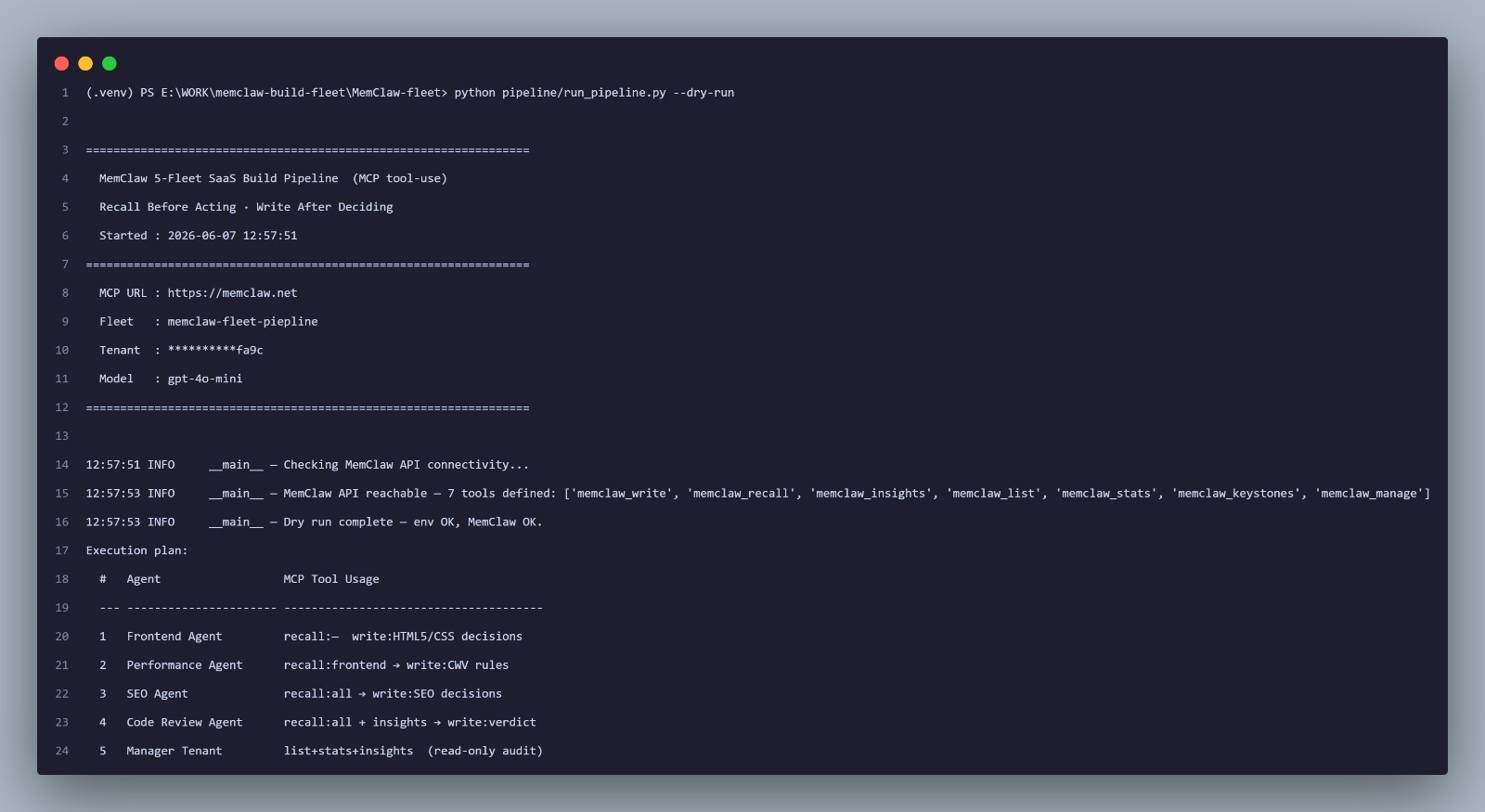
If any required env var is missing, the run exits immediately with a clear error before touching the network:
ERROR __main__  Missing required env vars: LLM_GATEWAY_API_KEY, LLM_GATEWAY_API_URL, LLM_GATEWAY_MODEL, MEMCLAW_API_KEY, MEMCLAW_TENANT_ID, MEMCLAW_FLEET_ID
Copy .env.example → .env and fill in your keys.
Full pipeline run
MemClaw Fleet  ·  5-Agent MCP Pipeline
Recall Before Acting  ·  Write After Deciding

  Started  : 2026-06-06 10:58:10
  Fleet    : memclaw-build-fleet
  Tenant   : **********fa9c
  Model    : your-model-name
  MCP      : https://memclaw.net/mcp
Execution plan
| # | Agent | MCP Tool Usage |
|---|---|---|
| 1 | Frontend Agent | recall: none → write: HTML5/CSS decisions |
| 2 | Performance Agent | recall: frontend → write: CWV rules |
| 3 | SEO Agent | recall: all → write: SEO decisions |
| 4 | Code Review Agent | recall: all + insights → write: verdict |
| 5 | Manager Tenant | list + stats + insights (read-only audit) |
Agent Results
| Agent | Time | Tool Calls |
|---|---|---|
| ✓ Frontend Agent | 18.4s | write×3 |
| ✓ Performance Agent | 21.3s | recall×1 write×3 |
| ✓ SEO Agent | 33.1s | recall×1 write×2 |
| ✓ Code Review Agent | 34.0s | recall×3 insights×1 write×1 |
| ✓ Manager Tenant | 40.7s | stats×1 list×1 insights×2 |
Verdicts
| Code Review Verdict | ✅ LGTM or 🚫 BLOCK — depends on model |
| Pipeline Health | ✅ HEALTHY, ⚠️ WARNINGS, or 🚫 CRITICAL — depends on model |
| Data Isolation | ✅ VERIFIED or ⚠️ UNCONFIRMED — depends on Manager agent trust level |
▸ View memories : https://memclaw.net/prism
Note on verdict reproducibility:
Code Review VerdictandPipeline Healthare emitted by the LLM and are model-dependent. Different models (or the same model on different runs) may produceLGTMorBLOCKdepending on how they interpret recalled memories and any detected contradictions. ABLOCKverdict is not a pipeline failure; it means the model found a real or apparent inconsistency (e.g. SEO inline JSON-LD read as conflicting with the Performance "no external JS" rule). Review the agent'sfinal_textfor its cited reasoning.
Viewing memories in Prism
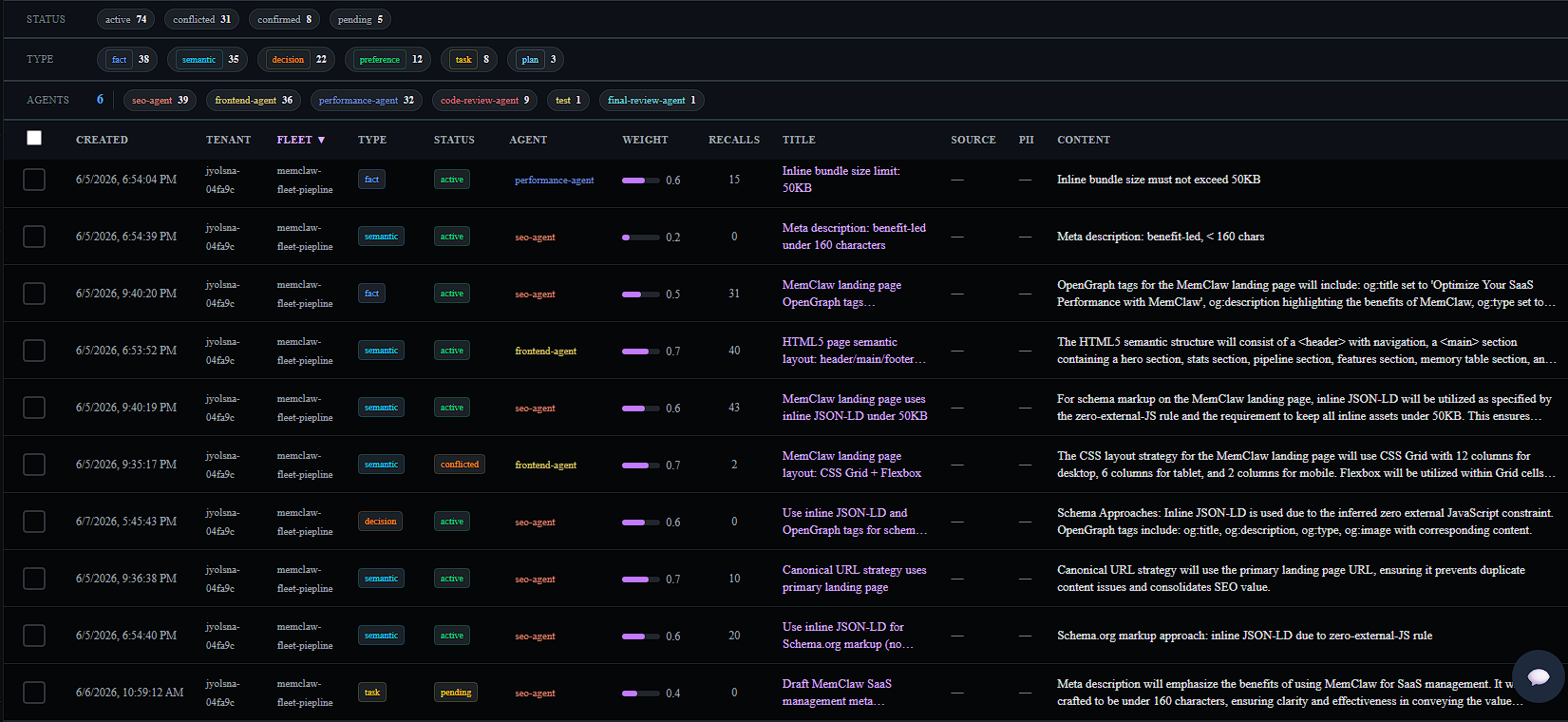
After any full pipeline run, every memory written by the fleet is visible in the Prism dashboard. The summary line at the end of the run prints the direct URL:
View memories at: https://memclaw.net/prism
In Prism you can:
- Browse all memories by fleet, agent, or memory type (
decision,rule,fact,insight) - Inspect individual memory content, importance score, tags, and write timestamp
- Filter by agent ID to see exactly what each pipeline agent contributed
- Check the audit log for every write and recall operation across the run
Creating a New Fleet
A "fleet" is a named namespace (fleet_id) that scopes all memories written by a group of agents. You don't need to register it anywhere; set the name in .env and memories are automatically isolated to that namespace.
1. Pick a fleet name
MEMCLAW_FLEET_ID=my-api-review-fleet
Any string works. Use something descriptive: payments-audit-fleet, onboarding-pipeline-v2, security-review-fleet.
2. Adapt the agent prompts for your domain
Copy pipeline/agent_seo.py to pipeline/agent_<name>.py and change:
AGENT_ID      = "my-new-agent"
SYSTEM        = "You are a ..."
PROMPT        = "Review the ..."
ALLOWED_TOOLS = ["memclaw_recall", "memclaw_write"]
3. Register the agent in the orchestrator
In pipeline/config.py, add a constant for your agent ID. In pipeline/run_pipeline.py, add it to PIPELINE_STEPS:
PIPELINE_STEPS = [
    ("Frontend Agent",   agent_frontend,  "recall: none  →  write: HTML5/CSS decisions"),
    ("My New Agent",     agent_myagent,   "recall: all  →  write: my decisions"),   # ← add here
    ...
]
4. Start with a clean slate
Change MEMCLAW_FLEET_ID to a new value to start fresh. Old memories remain under the old namespace and won't affect the new fleet.
MEMCLAW_FLEET_ID=my-api-review-fleet-v2
Fleet isolation at a glance
| Scenario | What to do |
|---|---|
| New domain, same tenant | Change MEMCLAW_FLEET_ID |
| Separate team, full isolation | Create a new MemClaw tenant at memclaw.net |
| Agent-level secrets | Set scope_agent=true in memclaw_write |
| Read-only audit agent | Omit memclaw_write from ALLOWED_TOOLS (see manager.py) |
Querying Fleet Memories
After the pipeline runs, query the written memories three ways.
Claude Code MCP
Register the MemClaw MCP server with Claude Code:
claude mcp add \
  --transport http \
  --header "X-API-Key: mc_your_key_here" \
  --scope user \
  memclaw https://memclaw.net/mcp
Open a new Claude Code session and ask it to recall memories from your fleet. Claude will call memclaw_recall directly against your tenant.
MCP Inspector
The official MCP debugging tool; browser UI, no code required.
npx @modelcontextprotocol/inspector
Opens at http://localhost:5173. Set transport to HTTP, URL to https://memclaw.net/mcp, add header X-API-Key: mc_your_key_here. Call any tool interactively.
Troubleshooting
| Symptom | Cause | Fix |
|---|---|---|
| Zero tool calls in output | Model doesn't support function calling | Switch to llama3.1 or qwen2.5 (Ollama), or check your provider's capability docs |
| Code Review BLOCK: "No relevant context found" | Earlier agents didn't run, or MEMCLAW_FLEET_ID mismatches |
Run full pipeline from Agent 1; confirm MEMCLAW_FLEET_ID is identical everywhere |
ModuleNotFoundError on a single agent |
Running from inside pipeline/ |
Run from repo root: python pipeline/agent_codereview.py |
| MemClaw 401 Unauthorized | Missing or malformed API key | Keys follow format mc_xxxxx. Get yours at memclaw.net/prism |
| LLM gateway 429 rate limit | Provider quota exceeded | Pipeline retries automatically (4 attempts, 20–80s backoff). Set LLM_GATEWAY_MAX_TOKENS=2048 to reduce per-request size |
Inline comment breaks .env value |
Shell comments inside env values | LLM_GATEWAY_MODEL=my-model — no trailing # comments on the same line |
| Recall returns memories from a different run | MEMCLAW_FLEET_ID typo (e.g. piepline vs pipeline) |
Recall queries by tenant first; a typo'd fleet_id still returns results but mixes namespaces. Standardise one value in .env and keep it consistent across all runs |
Manager reads return 403 / Data Isolation: ⚠️ UNCONFIRMED |
Agent trust_level is 1; memclaw_stats, memclaw_list, and memclaw_insights require trust ≥ 2 |
Elevate trust via the admin API: curl -X PATCH "https://memclaw.net/api/agents/manager-tenant/trust?tenant_id=<your-tenant-id>" -H "X-API-Key: $MEMCLAW_API_KEY" -d '{"trust_level": 2}'. Do the same for code-review-agent. Only needs to be done once per tenant. |
memclaw_insights returns 403 for Code Review |
Agent trust_level is 1 |
Same fix as above; elevate code-review-agent trust to 2 via the admin API |
Using MemClaw with Other Agent Frameworks
This repo is a plain-Python reference implementation; no framework dependency required. The MemClaw MCP server works with any framework that can call an OpenAI-compatible tool or an MCP endpoint.
CrewAI
Wrap each memclaw_* tool as a CrewAI @tool and pass it to your Agent definition. The recall_before_acting and write_after_deciding prompts in each agent's SYSTEM string map directly onto CrewAI task descriptions.
from crewai_tools import tool
import mcp_client as mcp

@tool("recall fleet memories")
def recall(query: str) -> str:
    """Retrieve relevant memories from the shared fleet before acting."""
    return str(mcp.call_tool("memclaw_recall", {"query": query}, agent_id="my-crew-agent"))

@tool("write fleet memory")
def write(content: str, importance: float = 0.85) -> str:
    """Persist a decision to shared fleet memory after acting."""
    return str(mcp.call_tool("memclaw_write", {"content": content, "importance": importance}, agent_id="my-crew-agent"))
Assign tools=[recall, write] to agents that need fleet memory. The Manager audit agent gets tools=[recall] only; matching the read-only isolation this repo enforces.
LangGraph / LangChain
Register MemClaw tools as StructuredTool objects and bind them to your graph nodes. Each node in the LangGraph state machine corresponds to one agent in this pipeline.
from langchain_core.tools import StructuredTool
import mcp_client as mcp

recall_tool = StructuredTool.from_function(
    func=lambda query: mcp.call_tool("memclaw_recall", {"query": query}, agent_id="langgraph-agent"),
    name="memclaw_recall",
    description="Recall relevant fleet memories before acting.",
)
Bind the tool to your ChatOpenAI model with llm.bind_tools([recall_tool, write_tool]); the rest of the agentic loop (tool-call → execute → feed back) works identically to agent_base.py.
AutoGen / AG2
Add MemClaw tools to an AssistantAgent's function map. AutoGen's register_for_llm + register_for_execution pattern maps cleanly onto the write-after-deciding pattern:
import autogen, mcp_client as mcp

assistant = autogen.AssistantAgent("seo_agent", llm_config={...})

@assistant.register_for_llm(description="Recall fleet memories.")
@assistant.register_for_execution()
def memclaw_recall(query: str) -> str:
    return str(mcp.call_tool("memclaw_recall", {"query": query}, agent_id="seo-agent"))
Harness AI / Custom Orchestrators
Any orchestrator that can make HTTP POST requests can call MemClaw directly without this Python client. Set MEMCLAW_TRANSPORT=rest in .env to use the REST fallback path in mcp_client.py, or POST to https://memclaw.net/api/v1/recall and /memories directly with X-API-Key authentication.
The MCP server (https://memclaw.net/mcp) also works with any MCP-compatible runtime; register it as an MCP tool server and each tool schema is discovered automatically at session start.
Contributing
Contributions welcome. Useful directions:
- New agent types: accessibility, i18n, analytics, security review, API contract validation
- Transport coverage: integration tests with a mock MCP Streamable HTTP server
- Tests: unit tests for
mcp_client.pyMCP session handling and REST compatibility mode - New pipeline domains: API design review, infrastructure audit, data pipeline validation
Development setup
git clone https://github.com/caura-ai/memclaw-build-fleet.git
cd memclaw-build-fleet
python -m venv .venv && source .venv/bin/activate  # or .venv\Scripts\Activate.ps1 on Windows
pip install -r pipeline/requirements.txt
Always run --dry-run first after making changes:
python pipeline/run_pipeline.py --dry-run
Adding a new agent
- Copy
pipeline/agent_seo.pytopipeline/agent_<name>.py - Define
AGENT_ID,SYSTEM,PROMPT,ALLOWED_TOOLS, and arun() -> dictfunction - Add the agent ID constant to
config.py - Add the agent to
PIPELINE_STEPSinrun_pipeline.py
agent_base.run_agent() handles the full tool-use loop, retry logic, and tool execution. You only write prompts and declare which tools the agent can call.
Resources
| Resource | Link |
|---|---|
| MemClaw Platform | memclaw.net |
| Prism Dashboard | memclaw.net/prism |
| MemClaw Docs | memclaw.net/docs |
| OpenClaw Docs | docs.openclaw.ai |
| Ollama | ollama.com |
| MCP Inspector | github.com/modelcontextprotocol/inspector |
| Model Context Protocol | modelcontextprotocol.io |
License
MemClaw platform is separately licensed. See memclaw.net for terms.
Reviews (0)
Sign in to leave a review.
Leave a reviewNo results found