pitago
Health Warn
- License — License: MIT
- Description — Repository has a description
- Active repo — Last push 0 days ago
- Low visibility — Only 5 GitHub stars
Code Pass
- Code scan — Scanned 7 files during light audit, no dangerous patterns found
Permissions Pass
- Permissions — No dangerous permissions requested
No AI report is available for this listing yet.
A polished terminal UI (TUI) for the pi AI coding agent — real-time chat, multi-provider LLMs, tools and sessions. Built with Go and Bubble Tea.
pitago
████  ███ █████  ███   ███   ███
█   █  █    █   █   █ █     █   █
████   █    █   █████ █  ██ █   █
█      █    █   █   █ █   █ █   █
█     ███   █   █   █  ███   ███
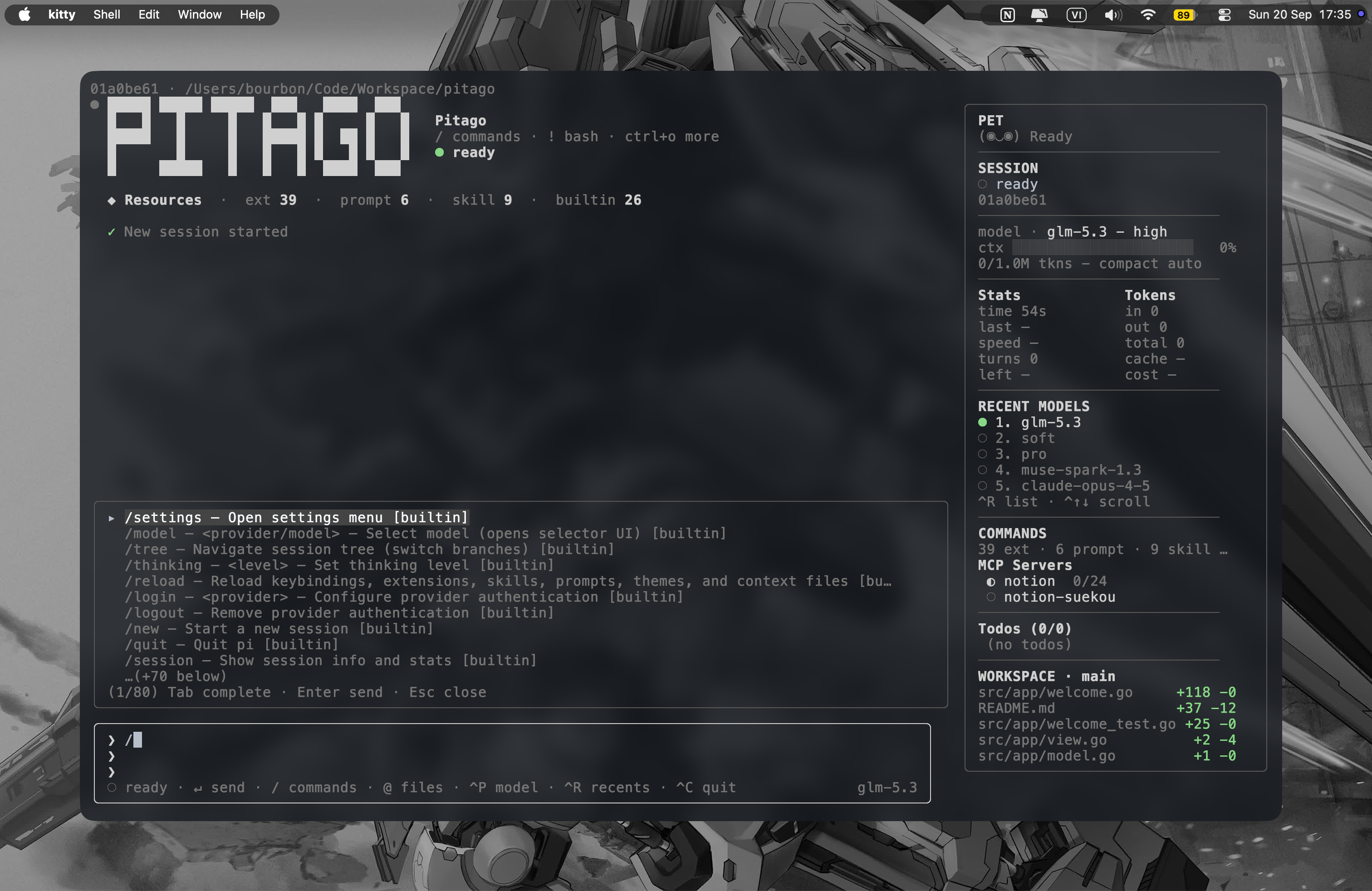
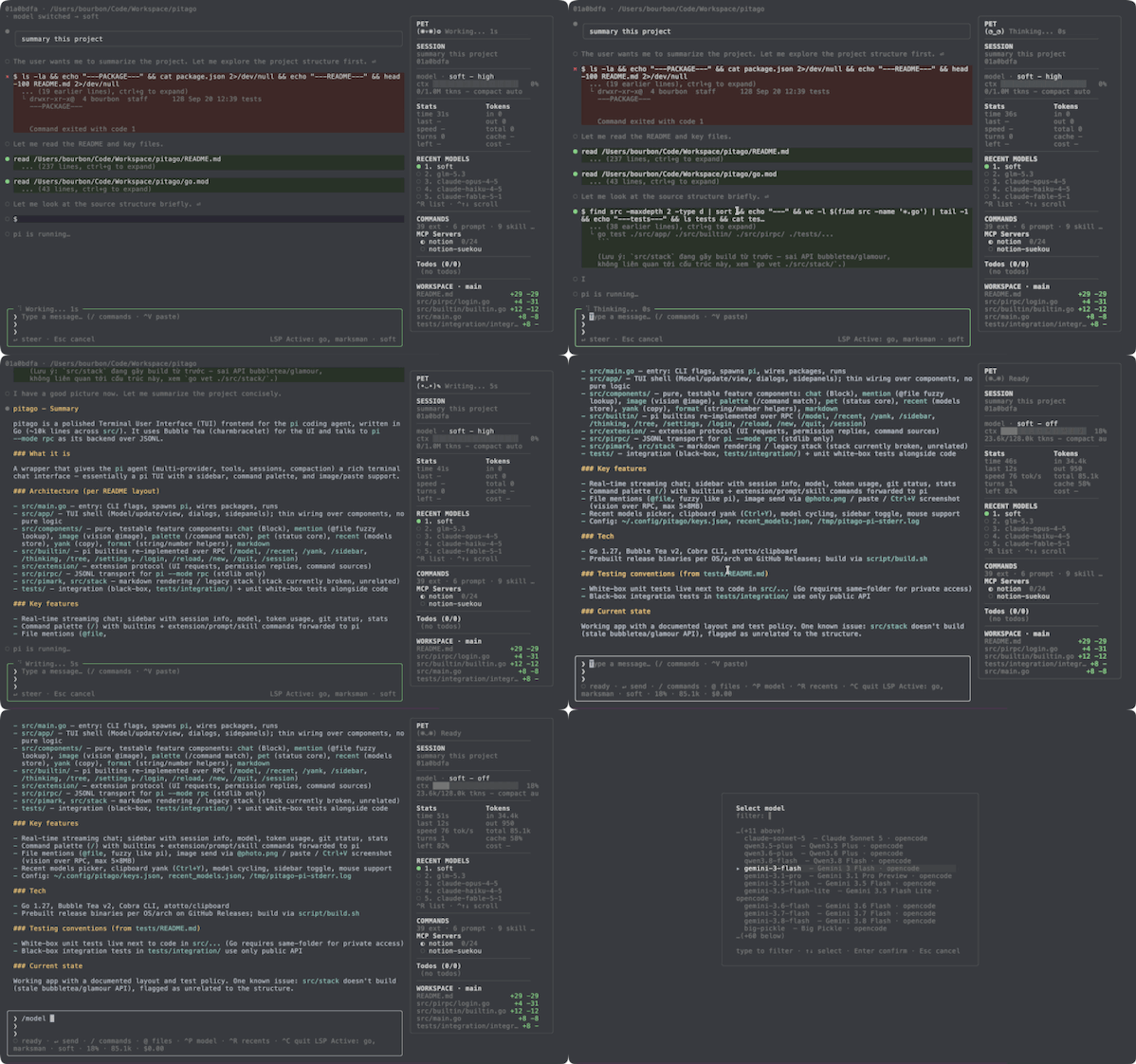
A polished Terminal User Interface (TUI) frontend for the pi agent, built with Bubble Tea. pi --mode rpc serves as the backend (multi-provider, tools, sessions, compaction), while pitago provides a rich terminal interface communicating over JSONL.
Overview
pitago wraps the pi agent in a beautiful terminal interface with:
- Real-time chat with streaming responses
- Sidebar showing session info, model details, token usage, and git status
- Command palette with builtins and extension commands
- File mention support (
@file) - Image send via
@photo.pngor dropping/pasting file paths — orCtrl+Von a copied screenshot (macOS needspngpaste, Linux useswl-paste/xclip). Vision over RPC, max 5 × 8MB. Paths collapse into[Image N]chips;↓moves into the tray,←→picks a chip,⌫deletes it,Escback - Recent models picker
- Clipboard integration (
Ctrl+Yto yank last answer)
Requirements
- Go ≥ 1.27
piavailable in PATH (or setPI_BINto its path)- An API key for your provider (e.g.
ANTHROPIC_API_KEY), or run/logininside the app to save one to the keystore
Install
Option 1 — install into bin (use anywhere)
From a release binary (latest version, pick your OS — single block, no variables):
macOS (Apple Silicon):
curl -L -o pitago https://github.com/cavaldos/pitago/releases/latest/download/pitago-darwin-arm64
chmod +x pitago
sudo mv pitago /usr/local/bin/pitago   # or ~/go/bin, ~/.local/bin — any dir on PATH
pitago --version
macOS (Intel):
curl -L -o pitago https://github.com/cavaldos/pitago/releases/latest/download/pitago-darwin-amd64
chmod +x pitago
sudo mv pitago /usr/local/bin/pitago   # or ~/go/bin, ~/.local/bin — any dir on PATH
pitago --version
Linux:
curl -L -o pitago https://github.com/cavaldos/pitago/releases/latest/download/pitago-linux-amd64
chmod +x pitago
sudo mv pitago /usr/local/bin/pitago   # or ~/go/bin, ~/.local/bin — any dir on PATH
pitago --version
Windows (PowerShell):
Invoke-WebRequest https://github.com/cavaldos/pitago/releases/latest/download/pitago-windows-amd64.exe -OutFile pitago.exe
# move pitago.exe somewhere on your PATH, then: pitago --version
From source:
git clone https://github.com/cavaldos/pitago.git
cd pitago
script/build.sh                      # outputs bin/pitago (VERSION defaults to git tag/commit)
sudo cp bin/pitago /usr/local/bin/pitago
pitago --version
Uninstall (if installed into bin):
macOS:
sudo rm /usr/local/bin/pitago   # or wherever you put it: ~/go/bin, ~/.local/bin, …
rm -rf ~/.config/pitago         # optional: remove saved API keys + recent models
Linux:
sudo rm /usr/local/bin/pitago   # or wherever you put it: ~/go/bin, ~/.local/bin, …
rm -rf ~/.config/pitago         # optional: remove saved API keys + recent models
Windows (PowerShell):
del C:\path\to\pitago.exe              # wherever you placed it (a folder on your PATH)
Remove-Item -Recurse -Force $HOME\.config\pitago   # optional: remove saved API keys + recent models
Option 2 — run local in the project (no install)
From a release binary:
cd /path/to/your-project
curl -L -o pitago https://github.com/cavaldos/pitago/releases/download/v0.0.1/pitago-v0.0.1-linux-amd64
chmod +x pitago
./pitago --version
From source:
git clone https://github.com/cavaldos/pitago.git
cd pitago
script/build.sh
./bin/pitago --version
Or skip the build and run straight from source:
script/run.sh
Quick Start
# From the repo root — everything lives under src/
go run ./src

# Open another working directory (flags first, then the path)
go run ./src ~/Code/workspace
go run ./src --cwd ~/Code/workspace

# Resume most recent session
go run ./src -c

# Specify provider and model
go run ./src --provider anthropic --model claude-sonnet-4-20250514

# Don't persist a session
go run ./src --no-session

# Self-update to the latest GitHub release
go run ./src --update   # or /update inside the app

# Mouse (sidebar click + wheel scroll) is on by default;
# opt out with --mouse=false for plain highlight-to-copy
go run ./src --mouse=false
Build & Test
# Vet
go vet ./...

# Build
go build -o /tmp/pitago ./src

# Test
go test ./...
Release
Tag push triggers the release workflow, which cross-builds
(linux-amd64, darwin-amd64/arm64, windows-amd64) and publishes a GitHub Release:
script/test-cicd.sh        # check vet + test + builds locally first
script/release.sh v0.0.1
Keybindings
| Key | Action |
|---|---|
Enter |
Send (idle) / steer (while running) |
Esc |
Cancel running turn (clear queue + abort) |
Ctrl+C |
Quit (press twice within 3s — warning pins to the sidebar corner) |
Ctrl+N |
New session |
Ctrl+P |
Cycle model |
Ctrl+R |
Recent-models picker |
Ctrl+T |
Cycle thinking level (no picker) |
Ctrl+B |
Hide/show sidebar (hide for clean drag-select of chat only) |
Ctrl+Y |
Yank last assistant answer to clipboard (chat-only, no sidebar) |
Ctrl+V |
Paste text — or screenshot data (pngpaste/wl-paste/xclip); errors shown, terminal Cmd+V still works |
Backspace |
Empty input + image tray → remove last [Image N] chip |
↓ (+tray) |
Cursor into the image tray · ←→ pick a chip · ⌫ delete it · Esc back to input |
Ctrl+O |
Yank picker: choose any message to copy (sidebar stays visible) |
Ctrl+G |
Expand/collapse tool output: write content, read results, diffs (collapsed previews like pi) |
Alt+1…5 |
Jump straight to a recent model |
Tab |
Complete /command or @file |
@ |
Mention a file (fuzzy finder, like pi — Tab/Enter completes, text goes to pi raw; @*.png/.jpg/.gif/.webp also sends vision) |
↑↓ PgUp PgDn |
Scroll chat (when input is single-line) |
Alt+↑↓ PgUp PgDn Home End or Ctrl+↑↓ PgUp PgDn Home End |
Scroll sidebar (keyboard, always works) |
Mouse wheel |
On by default: hover sidebar to scroll it, chat otherwise; --mouse=false disables |
Copying text
- With mouse on (default): hold
Option/Shift(terminal-dependent) to select - Or toggle it at runtime with
/mouse(/mouse offfor plain highlight-to-copy), or start with--mouse=false - To copy only chat content (without sidebar): hide the sidebar with
/sidebarorCtrl+B, then select - Or use
Ctrl+Y//yank(/copy) to copy the last assistant answer directly to clipboard - Or press
Ctrl+Oto pick any message to copy — sidebar stays visible - With mouse on: hold
Option/Shift(terminal-dependent) to select
Commands
Type / to open the command popup. Two kinds:
Builtins
(intercepted locally, re-implemented over RPC):
/model— change model/recent— recent models picker/yank//copy— copy last answer to clipboard/sidebar— hide/show sidebar/plugins— collapse/expand installed pi plugins in the sidebar/mouse— toggle mouse (click sidebar, wheel scroll) at runtime,[on|off]; off for native text selection/update— check GitHub releases + install latest (auto-checks in background, once a day)/thinking— toggle thinking level/tree— session tree, pi-style rows (read-only over RPC)/settings— open settings/login//logout— manage API keys/reload— reload extensions/new— new session/resume— resume picker (like pi: current project, Tab for all)/quit— exit/session— session management
Extension / prompt / skill
(from pi's get_commands): forwarded to pi as /... prompt text, executed server-side.
Sidebar
The right column (pi session-panel style) shows:
- SESSION — first message + session id
- Model + thinking level
- Context bar (
used/total tkns) - Stats | Tokens —
time,last,speed,turns, context left,in/out/total/cache/cost - Clickable RECENT MODELS and COMMANDS counts
- Collapsible PLUGINS — installed pi packages (
pi list), click the header or/pluginsto collapse/expand - WORKSPACE — git status (branch + per-file
+add -del, refreshed every 10s and after each turn) - Current working directory
Hidden on terminals narrower than 80 columns.
Long content scrolls inside the sidebar (Ctrl/Alt+↑↓ PgUp PgDn Home End, or mouse wheel over it).
Layout
src/main.go       # entry: flags, spawn pi, wire packages, run
src/app/          # TUI shell: Model, update, view, dialogs, sidepanels;
                  # thin wiring over src/components (no pure logic here)
src/components/  # feature components (pure, testable without TUI state):
                   # chat (Block), mention (@file lookup), image (@image vision),
                   # palette (/ match),
                  # pet (status core), recent (models store), yank (copy),
                  # format (shared string/number helpers)
src/builtin/      # pi builtin features re-implemented over RPC
                  # Origin "pi" = pi TUI builtin, "pitago" = ours (/recent)
src/extension/    # extension protocol: UI requests, permission replies,
                  # command sources (extension/prompt/skill)
src/pirpc/        # JSONL transport for `pi --mode rpc` (stdlib only)
tests/            # integration tests (black-box, public API only).
                  # Unit white-box tests stay next to code as *_test.go
                  # (Go requires this for private access) — see tests/README.md
Rules: app never imports builtin/extension (wired in main via UseBuiltins); builtin operates on *app.Model, extension is pure protocol helpers.
Configuration Files
~/.config/pitago/keys.json(0600) — saved API keys (/login,/logout)~/.config/pitago/recent_models.json— recent models (max 5)~/.config/pitago/update.json— last update-check timestamp + tag (24h TTL)/tmp/pitago-pi-stderr.log— pi child stderr
Reviews (0)
Sign in to leave a review.
Leave a reviewNo results found