keymotion
Health Uyari
- License — License: Apache-2.0
- Description — Repository has a description
- Active repo — Last push 0 days ago
- Low visibility — Only 8 GitHub stars
Code Basarisiz
- rm -rf — Recursive force deletion command in .github/workflows/release.yml
Permissions Gecti
- Permissions — No dangerous permissions requested
Bu listing icin henuz AI raporu yok.
Free, open-source Windows app for the AJAZZ AK980 PRO keyboard (also sold as AK980 V2): per-key RGB lighting, key mapping, macros, your own GIFs on its screen, music mode, game lights and alerts from AI coding agents. No AJAZZ software needed.
Keymotion
A free, open-source Windows app for the AJAZZ AK980 PRO keyboard (also sold as AK980 V2):
lighting, key mapping, macros and your own GIFs on its little screen. No AJAZZ software needed.
Have another keyboard? Several from AULA, AJAZZ and LangTu could come next.
Is yours on the list? Plug it in with Keymotion open and tell us what it finds.
English · Türkçe · Русский · 简体中文
User guide · Release notes · Questions

Free · Unofficial, not affiliated with AJAZZ · The same app either way: Microsoft signs the Store copy, while the GitHub installer isn't code-signed yet, so Windows may warn before it runs: which to choose




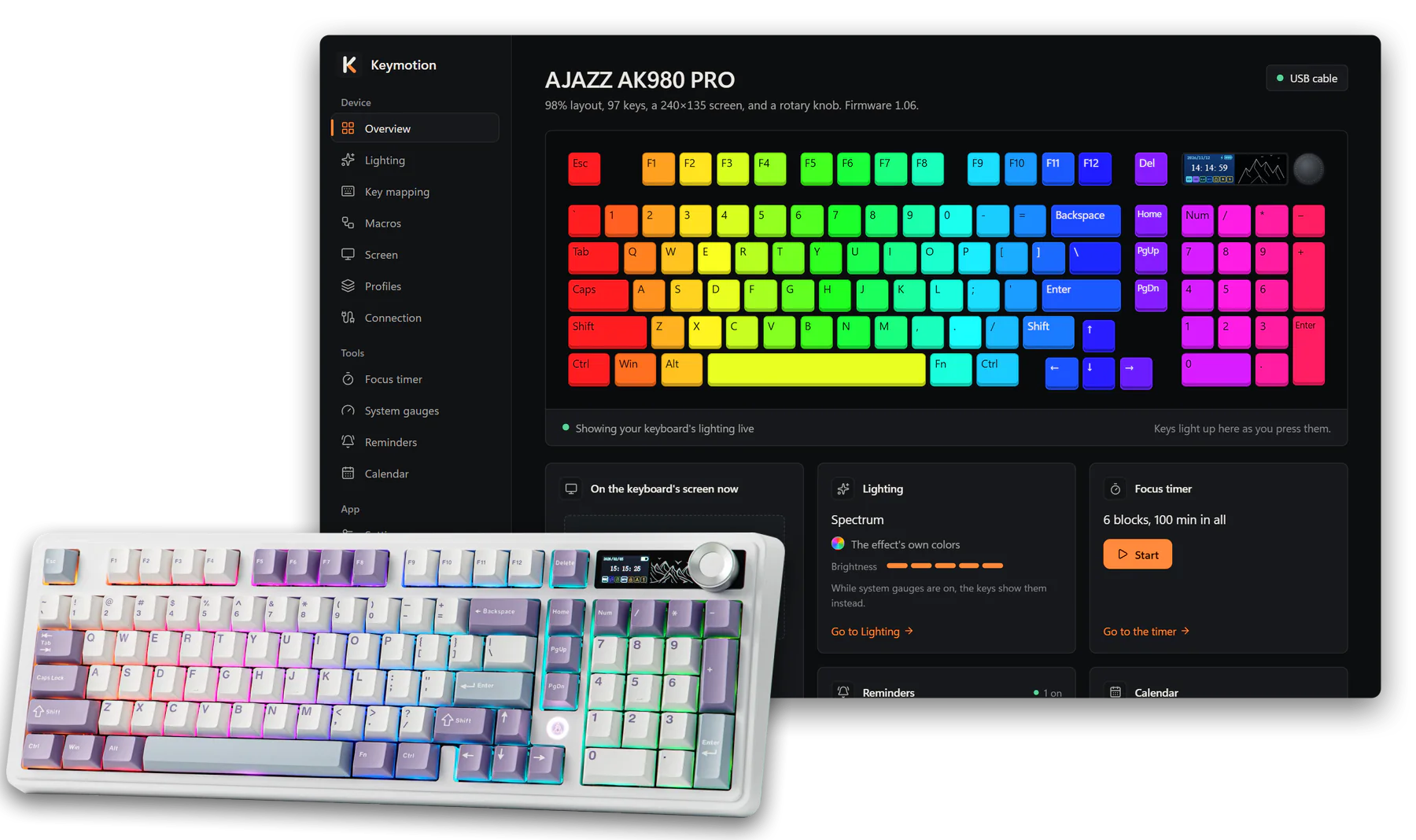
Keyboard scenes rendered with AI; the app's pages and what the keyboard's screen shows are real.
The 36-second video with sound: on YouTube
Supported keyboards
Keymotion is tested on the AJAZZ AK980 PRO. Other keyboards built on the same platform could come next, and if you have one, you can help add it.
Tested and working
| Keyboard | USB cable | 2.4 GHz receiver | Bluetooth | |
|---|---|---|---|---|
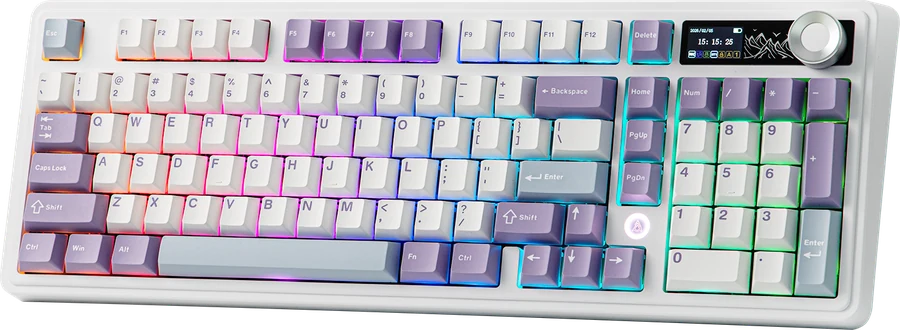 |
AJAZZ AK980 PRO also sold as AK980 V2 |
Everything | Typing, media keys and the knob | Typing, media keys, the knob and the battery level |
Settings travel over the USB cable: that is how the keyboard is built.
[!NOTE]
AJAZZ's newest firmware for the AK980 PRO, 3.01 ("AK980 Led v2 Firmware 769"), uses a different set of commands that Keymotion doesn't support yet, and AJAZZ offers no way back to the older firmware. If you want to keep using Keymotion now, wait before updating. More in the FAQ.
Same platform, not tested yet
According to other open-source projects that measured them on real keyboards, these appear to use the same commands as the AK980 PRO. Keymotion doesn't work with them yet: a keyboard is added only after someone has tried it, because the limits that keep it safe differ from model to model.
Have one? Here's how to help:
- Download Keymotion and connect the keyboard with its USB cable.
- If Keymotion says This keyboard isn't supported yet, select Request support. It copies the keyboard's details and writes nothing to the keyboard.
- Select Tell us next to your keyboard below and paste the details. With them we can prepare a test build for you to try.
| Keyboard | Screen | Status | Have one? |
|---|---|---|---|
| AULA F108 Pro also EPOMAKER x AULA F108 Pro · the closest relative |
240×135 | Not tested yet | Tell us |
| AULA NOVA75 | 240×135 | Not tested yet | Tell us |
| AULA F75 Max also EPOMAKER x AULA F75 Max |
128×128 | Not tested yet | Tell us |
| AULA EA75 Max | 135×240, upright | Not tested yet | Tell us |
| AULA S75 Pro | 135×240, upright | Not tested yet | Tell us |
| AULA F98 Pro | 1.14 inch | Not tested yet | Tell us |
| AJAZZ AK820 Pro the version with the SONiX program; also EPOMAKER AK820 Pro |
128×128 | Not tested yet | Tell us |
| AJAZZ AK820 MAX / MAX PLUS the version with a SONiX screen |
128×128 | Not tested yet | Tell us |
| AJAZZ AK35I V3 MAX | 240×135 | Not tested yet | Tell us |
| AJAZZ AKS075 | 128×128 | Not tested yet | Tell us |
| AJAZZ AK650 / AK650 Pro | 0.85 inch | Not tested yet | Tell us |
| AJAZZ AK980 without a screen |
None | Not tested yet | Tell us |
| LangTu LT-104 | 160×80 | Not tested yet | Tell us |
Not on the list? Plug it in anyway and tell us about it. The supported keyboards page has what is known about each model, the keyboards that look alike but are different inside, and how a keyboard moves from Not tested yet to Works.
What we know about these keyboards comes from other open-source projects that measured them, among them OpenKey, sonix-keyboard-studio, ak820pro-modder and OpenRGB. Product names are used only to say which hardware this is about; Keymotion isn't affiliated with any of these brands.
What it does
 |
Lighting The keyboard's 19 effects, a color for every key, and a live mirror of what the keys show. |
 |
Key mapping Change any key on the base and Fn layers: shortcuts, media keys, mouse buttons. |
 |
Macros Record a sequence by pressing keys, then edit each step and its timing. |
 |
Screen studio Put images, GIFs, videos and text cards on the 240×135 screen. |
 |
Live screen Cards that update on their own: the song that is playing, your next meeting, the focus timer. |
 |
Focus and reminders A focus timer, reminders and system gauges that light up on the keys. |
 |
Music mode Key lights that move with the sound your PC plays: bars from bass to treble, a pulse on each beat, a band of loudness, or waves. Nothing is recorded and the microphone isn't used. |
 |
Game session Notices when you play: a card on the screen when a game starts and a summary when it ends, and the game's keys lit. In League of Legends, your health, mana and the match's events show on the keys. |
 |
Profiles by app Keep lighting, keys and macros as profiles. Each program, or every game, switches to its own when it comes to the front. |
 |
AI coding agents Claude Code and Codex tell you with light when they finish, wait for your approval or run into an error; an agent can also write on the keys or send a card to the screen. More below. |
The user guide goes through every page of the app.
AI coding agents
When Claude Code or Codex finishes a task, waits for your approval or runs into an error, your keyboard can tell you with light. An agent can also light keys its own way: a word on the letter keys, a progress bar on the F row. You turn it on once, under Tools › AI agents: Keymotion shows what it will add to each coding app and connects them after you approve.
Agents talk to Keymotion through keymotion-cli, a command-line tool that comes with the app. It never opens the keyboard itself, works only for your Windows user on this computer, and does nothing until you turn agent access on. Read more in the AI agents guide; the commands are on the Agent command line page.
Download and install
Keymotion comes two ways. It is the same app, with the same version and the same release notes, for Windows 10 and 11 (64-bit). Install one of them.
| Microsoft Store | GitHub | |
|---|---|---|
| Get it | Keymotion in the Microsoft Store | Keymotion_<version>_x64-setup.exe from the latest release |
| Signed | Yes, by Microsoft: Windows installs it without a warning | Not yet: Windows may warn before it runs |
| Updates | The Microsoft Store | Keymotion checks GitHub and asks before installing |
| Test versions | No | Yes |
We suggest the Microsoft Store. Choose GitHub if your computer has no Microsoft Store (Windows LTSC, or a work PC where it is turned off), or to try test versions.
From the Microsoft Store
- Open Keymotion in the Microsoft Store and select Get.
- Connect the keyboard with the USB cable and set the switch on its back to the middle (USB).
From GitHub
- Download the installer,
Keymotion_<version>_x64-setup.exe, from the latest release. The release page lists its SHA-256. - Run it and follow the steps.
- Connect the keyboard with the USB cable and set the switch on its back to the middle (USB).
[!NOTE]
The GitHub installer isn't signed yet, so Windows may say "Windows protected your PC". Select More info, then Run anyway. If Smart App Control is on, Windows may block it outright; the Microsoft Store copy installs without either. See the code signing policy.
Good to know before you install:
- Keymotion is unofficial. It isn't made, endorsed or supported by AJAZZ.
- Both are built by GitHub Actions from the code in this repository: the installer, whose SHA-256 the release page lists, and the Microsoft Store package, which Microsoft checks and signs.
- On VirusTotal, 70 of 71 antivirus engines find nothing in the 0.1.0 installer. One machine-learning engine flags it as a new, unsigned file; we've reported it as a false positive. Details.
- It collects no usage data, and it never updates the keyboard's firmware.
Updates: the Microsoft Store updates its copy. The copy from GitHub checks GitHub for a new version once a day and asks before installing it; you can turn the check off in Settings.
Safety
Keymotion only sends commands that were measured on a real keyboard, and firmware and bootloader updates are blocked in the code. Lighting, key assignments, macros and screen pictures are saved in the keyboard's memory, and you can always go back: If something goes wrong shows how.
Privacy
Keymotion collects nothing about you. It goes online for two things only: your calendar, if you add one, and a daily update check on GitHub, which you can turn off. Read the privacy policy.
How Keymotion is made
I made Keymotion with Claude, an AI coding assistant. Claude wrote most of the code; I decided what it should do and tried every feature on my own AK980 PRO before it went in. Every change goes through a pull request and the automatic checks. Everything that talks to the keyboard was measured on the real keyboard first, and commands that could harm it are blocked in the code.
Code signing policy
The installer on GitHub isn't signed yet. SignPath Foundation, which signs open-source projects for free, declined our application of 15 November 2026 for now because the project is still new; we'll apply again. Keymotion is also in the Microsoft Store, where Microsoft signs it.
- Releases are built from this repository by GitHub Actions (release workflow).
- Committers and reviewers: @cebersaban44-rgb
- Approvers: @cebersaban44-rgb
- Privacy: see the privacy policy.
The full policy: Code signing policy.
Contributing
Bug reports, keyboard requests and ideas are welcome:
Before you open a pull request, read CONTRIBUTING.md.
License
Keymotion is licensed under either of the Apache License, Version 2.0 or the MIT license, at your option. Third-party software in the app is listed in app/public/third-party-notices.txt.
Keymotion is an independent project. It is not affiliated with, endorsed by or supported by AJAZZ, AULA or any other keyboard brand named here. Product names are used only to say which hardware this software works with. See NOTICE.
Keymotion isn't endorsed by Riot Games and doesn't reflect the views or opinions of Riot Games or anyone officially involved in producing or managing Riot Games properties. Riot Games, and all associated properties are trademarks or registered trademarks of Riot Games, Inc.
Yorumlar (0)
Yorum birakmak icin giris yap.
Yorum birakSonuc bulunamadi