coban
Health Warn
- License — License: MIT
- Description — Repository has a description
- Active repo — Last push 0 days ago
- Low visibility — Only 5 GitHub stars
Code Fail
- fs module — File system access in package.json
- process.env — Environment variable access in scripts/demo-agent.mjs
- fs.rmSync — Destructive file system operation in scripts/snapshot.ts
- process.env — Environment variable access in scripts/snapshot.ts
- spawnSync — Synchronous process spawning in src/cli.ts
- process.env — Environment variable access in src/cli.ts
- os.homedir — User home directory access in src/config.ts
- process.env — Environment variable access in src/config.ts
- fs.rmSync — Destructive file system operation in src/hub.ts
- process.env — Environment variable access in src/hub.ts
Permissions Pass
- Permissions — No dangerous permissions requested
No AI report is available for this listing yet.
Terminal app where one orchestrator agent dispatches tasks to many AI coding agents (multiple Claude accounts, Codex, OpenCode, Cursor) that can message each other
coban


One orchestrator agent splits your request and hands the pieces to many AI coding agents — several Claude Code
accounts, Codex, OpenCode, Cursor — while they message each other over direct messages and a shared board. You watch
and steer it all from one terminal screen.
npm install -g coban      # Node >= 24, macOS or Linux
cd ~/your-project && coban
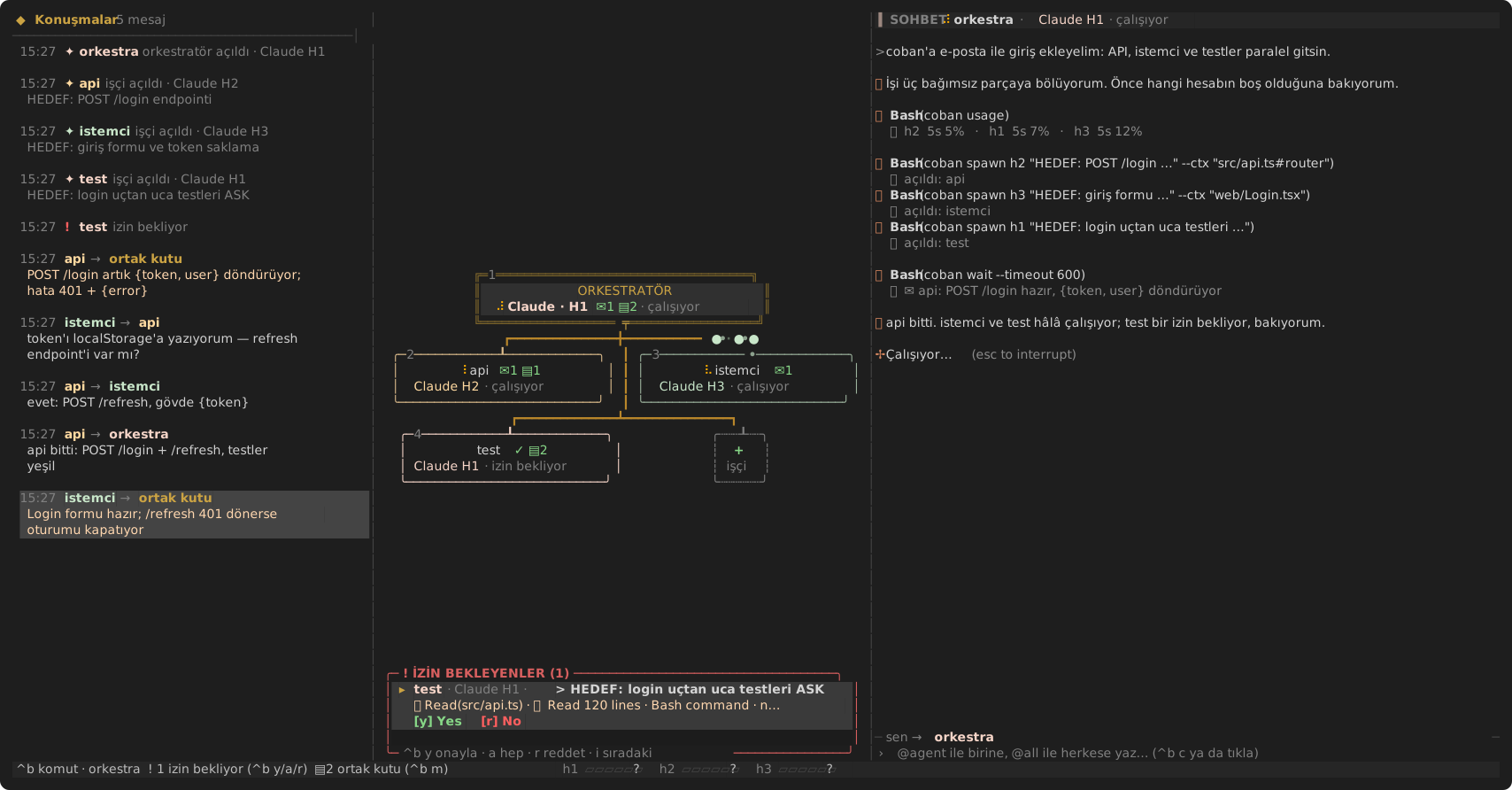
Rendered by npm run snapshot with scripted demo agents. Left: who said what to whom. Middle: the orchestrator
and its workers — the dots on the edges are messages in flight. Right: the focused agent's real terminal.
Why
- Use all your accounts. Hit a usage limit on one Claude account and coban hands the task to the least-spent one.
- Parallel work without chaos. Workers get small, scoped tasks with the exact code they need inlined, and tell
each other about interface changes on the board. - You stay in control. Permission questions from every agent land in one place and you answer them in a keystroke.
- Plain tools. Agents are the real CLIs in real terminals. No new agent runtime, no MCP server.
Çoban is Turkish for shepherd. The UI labels and the prompts coban gives agents are in Turkish for now.
A session in four steps
- Start
cobanin your project and pick the orchestrator with the+bubble (it defaults to your first profile). - Ask in the chat, e.g. "add a login endpoint and a login form, with tests".
- Watch the orchestrator run
coban map, spawn workers (api,istemci,test), and give each its task and code.
Workers post decisions to the board and message each other; packets travel along the graph edges. - Answer permission questions when a worker turns
blocked, then read the orchestrator's summary.
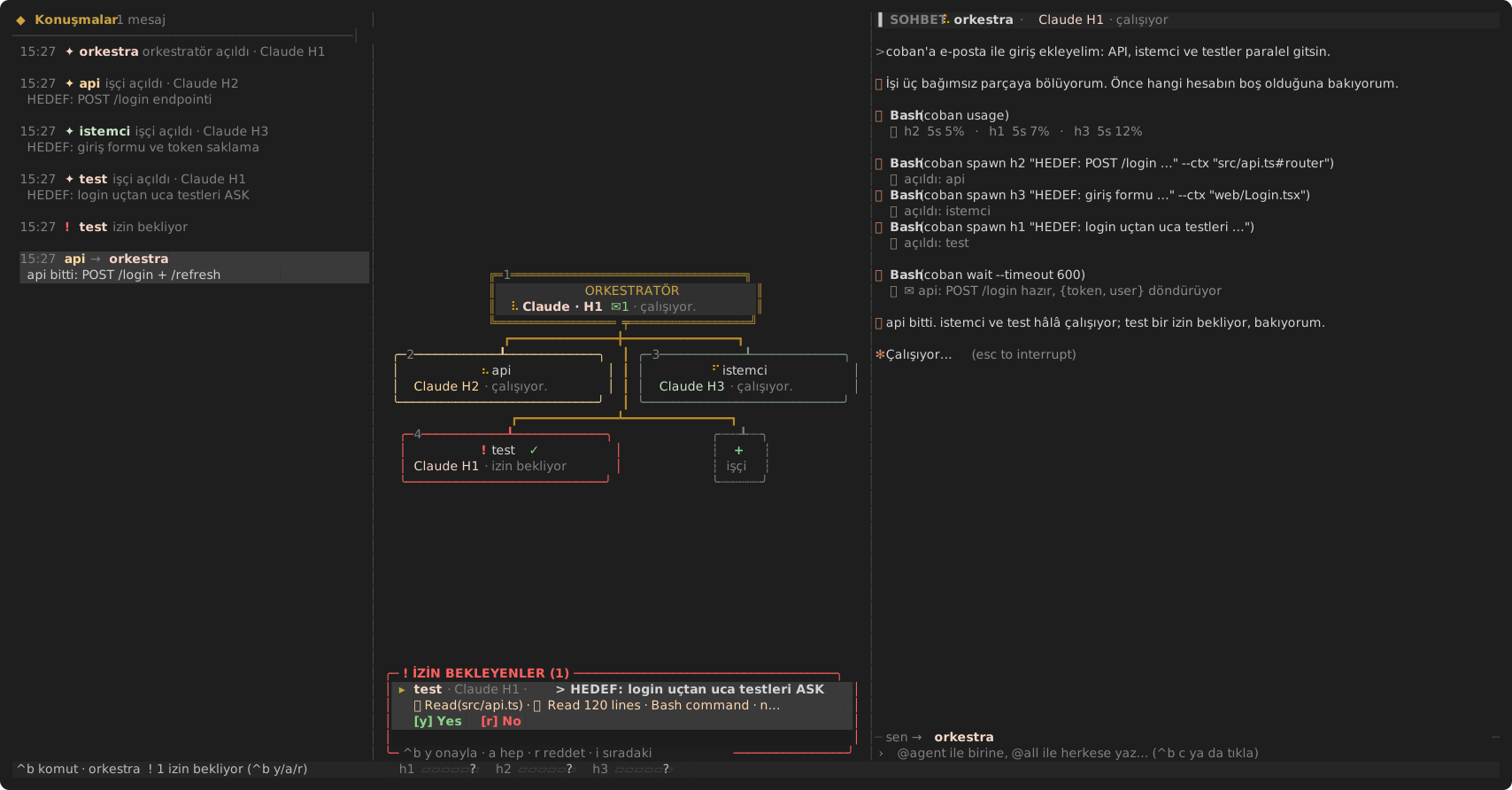
Approvals in one place — a worker turns red and its permission question appears in the box at the bottom right;
answer with y / a (always) / r (reject) without leaving the chat.
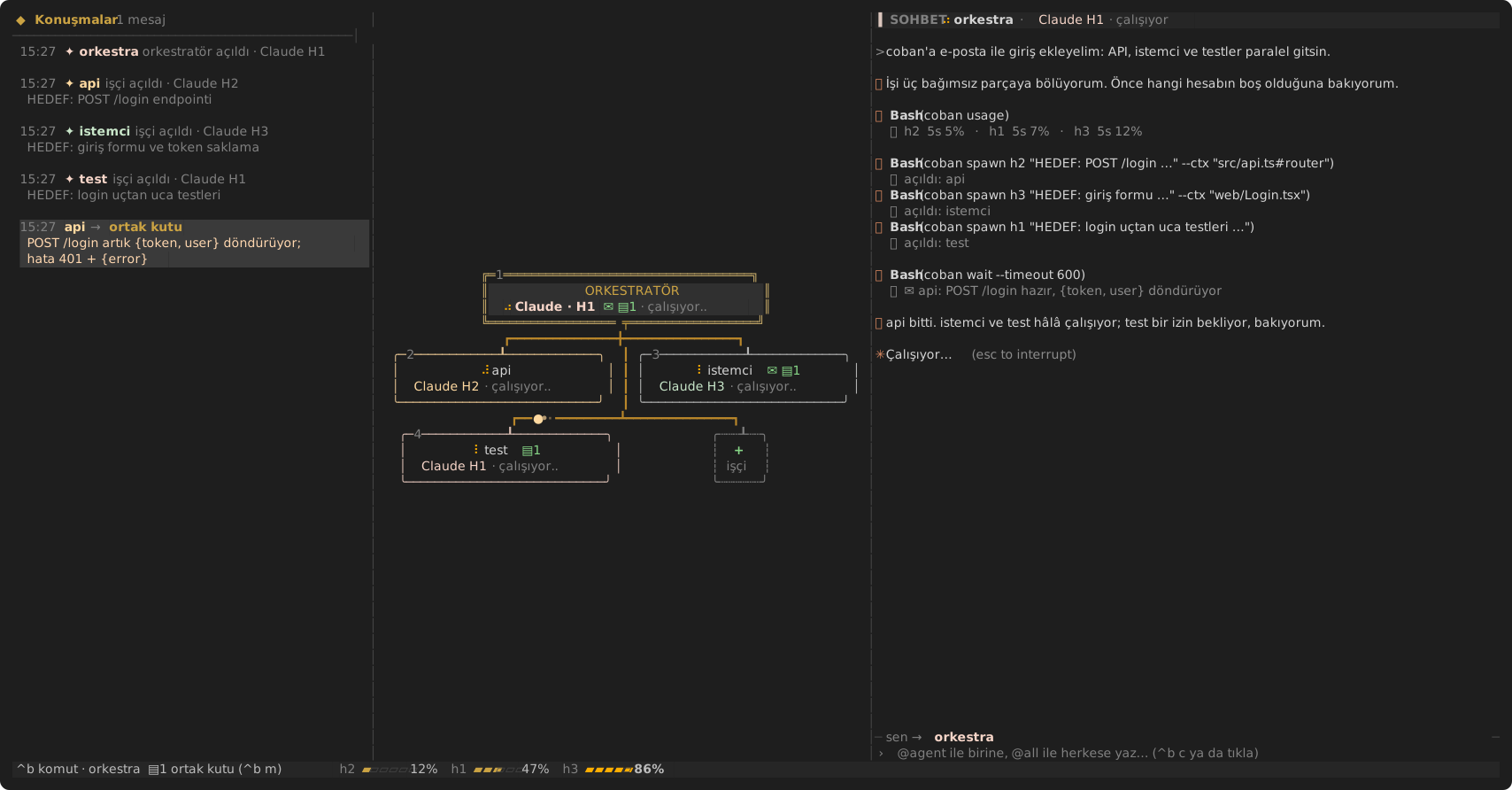
Usage per account — the status bar shows each account's 5-hour usage, and the orchestrator hands new work to the
least-spent one.
Status: early (v0.3). Its author runs it with three Claude accounts; Codex, OpenCode and Cursor
profiles are wired up but barely tested. Issues and PRs welcome.
How it works
- One screen, three columns. A conversation feed (messages, board notes, lifecycle events), the agent graph,
and the focused agent's terminal — your chat. Under 140 columns the feed hides; under 100 the graph stacks above
the chat. - Real agents, real terminals. Every agent runs in its own PTY; coban emulates the screen (xterm) and reads a
status from it:working,blocked(permission prompt),limited(usage limit),idle,exited. - The orchestrator drives a CLI, not an MCP server. Pick its profile with the
+bubble; it starts with a
system prompt that teaches it thecobancommand, which talks to the app over a unix socket. Anything that can
run a shell command can take part. - Alive, not busy. Messages travel along the edges as packets (board notes fan out to everyone), working agents
breathe, blocked ones blink, new ones fade in. Frames are drawn only while something moves.
coban agents                                   agents, model, status
coban map [subdir]                             repo map: files, line counts, symbol:line
coban spawn <profile> "<task>" [--name x] [--cwd dir] [--ctx where]...
                                               --ctx "file#sym1,sym2" | "file:10-80" | "file"
                                               inlines that code (line-numbered) into the task
coban post <id|user|all> "<message>"           direct message (queued until idle) or a board note (all)
coban inbox                                    your direct messages + board notes you haven't seen
coban board [--limit n]                        recent board notes
coban wait [id...] [--timeout s]               returns when an agent settles or mail arrives
coban read <id> [--lines n] [--raw]            an agent's screen, UI chrome stripped
coban approvals                                agents waiting on a permission question, parsed
coban approve <id> [yes|always|no]             answer it (always = the "Yes, and …" option)
coban key <id> <keys...>                       enter esc up down tab y 1 2 ...
coban usage                                    per-account usage, least spent first
coban kill <id> · coban log                    every command takes --json
Install
Requires Node ≥ 24 on macOS or Linux.
npm install -g coban
cd ~/your-project && coban
First run
On first start coban writes ~/.config/coban/config.json and only offers what it finds: claude, codex,opencode and cursor-agent that are on your PATH. A plain claude login (~/.claude) becomes profile h1.
Add more Claude accounts with coban account add (run it while the app is closed): it opens claude for the next
free profile (h2, h3...) in its own ~/.claude-hesapN dir, you log in in the browser and type /exit, and the
profile is written to the config. Restart coban to see it. Edit the file any time, see Config below.
Note: the prompts coban gives the orchestrator and workers, and coban --help, are currently in Turkish.
Troubleshooting
| symptom | fix |
|---|---|
SyntaxError / ERR_UNKNOWN_FILE_EXTENSION on start |
Node is too old, check node -v (needs ≥ 24) |
agent shows ✗ hata (error) |
it can't work at all: logged out (cursor-agent login, codex login), expired token, or its model provider rejects requests. coban tells the orchestrator, which should move the task. For Claude, log in with the profile's CLAUDE_CONFIG_DIR |
| a profile is missing | its CLI is not on PATH when coban first ran: install it and delete the config file, or add the profile by hand |
coban çalışmıyor from a coban ... command |
open the TUI first with plain coban: those commands talk to the running app |
| stale socket after a crash | rm ~/.coban/coban.sock |
Codex: coban: connect EPERM |
coban launches codex with --sandbox workspace-write -c sandbox_workspace_write.network_access=true so it can reach the socket; if your profile sets its own --sandbox, it must allow that too |
Cursor asks before every coban call |
add "Shell(coban)" to permissions.allow in ~/.cursor/cli-config.json, or answer from coban's approval box |
From source (development)
In a clone, TypeScript runs directly with no build step:
git clone https://github.com/cenkerarin/coban && cd coban
npm install
ln -s "$PWD/bin/coban" ~/.local/bin/coban
cd ~/your-project && coban
npm run build compiles to dist/, which bin/coban prefers when present.
Config
~/.config/coban/config.json is created on first run. A profile is a command plus env vars, so several accounts
are just different CLAUDE_CONFIG_DIRs:
{
  "orchestrator": "h1",
  "orchestratorModel": "claude-sonnet-5-5",
  "profiles": [
    { "id": "h1", "title": "Claude H1", "cmd": "claude --allowedTools 'Bash(coban:*)'", "model": "claude-opus-5-5",
      "promptArg": "-- {prompt}", "env": { "CLAUDE_CONFIG_DIR": "~/.claude-hesap1" }, "color": "#F6D5C8" },
    { "id": "h2", "title": "Claude H2", "cmd": "claude --allowedTools 'Bash(coban:*)'", "model": "claude-sonnet-5-5",
      "promptArg": "-- {prompt}", "env": { "CLAUDE_CONFIG_DIR": "~/.claude-hesap2" }, "limit5h": 4000000 },
    { "id": "codex", "title": "Codex", "cmd": "codex", "promptArg": "{prompt}" }
  ]
}
model is appended as --model <model>; orchestratorModel overrides it for the profile running as orchestrator —
coordination is mostly reading and routing, so a cheaper model there saves the most.
Accounts and limits
coban usage (and the bars in the status bar) read each Claude profile's session logs
($CLAUDE_CONFIG_DIR/projects/**/*.jsonl) and sum input + output + cache-creation tokens over 5 hours and 7 days.
The percentage is against the profile's limit5h; plans don't publish a token number, so the 5M default is a guess —
tune it per account. The orchestrator is told to give new work to the least-spent account.
When a worker hits a usage limit, coban hands its task off to the least-spent account of the same kind: the new
worker gets the original task plus the old worker's last screen, undelivered mail follows it, and the board and the
orchestrator are told.
Approvals and the input line
- One approval inbox. When agents stop at a permission question, coban reads it off their screen — title,
command or file, and the exact options — and lists them in a panel under the graph.ctrl+b yapproves the
selected one,ctrl+b apicks its "Yes, and …" option (shown verbatim, so you see what it grants),ctrl+b r
rejects,ctrl+b imoves to the next; or click the buttons. The orchestrator can do the same withcoban approvals/coban approve. Answers are given by moving the menu selection with arrow keys and pressing
Enter (never by digit: Claude Code's folder-trust menu has no numbers and defaults to "No, exit"), and an answer
is refused if the question changed since it was shown. - coban's own input line sits under the chat:
ctrl+b c(or a click) focuses it.@h2 also add a refresh endpointgoes to h2 without switching focus,@all …to the board, plain text to the focused agent; Tab
completes agent names, Esc returns the keyboard to the agent.
The parser is built against real Claude Code screens (test/fixtures/prompts). Driving agents through the Agent SDK
would give exact events instead of screen reading, but its docs ask third-party tools not to offer claude.ai login,
so coban keeps running the unmodified Claude Code with your own login.
Agents talking
- Direct messages (
coban post <id>) are typed into the recipient's terminal once it is idle. - The board (
coban post all) is for things everyone should know — changed interfaces, who is on which file,
decisions. Notes are pulled, not pushed:coban inboxreturns each note once, and workers are told to check it
after every major step and before editing shared files, so idle agents aren't woken (and billed) for every note.
It is mirrored to.coban/board.md;ctrl+b mopens it as a panel. - Agents opened by hand show as
manuel; the orchestrator is told to use idle ones before spawning new workers, and
coban prepends the worker brief to the first message they get.
Keeping context small
Each request an agent makes re-reads its whole context (Claude Code alone is ~45k tokens before any work), so coban
keeps what lands there lean:
- one-line CLI output;
coban readreturns 20 lines with agent UI chrome stripped; - workers send ≤5-line summaries and put long results in
.coban/reports/<id>.md(git-ignored automatically); - the orchestrator learns the repo from
coban map(≈400 tokens for this repo) and hands workers the relevant code
with--ctx— coban extracts symbols/line ranges itself (no model involved) so workers don't spend requests
searching; - tasks follow a template: HEDEF / DOSYALAR / KISITLAR / DOĞRULAMA / BİTTİ SAYILIR
(goal, files, constraints, verification, done when).
Keys
Mouse: click a bubble to focus it, click + to add an agent, scroll the feed with the wheel. Mouse events in the
chat are forwarded when the agent asks for them.
ctrl+b then: c input line · y/a/r approve / always / reject · i next approval · n new agent · 1-9 select · j/k next/prev · o orchestrator · m board panel ·l toggle feed · ←/→ (or </>) widen / narrow the chat, arrows repeat for a second without ctrl+b (saved as chatWidth, 0.3-0.6) · s select mode (release the mouse to copy text) · u next unread · x close agent · q quit ·ctrl+b send a literal ctrl+b.
Development
npm test            # unit tests + an end-to-end run of the real TUI in a pty with fake agents
npm run typecheck
npm run snapshot    # regenerate docs/screenshot.svg
See CONTRIBUTING.md for how the code is laid out.
Known gaps
No scrollback in the chat, no split view, no kitty keyboard protocol (shift+enter), no session restore yet.
Status detection is screen heuristics and may need tuning per CLI
version. coban captures the mouse: to copy text press ctrl+b s, or use your terminal's override (shift-drag in
Ghostty/cmux, ⌥-drag in iTerm2).
License
MIT
Reviews (0)
Sign in to leave a review.
Leave a reviewNo results found