coslash
Health Pass
- License — License: MIT
- Description — Repository has a description
- Active repo — Last push 0 days ago
- Community trust — 77 GitHub stars
Code Fail
- rm -rf — Recursive force deletion command in .github/workflows/ci.yml
- rm -rf — Recursive force deletion command in .github/workflows/release.yml
Permissions Pass
- Permissions — No dangerous permissions requested
No AI report is available for this listing yet.
Search and resume any coding-agent session, across every agent and machine. Open source, read-only.

Run more agents, lose less context.





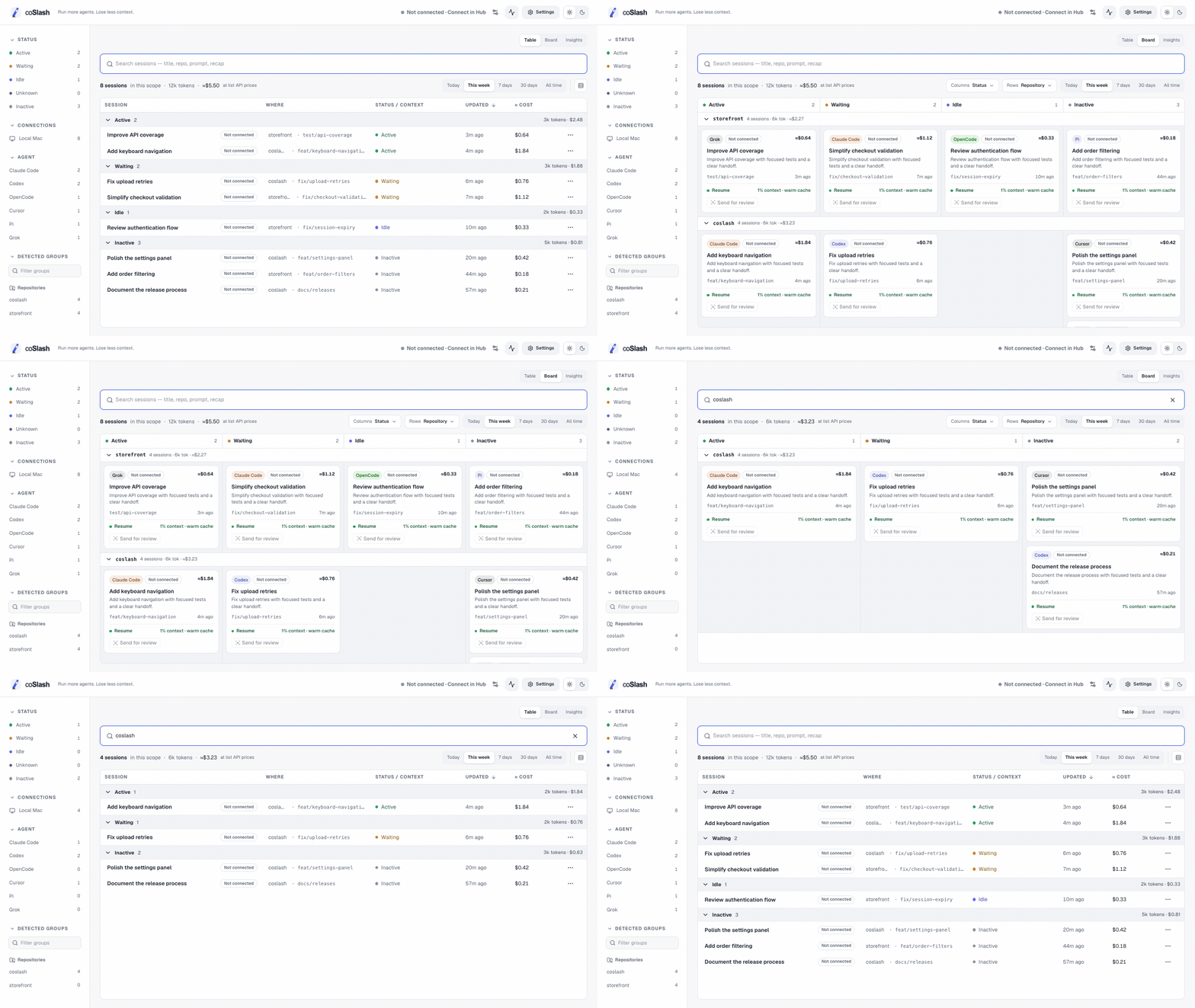
coSlash brings your coding-agent sessions into one board. See which agents need you,
catch up on what changed, and resume work with context.
coSlash Local is free and open source under the MIT license.
coSlash Hub is an optional commercial, proprietary service with free and paid plans.
Search session content across all time in Local, or runcoslash search "why did we choose the merge queue" --json for ranked sessions
and decisions. Search runs locally without a model or API key.
Why coSlash?
- Know where to look. See which sessions are active, waiting for your answer,
or no longer running, across agents, repositories, and branches. - Catch up without reading the whole transcript. Open a session for its goal,
decisions, changed files, subagents, and token and cost breakdowns. - Pick up where you left off. Resume the original session, start fresh with a
handoff, or send the work to another installed agent.
Supported agents: Claude Code, Codex / ChatGPT, Cursor, OpenCode, Pi, and Grok Build.
Early preview: macOS, Linux (amd64 and arm64), and Windows 11 amd64. Agent capabilities vary by platform. See the support table for desktop, CLI, and SSH support, including resume limitations.
Get started
Local use needs no Hub account, Go, or Node installation.
macOS / Linux
curl -fsSL https://coslash.io/install.sh | bash
Windows
irm https://coslash.io/install.ps1 | iex
After installation, run the startup command the installer prints.
coSlash opens its local UI in your browser.
See the installation guide for Homebrew, headless servers, and updates.
Connect to Hub (optional)
- Open Hub and choose Devices → Add device → This computer.
- Run the command Hub provides. It installs coSlash Local and starts it in the background.
- Return to Hub and approve the computer to connect it and enable personal sync.
For a Linux server, choose A server over SSH instead.
Run its setup command in your own SSH session. Hub never receives your SSH credentials.
coSlash needs at least one session from a supported agent.
If no sessions appear, take one turn in an agent inside a repository.
Then run the checks again, or use coslash doctor for diagnostics.
See troubleshooting for setup errors.
Your data
Local collection needs no Hub account and uses no telemetry.
coSlash reads transcripts without changing them.
Pairing a device enables automatic personal sync under Hub policy.
Eligible session data can upload without another preview.
Pause sync in Settings → Sync.
Workspace sharing and remote MCP access require separate authorization.
AI synthesis is off by default. If you enable it, coSlash sends derived session facts
through your chosen agent CLI and its account. Paid models can incur charges.
See data and privacy for what leaves your machine,
local storage, and removal controls.
More
- Installation, updates, and uninstall
- Agent skills, CLI commands, and Hub MCP
- AI synthesis and model options
- Troubleshooting
- Contributing and source builds
- Security policy · MIT license
Bug reports are welcome through Issues.
Redact transcripts, prompts, and private paths before posting.
Unsolicited pull requests are not accepted. See Contributing for the project policy.
Reviews (0)
Sign in to leave a review.
Leave a reviewNo results found