cert-pepper
Health Warn
- License — License: MIT
- Description — Repository has a description
- Active repo — Last push 0 days ago
- Low visibility — Only 5 GitHub stars
Code Pass
- Code scan — Scanned 12 files during light audit, no dangerous patterns found
Permissions Pass
- Permissions — No dangerous permissions requested
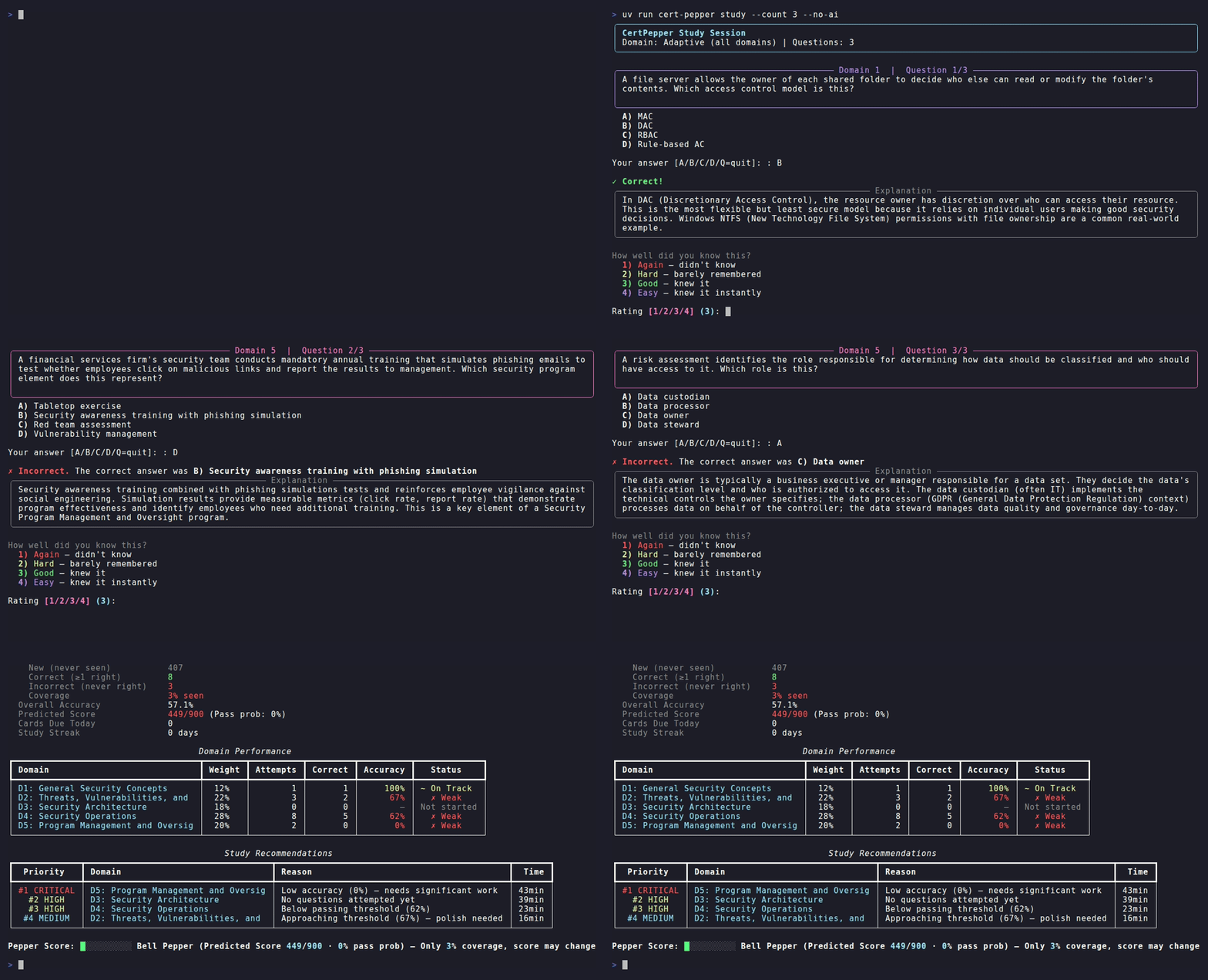
This is an adaptive command-line study tool designed to help users prepare for IT certification exams. It leverages spaced repetition algorithms and AI-generated explanations to target a user's weak knowledge areas.
Security Assessment
The tool requires an Anthropic API key to function, meaning it makes external network requests to AI endpoints. The automated code scan of 12 files found no dangerous patterns, hardcoded secrets, or requests for dangerous system permissions. There are no obvious mechanisms that execute arbitrary shell commands or aggressively scrape sensitive local data. Because it handles an API key, users must still be careful to secure their local `.env` file and avoid exposing it. Overall risk rating: Low.
Quality Assessment
The project is licensed under the permissive and standard MIT license. It is actively maintained, with repository updates pushed as recently as today. However, community trust and visibility are currently very low. With only 5 GitHub stars, the tool has not seen widespread public adoption or extensive peer review. While the included CI pipeline and clear documentation suggest professional development practices, the lack of a large user base means bugs or edge cases might not yet be fully addressed.
Verdict
Safe to use, provided you securely manage your Anthropic API key in your local environment.
Adaptive CLI study tool for IT certification exams — FSRS spaced repetition meets AI explanations
CertPepper

IT LEARNS WHAT YOU DON'T KNOW.


Adaptive CLI study tool for IT certification exams — FSRS spaced repetition meets AI-powered explanations.
Quick Start · Why CertPepper? · Features · MCP Integration · Content Format · Contributing
Quick Start
# Clone and install
git clone https://github.com/cert-pepper/cert-pepper.git && cd cert-pepper
cp .env.example .env          # add ANTHROPIC_API_KEY for AI explanations
uv sync

# Set up a database and start studying
uv run cert-pepper db init
uv run cert-pepper ingest     # loads the bundled Security+ content
uv run cert-pepper study
Or open the repo in Claude Code and ask it to generate a question bank for any exam:
Set up a question bank for the CISSP exam
See MCP Integration to enable the servers.
Why CertPepper?
Most study tools — Anki, Quizlet, flashcard apps — treat every question the same. CertPepper adapts:
- FSRS-4.5 spaced repetition schedules reviews at optimal intervals based on your recall history — the same core algorithm behind Anki, tuned for exam prep.
- Bayesian Knowledge Tracing estimates mastery per domain and steers new questions toward your weakest areas, weighted by how much each domain counts on the real exam.
- AI explanations break down wrong answers with domain-specific context via Claude (MCP sampling in Claude Code, or the Anthropic API in CLI mode).
- Domain-weighted scoring predicts your exam score using actual exam weights, with a conservative prior for unseen material.
- MCP integration — study inside Claude Code with three servers for content, study sessions, and analytics.
Features
| Command | What it does |
|---|---|
cert-pepper study |
Adaptive study session — picks questions based on your weak spots |
cert-pepper study --domain 4 --count 15 |
Target a specific domain |
cert-pepper study --new-questions |
Focus on unseen material |
cert-pepper exam |
90-question timed mock exam with countdown |
cert-pepper progress |
Dashboard: domain accuracy, predicted score, pass probability, study streak |
cert-pepper goal set --exam-date 2026-03-09 |
Set exam date, get a paced study calendar |
cert-pepper pregenerate |
Batch-generate AI explanations (requires API key) |
cert-pepper db init |
Create/reset the SQLite database |
cert-pepper ingest |
Parse markdown content into the DB |
cert-pepper upgrade |
Apply schema migrations and refresh content |
No guarantees. Predicted scores and pass probabilities are estimates based on practice performance — not predictions of real exam outcomes.
MCP Integration
Three STDIO MCP servers are registered in .mcp.json:
| Server | Purpose |
|---|---|
cert-pepper-study |
Start sessions, submit answers, get due cards |
cert-pepper-content |
Search questions, get explanations, look up acronyms |
cert-pepper-analytics |
Predict score, find weak areas, study recommendations |
Enable them in Claude Code by adding enableAllProjectMcpServers: true to .claude/settings.local.json.
In Claude Code, explanations use MCP sampling — no ANTHROPIC_API_KEY needed.
Adding Your Own Exam
- Create a content directory in CertPepper's markdown format.
- Set
CONTENT_ROOT=/path/to/your/contentin.env. - Run
cert-pepper db initandcert-pepper ingest.
The examples/security-plus/ directory is a complete reference implementation with 228 questions, 135 flashcards, and 262 acronyms.
Configuration
| Variable | Default | Description |
|---|---|---|
DB_PATH |
./cert_pepper.db |
SQLite database path |
CONTENT_ROOT |
./examples/security-plus |
Root of your exam content |
ANTHROPIC_API_KEY |
— | Required for CLI AI explanations (study, pregenerate). Not needed in Claude Code. |
HAIKU_MODEL |
claude-haiku-4-5-20251001 |
Model for AI explanations |
SONNET_MODEL |
claude-sonnet-4-6 |
Model for MCP sampling |
DEFAULT_SESSION_SIZE |
10 |
Questions per study session |
MASTERY_THRESHOLD |
0.85 |
BKT mastery cutoff |
Repository Layout
cert-pepper/
├── cert_pepper/          — Python source (CLI, MCP servers, algorithms)
│   ├── cli/              — Typer commands
│   ├── mcp/              — Three FastMCP STDIO servers
│   ├── engine/           — FSRS, BKT, selector, scorer (pure Python)
│   ├── ingestion/        — Markdown parsers
│   ├── ai/               — Anthropic client + explainer
│   └── db/               — SQLAlchemy async engine + schema
├── tests/                — pytest suite
├── examples/
│   └── security-plus/    — Security+ SY0-701 exam content
└── docs/
    ├── security-plus-in-10-days.md — 10-day Security+ study guide
    └── content-format.md — Format spec for your own exam content
Worked Example
The examples/security-plus/ directory contains a complete Security+ SY0-701 exam prep set:
- 5 domains of notes
- 135 flashcards
- 228 practice questions across all 5 domains
- 262 acronyms
See Security+ in 10 Days for a step-by-step guide.
Contributing
See CONTRIBUTING.md for setup instructions, workflow, and PR guidelines.
License
Reviews (0)
Sign in to leave a review.
Leave a reviewNo results found