cesiumjs-ai-starter-app
Health Warn
- License — License: Apache-2.0
- Description — Repository has a description
- Active repo — Last push 0 days ago
- Low visibility — Only 5 GitHub stars
Code Fail
- network request — Outbound network request in backend/src/app.integration.test.ts
- Hardcoded secret — Potential hardcoded credential in backend/src/app.integration.test.ts
- process.env — Environment variable access in backend/src/app.ts
- eval() — Dynamic code execution via eval() in backend/src/execute-cesium-code.integration.test.ts
- network request — Outbound network request in backend/src/execute-cesium-code.integration.test.ts
Permissions Pass
- Permissions — No dangerous permissions requested
No AI report is available for this listing yet.
A starter template for building LLM-powered 3D globe applications with CesiumJS and tool calling.
CesiumJS AI Sample App

A ready-to-run starter pairing a CesiumJS 3D globe with an LLM-powered chat interface. The LLM drives the globe through structured tool calls (e.g. "fly to Paris") while the LLM API key never reaches the browser — all inference runs behind a Node.js API server.
Getting Started · Architecture · Packages · Viewer Tools Tutorial
Get Started
You need an LLM API key from OpenAI, Anthropic, or Google Generative AI to enable chat. A free Cesium Ion token is optional but improves terrain and imagery.
npx degit CesiumGS/cesiumjs-ai-starter-app cesiumjs-ai-starter-app
cd cesiumjs-ai-starter-app
cp .env.example .env
Open .env and set AI_PROVIDER with its matching API key (e.g. OPENAI_API_KEY). Optionally set VITE_CESIUM_ION_ACCESS_TOKEN.
Option A — Docker (recommended)
Requires Docker Desktop only — no local Node.js needed.
docker compose up --build --wait
Open http://localhost:8080 once both containers report healthy.
Option B — Local dev (hot reload)
Requires Node.js ≥ 20 and npm ≥ 9.
npm install
npm run dev
- Globe + HMR: http://localhost:5173
- Chat API:
http://localhost:3001
Try It Out
Type a place into the chat panel — e.g. fly to Paris — and the camera flies there. Any city, landmark, or address works.
For requests that don't fit a single fly-to, try something like drop a pin at the Eiffel Tower — this routes through executeCesiumCode instead, which is gated behind AI SDK's native tool-approval mechanism (toolApproval configured in backend/src/app.ts — see backend/src/tools/execute-cesium-code-tool.ts): the chat panel shows you the assistant's raw intent for the call and waits for you to approve or reject it (a human-in-the-loop checkpoint — see frontend/src/components/ChatPanel.tsx's onApprovalRequired handler) before any code is generated. After approval, the backend generates and statically verifies a CesiumJS snippet; the frontend then executes it in a fresh QuickJS-WASM sandbox with memory/deadline limits and a guarded bridge to the live Viewer.
If no provider key is configured, the globe still runs as a plain viewer with a "AI is not configured. Add a supported provider API key to your .env file." banner.
Architecture
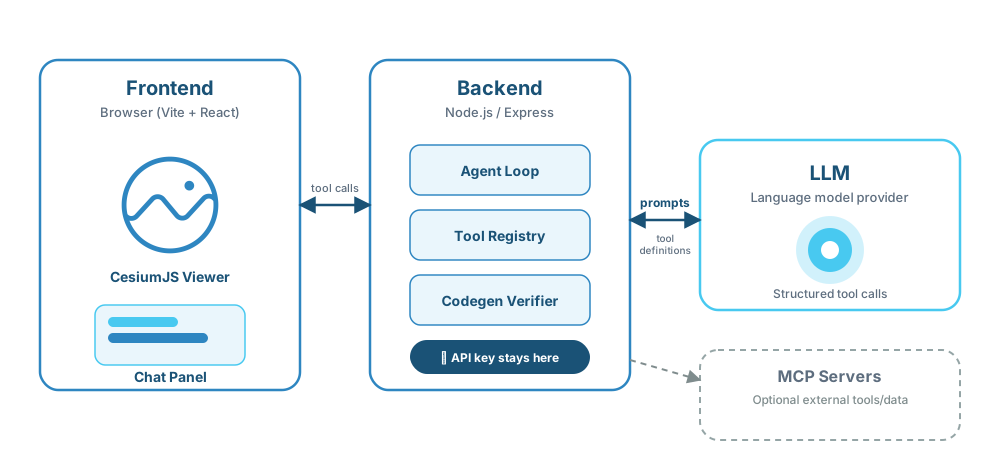
Viewer tools (camera, entities) are streamed via Server-Sent Events to the browser and executed against the live Viewer. The LLM API key never reaches the browser — all inference happens behind the Node.js API. See Architecture for the full component diagram, request sequence, and deployment topology. The workspace packages provide the reusable pieces:
| Package | Role |
|---|---|
@cesium-ai/server |
Express router — mounts POST /api/chat, runs the streamText agent loop |
@cesium-ai/tools-schemas |
Zod-schemed viewer tool definitions (flyTo, entities, imagery, …) — schemas only, no execute |
@cesium-ai/codegen-cesium |
Intent → AST-verified CesiumJS code pipeline; owns the executeCesiumCode tool definition |
@cesium-ai/codegen-sandbox |
QuickJS + WASM runtime isolation for executing verified CesiumJS snippets in the browser |
@cesium-ai/mcp-tools |
Optional Model Context Protocol client bridge that exposes allowlisted MCP tools to the agent |
@cesium-ai/chat-element |
Reusable React chat panel component that renders streamed assistant/tool activity and approval UX |
@cesium-ai/sample-config |
App-level tool allowlist and shared flyTo args contract |
@cesium-ai/server— an Express router that mounts the AI SDK chat key-layer (/api/chat). It accepts a tool registry and a resolved language model and runs thestreamTextagent loop server-side, so the LLM API key never reaches the browser. The host app owns provider selection.@cesium-ai/tools-schemas— Zod-schemed CesiumJS viewer tool definitions (flyTo, …). Schemas only, noexecute, and scoped strictly to tools that run directly against a liveViewer.@cesium-ai/tools— default, ready-to-use client-side executors for every tool in@cesium-ai/tools-schemas's catalogue (flyTo, camera, entity, animation, and imagery tools) — the browser-side "other half" of that schema-only package, so a host app doesn't have to hand-write an executor for every tool before it can turn one on.createCesiumToolExecutors({ ... })lets a host override or extend any individual tool (e.g. this app's ownflyTo, which validates against an extended shape — see below) without forking the rest. Seepackages/tools/README.md.@cesium-ai/codegen-cesium— backend-only pipeline that turnsexecuteCesiumCode's natural-languageintentinto statically-verified CesiumJS code (skills-grounded generation + an AST verifier), and also ownsexecuteCesiumCode's tool definition itself (schema-only, noexecute) — that tool can't run directly against aViewerlikeflyTodoes, so it lives here rather than intools-schemas. Parse-only — it never executes generated code itself.@cesium-ai/codegen-sandbox— frontend-only QuickJS-WASM execution sandbox used to run verified generated CesiumJS snippets under strict memory/time limits and a guarded bridge to the liveViewer.@cesium-ai/mcp-tools— optional, server-only Model Context Protocol client bridge. Connects to MCP servers (SSE/HTTP — stdio is deliberately unsupported), namespaces + allowlist-filters their tools, and merges them into an AI SDKToolSeta host app spreads alongsidecreateCesiumTools()— this is the "MCP-backed tool group" the split-execution diagram above refers to. Entirely opt-in through anmcp.config.jsonfile, with no MCP client created when the file is absent. Seepackages/mcp-tools/README.mdfor the full security model and API.@cesium-ai/chat-element— reusable React chat UI package consumed by the frontend app, including tool event rendering and inline approval UI used for protected tool calls.
This app builds its own executable executeCesiumCode tool on top of the library's schema (backend/src/tools/execute-cesium-code-tool.ts, wrapping @cesium-ai/codegen-cesium), the same "app extends the shared schema" pattern flyTo uses via backend/src/tools/flyto-tool.ts. Because executeCesiumCode is a "Code Mode" tool — the model's output is arbitrary generated code, not bounded typed args like flyTo's lat/lon/altitude — it needs a materially different security posture than flyTo. The backend's AST verification (see packages/codegen-cesium/README.md) is defense-in-depth only, not a substitute for runtime isolation; the frontend independently executes verified snippets through @cesium-ai/codegen-sandbox, a fresh QuickJS-WASM interpreter with memory/deadline limits and a guarded host bridge. See packages/tools-schemas/README.md and packages/codegen-cesium/README.md for the full generation/verification pipeline.
See Architecture for more detail.
Working with Cesium Tools
Enable or disable a tool: edit ENABLED_CESIUM_TOOLS in shared/src/enabled-tools.ts. Both the backend registry and frontend executor map derive from this array — a typo fails to build, and enabling a tool without a client-side executor also fails to compile.
Update a tool's schema: structural args rules live in flyToInputShape (both tiers derive from it); model-facing descriptions live in flyTo.ts backend-only and are never bundled into the client.
See the Cesium Viewer Tools Tutorial for the full step-by-step walkthrough.
Enabling MCP tools
MCP tools are a separate, opt-in tool group — see @cesium-ai/mcp-tools for the full API and security model. Nothing below is required for the app to run; without an mcp.config.json file, no MCP client is ever created.
List servers in a dedicated mcp.config.json file at the repo root (see mcp.config.json.example). It is a plain JSON array, easier to read and edit than an inline environment value, and keeps server configuration out of shell history:
[
  {
    "name": "docs",
    "transport": { "type": "http", "url": "https://example.com/mcp" },
    "allowedTools": ["search"]
  },
  { "name": "ion", "transport": { "type": "http", "url": "http://localhost:3000/mcp/" } }
]
There's no manual "does this need OAuth" flag to set. backend/src/index.ts attempts every configured server the same way at startup (createMcpTools):
- Connects successfully (e.g. the
docsserver above, using a static header/API key or no auth at all) — shared by every visitor from then on. Tools are namespacedmcp__<name>__<toolName>and merged into the same registryflyTo/executeCesiumCodelive in (backend/src/app.ts) — every MCP tool is approval-gated by default (toolApproval: "user-approval"), the same human-in-the-loop checkpointexecuteCesiumCodeuses, since MCP tools run arbitrary third-party server code this app doesn't control. - Fails with a 401 (e.g. the
ionserver above) — auto-detected as needing per-user authentication, and automatically offered through the chat panel's interactive Connect flow instead: credentials and MCP clients are scoped to the browser session, kept in backend memory only, and discarded on disconnect or restart. See the mcp-tools README's session-scoped OAuth section. - Fails any other way (network unreachable, bad URL, etc.) — recorded as a genuine connection failure (surfaced on
GET /healthasmcpServers) and never prevents the rest of the app from starting.
The full resolved tool registry for a given request — including any connected MCP tools, which aren't knowable statically at build time — can be inspected via GET /api/tools (rate-limited the same as /api/chat); the frontend's ChatPanel shows this list in a small "Tools (N)" disclosure so it's visible which tools (built-in and MCP) are actually available in a running instance.
If a connected server's tool declares an "MCP Apps" ui:// widget resource (e.g. an interactive asset-import launcher), GET /api/tools reports it via that tool's mcpApp field and the chat panel renders it inline in a sandboxed iframe (packages/chat-element/src/McpAppWidget.tsx) — including a bridge that lets the widget call tools back on its own server, gated behind an explicit inline Approve/Reject prompt. See the mcp-tools README's MCP Apps widgets section for the full architecture.
Environment Variables
| Variable | Required | Description |
|---|---|---|
VITE_CESIUM_ION_ACCESS_TOKEN |
No | Cesium Ion token — baked into the client bundle at build time. Intentionally client-visible; scope it in the Ion console to restrict allowed assets and HTTP referrers. |
VITE_CESIUM_ION_SERVER_URL |
No | Cesium ion API server the token above was issued by. Only needed for a token from a non-production ion server (e.g. an internal or staging ion environment) — leave unset for a normal ion.cesium.com token. A mismatched/missing value here causes every asset request to 401 against the default production server. |
OPENAI_API_KEY |
Yes | LLM API key — server-side only, never VITE_ prefixed. Required when AI_PROVIDER=openai. |
ANTHROPIC_API_KEY |
Yes | Required when AI_PROVIDER=anthropic. |
GOOGLE_GENERATIVE_AI_API_KEY |
Yes | Required when AI_PROVIDER=google. |
AI_PROVIDER |
No | openai (default) | anthropic | google |
AI_MODEL |
No | Override the default model for the selected provider. |
RATE_LIMIT_RPM |
No | Per-IP requests/minute for /api/chat (default 20). |
CODEGEN_MAX_SKILLS |
No | Max BM25-matched cesiumjs-skills domains inlined as grounding context in the executeCesiumCode tool's generation prompt (default 1). |
CODEGEN_SKILL_THRESHOLD |
No | Minimum BM25 score a cesiumjs-skills domain must reach to be considered a match for the executeCesiumCode tool's generation prompt (default 1.0). Set to 0 to disable filtering. |
CODEGEN_MAX_ATTEMPTS |
No | Max regeneration attempts if a generated executeCesiumCode snippet fails static AST verification (default 3). |
CODEGEN_MAX_CODE_LENGTH |
No | Max generated executeCesiumCode source length in characters enforced by static AST verification (default 4000). |
CODEGEN_MAX_CODE_LINES |
No | Max generated executeCesiumCode line count enforced by static AST verification (default 100). |
CODEGEN_ALLOWED_SYMBOLS |
No | Optional comma-separated free-identifier allowlist passed to static AST verification (allowedSymbols). Leave unset/blank to disable allowlist enforcement. |
CODEGEN_EXTRA_INSTRUCTIONS |
No | Optional operator-supplied instructions appended to the codegen prompt output rules (for app-specific constraints/style guidance). |
MCP_TOOL_TIMEOUT_MS |
No | Per-tool-call timeout for MCP tools, in ms (default 30000). |
TELEMETRY_ENABLED |
No | Enables backend OTEL log + trace + metric export (true/false, default false). Traces cover the agent loop's GenAI spans (invoke_agent/chat/execute_tool) via @ai-sdk/otel. Metrics cover /api/chat token usage/duration and executeCesiumCode token usage/skill-match scores/generation duration. |
OTEL_EXPORTER_OTLP_ENDPOINT |
No | Base OTLP endpoint for backend log/trace/metric export. The app sends logs to <endpoint>/v1/logs, traces to <endpoint>/v1/traces, and metrics to <endpoint>/v1/metrics unless the explicit endpoints below are set. |
OTEL_EXPORTER_OTLP_LOGS_ENDPOINT |
No | Explicit backend OTLP logs endpoint (overrides OTEL_EXPORTER_OTLP_ENDPOINT + /v1/logs). |
OTEL_EXPORTER_OTLP_TRACES_ENDPOINT |
No | Explicit backend OTLP traces endpoint (overrides OTEL_EXPORTER_OTLP_ENDPOINT + /v1/traces). |
OTEL_EXPORTER_OTLP_METRICS_ENDPOINT |
No | Explicit backend OTLP metrics endpoint (overrides OTEL_EXPORTER_OTLP_ENDPOINT + /v1/metrics). |
OTEL_EXPORTER_OTLP_HEADERS |
No | Comma-separated OTLP headers (key=value,key2=value2) for backend provider auth/project routing. |
OTEL_SERVICE_NAME |
No | OTEL service.name for backend logs (default cesiumjs-ai-starter-app-backend). |
OTEL_SERVICE_NAMESPACE |
No | OTEL service.namespace for backend logs (default cesium-ai). |
OTEL_RESOURCE_ATTRIBUTES |
No | Extra backend OTEL resource attributes as key=value,key2=value2. |
OTEL_LOG_LEVEL |
No | Backend telemetry log threshold: debug | info | warn | error | silent (default info). |
VITE_API_BASE_URL |
No | Dev default http://localhost:3001. In compose.yaml this is built as "" so the frontend calls relative /api/chat, which nginx proxies to the backend. |
VITE_SANDBOX_ALLOWED_NETWORK_ORIGINS |
No | Comma-separated exact HTTP(S) origins generated Cesium code may load assets from. Empty/unset denies guest-provided network URLs. |
VITE_TELEMETRY_ENABLED |
No | Enables frontend OTEL log export (true/false, default false). |
VITE_OTEL_EXPORTER_OTLP_ENDPOINT |
No | Base OTLP endpoint for frontend log export. The app sends logs to <endpoint>/v1/logs unless the explicit logs endpoint is set. |
VITE_OTEL_EXPORTER_OTLP_LOGS_ENDPOINT |
No | Explicit frontend OTLP logs endpoint (overrides VITE_OTEL_EXPORTER_OTLP_ENDPOINT + /v1/logs). |
VITE_OTEL_EXPORTER_OTLP_HEADERS |
No | Comma-separated OTLP headers (key=value,key2=value2) for frontend provider auth/project routing. |
VITE_OTEL_SERVICE_NAME |
No | OTEL service.name for frontend logs (default cesiumjs-ai-starter-app-frontend). |
VITE_OTEL_SERVICE_NAMESPACE |
No | OTEL service.namespace for frontend logs (default cesium-ai). |
VITE_OTEL_RESOURCE_ATTRIBUTES |
No | Extra frontend OTEL resource attributes as key=value,key2=value2. |
VITE_OTEL_LOG_LEVEL |
No | debug | info | warn | error | silent for this app's browser-side loggers (console + OTLP export alike, currently just the codegen sandbox's). Defaults to debug in dev builds, silent in production. |
See .env.example for the complete list, including AI_BASE_URL and telemetry settings for OTLP-compatible providers.
All VITE_* vars are read from this single repo-root .env for both npm run dev (via frontend/vite.config.ts's envDir) and docker compose up (via compose.yaml's build-arg substitution) — there is no separate frontend/.env to keep in sync.
Copy .env.example to .env and fill in your values. The .env file is git-ignored.
Scripts
| Command | Description |
|---|---|
npm run dev |
Build packages, then start packages (watch), backend, and frontend together |
npm run dev:frontend |
Vite dev server only |
npm run dev:backend |
Build packages, then run backend + packages in watch mode |
npm run build:packages |
Type-check and build the @cesium-ai/* workspace packages |
npm run build |
Build packages, frontend bundle, and backend |
npm run preview |
Serve the production frontend bundle locally |
npm run format |
Format the whole workspace with Prettier (writes in place) |
npm run format:check |
Verify formatting without writing (used in CI) |
Project Structure
cesiumjs-ai-starter-app/
├── frontend/              # Vite + React SPA (CesiumJS globe + chat panel)
├── backend/               # Thin Express host (provider selection, tool registry, API key)
├── packages/
│   ├── server/            # @cesium-ai/server — chat router + agent loop
│   ├── tools-schemas/     # @cesium-ai/tools-schemas — viewer tool schemas
│   ├── tools/             # @cesium-ai/tools — default client-side tool executors
│   ├── codegen-cesium/    # @cesium-ai/codegen-cesium — codegen pipeline + executeCesiumCode tool
│   ├── codegen-sandbox/   # @cesium-ai/codegen-sandbox — frontend sandbox for generated code
│   ├── mcp-tools/         # @cesium-ai/mcp-tools — optional MCP client bridge
│   ├── chat-element/      # @cesium-ai/chat-element — reusable chat panel component
├── shared/                # @cesium-ai/sample-config — enabled tools + flyTo args contract
├── compose.yaml           # Docker Compose — frontend + backend on internal network
└── .env.example           # Environment variable template
Code Style
Formatted with Prettier (printWidth: 100, otherwise defaults). Run before committing — CI fails on unformatted files.
npm run format        # format in place
npm run format:check  # verify (CI)
Contributing & License
Contributions welcome — see CONTRIBUTING.md and CODE_OF_CONDUCT.md.
Apache 2.0 — see LICENSE.
Reviews (0)
Sign in to leave a review.
Leave a reviewNo results found