claudetuner
Health Pass
- License — License: MIT
- Description — Repository has a description
- Active repo — Last push 0 days ago
- Community trust — 33 GitHub stars
Code Fail
- network request — Outbound network request in analytics.js
- Hardcoded secret — Potential hardcoded credential in analytics.js
- network request — Outbound network request in bg/analytics.js
- Hardcoded secret — Potential hardcoded credential in bg/analytics.js
- network request — Outbound network request in bg/api-chatgpt.js
- network request — Outbound network request in bg/api-gemini.js
- network request — Outbound network request in bg/api.js
- network request — Outbound network request in bg/collect-chatgpt.js
Permissions Pass
- Permissions — No dangerous permissions requested
No AI report is available for this listing yet.
Know when you'll hit your Claude, ChatGPT & Gemini usage limits — live 5h/weekly gauges, reset forecasts, and the usage history they don't show you. Covers Claude Code via the shared subscription pool. Chrome extension + dashboard, MIT.

Claude Tuner
Know when you'll hit your Claude, ChatGPT & Gemini limits — live gauges, reset forecasts, and the usage history none of them show you. One extension, every AI, personal and team.




Trusted by thousands of Claude, ChatGPT, and Gemini users — from solo Pro subscribers to Enterprise teams worldwide.
Why Claude Tuner?
AI rate limits are opaque — you don't know how much you've used, when it resets, or whether your plan is right for you. And most people now juggle more than one AI. Claude Tuner fixes that.
- See every limit — live 5h / 7d usage gauges with reset countdowns for Claude, ChatGPT (Codex), and Gemini, all in one popup
- Claude Code counts too — claude.ai, the desktop app, and Claude Code all draw from one subscription pool, so your CLI burn shows up in the same gauges. Anthropic exposes that pool as a single number, so it's a combined total, not a per-surface split
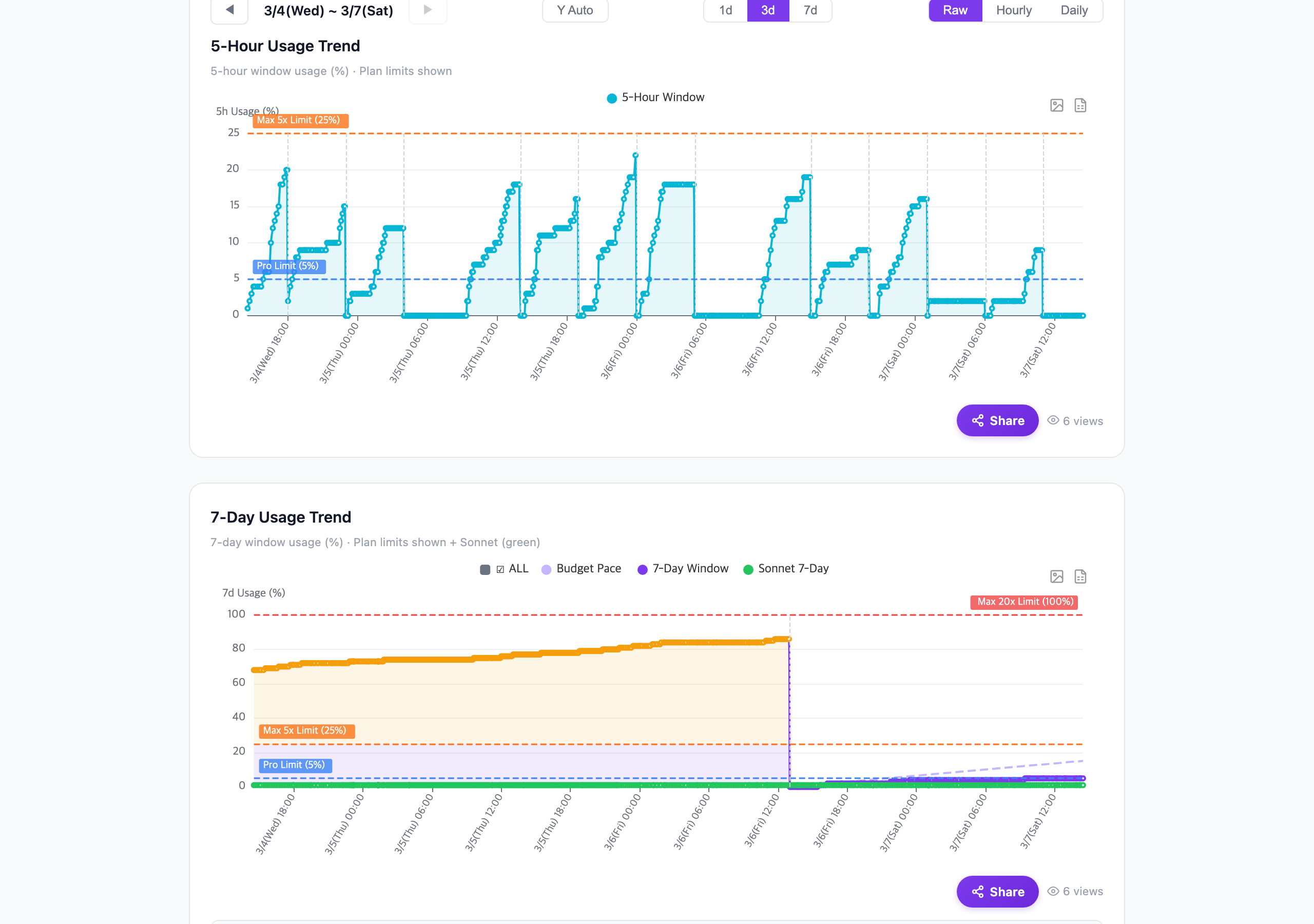
- Predict resets — know if you'll hit the cap before the window rolls over, with sharpened 7-day projection accuracy
- Find the right plan — "what if" simulations across Pro, Max 5x, and Max 20x, with independent 5h / 7d evaluation
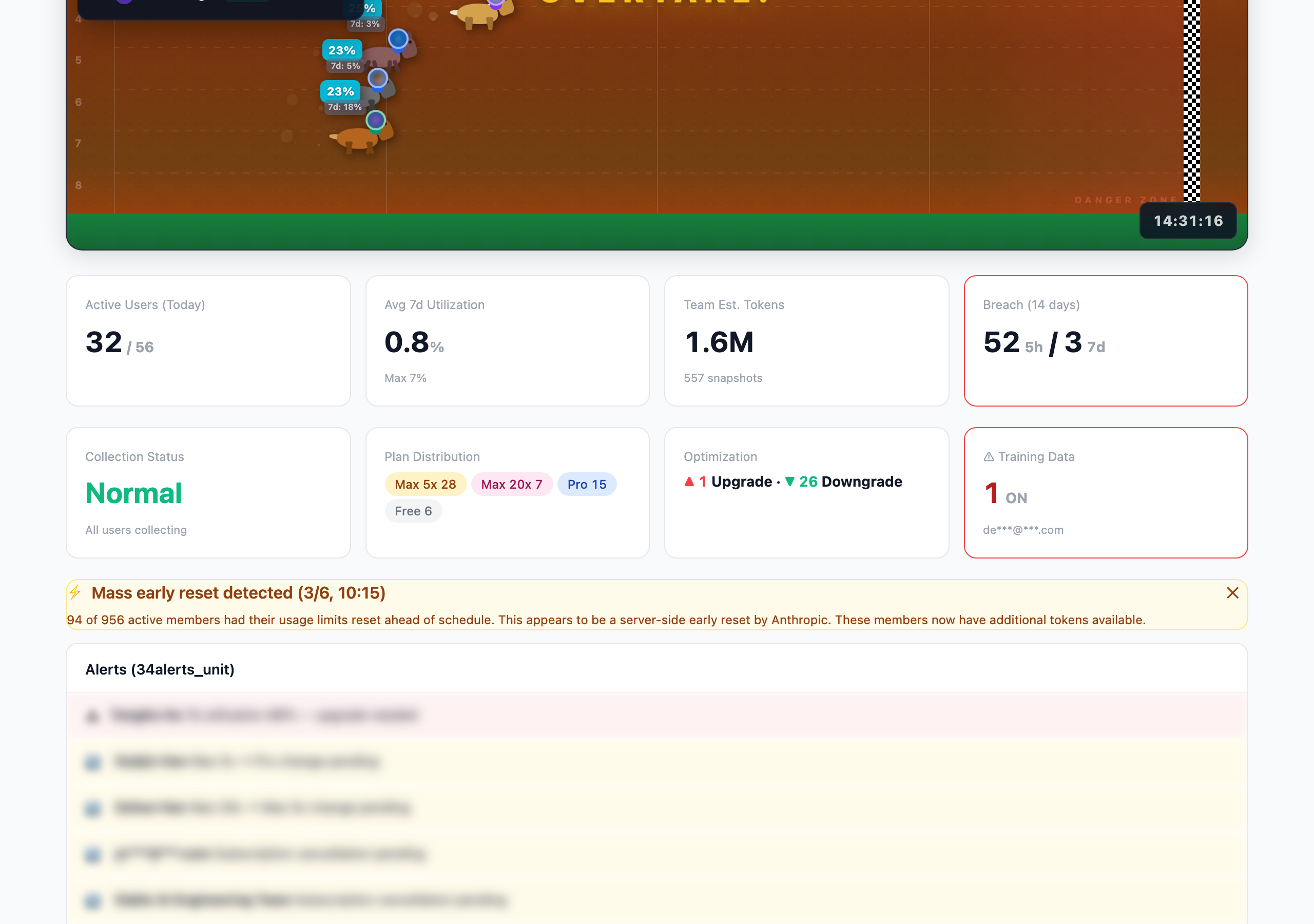
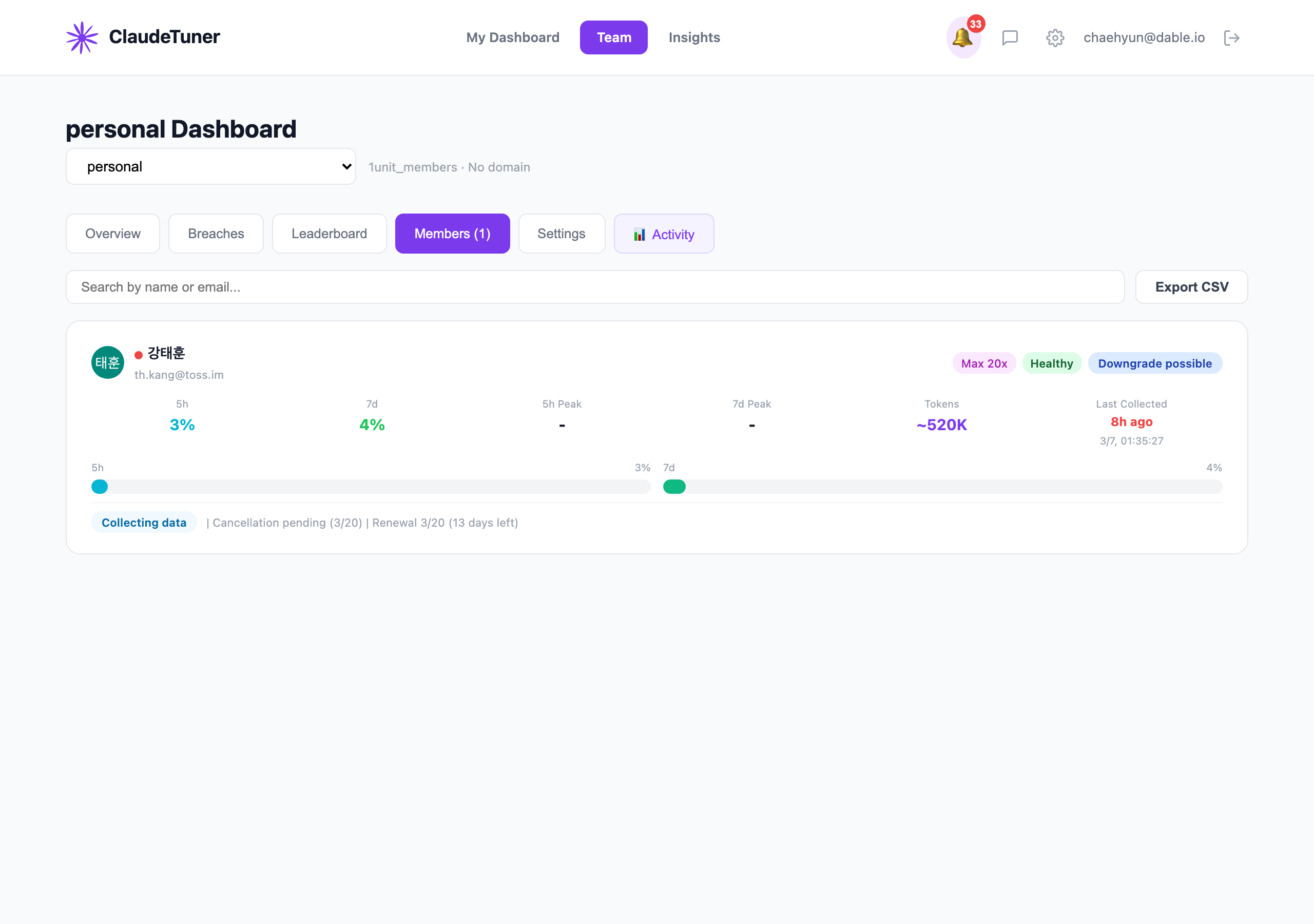
- Monitor your team — free dashboard covering Claude, ChatGPT & Gemini, with per-member analytics, breach tracking, group comparisons, and access controls for who sees what
Screenshots
| Usage Trends | Team Dashboard |
|---|---|
 |
 |
| Insights | Members |
|---|---|
 |
 |
Features
Real-Time Usage Monitoring- Live 5-hour and 7-day usage gauges — for Claude, ChatGPT (Codex), and Gemini side by side
- In-page usage gauge injected right into Claude, ChatGPT, and Gemini — no popup needed
- Reset countdown timers
- Toolbar badge showing current usage level
- 6-tier pace indicator (safe → critical)
- Sparkline charts for usage trends
- Multi-organization & multi-account support (auto-detect or pin, drag to reorder)
- Usage prediction at reset based on consumption rate — with a redesigned, more accurate 7-day projection (diurnal re-weighting + adaptive smoothing)
- Configurable threshold notifications (80%, 95%)
- Weekly usage reports via email
- Estimated token breakdown per model
- Model-scoped weekly limit tracking (Anthropic rotates which model gets its own weekly bucket)
- Real-time 429 rate limit detection
- "What if" simulation for every plan (Pro / Max 5x / Max 20x)
- Visual exceeded-days comparison
- Smart upgrade/downgrade recommendations
- Cost-efficiency analysis
- At-a-glance fitness rating for your subscription
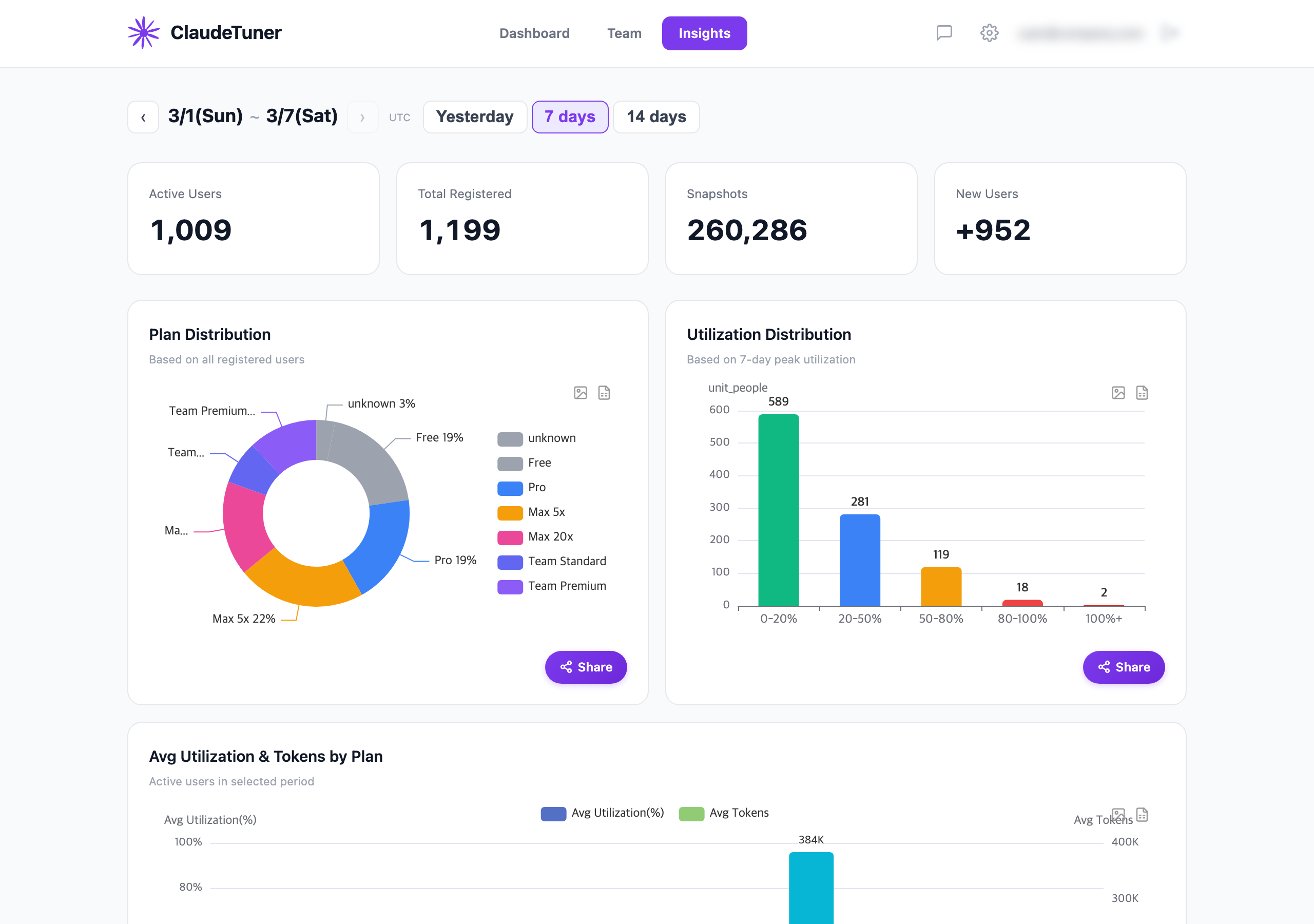
- Percentile ranking among Claude Tuner users
- Usage distribution histogram
- 24×7 heatmap of your Claude usage patterns
- Peak hours and quiet periods at a glance
- Weekday vs weekend comparison
- Multi-service — track Claude, ChatGPT, and Gemini usage for the whole team in one dashboard
- Access controls — admins decide which members can see whose usage, per member
- Per-member usage analytics and rate limit tracking
- Token usage leaderboard and cost analytics
- Breach tracking with plan upgrade/downgrade recommendations
- Group-based usage comparison analysis
- Daily team reports and weekly personal reports
- Training data policy monitoring
- Domain-based auto-invite and group management (admin)
- Per-organization usage opt-out (hide specific orgs from the shared view)
- CSV / Excel export
Supported Plans
Full analytics for every Claude.ai paid plan. ChatGPT (Free / Go / Plus / Pro / Team) and Gemini (Free / AI Plus / Pro / Ultra / Workspace) are also tracked in the popup and dashboard (beta).
| Plan | 5h Limit | 7d Limit | Extras |
|---|---|---|---|
| Pro (1x) | ● | ● | — |
| Max 5x | ● | ● | — |
| Max 20x | ● | ● | — |
| Team Standard | ● | ● | — |
| Team Premium | ● | ● | — |
| Enterprise (seat-based) | ● | ● | Spending cap |
| Enterprise (usage-based) | — | — | Spending cap |
Install
Chrome Web Store (recommended)

Manual install (developer mode)
git clone https://github.com/chaehyun2/claudetuner.git
- Open
chrome://extensions/ - Enable Developer mode
- Click Load unpacked and select the cloned folder
How It Works
You ──→ Claude.ai / ChatGPT / Gemini ──→ Claude Tuner extension ──→ Claude Tuner API server
                                            (reads usage data)         (stores history & analytics)
                                                  │
                                                  ▼
                                            Extension popup          Web dashboard
                                           (gauges & alerts)     (charts, team, insights)
- Collect — The extension reads the same account usage endpoint claude.ai itself uses, plus ChatGPT and Gemini (no conversation content, ever). Because the Claude subscription pool is shared, this includes usage spent in Claude Code and the desktop app
- Analyze — Snapshots are sent to the API server, which stores history and computes analytics
- Display — View real-time gauges in the popup, or dive deep on the web dashboard
Self-Hosting
Point the extension at your own server by editing config.js:
const CT_CONFIG = {
  DEFAULT_SERVER_URL: 'https://your-server.example.com',
  DEFAULT_API_KEY: 'your-api-key',
  SITE_URL: 'https://your-dashboard.example.com',
};
See API.md for the full server API specification.
Privacy
- No conversation content is ever collected — no messages, files, or prompts
- Only usage metrics, reset timestamps, plan info, and organization membership
- Self-service account deletion available anytime
- Full privacy policy: claudetuner.com/privacy
popup.html/js          Popup UI (usage gauges, charts, recommendations)
options.html/js        Settings page (intervals, alerts, org selection)
background.js          Service worker (alarm scheduling, message routing)
  bg/collect.js        Main collection engine (Claude.ai API -> server)
  bg/plan.js           Plan detection, change execution, recommendations
  bg/api.js            Claude.ai API wrapper (dual auth fallback)
  bg/storage.js        Chrome storage helpers
  bg/constants.js      Configuration constants
  bg/badge.js          Toolbar badge updates
  bg/notifications.js  Usage alerts, reset notifications
  bg/analytics.js      GA4 event tracking
config.js              Centralized config (server URL, API key)
content.js             Content script (message relay)
page-script.js         Injected into Claude.ai (fetch with page auth)
i18n.js                Localization helper
_locales/              English and Korean translations
No build step — the source files in this repo are identical to what's published on the Chrome Web Store.
Verify CWS BuildThis extension has no build step. The files in this repository are byte-for-byte identical to the Chrome Web Store package, with one intentional difference: manifest.json in the private development repo includes a pages.dev preview URL in externally_connectable that is stripped during publishing.
To verify:
- Install the extension from CWS
- Find the installed files at
~/Library/Google/Chrome/Default/Extensions/ajnnckikagphjbgpicpoffockabnhond/<version>/ - Compare with this repository (excluding
_metadata/added by Chrome)
Contributing
See CONTRIBUTING.md.
Security
See SECURITY.md.
License
Claude Tuner is not affiliated with or endorsed by Anthropic. Token limits are community-observed estimates, not official figures.
Reviews (0)
Sign in to leave a review.
Leave a reviewNo results found