ASTra-MCP
Health Warn
- License — License: Apache-2.0
- Description — Repository has a description
- Active repo — Last push 0 days ago
- Low visibility — Only 5 GitHub stars
Code Pass
- Code scan — Scanned 12 files during light audit, no dangerous patterns found
Permissions Pass
- Permissions — No dangerous permissions requested
No AI report is available for this listing yet.
MCP server giving Claude Code, Cursor & Codex permanent AST code memory. 98.9% token reduction. 100% local.
ASTra MCP — Permanent Code Memory for AI Coding Assistants
MCP server that gives Claude Code, Cursor, Codex and Windsurf structural memory of your codebase
AST parsing · Knowledge graph · PageRank · Semantic embeddings · 100% local · 98.9% token reduction









Quickstart · Integrate · How It Works · All Commands · Architecture · Live Demo
ASTra MCP is an open-source MCP server that builds a permanent AST knowledge graph of your codebase, so AI coding assistants like Claude Code, Cursor, and Codex get surgical context — not entire files. 98.9% fewer tokens. Zero cloud. Runs fully local.
🔥 The ProblemYour AI assistant reads entire files to understand your codebase. On a 100k-line repo that's 500k+ tokens per session.
|
⚡ The FixASTra builds a permanent knowledge graph of your codebase. Every AI task gets only the 5–25 most relevant functions — not 50 whole files.
|
📊 Real Numbers
| Metric | ❌ Without ASTra | ✅ With ASTra | Saved |
|---|---|---|---|
| Tokens per task | ~112,000 |
~1,250 |
98.9% |
| Cost per task (Claude Sonnet) | $0.34 |
$0.004 |
$0.336 |
| Time to context | 12–18 s |
< 100 ms |
150× |
| Files AI must read | 20–40 |
0 |
100% |
💡 50 AI tasks/day × 10 engineers = roughly $5,000/month saved.
🎬 See It In Action
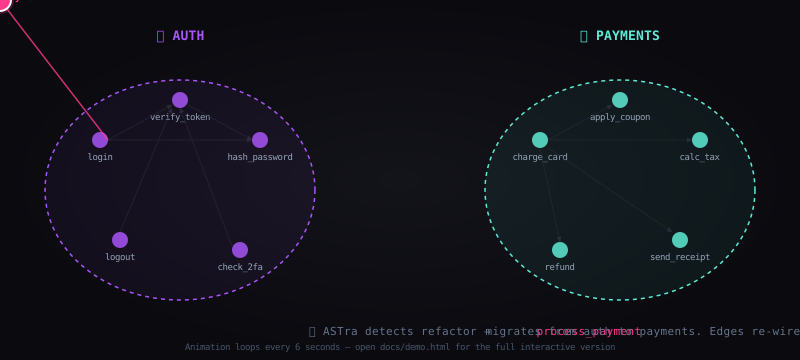
A function migrates between code clusters. Edges re-wire live. Loops every 6s.
Drag nodes · Click to inspect callers/callees · Watch live migration
🚀 Quickstart
# 1. Install
pip install astra-mcp

# 2. Index your project (one-time, ~60s)
cd ~/your-project
astra init

# 3. Start live daemon (keeps graph hot in memory)
astra daemon start

# 4. Connect your AI assistant (2 min setup)
# → Claude Code:  add to ~/.claude/mcp.json  (or use Plugin)
# → Cursor:       Settings → Features → MCP Servers
# → Windsurf:     Settings → MCP
# → Continue.dev: ~/.continue/config.json
# Full per-assistant instructions: see "Integrate With Your AI Assistant" below

# 5. Optional: open the visual dashboard
astra dashboard
# → http://localhost:7865
That's it. Your AI assistant now has permanent structural memory of your codebase.
🧠 How It Works
YOUR CODEBASE
      │
      ▼
┌─────────────────────────────────────────────────────────────┐
│  PHASE 1 — INDEX  (one-time, ~60s)                          │
│                                                             │
│  tree-sitter  →  AST parse every .py/.js/.ts/.go/.rs/.java │
│       ↓                                                     │
│  Extract symbols: functions, classes, methods, imports      │
│       ↓                                                     │
│  all-MiniLM-L6-v2  →  embed each symbol → 384-dim vector   │
│       ↓                                                     │
│  SQLite  →  store nodes + edges + embeddings                │
└─────────────────────────────────────────────────────────────┘
      │
      ▼
┌─────────────────────────────────────────────────────────────┐
│  PHASE 2 — LIVE DAEMON  (background process)                │
│                                                             │
│  watchdog  →  detects file saves → re-index changed file    │
│  Unix socket  →  any tool queries the live in-memory graph  │
│  Incremental PageRank  →  updates subgraph only (10× faster)│
└─────────────────────────────────────────────────────────────┘
      │
      ▼
┌─────────────────────────────────────────────────────────────┐
│  PHASE 3 — QUERY  (per AI task, <100ms)                     │
│                                                             │
│  embed(task)  →  cosine similarity  →  top-5 seed nodes     │
│       ↓                                                     │
│  Personalized PageRank from seeds  →  expand to top-25      │
│       ↓                                                     │
│  Serialize signatures only  →  fit token budget             │
│       ↓                                                     │
│  Inject into AI assistant via MCP protocol                  │
└─────────────────────────────────────────────────────────────┘
Full query trace example:
You type:  "Add 2FA to the login flow"
                    ↓
           ASTra embeds → 384-dim vector
                    ↓
           Cosine top-5 seeds:
             • login()        0.81
             • auth_check()   0.78
             • User.verify()  0.74
             • session_new()  0.71
             • hash_pw()      0.68
                    ↓
           PageRank expands to 25 nodes:
             JWT helpers, session store,
             rate limiter, middleware...
                    ↓
           1,254 tokens injected  (was 112,000)
                    ↓
           Claude writes focused 2FA code
           using only the 25 relevant symbols.
🔬 Intelligence Layers
ASTra ships with 5 analysis engines beyond basic context retrieval:
⚡ Live Daemon
astra daemon start          # persistent background process
astra daemon status         # live graph stats
astra daemon query "auth"   # query hot in-memory graph (~10ms)
astra daemon stop
The daemon keeps the knowledge graph loaded in memory. No cold-start per query. Broadcasts graph deltas to all subscribers (dashboard auto-refreshes).
💥 Impact Analyzer
astra impact get_context get_node
# Impact Analysis
#   Changed nodes  : 2
#   Blast radius   : 278 functions affected
#   Risk score     : 91/100
#   ⚠ Untested high-risk: build_context, search_symbols, ...
Before you change a function, know what breaks. Reverse BFS over the call graph, weighted by PageRank. Parses git diff directly for pre-commit hooks.
# Wire into pre-commit
git diff HEAD | astra impact --diff --project .
🔍 Semantic Drift Detector
astra audit .
# Found 134 drift warnings
# dashboard   drift=0.96   calls: start, _resolve_dirs
# _migrate    drift=0.95   calls: commit, commit
# recall      drift=0.95   calls: embed_text, top_k_similar
Detects functions whose name/docstring doesn't match their actual behavior (what they call). recall() that calls embed_text() is doing semantic search — that's drift. Uses existing embeddings, zero new ML.
📅 Temporal Knowledge Graph
astra timeline . --max-commits 200
# Top volatile nodes:
# login        changes: 7   volatility: 0.035
# auth_check   changes: 5   volatility: 0.025
Replays git history through the AST parser. Builds a 4D graph (nodes + edges + time). Reveals which functions are volatile (high churn = high risk), when dependencies appeared, which files always break together.
pip install gitpython   # one-time dependency
astra timeline . --max-commits 50
🌐 Cross-Repo Federation
astra federate ./service-auth ./service-api ./service-payments
# Added repo: service-auth
# Added repo: service-api
# Cross-repo edges: 47 found
# validate_token   EXPORT   service-auth → service-api   conf=0.90
Links boundary nodes across repos: __init__.py exports, API endpoints, shared function names. Builds a unified graph spanning your entire microservices fleet. PageRank runs across the full federation.
🛠 Command Reference
Core
| Command | Description |
|---|---|
astra init [path] |
Index codebase (one-time setup, ~60s) |
astra init --force |
Force full re-index |
astra status |
Show index health: nodes, edges, files |
astra watch |
Start MCP server + file watcher |
astra query "task" |
Test context retrieval |
astra bench "task" |
Benchmark token savings vs naive read |
astra dashboard |
Launch web dashboard on :7865 |
Intelligence
| Command | Description |
|---|---|
astra daemon start |
Start live background daemon |
astra daemon stop |
Stop daemon |
astra daemon status |
Show daemon stats |
astra daemon query "task" |
Query hot in-memory graph |
astra impact [fn1] [fn2] |
Blast radius analysis |
astra impact --diff |
Impact from git diff stdin |
astra audit |
Semantic drift scan |
astra audit --file path.py |
Scan one file |
astra timeline |
Build temporal graph from git history |
astra federate repo1 repo2 |
Link repos into federated graph |
MCP Tools (AI assistant calls these automatically)
| Tool | Description |
|---|---|
astra_get_context |
Main: task → minimal relevant context |
astra_search |
Semantic symbol search |
astra_get_callers |
Who calls this function |
astra_get_callees |
What this function calls |
astra_get_file_map |
Symbol signatures for a file |
astra_session_memory |
Recall past sessions |
astra_index_status |
Index health check |
astra_impact_analysis |
Blast radius before editing |
astra_semantic_audit |
Drift scan |
astra_get_volatility |
Temporal risk data |
astra_trace_cross_repo |
Follow calls across repos |
📥 Installation
Step 1 — Install ASTra
# From PyPI
pip install astra-mcp

# Or from source
git clone https://github.com/Charan-place/ASTra-MCP.git
cd ASTra-MCP && bash install.sh
Step 2 — Index your project
cd ~/your-project
astra init                  # one-time, ~60s for large repos
astra daemon start          # keep graph hot in memory
Step 3 — Connect to your AI assistant
Pick your assistant below. Each takes under 2 minutes.
🔌 Integrate With Your AI Assistant
Claude Code
Option A — Plugin (zero config, recommended)
Claude Code → Settings → Manage Plugins → search "astra" → Install
Done. ASTra activates automatically for every project.
Option B — Manual MCP config
Find your Claude Code config file:
# macOS / Linux
~/.claude/mcp.json

# Or per-project (takes priority)
/your-project/.mcp.json
Add ASTra:
{
  "mcpServers": {
    "astra": {
      "command": "python3",
      "args": ["-m", "astra.mcp.server"],
      "env": {
        "ASTRA_PROJECT": "/absolute/path/to/your-project",
        "ASTRA_DATA_DIR": "/absolute/path/to/your-project/.astra"
      }
    }
  }
}
Restart Claude Code. You'll see astra in the MCP server list (green dot = connected).
Verify it's working:
/mcp                         ← shows all connected servers
astra_index_status           ← call this tool to check node count
Cursor
- Open Cursor →
Settings→Features→MCP Servers - Click + Add Server
- Fill in:
| Field | Value |
|---|---|
| Name | astra |
| Command | python3 |
| Args | -m astra.mcp.server |
Or edit ~/.cursor/mcp.json directly:
{
  "mcpServers": {
    "astra": {
      "command": "python3",
      "args": ["-m", "astra.mcp.server"],
      "env": {
        "ASTRA_PROJECT": "/absolute/path/to/your-project",
        "ASTRA_DATA_DIR": "/absolute/path/to/your-project/.astra"
      }
    }
  }
}
Restart Cursor. The ASTra tools appear in Cursor's tool list automatically.
GitHub Copilot (VS Code)
Copilot supports MCP via the VS Code MCP extension.
- Install:
VS Code → Extensions → search "MCP Client"→ installMCP Client for VS Code - Open
settings.json(Cmd+Shift+P→Preferences: Open User Settings JSON) - Add:
{
  "mcp.servers": {
    "astra": {
      "command": "python3",
      "args": ["-m", "astra.mcp.server"],
      "env": {
        "ASTRA_PROJECT": "/absolute/path/to/your-project",
        "ASTRA_DATA_DIR": "/absolute/path/to/your-project/.astra"
      }
    }
  }
}
- Restart VS Code → Copilot Chat will now call ASTra tools automatically.
Windsurf (Codeium)
- Open Windsurf →
Settings→MCP - Add a new server entry:
{
  "mcpServers": {
    "astra": {
      "command": "python3",
      "args": ["-m", "astra.mcp.server"],
      "env": {
        "ASTRA_PROJECT": "/absolute/path/to/your-project",
        "ASTRA_DATA_DIR": "/absolute/path/to/your-project/.astra"
      }
    }
  }
}
- Click Reload. ASTra appears in Windsurf's connected tools.
OpenAI Codex / ChatGPT with Code Interpreter
Codex doesn't support MCP natively yet. Use the CLI bridge instead:
# Query ASTra from any terminal, pipe output to Codex
astra query "add rate limiting to auth middleware"
# Copy the output → paste into Codex chat as context

# Or use daemon for fast repeated queries
astra daemon start
astra daemon query "fix the payment flow"
For automation, use the JSON output flag:
astra query "task description" --no-tokens | jq '.context'
Continue.dev
Edit ~/.continue/config.json:
{
  "mcpServers": [
    {
      "name": "astra",
      "command": "python3",
      "args": ["-m", "astra.mcp.server"],
      "env": {
        "ASTRA_PROJECT": "/absolute/path/to/your-project",
        "ASTRA_DATA_DIR": "/absolute/path/to/your-project/.astra"
      }
    }
  ]
}
Restart Continue. Tools appear under @astra in chat.
Any MCP-Compatible Client
ASTra uses the standard Model Context Protocol over stdio. If your tool supports MCP, this config works:
{
  "mcpServers": {
    "astra": {
      "command": "python3",
      "args": ["-m", "astra.mcp.server"],
      "env": {
        "ASTRA_PROJECT": "/absolute/path/to/your-project",
        "ASTRA_DATA_DIR": "/absolute/path/to/your-project/.astra"
      }
    }
  }
}
Finding the right Python path (if python3 doesn't work):
which python3           # use this full path in "command"
# e.g. /usr/local/bin/python3  or  /opt/homebrew/bin/python3
🔧 Troubleshooting Connection Issues
Server shows red / not connected# 1. Verify astra is installed
python3 -m astra.mcp.server --help
# 2. Check paths are absolute (relative paths fail in MCP configs)
# ✅ /Users/you/project/.astra
# ❌ .astra
# 3. Check the crash log
cat ~/.astra-mcp/crash.log
# Confirm server starts successfully
python3 -m astra.mcp.server
# Should print: ASTra MCP server starting. project=...
# (Ctrl+C to stop)
cd /your-project
astra init          # re-index
astra status        # should show nodes > 0
Set ASTRA_PROJECT explicitly in the MCP config env block to the absolute path of your repo root.
🏗 Architecture
Full deep-dive → ARCHITECTURE.md
astra/
├── daemon/         ← Live background process + Unix socket server
├── indexer/        ← tree-sitter parser + sentence-transformer embedder
├── graph/          ← SQLite store + NetworkX PageRank
├── query/          ← Semantic search + context serializer
├── impact/         ← Blast radius analyzer
├── semantics/      ← Drift detector
├── temporal/       ← Git history replay + volatility scoring
├── federation/     ← Cross-repo graph linker
├── mcp/            ← MCP stdio server + 11 tools
├── dashboard/      ← FastAPI + D3.js real-time dashboard
├── memory/         ← Session memory store
├── watcher/        ← watchdog file monitor
└── cli/            ← typer CLI
Stack:
- 🌳 tree-sitter — AST parsing (Python, JS, TS, JSX, TSX)
- 🤖 sentence-transformers — local embeddings (
all-MiniLM-L6-v2, 384-dim) - 🕸 NetworkX — Personalized PageRank over call graph
- 💾 SQLite — zero-dependency knowledge graph storage
- 🛰 MCP protocol — stdio interface for AI assistants
- 🌐 FastAPI + D3.js v7 — real-time knowledge graph dashboard
🔐 Privacy & Security
| ✅ | Local-first — code never leaves your machine |
| ✅ | No telemetry — ASTra doesn't phone home |
| ✅ | No API keys — embeddings model runs 100% locally |
| ✅ | Self-hosted dashboard — localhost only |
| ✅ | Open source — Apache 2.0, audit everything |
| ✅ | Delete anytime — rm -rf .astra removes all data |
Safe for confidential codebases: medical, financial, defense, enterprise.
🆚 vs. Alternatives
| ASTra | grep | Copilot RAG | Chroma RAG | tree-sitter | |
|---|---|---|---|---|---|
| Semantic search | ✅ | ❌ | ✅ | ✅ | ❌ |
| Structural (AST) | ✅ | ❌ | ❌ | ❌ | ✅ |
| Call graph / PageRank | ✅ | ❌ | ❌ | ❌ | ❌ |
| Local / no cloud | ✅ | ✅ | ❌ | partial | ✅ |
| Auto-injects to AI | ✅ | ❌ | partial | manual | ❌ |
| Persistent memory | ✅ | ❌ | ❌ | ❌ | ❌ |
| Impact analysis | ✅ | ❌ | ❌ | ❌ | ❌ |
| Cross-repo tracing | ✅ | ❌ | ❌ | ❌ | ❌ |
❓ FAQ
Does this slow down my AI assistant?No. Daemon queries take ~10ms. You save 10–15 seconds of file-reading per task.
How big is the index?Roughly 1–3% of source size. A 50,000-line codebase produces a ~2MB SQLite file.
Languages supported?Python, JavaScript, TypeScript, JSX, TSX, Go, Rust, Java.
What if my code changes constantly?File watcher re-indexes changed files in <100ms. Daemon graph updates incrementally.
Does it work offline?Yes. After first install, the embeddings model (~80MB) is cached locally. No internet needed.
How is this different from RAG?RAG embeds raw text chunks. ASTra embeds parsed symbols with structural context — function signatures, docstrings, call relationships. Far higher signal density per token.
Does ASTra train on my code?No. All computation is local. Nothing sent anywhere. Embeddings stored in .astra/graph.db.
rm -rf .astra — rebuild with astra init.
🗺 Roadmap
- Python, JS, TS parser
- Go, Rust, Java parsers
- Personalized PageRank
- MCP stdio protocol (11 tools)
- Real-time dashboard
- Live daemon + Unix socket
- Impact analyzer
- Semantic drift detector
- Temporal knowledge graph
- Cross-repo federation
- VS Code inline graph extension
- Team-shared index (S3/GCS backend)
- HNSW indexing for 100k+ symbol corpora
- Pre-commit hook installer
🤝 Contributing
Read CONTRIBUTING.md for full setup instructions and guidelines.
PRs welcome. High-value areas:
- 🌐 New language parsers (C, C++, Ruby, ...) — astra/indexer/parser.py
- 📊 Benchmarks on diverse codebases — benchmarks/
- 🎨 Dashboard UX — astra/dashboard/
- 🧪 Test coverage — tests/
Please read our Code of Conduct before contributing.
📜 License
Apache License 2.0 · Copyright © 2026 Narra Satya Sai Charan

| Apache 2.0 allows | |
|---|---|
| ✅ | Commercial use, modification, distribution |
| ✅ | Patent grant from all contributors |
| ✅ | Private use without releasing changes |
| 📌 | Must: include LICENSE + NOTICE, state changes, keep copyright |
Full text → LICENSE
🕸 ASTra MCP — Code memory that thinks like an engineer.
Built by Narra Satya Sai Charan
If ASTra saves you tokens, ⭐ star the repo — it helps others find it.
Made with ☕ and a deep grudge against context window limits.
Reviews (0)
Sign in to leave a review.
Leave a reviewNo results found