Vitals
Health Warn
- License — License: MIT
- Description — Repository has a description
- Active repo — Last push 0 days ago
- Low visibility — Only 5 GitHub stars
Code Pass
- Code scan — Scanned 12 files during light audit, no dangerous patterns found
Permissions Pass
- Permissions — No dangerous permissions requested
No AI report is available for this listing yet.
Lightweight cross-platform (Windows & macOS) personal status hub & multi-device control center with Bento widgets, Apple/Android health, two-way calendar & Reminders, AMLL lyrics, flip clock, ZIP backup & AI assistant (Liquid Glass UI).
English | 简体中文
Vitals
Local-First Personal Status Hub, Cross-Device Controller & Wireless Studio Deck
Unifies a customizable Today Bento Dashboard, real-time Windows & macOS Hardware Monitoring & Remote Control, an iPad / iPhone Wireless Deck with Plugin Store, Apple Music-style Fullscreen Player & AMLL Lyrics, Cross-Device Scratchpad, and an optional AI Assistant — designed with Liquid Glass aesthetics and zero cloud lock-in.





Screenshots
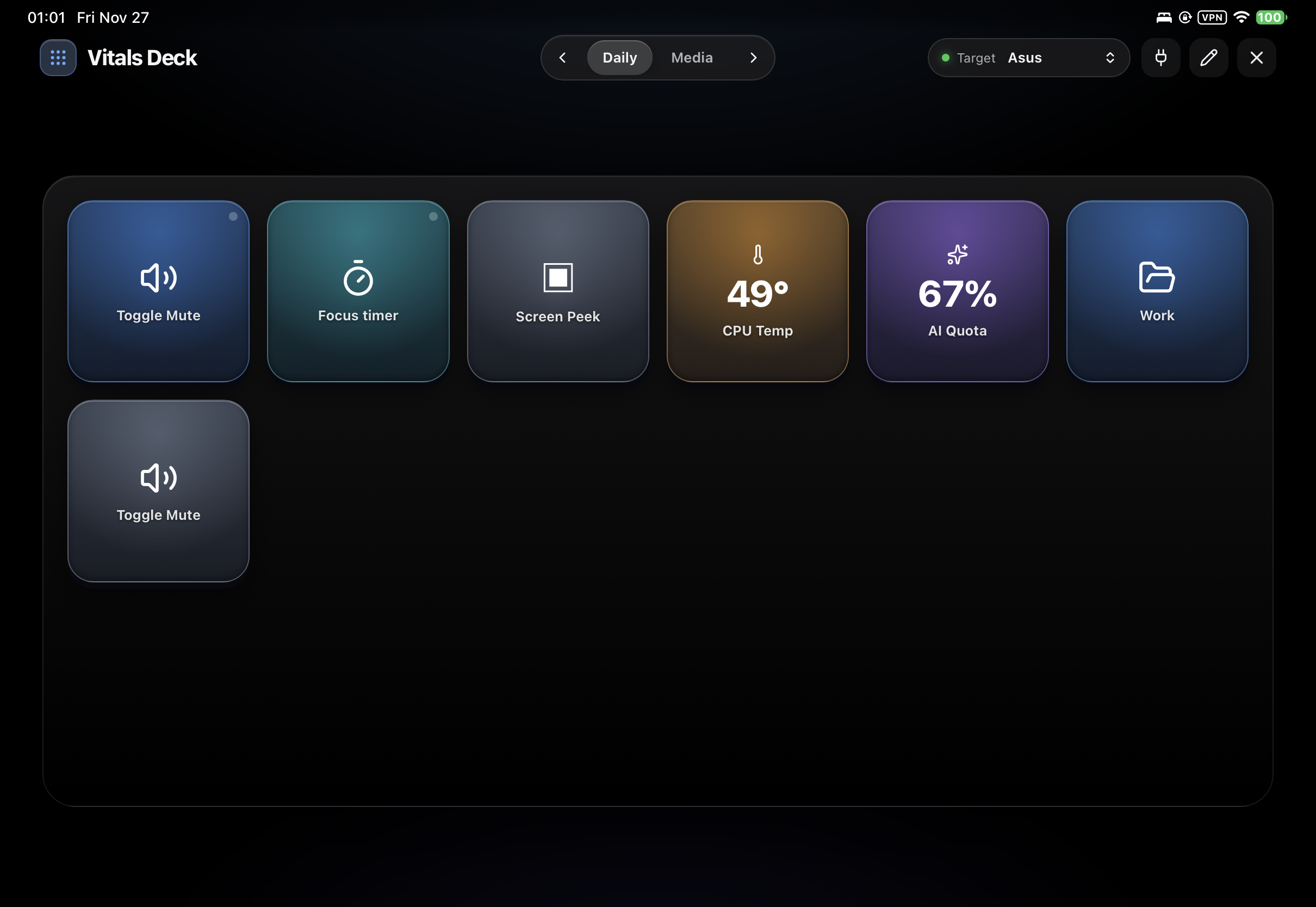
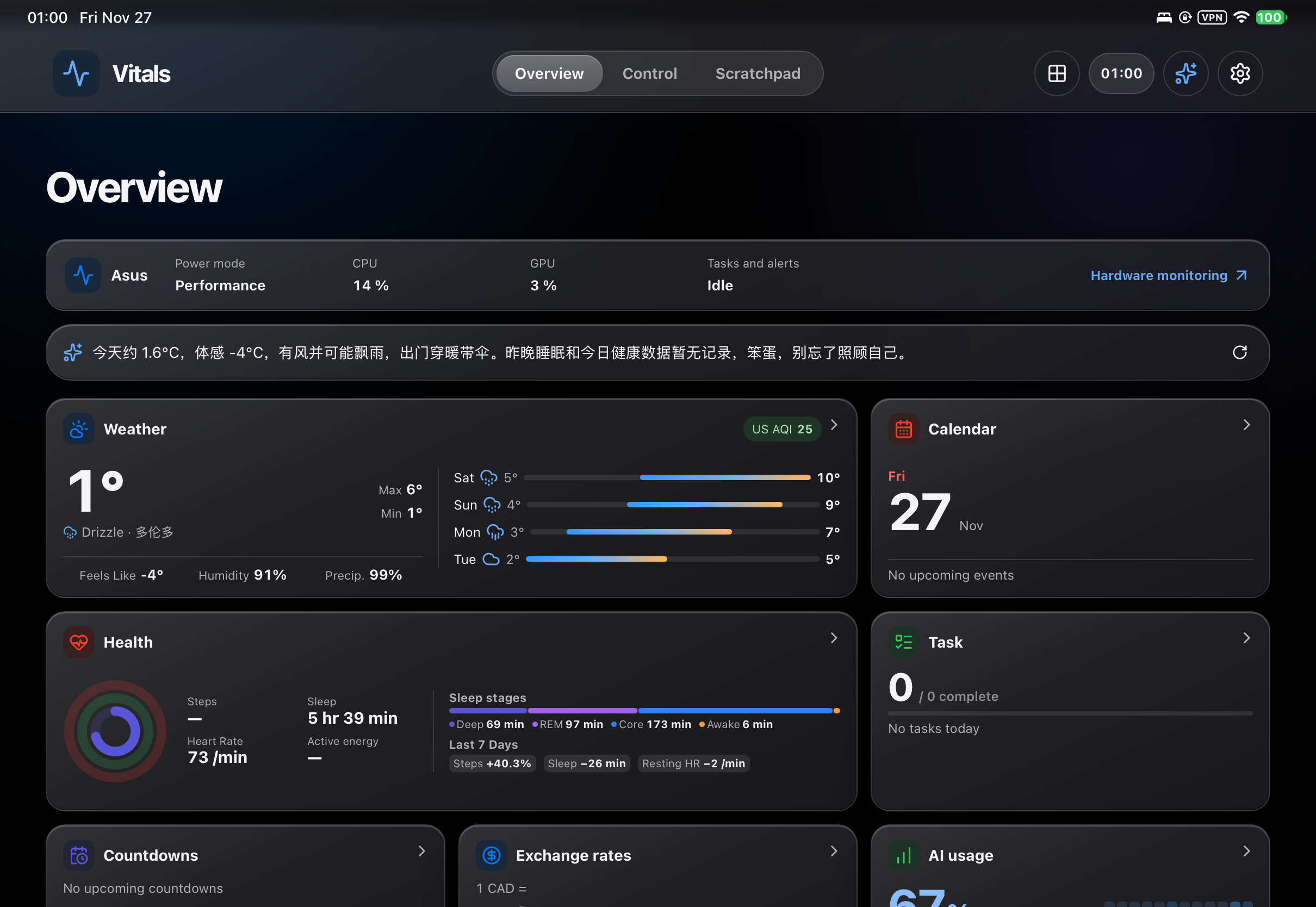
| Vitals Deck (Touch Console) | Overview Dashboard (Bento Widgets) |
|---|---|
 |
 |
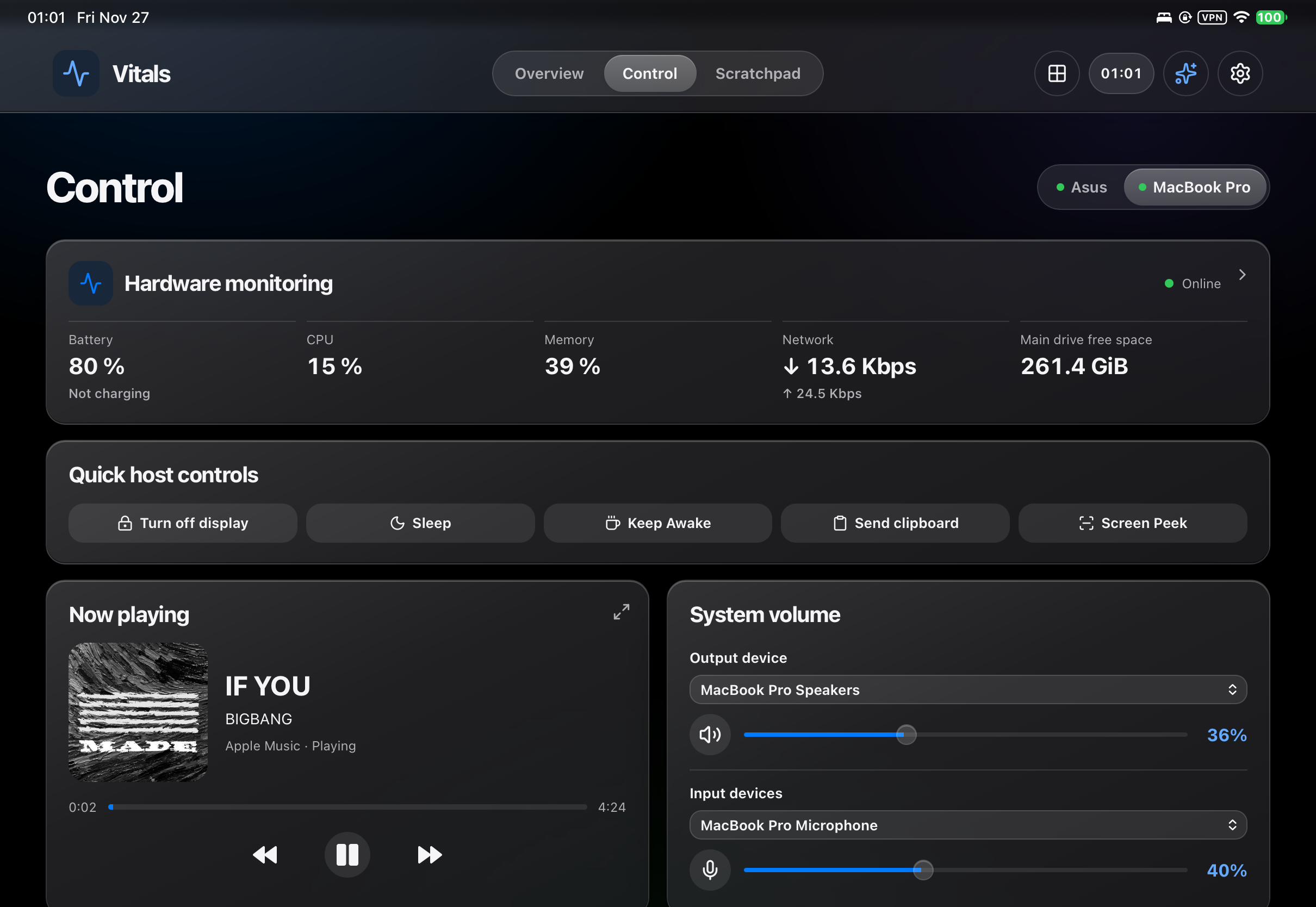
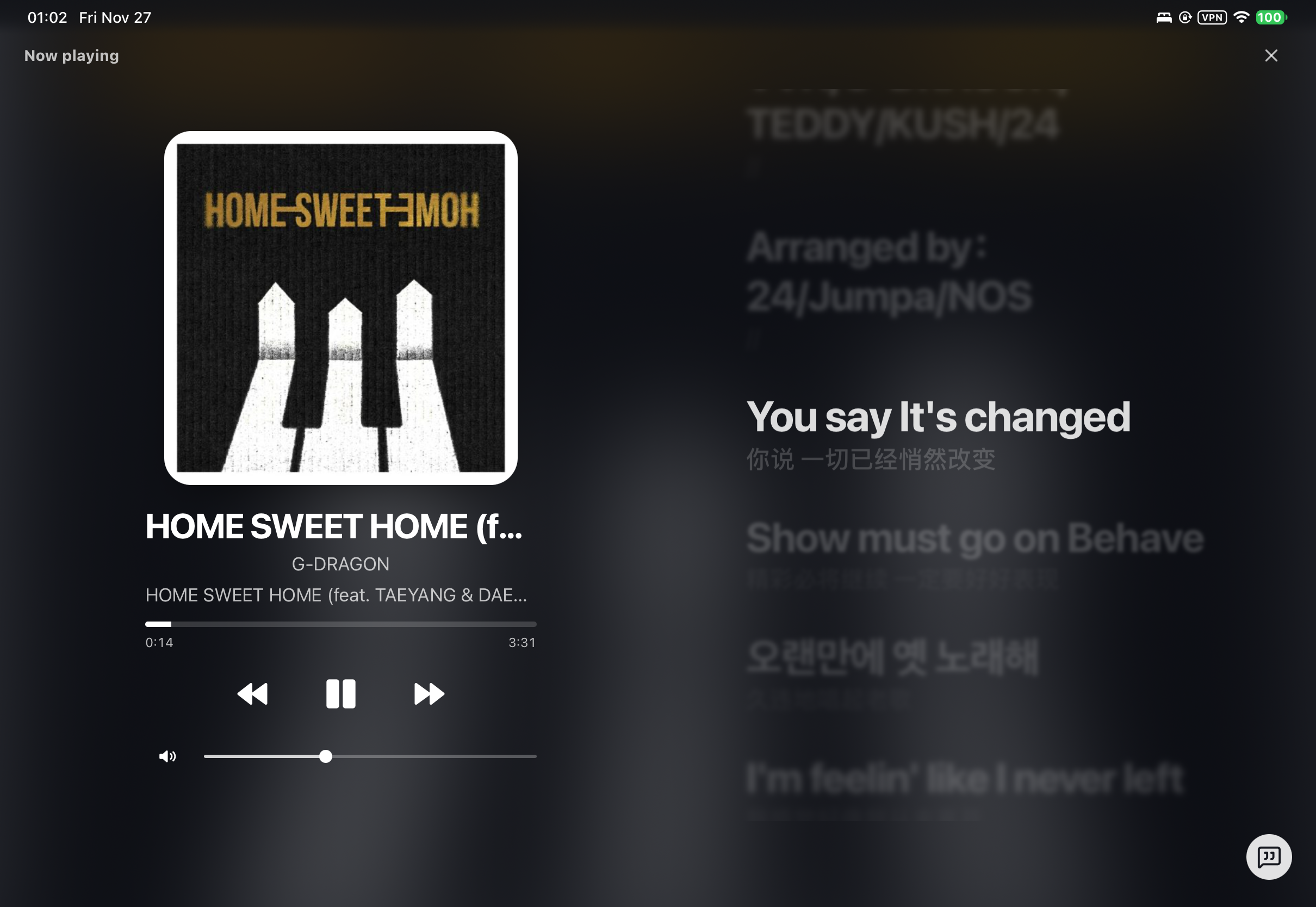
| Cross-Device Control & Audio | Fullscreen Now Playing & Lyrics |
|---|---|
 |
 |
Prerequisites (For iPad / iPhone / Multi-Device Access)
If you only use Vitals on a single desktop, simply install the app and open http://127.0.0.1:3993/.
To access Vitals securely from your iPad, iPhone, or remote MacBook over HTTPS (free, private tailnet, no public IP or port forwarding required), set up Tailscale first:
- Install & Sign in to Tailscale: Install Tailscale on your hub computer (Windows or Mac) and your iPad / iPhone / secondary Mac using the same account.
- Enable MagicDNS & HTTPS:
- Open the Tailscale Admin Console → DNS;
- Enable MagicDNS;
- Scroll down and click Enable HTTPS.
- Done: In the Vitals desktop Setup Wizard, click One-Click Setup to automatically configure
tailscale serve --bg 3993and generate your trustedhttps://<your-device>.<your-tailnet>.ts.net/URL with a QR code for your iPad/iPhone.
Quick Start
Option 1: Desktop Installer (Recommended — No Python / Node.js Required)
- Download the latest release from GitHub Releases:
- Windows (x64):
Vitals_x.x.x_x64-setup.exe(recommended) or.msi - macOS (Apple Silicon):
Vitals_x.x.x_aarch64.dmg(dragVitals.apptoApplications) - (Note: Open-source builds are currently locally signed without Apple/EV notarization. If prompted by OS security on first launch, choose "Run anyway" / "Open anyway".)
- Windows (x64):
- First-Run Setup Wizard:
- Hub Mode: Click one-click setup to auto-configure Tailscale HTTPS, detect local weather & timezone, and generate a pairing token for secondary devices.
- Remote Agent Mode (e.g., secondary MacBook): Enter your hub's HTTPS URL and pairing token to sync hub data and run a lightweight outbound control agent.
- Tray / Menu Bar & Native Chrome: Closing the main window releases WebView memory and minimizes Vitals cleanly to the Windows tray or macOS menu bar (macOS supports Hide Dock Icon and Launch at Login toggles).
Option 2: Run from Source & Manual config.json
Expand source deployment and manual config.json reference
1. Requirements
- Windows 10/11 or macOS 13+
- Python 3.10+
- Node.js 20.19+ or 22.12+
2. One-Click Dev Scripts
- Windows: Run
.\start_service.batin the repository root. - macOS: Run
./start_service.shin the repository root.
The scripts automatically create .venv, install dependencies, copy config.example.json to config.json, build the frontend into backend/static/, and start the server on 0.0.0.0:3993.
3. Key config.json Fields
(Desktop users can configure these visually under Settings → Host Config without editing JSON manually.)
weather:city_name,latitude,longitude(uses free Open-Meteo API).health:timezone(e.g.America/Toronto), optionalexport_dir, andingest_token.calendar.sources: Two-wayicloud(CalDAV + app-specific password),google/outlook(OAuth refresh token), and read-only.icsfeeds.ai:enabled,api_key,model. Editbackend/agent.mdto customize assistant persona with hot reload.webhook:kind: "bark",bark_url_template(https://api.day.app/<DEVICE_KEY>/{title}/{body}),daily_briefing_time.agents.token: Shared pairing token for remote desktop agents.launchers: Whitelisted quick launchers ([{"id": "steam", "name": "Steam", "kind": "app", "target": "..."}]).
4. Manual Tailscale Serve HTTPS
tailscale serve --bg 3993
tailscale serve status
Core Features
1. Vitals Deck (Studio Glass + Plugin Store)
Click the grid icon in the top bar (especially great in fullscreen on an iPad next to your monitor):
- Glass Keys & Custom Covers. Mix standard
1×1and wide2×1keys. Pick a vector icon or upload a PNG, JPG, WebP, or SVG cover that syncs across devices. - Touch Strip. Adjust speaker and microphone volume, mute either channel, and play, pause, or skip on the selected host. Swipe the board to change scenes.
- Four Key Types: Trigger Actions, Two-State Toggles, Live Data Tiles (CPU/GPU temp, Focus countdown, AI quota), and Scenes / Nested Folders (
3×2to6×3grids, drag-and-drop editing, JSON import/export). - Temporary Target Switching: Control Windows or your remote MacBook directly from Deck; exits cleanly back to your default host when leaving Deck.
- Built-in Universal Engine:
- Cross-platform Hotkeys & Text Snippets (Windows
SendInput, macOSCGEvent/osascript— requires Accessibility permission on Mac). - OS Desktop Presets: Switch virtual desktops, snap windows,
Win+Tab/ Mission Control /Cmd+Tab. - Multi-Action Macros (up to 8 steps with configurable millisecond delays), HTTP Webhooks (configured on the hub in
config.json), and native Vitals actions.
- Cross-platform Hotkeys & Text Snippets (Windows
- In-App Plugin Store & Open Plugin SDK (
plugins/):- Install official or GitHub ZIP plugins, toggle enable/disable, and save plugin settings (such as OBS host/port/password) directly from iPad or desktop using the hub admin key (
GET /api/setup/deck/plugins/key). - Ships with official cross-platform plugins for OBS Studio (9 actions + live recording/streaming/scene feedbacks via
obs-websocketv5) and DaVinci Resolve (14 editing/color/transport actions). - Build your own plugins with our lightweight declarative contract in Deck Plugin SDK.
- Install official or GitHub ZIP plugins, toggle enable/disable, and save plugin settings (such as OBS host/port/password) directly from iPad or desktop using the hub admin key (
2. Cross-Platform Control & 3-Tier Smart Sampling
- Seamless Hub & Remote Switching: Switch between Windows and MacBook in one click; offline agents hide automatically in Control view.
- Hardware Telemetry & Smart Sampling:
- Windows uses LibreHardwareMonitor +
psutilfallback (per-core loads, top 5 memory processes, usage/temperature charts); macOS reads native battery health/cycles and primary disk. - Sampling Modes (
Settings → System Status):- Smart (default): 1s while a visible client is actively viewing Monitor/Control/Deck (auto-wakes immediately on interaction), 5s while viewing Today/Scratchpad or in background, 15s when all UI windows are closed (tray idle).
- Live: Fixed 1s interval.
- Eco: Fixed 5s interval.
- Windows uses LibreHardwareMonitor +
- Quick Controls & Screen Peek: Power modes, Lock, Display Off, Sleep, Keep Awake (
caffeinate), Scheduled Shutdown, Whitelisted Quick Launchers, and on-demand Screen Peek live screenshots. - Dual-Layer Audio & AMLL Fullscreen Lyrics: Switch both speaker output and microphone input devices, mute/adjust levels independently, control media playback across players, and enjoy Apple Music-style fullscreen lyrics powered by
@applemusic-like-lyrics/react.
3. Today Dashboard, Utilities & Bilingual UI
- Customizable Bento Grid: Toggle cards, reorder, and switch between
1×1and2×1wide split layouts (English & Simplified Chinese instant switching, auto-matches system locale). - Widgets:
- Weather (Open-Meteo, AQI, hourly & 7-day forecast with automatic city geocoding & timezone).
- Health Rings & Trends (compatible with iPhone Health Auto Export v2 and Android HCGateway / Health Sync / Tasker).
- Two-Way Calendar (iCloud CalDAV, Google Calendar, Outlook,
.icsfeeds). - AI Usage Quota & Heatmap (auto-parses local Codex CLI 5h/7d quotas and Claude Code 12-week token heatmaps).
- Tasks & Micro-Habits, Countdowns, Currency Converter (
24H / 7D / 30D / 1Ycharts), Fullscreen Focus Clock, Cross-Device Scratchpad (file/image/text transfer + client-side PDF/DOCX/XLSX/CSV preview + pinning & search), and Optional Expenses & Subscriptions (custom base currency, monthly budget bar, and iPhone Apple Pay Shortcuts ingest).
Mobile Integration (iPhone / Android)
1. iPad / iPhone PWA & Apple Pay Auto-Expense Shortcut- Install PWA: Open
https://<your-device>.<your-tailnet>.ts.net/in Safari on iPad/iPhone → Share → Add to Home Screen for fullscreen native-like Deck & Dashboard access. - Apple Pay Auto-Expense (iOS 17+ Shortcuts Automation):
- Open Shortcuts → Automation →
+→ Transaction (set to Run Immediately). - Add Get Contents of URL:
- URL:
https://<your-device>.<your-tailnet>.ts.net/api/expenses/ingest - Method:
POST, Body:JSON(amount,merchant,card).
- URL:
- Open Shortcuts → Automation →
- iPhone (Health Auto Export): Configure a REST API automation (
JSON / Version 2) pointing tohttps://<your-device>.<your-tailnet>.ts.net/api/health/ingest. - Android: Push JSON via HCGateway or Tasker + Health Connect to
/api/health/ingest, or sync files via Health Sync tohealth.export_dir.
Credits
- Tauri — Lightweight cross-platform desktop framework
- Bitfocus Companion & Macro Deck — Architectural inspiration for the Action / Feedback / Variable plugin contract
- LibreHardwareMonitor — Windows hardware sensors
- AMLL (applemusic-like-lyrics) — Apple Music-style synced lyrics rendering
- LRCLIB & Open-Meteo — Free open lyrics, weather, air quality, and geocoding APIs
- TaskBarWidget — Multi-source lyrics matching and AI usage heatmap design reference
- FastAPI, React, Vite, ECharts, Framer Motion, Lucide, PyWinRT, pycaw
License
Released under the MIT License.
Reviews (0)
Sign in to leave a review.
Leave a reviewNo results found