chattermate.chat
Health Pass
- License — License: Apache-2.0
- Description — Repository has a description
- Active repo — Last push 0 days ago
- Community trust — 156 GitHub stars
Code Pass
- Code scan — Scanned 12 files during light audit, no dangerous patterns found
Permissions Pass
- Permissions — No dangerous permissions requested
No AI report is available for this listing yet.
Open-source AI customer support chatbot with human handoff — omnichannel inbox (web, WhatsApp, Instagram, Messenger, Slack, email), AI lead capture, AI-generated help center, MCP tools and bring-your-own LLM. Self-hosted alternative to Intercom, Zendesk & Chatbase. Apache-2.0.

ChatterMate - Open Source AI Customer Support Chatbot Platform



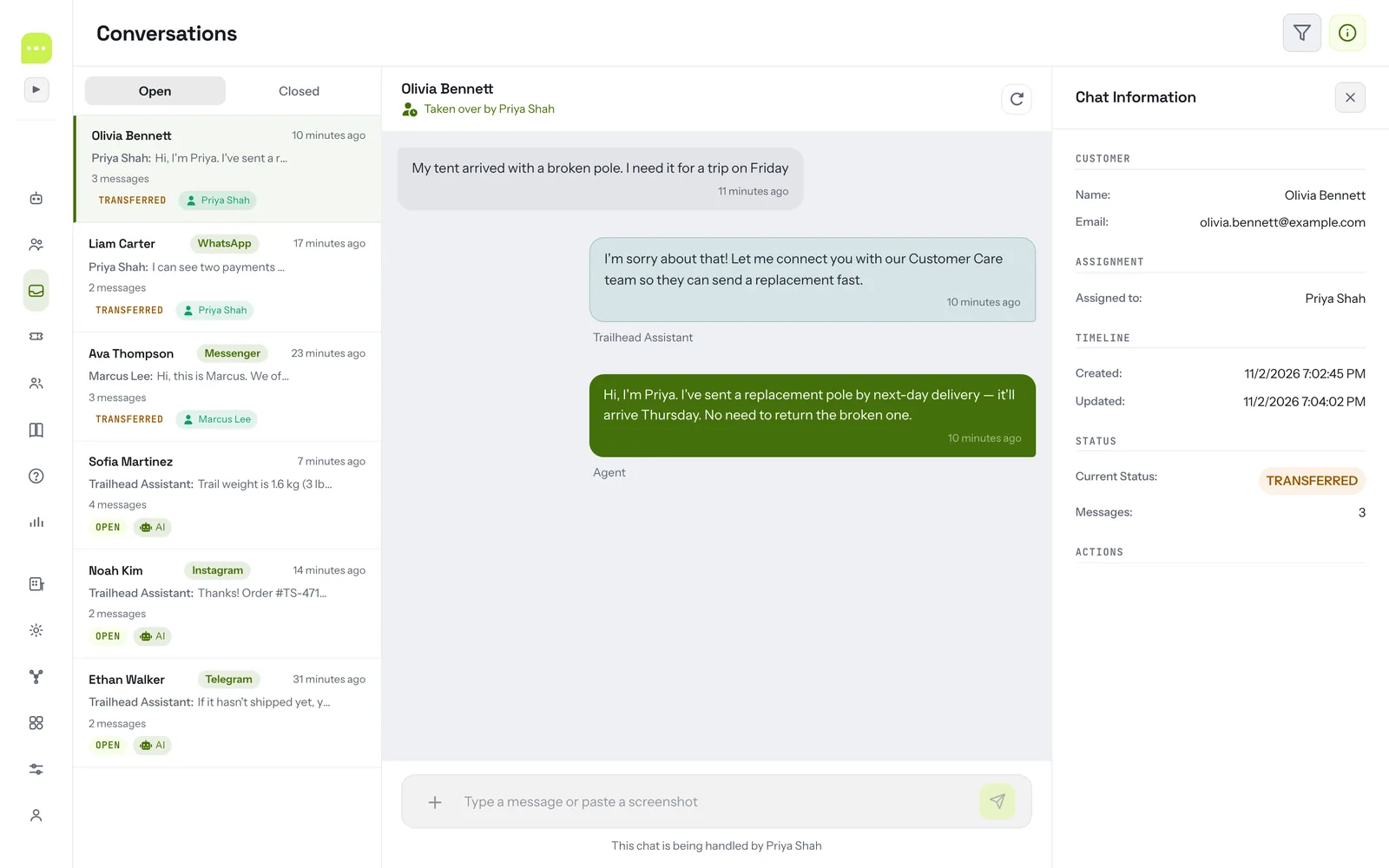
Open-source AI customer support platform with human handoff. ChatterMate is an open source AI chatbot that answers customers 24/7 from your knowledge base, hands complex conversations to your team in one shared inbox, and works across your website, WhatsApp, Instagram, Messenger, Telegram, Slack, SMS and email (omnichannel). It captures and qualifies leads, generates an AI help center, calls your tools over MCP, and runs on the model you choose (OpenAI, Anthropic Claude, Google Gemini, Mistral, xAI Grok, DeepSeek, Groq or any OpenAI-compatible endpoint). Use the free hosted service or self-host it as an open-source alternative to Intercom, Zendesk, Chatbase and Chatwoot.
Documentation | Live Demo | Free Signup | Shopify App | WordPress Plugin
Works with the tools you already use
Channels — 


Commerce & CMS — 

CRM & tickets — 


Data & tools for the AI — 


AI models — 




Every integration ships in the open-source codebase — see Integrations for setup.
Table of Contents
- Why ChatterMate?
- Features
- Integrations
- ChatterMate vs. Intercom, Zendesk & Chatbase
- Screenshots
- Quick Start
- Installation
- Deployment
- FAQ
- Roadmap
- Contributing
- Support
Why ChatterMate?
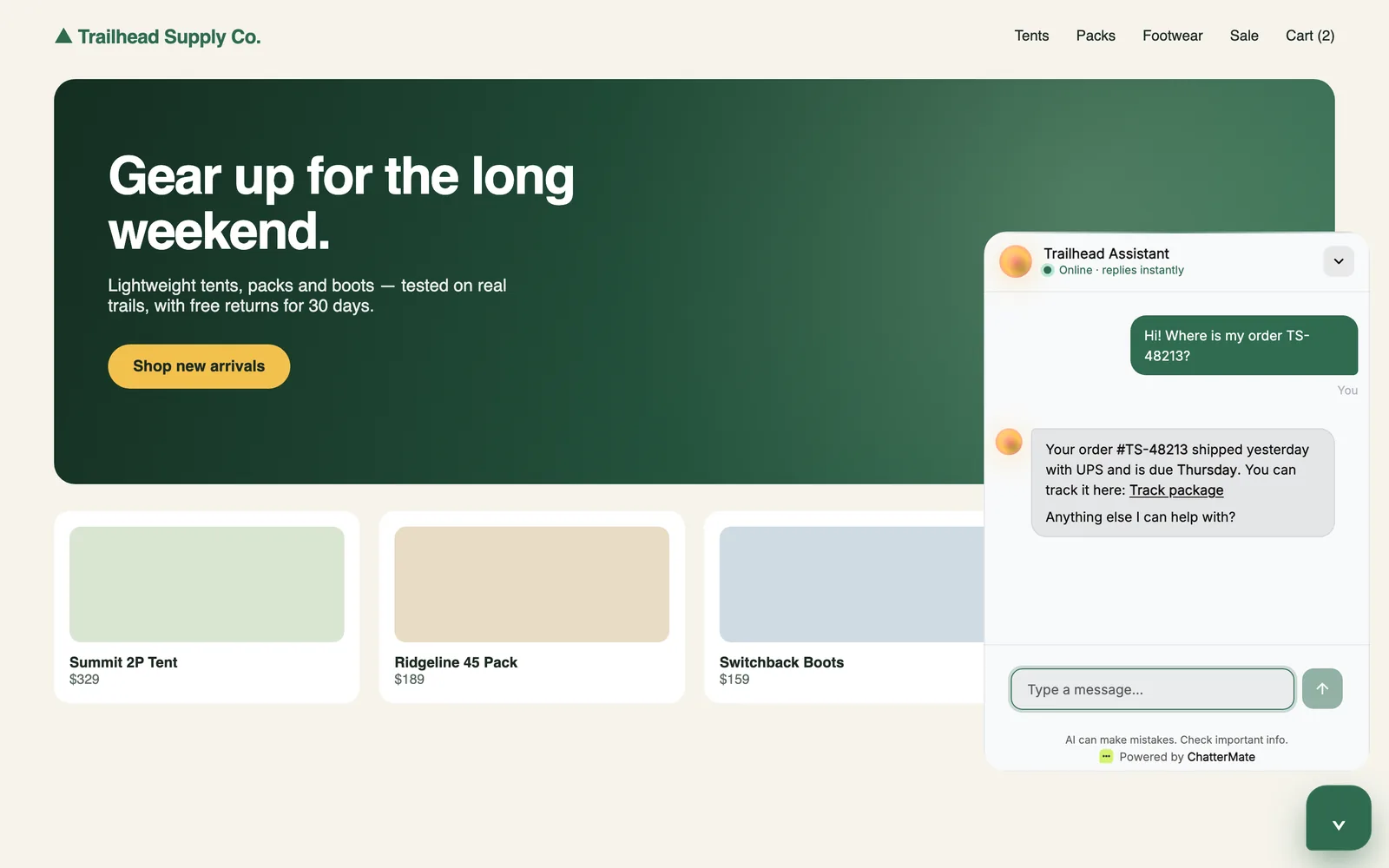
ChatterMate is a no-code AI customer support platform that enables businesses to provide 24/7 customer service through intelligent AI agents. Your AI chatbot handles common queries, escalates complex issues to human agents when needed, and continuously learns from your knowledge base. Integrate the chat widget on any website — or any Shopify store — with a single line of code.
Perfect for: e-commerce and Shopify stores, SaaS companies, help desks, customer success teams, and any business looking to automate customer support while maintaining a human touch.
Features
Core Features
| Feature | Description |
|---|---|
| 🤝 Smart Human Handoff | Intelligent AI-to-human transfer with business hours awareness, real-time availability detection, and context-aware escalation messages. |
| 🛍️ Shopify & E-commerce Support | Native Shopify integration (App Store listing) — answer order, shipping, and product questions from store data. Works for any online store. |
| 📝 WordPress Plugin | Official WordPress plugin (download) — add the chat widget to any WordPress site by entering your Widget ID. No theme edits required. |
| 🧠 Multi-Model AI Support | Choose your AI provider — OpenAI, Anthropic (Claude), Google Gemini, Mistral, xAI (Grok), DeepSeek, and Groq — with your own API key, or enter a custom model ID. Switch providers anytime without code changes. |
| 💬 Ask Anything Mode | Let visitors start conversations instantly — no signup or email required. Perfect for Q&A, documentation assistants, and exploratory chat experiences. |
| 📎 File Attachments | Customers can share images, PDFs, Word docs, spreadsheets, and more directly in chat. Secure uploads with S3 storage and magic byte validation. |
| 🌍 Auto Translation | Multilingual support with configurable default language per workflow. Serve customers globally in their preferred language. |
| 🎫 AI Ticketing | Native tickets raised straight from chat, then auto-triaged and investigated by AI — it forms hypotheses, gathers evidence from your observability tools and databases, and writes a root-cause analysis you can read and audit. See AI Ticketing. |
| 🔗 Jira Ticket Creation | Create and manage Jira tickets directly from chat conversations. OAuth 2.0 secure integration with automatic ticket tracking. Native tickets can also escalate to Jira one-way. |
| 🔑 Widget Authentication | Token-based security for embedded widgets. Support both public Q&A and private authenticated conversations. |
| 💼 Slack Integration | Connect your Slack workspace for internal product support. Teams get AI-powered assistance directly in Slack channels. |
| 🧩 Visual Workflow Builder | Design conversation flows with a drag-and-drop interface. Branching logic, conditional responses, and multi-step workflows without coding. |
| 🎯 AI Lead Capture | The agent collects name, email, phone and company during the conversation, with consent, writes a qualification summary, and pushes the lead to HubSpot or Pipedrive. See Lead Capture. |
| 📚 AI-Generated Help Center | Turn your knowledge base into a public, SEO-friendly help center — FAQs are generated by AI, reviewed, then published, with AI search and the chat assistant built in. See Help Center. |
| 🧰 MCP Tools | Connect any Model Context Protocol (MCP) server so the agent can look up orders, query APIs and call your tools mid-conversation. See MCP. |
| 🎨 Chat Customization | Pick a chat design, set brand colours, avatar, welcome message and quick actions, with a live preview. See Customization. |
Workflow Builder
Build sophisticated conversation flows visually with our intuitive workflow builder:
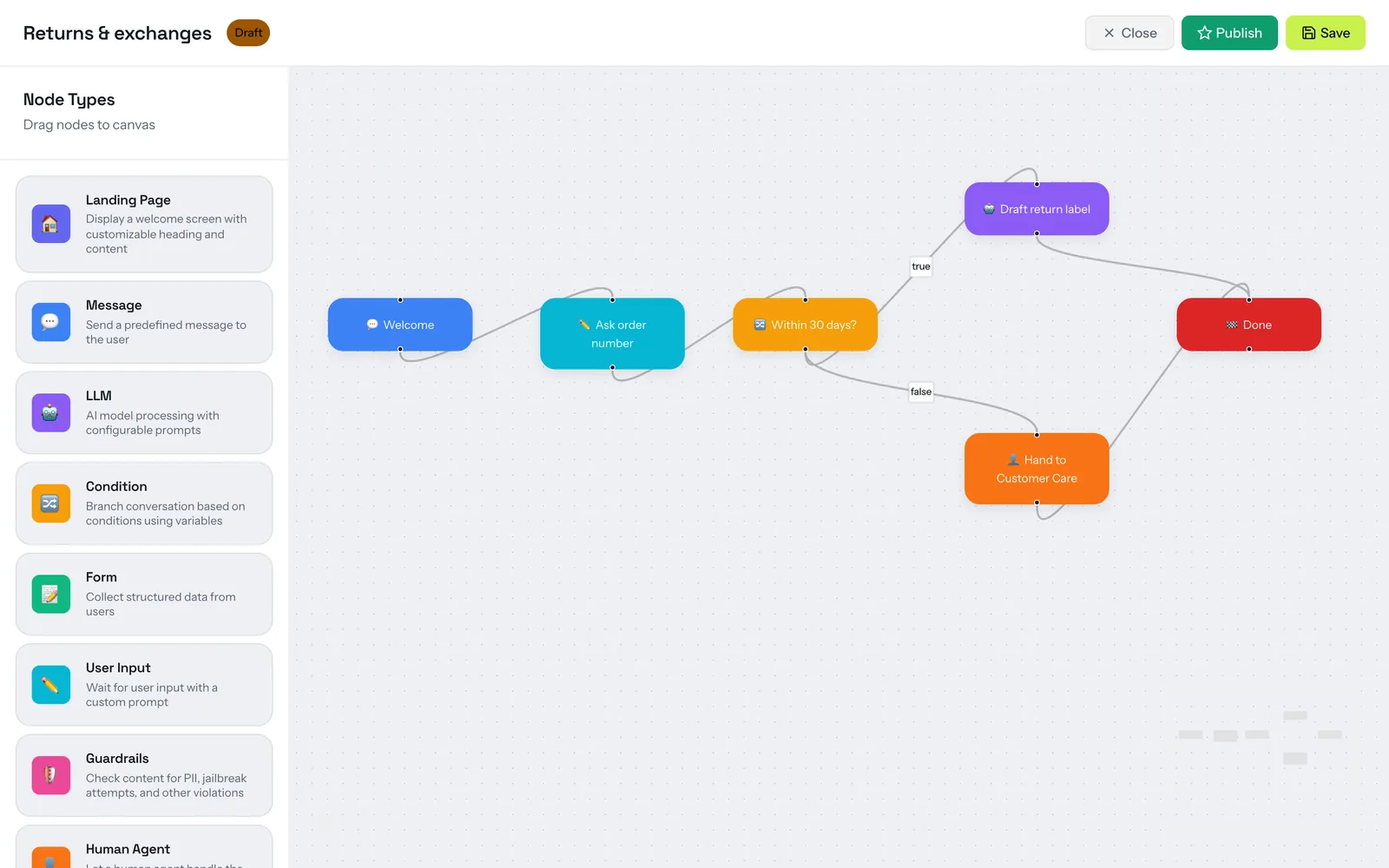
Workflow Builder Features:
- Drag-and-drop nodes - AI responses, human handoff, conditions, and more
- Branching logic - Create different paths based on user input
- Node types - Start, AI Response, Human Transfer, Condition, End nodes
- Real-time preview - Test workflows before deploying
- Version control - Save and restore workflow versions
AI Lead Capture
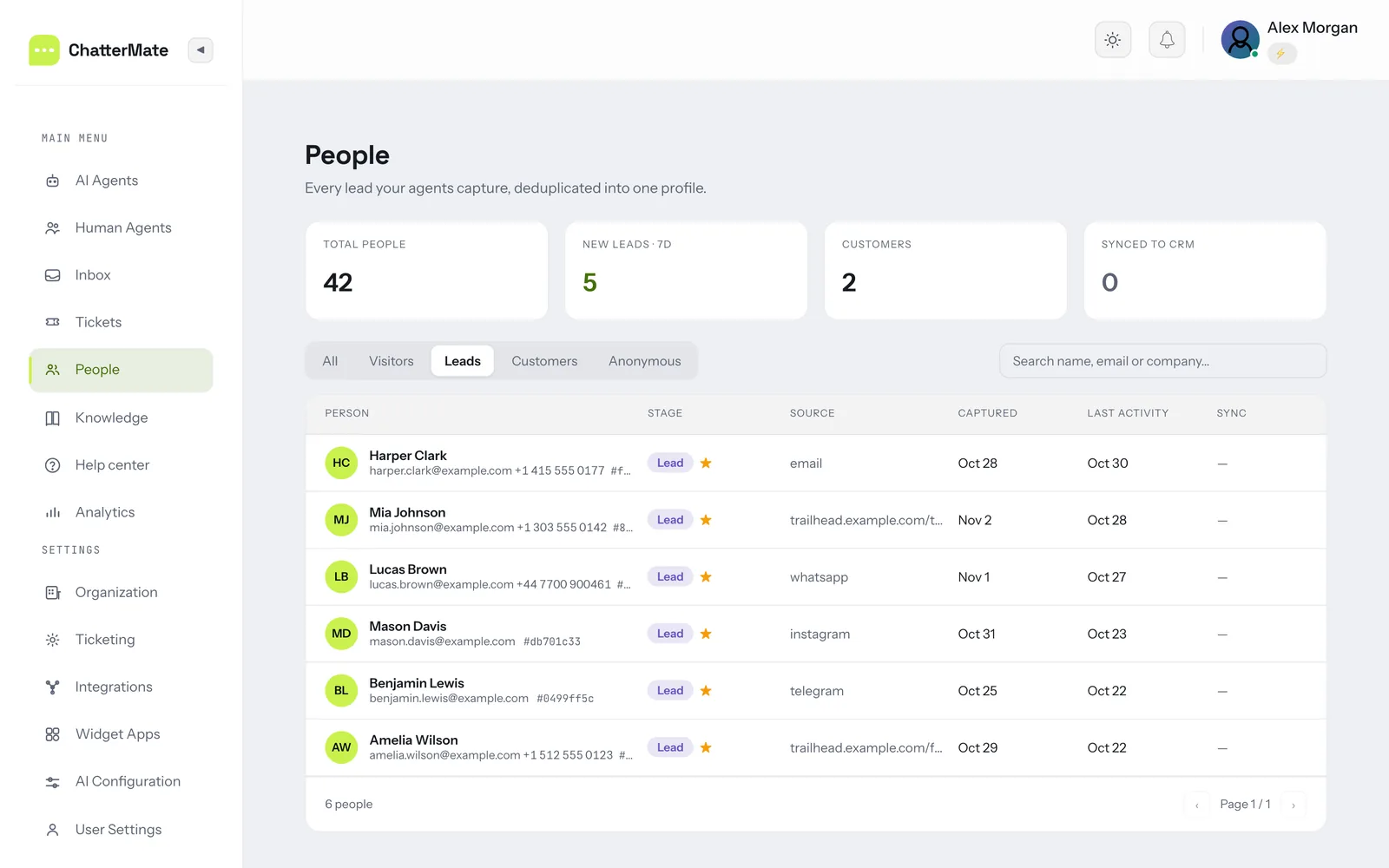
Turn support and sales chats into qualified leads without a form. When a visitor
shows buying intent, the agent asks for their details in the conversation (with a
consent step you can switch on), records them on the person's profile, and writes
an AI qualification summary so your team knows who to call first.
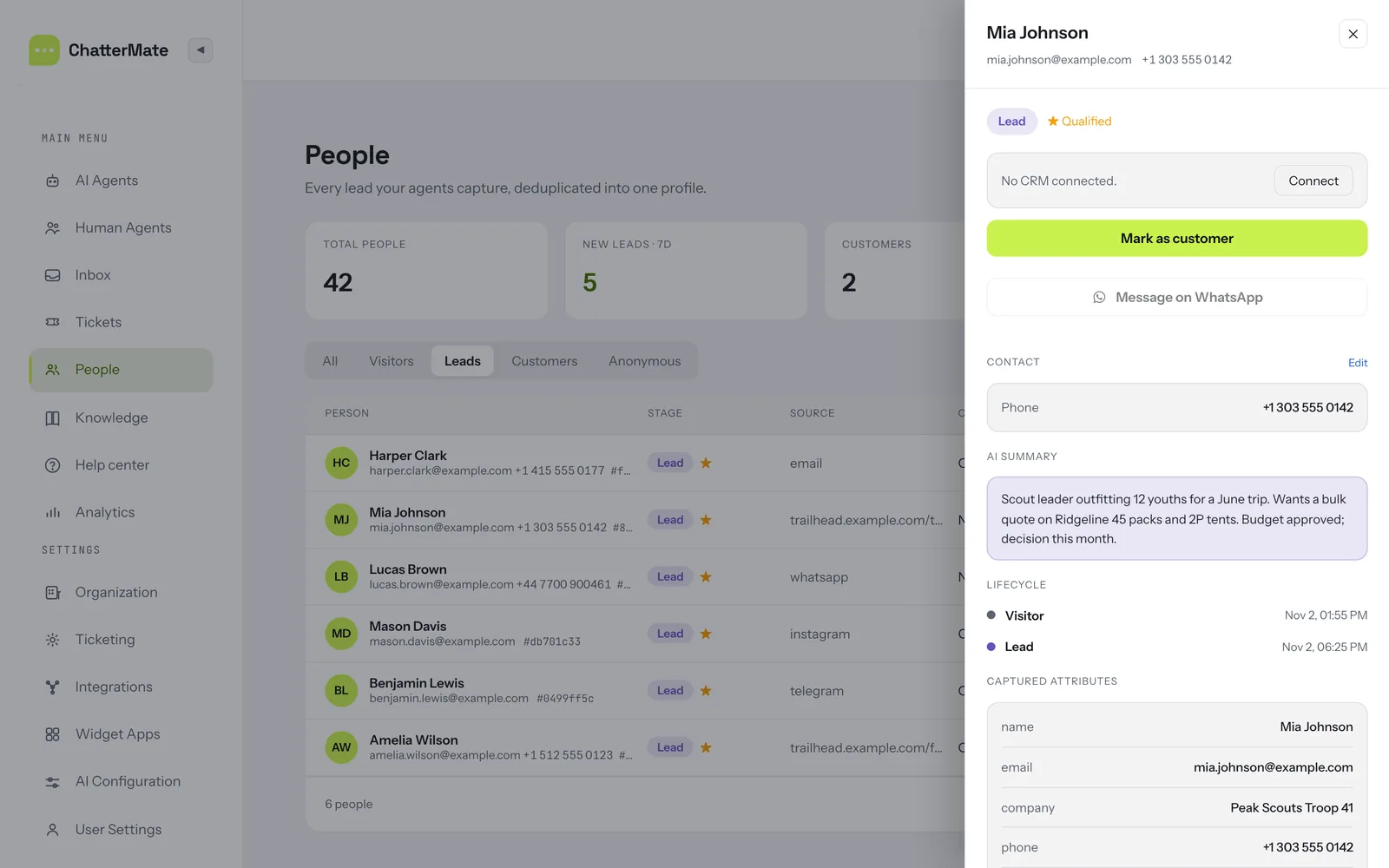
- One profile per person across the web widget, WhatsApp, Instagram, Messenger, Telegram and email, moving from Visitor → Lead → Customer
- Configurable fields per agent — name, email, phone, company, or your own
- Source tracking — the page or channel each lead came from
- CRM sync — push leads to HubSpot or Pipedrive
- People view to filter, search and follow up on every lead
AI-Generated Help Center
Point ChatterMate at your website, docs or PDFs and it generates FAQ articles
with AI, grouped into topics and linked back to their source. You review and
publish them as a public knowledge base / help center — no separate help desk
tool needed.
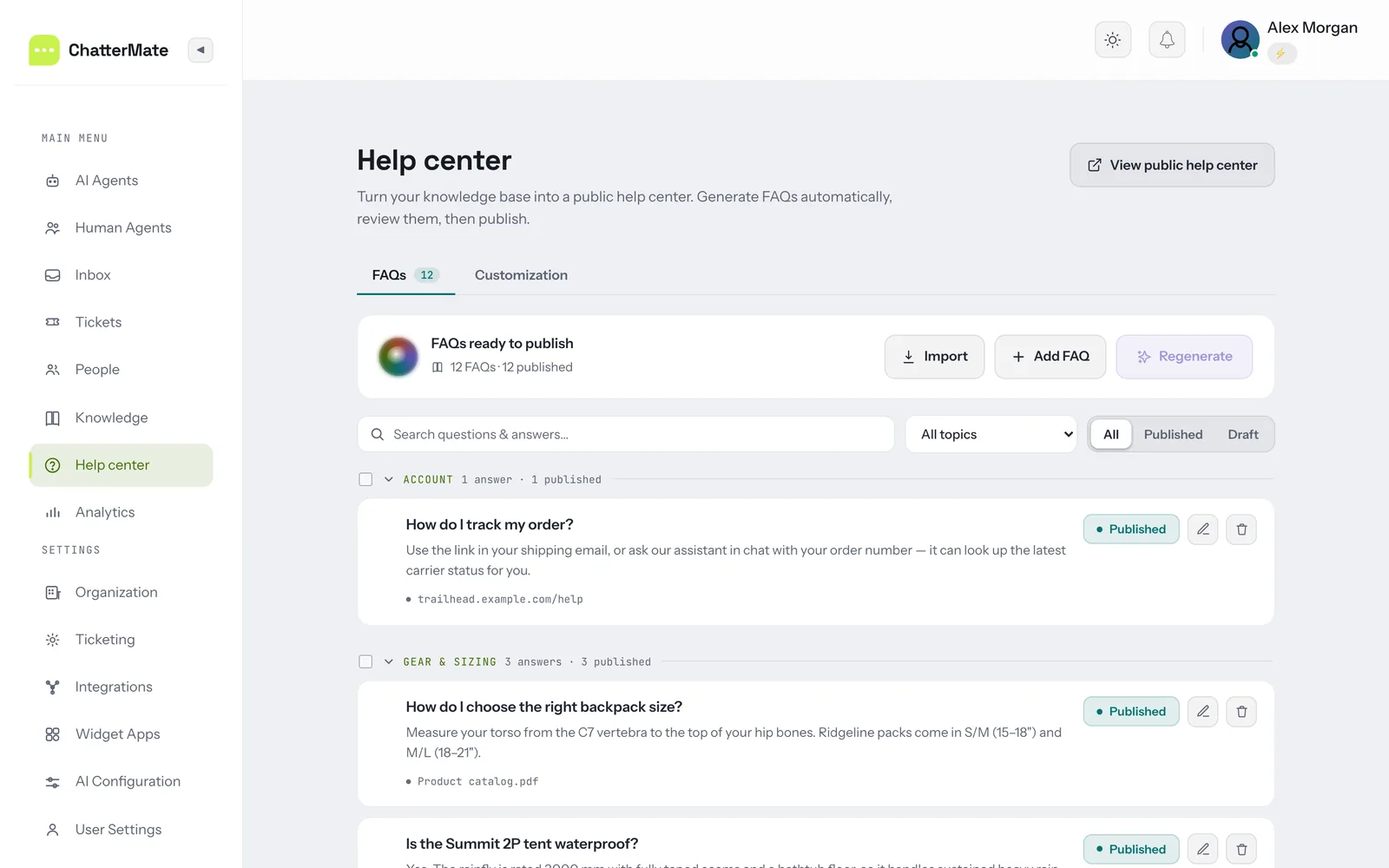
- AI-generated FAQs from your knowledge base, or import an existing help center
- Review before publishing — edit, regenerate, draft or publish each article
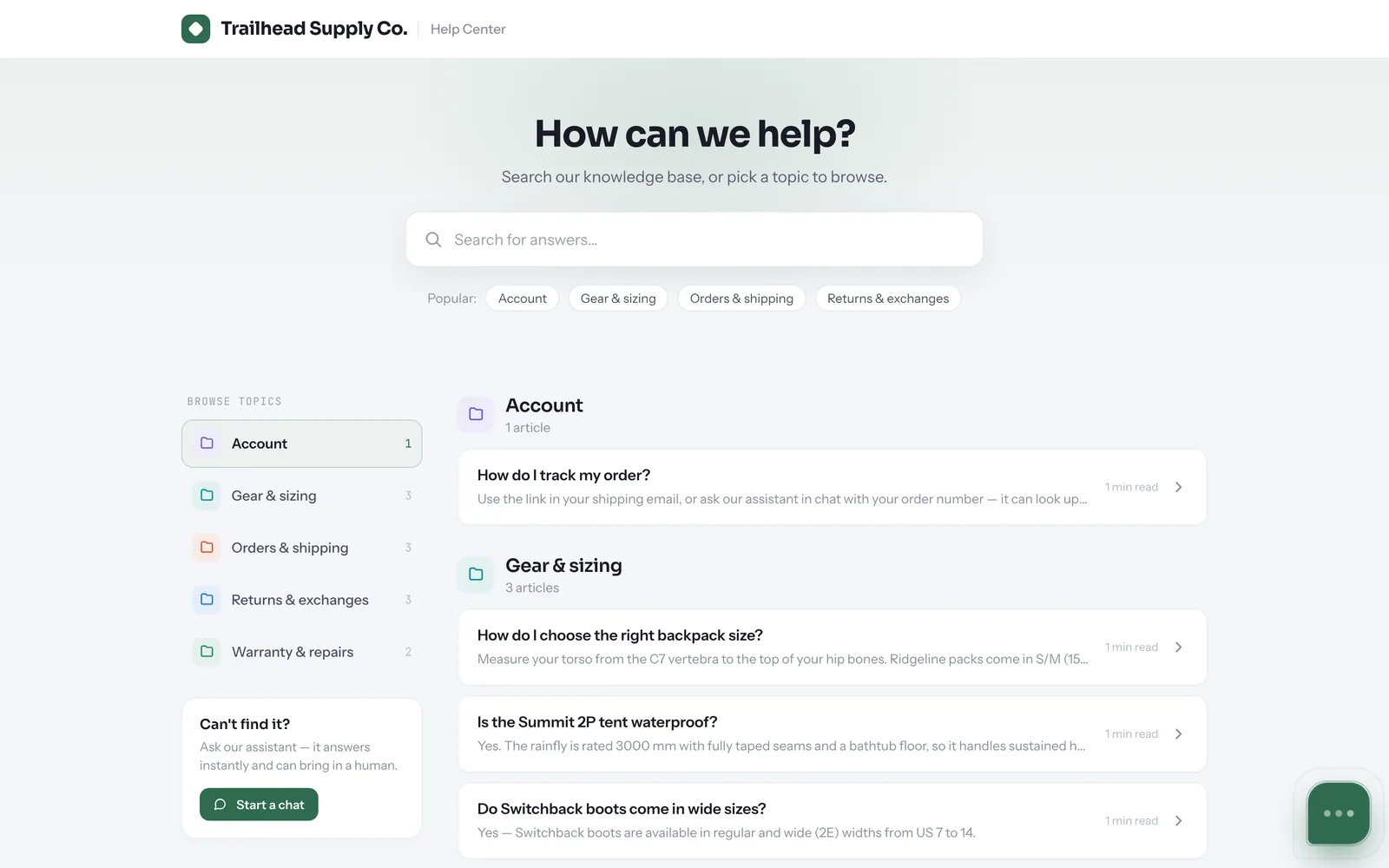
- SEO-friendly public pages with per-article titles and meta descriptions
- AI search over your articles, and the chat assistant on every page for anything they don't cover
- Your branding — name, logo, colour and header links
Connect Any MCP Server
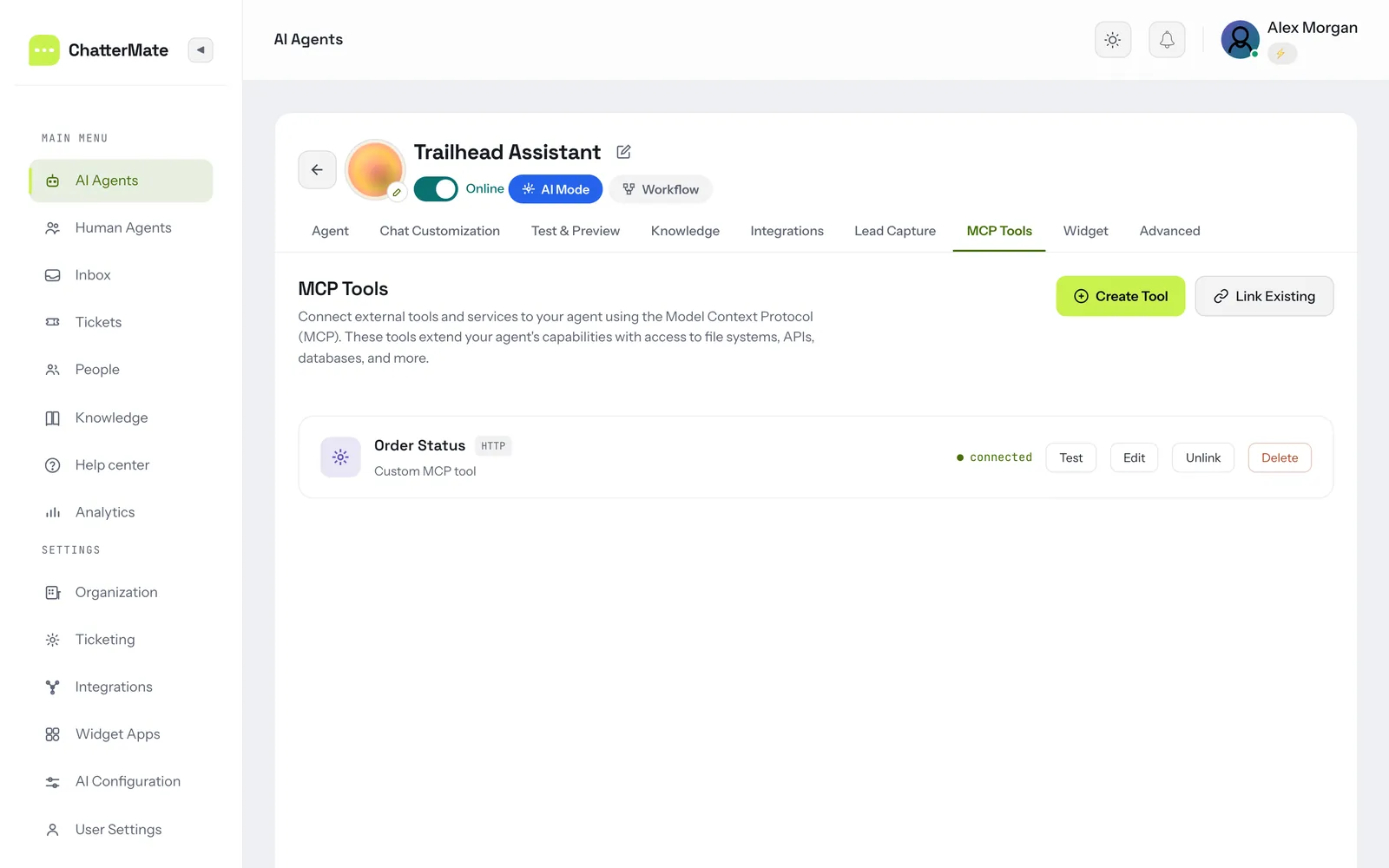
Give your AI agent real tools. Add any Model Context Protocol (MCP) server —
over HTTP, SSE or stdio — and the agent can call it mid-conversation to look up an order,
check stock, query an internal API or search logs. Add per-connector guidance so
the agent knows when to use each tool, and test the connection from the
dashboard.
ChatterMate is also manageable over MCP itself — see the
MCP server docs.
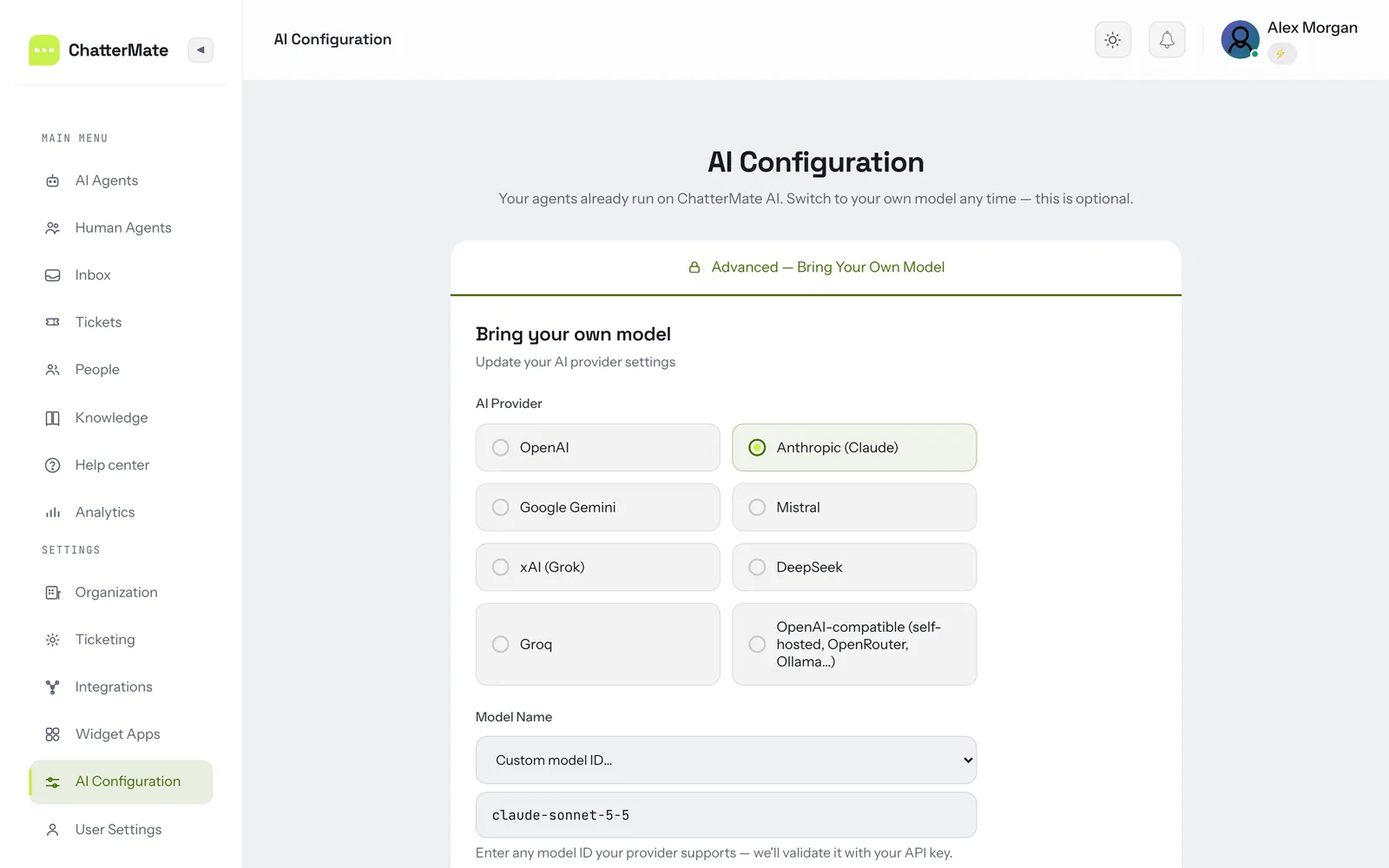
Bring Your Own Model
Run your agents on the model you trust: OpenAI, Anthropic Claude, Google
Gemini, Mistral, xAI Grok, DeepSeek, Groq, or any OpenAI-compatible
endpoint (self-hosted, OpenRouter, Ollama…). Use your own API key, pick from
the list or enter any model ID, and switch providers at any time without code
changes.
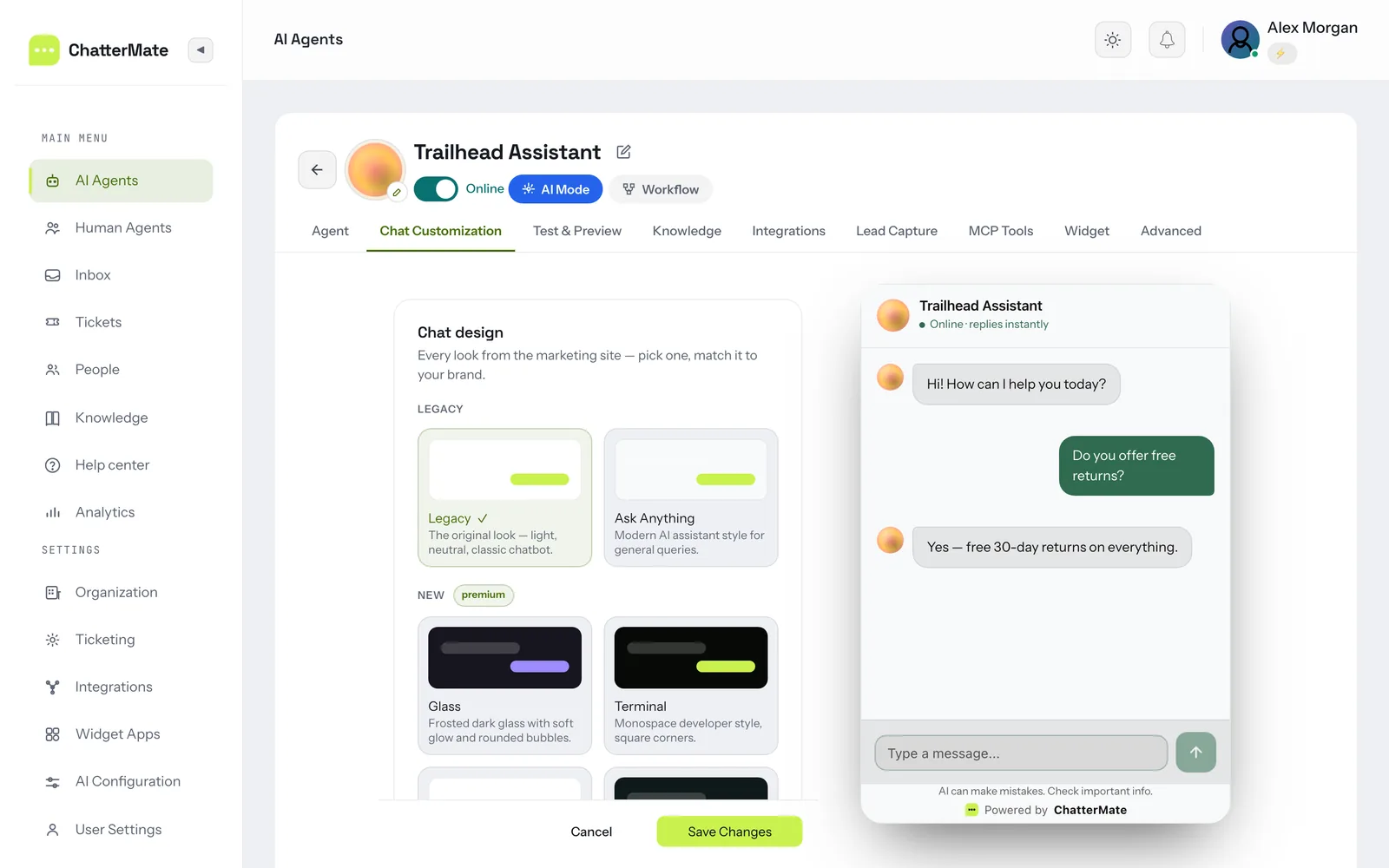
Chat Widget Customization
Make the chat widget look like part of your site: choose a chat design, set
colours, avatar, fonts, welcome title and message, starter questions and quick
actions, and see every change in the live preview before you save.
AI Ticketing
Tickets are raised from a conversation (by the AI or an agent), or from an alert
webhook. Each one is triaged, deduplicated against open tickets, and then
investigated: the AI proposes hypotheses, tests each against your connected
tools, and records every query it ran as evidence you can inspect. The result is
a versioned root-cause analysis with citations back to that evidence.
Connect read-only investigation sources under Settings → Ticketing:
observability platforms via MCP (Grafana, Elasticsearch, Sentry, CloudWatch, or
any MCP server), and optionally a guardrailed SQL connector (Postgres/MySQL,
direct or over an SSH tunnel).
Autonomy is staged, and you choose the level:
| Level | The AI can |
|---|---|
| L1 | Investigate and document only |
| L2 | Also propose a resolution — a human approves or rejects it |
| L3 | Also message the customer and close the ticket, behind confidence guards |
Guardrails
The investigation agent reads untrusted customer text and holds live tool
access, so the limits are enforced in code, not by prompting:
- The SQL connector is read-only, structurally. Queries are parsed to an AST
and rejected unless they are a single plainSELECT. Writes, DDL, multiple
statements, and a denylist of dangerous functions cannot pass. Table access is
restricted to an allowlist you pick, enforced through CTEs, joins and
subqueries. ALIMITis forced. Comments are stripped before execution, since
MySQL executes/*! */. The connection itself is a read-only transaction with
a statement timeout — a second, independent barrier. - Columns you mask are never readable. Masked columns are blocked from being
referenced anywhere, including in aWHEREclause, so their values can't be
probed; whole-row tricks that would smuggle them out (to_jsonb(t),t::text,to_json(t.*)) are blocked too, and results are masked again on the way back. - Nothing is written to your database, ever. Approving an AI proposal records
the decision — any change to your systems is made by your team. - Row-level scoping keeps one customer's data out of another's ticket. Mark
the column that identifies the customer on any table holding per-customer rows
(orders → customer_email). Queries against it are rewritten to read only the
ticket customer's own rows — the AI cannot widen that, because the filter is
applied to the table it selects from, not to a condition it could write
around. A ticket with no known customer cannot query a scoped table at all,
rather than falling back to reading everything. Tables you leave unscoped
(products, error codes) stay fully readable. - Cross-customer isolation on outbound messages. Identifiers belonging to
anyone other than the recipient are stripped from every message sent to a
customer, and other customers' tickets are redacted before they reach the
model — a second line behind row scoping. - Every query is audited. Each attempt is logged with the SQL and outcome;
returned rows are deliberately never stored.
When you connect a database: set a row-scope column for every table that
holds per-customer rows — it's the control that stops the agent reading across
customers, and it's off until you set it. Point the connector at a service
account restricted to what support genuinely needs, and prefer views that are
already scoped.
Platform Features
| Feature | Description |
|---|---|
| 🤖 AI-Powered Responses | Context-aware AI with conversation memory across sessions |
| 📊 Analytics Dashboard | Real-time monitoring, conversation insights, and performance metrics |
| 📚 Knowledge Base Training | Train your AI with domain-specific knowledge and FAQs |
| 🎨 Custom Theming | Fully customizable chat widget to match your brand |
| 🔐 Role-Based Access Control | Granular permissions for team members |
| 🌐 Open Source & Self-Hosted | Full control over your data with self-hosting option |
Single sign-on
Team members can sign in to the dashboard with Google or Microsoft
(OpenID Connect) once an operator sets the provider's client id and secret
(GOOGLE_SSO_CLIENT_ID / MICROSOFT_SSO_CLIENT_ID and secrets, seebackend/.env.example). SSO signs in existing team members and never creates
accounts: the first sign-in links the provider account to the team member with
the same e-mail address, when the provider vouches for that address, and later
sign-ins use that link. Each team member links at most one account per
provider. Changing a team member's address drops their links (changing your own
needs your current password), and an admin can list and unlink them
(GET/DELETE /api/v1/users/{id}/identities).
A team member without a profile picture gets the provider's photo. Register{BACKEND_URL}/api/v1/sso/<provider>/callback as the redirect URI with the
provider. For Microsoft on the default common tenant, add the optional email
and xms_edov claims to the app's ID token (Entra ID → Token configuration):
a work or school account links only when xms_edov says Microsoft verified its
domain, so without it those accounts can't sign in. Step-by-step setup for both
providers is in the single sign-on docs.
With PASSWORD_LOGIN_ENABLED=false the login page leads with SSO, and
a team member's password stops working once they have signed in with SSO, and
their password sessions end (it applies install-wide, so it is meant for
single-organization installs).
Integrations
All of these are free and included — every adapter ships in the
open-source codebase, and self-hosting unlocks the lot.
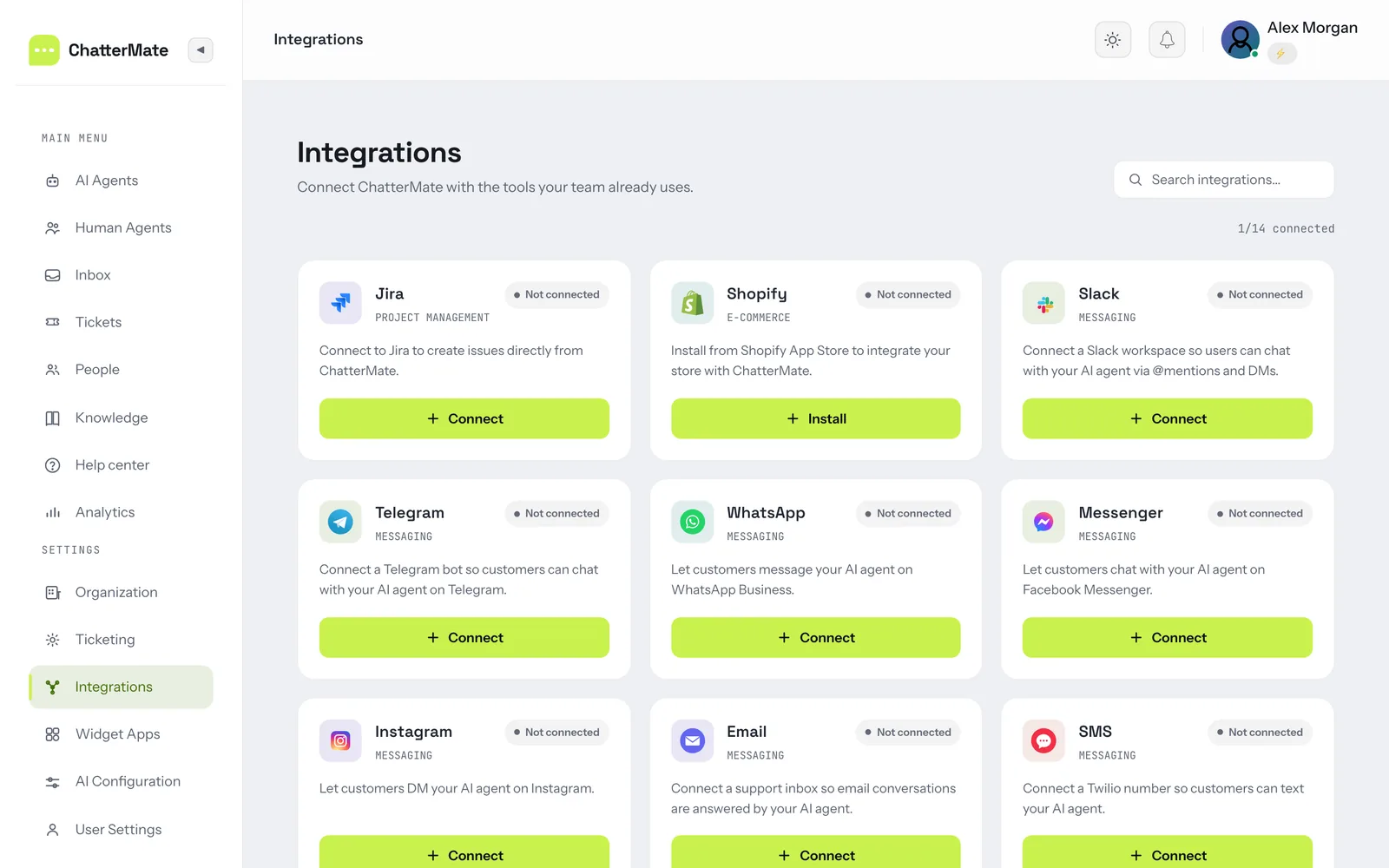
What some of them need is your own credentials, because the integration
talks to your account on someone else's platform:
- You create the app — a developer app registered once per ChatterMate
install, with its keys in the backend.env. - You paste a token — no app to create; you generate a token or API key on
the provider's side and enter it in the ChatterMate UI when connecting.
Both are marked in the tables below.
Messaging channels — one shared inbox for all of them, with the same AI
answers, human handoff, and workflows as the web widget:
| Channel | Setup | Notes |
|---|---|---|
| Your Meta app | WhatsApp Business Cloud API — templates, media, and 24-hour session handling | |
| 💬 Facebook Messenger | Your Meta app | Meta Messenger Platform, connected per Page |
| Your Meta app | Instagram Direct Messages via the Meta Graph API | |
| 🔷 Slack | Your Slack app | Your Slack workspace as an internal support channel |
| ✈️ Telegram | Paste a token | Bot token from BotFather — no app registration |
| 🟢 LINE | Paste a token | LINE Messaging API channel credentials |
| 📱 SMS | Paste a token | Your Twilio, Vonage, Plivo, or MessageBird account keys |
| Paste a token | Your mailbox credentials; inbound email becomes a conversation and replies go back over email | |
| 🌐 Web widget | Nothing | The embeddable widget, plus Shopify and WordPress surfaces |
CRM — push captured leads and contacts out to your sales stack:
| Integration | Setup | Notes |
|---|---|---|
| 🟠 HubSpot | Your HubSpot app | Contacts and leads pushed from chat, OAuth connected |
| 🟩 Pipedrive | Your Pipedrive app | Persons and leads pushed from chat, OAuth connected |
Synced by the crm_sync worker — see Background processors.
Tickets, data and tooling
| Integration | Setup | Notes |
|---|---|---|
| 🔗 Jira | Your Atlassian app | Create and track Jira issues from chat (OAuth 2.0); native tickets can escalate to Jira |
| 🛍️ Shopify | Your Shopify app | Order, shipping, and product answers from live store data |
| 🧰 MCP servers | Paste a token | Any MCP server as an agent tool — Grafana, Elasticsearch, Sentry, CloudWatch, and others |
| 🗄️ SQL connectors | Paste a token | Read-only, guardrailed PostgreSQL and MySQL access for AI ticket investigation |
| 🪝 Webhooks | Nothing | Outbound ticket webhooks to drive your own automations |
Adding a channel means implementing one adapter in
backend/app/channels/
against the sharedChannelAdapterbase — the inbox, AI, and handoff come for
free. CRM adapters follow the same shape inbackend/app/crm/.
ChatterMate vs. Intercom, Zendesk & Chatbase
ChatterMate is a free, open-source alternative to Intercom, Zendesk AI, and Chatbase — with AI answers and human handoff in one inbox:
| ChatterMate | Intercom | Zendesk AI | Chatbase | |
|---|---|---|---|---|
| Open source (Apache-2.0) | ✅ | ❌ | ❌ | ❌ |
| Self-hosting / data ownership | ✅ | ❌ | ❌ | ❌ |
| AI answers from your knowledge base | ✅ | ✅ | ✅ | ✅ |
| Built-in human handoff + shared inbox | ✅ | ✅ | ✅ | ⚠️ limited |
| Bring your own AI model (OpenAI, Claude, Gemini, Grok, +more) | ✅ | ❌ | ❌ | ⚠️ limited |
| Visual no-code workflow builder | ✅ | ✅ | ⚠️ add-on | ❌ |
| Free tier | ✅ | trial only | trial only | ✅ |
| Per-AI-resolution fees | ❌ none | $0.99/resolution | usage-based | credit-based |
Detailed comparisons: ChatterMate vs Chatbase · ChatterMate vs Chatwoot
Screenshots
Analytics Dashboard
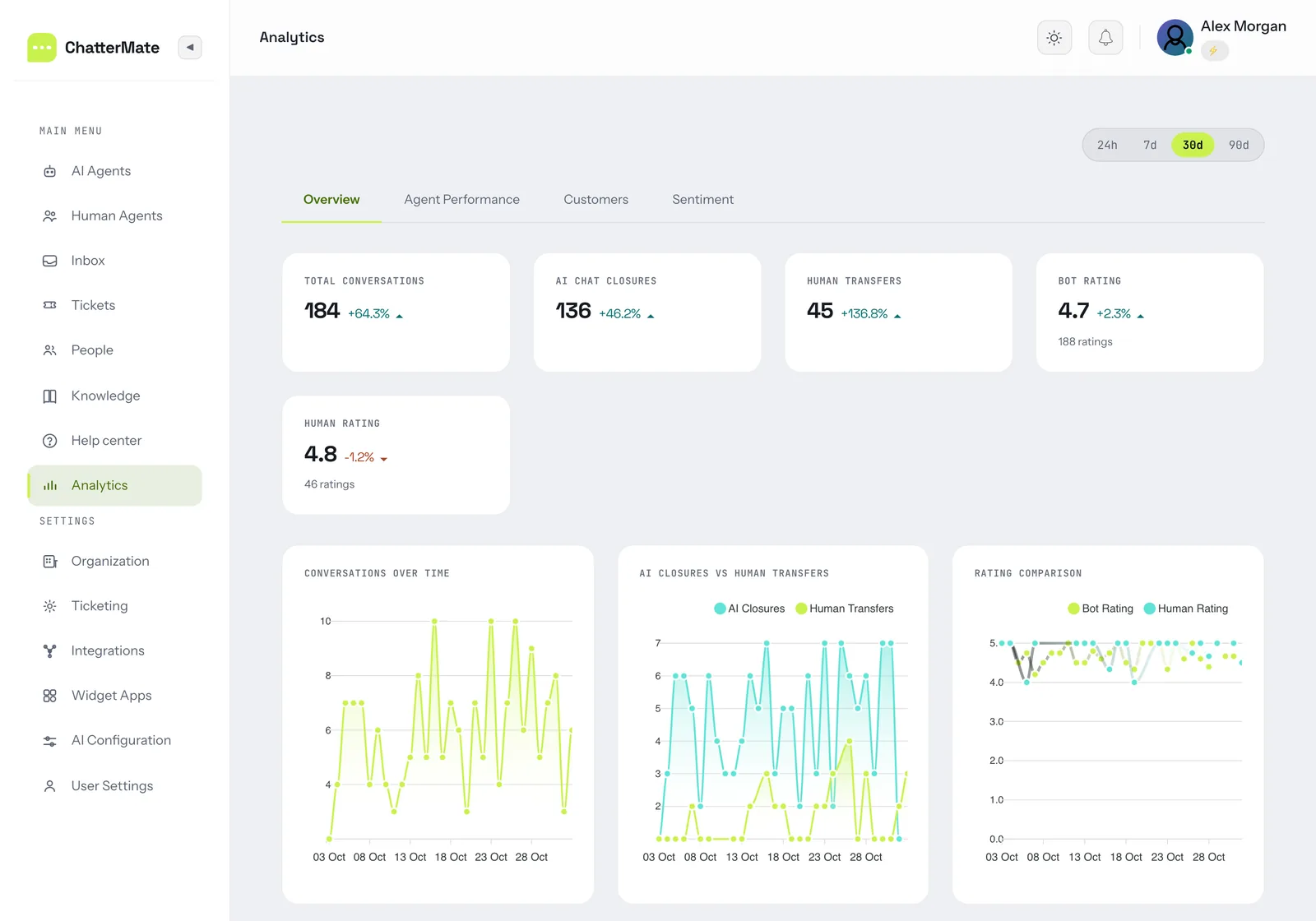
Tickets
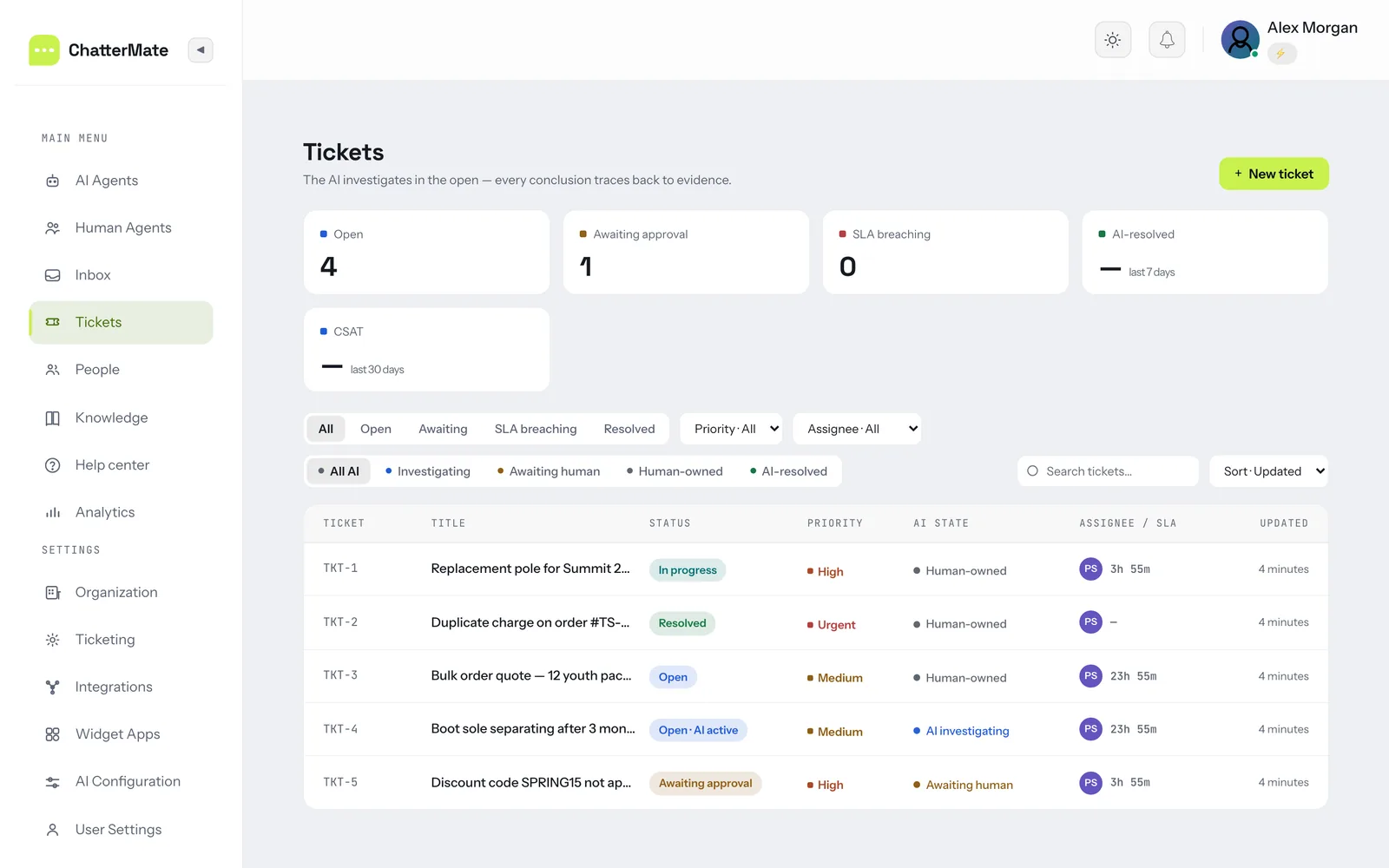
Screenshots are from a self-hosted install loaded with demo data (a fictional outdoor-gear store).
Quick Start
There are two ways to run ChatterMate. Most people want the hosted service — sign up and
manage everything from the dashboard, the CLI, or an AI agent. Self-host with Docker only if
you need to run ChatterMate on your own infrastructure.
Option A — Hosted (fastest)
- Sign up: app.chattermate.chat — free, no card required.
- Manage from your terminal, automate, or drive it with an AI agent using the ChatterMate CLI:
# The ChatterMate CLI — sign up, mint tokens, and manage agents, workflows & knowledge
pip install chattermate-cli          # installs the `chattermate` command

chattermate signup --name "Acme Inc" --domain acme.com --admin-email [email protected]
chattermate agent create --name "Support" --type customer_support -i "Be concise and friendly"
chattermate knowledge add-url --website https://docs.acme.com --agent-id <agent-id>
➡️ AI Agent & Automation Quickstart · CLI reference · MCP server
🤖 Building an AI agent that sets up ChatterMate? Start at
chattermate.chat/llms.txt, follow the
agent quickstart, or connect the
MCP server to configure ChatterMate over MCP.
Option B — Self-host with Docker
Run the full ChatterMate stack on your own infrastructure with the self-host CLI (Docker-based):
# Install the self-host / deployment CLI
npm install -g chattermate-deploy

# Scaffold a project, then start the full stack (Postgres, Redis, backend, frontend, worker)
chattermate-deploy init my-chattermate-project
cd my-chattermate-project
chattermate-deploy start                  # then open http://localhost/
chattermate-deploy init <project-name>    # Scaffold a new self-hosted project
chattermate-deploy start                  # Start all services (Docker)
chattermate-deploy stop                   # Stop all services
chattermate-deploy status                 # Check service status
chattermate-deploy logs                   # View service logs
chattermate-deploy reset                  # Reset and remove all data
⚠️ Two different
chattermatecommands — don't mix them up. The hosted CLI
(pip install chattermate-cli) signs you up and manages agents/knowledge against the
ChatterMate API. The self-host CLI (npm install -g chattermate-deploy) scaffolds and runs
the Docker stack. They are separate tools that happen to share thechattermatename.
Installation Methods
Prefer the hosted service? Skip this section — just sign up
and/or use the ChatterMate CLI
(pip install chattermate-cli). The methods below are for self-hosting.
Prerequisites
For Self-Host CLI (Recommended)
- Node.js 16+
- Docker & Docker Compose
- npm or yarn
For Manual Installation
- Python 3.12+
- PostgreSQL 14+ (with Vector extension)
- Firebase Project (for push notifications)
- Redis (optional, for rate limiting and multi-server socket deployment)
Method 1: Self-Host CLI (Recommended)
The self-host CLI (chattermate-deploy, installed via npm) scaffolds and runs the Docker stack.
This is not the account CLI — for signup and agent management see the
ChatterMate CLI.
npm install -g chattermate-deploy
chattermate-deploy init my-project
cd my-project
chattermate-deploy start
Method 2: Docker Installation
# Build and start all services
docker compose up --build

# Run in background
docker compose up -d

# Stop services
docker compose down

# View logs
docker compose logs -f
Method 3: Manual Installation
Click to expand manual installation stepsBackend Setup
cd backend
python -m venv venv
source venv/bin/activate  # Windows: venv\Scripts\activate
pip install -r requirements.txt

# Set up environment variables
cp .env.example .env
# Configure .env with your credentials

# Database setup
alembic upgrade head

# To generate revisions if any model changes
alembic revision --autogenerate -m "Changes description"
Frontend Setup
cd frontend
npm install
cp .env.example .env
For Web Push notification, generate a firebase config and place it in backend/app/config/firebase-config.json
Running the Application
Backend
# Development
uvicorn app.main:app --reload --port 8000

# Run Knowledge Processor (in a separate terminal)
python -m app.workers.run_knowledge_processor
Background processors
The API server only enqueues long-running jobs — a separate worker process
executes them. If no worker is running, jobs sit at pending forever and the
UI shows a progress bar that never advances.
| Worker | Command | Handles |
|---|---|---|
| Knowledge + FAQ | python -m app.workers.run_knowledge_processor |
Knowledge ingestion (crawl, PDF, sitemap) and FAQ jobs |
| Ticket investigator | python -m app.workers.ticket_investigator |
AI ticket investigation + ticket lifecycle |
| CRM sync | python -m app.workers.crm_sync |
Lead push to HubSpot / Pipedrive |
Run each from the backend/ directory with the virtualenv active.
FAQ / Help Center processor. FAQ generation and import jobs (Generate FAQs,
"Migrate an existing help center", PDF import) are drained by the knowledge
worker — there is no separate FAQ container. Both knowledge entrypoints pick
up the FAQ queue, so either one is enough:
# Recommended for local dev — knowledge and FAQ in one loop
python -m app.workers.run_knowledge_processor

# What Docker runs: knowledge and FAQ as independent asyncio tasks, so a long
# FAQ generation never blocks knowledge ingestion
python -m app.workers.knowledge_processor

# FAQ queue only — useful when debugging generation/import in isolation
python -m app.workers.faq_processor
Polls every 60s. On startup it fails any job left stuck in processing by a
previous crash, so a killed worker doesn't strand a job forever.
Ticket investigator. Runs two loops in one process — investigation runs
(polled every 15s) and ticket lifecycle/SLA sweeps (every 5 min):
python -m app.workers.ticket_investigator
Needs Redis (REDIS_URL) to push live ticket_update frames to dashboard
clients; without it the frontend falls back to polling. Orphaned runs are
reaped on startup.
Under Docker, these already run as services — docker compose up starts
them alongside the API:
docker compose logs -f knowledge_processor   # knowledge + FAQ jobs
docker compose logs -f ticket_investigator
Frontend
# Development
npm run dev

# Build Widget for chat integration
npm run build:widget

# Build Web Client
npm run build:webclient
Testing
Backend
cd backend && pytest tests/
Frontend
cd frontend && npm run test:unit
End-to-end: Playwright drives the real dashboard, widget and backend against a throwaway database and a fake LLM, all on 127.0.0.1. Needs a local Postgres with pgvector and Mailpit.
cd e2e && npm ci && npx playwright install chromium && npm test
See e2e/AUTHORING.md to add a test and e2e/FEATURES.md for what's covered.
Deployment
Docker Deployment (Recommended)
Pre-built Docker images are available:
# Pull images
docker pull chattermate/frontend:latest
docker pull chattermate/backend:latest

# Run with production compose
docker compose -f docker-compose.prod.yml up -d
Backend
pip install gunicorn

gunicorn app.main:app \
    --workers 4 \
    --worker-class uvicorn.workers.UvicornWorker \
    --bind 0.0.0.0:8000 \
    --access-logfile - \
    --error-logfile - \
    --log-level info \
    --timeout 120
Knowledge Processor (systemd)
sudo tee /etc/systemd/system/chattermate-knowledge-processor.service << EOF
[Unit]
Description=ChatterMate Knowledge Processor
After=network.target

[Service]
User=chattermate
Group=chattermate
WorkingDirectory=/path/to/chattermate/backend
Environment="PATH=/path/to/chattermate/backend/venv/bin"
ExecStart=/path/to/chattermate/backend/venv/bin/python -m app.workers.run_knowledge_processor
Restart=always

[Install]
WantedBy=multi-user.target
EOF

sudo systemctl daemon-reload
sudo systemctl enable chattermate-knowledge-processor
sudo systemctl start chattermate-knowledge-processor
Frontend
npm run build
# Serve using nginx or other web server
FAQ
What is ChatterMate?
ChatterMate is an open-source AI customer support platform. It combines an AI chatbot (trained on your knowledge base) with human agents in a shared inbox, so AI handles routine questions 24/7 and hands off to your team when it matters.
Is ChatterMate free and open source?
Yes. The core platform is Apache-2.0 licensed — free for personal and commercial use, including self-hosted production deployments. There's also a free hosted plan at app.chattermate.chat.
Can the AI hand off conversations to a human agent?
Yes — human handoff is a core feature, not an add-on. ChatterMate detects frustration or explicit requests for a human and transfers the conversation with full context, respecting business hours and agent availability.
Does ChatterMate work with Shopify?
Yes. Install it from the Shopify App Store to answer order-status, shipping, and product questions directly from your store data. The widget also embeds on any other e-commerce or website platform with one line of code.
Does ChatterMate work with WordPress?
Yes. Download the WordPress plugin, install it via Plugins → Add New → Upload Plugin, then enter your Widget ID under Settings → ChatterMate Chat. The chat launcher appears on your site with no theme edits. A WordPress.org directory listing is in progress.
Can I self-host ChatterMate?
Yes. Run the full stack (Postgres, Redis, backend, frontend) on your own infrastructure with npm install -g chattermate-deploy — see Quick Start. Self-hosting gives you complete data ownership.
Which AI models does ChatterMate support?
OpenAI, Anthropic (Claude), Google Gemini, Mistral, xAI (Grok), DeepSeek, Groq, and any OpenAI-compatible endpoint (self-hosted, OpenRouter, Ollama) — bring your own API key, or enter a custom model ID for any model a provider supports. You can switch providers at any time without code changes.
Can the AI chatbot capture and qualify leads?
Yes. With AI lead capture the agent collects contact details during the conversation (with optional consent), writes a qualification summary, and can push the lead to HubSpot or Pipedrive. It works on the web widget and on messaging channels like WhatsApp and Instagram.
Does ChatterMate work as a WhatsApp chatbot?
Yes. Connect WhatsApp Business (Cloud API), plus Instagram, Facebook Messenger, Telegram, LINE, Slack, SMS and email. Every channel shares the same AI agent, inbox, human handoff and workflows.
Can ChatterMate build a help center or knowledge base?
Yes. It generates FAQ articles from your website, docs and PDFs with AI, and you review and publish them as a public, SEO-friendly help center with AI search and the chat assistant built in.
Does ChatterMate support MCP (Model Context Protocol)?
Yes, both ways. Your AI agents can call any MCP server as a tool (details), and ChatterMate itself can be configured through its own MCP server.
Roadmap
Coming Soon
- 🔄 Auto Follow-up System - Automated follow-ups for idle customers
- 📘 Customer Contact Management - CRM-like contact organization
- 🤝 Human Agent AI Suggestions - AI-powered response suggestions for agents
- 📞 AI Voice Chat - Voice-enabled AI conversations
- 🔌 More Integrations - Zendesk, Intercom, and more
Contributing
We welcome contributions! Here's how to get started:
- Fork the repository
- Create a feature branch (
git checkout -b feature/amazing-feature) - Commit your changes (
git commit -m 'Add amazing feature') - Push to the branch (
git push origin feature/amazing-feature) - Open a Pull Request
Development Guidelines
- Follow PEP 8 style guide
- Write tests for new features (and an e2e spec when a user journey changes)
- Update documentation as needed
- Add type hints to new functions
Support
- 📖 Documentation: docs.chattermate.chat
- 🐛 Issues: GitHub Issues
- 📧 Email: [email protected]
License
ChatterMate follows an open-core model:
Open Source Core (Apache-2.0)
- Free for personal and commercial use — including proprietary and SaaS deployments
- No source-disclosure or copyleft obligations
- Includes an explicit patent grant
- See LICENSE and NOTICE
Enterprise features & support
- Advanced/enterprise capabilities are provided separately under a commercial arrangement
- Priority support, warranties, and indemnification available
- Contact: [email protected]
Contributions are accepted under Apache-2.0 with a Developer Certificate of Origin sign-off — see CONTRIBUTING.md.
Made with ❤️ by the ChatterMate team
Keywords: AI customer support, AI chatbot, Shopify chatbot, WordPress chatbot, WordPress chat plugin, ecommerce chatbot, customer support automation, open source help desk, live chat software, self-hosted chatbot, Intercom alternative, Zendesk alternative, Chatbase alternative, no-code chatbot builder, human handoff, Jira integration, Slack bot, multilingual chatbot, open source AI chatbot, WhatsApp chatbot, Instagram chatbot, omnichannel customer support, AI lead capture, lead generation chatbot, AI help center, AI knowledge base, FAQ generator, MCP server, Model Context Protocol, bring your own LLM, OpenAI chatbot, Claude chatbot, Chatwoot alternative
Reviews (0)
Sign in to leave a review.
Leave a reviewNo results found