Agent-Meter
Health Warn
- License — License: MIT
- Description — Repository has a description
- Active repo — Last push 0 days ago
- Low visibility — Only 8 GitHub stars
Code Fail
- child_process — Shell command execution capability in docs/screenshots/demo-gif.js
- fs.rmSync — Destructive file system operation in docs/screenshots/demo-gif.js
- fs module — File system access in docs/screenshots/demo-gif.js
- fs module — File system access in docs/screenshots/strip-duo.js
- fs.rmSync — Destructive file system operation in scripts/antigravity-bridge.mjs
- os.homedir — User home directory access in scripts/antigravity-bridge.mjs
- process.env — Environment variable access in scripts/antigravity-bridge.mjs
Permissions Pass
- Permissions — No dangerous permissions requested
No AI report is available for this listing yet.
2.3mb Windows Taskbar Widget to monitor live quotas, burn-rate, and API cost for Claude Code, Codex, Gemini CLI, Antigravity and Grok.
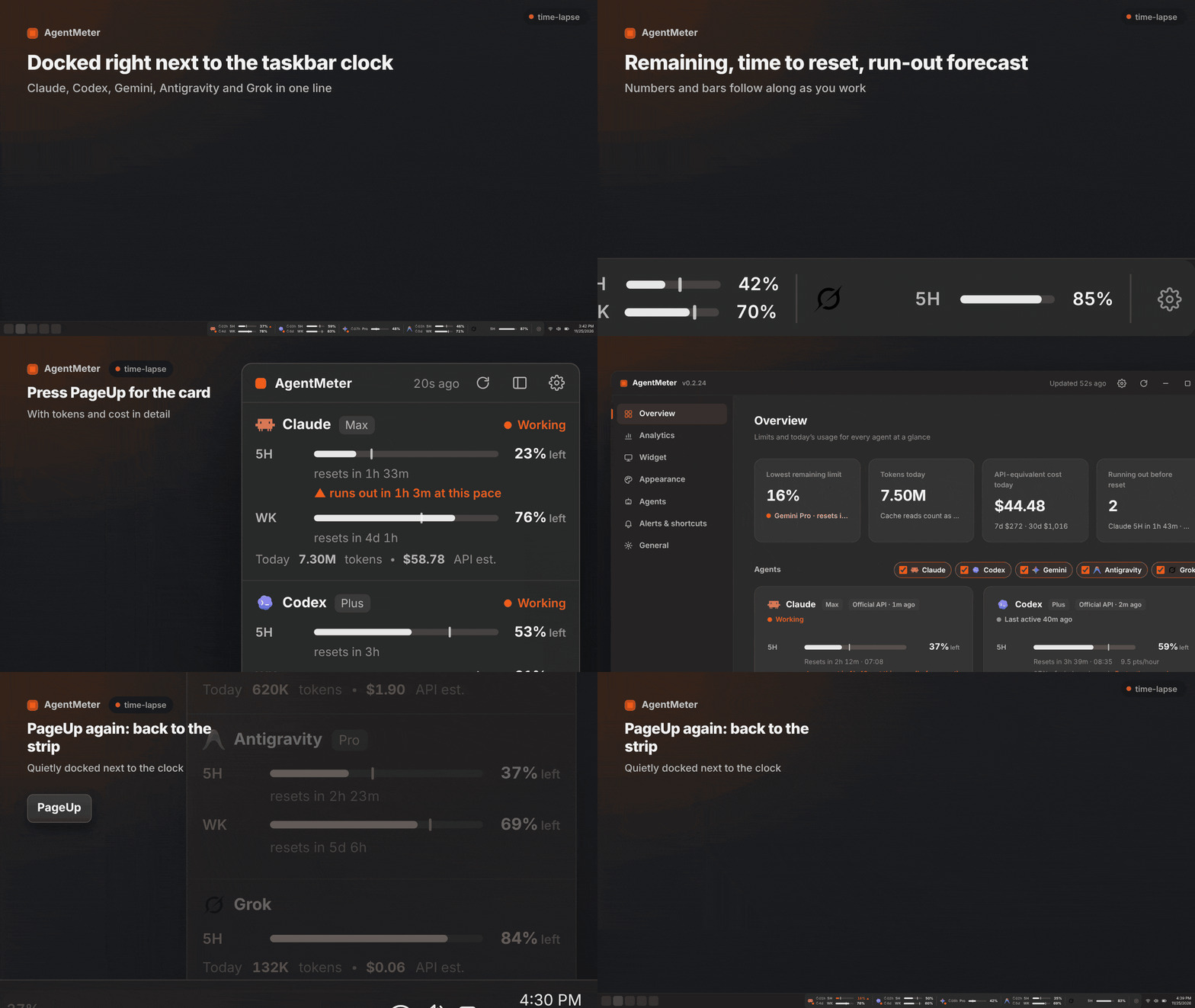
AgentMeter
Live usage limits for Claude Code · Codex · Gemini CLI · Antigravity · Grok · MiniMax · Z.AI · Qwen,
right in your Windows taskbar, your Mac menu bar or on your desktop.







Download ·
Features ·
Widget ·
Dashboard ·
Install ·
How it works ·
Privacy ·
FAQ ·
Development
If you use several AI coding agents, it's hard to tell which limit runs out first and whether you'll
make it to the reset. AgentMeter reads the official limit percentages from each service and the usage logs on
your own machine, and shows them as one line in the taskbar or a small card on the desktop. It works out when a
limit will run out at your current pace, alerts you only when it's urgent, and shows what the same usage would
have cost at API prices.
- 100% local, zero telemetry. No server, no account and no analytics. Your usage never leaves your computer.
- Verifiable source build. Every release is built from this repository by a public GitHub Actions workflow,
and you can build it yourself. - Small and light. A 2.3 MB installer on Rust + Tauri, reading only new log lines.
Features
| Official limit % | Claude 5-hour, weekly and per-model limits (such as Claude Fable), Codex 5-hour and weekly (account-wide), Gemini CLI daily quotas, and Antigravity CLI 5-hour and weekly limits (Windows), straight from each service. Gemini CLI and Antigravity are separate agents, so you can watch both side by side. While an agent is working, limits are re-checked within a minute. MiniMax (M Plan / Token Plan) and Z.AI (GLM Coding Plan) 5-hour and weekly limits come from their official endpoints with the API key you enter. Qwen Code has no % limit API, so it is tracked by local tokens and cost instead. |
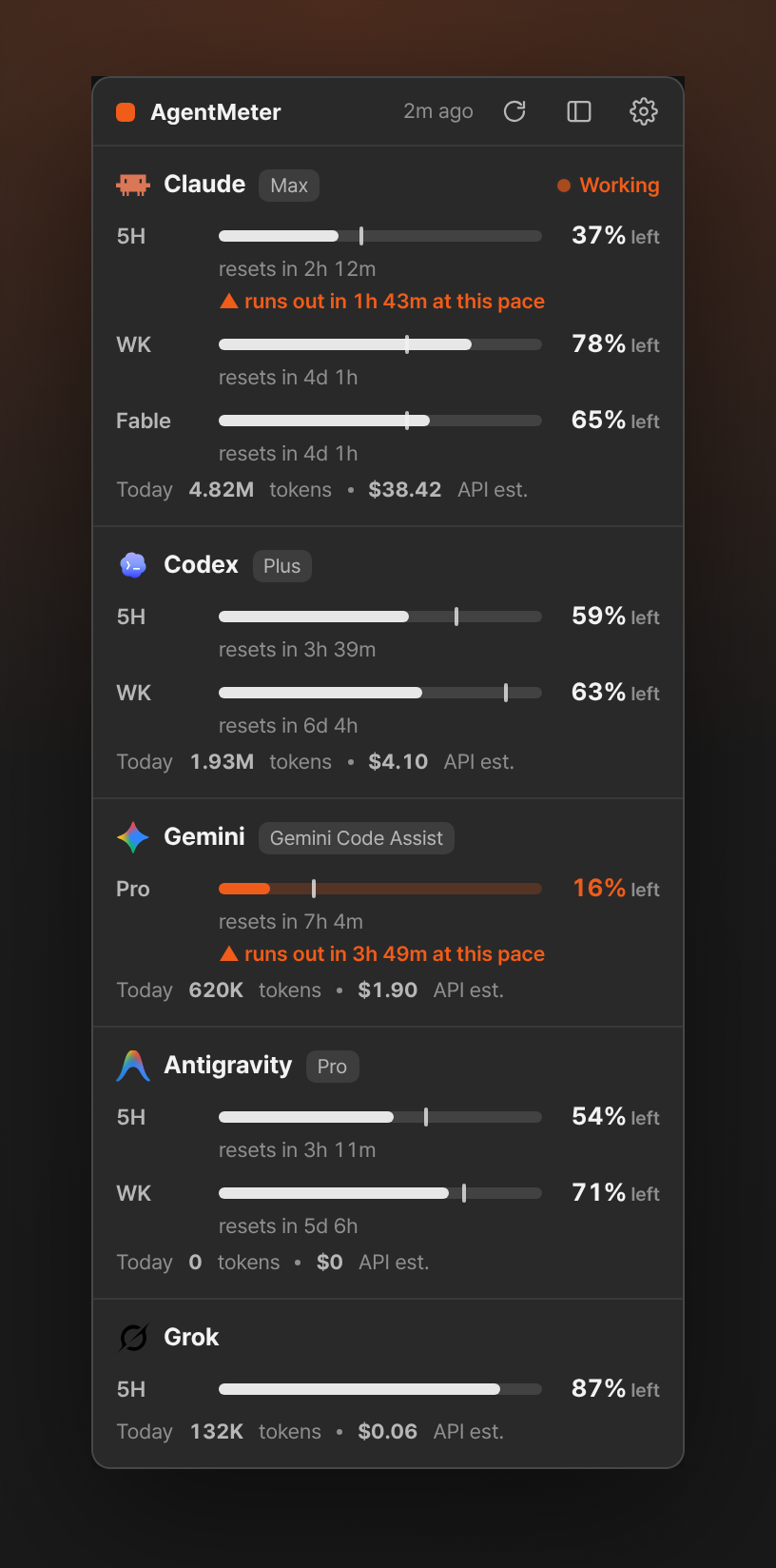
| Run-out forecast | Works out when a limit will run out from your recent pace, and shows ▲ runs out in 40m at this pace when that's before the reset. |
| Pace mark | A mark on each bar shows how much of the limit window has passed. If the bar is ahead of the mark, you're going faster than usual. |
| API-equivalent cost | Estimates today's, 7-day and 30-day cost at public API prices, e.g. $44.48 today · 7d $272 · 30d $1,016. Costs are shown in USD, with KRW (₩) or both also available. |
| Analytics | Daily token and cost charts (14 or 30 days), an hour-of-day heatmap, usage by project and model, and CSV export. |
| Quiet alerts | Notifies at thresholds (80% and 95% by default), on resets, and only when a limit will run out within the hour. Each alert fires once per window, even across restarts. |
| One-click connect | Missing CLI or login? One button opens a terminal that installs the CLI and runs its login, and AgentMeter picks it up when you're done. |
| Update prompts | When a new version ships you see what's new and choose Update now or Later. Past patch notes are always one click away in Settings. |
| English and Korean | Follows your system language. Switch any time in Settings → General → Language. |
Widget
One widget, two layouts. Press PageUp to switch.
- Card (default): a floating card with each agent's limit bars, what's left, time to reset, run-out forecasts,
and today's tokens and cost. Put it anywhere, on any monitor. - Strip: one line per agent, like
↻02h 5H ▬▬▬ 37%. Dock it in the taskbar next to the clock, pull it up
to float it on the desktop, and drop it near the taskbar to dock it again.
| To | Do |
|---|---|
| Switch strip ↔ card | PageUp, or the right-click menu |
| Hide / show the widget | Shift+PageUp |
| Open the dashboard | Double-click the widget, or click the tray icon (on a Mac: the menu bar icon → Open dashboard) |
| Widget settings | The ⚙ button on the widget |
| Lock position · always on top · show remaining | Right-click menu |
The widget steps behind full-screen apps such as videos and games.

Appearance
Pick a theme in Dashboard → Appearance. Every value stays within safe ranges, so nothing can break the layout.
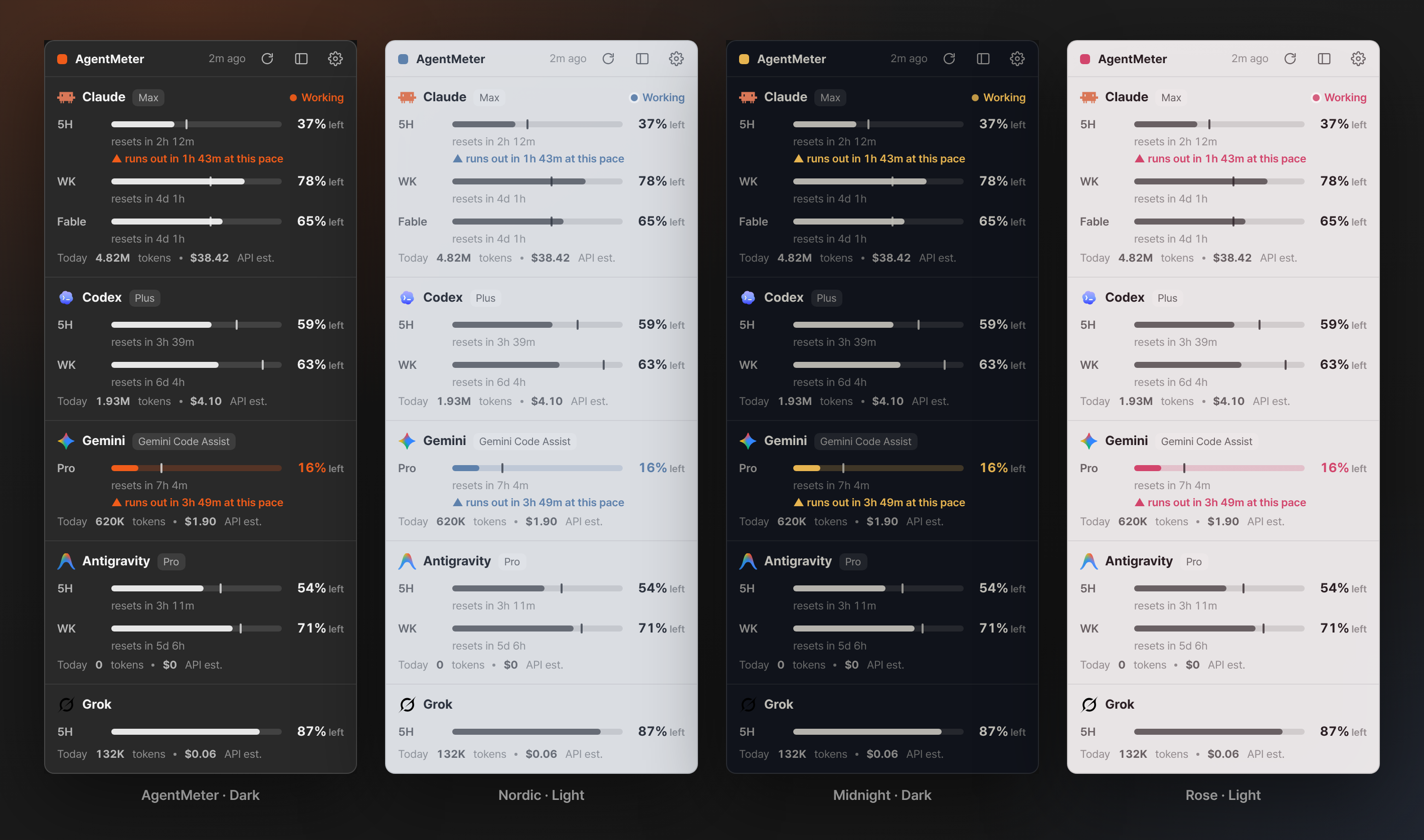
- Mode: system, light or dark (system follows Windows or macOS)
- Themes: AgentMeter, Midnight, Nordic, Forest, Graphite and Rose, each in light and dark
- Colors: your own accent, background and text colors, with a warning when text contrast drops below 4.5:1
- Size: font, dashboard scale (90–125%), and widget opacity, scale, bar length, card width and corner radius
Dashboard
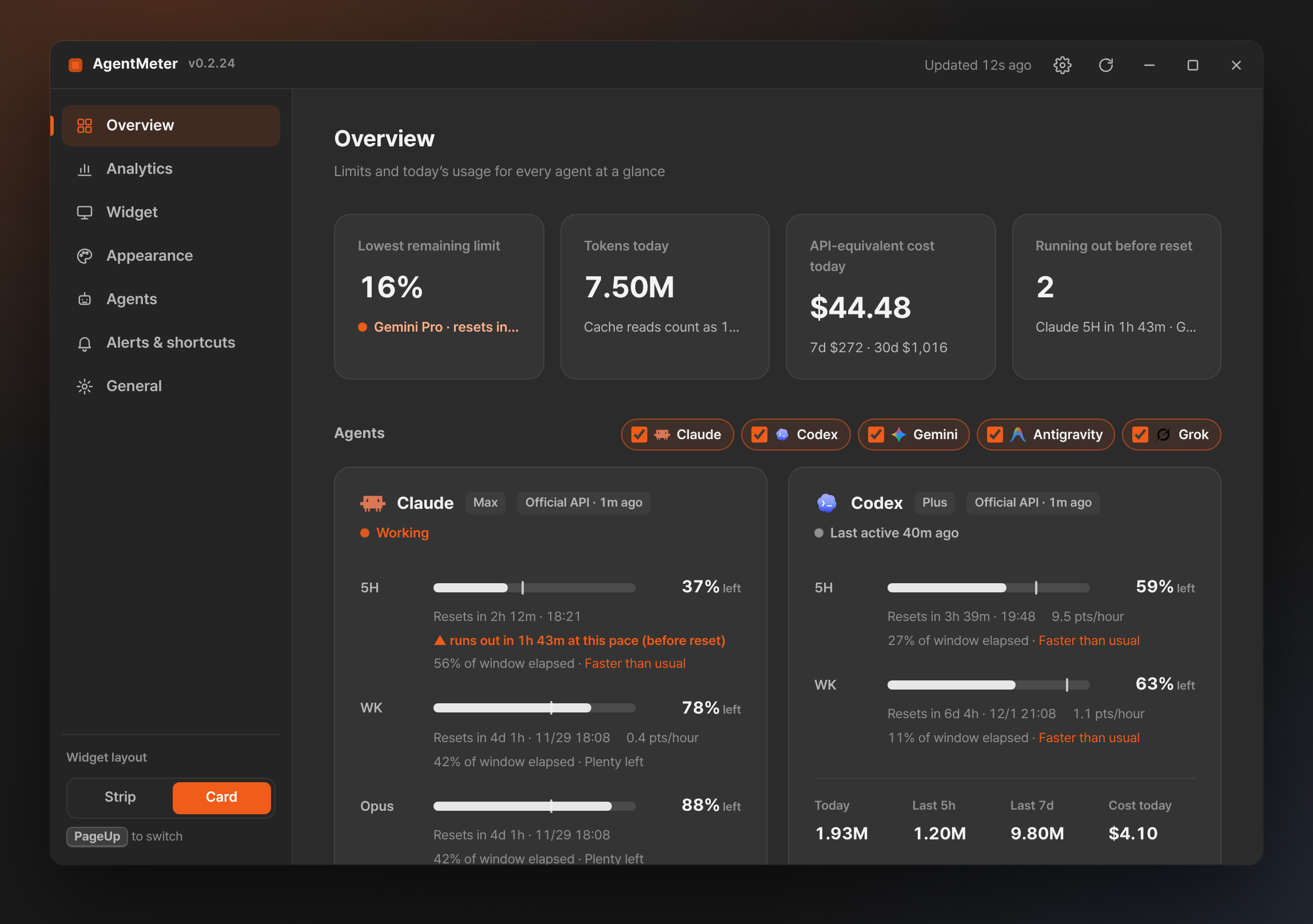
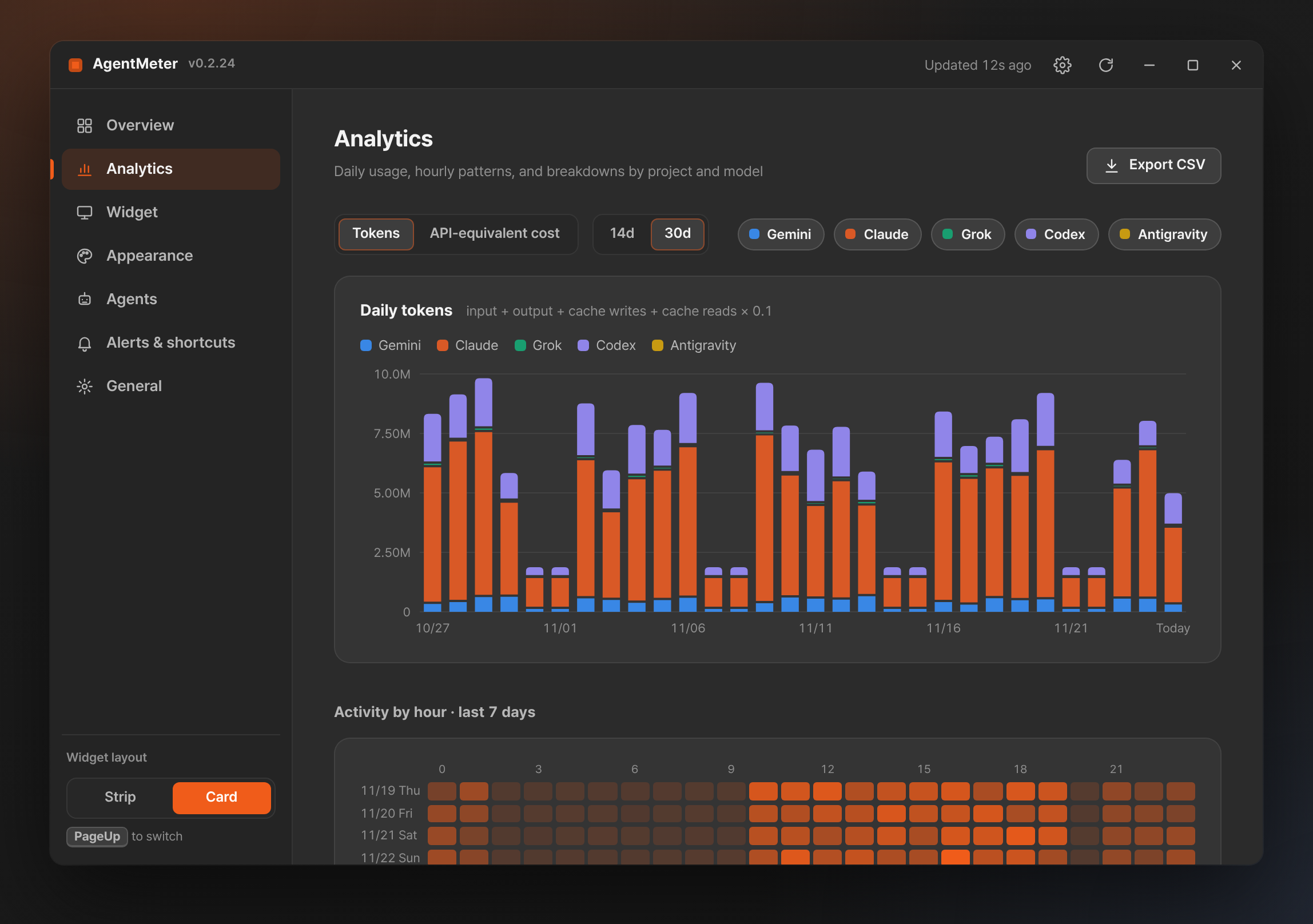 Analytics · daily charts, hourly heatmap, usage by project and model |
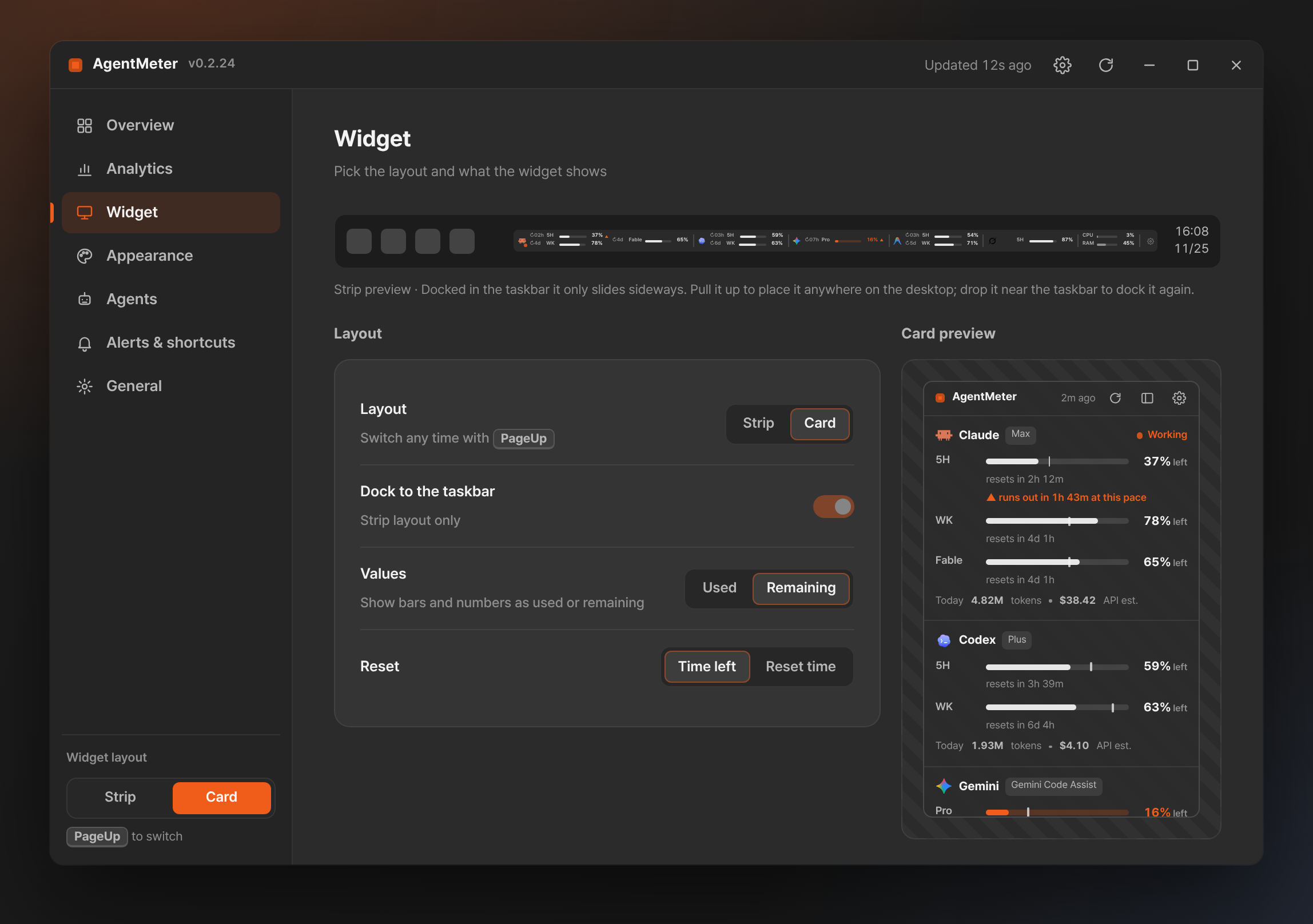 Widget · turn items on and off with a live preview |
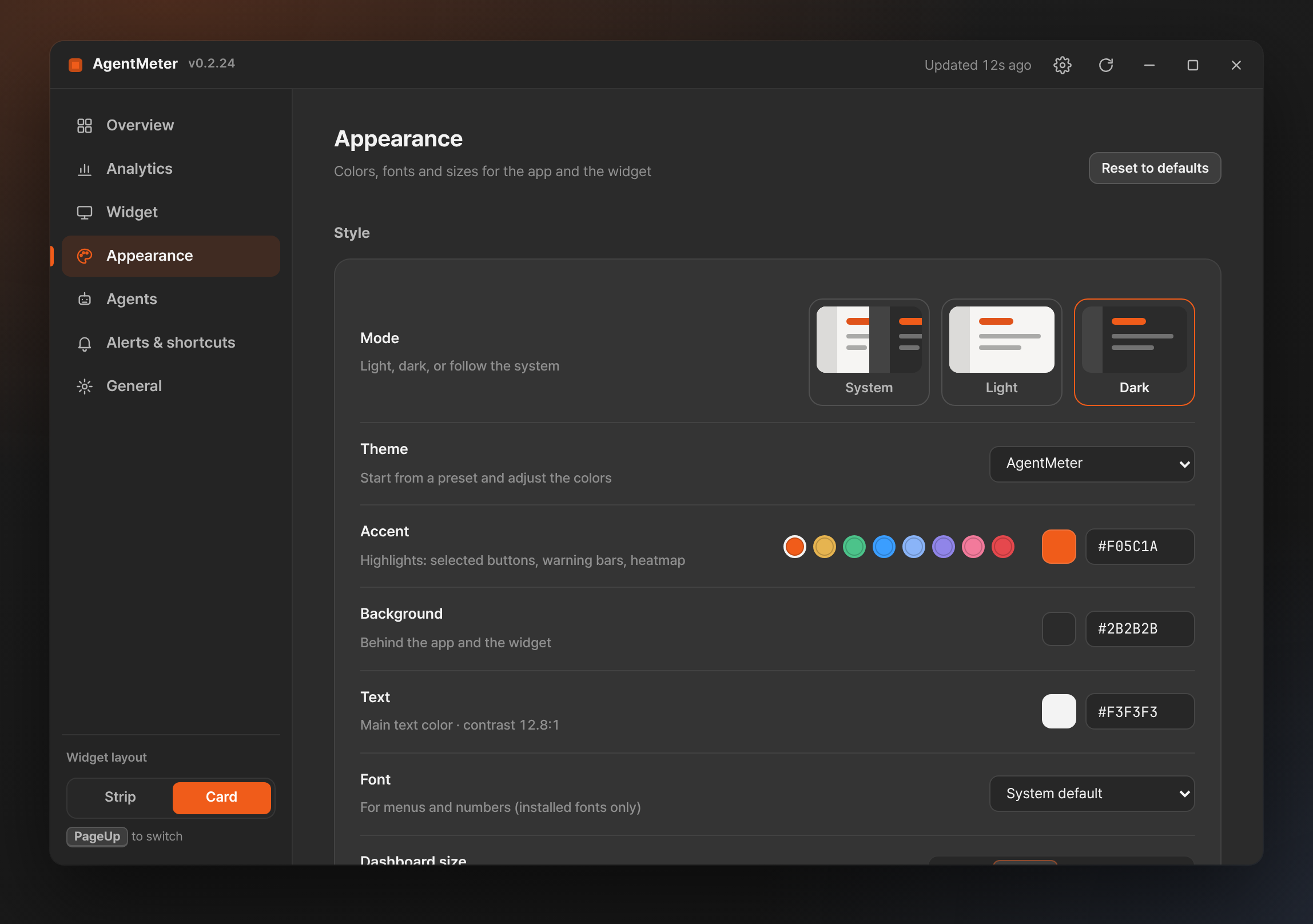 Appearance · themes, colors, fonts and sizes |
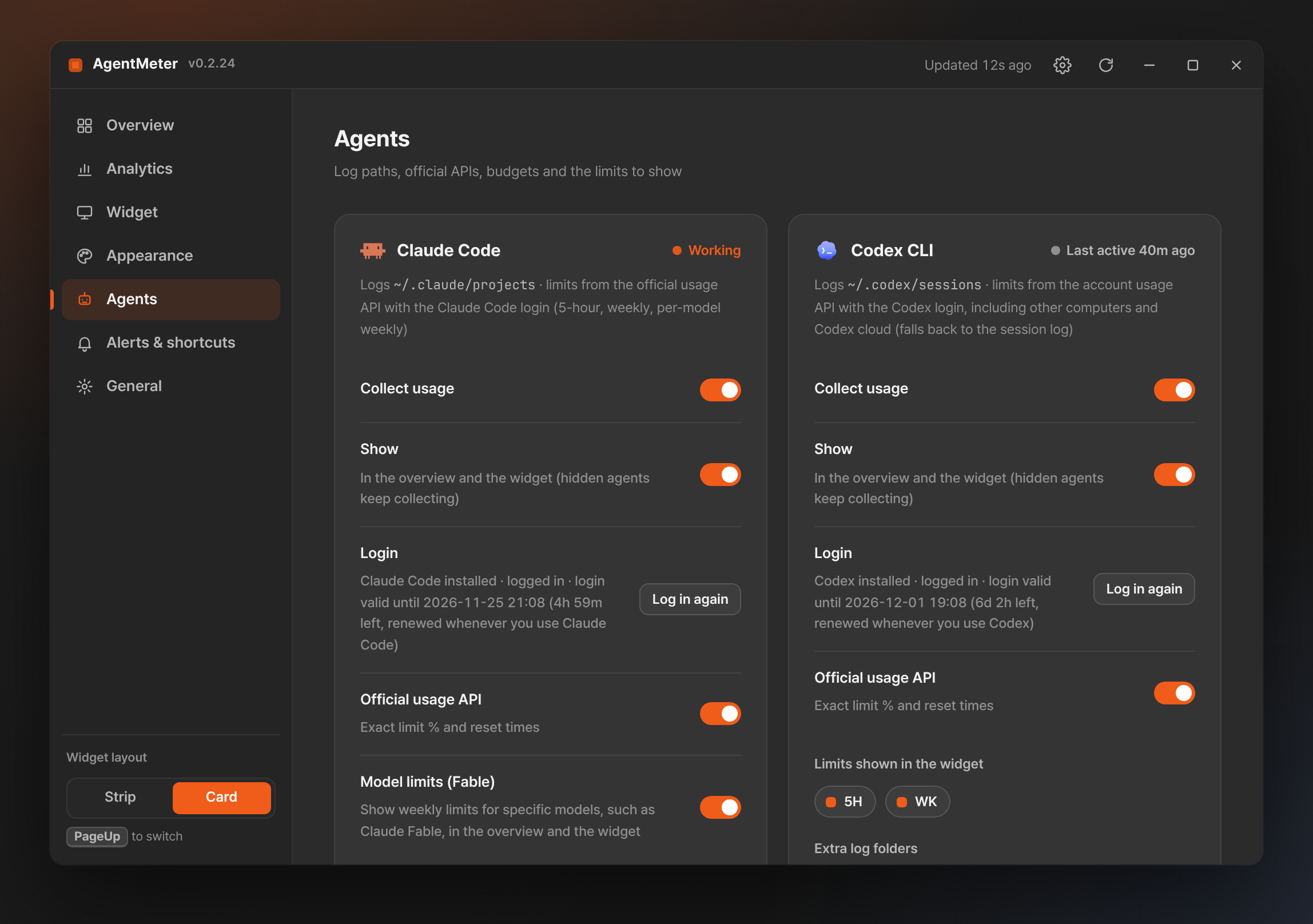 Agents · login, official APIs, which limits to show |
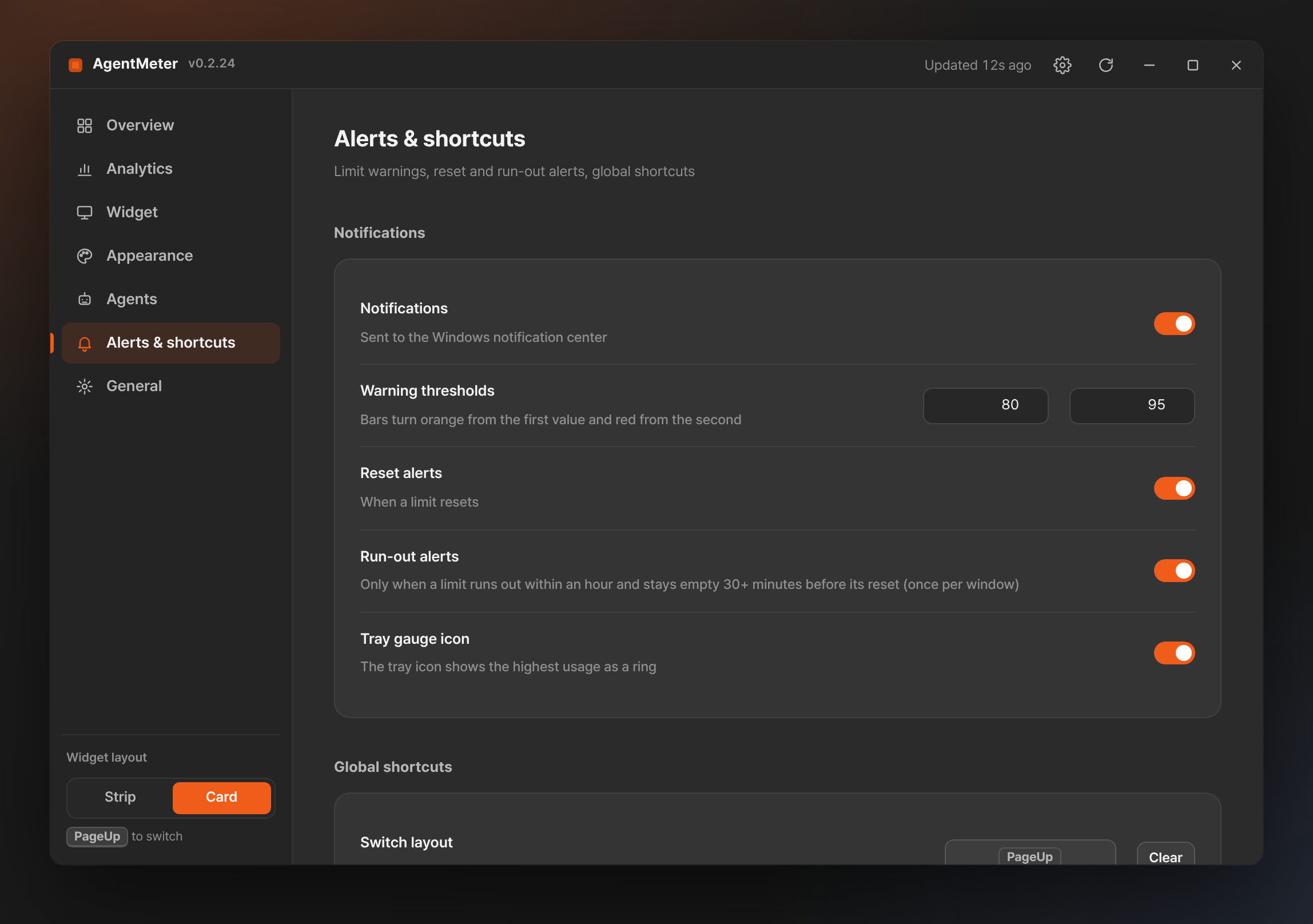 Alerts & shortcuts · thresholds, reset and run-out alerts |
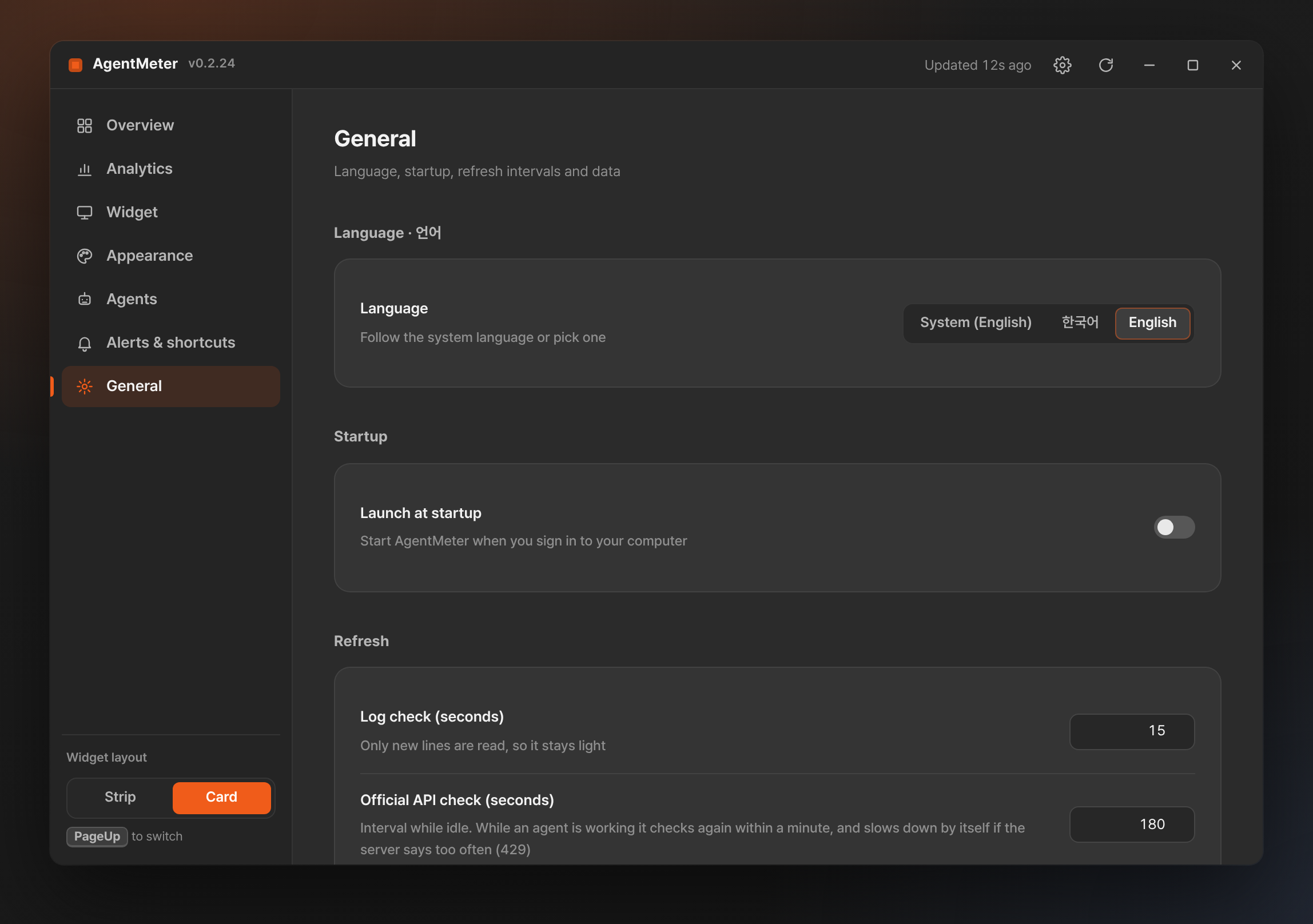 General · language, startup, updates, currency |
Install
Windows
- Download
AgentMeter_<version>_x64-setup.exefrom the latest release and run it. - If Windows shows "Windows protected your PC", click More info → Run anyway. The installer isn't
code-signed because this is an independent open-source project. Every release is built by a
public workflow from this repository, and updates are verified with a
signing key before they install. - It installs for your user only, so no admin rights are needed. On first run the dashboard opens, the widget
appears at the bottom right, and a gauge icon appears in the tray. - If you've logged in to Claude Code, Codex, Gemini CLI or Antigravity CLI before, the limits show up right
away. If not, click Connect on the dashboard overview or under Agents. It installs the CLI if it's missing
and opens its login.
macOS
- Download
AgentMeter_<version>_universal.dmgfrom the latest release.
One file runs natively on both Apple Silicon and Intel Macs (macOS 11 Big Sur or later). - Open the
.dmgand drag AgentMeter into Applications. - The app isn't notarized by Apple (an independent open-source project), so Gatekeeper blocks the first
launch with "AgentMeter" can't be opened / Apple could not verify…. Allow it once in either way:- System Settings → Privacy & Security, scroll down and click Open Anyway next to AgentMeter, then
confirm. (On macOS 14 and earlier, Control-click the app in Applications → Open → Open also works.) - Or in Terminal:
xattr -dr com.apple.quarantine /Applications/AgentMeter.app
- System Settings → Privacy & Security, scroll down and click Open Anyway next to AgentMeter, then
- AgentMeter lives in the menu bar (no Dock icon). Click the gauge icon for the menu, and use the floating
widget in either layout (strip or card).PageUpswitches them (fn+↑on a MacBook keyboard), and
Always on top is in the widget's right-click menu. A Mac has no taskbar, so the strip always floats.
On a Mac, Claude Code's login is read from the Keychain (Claude Code-credentials), so macOS may ask once
whether AgentMeter may use it: choose Always Allow. Antigravity CLI collection is Windows-only for now.
When a new version ships, a window shows what's new with Update now / Later. AgentMeter checks 20 seconds
after start and every 3 hours. You can also check now, read the patch notes, or switch to silent installs in
Dashboard → General → Updates. The full history is in CHANGELOG.md (Korean).
Released for Windows 10 and 11 (x64) and macOS 11+ (Apple Silicon and Intel). The WebView2 runtime Windows
needs ships with Windows. Linux can build from source; taskbar docking is Windows-only.
How it works
There's no AgentMeter server. Everything is read from log files on your machine and the logins each CLI has
already saved.
| Agent | Tokens & cost (local logs) | Limit % (official API) | Login |
|---|---|---|---|
| Claude Code | ~/.claude/projects/**/*.jsonl |
api.anthropic.com/api/oauth/usage: 5-hour, weekly and per-model limits (e.g. Fable); plan from /api/oauth/profile |
~/.claude/.credentials.json · macOS Keychain |
| Codex CLI | ~/.codex/sessions/**/rollout-*.jsonl |
chatgpt.com/backend-api/wham/usage: account-wide 5-hour and weekly, including other computers and Codex cloud |
~/.codex/auth.json |
| Gemini CLI | ~/.gemini/tmp/*/chats/session-*.jsonl |
Code Assist retrieveUserQuota: daily quota per model |
~/.gemini/oauth_creds.json |
| Antigravity CLI (Windows) | none (no token logs) | 5-hour and weekly limits from the official agy.exe status line, read in the background (details) |
Handled by the official CLI; AgentMeter never reads it |
| Grok | ~/.grok/**/*.jsonl |
No official API: estimated from a token budget, or a custom command | |
| MiniMax (M Plan / Token Plan) | none (used through other tools) | www.minimax.io/v1/token_plan/remains (China: api.minimaxi.com): 5-hour and weekly limits of the general bucket, from the *_remaining_percent fields |
API key in Agents → MiniMax (Global / China) |
| Z.AI (GLM Coding Plan) | none (used through other tools) | api.z.ai/api/monitor/usage/quota/limit (China: open.bigmodel.cn): 5-hour and weekly token limits, monthly web search / reader as a minor window |
API key in Agents → Z.AI (Global / China) |
| Qwen Code | ~/.qwen/projects/*/chats/*.jsonl (+ chats/archive/, QWEN_HOME) |
No % limit API: local token and cost tracking only. Needs chat recording on (general.chatRecording or --chat-recording) |
- Only new lines are read. Sessions that were resumed (and copy earlier messages) and duplicate events are
filtered out. - Token counts weigh cache reads at 10% (input + output + cache writes + cache reads × 0.1).
- Projects are grouped by the working folder recorded in the logs.
CLAUDE_CONFIG_DIRandCODEX_HOMEare respected. For agents running in WSL, add a path such as\\wsl.localhost\Ubuntu\home\<me>\.claudeunder Dashboard → Agents → Extra log folders.- Antigravity CLI is its own agent, next to Gemini CLI. AgentMeter finds
agy.exeby itself (where agy,
then the default install folders such as%LOCALAPPDATA%\agy\bin). If it isn't installed, Connect in
Dashboard → Agents → Antigravity CLI runs the official installer and opens the first-run login. If it lives
somewhere else, pick it with Browse…. AgentMeter runs only anagy.exewith a valid Google LLC signature,
in an isolated temporary profile with every tool denied and no prompt sent, and keeps only the quota numbers and
plan. It checks at most every 3 minutes and hides readings older than 15 minutes. Antigravity writes no token
logs, so it has limits but no token counts or costs. See docs/antigravity-native.md. - The usage APIs are undocumented internal endpoints and may change. If they fail, log-based tracking keeps
working, and AgentMeter backs off when a server answers too many requests (429).
Privacy
- No telemetry, no analytics, no account. Your usage history stays on your computer.
- Login tokens are only sent to the official endpoints above. For Antigravity, the official CLI handles its own
login; AgentMeter doesn't read its credentials. When a Claude Code token expires, AgentMeter renews
it the same way Claude Code does and saves it back to the same file. It does this because Claude Code sessions
inside the Claude desktop app don't refresh that file. Other CLIs' tokens are read-only. - The only network requests go to the endpoints in the table, the Claude login refresh (
platform.claude.com),
the exchange rate for KRW display (open.er-api.com), and update checks (GitHub Releases). - MiniMax and Z.AI API keys are kept in AgentMeter's settings file on this computer and are only sent to their official quota endpoints above.
Custom command
Point any agent at a command, and its JSON output drives the limit gauge. This is handy when another tool knows
the official limits.
{ "plan": "SuperGrok", "windows": [ { "label": "5H", "usedPercent": 42, "resetsAt": "2026-11-17T12:00:00Z" } ] }
FAQ
Why is the cost different from my bill?The cost is what the same usage would have cost at public API prices. It isn't your subscription price
(Pro, Max and so on) or anything you were charged. Use it to see how much your subscription saves compared with
the API. Models without a public price are left out.
Limit percentages, yes. They come from the official APIs, so they cover your whole account (Claude, Codex,
Gemini). Tokens and costs count this computer's logs only.
The plan is re-read from your account every 30 minutes. Wait a little, or log in to the CLI again to update it
right away.
Fable is a Claude model with its own weekly limit, on top of the overall weekly limit. AgentMeter shows such
per-model limits whenever Claude's usage API reports them. Make sure Model limits (Fable) is on under
Dashboard → Agents → Claude.
Press Shift+PageUp, or turn the widget back on from the tray menu. If it's somewhere odd, use Dashboard →
Widget → Reset position.
Global shortcuts take the key away from other apps. Change it to a combination such as Ctrl+PageUp, or turn it
off, under Dashboard → Alerts & shortcuts.
Turn individual alert types off, or all of them, under Dashboard → Alerts & shortcuts. Run-out alerts only fire
when a limit will be empty within the hour and stay empty for 30+ minutes before its reset, once per window.
Development
A Rust + Tauri 2 app. The UI is plain HTML, CSS and JS with no build step.
| To | Windows | Command |
|---|---|---|
| Browser preview: widget and dashboard with demo data, no app build | preview.bat |
cargo run -p agentmeter-devserver |
| Run the real app with your own usage | dev.bat |
cargo tauri dev |
Release build: agentmeter.exe + installer |
build.bat |
cargo tauri build |
| Tests | cargo test --workspace |
|
| Regenerate README images (Playwright; the Pretendard font is recommended) | npm run screenshots |
The browser preview (http://localhost:1420) reloads as you save files under ui/. Append ?lang=en or?lang=ko to a page URL to pick the language. The dev app rebuilds and restarts when Rust code changes.
Build from source
You need Git and Rust (stable). On Linux, also installlibwebkit2gtk-4.1-dev libayatana-appindicator3-dev librsvg2-dev libxdo-dev.
git clone -b main https://github.com/cheapbutsimilar/Agent-Meter
cd Agent-Meter && cargo run --release -p agentmeter
For the installer, run cargo install tauri-cli --version "^2" --locked, then cargo tauri build in the
repository folder.
crates/core/       collectors and logic (no OS dependencies, unit-tested)
crates/antigravity/  native Windows Antigravity quota collection (ConPTY, signature check, isolated profile)
  usage/           Claude · Codex · Gemini · Antigravity · Grok · MiniMax · Z.AI · Qwen collectors, forecasts, the usage ledger
  pricing.rs       API prices per model      settings.rs  settings schema, validation, migrations
src-tauri/         windows, multi-monitor, taskbar docking, shortcuts, tray gauge, notifications, updates
ui/widget/         the widget window
ui/dashboard/      the dashboard
ui/update/         the "new version" window
ui/shared/         i18n.js (Korean/English), tokens.css, theme.js, render.js (widget renderer), util.js, logos.js
crates/devserver/  the browser preview server
scripts/           mock-api.js (demo data), preview.js (README images), release-notes.js, make-icons.py
docs/screenshots/  README images; demo-gif.js (demo GIF) and strip-duo.js render them from the real widget UI (reproductions, not recordings)
See docs/HANDOFF.md for building another app on the same design and shell, and
docs/RELEASING.md for the release and update-signing setup.
Roadmap
- Antigravity CLI limits on macOS (planned)
Notes
- Costs are estimates at public API prices. They're not your subscription price or your bill.
- Claude, Codex (OpenAI), Gemini and Antigravity (Google), Grok (xAI), MiniMax, Z.AI (Zhipu) and Qwen (Alibaba Cloud) names and logos are trademarks of their owners. AgentMeter
is an independent project, not affiliated with any of them. Logo SVGs come from
@lobehub/icons (MIT). - Design: base
#2B2B2B, key color#F05C1A. Bars are light gray normally, orange from the first threshold and
red from the second. Icons accompany the colors, so status never relies on color alone.
Reviews (0)
Sign in to leave a review.
Leave a reviewNo results found