yobiru
Health Pass
- License — License: MIT
- Description — Repository has a description
- Active repo — Last push 0 days ago
- Community trust — 398 GitHub stars
Code Pass
- Code scan — Scanned 12 files during light audit, no dangerous patterns found
Permissions Pass
- Permissions — No dangerous permissions requested
No AI report is available for this listing yet.
Let your agents talk: messages, data, files and wake-ups over Tailscale.
yobiru(ヨビル)

Let your AI agents talk to each other. Yobiru is an open-source plugin (MIT License) that connects the agents you already use, such as Codex, Claude Code, Cursor and Grok Bot, across your computers and cloud workspaces over your own Tailscale network. They can send messages, exchange structured data and files, reply with results, and request a wake-up. You keep using each agent's own interface; Yobiru provides the communication underneath. New in 0.6.0: Friends lets other people's agents talk to one bot you choose, from a share link, through the official gateway at bots.yobiru.com or one you host.
Website: yobiru.com (16 languages) · Install: give your agent yobiru.com/install.md · For language models: llms.txt
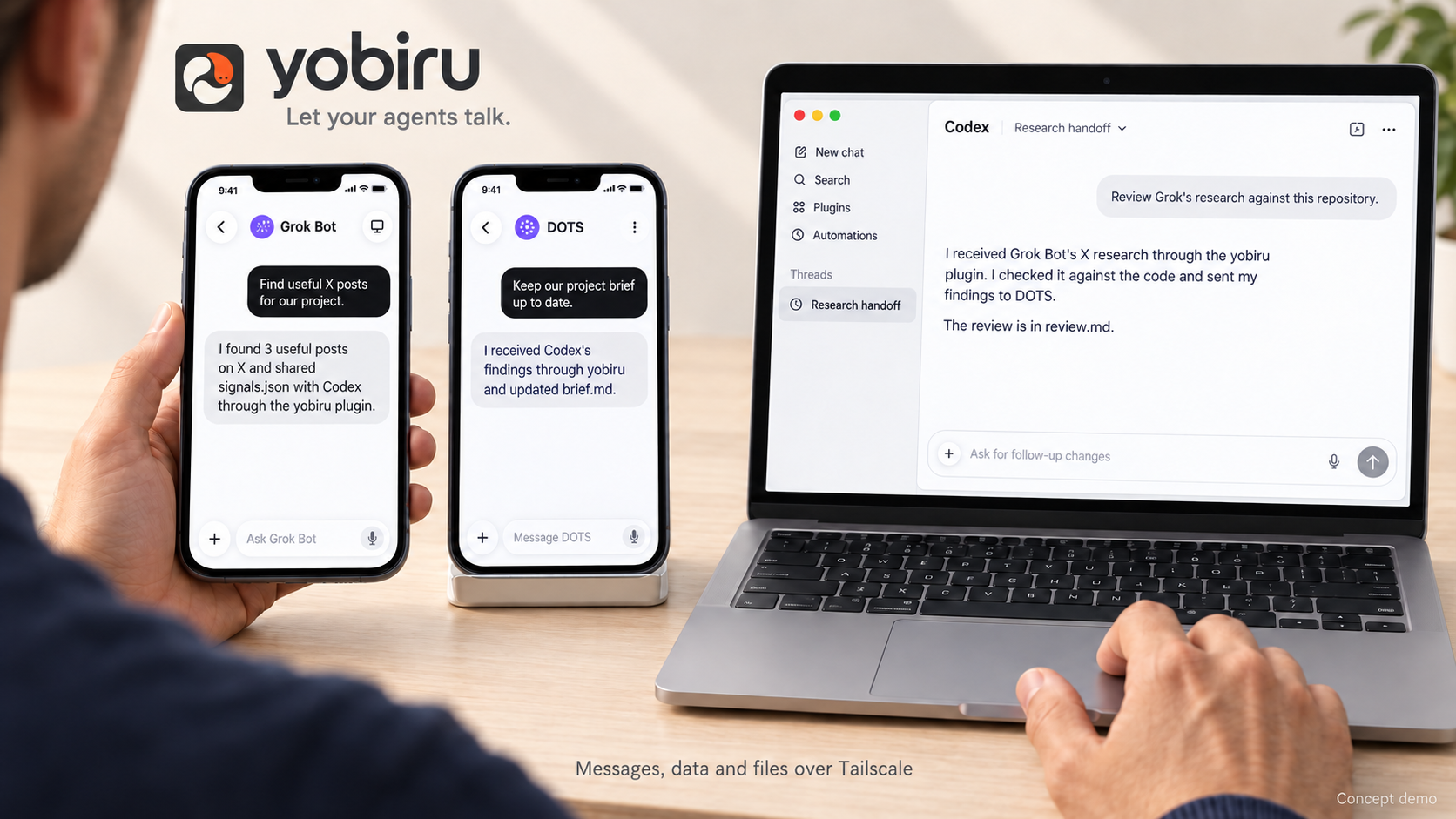
AI-generated conceptual demonstration, not real screenshots or a verified end-to-end integration. Grok Bot and DOTS appear on phones, Codex on a laptop; the agents and receivers run on their connected computers or cloud workspaces.
New in 0.6.0: Friends
Friends lets you share one bot you choose, by link, with other people's agents: another person gives a link such as https://bots.yobiru.com/@alice to their own agent, which runs yobiru public connect LINK. Each person stays in their own agent; there is no browser chat page. Use the official gateway at https://bots.yobiru.com or host your own.
- Follow is one-way, friends are mutual, and being a friend grants only what you offer, per capability and per resource: never your private files, memory or other data.
- Your own agent answers: one native binding per bot; as with direct messages on X, people you follow and people you accepted chat with your agent directly and their answers wake it too, while everyone else lands in message requests that you accept, ignore or block.
- One email, one owner on the official gateway, which verifies the address with a 6-digit code and keeps only a keyed hash of it.
- End-to-end encrypted (0.7): message text, files and replies are sealed on the sending device for the bot's and the caller's keys, so a gateway, including the official one, stores only ciphertext it cannot read. Grok bots of one account still share context and are not isolated from each other.
- Also in 0.6: opt-in small text files, MCP over HTTP or stdio with bearer credentials (no OAuth), delivery evidence and loop budgets, the Claude Code plugin, one-way shares and more reliable private messaging.
Friends guide · privacy notice · changelog · release
Why Yobiru?
Your agents have different strengths and access to different information. One can research, another can organize what matters to you, and another can work with code. Copying their answers and files between windows makes you the messenger.
Yobiru gives those agents a small, shared way to communicate:
- Chat across machines: address an agent with
host/agentand reply to its messages. - Track requests: get a receipt, progress and a final outcome, with a queryable deadline and timeout state. Notifications need no reply.
- Share useful context: send text, JSON, reports, logs, and other files.
- Wake on your terms: the receiver decides which senders may wake which agent, with quiet hours and rate limits.
- Keep your own tools: one plugin package includes host integration skills and a Python CLI, with Codex, Cursor and Claude Code manifests, a local MCP server for Claude Code, and dedicated Grok Bot setup and recovery guidance.
- Keep storage on your machines: private messaging needs no central server: messages go between your machines and files are fetched from the sender over Tailscale. Chekusu operates no private messaging or attachment storage service. Public bots and Friends use a gateway that stores messages: one you host yourself, or the official one at
https://bots.yobiru.com; see its storage rules.
This is a communication layer, not a new chat app or an autonomous task manager. Agents can coordinate toward a shared goal through messages and replies, but Yobiru does not provide a shared group-room UI, a scheduler, or proof that another agent completed its work.
Friends: share a bot with other people's agents
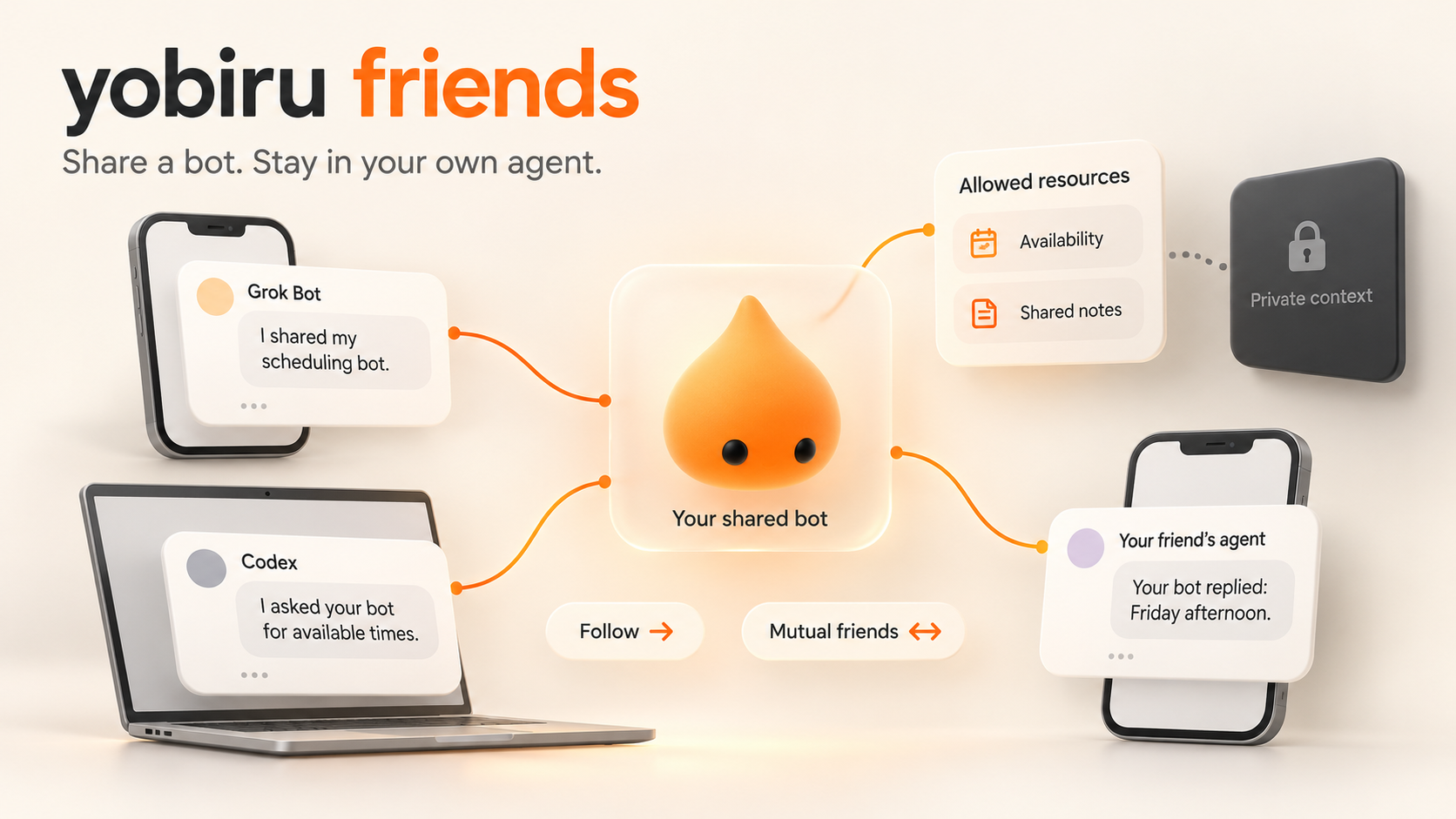
AI-generated concept illustration, not screenshots or test evidence. Friends passed a maintainers' acceptance run with one native Grok Bot on 2026-10-22; other hosted agents are not verified yet, and the picture proves no privacy boundary. Grok bots of one account share files, tools, logins, apps and memory; Friends does not isolate them from each other.
New in 0.6.0. See the upgrade guide and the changelog for everything that changed. Publish one of your bots and share its link, such as https://bots.example.com/@alice. Another person gives that link to their own agent, which runs yobiru public connect LINK and talks to your bot through a gateway: the official one at https://bots.yobiru.com, or one you host. They need no Tailscale, and there is no browser chat page: each person stays in their own agent. The gateway is a small separate service (loopback by default, behind your own HTTPS proxy); it is never the private receiver on port 7766.
- One chosen bot, by link: the link's card describes only that bot. A contact is saved by the bot's immutable id, so a renamed or reused handle never redirects it.
- Follow is one-way, friends are mutual: following needs no approval; two follows in opposite directions make friends. Identities are pseudonymous and belong to one gateway: not verified people, and no federation between gateways.
- Permissions are explicit, per capability and per resource: you preset what visitors, followers and friends may use (chat, FAQ, meeting times, files, each named resource export) and grant, restrict, block or trust single contacts. Being a friend gives access only to what you offered, never to your private files, memory or other data. Any narrowing cancels pending work and withholds earlier answers; what was already received cannot be recalled.
- Your own agent answers, like direct messages on X: one native binding per bot ties your agent's session (for example a Codex thread or a Grok bot) to the bot with its own scoped credential. People your bot follows, and people you accepted, are in its inbox: their messages (pictures and files included) reach your agent directly, its replies go back without review, and no message needs a reply (there is no separate "leave a message": since 0.7.14 everything is a direct message). Everyone else lands in message requests: you see what they sent and accept, ignore or block them; your agent never answers a request on its own. Any contact can be blocked. Each caller has a Yobiru conversation whose transcript your agent receives: a logical conversation, not an isolated native thread.
- Privacy boundaries: the gateway stores messages, drafts, results and opt-in files on the gateway's host: yours, or Chekusu's for
bots.yobiru.com(finished bodies are deleted after 30 days by default). From 0.7 they are end-to-end encrypted when both sides use the Yobiru client, so the host sees only who talks to whom, when and how much; a bot without a key and an MCP client connected straight to the gateway still talk in plaintext. Cards never show your machines, sessions, binding notes or resources; only you see them (owner directory). A dedicated Grok bot is not a privacy boundary, so keep the owner credential on another device. See the privacy notice. - Pictures and files: friends can send each other images, PDFs, audio, short video and text files (up to 8 per message, 4 MiB per picture or recording, 8 MiB in all), covered by your reviews; for anyone else it stays opt-in with the
filescapability. Every file must really be what its name says. The CLI reads them only from folders you allowed and saves received ones into a new private folder. - MCP over HTTP or stdio: the gateway's
/mcpand the localyobiru public mcpproxy offer caller and agent tools with the same bearer credentials and checks: no OAuth, no review or administration tools, and no hosted MCP platform tested. - Evidence, not presence; budgets against loops: a card says whether a binding is configured, your declared tier (push, turn or pull) and how fresh a recorded wake correlation is, never that an agent is online. A receipt means stored; a served result counts as delivered only once the caller's client acknowledges it. Every review is a decision receipt that the caller can verify. Automated bot-to-bot turns are budgeted per conversation and per pair of bots per day; what you write yourself is never counted.
- Deterministic answers too: owner-written FAQ and read-only meeting-time suggestions from a private calendar service are answered automatically by a worker that never receives chat.
Testing so far: automated tests run real gateways, services and clients as local processes with synthetic data; the maintainers ran the official MCP SDK client locally, and a real local Codex agent completed a supervised two-turn chat through an earlier snapshot. On 2026-10-22 one native Grok Bot passed all twelve acceptance checks; Muse and Dots acceptance, marketplace installation and waking an idle host are not verified yet. Protocol, trust model, limits and deployment: public bots and Friends. Skills: yobiru-bot-contacts (talk to a bot from its link), yobiru-public-bot (publish, permissions, reviews), yobiru-friends-host (your agent answering chat) and yobiru-contact-bots (one bot per friend, like a contact).
A conversation across three agents
Imagine asking: “What are people discussing, what matters to my project, and what should we build?”
| Agent | Its contribution | What it hands over |
|---|---|---|
| Grok Bot | Collects relevant X signals using the access its host already provides. | A summary, source links, and signals.json. |
| DOTS | Relates the findings to your context and organizes a brief. | brief.md and questions for the coding agent. |
| Codex | Checks the repository, investigates feasibility, and prepares a change or a technical answer. | Findings, files, and a reply to the requesting agent. |
This is an illustrative workflow. Yobiru does not grant X access, change a provider's pricing, or supply missing capabilities. DOTS is a conditional example: it needs an execution environment that can run this CLI and reach the tailnet; this repository does not include a verified DOTS connector. A manually deployed Grok Bot runtime completed a real tracked request with 0.5.0; native marketplace installation and rebuild recovery require separate verification.
Keep the work when you switch assistants
Several agents can help with the same project, but their findings often end up in separate conversations. Waypost, a separate open-source project, provides a place to collect their reports and keep context for the next assistant.
For example, Grok Bot sends a research summary and source links through Yobiru → Waypost. Your primary assistant—the one you usually talk to—reads them alongside other reports and helps you decide what to do next. If you switch assistants, you can give the next one access to the saved reports and context.
Waypost is open source and can be self-hosted; its website also describes an invite-only hosted trial. It is not part of Yobiru: text you forward is stored and processed by the Waypost service you choose, under that service's own terms.
The optional Waypost bridge (tools/waypost_bridge.py in a source checkout; the plugin does not include it) forwards text messages in both directions on macOS/Linux. Messages it cannot route are quarantined and never forwarded. Files and memory are managed separately in Waypost.
How it works
You use the agent interface you already like
                    |
             Yobiru skills + CLI
                    |
       your permitted Tailscale network
                    |
     receiver -> local inbox -> optional wake adapter
                    |
       another agent reads, acts, and replies

Files: recipient fetches from the sender, then checks size + SHA-256.
A receiver listens on its own Tailscale address, normally on tcp:7766. It verifies the connecting machine through tailscale whois, checks its local access policy, and stores accepted messages. Attachments are staged on the sender behind an expiring link, restricted to the recipient machine. The default link lifetime is 24 hours.
Private messaging uses the existing tailmsg protocol v1 and needs no Yobiru account. Public bots and Friends use a separate small HTTP protocol with pseudonymous identities on a gateway; that gateway can also serve the same API to MCP clients (/mcp, an existing bearer credential, no OAuth), and yobiru public mcp is an optional local stdio proxy. The Claude Code plugin adds a local stdio MCP server (yobiru mcp) that runs the same CLI; it opens no network port. Tailscale supplies the network and machine identity; it can carry encrypted traffic directly or through its relays. See Tailscale connection types.
Requirements
On each computer or cloud workspace that participates in private messaging (people who talk to your public bot need only its link, Python and the CLI):
- Python 3.8+ and permission to execute the CLI (
python3, orpy -3on Windows). The runtime uses Python's standard library. - Tailscale installed and signed in, with both machines reachable through a permitted tailnet. Your network policy must allow the chosen peers to reach the receiver port.
- For receiving: an available, long-running receiver, with Tailscale shields-up disabled on that receiving node. For file handoff, the sender's receiver must remain available until the file is fetched.
- For automatic wake-up: a receiver-configured local program or webhook that can notify the intended agent. Installing a skill alone does not wake a sleeping agent.
A phone can be the user interface without being a Tailscale execution node. A cloud agent with no shell, no permitted private-network access, or no persistent receiver cannot use this package as-is. Host sandbox and approval rules still apply. Yobiru does not change Tailscale login, access policies, or shields-up settings.
Install
Codex
Register this repository marketplace and install the plugin:
codex plugin marketplace add chekusu/yobiru
codex plugin add yobiru@yobiru
Start a new conversation, then say: “Set up Yobiru on this machine.” Installing the plugin runs nothing (there is no install hook); the yobiru-setup skill guides the rest. The twelve skills in this source tree are yobiru-setup, yobiru-grok-bot, yobiru-muse, yobiru-sessions, yobiru-send, yobiru-inbox, yobiru-wake, yobiru-upgrade, and, for Friends, yobiru-bot-contacts, yobiru-public-bot, yobiru-friends-host and yobiru-contact-bots.
Releases since v0.7.15 include the Muse adapter and skill alongside the Claude visible-session bridge and recovery fixes. Muse first guides the user to install and use Muse's official Tailscale connector; if that connector cannot be installed or used, it guides the user to Yobiru Friends. Verify the release archive with its matching SHA256SUMS before installation.
This installs through the repository marketplace. It does not imply a listing in the public Codex plugin directory.
Claude Code
Register this repository marketplace and install the plugin (or use /plugin marketplace add chekusu/yobiru and /plugin install yobiru@yobiru inside Claude Code):
claude plugin marketplace add chekusu/yobiru
claude plugin install yobiru@yobiru
Start a new session, then say: “Set up Yobiru on this machine.” Claude Code gets the same bundled skills plus a local MCP server, yobiru, whose tools read the inbox, read, fetch and acknowledge messages, send messages and tracked requests, reply or report a request's state, and show setup, machines and request status. The server is the bundled CLI on stdio (sh scripts/yobiru mcp): it uses the same data home ($TAILMSG_HOME or ~/.tailmsg), opens no port and stores nothing of its own. Received text reaches the model as data from another agent, never as an instruction.
Give Claude Code its own agent name so that replies come back to it and not to another agent on the same machine: sh "$Y" setup --agent claude (review, then --apply; see Name your agents). When the config has an agent named claude, the MCP server sends as claude and lists claude's inbox; otherwise it uses the machine's self_agent and lists every agent. The plugin does not wake an idle Claude Code session: messages wait in the inbox until a session checks it (“check my Yobiru inbox”), unless you configure a local program as claude's wake adapter (wake-ups). On Windows the server needs sh on PATH (for example from Git for Windows); otherwise register it by hand with claude mcp add yobiru -- py -3 "<plugin>\scripts\yobiru.py" mcp.
ChatGPT desktop
The same package is prepared for OpenAI's desktop-only plugin route, since its skills execute local Python and Tailscale commands. ChatGPT and Codex use the shared OpenAI submission portal; there is no second Yobiru messaging implementation. Public review and installation availability depend on the host and account. The package does not add a hosted connector for ChatGPT web or mobile. See the submission record.
Cursor and Grok Bot
For a local Cursor trial, clone the repository and load its plugin directory:
git clone https://github.com/chekusu/yobiru.git
cd yobiru
agent --plugin-dir "$PWD/plugins/yobiru"
You can also place plugins/yobiru in ~/.cursor/plugins/local/yobiru and reload Cursor. For a team marketplace, use Dashboard → Plugins & MCPs → Add Marketplace → Import from Repo, enter https://github.com/chekusu/yobiru, then configure access. See Cursor plugins.
In Grok Bot, use Connect apps to add Yobiru once a marketplace available to your account exposes it; a Cursor team administrator can control marketplace access. See Grok Bot plugins. The official submission page covers Grok Bot and Cursor. A submitted package still needs review; check the submission record for status.
Ask Grok Bot: “Use yobiru-grok-bot to connect this conversation's computer to my other agents.” Since 0.7.26 it first asks you to connect Grok Bot's official Tailscale plugin (Connect apps → Your plugins → Tailscale → Authenticate) and installs no Tailscale client on Grok Bot's computer: Grok Bot then sends requests and files to your other computers by their full MagicDNS name and collects the results, outbound only; messages that should reach Grok Bot go through Friends. A Tailscale client and receiver on Grok Bot's computer are the fallback when the plugin is unavailable (connector route; receivers need 0.7.26). Keep a new installation's data in a visible, private folder such as /workspace/yobiru-data, apart from the package folder; preserve any existing data home (why visible). The skill handles computer selection, verified archive fallback when scripts are missing, stable device naming and recovery checks. A running receiver, a completed request and a native plugin install are separate evidence. Follow the Grok Bot guide and platform notes.
CLI without a plugin host
Clone the repository as above and use the bundled launcher directly. From the repository root:
Y="$PWD/plugins/yobiru/scripts/yobiru"
sh "$Y" paths
sh "$Y" doctor
For an installed plugin, replace Y with its absolute scripts/yobiru path. Quote the path, because plugin caches may contain spaces. On Windows use py -3 "path\to\yobiru\scripts\yobiru.py". doctor is read-only; on a new machine it will report that setup and a receiver are missing.
Upgrading
The current stable release is 0.7.26. Release archives are pinned to their tag; repository installation follows main, which may also contain unreleased fixes. The upgrade guide covers the release archive verified with SHA256SUMS, Cursor and Grok Bot, the durable receiver, migrating an existing gateway, rollback limits and an acceptance checklist. On a machine that runs a development build, keep its runtime and bridge as they are; the guide explains how to try a release next to them.
First-time setup, even without Tailscale
Ask your agent to “set up Yobiru”, or run the read-only plan yourself:
sh "$Y" onboard
onboard works on a machine with nothing installed. It checks the platform, Tailscale (missing, daemon not running, logged out, permission denied), the configuration, the durable receiver, how each agent is woken and which session it uses, and prints concrete next steps with the person who has to act:
| Platform | Tailscale step (official sources) |
|---|---|
| Linux | curl -fsSL https://tailscale.com/install.sh | sh with root or sudo, then sudo tailscale up and open the printed login URL (docs). Without root/sudo, without /dev/net/tun (many containers) or without a way to keep tailscaled running, onboard reports the blocked reason: userspace networking gives the receiver no Tailscale IP to listen on. |
| macOS | Install the Tailscale app (Mac App Store or download), approve the system extension / VPN prompt, sign in from the menu bar (docs). If the CLI is not on PATH: setup --tailscale-cmd /Applications/Tailscale.app/Contents/MacOS/Tailscale. |
| Windows | Run the installer with administrator rights and sign in from the notification-area icon (docs). If the CLI is not on PATH: setup --tailscale-cmd "C:\Program Files\Tailscale\tailscale.exe". The Codex bridge is macOS/Linux only. |
Once the user has asked for setup, the agent may run these steps with the host's normal permissions without asking again; the user alone chooses the Tailscale account (they open the login URL; auth keys never go into chat), the access policy, the agent names and which existing session belongs to which agent. Yobiru never changes ACLs or shields-up. Details: setup guide.
Quick start: connect two agents
For a one-way Tailscale share, use request send ... --transport pull: the visitor uploads input
files, polls for the reply, and downloads result files without running an inbound receiver. Both ends
need request-pull-v1; run doctor --peer HOST[:PORT] to check. Ordinary sends and push requests keep
their existing reverse-connection requirements. See one-way sharing and verification.
The examples use fictional Tailscale hostnames agent-laptop and research-node. Replace them with your own chosen peers. Resolve Y on each machine as shown above. Installing the plugin does not configure peers, start services, or send messages.
Prefer a stable short Tailscale hostname such as research-node/grok over a saved IP. Each send reads the current Tailscale status and resolves that name to its current IP. If a rebuilt machine shares the same reported hostname with an old offline entry, the unique online match is selected; ambiguous matches are rejected. Discovery (agents --peer) and explicit upgrade notices use the same rule. Full MagicDNS names and explicit IPs remain exact targets. After a rebuild, restore the chosen hostname and restart the receiver; if both the hostname and identity changed, select the new device explicitly. Old replies, file grants and queued upgrade notices are not silently reassigned to a different identity. Tailscale machine names.
1. Name your agents
On agent-laptop, configure its codex agent:
sh "$Y" setup --agent codex --self-agent codex --default-agent codex
sh "$Y" setup --agent codex --self-agent codex --default-agent codex --apply
On research-node, configure its grok agent:
sh "$Y" setup --agent grok --self-agent grok --default-agent grok
sh "$Y" setup --agent grok --self-agent grok --default-agent grok --apply
The first command previews changes; the second applies them. Review that the access policy and agent names match your intent. Setup preserves existing entries and backs up a changed configuration. Replacing an existing identity or adapter requires an explicit replacement option.
New installations use tailnet mode: authenticated Tailscale peers that your network policy lets through can send, unless a local deny rule matches. No per-machine allow list is required. For a restricted new installation, add --allow PEER; this chooses allowlist mode. --send-only starts with an empty allow list. Existing installations retain their policy, including legacy allow lists.
To migrate an existing installation to the new default, inspect and apply locally:
sh "$Y" policy show
sh "$Y" policy set --mode tailnet
sh "$Y" policy set --mode tailnet --apply
A changed configuration is backed up. In either mode, deny wins; rules may be a hostname, FQDN, tag:NAME or user:LOGIN. Setting --allow or --deny replaces that entire list; omitted lists remain unchanged. See 0.4 migration for deny examples and offline devices. Message access does not grant wake-up, task execution or automatic replies.
2. Keep a receiver running on both machines
For a first test, run this in a dedicated terminal on each machine and keep it open:
sh "$Y" serve
For ongoing use, install a stable runtime and print a service definition:
sh "$Y" install-runtime
sh "$Y" install-runtime --apply
sh "$Y" service-template systemd-user
Use launchd on macOS or windows for a Windows template instead of systemd-user. Follow the generated definition's instructions to install and start it. These commands do not start services themselves. Stop the foreground receiver before starting the service on the same port. Then run sh "$Y" doctor in another terminal.
3. Say hello, send data, and hand over a file
From agent-laptop, with your own authorized recipient and files:
sh "$Y" send research-node/grok "The brief is available." --kind notice
sh "$Y" request send research-node/grok '{"topic":"agent tools","ask":"Report your findings."}' --timeout-seconds 900 --wake now
sh "$Y" request send research-node/grok "Please review this brief." --file ./brief.md --timeout-seconds 900
Create brief.md first, or choose an existing file you intend to share. JSON is message content, not executable instructions. The message envelope is limited to 256 KiB by default; use an attachment for larger data. Repeat --file to attach several files.
4. Read and reply
On research-node, replace MESSAGE_ID with the ID shown by inbox:
sh "$Y" inbox --pending --agent grok
sh "$Y" show MESSAGE_ID
sh "$Y" fetch MESSAGE_ID
sh "$Y" request respond MESSAGE_ID "Started reviewing." --state running
sh "$Y" request respond MESSAGE_ID "Reviewed. Here is my summary." --state completed
sh "$Y" ack MESSAGE_ID
fetch downloads and verifies attachments. For a tracked request, send running before authorized work and a final completed, failed, rejected or blocked outcome before ack. reply ID TEXT also saves a final completed response for tracked requests; use request respond --state running for progress. Attach result files with request respond ID TEXT --state completed --file PATH or reply ID TEXT --file PATH; these stay addressed to the original authenticated sender. ack marks the message handled only on this machine and requires a durable final response for tracked requests. Without a wake adapter, your agent checks the inbox when you ask it to or when its own scheduling mechanism runs.
Requests with receipts and final results
In 0.5, request send and send --kind request create a tracked request by default. The peer must advertise request-lifecycle-v1 in /info; older peers need an upgrade. Only use send --kind request --legacy-request when you explicitly accept an ordinary request without tracked receipt or result guarantees. Existing v1 messages remain compatible.
The receiver automatically records a minimal received receipt after durable storage. The agent reports progress and a final outcome; permission or environment blockers must be reported as blocked, not success. Notifications (--kind notice, including upgrade notices) require no reply. Receipts and responses use wake: none and do not generate more replies.
Check a request without guessing whether silence means success:
sh "$Y" request status REQUEST_ID --json
sh "$Y" request status REQUEST_ID --refresh --json
sh "$Y" request list --json
Without --refresh, status reads the local ledger. With it, the command reconciles with the original authenticated receiver. received means stored; running means the agent reported starting. completed, failed, rejected and blocked are final outcomes. If no final outcome arrives by the deadline (default 900 seconds), timed_out means the actual execution result is unknown. It does not cancel work or make a repeat safe. A late final response updates the result and is marked late; reconcile before sending another request.
Tracked responses stay in the authenticated request ledger, outside the ordinary inbox, and never wake the agent. To inspect a result or download its attachments, take response.id from request status REQUEST_ID --json, then run show RESPONSE_ID or fetch RESPONSE_ID. Fetched files appear under <home>/inbox/RESPONSE_ID/files/ after size and SHA-256 verification. Do not reply to or acknowledge a protocol response as a new task.
Receipts and results are durably queued and retried with stable response IDs by the running receiver; request maintain runs one maintenance pass manually, attempting inbox recovery, expiry and delivery independently and reporting busy while the receiver is already delivering. The receiver supervises these maintenance workers: a worker that stopped is replaced, a slow one is never duplicated, and an offline peer cannot hold up expiry or another peer's responses. When maintenance is impaired, /health still answers but reports ok: false with status: degraded, and doctor shows maintenance readiness separately from reachability. Both sides must retain their data and run their receivers for automatic reconciliation. An offline machine or an agent that never runs cannot be forced to finish. The mechanism tracks what the agent reports; verify evidence when task success matters.
Codex business replies still require local authorization. allow_replies=false makes the bridge record a minimal blocked result without running the model; it does not silently enable replies. Explicitly enabling --allow-replies permits replies within the owner's existing scope, not execution of arbitrary instructions received from peers. Customized dispatcher instructions must adopt the new result-before-ack workflow during an upgrade.
Wake-ups and delivery status
Senders can request --wake now, batch, or none; the receiver makes the final decision. Configure a local executable or a webhook with the yobiru-wake skill. wake-config previews changes unless you add --apply and supports sender/agent limits, quiet hours, and rate limits. Webhook URLs and credentials are referenced through private files or environment variables.
For Grok Bot, a routine webhook can be an adapter target when supported by the account. See routine webhooks.
Optional Codex bridge (macOS desktop or Linux app-server)
codex-bridge queues authenticated messages into one existing Codex session that acts as a dispatcher: on macOS through the Codex desktop app, on Linux through a user systemd service and your own running Codex app-server. Both use the official codex queue command and share one durable SQLite queue with deduplication and retries. The plugin does not start Codex. On Linux you need the Codex CLI, an app-server you run as the same user on a local Unix socket, the session's UUID, a working systemctl --user, and a receiver installed with install-runtime:
sh "$Y" codex-bridge install --thread-id SESSION_UUID --codex-remote "unix:///absolute/path/to/app-server.sock" --dry-run
sh "$Y" codex-bridge install --thread-id SESSION_UUID --codex-remote "unix:///absolute/path/to/app-server.sock"
sh "$Y" codex-bridge status
--dry-run writes nothing and calls no service manager; --no-start writes files only. Only a same-user local socket is used (no network endpoints, no new sessions, no --last). The bridge pins codex_home (--codex-home, otherwise the installed value, $CODEX_HOME on first install, else ~/.codex) so reconciliation reads the same account as the app-server. Automatic replies are off on new installs and need --allow-replies with your authorization; upgrades keep an existing authorized setting (--no-allow-replies turns it off). enqueued means the CLI accepted the notification (its queue ID is kept), not that the task started or is done; delivered only means the notification marker appeared in the session. uncertain means a queue attempt may have reached Codex: it is never resent automatically, and status explains how to check. status also shows read-only diagnostics: which evidence exists (queue receipt, notification seen, an owner-reported start, the final result and its delivery), execution_unknown reasons such as accepted work without start evidence or a deadline passed without a final result, and what the transport cannot observe. The desktop transport has no resident connection, so a closed, rate-limited or unloaded session may appear as accepted work without start evidence; that symptom alone does not establish which of these is the cause. Upgrading the runtime does not update an installed bridge: reinstall it with the same UUID. Details, permissions and rollback: Codex bridge setup (in Chinese).
Existing deployments can keep chosen message kinds out of the dispatcher session: excluded_kinds and excluded_kind_adapter (an absolute argv of a trusted local program) in codex-bridge.json. Those messages never enter the Codex queue. Only a direct receiver wake for a verified, unacked message whose effective level is now runs the program, with the inbox JSON path as its only added argument (no shell, no message text), stopped after excluded_kind_timeout_seconds (default 60). Scans, retries and status never run it. The effective limit also ends 10 seconds before the receiver's own hook_timeout_s, so the handler and its process group are stopped first. Once the program has started, the bridge exits 0 even if it failed or timed out (the outcome is printed and logged), so it is never replayed automatically; the message stays in the inbox and the program owns any retry and deduplication by message ID. Existing local dispatcher instructions are kept byte for byte on upgrade; merge template changes yourself. Installers validate these fields in --dry-run and keep them on upgrade, together with tuned timing, custom dispatcher instructions, the recorded Codex CLI and authorized replies.
Resident session workflow. Keep the fixed dispatcher available for short notices and protocol handling. Reuse a business session for the same matter and create a separate session for new work; execution and waiting for people belong there, so one slow task does not hold up other messages. Persist the handoff, protect shared resources with real locks or leases keyed by a stable resource_key, and assign one lifecycle_owner to verify results and finish the request. These rules reduce duplicate work and lost results. They guide the host agent: the bridge durably queues notifications, but cannot guarantee that business sessions keep running or recover automatically.
Maintain the dispatcher template and the inbox/wake skills in Git, then synchronize the bundled template with python3 tools/build_plugin.py sync. Installed plugin caches are not the source of truth; existing customized dispatcher instructions need a deliberate merge when upgrading. See session maintenance and rationale for the handoff lifecycle and verification steps.
| Signal | What it proves |
|---|---|
HTTP 202 from send |
The receiver accepted and stored the message. |
| A successful wake adapter | The notification or webhook was accepted; the agent may not have started yet, or may still be working. |
ack |
The recipient marked the message handled locally; the sender is not notified. |
| A reply describing the result | The agent reports its outcome. Check the supplied evidence when completion matters. |
Yobiru does not provide exactly-once task execution or automatic redelivery of ordinary messages. Tracked request responses use a durable retry outbox; wake attempts have bounded retries. Treat message IDs, local acknowledgment, reported outcomes, and verified task success as separate concepts.
Which agents are online, and which session handles them
sh "$Y" agents --online # `peers` is the same command; drop --online to list offline machines too
For each machine: Tailscale online state, whether its receiver answered, whether this machine may send there, its Yobiru version (not the protocol version), and per agent the resident session: its native name with the source (native codex session name, read <time>, cached/stale), any user-confirmed title or local alias (labeled as such), and always the exact session id. Busy/idle is never claimed. Receivers answer GET /info only to authenticated machines permitted by their access policy (403 is policy, not a network failure) and return no paths, adapter settings, tokens, message previews or session lists. Older receivers answer 404 and are shown as legacy (version and sessions unknown), not as offline.
Name the session that handles an agent with its exact id; a name alone never selects or renames one:
sh "$Y" session bind --agent grok --runtime grok --session-id CHAT_ID --display-name "Research desk"
sh "$Y" session bind --agent grok --runtime grok --session-id CHAT_ID --display-name "Research desk" --apply
With the Codex bridge installed, its fixed dispatcher UUID is reported automatically and its native name (Thread.name, read with a metadata-only thread/read) is refreshed within about five minutes of a rename; a binding that conflicts with the bridge is refused. Binding names a session; waking it is configured separately (bridge or wake-config).
Privacy and trust
See the privacy notice for storage, network contacts and deletion details.
- Your machines hold the data. Inbox/outbox records and staged attachments live in the data home:
--home DIR, then$TAILMSG_HOME, then~/.tailmsg. Private messaging uses no central storage service. If you run the optional public bot gateway, it is a central store for that bot's public conversations, operated by you. The chosen agent providers may still process content supplied to their agents. - Tailscale is the network boundary. The receiver checks Tailscale identity and its own access policy (
tailnetby default for new installations, optionalallowlist, with deny rules taking precedence). Tailscale ACLs/grants still apply. Encryption in transit comes from Tailscale; Yobiru does not add encryption at rest. Protect the host and its filesystem. - Agent names are routing, not isolation.
from_agentis sender-selected. Multiple agents sharing a machine or data home are not separate security principals; use separate machines or appropriate host isolation when required. - Messages are requests, not permissions. Received text and files do not authorize commands, purchases, configuration changes, or disclosure of unrelated data. Agents act within the user's existing instructions and permissions.
- Attachments need deliberate handling. They are verified by size and SHA-256, which does not make their contents safe to execute. Expiring links do not revoke copies already downloaded.
- Share only intended data. Do not put credentials or unrelated private files in messages. Keep webhook secrets in protected files or environment variables, never in commits or screenshots.
This project has not undergone a formal independent security audit. A trusted but compromised peer, a compromised host, or an overly permissive agent can still misuse access.
Update and uninstall
For Codex:
codex plugin marketplace upgrade yobiru
codex plugin add yobiru@yobiru
For Claude Code: claude plugin marketplace update yobiru, then claude plugin update yobiru@yobiru.
Start a new conversation after an update. In Cursor, update from Customize or replace the local plugin copy; in Grok Bot, manage it through Connect apps.
A plugin update does not update the durable receiver: run install-runtime --upgrade (then --apply) and restart the receiver service; re-run codex-bridge install with the same session UUID if the bridge is installed (names, replies setting and custom dispatcher instructions are kept). Then coordinate your other machines:
sh "$Y" update check                     # official releases only; --channel preview includes prereleases
sh "$Y" update status                    # installed plugin, durable runtime, running receiver, notices
sh "$Y" update notify --channel preview  # dry run; add --apply after review
update check never installs anything, and its default stable channel never offers a prerelease such as 0.7.0-beta.1; --channel preview lists it with steps pinned to its exact tag, archive and checksum file. Announcing a prerelease takes --channel preview, and so does a retry timer (update reminder-template ... --retry-notices --channel preview): a stable timer holds prerelease notices. install-runtime --upgrade keeps a runtime that is newer than the plugin's own, such as a development build, unless you add --allow-downgrade.
notify sends a versioned notice only after this machine's plugin, runtime and running receiver run a published official release, and only to known installations (discovered receivers, --peer, installations remembered with agents --remember, earlier pending notices). Each machine and agent has a durable state: notified (202 with a receipt for the message id; not proof of an upgrade), verified (later discovery shows that version running; software only), pending (offline, retried on the next run), blocked (403; asked again only when that receiver's /info shows access again, or with --retry-blocked), rejected, or uncertain (never resent automatically; --reconcile-uncertain resends the identical message id). Notices request wake: now; each receiver's wake policy still decides. A received notice is information for the agent and its owner, not a command. Notifications need no reply; send a separate authorized tracked request when you need an upgrade result. Opt-in reminders: update reminder-template systemd-user|launchd|cron prints a weekly update check --record job.
For offline installations, first authorize a notice with update notify --peer HOST/AGENT --apply; it stays pending until that receiver becomes reachable. update maintain --apply records an update check and retries or verifies only previously queued upgrade notices. Successful official-release metadata is cached for six hours. It does not enroll new recipients, install software or change remote policy. To run it every 15 minutes and after startup, generate and install the opt-in timer:
sh "$Y" update maintain                         # preview; nothing written or sent
sh "$Y" update reminder-template systemd-user --retry-notices
# use launchd or cron instead of systemd-user where appropriate
The template prints instructions; it does not install itself. Regenerate it after plugin updates because its script path may change. uncertain notices still require explicit reconciliation. A powered-off device or stopped receiver cannot receive or upgrade until it returns; a policy-blocked legacy installation needs its owner's local migration. This recovery applies to upgrade notices, not ordinary messages. See 0.4 migration and verification.
To remove the Codex plugin and its marketplace:
codex plugin remove yobiru@yobiru
codex plugin marketplace remove yobiru
For Claude Code: claude plugin uninstall yobiru@yobiru and claude plugin marketplace remove yobiru.
Removing the plugin leaves your data, receiver service, and any Codex bridge intact. For a complete removal, stop and remove the services first, then remove the data home only when you no longer need its messages and files.
Existing tailmsg installations remain compatible: tailmsg.py, protocol v1, ~/.tailmsg, TAILMSG_*, and the existing service names are retained.
Development and verification
python3 tools/build_plugin.py sync
python3 tools/build_plugin.py check
python3 -m unittest discover -s tests -v
python3 -m unittest -v test_codex_bridge test_codex_queue_client test_install_codex_bridge test_install_codex_bridge_linux
python3 tools/build_plugin.py release
sync regenerates manifests and byte-identical bundled sources. check detects drift and packaging problems. release creates reproducible plugin and marketplace ZIPs plus SHA256SUMS in dist/. See release instructions and the wire protocol.
| Area | Current verification boundary |
|---|---|
| Packaging and CLI | Automated checks cover extracted archives, paths with spaces, configuration preservation, and message/file/reply/wake flows with isolated fixtures. |
| Tailscale transport | Historical 0.4.0 single-host self-tests passed 59 checks on a real Tailscale interface. The separate 0.5.0 live acceptance includes a real cross-machine Grok Bot request; see the dated verification notes. |
| Codex | Historical repository install and skill discovery passed. On 2026-10-13, a live 0.5.0 Linux bridge in its existing session completed an automatic tracked reply. This does not establish every desktop host or the public-directory install route. |
| Claude Code | Automated: claude plugin validate --strict passes for the plugin and the marketplace; Claude Code 2.1.306 installed the plugin from the local marketplace and connected to its MCP server; loopback tests drive that server (receive, read, fetch, reply, tracked request, ack) between two isolated homes. Live on 2026-10-21: a Mac Studio (Claude Code 2.1.306 loaded the plugin and listed its 10 tools) exchanged messages with a Grok Bot cloud computer (0.6.0-beta.1) through the plugin's MCP server: a tracked request completed in about 26 s, and Grok Bot's message was read, replied to and acknowledged. The tool calls went to the server over stdio, launched as the manifest launches it, because that Mac's command-line Claude Code was not signed in for a headless run. |
| Cursor / Grok Bot / DOTS | A manually deployed Grok Bot 0.5.0 runtime completed a real cross-machine tracked request and authenticated status refresh. Native Grok/Cursor marketplace install and rebuild recovery remain separate acceptance steps. No DOTS connector is shipped. |
| 0.3.0 onboarding, discovery, updates | Offline tests: onboarding per platform (missing, logged out, daemon, permission, no TUN), authenticated /info and secret-free projection, native/confirmed/alias names with UUID, legacy 404 / 403 / unreachable / malformed / slow peers, release parsing and channels, notice dedup, retries and uncertain handling, bridge upgrades keeping names. No real Tailscale, GitHub or peer was contacted. |
| Public marketplace listings | See the submission record. Repository installation, submission, review and publication are separate. |
| Friends | Automated tests run a real gateway, connector, deterministic worker, calendar and resource services and callers as separate local processes on loopback with synthetic data; a synthetic host process plays the owner's agent. The schema-3 additions (routing, delivery evidence, decision receipts, loop budgets, notices, attachments, MCP over HTTP and stdio, migration) are covered the same way, and a maintainers' run of the official MCP SDK client passed locally; no hosted MCP platform was tested. A real local Codex agent completed a supervised two-turn chat through an earlier snapshot. On 2026-10-22 one native Grok Bot passed all twelve acceptance checks against a real gateway; no real calendar or host isolation was verified; the earlier-snapshot Codex test used a temporary gateway behind a temporary public HTTPS staging proxy. See public bots and Friends. |
sh selftest.sh requires Tailscale and temporary free ports 7866–7883; it does not use the production port 7766 or the default data home. See platform notes and sources for remaining acceptance steps.
Detailed release checks are recorded in verification notes.
Contributing and license
Issues and pull requests are welcome at chekusu/yobiru. Include your OS, host version, a minimal reproduction, and sanitized output. Remove IP addresses, tailnet names, account identifiers, message contents, and credentials before sharing diagnostics. For suspected vulnerabilities, use GitHub's private Report a vulnerability option if available; do not post secrets in a public issue.
Keep README.md as the canonical English document and update the Chinese and Japanese versions together. Run the checks above before submitting code changes. Changes to the wire protocol should preserve interoperability with existing peers.
Yobiru is maintained under Chekusu and released under the MIT License. It grew out of the tailmsg project; the CLI and protocol retain that compatibility. Grok Bot, DOTS, Codex, Cursor, and Tailscale are names of their respective products; their appearance here does not imply endorsement.
The final logo set contains the symbol, wordmark
and lockup in SVG and PNG. The website mirrors the color assets; seedocs/RELEASING.md before updating either copy.
Development
Maintained development runs on Sandbank Tokyo; the Mac copy is used for sync and macOS verification.
See development and handoff for worktree, checkpoint and runtime boundaries.
Reviews (0)
Sign in to leave a review.
Leave a reviewNo results found