toki
Health Warn
- License — License: MIT
- Description — Repository has a description
- Active repo — Last push 0 days ago
- Low visibility — Only 5 GitHub stars
Code Fail
- spawnSync — Synchronous process spawning in .agents/hooks/notify_completion.ts
- process.env — Environment variable access in .agents/hooks/notify_completion.ts
- process.env — Environment variable access in .agents/hooks/skill_activation.ts
Permissions Pass
- Permissions — No dangerous permissions requested
No AI report is available for this listing yet.
macOS menu bar app for tracking token usage, active work time, and costs across AI coding agents.
Toki




Toki is a local-first macOS menu bar app for tracking token usage, cost,
project attribution, and AI work time across Claude Code, Codex, Hermes,
Cursor, Gemini CLI, GJC, OpenCode, and OpenClaw.
It reads each tool's local usage store and gives you a six-tab popover for daily
totals, date ranges, projects, models, sources, work time, hourly usage, exports,
and security checks. Optional end-to-end encrypted remote sync can add those
same supported local sources from Linux/Ubuntu or other macOS computers without
giving Toki SSH or filesystem access.
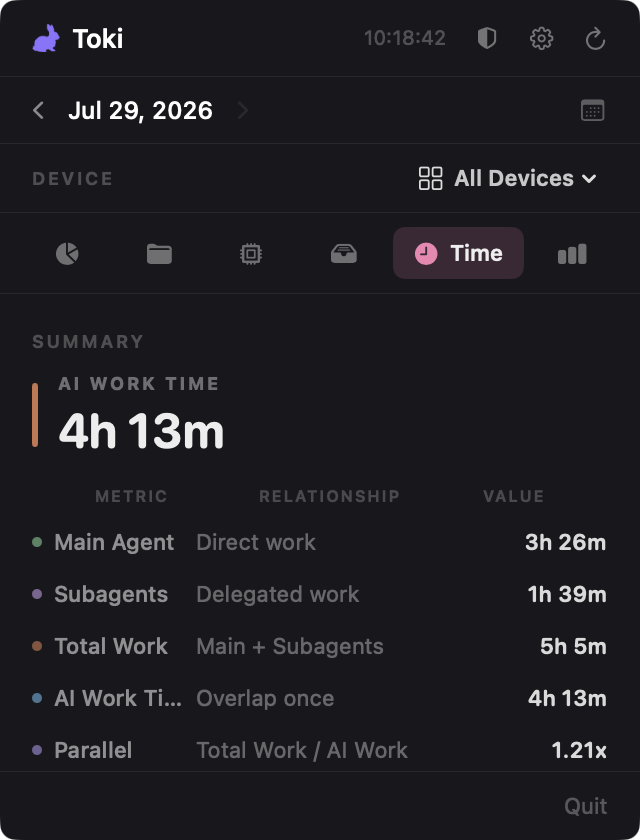
What makes Toki different from a token counter: it measures how long your
agents actually worked — direct main-agent time, delegated subagent time,
wall-clock overlap, and a parallel multiplier — not just how many tokens they
spent.
Install
Download the app
Download
Toki-macOS.zipfrom the
latest release.Unzip it and move
Toki.appinto/Applications.Toki is not yet signed with an Apple Developer ID, so macOS blocks it on
first launch with a "damaged and can't be opened" or "unidentified developer"
message. Clear the quarantine flag once:xattr -dr com.apple.quarantine /Applications/Toki.appAdd
sudoif you get a permission error. Then open Toki normally.
On macOS 15 (Sequoia) and later, the Control-click → Open shortcut no longer
works. Instead:
- Try to open Toki, then dismiss the warning.
- Open System Settings → Privacy & Security, scroll to the bottom, and
click Open Anyway next to Toki (within one hour of the warning). - Enter your admin password, then open Toki again and confirm.
Run Toki from /Applications rather than ~/Downloads, otherwise macOS App
Translocation runs it from a hidden read-only copy.
Why the extra step? Notarizing a macOS app requires a paid Apple Developer
account. Toki does not have one yet. Every release is built in public by the
Release workflow from the tagged commit, and
the full source is in this repository — you can also build it yourself below.
Build from source
git clone https://github.com/choi138/toki.git
cd toki
brew install xcodegen swiftlint swiftformat
xcodegen generate
open Toki.xcodeproj
Then build and run the Toki scheme in Xcode. Locally built apps are not
quarantined, so no xattr step is needed.
Uninstall
rm -rf /Applications/Toki.app
rm -rf ~/Library/Application\ Support/Toki
defaults delete com.toki.app 2>/dev/null
Toki never writes to your agents' data directories, so removing it leaves every
tracked tool untouched.
Screenshots
| Overview | Projects | Models |
|---|---|---|
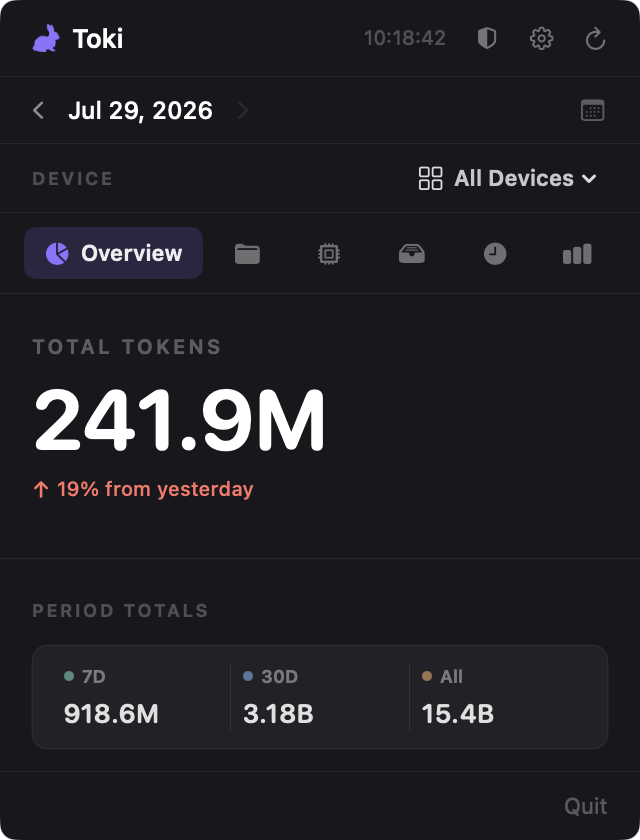 |
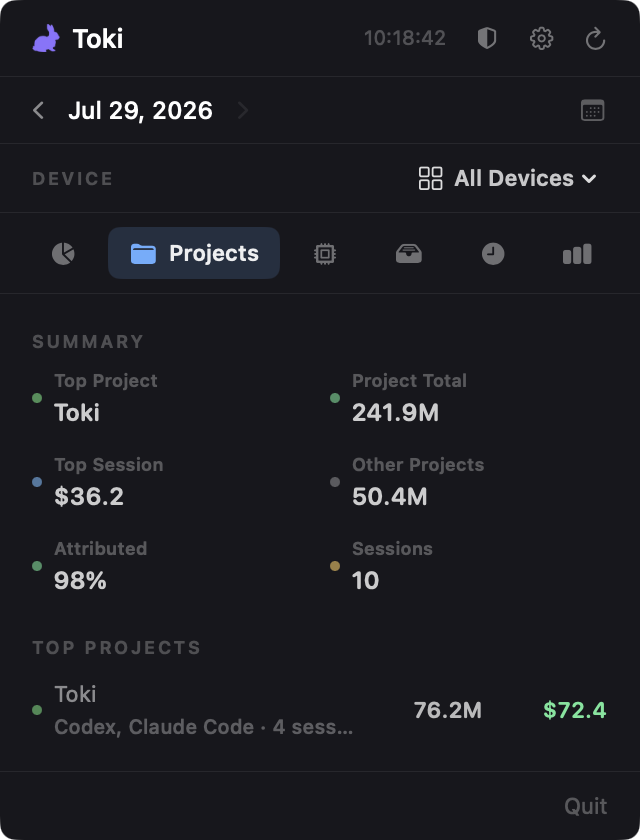 |
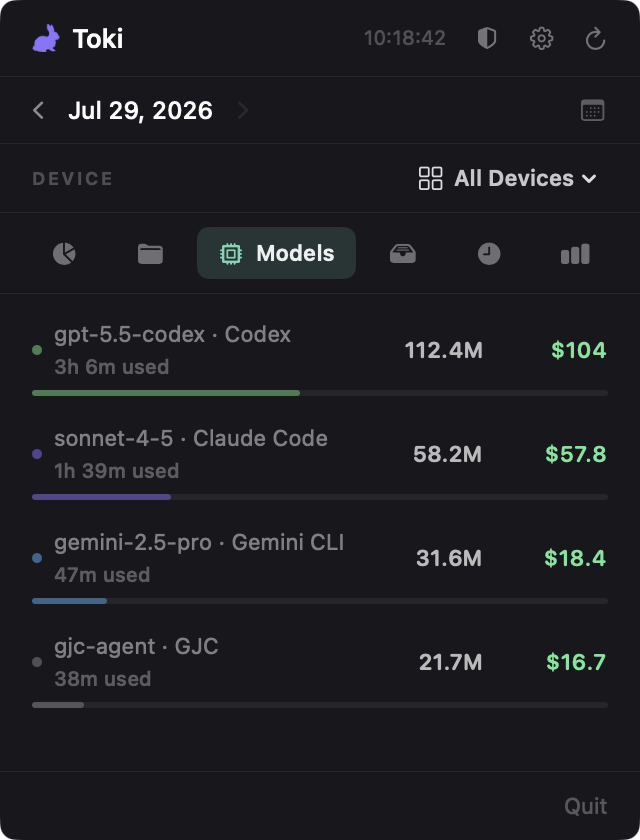 |
| Sources | Time | Hourly | Settings |
|---|---|---|---|
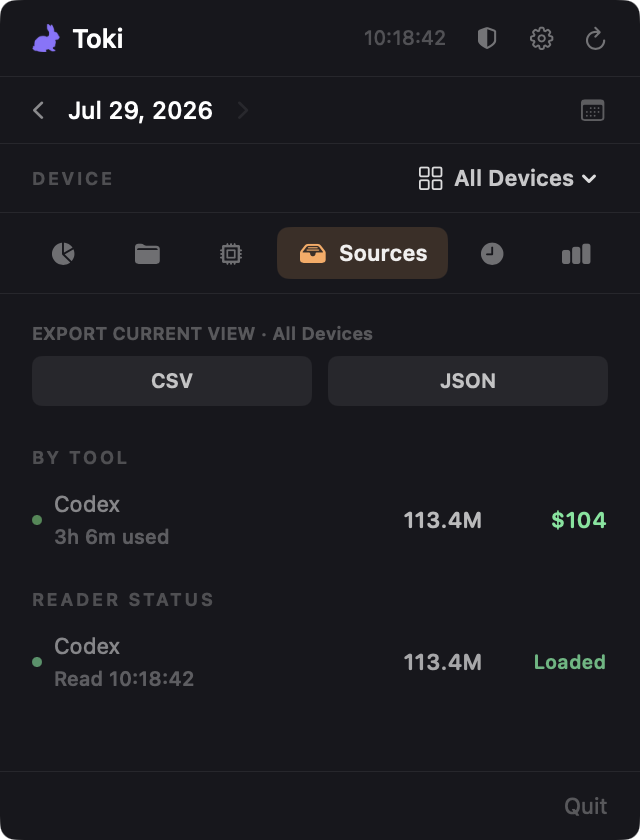 |
 |
 |
 |
What It Tracks
- Daily and ranged usage: total, input, output, cache read/write, reasoning
tokens, cache hit rate, and estimated cost. - Six focused views: Overview, Projects, Models, Sources, Time, and Hourly
stay one click away in the compact tab bar. - Projects and sessions: cost and token attribution with expandable project
and session lists when logs expose enough context. - Models: per-model token totals, cost estimates, active time, and
proportional token-share bars, plus unpriced/context-only rows. - Sources: per-agent totals, reader status diagnostics, and CSV/JSON copy
exports. Reader failures also surface as a header badge that opens Sources. - Work time: direct main-agent time, delegated subagent time, wall-clock
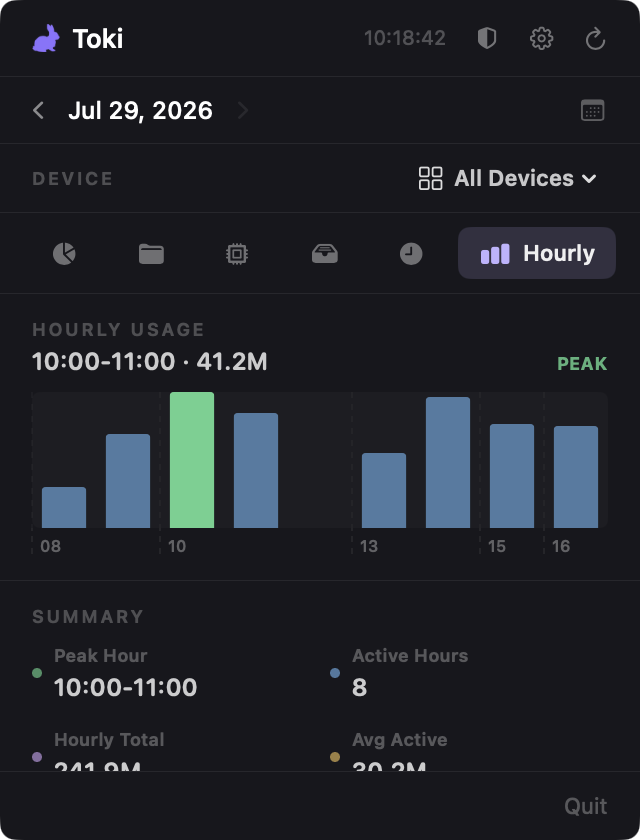
overlap, stream counts, and parallel multiplier. - Hourly usage: active hours, peak hour, average active hour, and top-hour
rows. - Local security audit: masked findings for API keys, access tokens, cloud
credentials, JWTs, private key blocks, and secret assignments.
Supported Agents
Toki auto-detects the default local data locations below. No account login or
remote service is required for local readers.
| Agent | Usage data source | Notes |
|---|---|---|
| Claude Code | ~/.claude/projects/**/*.jsonl |
Deduplicates request/message usage and caches parsed logs locally. |
| Codex | ~/.codex/state_5.sqlite plus discovered rollout JSONL files |
Reconstructs ranged usage from rollout token-count snapshots. |
| Hermes | ~/.hermes/state.db |
Reads per-session token totals, model, cost, and activity from SQLite. |
| Cursor | ~/Library/Application Support/Cursor/User/globalStorage/state.vscdb |
Exact token rows are counted when present; context-window metrics are shown separately when exact tokens are unavailable. |
| Gemini CLI | ~/.gemini/tmp/*/chats/**/*.json |
Reads current and legacy Gemini chat history formats. |
| GJC | ~/.gjc/agent/sessions/**/*.jsonl |
Reads local JSONL sessions, including assistant and delegated task token usage plus recorded cost. |
| OpenCode | ~/.local/share/opencode/opencode.db |
Reads assistant message token rows from SQLite. |
| OpenClaw | ~/.openclaw/agents/**/*.jsonl |
Reads assistant usage records from local agent logs. |
| Remote Toki Agent | The supported stores above under the remote user's home/XDG directories | Optional outbound-only Linux/macOS Agent uses the same local reader registry and uploads per-device encrypted usage snapshots through a Hub. |
Remote Devices
Remote sync consists of an outbound-only toki-agent, a ciphertext-onlytoki-hub, and the macOS Remote Devices reader. It is not tied to SSH and does
not transmit prompts, responses, local paths, project/session attribution, raw
database rows, or security-audit findings.
See Remote Usage Sync for Ubuntu installation, systemd
services, TLS reverse-proxy configuration, pairing, capacity limits, key
rotation, and the full threat model.
Privacy And Data Notes
- Local usage collection stays on-device. Automatic model-pricing updates
(enabled by default) download LiteLLM's public pricing catalog at most once
every 24 hours; no usage data is sent. Remote sync remains opt-in. - Remote sync uploads only authenticated encrypted usage snapshots; raw logs,
databases, prompts/responses, paths, and audit findings remain on the source
computer. - Security audit evidence is masked in the UI.
- Cost estimates prefer curated bundled prices and use downloaded prices only
as a fallback for otherwise unknown models. - Unknown prices remain visible as unpriced rows instead of being silently
folded into totals. - Project/session attribution depends on what each agent records locally; rows
with weaker attribution are marked as inferred or unknown.
Controls
- Click the menu bar icon to open the usage popover; right-click it for
Open Usage Panel and Quit Toki. - Enable
Show today's cost in menu barto keep the estimated daily cost beside
the icon. Hover it for today's token total and pricing/reader caveats. - Switch among Overview, Projects, Models, Sources, Time, and Hourly from the
six-tab navigation bar. - Use the date picker for a single day or custom date range.
- Use the shield button to run the local security audit.
- Use the amber reader-failure badge to jump directly to Sources diagnostics.
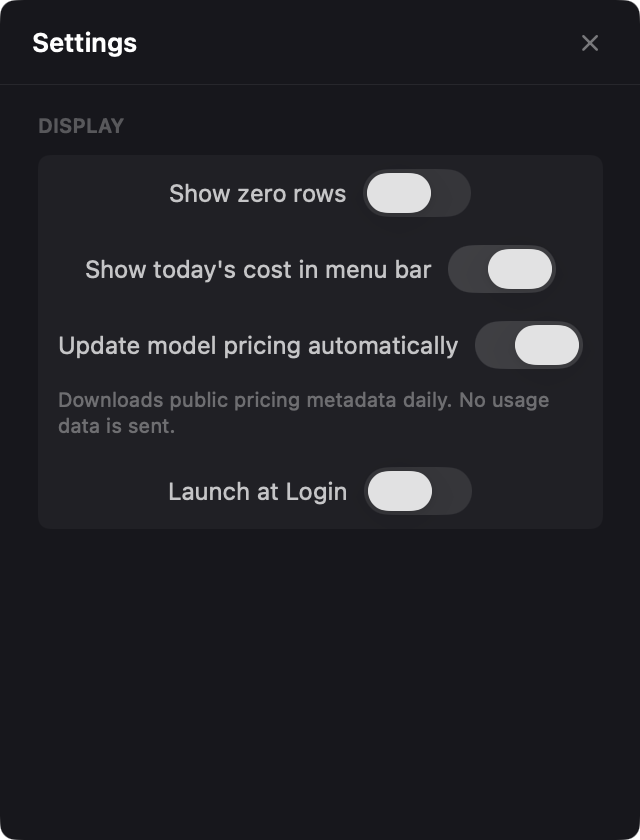
- Use settings to choose a refresh interval, enable or disable readers, show
zero-value source rows, and launch Toki at login. KeepUpdate model pricing automaticallyenabled to refresh fallback pricing once
per day. - Use the Remote Sync settings to connect a Hub, provision/revoke devices, and
choose each Agent's retention and interval. - Use the refresh button for an immediate read; otherwise Toki refreshes on the
configured interval.
Troubleshooting
"Toki.app is damaged and can't be opened" / "unidentified developer"
Toki is unsigned. Run xattr -dr com.apple.quarantine /Applications/Toki.app,
or follow the System Settings route in Install.
A tool I use shows zero usage
Open the Sources tab and check its reader status. A disabled reader, a
missing data directory, or a non-default install location all show up there. If
the reader reports a failure, the header shows an amber badge that jumps
straight to the diagnostics.
My tool isn't listed at all
Only the agents in Supported Agents are read today. Open an
issue with your tool's local data path and a redacted log sample, or add a
reader yourself — see Contributing.
Costs look wrong or a model shows no cost
Toki prefers curated bundled prices and falls back to LiteLLM's public catalog.
Models it has no price for stay visible as unpriced rows rather than being
folded into the total, so a missing price never silently inflates or deflates
your spend. Open an issue with the model ID if you hit one.
Cursor shows context-window numbers instead of tokens
Cursor does not always record exact token counts locally. Toki shows exact rows
when they exist and reports context-window metrics separately when they do not.
Requirements
To run Toki
- macOS 13.0 or later
To build from source
- Xcode 15 or later
- XcodeGen (
brew install xcodegen) - SwiftLint (
brew install swiftlint) - SwiftFormat (
brew install swiftformat) - Apple Developer account only when producing signed/notarized release builds
- Optional Linux Agent/Hub: Swift 5.9.2 or later and
libsqlite3-dev
Remote Agent and Hub builds use SwiftPM:
swift test
swift test --package-path TokiHub
swift build -c release --product toki-agent
swift build --package-path TokiHub -c release --product toki-hub
Development
Toki is organized by responsibility:
Toki/App: menu bar lifecycle and app entry points.Toki/Domain: app-level usage/security models, report builders, formatting,
and export payloads.Toki/Infrastructure: app-specific aggregation, remote sync, activity
monitoring, and security scanning.Toki/Features: SwiftUI panels, settings, view models, exports, and audit UI.TokiTests: focused unit tests for readers, aggregation, formatting,
settings, security audit behavior, and view-model logic.Sources/TokiUsageCore: reusable token usage values, active-time estimation,
date parsing, and the base reader protocol.Sources/TokiUsageReaders: reusable local readers, pricing, parse caches, and
the Hermes usage ledger.Sources/TokiSyncProtocol: versioned encrypted remote-sync protocol.Sources/TokiDurableStorage: durable private-file primitives shared by sync
components.Sources/TokiAgentCoreandSources/TokiAgent: optional Linux-compatible
outbound collector.TokiHub/Sources/TokiHubCoreandTokiHub/Sources/TokiHub:
dependency-isolated optional Linux-compatible Hub.
The root Swift package exposes TokiUsageCore, TokiUsageReaders,TokiSyncProtocol, TokiDurableStorage, and toki-agent, with no Vapor
dependency. Importing a library product does not start collection or networking;
callers choose which readers or sync components to run. Server dependencies are
resolved only when the nested TokiHub package is built, so library consumers do
not pull in or start Hub code. The nested Hub is intended for repository clones,
source/container builds, or distributed Hub binaries; a SwiftPM dependency on
this repository's root URL cannot select the nested TokiHub/Package.swift
product directly.
Required checks before opening a PR:
swiftformat . --lint
swiftlint lint --strict --quiet
xcodegen generate
xcodebuild test \
  -project Toki.xcodeproj \
  -scheme Toki \
  -destination "platform=macOS" \
  CODE_SIGN_IDENTITY="" \
  CODE_SIGNING_REQUIRED=NO \
  CODE_SIGNING_ALLOWED=NO
CI runs formatting, linting, XcodeGen, build, and tests on macOS, plus SwiftPM
tests and release builds for the Agent and Hub on Ubuntu.
Contributing
Issues and pull requests are welcome. Issues in languages other than English
are fine — write in whatever you are comfortable with.
Good places to start are labelledgood first issue.
Add support for a new agent
This is the most useful contribution, and it is smaller than it looks — a
minimal reader is around 130 lines. Readers live in the TokiUsageReaders
SwiftPM package, so swift build works without Xcode.
- Find where your tool stores usage locally (JSONL logs or a SQLite database).
- Copy the closest existing reader as a starting point:
- JSONL logs →
Sources/TokiUsageReaders/OpenClawReader.swift(131 lines,
the simplest one) - SQLite →
Sources/TokiUsageReaders/OpenCodeReader.swift
- JSONL logs →
- Conform to
TokenReader(Sources/TokiUsageCore/TokenReader.swift). OnlynameandreadUsage(from:to:)are required; token and output totals have
default implementations. - Register it in
Sources/TokiUsageReaders/LocalUsageReaderRegistry.swift
(see the existingLocalUsageReaderDescriptorlist), adding a path override
so tests can point at a fixture directory. - Add a test next to the others in
TokiTests/, modelled onTokiTests/OpenClawReaderTests.swift. - Add a row to Supported Agents.
No sample logs? Open an issue instead. A redacted snippet of your tool's
local usage file plus its path is genuinely useful on its own — it is the part
that cannot be written without access to the tool.
Add or fix model pricing
The lowest-barrier contribution: Sources/TokiUsageReaders/ModelPricing.swift
is a table of per-model rates. Adding a model is a few lines and CI validates
it, so you can edit it straight from the GitHub web editor. Include a link to
the provider's public pricing page in the PR.
Before opening a PR
Run the checks listed under Development. If you changed date,
cost, token, reader status, attribution, or security audit behavior, add or
update a focused test — see.agents/skills/project-conventions/
for the full conventions.
Release
Releases are built by the GitHub Actions Release workflow. Run it manually
with workflow_dispatch to produce workflow artifacts, or push a version tag
such as v1.1.2 to publish a GitHub Release.
The workflow regenerates the Xcode project, archives the Release configuration,
exports Toki.app, packages the app and dSYM ZIPs, and can optionally sign and
notarize the app.
Required signing secrets are BUILD_CERTIFICATE_BASE64, P12_PASSWORD,KEYCHAIN_PASSWORD, DEVELOPMENT_TEAM, and CODE_SIGN_IDENTITY. Optional
secrets are PROVISIONING_PROFILE_BASE64, NOTARY_APPLE_ID,NOTARY_PASSWORD, and NOTARY_TEAM_ID.
Tech Stack
- Swift 5.9.2
- SwiftUI and Charts
- SQLite3
- CryptoKit/swift-crypto and Vapor for optional remote sync
- XcodeGen
- SwiftFormat and SwiftLint
- macOS 13.0+
License
MIT — see LICENSE for details.
Reviews (0)
Sign in to leave a review.
Leave a reviewNo results found