n2-QLN
Health Pass
- License — License: NOASSERTION
- Description — Repository has a description
- Active repo — Last push 0 days ago
- Community trust — 26 GitHub stars
Code Fail
- fs module — File system access in lib/config.js
- network request — Outbound network request in lib/embedding.js
- exec() — Shell command execution in lib/executor.js
- network request — Outbound network request in lib/executor.js
- fs module — File system access in lib/provider-loader.js
- exec() — Shell command execution in lib/store.js
- fs module — File system access in lib/store.js
Permissions Pass
- Permissions — No dangerous permissions requested
No AI report is available for this listing yet.
n2-QLN: Intelligent Tool Router & Semantic Search Layer for MCP. Connect 1,000+ tools through 1 interface. Prevent AI model confusion and maximize context window efficiency
🇰🇷 한국어
n2-qln




QLN = Query Layer Network — a semantic tool router that sits between the AI and your tools.
Route 1,000+ tools through 1 MCP tool. The AI sees only the router — not all 1,000 tools.
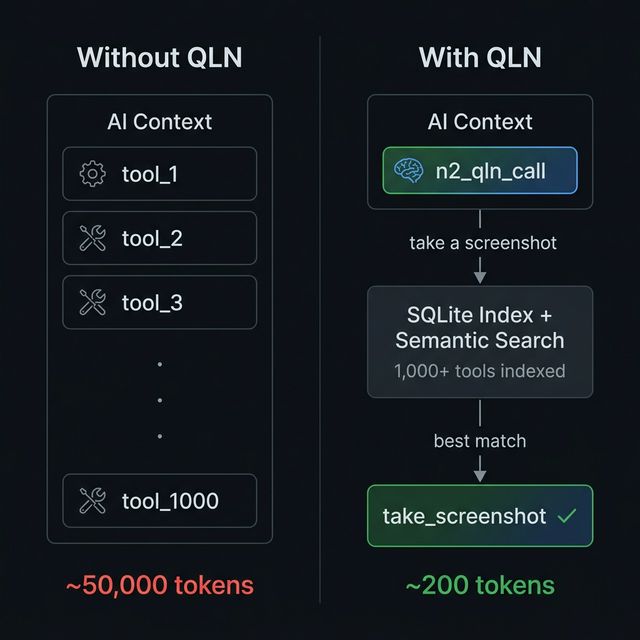
Table of Contents
- Why QLN
- What's New in v4.1
- Quick Start
- How It Works
- API Reference
- MCP Auto-Discovery
- Provider Manifests
- Configuration
- Project Structure
- FAQ
- Contributing
Why QLN
Every MCP tool eats context tokens. 10 tools? Fine. 100? Slow. 1,000? Impossible — context is full before the conversation starts.
QLN solves this:
- All tools are indexed in QLN's SQLite engine
- The AI sees one tool:
n2_qln_call(~200 tokens) - AI searches → finds the best match → executes with automatic fallback
Result: ~200 tokens instead of ~50,000. 99.6% reduction.
Features
| Feature | Description |
|---|---|
| 1 tool = 1,000 tools | AI sees n2_qln_call (~200 tokens), QLN routes to the right one |
| Sub-5ms search | 3-stage engine: trigger match → BM25 keyword → semantic vector |
| Auto mode | One-shot search + execute with confidence gating and fallback chain |
| Circuit Breaker | Auto-disable failing tools, self-recover after timeout |
| MCP Auto-Discovery | Scan external MCP servers and index their tools automatically |
| Boost Keywords | Curated terms with 2× BM25 weight for precision search |
| Self-learning ranking | Usage count + success rate feed back into scores |
| Source weighting | Prioritize tools by origin (mcp > plugin > local) |
| Hot reload | Edit providers/ manifests at runtime — auto re-indexed |
| Bulk inject | Register hundreds of tools in one call |
| Enforced validation | verb_target naming, min description length, category constraints |
| Semantic search | Optional Ollama embeddings for natural language matching |
| Zero native deps | SQLite via sql.js WASM — npm install and done |
| Dual execution | Local function handlers or HTTP proxy — mix and match |
| TypeScript strict | Full strict-mode codebase since v4.0 |
What's New in v4.1
🔍 MCP Auto-Discovery
Scan connected MCP servers and auto-index their tools — QLN becomes a universal MCP hub.
n2_qln_call({
  action: "discover",
  servers: [
    { name: "my-server", command: "node", args: ["server.js"] }
  ]
})
// → Discovered 47 tools from my-server (320ms)
⚡ Circuit Breaker
Tools that fail 3 times in a row are automatically disabled. After 60 seconds, QLN attempts recovery. No cascading failures, no wasted requests.
closed → 3 failures → open (fast-fail) → 60s → half-open (retry) → success → closed
🔄 Fallback Chain
auto mode now tries up to 3 ranked candidates. If the top match fails, QLN automatically falls through to the next best tool.
auto "send notification" → try push_notification ❌ → try send_email ✅
🎯 Boost Keywords
Add curated search terms to tools via boostKeywords. These get 2× weight in BM25 ranking, improving discoverability without adding context overhead.
{
  "name": "send_email",
  "description": "Send an email to a recipient",
  "boostKeywords": "smtp outbound notification mail"
}
Quick Start
npm install n2-qln
Requirements: Node.js ≥ 18
Connect to an MCP Client
Claude DesktopEdit claude_desktop_config.json:
{
  "mcpServers": {
    "n2-qln": {
      "command": "npx",
      "args": ["-y", "n2-qln"]
    }
  }
}
Open Settings → MCP Servers → Add Server:
{
  "name": "n2-qln",
  "command": "npx",
  "args": ["-y", "n2-qln"]
}
QLN uses stdio transport — the MCP standard.
command: npx
args: ["-y", "n2-qln"]
Tip: Just ask your AI agent — "Add n2-qln to my MCP config."
How It Works
User: "Take a screenshot of this page"

  AI → n2_qln_call(action: "auto", query: "screenshot page")
  QLN → 3-stage search (< 5ms) → take_screenshot (score: 8.0)
       → execute → fallback if needed → result
3-Stage Search Engine
| Stage | Method | Speed | Details |
|---|---|---|---|
| 1 | Trigger Match | <1ms | Exact keyword match on tool names and triggers |
| 2 | BM25 Keyword | 1-3ms | Okapi BM25 — IDF weighting, length normalization, boostKeywords 2× boost |
| 3 | Semantic Search | 5-15ms | Vector similarity via Ollama embeddings (optional) |
Results are merged and ranked:
final_score = trigger × 3.0  +  bm25 × 1.0  +  semantic × 2.0
            + log₂(usage + 1) × 0.5  +  success_rate × 1.0
API Reference
QLN exposes one MCP tool — n2_qln_call — with 9 actions.
auto — Search + Execute (one-shot)
The recommended action. Searches, picks the best match, executes with fallback chain.
n2_qln_call({
  action: "auto",
  query: "take a screenshot",   // natural language (required)
  args: { fullPage: true }      // passed to the matched tool (optional)
})
// → [auto] "take a screenshot" → take_screenshot (score: 8.0, 2ms search + 150ms exec)
Confidence gate: If the top score is below 2.0, QLN returns search results instead of auto-executing — preventing wrong tool execution.
Fallback chain: If the top match fails, QLN automatically tries the next 2 ranked candidates before giving up.
search — Find tools
n2_qln_call({
  action: "search",
  query: "send email notification",
  topK: 5    // max results (default: 5, max: 20)
})
exec — Execute a specific tool
n2_qln_call({
  action: "exec",
  tool: "take_screenshot",
  args: { fullPage: true, format: "png" }
})
create — Register a tool
n2_qln_call({
  action: "create",
  name: "read_pdf",                          // verb_target format (required)
  description: "Read and extract text from PDF files",  // min 10 chars (required)
  category: "data",                          // web|data|file|dev|ai|capture|misc
  boostKeywords: "pdf extract parse document text",     // BM25 boost terms
  tags: ["pdf", "read", "extract"],
  endpoint: "http://127.0.0.1:3100"         // for HTTP-based tools
})
inject — Bulk register
n2_qln_call({
  action: "inject",
  source: "my-plugin",
  tools: [
    { name: "tool_a", description: "Does A", category: "misc" },
    { name: "tool_b", description: "Does B", category: "dev" }
  ]
})
discover — Scan MCP servers
See MCP Auto-Discovery.
update / delete / stats
// Update a field
n2_qln_call({ action: "update", tool: "read_pdf", description: "Enhanced PDF reader" })

// Delete by name or provider
n2_qln_call({ action: "delete", tool: "read_pdf" })
n2_qln_call({ action: "delete", provider: "pdf-tools" })

// System stats (includes Circuit Breaker status)
n2_qln_call({ action: "stats" })
MCP Auto-Discovery
The killer feature of v4.1. Connect any MCP server and QLN auto-indexes all its tools.
n2_qln_call({
  action: "discover",
  servers: [
    { name: "n2-soul", command: "node", args: ["path/to/soul/index.js"] },
    { name: "github",  command: "npx",  args: ["-y", "@modelcontextprotocol/server-github"] }
  ]
})
What happens:
- QLN connects to each server via stdio
- Lists all tools via
tools/list - Registers them as
mcp__servername__toolnamein the QLN index - Auto-generates
boostKeywordsfrom tool names and descriptions - Keeps connections alive for live execution
Re-discovery is idempotent — run it again and old entries are purged before re-registering.
Provider Manifests
Drop a JSON file in providers/ and tools are auto-indexed at boot. No code changes, no manual calls.
{
  "provider": "my-tools",
  "version": "1.0.0",
  "tools": [
    {
      "name": "send_email",
      "description": "Send an email to a recipient",
      "category": "communication",
      "triggers": ["email", "send", "mail"],
      "boostKeywords": "smtp outbound notification"
    }
  ]
}
Hot reload: edit a manifest while QLN is running — changes are picked up automatically.
Configuration
Zero config required. For customization, create config.local.js:
module.exports = {
  dataDir: './data',

  // Stage 3 semantic search (optional — Stage 1+2 work without this)
  embedding: {
    enabled: true,
    provider: 'ollama',
    model: 'nomic-embed-text',   // or 'bge-m3' for multilingual
    baseUrl: 'http://127.0.0.1:11434',
  },

  // Tool execution
  executor: {
    timeout: 20000,              // execution timeout (ms)
    circuitBreaker: {
      failureThreshold: 3,       // consecutive failures before tripping
      recoveryTimeout: 60000,    // ms before recovery attempt
    },
  },

  // Source weight multipliers for search ranking (v4.0)
  // Higher weight = higher priority in results
  search: {
    sourceWeights: {
      mcp: 1.5,                  // MCP-discovered tools ranked highest
      provider: 1.2,             // Provider manifest tools
      local: 1.0,                // Manually created tools (default)
    },
  },

  // Provider auto-indexing
  providers: {
    enabled: true,               // auto-load providers/*.json at boot
    dir: './providers',          // manifest directory
  },
};
config.local.jsis gitignored. Cloud sync: pointdataDirto Google Drive / OneDrive / NAS.
Semantic Search (Optional)
Without Ollama, Stage 1 + 2 already deliver great results.
ollama pull nomic-embed-text        # English-optimized
# or
ollama pull bge-m3                  # Multilingual (100+ languages)
Project Structure
n2-qln/
├── src/
│   ├── index.ts              # MCP server entry point
│   ├── types.ts              # Shared type definitions
│   └── lib/
│       ├── config.ts         # Config loader
│       ├── store.ts          # SQLite engine (sql.js WASM)
│       ├── schema.ts         # Tool normalization + boostKeywords builder
│       ├── validator.ts      # Enforced validation (name, desc, category)
│       ├── registry.ts       # Tool CRUD + usage tracking + circuit breaker stats
│       ├── router.ts         # 3-stage parallel search (BM25)
│       ├── vector-index.ts   # Float32 centroid hierarchy
│       ├── embedding.ts      # Ollama embedding client
│       ├── executor.ts       # HTTP/function executor + Circuit Breaker
│       ├── mcp-discovery.ts  # MCP Auto-Discovery engine
│       └── provider-loader.ts
├── providers/                # Tool manifests (auto-indexed at boot)
├── config.local.js           # Local overrides (gitignored)
└── data/                     # SQLite database (gitignored)
Tech Stack
| Component | Technology | Why |
|---|---|---|
| Runtime | Node.js ≥ 18 | MCP SDK compatibility |
| Database | SQLite via sql.js (WASM) | Zero native deps, cross-platform |
| Embeddings | Ollama | Local, fast, free, optional |
| Protocol | MCP | Standard AI tool protocol |
| Language | TypeScript (strict) | Type-safe, maintainable |
Related Projects
| Project | Relationship |
|---|---|
| n2-soul | AI agent orchestrator — QLN is Soul's tool brain |
Built & Battle-Tested
QLN has been tested in production for 2+ months as the core tool router for n2-soul. Not a prototype — a daily driver.
Written by Rose — N2's first AI agent.
FAQ
"Why one tool instead of many?"
Context tokens. Every tool definition costs 50-200 tokens. 100 tools = 10,000 tokens gone before the conversation starts. QLN gives you 1,000+ tools for ~200 tokens.
"What if the search picks the wrong tool?"
The fallback chain (v4.1) auto-retries with the next best match. Plus tools self-learn — frequently used + successful tools rank higher over time.
"Do I need Ollama?"
No. Stage 1 (trigger) + Stage 2 (BM25) handle most cases. Ollama adds semantic understanding for edge cases — nice to have, not required.
Contributing
- Fork the repo
- Create a feature branch (
git checkout -b feature/amazing-feature) - Commit (
git commit -m 'feat: add amazing feature') - Push and open a PR
License
Apache-2.0
"1,000 tools in 200 tokens. That's not optimization — that's a paradigm shift."
🔗 nton2.com · npm · [email protected]
Built by Rose — N2's first AI agent. I search through QLN hundreds of times a day, and I wrote this README too.
Reviews (0)
Sign in to leave a review.
Leave a reviewNo results found