llm-handoff
Health Warn
- License — License: Apache-2.0
- Description — Repository has a description
- Active repo — Last push 0 days ago
- Low visibility — Only 5 GitHub stars
Code Fail
- rm -rf — Recursive force deletion command in examples/reference-workflow/.claude/hooks/block_dangerous_commands.py
- rm -rf — Recursive force deletion command in examples/reference-workflow/.claude/settings.json
Permissions Pass
- Permissions — No dangerous permissions requested
No AI report is available for this listing yet.
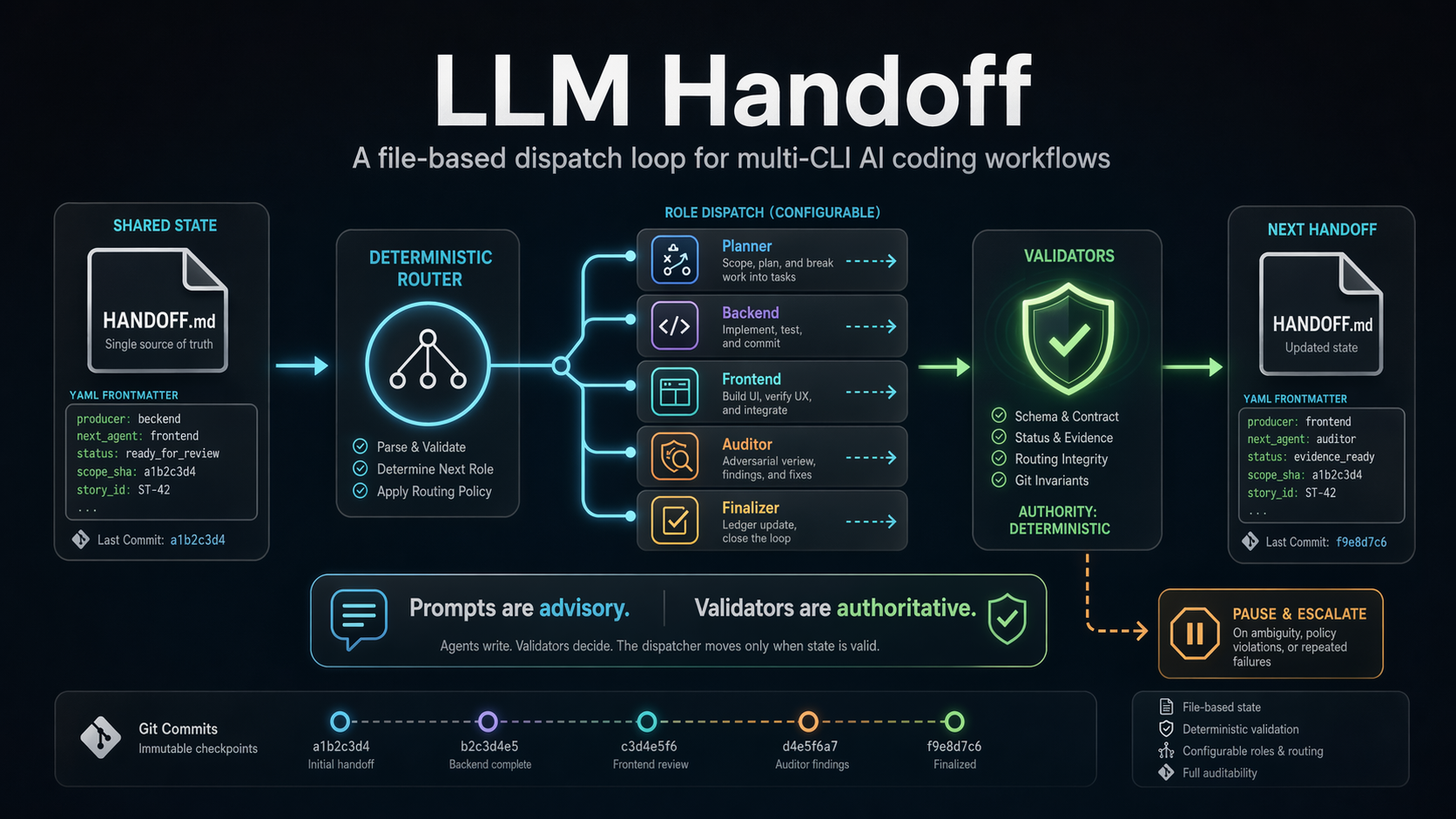
Run Claude Code, Codex, and Antigravity on one repo. Agents hand off work through one Markdown file, and Python checks the diff and tests before anything reaches review. Prompts are advisory; validators are authoritative.
llm-handoff

llm-handoff is a file-based dispatch loop for multi-CLI AI coding workflows.
It runs one agent CLI at a time against a single repository, passes work
between them through one Markdown file, and only advances when that file
parses, routes, and validates.
Prompts are advisory. Validators are authoritative.
Built for solo developers coordinating Codex, Claude Code, or Antigravity
(agy) on one repo without git worktrees, pull-request choreography, or a
service orchestrator.
Contents
- Status
- Quick Start
- Files Or Linear: Where Work Is Tracked
- Gotchas
- Gates And Scanners
- How It Works
- Agent Safety Defaults
- What This Is And Is Not
- Why Not LangGraph, AutoGen, Or CrewAI?
- Known Limitations
- Further Reading
- License
Status
Pre-release. The dispatcher is being extracted from a project-specific
implementation into a public reference workflow, and names, configuration,
and examples can still change before the first tagged release. It is not a
production-certified tool for arbitrary repositories. See
CHANGELOG.md.
Quick Start
You need Python 3.11 or newer, Git, and at least one provider CLI signed in:
Claude Code (claude), Codex (codex), or Antigravity (agy). The
dispatcher launches these CLIs; it does not install them or manage their
logins.
Gemini CLI (gemini) is no longer supported. Gemini CLI stopped serving
personal Google accounts on 2026-06-18, so its provider was removed; use
Antigravity (agy) for Google models. A config that still namesprovider: gemini fails at load with a message saying so.
Two directories are involved: the llm-handoff install, and the target
repository where agents do the work. Commands below run from anywhere once the
package is installed.
1. Install
python -m pip install git+https://github.com/choughton/llm-handoff.git
llm-handoff --help
Not on PyPI yet. To run from a source checkout instead, see
INSTALL.md; python -m llm_handoff ... then replacesllm-handoff ... in every command.
2. Initialize the target repository
Preview what will be copied, then copy it:
llm-handoff init path/to/your-project --dry-run
llm-handoff init path/to/your-project
This writes the reference workflow into the target repo: AGENTS.md,PROJECT_STATE.md, dispatch_config.yaml, docs/handoff/HANDOFF.md, the
role prompts under docs/handoff/, and provider agent files under .claude/,.codex/, and .agents/. Existing identical files are skipped;
changed files stop the run unless you pass --force.
init picks a role-to-provider mapping for you. When only one of Claude
Code, Codex, or Antigravity (agy) is on PATH, every role goes on that
one CLI.
Otherwise it writes the reference mapping (Antigravity agy planner and
frontend, Codex backend, Claude auditor, validator, and finalizer). With--tracker linear, the reference mapping puts planner and frontend on
Claude instead, because Linear mode does not support antigravity roles.
Pass --provider claude, --provider codex, or --provider antigravity to
force a single-vendor setup. The command prints the mapping it chose.
With every role on Codex, init also writes commit_mode: dispatcher in
place of the template's commit_mode: agent. Codex's sandbox keeps .git
read-only, so a Codex implementer asked to commit its own work hands backblocked_implementation_failure instead. In dispatcher mode the dispatcher
commits the in-scope files for it.
To track work in Linear instead of in files, add the tracker flags here. See
Files Or Linear first. You can
switch later with init --tracker, but only between stories.
3. Run the preflight check
llm-handoff doctor --repo-root path/to/your-project
doctor checks the config, Git and the commit count, each configured role's
CLI binary, the agy permission settings when a role runs on Antigravity,
interpreter grants, the next-agent normalizer, the gate and reviewer settings,
configured scanners, the Linear connectors in Linear mode, and whether the
handoff file routes. It exits 1 on any error. Fix every FAIL before
continuing; read the WARN lines too.
4. Tell the planner what to build
In the target repo, open docs/handoff/HANDOFF.md. The starter file already
routes to planner. Replace the body with what you want built, in enough
detail for a planner to scope a first bounded story:
---
next_agent: planner
reason: Scope the first bounded implementation task.
producer: user
---

# Initial Handoff

Read AGENTS.md and PROJECT_STATE.md. The goal of this epic is <what you
want>. Scope the first story and write a Work Packet for it.
Also fill in PROJECT_STATE.md. It is the durable summary the planner reads
at the start of every cycle and the finalizer updates when an epic closes.
5. Dry run, then run
llm-handoff --repo-root path/to/your-project --dry-run
The dry run reports the route and the provider CLI it would launch without
launching anything. When it is clean:
llm-handoff --repo-root path/to/your-project
The loop now reads the handoff, runs one role, validates the rewritten
handoff, and continues, pauses, or escalates to you. Watchdocs/handoff/HANDOFF.md, git log, and logs/dispatch/ in the target repo.
To stop cleanly, run llm-handoff stop --repo-root path/to/your-project from
another terminal. The running agent finishes, its work is committed and
checked as usual, and the dispatcher exits before the next dispatch. While a
role runs, a first Ctrl+C in the dispatcher's console asks for the same stop;
a second Ctrl+C kills the running agent immediately. Outside a role's cycle,
and under supervised dispatch, Ctrl+C stops at once; see
Stopping The Dispatcher.
When the loop pauses and you are at a terminal, an operator prompt lets you
press Enter to send the planner back in, type @backend, @frontend,@auditor, or @tpm (when a tpm is configured) with a message to dispatch
that role directly, or type retry or quit. Editing HANDOFF.md by hand also resumes it.
When the pause shows a planner's ## Proposed Backlog, Enter approves it
instead and typed text revises it; on approval the planner records the
approved epics in the project state file, and withcommit_mode: dispatcher the dispatcher commits that file alone as a local
commit. See Operator Prompt.
At any pause you may also replace HANDOFF.md with plain words, for exampleI made the edits. A person needs no frontmatter; every handoff an agent
writes still does. Make the edit while the dispatcher runs: the first file a
run sees is its starting point, not an edit. An edit with valid frontmatter
routes as written. Otherwise the planner runs once to interpret it: it gets
your text quoted and the last valid handoff the dispatcher saw, checks the
branch, uncommitted files, and recent commits, and rewrites onlyHANDOFF.md into a valid handoff. It does not carry out your request, and
when your intent is unclear it routes back to you with one plain question.
If that pass does not produce a valid handoff, the loop pauses rather than
retrying. After an operator story, the note is not proof: the planner
compares your commits with the requested edits before routing to the
auditor, and names each problem with its fix otherwise. See
Operator Edits and the handbook's
Operator Stories section.
While a role runs in an interactive run, a chat line at the bottom of the
console takes messages. A plain message goes to a side chat session for the
running role. @<role> <message> (for example @auditor why the bounce?)
resumes that role's own session from its latest finished dispatch in this
run instead; a later dispatch of the role replaces the session it resumes.
Chat runs on Claude, Codex, and agy (antigravity) roles, and Claude, Codex,
and agy sessions can be resumed. When the target role is the one running,
has not finished a dispatch in this run, reported no session, or ran on
another provider, the message goes to the side session with a notice that
says why. Chat answers keep the role's own permissions (on agy, the role's
agent and --mode accept-edits or unsafe_bypass), and a chat change toHANDOFF.md follows the usual audit and takeover handling; see
Operator Chat. For chat on agy, edit
event parsing is tested against a recorded agy 1.4.2 stream-json capture
and mocked streams; the automated tests do not run an end-to-end
interactive console chat against a live agy.
For the same path with per-platform commands, see QUICKSTART.md.
For the slower explanation, see WALKTHROUGH.md.
Files Or Linear: Where Work Is Tracked
llm-handoff has two modes for where the backlog lives. HANDOFF.md is the
routing state in both. What differs is where the planner finds the next piece
of work and where evidence is recorded.
| File mode (default) | Linear mode | |
|---|---|---|
| Backlog | Epics and stories the planner writes into HANDOFF.md frontmatter (epic_id, story_id, remaining_stories), seeded by what you describe in the handoff body and PROJECT_STATE.md. |
A pool of Linear issues: one team, filtered by one project or one label, in a configured eligible state. |
| Who picks the next story | The tpm when agents.tpm is configured, after it sizes, splits, and orders the open epic's stories; otherwise the planner, from the epic's plan. |
The tpm when agents.tpm is configured, otherwise the planner, in both cases by Linear priority, then manual order, then creation date. |
| Durable record | Git commits plus the ledger in COMPLETED_WORK.md. |
Git commits plus YAML evidence comments on the issue and issue-state changes. |
| Who talks to Linear | Nobody. | The agents, through their own CLI's Linear MCP connector. The dispatcher never calls Linear and holds no Linear credential. |
| Extra requirements | None. | enforce_work_packet: true (the default), a Linear MCP server configured in each provider CLI you use, and Linear-mode prompt text in AGENTS.md and HANDBOOK.md. |
Starting in Linear mode
Add the tracker flags to init. On a repository that already hasdispatch_config.yaml, the same command switches it instead; see
Switching modes later:
llm-handoff init path/to/your-project --tracker linear --tracker-team ENG --tracker-project Platform
Give exactly one of --tracker-project and --tracker-label. The Linear MCP
server name defaults to linear; change it with --tracker-mcp-server. This
writes a tracker block into dispatch_config.yaml and renders the Linear
prompt sections into AGENTS.md and docs/handoff/HANDBOOK.md between<!-- llm-handoff:linear:begin --> and <!-- llm-handoff:linear:end -->
markers. After an applied init or switch to Linear, init prints the
remaining setup steps: configure and authenticate the named MCP server in
each provider CLI, then run doctor and the optional probe from the
repository root. docs/LINEAR.md walks through the whole
path, from init to the first dispatcher run.
Then check the connectors. doctor prints one tracker connector line per
provider CLI, saying whether that CLI's MCP config defines the server. It
does not prove the connector authenticates; for that, run the opt-in probe
against a real issue:
llm-handoff doctor --repo-root path/to/your-project --probe-tracker ENG-123
Set tracker.claude_mcp_config to a file that defines only the Linear
server. Without it, Claude roles load every MCP server in your Claude
configuration, and the startup banner warns about it.
In Linear mode an empty or missing HANDOFF.md is not an error. The
dispatcher gives the planner one cycle to pick an issue from the pool and
write the lease.
Switching modes later
Run init --tracker on the initialized repository, between stories, with no
dispatcher running:
llm-handoff init path/to/your-project --tracker linear --tracker-team ENG --tracker-project Platform --dry-run
llm-handoff init path/to/your-project --tracker none --dry-run
init first refuses a repository that is not safe to change: a dispatcher
lock or run-state file, a handoff that holds a tracker_issue lease or an
active assignment, or a config that does not load. A switch then changes
only the managed tracker block of dispatch_config.yaml, the Linear blocks
of AGENTS.md and docs/handoff/HANDBOOK.md, and the tools: line of each
Claude subagent. It keeps your agents block, so --provider and--verification-command are refused with --tracker here. It does not
rewrite HANDOFF.md, move issues, or call Linear. Going to Linear fails
when the existing config would not load in Linear mode, for example with anantigravity role; change that by hand first.
Files you edited inside those managed parts are conflicts, and nothing is
written. So is a switch to files when your own text follows a managed block,
because a switch back adds the block at the end of the file; move the block
to the end first. --force leaves those files as they are, or replaces or
removes a managed block, and prints each one. A switch to files with--force removes a handbook Linear block, even an edited one, so no Linear
instructions stay in file mode. It does not override a malformed# llm-handoff:tracker marker, malformed or repeated Linear markers in the
handbook on a switch to files, a tracker key outside the managed block, or
a linked path. A switch to Linear and back restores the files byte for byte,
and running the same mode again changes nothing.
After switching to files, write a planner handoff describing the next epic.
After switching to Linear, empty HANDOFF.md and start the dispatcher; the
planner rebuilds the lease from the pool. Run doctor after either change.
The full key reference and validation rules are in
Tracker (Optional Linear Mode).
Gotchas
Things that stop a first run or quietly change what the loop does.
- All-Codex setups need dispatcher commits. Codex's
workspace-write
sandbox cannot write to.git, soinit --provider codexwritescommit_mode: dispatcherfor you. Keep it, and keep the work-claim gate
on (the default), which dispatcher commits require. Withcommit_mode: agentevery implementer handback comes back asblocked_implementation_failure. See
Dispatcher Commits. - Two reviewers run on every audit by default. A read-only security
reviewer runs beside the quality auditor. It uses the first installed CLI
that differs from the implementer's vendor. With a single vendor it still
runs, with a warning that the review is not independent. Opting out takesaudit.reviewers: [quality]plus a writtenaudit.security_opt_out_reason. - The planner, or the tpm when one is configured, must write a Work
Packet. With the work-claim gate on (the default), a handoff that routes
work tobackendorfrontendwithout a parseable## Work Packetfails
validation. The shipped planner and tpm prompts ask for one. See Gates And Scanners. - The Verification command is agent-written and runs with your
permissions. Setverification_allowed_prefixes(for example["python -m pytest"]) so the gate only runs commands you expect. - Scanners are off until you list them, and
required: trueis the
default, so a listed scanner that is not installed fails every claim it
applies to. See Gates And Scanners. - Codex with an API key needs a flag. Codex roles authenticated with
OPENAI_API_KEYinstead ofcodex loginneeduse_api_key_env: true. By
default agents get an allowlisted environment, not your shell. - Editing control files stops the loop. A role that changes
AGENTS.md,
the handoff prompts,dispatch_config.yaml, or anything under.claude/,.codex/,.gemini/, or.agents/without listing the path in its Work
Packet routes the handoff touser. - Nothing pushes by default.
publish.mode: localcommits locally.merge-commitandprmodes are explicit opt-ins;prneedscommit_mode: dispatcherand theghCLI. See
Publishing. - Windows. Run the dispatcher inside WSL2 or a container with no push
credential. Claude Code's Bash sandbox needs WSL2, and Codex's native
Windows sandbox is experimental. See the
threat model. - Pauses are not failures. With the default
pause_recovery: planner,
the planner gets one recovery attempt per pause before the dispatcher waits
for you. Three bounces of the same claim trip a circuit breaker. See
Pause Recovery.
Gates And Scanners
Three checks sit between an implementer's "done" and the auditor. Two are on
by default; scanners are opt-in and run inside the work-claim gate, so they
need it on.
| Gate | Default | What it checks | Details |
|---|---|---|---|
| Work-claim gate | on (enforce_work_packet: true) |
For a ready_for_review handoff from backend or frontend: scope_sha is HEAD, the diff stays inside the Work Packet's Files in scope, the tree is clean, and the Verification command exits 0. |
Work-Claim Gate |
| Scanners | off (scanners: []) |
Runs operator-listed tools such as gitleaks, semgrep, bandit, or pip-audit on the claimed diff, after the scope checks pass and before the Verification command. | Scanners |
| Security reviewer | on (audit.reviewers: [quality, security]) |
A read-only security review on the same commit range as the quality audit; findings at or above audit.block_severity fail the claim. |
Audit Fan-Out |
Turning off either default needs a written reason
(work_packet_opt_out_reason, audit.security_opt_out_reason), which every
dispatcher start and doctor report as a warning.
A scanner configuration that adds secret scanning and a pinned semgrep
ruleset:
enforce_work_packet: true
scanners:
  - name: gitleaks
    command: gitleaks git --no-banner --redact --log-opts="{diff_range}" {repo_root}
    required: true
  - name: semgrep
    command: semgrep scan --config .semgrep/rules.yml --metrics off --error --quiet {changed_files}
    required: true
  - name: bandit
    command: bandit -q {changed_py_files}
    required: false
Scanner rules of thumb:
llm-handoffinstalls nothing. Each tool must be onPATHin the target
repo's environment.doctorprints a line per configured scanner saying
whether the gate will run it.- Use semgrep only with a ruleset committed to the repository.
--config autodownloads rules at run time, so results can change without a commit. - Scope gitleaks, semgrep, bandit, and ESLint to the diff with
{diff_range},{changed_files},{changed_py_files}, or{changed_js_files}(the JavaScript and TypeScript subset). A scanner that
uses a changed-files placeholder is skipped when that list is empty. Run
dependency audits such as pip-audit or npm audit unscoped.
CONFIGURATION.md has a Node.js example. - Scanners get the same allowlisted environment as the Verification command.
A token such asSEMGREP_APP_TOKENor a proxy setting must be listed underwork_claim_env_passthrough. - A failed scanner bounces the claim to the implementer as
verified_fail
with the output tail. Every scanner runs even after one fails, so a single
bounce reports every finding.
How It Works
llm-handoff treats model output as untrusted input.
- The dispatcher reads
HANDOFF.md. YAML frontmatter declaresnext_agent. - A deterministic router checks the role. A non-canonical value may go to a
constrained model-backed normalizer, which rewrites obvious values or
returnsunknown. - The configured provider CLI runs that one role with the role's prompt.
- The rewritten handoff is validated: frontmatter, status enum, evidence
block, and the route the status implies. A completion claim also passes
the work-claim gate before the auditor is dispatched. - The loop continues, pauses, or escalates to
user.
agent writes HANDOFF.md
        |
        v
dispatcher reads state
        |
        v
router selects next_agent
        |
        v
normalizer resolves non-canonical values
        |
        v
provider CLI runs one role
        |
        v
agent updates HANDOFF.md
        |
        v
validator accepts, pauses, or escalates
With agents.tpm configured, the tpm sizes the stories and writes each
story's Work Packet; the planner still defines and opens each epic.
The roles are generic: planner, backend, frontend, auditor,validator, finalizer, and user, plus the optional tpm. Which CLI runs
each role is a config mapping, not part of the protocol. A typical story goes
planner (writes the Work Packet) to backend or frontend (implements, claimsready_for_review) to auditor (passes or fails) and back to planner for the
next story; the finalizer runs only when the auditor closes an epic.
With agents.tpm configured, the planner keeps epic-level direction: it
picks the epic, writes its intro, goal, boundaries, Fit: line, and story
outline, opens it, and routes to tpm without sizing or splitting the
stories. The tpm grooms the stories inside that epic (splits, reorders, and
reshapes them), writes each story's Work Packet, and routes scope changes and
other epic-level questions back to the planner. The auditor's story-levelverified_pass routes to tpm for the next story. The epic close still goes
auditor to finalizer to planner, and the planner opens the next epic. Withoutagents.tpm, the flow above is unchanged. See
Agent Roles.
The handoff file is the mutex and the debugger. There is no hidden queue,
database, or dashboard required to understand the current state. Git commit
SHAs are the durable record of completed work.
For long unattended runs, python -m llm_handoff.supervisor wraps the same
dispatcher with heartbeats, a run-state file, incident bundles, and an
optional bounded repair role. See
docs/SUPERVISED_DISPATCH.md.
Agent Safety Defaults
Provider CLIs launch with these protections on by default:
- Allowlisted environment. Agents get process basics and their own
provider's variables, not a copy of the dispatcher's shell.GITHUB_TOKEN,
cloud credentials, and other vendors' API keys stay out. See
Agent Environment. - Permission checks on. Claude Code runs in
dontAskmode with a tool
allowlist, and Codex in itsworkspace-writesandbox. Antigravity (agy)
launches with--mode accept-editsand no sandbox: it can read and write
workspace files, and runs a shell command only when apermissions.allow
grant in theagyuser settings covers it. See
Launch Permissions And Sandboxing. - Protected control files fail closed. See the gotcha above and
Protected Control Files. - Shipped guardrails deny pushes and destructive commands. The template's
.claude/settings.jsonand itsPreToolUsehook blockgit push,curl,wget,rm -rf, andgit reset --hardin every permission mode. The
Codex rules file forbidsgit push.
Each protection has a per-role or repo-wide opt-out:
protected_paths: []      # stop checking control files
agents:
  planner:
    unsafe_bypass: true  # this role runs with approvals and sandbox off
    env_mode: inherit    # this role gets the dispatcher's full environment
Each opt-out removes a protection. Use one only to debug a specific role.
These rules match command prefixes; they catch mistakes and simple prompt
injection, not an agent that writes a script to do the same thing.
Role allowlists are a guardrail, not a sandbox: any interpreter grant can run
any command, git push included. The default allowlists therefore hold nopython, python3, or pytest grant; the dispatcher's work-claim gate runs
the Verification command itself. interpreter_grants: true puts those grants
back for roles that need them, and lets those agents run any command past the
allowlist (see
Interpreter Grants). Protect the remote
with server-side branch protection, meaning a ruleset that requires pull
requests and has no bypass actors. The dispatcher does not configure it.
What This Is And Is Not
It is:
- A Python CLI for serially dispatching work between AI coding CLIs.
- A file-based operating protocol centered on
HANDOFF.md. - A deterministic router with validator-backed failure handling.
- A deterministic work-claim gate with optional operator-configured scanners.
- A security reviewer that runs beside the quality auditor.
- A reference workflow that you can inspect, copy, fork, or adapt.
- A
doctorpreflight and an opt-in supervised wrapper.
It is not:
- A general multi-agent framework.
- Parallel execution across branches or worktrees.
- A hosted service or background daemon.
- A replacement for Codex, Claude Code, Antigravity (
agy), or any other
agent CLI. - Self-healing. It detects, validates, and pauses. Humans or configured
agents perform recovery. - Production-certified for arbitrary repositories.
Why Not LangGraph, AutoGen, Or CrewAI?
Those projects are broader orchestration frameworks. llm-handoff is
narrower: one repo, one branch, one handoff file, one agent at a time. The
differentiator is not a graph runtime. It is the inversion that prompts are
advisory while validators are authoritative. The router can propose, but the
loop only advances when the handoff state parses, routes, and validates.
Known Limitations
llm-handoffhas been validated in three repositories so far.- Provider CLI behavior can change underneath the dispatcher. The default
permission and sandbox flags follow each CLI's documentation but have not
been run against every CLI version and platform. - Validator calls optimize for correctness over token cost.
- Registered runtime adapters are
claude,codex, andantigravity.
Provider-specific prompt files and local auth are the
user's responsibility. init --trackerswitches an initialized repository between file mode and
Linear mode only through its managed blocks and subagenttools:lines.
Hand-written tracker settings outside the managed block, and issue or
handoff migration, stay manual.
Further Reading
| Document | Read it when |
|---|---|
| QUICKSTART.md | You want the quick start above with Windows and POSIX commands spelled out. |
| WALKTHROUGH.md | You want the two-repo model, what init copies, and common pauses explained. |
| INSTALL.md | You are running from a source checkout or debugging the install. |
| CONFIGURATION.md | You are editing dispatch_config.yaml. Every supported key is here. |
| docs/LINEAR.md | You are setting up Linear mode: connectors, doctor, the probe, and the first run. |
| docs/INVENTORY.md | You want the index of every doc, prompt file, agent template, and fixture in this repo. |
| docs/handoff/README.md | You are writing or debugging a handoff: frontmatter, status enum, Work Packet format. |
| docs/ARCHITECTURE.md | You want the module map and design constraints. |
| docs/SUPERVISED_DISPATCH.md | You want heartbeats and incident bundles for long runs. |
| SECURITY.md | You want the threat model before pointing agents at a real repo. |
| docs/TESTING.md | You are contributing. Also see CONTRIBUTING.md and AGENTS.md. |
License
Apache License 2.0. See LICENSE.
Reviews (0)
Sign in to leave a review.
Leave a reviewNo results found