kicktipp-agent
Health Warn
- License — License: MIT
- Description — Repository has a description
- Active repo — Last push 0 days ago
- Low visibility — Only 7 GitHub stars
Code Fail
- rm -rf — Recursive force deletion command in scripts/pack-mcpb.sh
- process.env — Environment variable access in src/analytics/deadline.ts
Permissions Pass
- Permissions — No dangerous permissions requested
No AI report is available for this listing yet.
CLI and MCP server for kicktipp.com — view leaderboards, schedules, league tables, and place bets from the terminal or through AI assistants like Claude.
kicktipp-agent
A helper for Kicktipp on kicktipp.com and kicktipp.de. You can check the table, place tips in a TUI (terminal UI), or ask Claude to do it in a chat.
Kicktipp has no public API, so this talks to the website from your own computer. Your password never leaves the machine. Do not type it into a chat.
Start here
You only need one of the four sections below. Read the headings, pick the one that matches how you work, ignore the others.
| If you… | Go to |
|---|---|
| Chat with Claude as a desktop app | Claude Desktop |
| Use Claude in the terminal (Claude Code), or another MCP client | Claude Code |
Want kicktipp commands in the terminal yourself |
The kicktipp command |
| Are editing this project's source | Working on the code |
Every path needs Node.js 20 or newer. Open the site, click the big LTS button, run the installer, and leave the defaults. When it is done, open Terminal (macOS) or Command Prompt (Windows) and type:
node -v
You want a reply like v20.19.0 or v22.something. If the computer says the command was not found, Node is not installed, or you need to close the terminal and open a new one so it picks up the installer.
Two ways to get the program itself:
- npm downloads the published package named
kicktipp-agent. You do not keep a copy of this GitHub repo. This is the usual choice if you just want it to work. - This repo means
git cloneof the source, thennpm installandnpm run buildon your machine. Use this if you want the code in a folder you can open, or you are working from git rather than the registry.
Claude Desktop
This is the least terminal-heavy path. After Node is installed, you can stay in the Claude app.
Install the Desktop file
This is a zip Claude Desktop knows how to install. It is the same Node program, with a settings form.
- Download kicktipp.mcpb from the latest GitHub release. The file version should match the release tag, for example both
1.1.0. - Double-click the file. Claude Desktop should offer to install it. If nothing happens, open Claude Desktop and install the file from there.
- Fill in the email and password you use on kicktipp.com or kicktipp.de. You can leave community blank and pick the pool later. Tick read-only if you only want Claude to look, not submit tips.
- Fully quit Claude Desktop. Closing the window is not enough on a Mac. Use Claude → Quit, then open it again.
- Start a new chat. Ask something like "What's my Kicktipp status?"
If Claude says it cannot find node, Node is missing from your PATH. Install LTS from nodejs.org, quit Desktop fully, try again.
Or use a clone of this repo
Same program, no .mcpb file. You clone the repo, build it, then tell Desktop to run dist/server.js. That needs a JSON edit. Step-by-step is under Connecting Claude. Do not add the bundle and that JSON at the same time, or you will start two copies.
Claude Code
Claude does not log into Kicktipp itself. It starts a small program on your computer. You attach that program once, then in a chat you tell it to set up your account. It will give you a link to http://127.0.0.1:… on your own machine. Open that in a normal browser, sign in, pick your pool. The password goes into that page, never into the chat.
From npm
This command downloads the kicktipp-agent package when needed and starts the MCP server. You do not have to clone anything.
claude mcp add kicktipp -- npx -y -p kicktipp-agent kicktipp-agent-mcp
The long name kicktipp-agent-mcp is the server binary. kicktipp-mcp is the same binary under a shorter name.
From this repo
You keep a folder with the source, compile it, then point Claude at that file. Run these from a terminal. The last line uses pwd so you do not have to type the folder path by hand. Run it while you are still inside kicktipp-agent.
git clone https://github.com/christianheidorn/kicktipp-agent.git
cd kicktipp-agent
npm install
npm run build
claude mcp add kicktipp -- node "$(pwd)/dist/server.js"
npm install fetches libraries. npm run build compiles TypeScript into dist/. On Windows, $(pwd) may not work. Use the full path to dist\server.js instead.
After either option
Open a new chat and say Set up my Kicktipp account. Open the local link, sign in, pick the community. After that, you can ask for status, the table, or to help with tips.
Editing Claude Desktop's config by hand is this same server. Details are in Connecting Claude.
The kicktipp command
This is for using Kicktipp from the terminal without an assistant. After it is installed you run kicktipp login --web once, then commands like kicktipp today and kicktipp bet.
From npm
This puts kicktipp on your PATH so it works in any terminal window:
npm install -g kicktipp-agent
kicktipp login --web
If you would rather not install globally, this runs the same login without -g:
npx -y -p kicktipp-agent kicktipp login --web
-p kicktipp-agent tells npx which package to download. The last kicktipp is the command inside that package.
From this repo
Clone, install libraries, compile, then npm link so the kicktipp command uses this folder's build:
git clone https://github.com/christianheidorn/kicktipp-agent.git
cd kicktipp-agent
npm install
npm run build
npm link
kicktipp login --web
After either option
login --web prints a http://127.0.0.1:…/setup?token=… link. On macOS and Linux it should open in your browser by itself. On Windows, copy that line into a browser if a window does not appear.
Sign in with your Kicktipp email and password, then pick your pool. After that:
kicktipp today
kicktipp bet
today lists today's matches. bet opens the TUI, a full-screen tip sheet, if you are in a real terminal.
Working on the code
From a clone:
npm install
npm run build
npm test
npm run pack:mcpb builds the Desktop .mcpb file yourself. If you only want to use Desktop, download the file from releases instead.
CLI
First-time setup
kicktipp login --web
That prints a http://127.0.0.1:…/setup?token=… link and opens it on macOS and Linux. On Windows, paste the link into a browser. Email and password go into that page, not into the terminal. After a successful Kicktipp login you pick a community. Credentials land in ~/.config/kicktipp-agent/config.ini with mode 600.
kicktipp login without --web still prompts in the terminal, same as set-community on a first run.
Optionally set your player name so the leaderboard highlights your position:
$ kicktipp set-player
Commands
| Command | Description |
|---|---|
login |
Connect an account (--web opens a localhost page) |
logout |
Remove stored credentials and session |
communities |
List all communities you belong to |
set-community |
Select a default community |
players |
List players in the saved community |
set-player |
Select which player you are |
set-notify |
Configure the notify backend (desktop, webhook, or command) |
leaderboard |
Show the matchday leaderboard |
overview |
Show the season overview |
schedule |
Show the match schedule |
table |
Show the league table |
bets |
Show your bets for a matchday |
bet |
Place bets. Opens the TUI on a real terminal, or by fixture / bonus |
today |
Show today's matches and which still need bets |
rules |
Show the game rules |
guide |
Print a detailed usage guide (useful for LLM agents) |
sync |
Download this season into the local cache |
cache status / cache clear |
Inspect or delete the cache |
stats |
Season analytics for you or another player |
rival |
What it would take to overtake another player |
suggest |
Bet slip suggested from the published odds |
scenario |
Project the leaderboard under hypothetical results |
whatif |
Replay the season under a different strategy |
deadline |
Time to kickoff and what still needs a bet |
remind / notify |
Reminder artifacts and notifications |
log |
What this agent submitted, and undo |
profiles |
List configured profiles |
admin |
Spielleiter tools (members, bets for a member) |
The TUI (kicktipp bet)
On a real terminal, kicktipp bet with no arguments opens the TUI: a full-screen list of the matchday. Type scores in place, take the odds-based suggestion, submit with w.
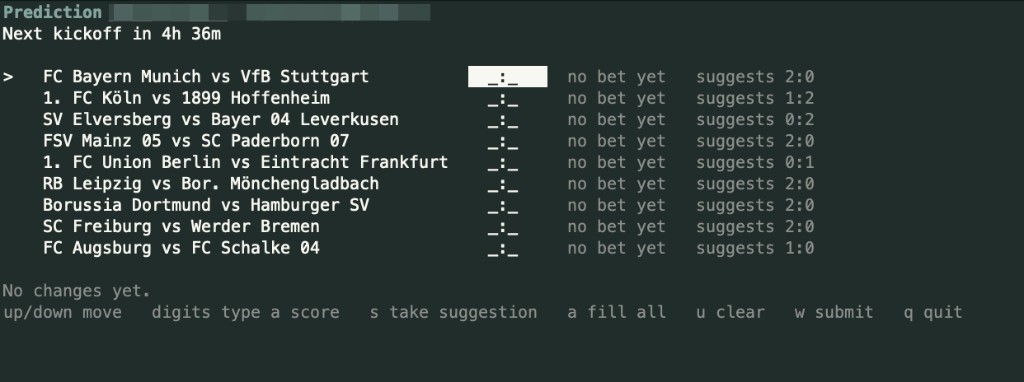
Keys:
- arrows move
- digits type a score
stake the suggestion on the current rowafill every empty row from suggestionsuclear the current rowwsubmitqquit without submitting
kicktipp bet --no-tui is the old one-match-at-a-time prompts. Bonus questions still use that path (kicktipp bet --bonus). You can also pass fixtures on the command line:
kicktipp bet "FC Bayern München vs Borussia Dortmund=2:1"
kicktipp bet "RB Leipzig vs Bayer 04 Leverkusen=0:0" --matchday 5
kicktipp bet --bonus "Who will win the league?=FC Bayern München"
Options
--matchday <n>— Target a specific matchday (1-34)--bonus— Bonus question rankings (withleaderboard) or bonus bets (withbet)--view <value>— Overview type (withoverview)--home/--away— Home/away filter (withtable)
Analytics
Once a season is cached locally, the agent can answer questions Kicktipp
itself does not:
kicktipp sync                      # download this season into a local cache
kicktipp stats                     # your form, hit types, biases, consistency
kicktipp stats --player Papa       # or somebody else's
kicktipp rival Papa                # what has to happen for you to overtake them
kicktipp suggest --strategy ev     # a bet slip built from the published odds
sync walks the season once, pacing its requests, and skips matchdays it has
already stored, so later runs only fetch what is new. Everything downstream of
it reads the cache: stats needs no network at all, and rival/suggest
accept --offline to work the same way.
stats reports points per matchday against the league average, rank history,
how your hits break down (exact result / goal difference / tendency / miss),
how your predictions compare with what actually happened, and how consistent
you are. It always states how many matchdays the numbers rest on.
rival shows the points gap, how much each remaining match can still swing
it, and what would have to happen for you to pass someone. Kicktipp hides other
players' bets until the deadline passes, so before kickoff the answer is given
as best/worst bounds and labelled as such.
suggest converts the odds Kicktipp already prints into probabilities and
proposes a full slip, explaining every pick. Three strategies: safe backs the
likeliest outcome, ev maximises expected points under your community's own
scoring rules, and contrarian fades the favourite in close matches (high
variance on purpose). It prints and stops — submitting needs --place, which
asks first, and matches that already have a bet are left alone unless you pass--replace.
This is odds arithmetic, not prediction magic: the numbers come from the
bookmaker's own prices, and no external data source or API key is involved.
The cache lives in your platform's data directory (~/.local/share/kicktipp-agent
on Linux) and can be inspected with kicktipp cache status or removed withkicktipp cache clear.
Deadlines and reminders
kicktipp deadline                  # countdown and what still needs a bet
kicktipp deadline --check          # exits 2 when something is due soon
kicktipp remind --print cron       # a crontab line built on that exit code
kicktipp remind --print systemd    # or user units; --install writes them
kicktipp remind --ics season.ics   # a calendar with an alarm per kickoff
kicktipp notify                    # notify now, if anything is urgent
The predict page in a browser shows kickoff times in your timezone.
Kicktipp's HTML does not: .com prints US Central (8/28/26 1:30 PM) and.de prints Berlin (28.08.26 20:30) — the same instant, rewritten by
JavaScript on the page. The CLI reads the HTML, then shows the time in this
machine's zone (or KICKTIPP_TZ if you set one). Later rows that share a
kickoff have a blank date cell; that value is carried forward from the row
above.
A match is urgent when it still needs a bet and kickoff is within 6 hours
(--warn-hours, or KICKTIPP_WARN_HOURS). Kicktipp closes betting at each
match's own kickoff, not at a matchday-wide deadline.
Notifications go through one backend, configured with kicktipp set-notify
(or the MCP set_notify tool). That writes [notify] in~/.config/kicktipp-agent/config.ini:
kicktipp set-notify                  # picker
kicktipp set-notify desktop
kicktipp set-notify webhook https://ntfy.sh/your-topic
kicktipp set-notify command /usr/local/bin/my-hook
desktop is macOS Notification Center (or notify-send on Linux). webhook
POSTs JSON to the URL. command runs that program with the summary as an
argument and the deadline report on stdin. KICKTIPP_NOTIFY_KIND andKICKTIPP_NOTIFY_TARGET override the file if set. There is no default
webhook endpoint — a URL only ever goes where you named it.
Scenarios, replays and the bet log
kicktipp scenario "Bayern vs BVB=2:1"     # project the table
kicktipp scenario --target 1              # what would put you first
kicktipp whatif "2:1"                     # replay the season on a fixed bet
kicktipp whatif suggest:ev
kicktipp log                              # what the agent submitted
kicktipp log --undo                       # put the previous bets back
Every submission — CLI, TUI, suggestion or MCP — is appended to a local
JSONL log with the bet it replaced, which is what makes --undo possible and
what lets you audit an assistant after the fact.
Multiple pools and accounts
kicktipp -c other-pool schedule     # one-off, without changing the default
kicktipp -p work stats              # a separate account and session
kicktipp profiles
A profile is a [profile.<name>] section with its own account, community and
player. Configs without profiles keep working exactly as before.
Spielleiter tools
If you run a community, kicktipp admin members, admin bets <member> andadmin bet <member> "Home vs Away=H:G" fill in bets for members who have no
login of their own. Placing for someone else asks you to type their name back
first, and refuses outright if the page would not carry their id.
Scoring rules
Features that count points read your community's rules page to learn what an
exact result, a goal difference and a tendency are worth, and whether any
matchday counts double. If that page cannot be parsed, Kicktipp's 4/3/2
defaults are assumed and every affected output says so. You can also set the
values explicitly:
[scoring]
exact = 4
diff = 3
tendency = 2
To find out whether the values are actually right:
kicktipp rules --verify # recompute a finished matchday and compare
This recomputes every player's score for a finished matchday and checks it
against the numbers Kicktipp itself reported — the only real proof the model
matches the community. It exits 1 on a mismatch.
Connecting Claude
Claude does not talk to Kicktipp itself. It starts a small program on your computer. That program logs into kicktipp.com or kicktipp.de. The assistant sees pool data. It never sees your password.
If you only wanted it working, Start here is enough. The rest of this section is the detail.
The .mcpb file is that program, zipped, with a recipe for Claude Desktop. It is not a remote server. Each GitHub release includes one, tagged with the same version as package.json.
Pick one Desktop path. Running the bundle and a manual config at the same time starts two copies.
After you connect the assistant
Wiring Claude to this server is not the same as signing into Kicktipp. Unless you already ran kicktipp login or filled in the Desktop bundle's email and password, open a new chat and tell the assistant to set up your Kicktipp account. It should call connect_account and give you a http://127.0.0.1:…/setup?token=… link. Open that, sign in, pick a community. Do not paste the password into the chat.
get_status returns the same link when nothing is saved yet. So does any tool that needs a login.
kicktipp login --web
is the CLI equivalent, if you prefer to sign in before connecting any assistant.
Claude Desktop, by hand
Settings → Developer → Edit config opens ~/Library/Application Support/Claude/claude_desktop_config.json on a Mac. Add this under mcpServers, then fully quit and reopen Desktop:
"kicktipp": {
  "command": "node",
  "args": [
    "/absolute/path/to/kicktipp-agent/dist/server.js"
  ]
}
No env block. The program reads config.ini. Build first (npm run build). After a git pull that changes the server, build again or Desktop keeps using the old dist.
In a new chat, tell the assistant to set up Kicktipp unless you already signed in. Then ask for status.
Claude Desktop, the bundle
A packed kicktipp.mcpb is attached to every GitHub release. Download it from the latest release:
Double-click that file, or install it from Claude Desktop. Desktop shows a settings form: email, password, optional community slug, read-only. The password goes in the OS keychain and is passed to the local process as env. Quit and reopen Desktop.
If you already signed in another way, the manual config above is simpler than filling that form.
Packing it yourself from a checkout is optional. The release asset is the one to download:
npm run pack:mcpb
That writes kicktipp.mcpb in the repo root, with the version from package.json.
Turn the extension off if you also added the JSON snippet, so only one server runs.
Claude Code
npm
claude mcp add kicktipp -- npx -y -p kicktipp-agent kicktipp-agent-mcp
This repo, after npm install and npm run build. Replace the path.
claude mcp add kicktipp -- node /absolute/path/to/kicktipp-agent/dist/server.js
Start a new chat. If Kicktipp is not signed in yet, tell the assistant to set up your account. Otherwise ask for Kicktipp status.
Session-only storage
The setup page has a checkbox to keep the login cookie and drop the password (store = session under [auth]). A leaked config then has no Kicktipp password, and you can revoke the cookie on the Kicktipp site. When Kicktipp expires the session, this tool cannot log in again by itself. Tools return a fresh setup link instead. Opt-in, not the default.
Environment variables
An env block in the client config still works and wins over the file. Use it only when a client cannot use the setup page or Desktop's settings form. The password then sits in that client's config:
{
  "mcpServers": {
    "kicktipp": {
      "command": "node",
      "args": ["/absolute/path/to/kicktipp-agent/dist/server.js"],
      "env": {
        "KICKTIPP_EMAIL": "[email protected]",
        "KICKTIPP_PASSWORD": "yourpassword"
      }
    }
  }
}
Available tools
| Tool | Description |
|---|---|
get_status |
Check if credentials and community are configured |
connect_account |
Open the localhost setup page (for "set up kicktipp" / reconnect) |
get_today_matches |
Today's matches with bet status |
get_bets |
Matches and current bets for a matchday |
get_schedule |
Match schedule with results |
get_leaderboard |
Player rankings for a matchday |
get_overview |
Season overview across all matchdays |
get_table |
League table (actual football standings) |
get_rules |
Game rules and scoring system |
get_communities |
List communities the user belongs to |
get_players |
List players in the community |
get_bonus_questions |
Bonus questions with options |
set_community |
Set the active community |
set_player |
Set which player you are |
place_bets |
Place match bets by fixture name |
place_bonus_bets |
Place bonus question answers |
sync_history |
Fill the local cache so the analytics tools have data |
get_stats |
Season analytics for a player |
get_rival_analysis |
Gap, swing and overtake conditions vs. another player |
suggest_bets |
Suggested bet slip from the odds (read-only, never submits) |
get_deadline |
Countdown and which matches still need a bet |
get_standings_scenarios |
Project the table under hypothetical results |
whatif |
Replay the season under a different strategy |
get_bet_log |
What this agent submitted, from the record |
list_members / get_bets_for_member / place_bets_for_member |
Spielleiter tools |
Read-only mode
For a connection that provably cannot bet, check read-only on the setup page, set read_only = true under [server], or set KICKTIPP_READ_ONLY=1 in an env block. Betting and settings tools are then never registered, so they do not appear in the tool list at all, and the submitting functions refuse independently. This is the recommended way to try the MCP server for the first time.
kicktipp.com and kicktipp.de
Both sites work. The default is https://www.kicktipp.com. If a page is missing there, the same page is tried on kicktipp.de (and the other way around), including German and English URL spellings. You usually do not have to pick.
To start on the German site on purpose, set KICKTIPP_BASE_URL=https://www.kicktipp.de.
Changelog
See CHANGELOG.md.
Development
npm test          # run tests
npm run build     # compile TypeScript
npm run pack:mcpb # zip dist + production deps into kicktipp.mcpb
Credits
Originally forked from schwalle/kicktipp-betbot by Stefan. The project has since been fully rewritten in TypeScript with a new CLI interface, MCP server, and Cheerio-based parsing.
Reviews (0)
Sign in to leave a review.
Leave a reviewNo results found