Python-for-AI-Driven-Automation
Health Pass
- License — License: MIT
- Description — Repository has a description
- Active repo — Last push 0 days ago
- Community trust — 14 GitHub stars
Code Pass
- Code scan — Scanned 12 files during light audit, no dangerous patterns found
Permissions Pass
- Permissions — No dangerous permissions requested
No AI report is available for this listing yet.
A modern, hands-on, self-paced course that takes you from your first line of Python to shipping a real AI-powered automation.
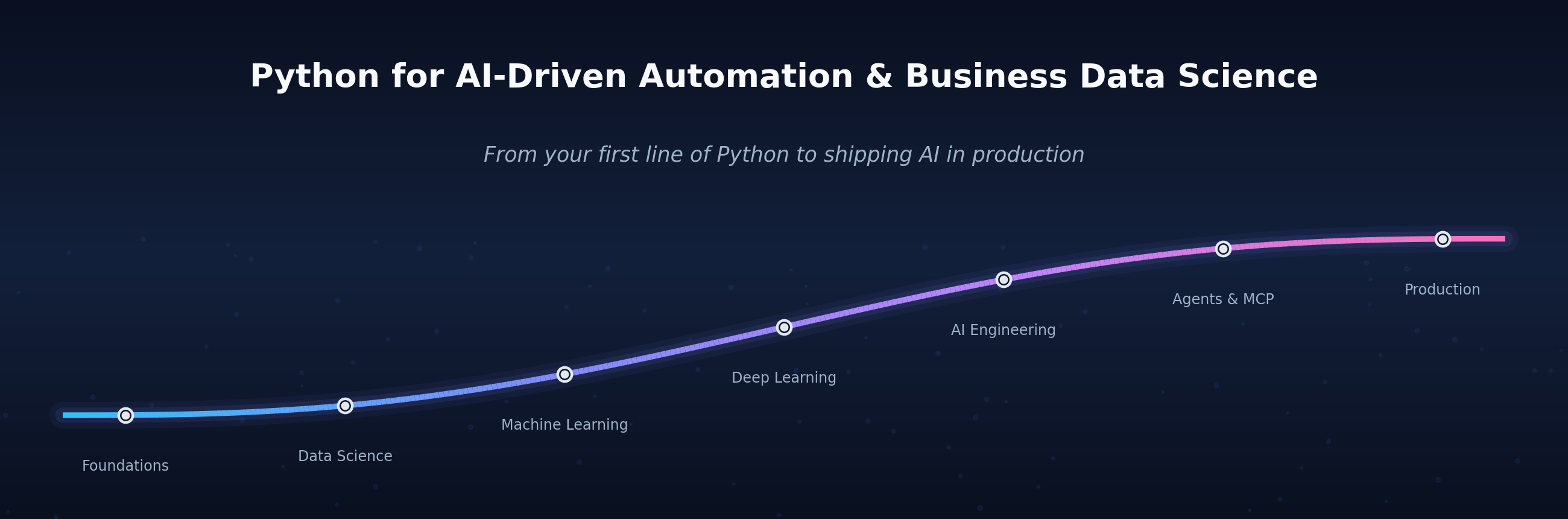
From your first line of Python to shipping a real AI-driven automation —
a hands-on curriculum (self-paced or instructor-led) across Python fluency, business data science,
machine learning, deep learning, AI engineering, and production.







113 runnable notebooks · 18 modules · 300+ end-of-lesson exercises · 322 in-lesson checkpoints · 100% offline
🚀 Quick start · 📚 Curriculum · 📓 How it works · ▶️ Open in Colab · 🤝 Contributing
Contents
- Why this course
- What's new
- Quick start
- Choose your path
- Curriculum
- Repository layout
- Datasets
- How each notebook works
- LLM providers
- Open any notebook in Colab — one-click links to all 113 notebooks
- About
- Citation
- Contributing & licence
⚡ Why this course
- End to end. From
print("hello")to a deployed, scheduled AI automation — no gaps assumed, no steps skipped. - Runs anywhere. One click into Google Colab, or
pip installlocally. Every notebook runs 100% offline — no API key, no paid service required. - Learn by doing. 300+ exercises — including a deliberate 🐞 debug-me in each lesson — every one shipping with a worked solution and the reasoning behind it.
- Built for live teaching. Every lesson is punctuated with short ✋ Quick exercise checkpoints (~2 min each) at natural section breaks, so a class can alternate ~20 minutes of instruction with a quick hands-on pause. 322 across the course, each with a scaffolded starter and a collapsible solution — and every solution has been executed in a fresh kernel to confirm it runs.
- Modern, minimal code. Charts in 1–3 lines (pandas
.plot(), seaborn, sklearn's built-in plot helpers), pipelines over boilerplate — you learn the way practitioners actually write Python today. - Visual where it counts. Key ideas — train/test splits, k-fold cross-validation, grid search, RAG pipelines, MCP topology — come with clean diagrams embedded right in the notebooks.
- Real business problems. Churn & CLV, fraud detection, demand forecasting, customer segmentation, RAG assistants, and AI governance — not toy datasets.
✨ What's new
- ☕ A new module on Compound AI Evaluation. Which pipeline knob actually moved quality — and is the difference real? Factorial designs over your system's factors, replication vs LLM noise, ANOVA attribution with effect sizes and interactions, cost/quality Pareto frontiers — built by hand, 100% offline, then expressed in a few lines of CAFE (Compound-AI Factorial Evaluation, cafe-ai.de). → Module 18
- 🔥 A new PyTorch module — deep learning as full lessons. Tensors → autograd → the five-step training loop (NB 20); the training craft — the two-curve overfitting diagnostic, dropout & weight decay, early stopping, LR schedules, save/load, a live four-bug clinic (NB 21); then embeddings for categorical data, an honest bake-off vs gradient boosting, a sklearn-style wrapper and TorchScript serving (NB 22) — all on the course's own churn data, 100% offline (Colab ships PyTorch preinstalled). The Module 5 appendix mini-track (A1–A3) stays as the condensed reference tour. → Module 6
- 🕸️ A new Web Scraping module. BeautifulSoup fundamentals (
robots.txt, politeness, pagination), managed scraping with Firecrawl, and the OpenAlex open scholarly API — the "check for an open API before you scrape" discipline, all runnable 100% offline. → Module 4 - 🛠️ Hands-on labs for shipping. CI/CD & Deployment (Docker, GitHub Actions, DNS/HTTPS — simulated in pure Python, no Docker required) and Django (a real ORM/views/forms/auth app booted inside a notebook) now ship runnable lab notebooks alongside their mini-books.
- 🏎️ The fast track now spans the whole course. 22 trimmed notebooks (~26 h): the 14 core essentials plus 8 breadth extensions mirroring the applied modules — forecasting, model evaluation, industry applications, NLP, deployment, a capstone, and web scraping. →
fast_track/ - 🧪 Module quizzes. Sixteen short multiple-choice quizzes — one per content module — to check what actually stuck. →
quizzes/ - ✋ Interactive in-lesson checkpoints, built for live teaching. Every lesson embeds short ~2-minute Quick exercise checkpoints at natural section breaks — 322 across the course — each with a scaffolded starter and a collapsible solution, executed in a fresh kernel to confirm it runs. The lecture → try → reveal rhythm turns any lesson into an interactive class with zero prep. → How each notebook works
- 🔌 100% offline, end to end. Every notebook — including the LLM, RAG, agent, and scraping lessons — runs with no API key via a built-in
MockLLMand offline stand-ins for the heavy libraries.
🚀 Quick start
A taste of the style you'll be writing by Module 5 — a full, leakage-free model in a handful of lines (pipelines over boilerplate, just like real practitioners):
from sklearn.pipeline import make_pipeline
from sklearn.preprocessing import StandardScaler
from sklearn.linear_model import LogisticRegression
from sklearn.model_selection import cross_val_score

# X, y: a feature matrix and churn labels you've already loaded (see Module 5)
churn_model = make_pipeline(StandardScaler(), LogisticRegression())
auc = cross_val_score(churn_model, X, y, cv=5, scoring="roc_auc").mean()
print(f"5-fold ROC-AUC: {auc:.3f}")
No setup yet — just open a notebook and press Run:
▶︎ Google Colab — zero setup (recommended)
Click a badge to open a notebook in your browser; nothing to install.
🔑 You need a free Google account to run the notebooks. Colab gives each signed-in user a free cloud runtime, so the first time you press Run it will ask you to sign in (any Gmail account works). Without signing in you can read a notebook but not execute its cells. No Google account? Use the Local Jupyter option below instead.
- Start the full course —
00_master_onboarding.ipynb
- Start the fast track —
00_fast_track_onboarding.ipynb - See it work first (5 min) —
00c_see_it_work.ipynb
Every notebook is listed with its own Colab link in Open any notebook in Colab.
⌥ Local Jupyter
python -m venv .venv
source .venv/bin/activate         # Windows: .venv\Scripts\activate
pip install -r requirements.txt
jupyter lab
Tested with Python 3.10+. Module 0 includes an environment-check cell. The heavier optional libraries (PyTorch for Module 6 and the ML appendices, Prophet, FAISS, LangChain, …) stay commented-out at the bottom of requirements.txt — every notebook that uses one still runs offline via a built-in stand-in or a graceful skip, so install them only to see the real library at work. (Colab ships PyTorch preinstalled, so Module 6 needs no install there at all.)
🧭 Choose your path
| 🎓 Complete course | 🏎️ Fast track | |
|---|---|---|
| Scope | All 18 modules + 13 optional appendices | The essentials, condensed |
| Notebooks | 53 lessons + 5 labs (+ 13 appendices) | 23 (onboarding + 22 lessons) |
| Time | ~125 hours | ~26 hours |
| Best for | Depth — every exercise, stretch problem & capstone | A credible end-to-end pass in a few evenings |
| Start here | 00_master_onboarding.ipynb |
fast_track/ |
New here? 00c_see_it_work.ipynb is a 5-minute offline demo of what you'll build, and 00b_course_overview.ipynb has the full module map and an interactive time estimator.
🧑🏫 Teaching this as a semester course? The fast track fits a 12-lecture × 180-minute format almost exactly — see the suggested lecture plan in
fast_track/.
📚 Curriculum
| Module | Lessons | Focus |
|---|---|---|
| 0 · Onboarding | — | Setup, orientation, 5-minute demo |
| 1 · Foundations | 1–6 | Variables, control flow, lists, dicts, functions, classes |
| 2 · Data Science | 7–11 | pandas, NumPy, seaborn/matplotlib, statistics, time series |
| 3 · Real-world I/O | 12–13 | HTTP/APIs, SQL, data validation |
| 4 · Web Scraping | 14–16 | Scraping fundamentals (BeautifulSoup, robots.txt, politeness), Firecrawl managed scraping, and the OpenAlex open scholarly API — all 100% offline |
| 5 · Machine Learning | 17–19 | scikit-learn, cross-validation & hyperparameter tuning, model evaluation, feature engineering |
| 6 · Deep Learning with PyTorch | 20–22 | Tensors, autograd & the training loop; overfitting, regularization & schedules; embeddings, an honest bake-off vs gradient boosting, a sklearn-style wrapper & serving |
| 7 · Industry Applications | 23–26 | Churn/CLV, fraud, segmentation + recommenders, demand & maintenance |
| 8 · AI Engineering | 27–32 | LLM fundamentals, prompts, RAG, agents, document processing, eval & observability |
| 9 · Building AI POCs | 33–36 | Copilot setup, three POCs, RAG deep dive, vector DBs + agentic AI |
| 10 · Agents, Tools & MCP | 37–40 | Agent architectures, robust tools, the Model Context Protocol, multi-agent systems |
| 11 · NLP (Text Analytics) | 41–43 | Topic modeling (BERTopic, STREAM) & sentiment analysis (VADER → classical → transformers) |
| 12 · Optional: DeepTab | 44 | Deep learning for tabular data — Mamba/FT-Transformer/SAINT… behind a scikit-learn API |
| 13 · Production | 45–46 | Packaging notebooks into projects, scheduling |
| 14 · CI/CD & Deployment | 3 labs | Docker, Compose, GitHub Actions, registries, DNS, reverse proxies, HTTPS, Ubuntu deployment — a self-contained mini-book + 3 hands-on lab notebooks + runnable example app |
| 15 · Capstones | 47–48 | Two end-to-end projects (analytics + AI assistant) |
| 16 · Business AI | 49–52 | Digital transformation, architecture, AI-assisted dev, governance |
| 17 · Optional: Django | 2 labs | Wrap a model in a real web app — ORM, admin, forms, a JSON API — a self-contained mini-book + 2 hands-on lab notebooks + runnable example app |
| 18 · Optional: Compound AI Evaluation | 53 | Which pipeline knob drives quality? Factorial designs, replication, ANOVA attribution & Pareto frontiers with CAFE |
13 optional appendices (classical → deep-learning → foundation-model forecasting, PyTorch, vector stores, RAG/agent frameworks) live beside their modules — all runnable offline. Modules 11–12 are optional, reference-style tracks (text analytics + deep tabular), and Modules 17 (Django) and 18 (Compound AI Evaluation) are optional closers — all fully offline. Module 6 (PyTorch) is the full-lesson treatment of the Module 5 appendix mini-track (A1–A3). Every content module also ships a short 5-question quiz to check what stuck; short on time? The fast track condenses the whole course into 22 notebooks (~26 h).
🗂️ Repository layout
| Path | Contents |
|---|---|
00_onboarding/ … 18_compound_ai_evaluation/ |
The complete course — modules 0–18 in learning order, lessons 1–53 + 13 appendices |
11_nlp/, 12_deeptab/ |
Optional reference tracks — text analytics (NB 41–43) & deep tabular learning (NB 44) |
14_cicd/ |
CI/CD, Docker & deployment mini-book — 14 chapters + 3 hands-on lab notebooks + a runnable example app |
17_django/ |
Optional: Django for AI web apps — mini-book (7 chapters) + 2 hands-on lab notebooks + a runnable example app, ChurnScope |
18_compound_ai_evaluation/ |
Optional: Compound AI Evaluation — factorial studies, replication & statistical attribution for AI pipelines with CAFE (lesson 53, offline; library install optional) |
04_webscraping/ |
Web scraping — fundamentals (BeautifulSoup, robots.txt), Firecrawl, and the OpenAlex open API (lessons 14–16, all offline) |
06_pytorch/ |
Deep Learning with PyTorch — tensors → autograd → the training loop, training craft, embeddings + bake-off + serving (lessons 20–22, all offline) |
fast_track/ |
The fast track — 22 trimmed notebooks (~26 h): 14 core essentials + 8 breadth extensions |
quizzes/ |
15 short multiple-choice quizzes — one per content module |
data/ |
Sample CSVs (support_ops, api_log, customer_feedback) — disk copies of inline data for read_csv practice; see Datasets |
slides/ |
Course-overview deck + lecture decks (PDF + LaTeX source) |
scripts/ |
Helpers — validate/execute every checkpoint (test_checkpoints.py), run every notebook end-to-end, regenerate the hero banner, check NB-number references |
docs/ |
Course-design notes (pedagogical review, module-descriptor coverage) |
llm_providers.py |
Unified interface to OpenAI / Anthropic / Google / Ollama (+ offline MockLLM) |
previous_versions/ |
The legacy flat 19-notebook layout, archived |
📊 Datasets
The course is offline-first and reproducible: almost every dataset is synthetic and generated inline from a fixed random seed, so each run produces identical data with zero downloads. One fictional world ties them together — a SaaS company running an AI customer-support operation — and its tables (customers, support tickets, API-cost logs, feedback, payments) recur from module to module, so you re-meet familiar data as the techniques get harder. Three of those synthetic tables are also dumped to data/*.csv so you can practise pd.read_csv against real files; two small real datasets (Palmer Penguins, UCI Bike Sharing) are bundled there too, so the optional 📊 try it on real data sections run offline as well; and a few lessons deliberately reach for live public APIs where that is the point.
Output convention. The quantitative teaching notebooks ship with their figures rendered, so every chart is viewable directly on GitHub and in Colab before you run a single cell. Deterministic seeds mean re-running a notebook reproduces the same figures; if you re-run and commit, keep the rendered outputs in place.
Bundled sample files
Small enough to fit on one screen and travel with the repo (see data/README.md). The first four are disk copies of data the notebooks build inline; the last two are small real datasets bundled for the optional try it on real data sections.
| File | Rows | What it is | Used by |
|---|---|---|---|
data/api_log.csv |
50 | LLM API request log — model, segment, quarter, tokens_in/out, latency_ms |
NB 7 — Pandas fundamentals |
data/support_ops.csv |
60 | Support-ops metrics by channel & month — tickets, automation rate, latency, satisfaction, cost | disk copy of the data NB 47 (Capstone A) builds inline |
data/customer_feedback.csv |
15 | Labelled feedback — text, sentiment, topic |
sample mirroring the inline data in NB 17 & 22 |
forecast.csv |
28 | 7-day weather forecast for 4 cities, saved from the Open-Meteo API (lives at the repo root) | written by NB 12 — APIs & HTTP |
data/penguins.csv |
344 | Real — Palmer Penguins: 3 species' bill/flipper/mass measurements, with real missing values · CC0 | NB 9 — Visualization |
data/bike_sharing_daily.csv |
731 | Real — UCI Bike Sharing: daily rentals 2011–12 with weather & calendar features · CC BY 4.0 | NB 26 — Demand forecasting |
Synthetic datasets, by theme
All generated inline (no downloads), grouped by the business problem they illustrate:
| Theme | What's in it | Notebooks |
|---|---|---|
| SaaS customer churn | The course backbone — tenure, charges, support tickets, usage, contract, region, churn label (+ a revenue target) | NB 17–23, 44 |
| LLM cost & latency logs | Support calls tagged by model & channel with tokens, cost, latency, satisfaction | NB 7–9 |
| Support operations | Tickets across five channels (Email/Chat/Phone/Web/Social), queried in an in-memory SQLite DB | NB 13, 30, 47 |
| Fraud / payments | One row per transaction, with planted fraud patterns (night spend, new-device takeover) | NB 24 |
| Customer segmentation | Customers drawn from hidden archetypes for clustering + recommendations | NB 25 |
| Demand & maintenance | Short demand series (lag & rolling features) plus predictive-maintenance signals | NB 26 |
| Time-series forecasting | Daily product-search series with trend & seasonality (classical → Prophet → DL → foundation models) | NB 11, DS A1–A4 |
| Customer feedback & reviews | Piles of short product reviews, support tickets and survey notes for topic models + sentiment | NB 41–43, 48 |
| RAG document corpora | Small knowledge bases / product catalogues chunked, embedded and retrieved | NB 29, 35, 36 |
| Invoices & documents | Synthetic messy invoices for an extraction pipeline | NB 31 |
| Golden eval sets | Tiny labelled sets for evaluating and triaging an AI feature | NB 32 |
| Agent / copilot data | A support copilot's lookup numbers + docs, exposed as tools / MCP resources | NB 37–40 |
| POC & app demo data | ~500 synthetic customer rows, a product catalogue, and random embedding vectors that seed the POC apps | NB 33, 34, 36 |
| Vision & sequences (PyTorch) | Toy 8×8 "digit" images, a synthetic sequence task, and tiny text-intent/support-note sets | ML A2, A3, NB 22 (stretch) |
| Business case studies | Meridian, a fictional 400-person B2B SaaS, for transformation & governance scenarios | NB 49–52 |
Real data & live services — the few exceptions
- scikit-learn toy sets — Iris & Wine (NB 17) and Breast Cancer (NB 18), used briefly to anchor the classic ML examples before switching to the synthetic SaaS data.
- Live public APIs (no key required) — Open-Meteo (weather — the running example) and JSONPlaceholder (a fake REST API) in NB 12; Firecrawl web scraping into a RAG-ready dataset in the I/O appendix.
- Pretrained models (models, not datasets — fetched on first use when online, each with an offline fallback) — sentence-transformers embeddings and small Hugging Face transformers in the embeddings/NLP lessons.
MockLLM— not a dataset, but the deterministic offline model that produces the text/JSON for 16 of the AI notebooks; swap one line inllm_providers.pyto call OpenAI / Anthropic / Google / Ollama instead.
Going further — real datasets to drop in
If you want to take a lesson onto real data, these fit the course's themes and mostly load in one line (cached after the first fetch):
| Dataset | Load / source | Pairs with | Licence |
|---|---|---|---|
| California Housing | sklearn.datasets.fetch_california_housing() |
M5 regression (17–18) | public |
| 20 Newsgroups | sklearn.datasets.fetch_20newsgroups() |
M11 topic modeling (41–42) | public |
| statsmodels series (CO₂, sunspots, Nile) | statsmodels.datasets.co2.load_pandas() |
M2 stats & forecasting (10–11, A1–A4) | public |
| Telco Customer Churn | Kaggle blastchar/telco-customer-churn · 7,043 rows |
M5–M7 churn (17–23), M12 (44) | IBM sample |
| RAG Mini-Wikipedia | load_dataset("rag-datasets/rag-mini-wikipedia") · corpus + Q/A |
M8–M9 RAG (29, 35, 36) | CC BY 3.0 |
| Twitter Financial News Sentiment | load_dataset("zeroshot/twitter-financial-news-sentiment") |
M11 sentiment (43) | MIT |
| Adult / Census Income | sklearn.datasets.fetch_openml("adult", version=2) |
M16 governance & fairness (52), M12 (44) | public |
| Online Retail II | UCI #352 · ~1M rows | M2 pandas-at-scale, M3 SQL (13), M7 RFM/CLV (25) | CC BY 4.0 |
| Credit Card Fraud (ULB) | Kaggle mlg-ulb/creditcardfraud · 0.17% fraud |
M7 fraud (24) | DbCL v1.0 |
Key-free public APIs for Module 3 (NB 12), beyond Open-Meteo: REST Countries, Frankfurter (FX rates), USGS earthquakes (GeoJSON), and Hacker News — each returns a different JSON shape to practise on.
📓 How each notebook works
A consistent six-part template:
🎯 Objectives + ✅ prerequisites → numbered concept sections (prose + runnable code), interleaved with ✋ quick-exercise checkpoints → 🧪 practice exercises (incl. a 🐞 debug-me) → 🧠 stretch exercises A–D → 🎁 bonus mini-project → ✅ self-assessment + 🚀 next step
Every exercise — 300+ across the course — ships with a worked solution and the reasoning behind it.
✋ In-lesson checkpoints — designed for interactive teaching
Beyond the end-of-lesson exercise bank, each lesson embeds short ✋ Quick exercise checkpoints at natural section breaks — roughly one every ~20 minutes of material. They turn a lecture into a rhythm: teach ~20 min → pause for a ~2-minute hands-on exercise → teach again.
Each checkpoint is a self-contained three-cell block:
- Prompt — a focused, business/AI-flavoured task, solvable with only what the lesson has covered up to that point.
# ✍️ Your turn— a scaffolded starter cell to fill in.- ✅ Solution — a collapsible answer with a one-line explanation.
There are 322 of these across the course (3–4 per core lesson, 3 per fast-track lesson, 4 per CI/CD & Django lab, per web-scraping and PyTorch lesson, and in the compound-AI-evaluation lesson), and every code solution has been executed in a fresh Jupyter kernel to verify it actually runs (the few file-content solutions — __init__.py, pytest, pyproject.toml — are validated by inspection). A CI workflow re-checks the structure and syntax of all 322 on every push; run the full kernel test yourself with python scripts/test_checkpoints.py --exec. They run 100% offline like everything else — no API key or network needed. Self-paced learners solve each one as they reach it; instructors use them as the built-in "pause and try" beats of a class. In the conceptual Business-AI lessons (43–46) the middle cell is a short written reflection/decision task instead of code.
🧑🏫 Teaching live? Lecture for ~20 minutes, then jump to the next ✋ checkpoint and give the room ~2 minutes to try it before you reveal the solution. With 3–4 per lesson, a 90-minute class gets several natural interactive breaks — no prep required.
Two more conventions you'll see throughout:
- Charts take a few lines, not a page. Plots are drawn with pandas
.plot(), seaborn one-liners (hue=instead of loops,sns.heatmap(cm, annot=True)for matrices), and scikit-learn's*Displayhelpers — raw matplotlib appears only for final tweaks and multi-panel layouts. - Diagrams travel with the notebook. Explanatory figures (the train/test split, 5-fold cross-validation, the GridSearchCV flow, RAG pipelines, MCP host/client/server topology, walk-forward backtesting, …) are embedded as attachments inside the
.ipynbfiles, so they render on GitHub, in Colab, and locally with no extra image files.
🔌 LLM providers
Notebooks 27–32 and 42 run entirely offline with the built-in MockLLM. For real intelligence, swap one line — the unified interface in llm_providers.py supports four providers:
| Provider | Class | When to use |
|---|---|---|
| 🟢 OpenAI | OpenAILLM(model="gpt-5.4-mini") |
Reliable default |
| 🟠 Anthropic | AnthropicLLM(model="claude-haiku-4-5") |
Long context, careful tone |
GoogleLLM(model="gemini-2.5-flash") |
Cheap at scale | |
| 🟣 Ollama | OllamaLLM(model="llama3.2:3b") |
Local — no internet, key, or cost |
Set the matching *_API_KEY env var for hosted providers (never inline). See 08_ai_engineering/A1_llm_providers_guide.ipynb for setup and cost notes. Never commit API keys.
▶️ Open any notebook in Colab
Every notebook below runs in Google Colab with one click — no install, no download. Click a badge to open it. Sign in with a free Google account the first time you run a cell — Colab needs it to give you a cloud runtime.
The 113 notebooks counted throughout this README are exactly the ones indexed here for Colab — the course modules (0–18), the quizzes, and the fast-track variants. Archived material under previous_versions/ is not included in that count.
0 · Onboarding
| Notebook | Open |
|---|---|
00_master_onboarding.ipynb |
|
00b_course_overview.ipynb |
|
00c_see_it_work.ipynb |
|
1 · Foundations
| Notebook | Open |
|---|---|
01_python_basics.ipynb |
|
02_control_structures.ipynb |
|
03_lists_data_structures.ipynb |
|
04_dictionaries_advanced.ipynb |
|
05_functions_modules.ipynb |
|
06_classes_and_oop.ipynb |
|
2 · Data Science
| Notebook | Open |
|---|---|
07_pandas_fundamentals.ipynb |
|
08_numpy_fundamentals.ipynb |
|
09_matplotlib_basics.ipynb |
|
10_statistics_basics.ipynb |
|
11_time_series_forecasting.ipynb |
|
A1_forecasting_classical.ipynb |
|
A2_forecasting_prophet_libraries.ipynb |
|
A3_forecasting_deep_learning.ipynb |
|
A4_forecasting_foundation_models.ipynb |
|
3 · Real-world I/O
| Notebook | Open |
|---|---|
12_apis_and_http.ipynb |
|
13_sql_fundamentals.ipynb |
|
A1_web_scraping_firecrawl.ipynb |
|
4 · Web Scraping
| Notebook | Open |
|---|---|
14_web_scraping_fundamentals.ipynb |
|
15_scraping_with_firecrawl.ipynb |
|
16_openalex_scholarly_data.ipynb |
|
5 · Machine Learning
| Notebook | Open |
|---|---|
17_sklearn_basics.ipynb |
|
18_model_evaluation.ipynb |
|
19_feature_engineering.ipynb |
|
A1_pytorch_foundations.ipynb |
|
A2_pytorch_vision_and_sequences.ipynb |
|
A3_pytorch_fine_tuning.ipynb |
|
A4_tabpfn_priorlab.ipynb |
|
A5_conformal_prediction.ipynb |
|
6 · Deep Learning with PyTorch
| Notebook | Open |
|---|---|
20_pytorch_fundamentals.ipynb |
|
21_training_neural_networks.ipynb |
|
22_pytorch_in_practice.ipynb |
|
7 · Industry Applications
| Notebook | Open |
|---|---|
23_churn_clv_retention.ipynb |
|
24_fraud_anomaly_detection.ipynb |
|
25_segmentation_recommenders.ipynb |
|
26_demand_maintenance.ipynb |
|
8 · AI Engineering
| Notebook | Open |
|---|---|
27_llm_fundamentals.ipynb |
|
28_ai_workflows.ipynb |
|
29_embeddings_retrieval.ipynb |
|
30_tools_and_agents.ipynb |
|
31_document_processing.ipynb |
|
32_ai_evaluation_observability.ipynb |
|
A1_llm_providers_guide.ipynb |
|
A2_vector_stores_survey.ipynb |
|
A3_rag_and_agent_frameworks.ipynb |
|
9 · Building AI POCs
| Notebook | Open |
|---|---|
33_from_setup_to_first_poc.ipynb |
|
34_three_pocs_growing_complexity.ipynb |
|
35_rag_pipeline_deep_dive.ipynb |
|
36_vector_db_and_agentic_ai.ipynb |
|
10 · Agents, Tools & MCP
| Notebook | Open |
|---|---|
37_agent_architectures.ipynb |
|
38_designing_robust_tools.ipynb |
|
39_model_context_protocol.ipynb |
|
40_multi_agent_systems.ipynb |
|
11 · NLP (Text Analytics)
| Notebook | Open |
|---|---|
41_topic_modeling_bertopic.ipynb |
|
42_topic_modeling_stream.ipynb |
|
43_sentiment_analysis.ipynb |
|
12 · Optional: DeepTab
| Notebook | Open |
|---|---|
44_deeptab_tabular_deep_learning.ipynb |
|
13 · Production
| Notebook | Open |
|---|---|
45_from_notebook_to_project.ipynb |
|
46_scheduling_orchestration.ipynb |
|
14 · CI/CD & Deployment (labs — mini-book module)
| Notebook | Open |
|---|---|
lab01_docker_and_compose.ipynb |
|
lab02_ci_pipeline_github_actions.ipynb |
|
lab03_deploy_dns_https_monitoring.ipynb |
|
15 · Capstones
| Notebook | Open |
|---|---|
47_capstone_analytics.ipynb |
|
48_capstone_ai_assistant.ipynb |
|
16 · Business AI
| Notebook | Open |
|---|---|
49_digital_transformation.ipynb |
|
50_architecture_patterns.ipynb |
|
51_ai_assisted_software_development.ipynb |
|
52_bpm_governance_poc_mvp.ipynb |
|
17 · Optional: Django (labs — mini-book module)
| Notebook | Open |
|---|---|
lab01_django_in_a_notebook.ipynb |
|
lab02_serving_a_model_with_auth.ipynb |
|
18 · Optional: Compound AI Evaluation (CAFE)
| Notebook | Open |
|---|---|
53_compound_ai_evaluation_cafe.ipynb |
|
🏎️ Fast track
| Notebook | Open |
|---|---|
00_fast_track_onboarding.ipynb |
|
01_python_basics.ipynb |
|
02_control_structures.ipynb |
|
03_lists_and_dicts.ipynb |
|
04_functions.ipynb |
|
05_classes_basics.ipynb |
|
06_pandas_fundamentals.ipynb |
|
07_visualization_and_stats.ipynb |
|
08_sklearn_basics.ipynb |
|
09_apis_and_sql.ipynb |
|
10_ai_workflows.ipynb |
|
11_embeddings_and_rag.ipynb |
|
12_tools_and_agents.ipynb |
|
13_notebook_to_project.ipynb |
|
14_agents_and_mcp.ipynb |
|
15_time_series_and_forecasting.ipynb |
|
16_model_evaluation_and_feature_engineering.ipynb |
|
17_industry_applications.ipynb |
|
18_document_ai_and_observability.ipynb |
|
19_nlp_topic_modeling_and_sentiment.ipynb |
|
20_shipping_scheduling_and_deployment.ipynb |
|
21_capstone_fast_track.ipynb |
|
22_web_scraping.ipynb |
|
🧠 Quizzes
| Notebook | Open |
|---|---|
quiz_01_foundations.ipynb |
|
quiz_02_data_science.ipynb |
|
quiz_03_real_world_io.ipynb |
|
quiz_04_webscraping.ipynb |
|
quiz_05_machine_learning.ipynb |
|
quiz_06_pytorch.ipynb |
|
quiz_07_industry_applications.ipynb |
|
quiz_08_ai_engineering.ipynb |
|
quiz_09_building_ai_pocs.ipynb |
|
quiz_10_agents_tools_mcp.ipynb |
|
quiz_11_nlp.ipynb |
|
quiz_13_production.ipynb |
|
quiz_14_cicd.ipynb |
|
quiz_16_business_ai.ipynb |
|
quiz_17_django.ipynb |
|
quiz_18_compound_ai_evaluation.ipynb |
|
👤 About
I am Christoph Weisser, Professor of Mathematics, specializing in Business Data Science at Hochschule Bielefeld (HSBI), and former Technical Lead Analytics & Artificial Intelligence at BASF. My work focuses on Artificial Intelligence, Generative AI, Business Data Science, and agentic AI systems that bridge research with real-world industrial applications.
Before joining academia, I led international AI initiatives at BASF from strategy through production deployment. Today, I combine research, teaching, open-source software development, and selected industry collaborations to advance the practical application of AI.
I hold two master’s degrees from the University of Oxford and the University of St Andrews and completed the PhD Program in Applied Statistics & Empirical Methods (summa cum laude) at Georg-August-Universität Göttingen. I was awarded scholarships by the Studienstiftung des deutschen Volkes, the Konrad-Adenauer-Stiftung, and the Evangelisches Studienwerk Villigst. I regularly publish research in leading journals and at international conferences and contribute to open-source software.
📌 Citation
If you use this course or its materials in your teaching, work, or research, please cite it. GitHub's “Cite this repository” button (top-right of the repo page) generates APA and BibTeX automatically from CITATION.cff, or copy the BibTeX below:
@misc{weisser2026python,
  author       = {Weisser, Christoph},
  title        = {Python for {AI}-Driven Automation \& Business Data Science},
  year         = {2026},
  publisher    = {GitHub},
  howpublished = {\url{https://github.com/ChrisW09/Python-for-AI-Driven-Automation}},
  note         = {Hochschule Bielefeld (HSBI)}
}
🤝 Contributing & licence
Spotted a bug or an unclear explanation? Open an issue or PR — contributions are welcome.
Licensed under the MIT License (see LICENSE) — use freely for learning, teaching, or anything else.
Happy coding 🚀
Reviews (0)
Sign in to leave a review.
Leave a reviewNo results found