optivibe-mcp
Health Warn
- License — License: Apache-2.0
- Description — Repository has a description
- Active repo — Last push 0 days ago
- Low visibility — Only 8 GitHub stars
Code Pass
- Code scan — Scanned 12 files during light audit, no dangerous patterns found
Permissions Pass
- Permissions — No dangerous permissions requested
No AI report is available for this listing yet.
Experimental MCP server for driving Zemax OpticStudio from a coding agent (code-only; vendor data built locally)
optivibe-mcp
optivibe-mcp is an experimental MCP server that provides tooling for a coding
agent — such as Claude Code — to interface with Zemax OpticStudio.
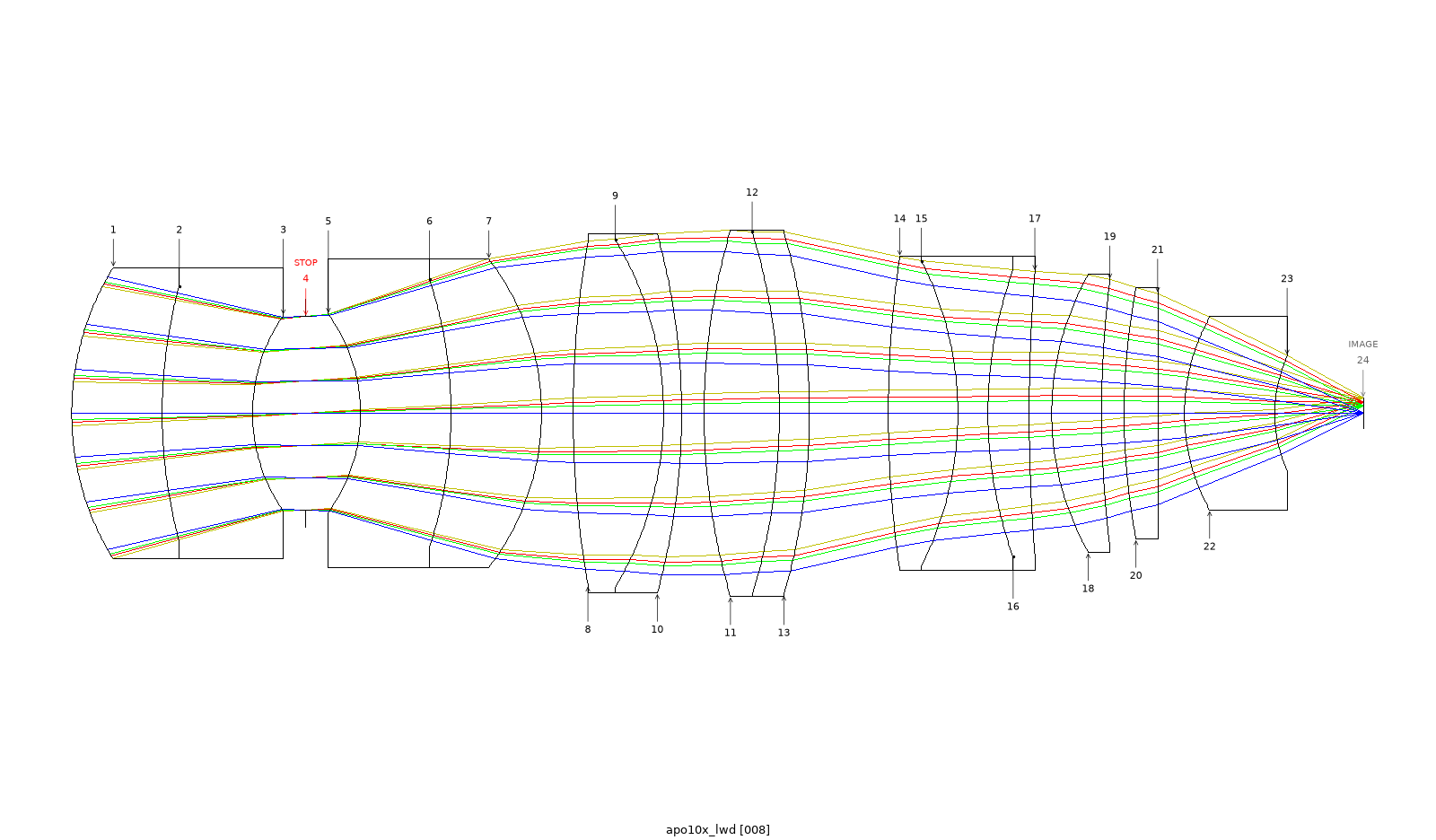
One unattended run: a 60× objective reworked into a 10× / NA 0.45 apochromat, polychromatic Strehl ≥ 0.935 at
every field point. How it was done and measured.
It exposes OpticStudio operations as typed MCP tools: loading designs, editing lens
data, running analyses, optimization, and tolerancing, driven through the ZOS-API so
the agent doesn't have to write raw API code. Alongside the tools is a reference
layer the agent can query — operand and glass lookups, and full-text search over the
OpticStudio manual.
What's in it
- Tools (
optivibe-harness) — more than 80 typed tools that drive OpticStudio over
the ZOS-API. Each returns a uniform result envelope rather than raising, so the
agent checks a read-back value instead of assuming a call succeeded. Beyond
spherical surfaces it authors aspheres, coordinate breaks, fold mirrors,
diffraction gratings, and gradient-index media. - Reference layer (
optivibe-reference) — operand and glass lookups plus manual
search, to help ground the agent's choices. Engine-free and license-free; its data
is built locally (see Build the reference data).
The project ships code only. No vendor data (glass catalog, manual text, operand
descriptions) is included — you generate it from your own licensed OpticStudio
install.
Demos
Each demo ships its brief, the agent's stage log, the starting lens and the result lens, with a
script that re-measures them: see demos/.
An agent reworks a 60× objective into a 10× / NA 0.45 apochromat, unattended
One run with no human in the loop produced a 10× / NA 0.45 objective with a polychromatic Strehl ratio of 0.935 or
better at all four field points, measured afterwards by a separate script.
A local model does the same job with OptiVibe's skills and MCP server
Qwen3.8-Flash-Next on a local server, given a brief tuned for this task, met the same targets with a polychromatic
Strehl of 0.834 or better at all four field points. The page says where it trails Opus.
An agent refines a 20× zoom, and the promotion gate holds it back
One run more than halved the blur at the zoom's worst position, missed its distortion target, and the server refused
to promote the result over two thin filter plates. The headline figures reproduced on a re-read of the saved file.
Does the agent design a better lens when it can see the drawing?
The same lens task, run with no human in the loop until each arm had three finished lenses: every run that used the layout
review produced a shorter lens than every run that worked from numbers alone (70–100 mm
against 140–221 mm), and every vision lens held an on-axis Strehl ratio of 0.93 or better at
all four wavelengths.
Prerequisites
- Windows. OpticStudio and the ZOS-API .NET surface are Windows-only.
- Zemax OpticStudio, licensed for the ZOS-API. Developed against
2025 R1 (25.1.0, Premium); other versions are untested. Access is gated at
first engine open onIsValidLicenseForAPI. - Python 3.11+.
- .NET Framework — used automatically. The bootstrap sets
PYTHONNET_RUNTIME=netfxand locates your install directory (via env override,
registry, or a Program Files scan). No manual setup.
Install
Clone the repository, then run one command from its root:
powershell -ExecutionPolicy Bypass -File install.ps1
It creates a virtual environment in .venv, installs both packages, builds the reference
data from your OpticStudio install, runs the doctor, and prints the command that registers
the server with Claude Code. It opens no OpticStudio session. Options:
-Python <path>: the Python 3.11+ to build the environment from, when thepythonon
PATH is older;-Probe: also run the two operand probes, which open OpticStudio and need the ZOS-API
licence (see Build the reference data);-Register: run theclaude mcp addcommand for you.
The script only runs the steps below, which you can also do by hand.
Manual install
From packages/optivibe-harness/:
pip install -e ../optivibe-reference   # reference layer first
pip install -e .                        # then the harness
Install the reference package first — the harness loads it in-process, and without
it the reference and lookup tools won't be available.
The [manual] extra (PyMuPDF) reads your OpticStudio manual PDF. It is needed for
both manual search and the operand/tolerance description enrichment (the
build extracts verbatim descriptions from the PDF). Without it, the operand and
tolerance catalogs build synonyms-only (grounding still works — every entry is
searchable by its synonyms — but carries no manual descriptions). To get the full
enriched build, install it:
pip install -e "../optivibe-reference[manual]"
A per-package environment.yml (Python 3.11) is provided if you prefer conda.
Then check the install:
python -m optivibe_doctor
It checks the interpreter, the two packages, their dependencies, the reference data and your
OpticStudio install directory, and prints one line per check with a remedy for anything that is
wrong. It opens no OpticStudio session unless you ask: --engine also opens one and proves the
ZOS-API licence, and --boot starts the real server once. On a fresh install the reference-data
checks read WARN until you build the reference data, and the
exit code is 1 while any check warns.
Register with Claude Code
claude mcp add optivibe -- /path/to/python -m optivibe_harness
/path/to/python is the interpreter of the environment you installed into — pointing it at
a different Python is a common cause of silent failures. You can find it with:
python -c "import sys; print(sys.executable)"
The equivalent JSON configuration:
{ "command": "/path/to/python", "args": ["-m", "optivibe_harness"] }
Build the reference data
The reference layer's data is built locally from your own licensed install; nothing
vendor-derived is committed. Run it from the repository root:
python packages/optivibe-reference/scripts/build_vendor_data.py
This reads the glass catalog from your .agf files (ZEMAX_GLASSCAT) and, if you
point it at the manual PDF (OPTIVIBE_MANUAL_PDF), indexes it for search.
The operand and tolerance catalogs are built from a live probe of your install's
ZOS-API enum surface. Run the two probes once first (each boots a headless
OpticStudio session, reads the operand/tolerance surface, and reaps it):
python packages/optivibe-reference/scripts/probe_operands.py
python packages/optivibe-reference/scripts/probe_tolerances.py
If an input is missing the corresponding step is skipped: that tool (glass or
manual search, or operand/tolerance lookup) returns a typed "unavailable" result
and the rest of the server keeps working. Details and the data-source ledger are
in PROVENANCE.md.
Running it
OpticStudio is not opened at startup — the engine is launched on the first tool call
that touches a design, and it works with one design at a time. The reference and
lookup tools work with no engine running — so install, registration, the reference
build, and every lookup succeed regardless of license tier; the ZOS-API license is
checked only when the engine opens.
A note on trust: tools return a result envelope and don't raise on failure, so a call
completing is not proof it did what you intended. Check the returned value or the
optimizer's verdict rather than the absence of an error.
Skills
The repository includes a few Claude Code skills for common tasks:
| Skill | For |
|---|---|
design-review |
Assess a design against a spec |
design-compare |
Compare designs side by side |
design-vision-review |
Observe a rendered layout and report what lens data does not show (advisory) |
design-aberration-review |
Read the ray fan and field curvature / distortion plots and report how the aberrations are balanced (advisory) |
optimize-loop |
Run optimization with monitoring |
bench-catalog |
Benchmark and rank a folder of lens designs against a target spec or each other |
zos-api-debug |
Troubleshoot OpticStudio connection / license errors |
Status
Experimental, early-stage and provided as-is; expect rough edges. It has been developed
and exercised against a single OpticStudio version (2025 R1) on Windows; behavior on
other versions is unverified. Interfaces and tool coverage may change.
Running another OpticStudio version or licence tier? Please
open an issue with the output of python -m optivibe_doctor --engine,
whether it works or not. A report that it works on your version is as useful as a bug.
Contributing & contact
Bug reports, questions, and pull requests are welcome via
GitHub Issues and pull requests; see CONTRIBUTING.md.
Please don't include any vendor-derived data (glass catalogs, manual text, operand
descriptions) in issues or PRs — see PROVENANCE.md.
Licensing & provenance
optivibe-mcp is licensed under the Apache License 2.0 — see LICENSE
and NOTICE.
It is code-only and drives your own licensed OpticStudio install at runtime; no
vendor data or SDK files are redistributed. The reference data you build locally
stays local (it is gitignored). optivibe-mcp is an independent project and is not
affiliated with or endorsed by Ansys/Zemax. See PROVENANCE.md for
the data-source and license ledger.
Reviews (0)
Sign in to leave a review.
Leave a reviewNo results found