clarilayer
Health Pass
- License — License: NOASSERTION
- Description — Repository has a description
- Active repo — Last push 1 days ago
- Community trust — 124 GitHub stars
Code Fail
- process.env — Environment variable access in src/commands/init.ts
- spawnSync — Synchronous process spawning in src/lib/agents.ts
- network request — Outbound network request in src/lib/validate.ts
Permissions Pass
- Permissions — No dangerous permissions requested
No AI report is available for this listing yet.
Stop re-explaining your data to your AI every session. The individual-analyst context layer, delivered over MCP (Claude Code / Cursor / Codex).

ClariLayer
Stop re-explaining your data to your AI every session.
The individual-analyst context layer, delivered over MCP.
Connect it to Claude Code, Cursor, or Codex — your agent stops making the same data mistakes.
Website · Docs · Get started (free) · Use cases



ClariLayer is an individual-analyst context layer, delivered over MCP. Connect it to Claude Code, Cursor, or Codex and it bootstraps your real working context from the SQL and dbt you already have, reconciles your definitions against your warehouse, and remembers your corrections — so your agent stops re-explaining your data and stops making the same mistakes every session.
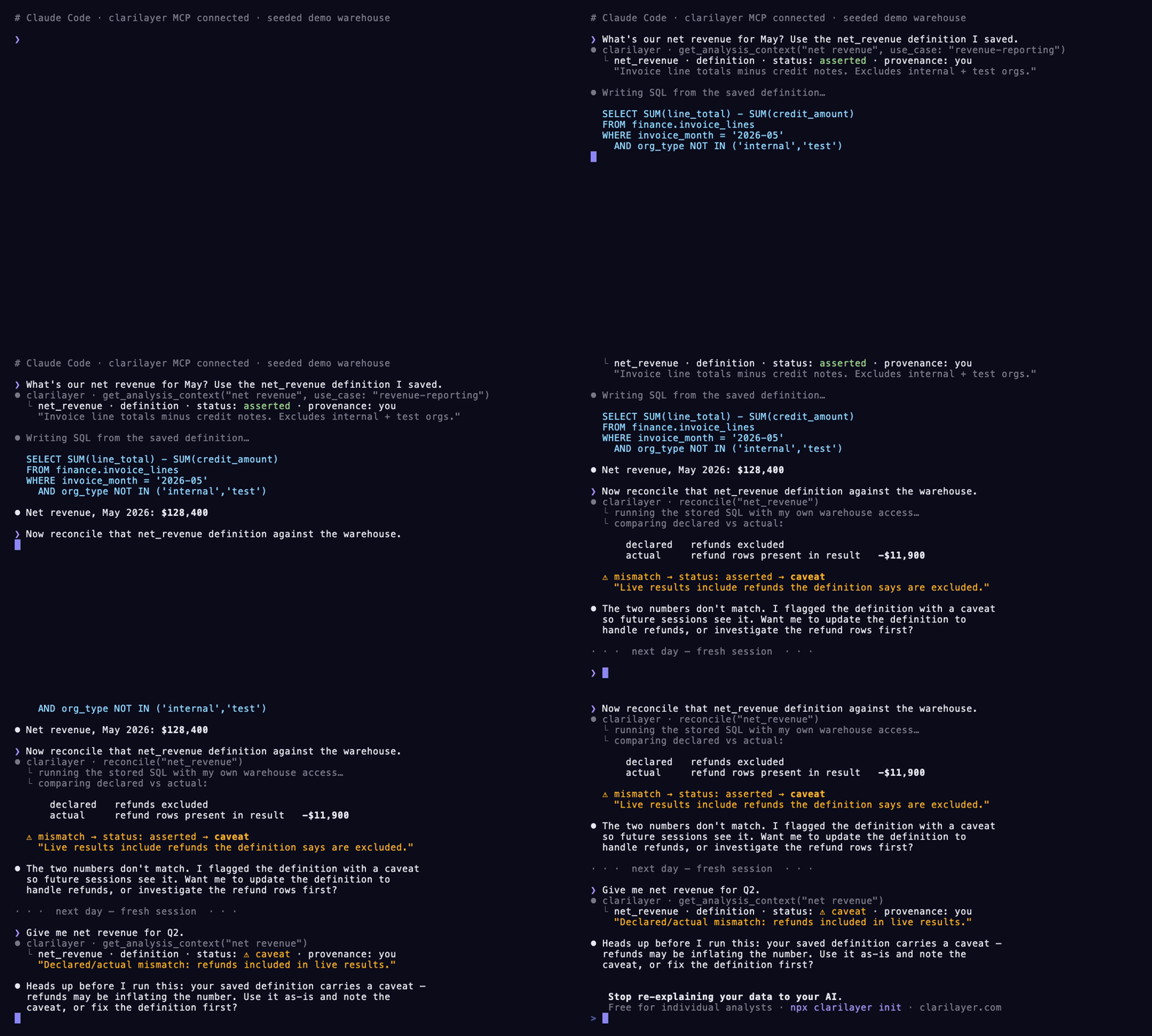
A seeded demo warehouse: your agent recalls a saved definition, reconciles it against real results, and the mismatch is flagged as a caveat that's waiting next session. Statuses are asserted / caveat — never "verified".
The problem
Every new session, your AI coding agent starts from zero about your data. So it makes the same mistakes — queries the wrong table, picks the wrong join, counts refunds in revenue, uses a churn definition you deprecated months ago. You correct it. Next session, it forgets, and you correct it again.
A hand-written CLAUDE.md of definitions helps a little — but it has the same trust problem as the original numbers: it's just asserted text. Nobody checked it against your warehouse.
What ClariLayer does
It gives your agent a durable, reconciled memory of your data context — and it lives inside the agent you already use, over MCP. Four verbs, all live:
| Verb | What it does |
|---|---|
| recall | Before writing SQL or defining a metric, your agent pulls the most relevant saved context — each with its provenance and status. Read-only, in-flow. |
| remember | Saves one durable fact — a definition, schema note, reusable query, assumption, caveat, or decision — so it survives across sessions. |
| bootstrap | Bulk-imports context from artifacts you already have, across four source kinds: a SQL SELECT (deterministically structured), a data dictionary / codebook (structured into one schema-note per variable), dbt models, and CLAUDE.md / freeform notes. No cold empty store. |
| reconcile | Grounds a saved definition against your real warehouse result. Your agent runs the SQL with its own access and reports back, so a declared-vs-actual mismatch surfaces as a caveat. |
The context you build compounds across sessions and is portable across Claude Code, Cursor, and Codex.
These four verbs are the in-flow core loop. The full contract today is 17 MCP tools at capability v26 (the four above plus propose / propose_batch, the entry and reasoning lifecycle, supersede, capabilities, and a health check). The canonical, live list is always discoverable by your client at connect — via the initialize response or a capabilities call — so you never have to trust a doc over the wire. See CAPABILITIES.md for what each recent capability bump added.
Install
Fastest — one command. Auto-detects Claude Code, Cursor, and Codex, writes the right config, and offers to add the standing-orders block to your CLAUDE.md:
npx clarilayer init
You'll need a free context key — sign up at clarilayer.com, then open Connect your AI to mint one. The CLI prompts for it and validates it. Full options: CLI.md.
Prefer to wire it up by hand?Replace cl_YOUR_CONTEXT_KEY with your key.
Claude Code — run in your terminal:
claude mcp add --transport http clarilayer https://clarilayer.com/api/mcp/mcp --header "Authorization: Bearer cl_YOUR_CONTEXT_KEY"
Cursor — add to ~/.cursor/mcp.json:
{
  "mcpServers": {
    "clarilayer": {
      "url": "https://clarilayer.com/api/mcp/mcp",
      "headers": { "Authorization": "Bearer cl_YOUR_CONTEXT_KEY" }
    }
  }
}
Codex — add to ~/.codex/config.toml. Recent Codex connects to the URL directly, no Node/npx needed (same as Claude Code and Cursor):
[mcp_servers.clarilayer]
url = "https://clarilayer.com/api/mcp/mcp"
http_headers = { "Authorization" = "Bearer cl_YOUR_CONTEXT_KEY" }
Only on older Codex without direct-HTTP support, bridge it via mcp-remote instead — this route requires Node.js (npx):
[mcp_servers.clarilayer]
command = "npx"
args = ["-y", "mcp-remote", "https://clarilayer.com/api/mcp/mcp", "--header", "Authorization: Bearer cl_YOUR_CONTEXT_KEY"]
See QUICKSTART.md for the full walkthrough and troubleshooting.
Then tell your agent to actually use it
Paste this into your project's CLAUDE.md (or AGENTS.md) so your agent reaches for ClariLayer proactively instead of waiting to be asked. The full file is in examples/CLAUDE.md:
## ClariLayer — your data context layer (use it proactively)

ClariLayer is connected over MCP and holds this project's durable data context: definitions, schema notes, reusable SQL, assumptions, caveats, and decisions. Use it WITHOUT waiting to be asked.

- Recall first: before writing SQL, defining or computing a metric, or answering a question about this data, call `get_analysis_context` (pass a `use_case`). Build on what is already known instead of re-deriving it.
- Write back as you learn: when you establish a durable fact — a definition, schema note, reusable query (attach the SELECT as `sql`), assumption, caveat, or decision — save it with `remember`. Use `propose` for suggestions (they go to the human's review inbox).
- Reconcile on drift: if a definition's SQL changed or staleness is flagged, call `reconcile` to check it against the warehouse.
- Stay honest: treat status as `asserted`/`caveat`, never `verified`.
Propose before you save, and harvest a working session
Not every fact should write straight to your context. Two verbs put a human in the loop:
- propose stages one suggested entry in your Context Inbox. It stays pending until you accept it — it is never auto-saved and never recalled while it sits there.
- propose_batch is the bulk form: up to ~25 candidate entries in a single call, all landing in the same inbox for review.
Conversation harvest builds on propose_batch. When you explicitly ask, your agent distills the durable facts from a working conversation — the definitions, gotchas, and decisions you settled during the session — into a handful of candidates and stages them for your review. The guardrails are deliberate:
- Explicit request only — harvesting never runs in the background or ambiently; you have to ask for it.
- You approve each candidate — nothing enters your context until you accept it from the inbox.
- Your transcript is never sent to ClariLayer — only the distilled candidate facts cross the boundary, not the conversation itself.
- Harvested candidates carry provenance
agent(they're the agent's suggestion, not your authorship) and remainasserted/caveatonce accepted — never "verified".
propose, propose_batch, and harvest are all on the free single-player tier, alongside recall, remember, bootstrap, and reconcile.
Tidy the reasoning on an entry — reversibly
Caveats and assumptions attached to an entry have their own lifecycle, so you can quietly retire a note without losing the history:
- archive_reasoning reversibly hides an attached caveat/assumption — it stops being recalled but is kept as history.
- restore_reasoning brings an archived one back.
- forget_reasoning deletes one permanently.
(Entries themselves have the matching archive / restore / forget.)
What makes it different from a plain CLAUDE.md
reconcile. A saved definition isn't just trusted — your agent runs its SQL against your warehouse and reports the result shape back, and ClariLayer compares declared-vs-actual. A mismatch becomes a caveat so you and your agent know exactly what to trust.
On trust language — we keep it honest. Today ClariLayer's two statuses are
assertedandcaveat. A strongerverifiedstatus is not shipped yet — it's the documented fast-follow. We reconcile and flag caveats; we don't claim your context is "verified." (why)
Your data stays yours
ClariLayer never holds your warehouse credentials and never executes SQL server-side. Your agent is the connector — it runs queries with its own access and sends back result metadata plus any optional preview rows it chooses to include. ClariLayer stores the context, not your warehouse keys.
Pricing
Free for individuals — install, recall, remember, bootstrap, reconcile, propose / propose_batch, and conversation harvest are unmetered for single-player use. Team-merge, governance, and the Contract API are the secondary for teams expansion strand. See clarilayer.com/pricing.
Get started
- Sign up free →
- Open Connect your AI and mint a context key
- Paste the install command for your agent (above)
- In your next session, ask your agent to
bootstrapfrom your./sqlfolder — then watch the firstreconcile
FAQ
Is this open source?
This repo — the docs, examples, and (soon) a thin setup CLI — is MIT licensed. The ClariLayer service itself is hosted and proprietary; you connect to it with a free account. This repo is the front door, not the product source.
Where does my data go?
Your context (definitions, notes, SQL you choose to save) is stored in your ClariLayer account. Your warehouse credentials are never sent to ClariLayer, and ClariLayer never runs SQL against your warehouse — your agent does that locally. See Your data stays yours.
Which agents are supported?
Claude Code, Cursor, and Codex today — anything that speaks MCP over Streamable HTTP.
I have a team / need governance.
That's the for teams strand — ownership, approvals, the one right metric, and the Contract API. Start here.
Built for analysts who live in their AI agent. · clarilayer.com
Reviews (0)
Sign in to leave a review.
Leave a reviewNo results found