claude-monitor-browser-extension
Health Warn
- License — License: MIT
- Description — Repository has a description
- Active repo — Last push 0 days ago
- Low visibility — Only 8 GitHub stars
Code Warn
- network request — Outbound network request in extension/background.js
Permissions Pass
- Permissions — No dangerous permissions requested
No AI report is available for this listing yet.
Claude Monitor: see your Claude usage limits (session, weekly, per-model, credits) live in Chrome and Firefox, with alerts and Free plan support.
Claude Monitor





Never get cut off by a Claude usage limit again. Claude Monitor is a free, open-source browser extension that shows your Claude usage limits live: the 5-hour session, the weekly limit and per-model caps, each with a countdown to its reset, plus desktop alerts at 80% and 95%. It works on the Free plan too.
Install: Chrome Web Store · Firefox Add-ons · Website: claude-monitor.com
Manifest V3, MIT licensed, unminified: all code in this repo is exactly what runs in your browser. No account, no servers, no telemetry.
On claude.ai, and on the Free plan
Turn on the optional usage bar in Settings and your session and weekly limits sit right above claude.ai's chat box, so you see them while you type.
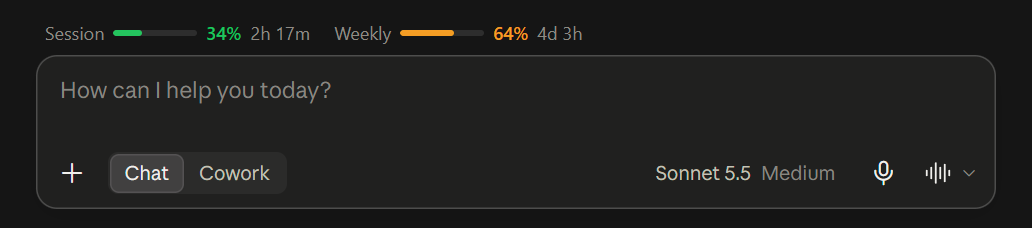
It also covers the Free plan. Since August 2026 claude.ai shows no usage limits to Free accounts, and its usage endpoint returns every field empty for them. Each chat reply still carries the 5-hour and 7-day figures, so with the bar on, the extension reads them from the reply and the popup, badge and alerts work on Free as well. More in the Free plan guide.
The bar is off by default. Turning it on requests scripting and access to claude.ai pages as optional permissions; turning it off unregisters the scripts and gives both permissions back.
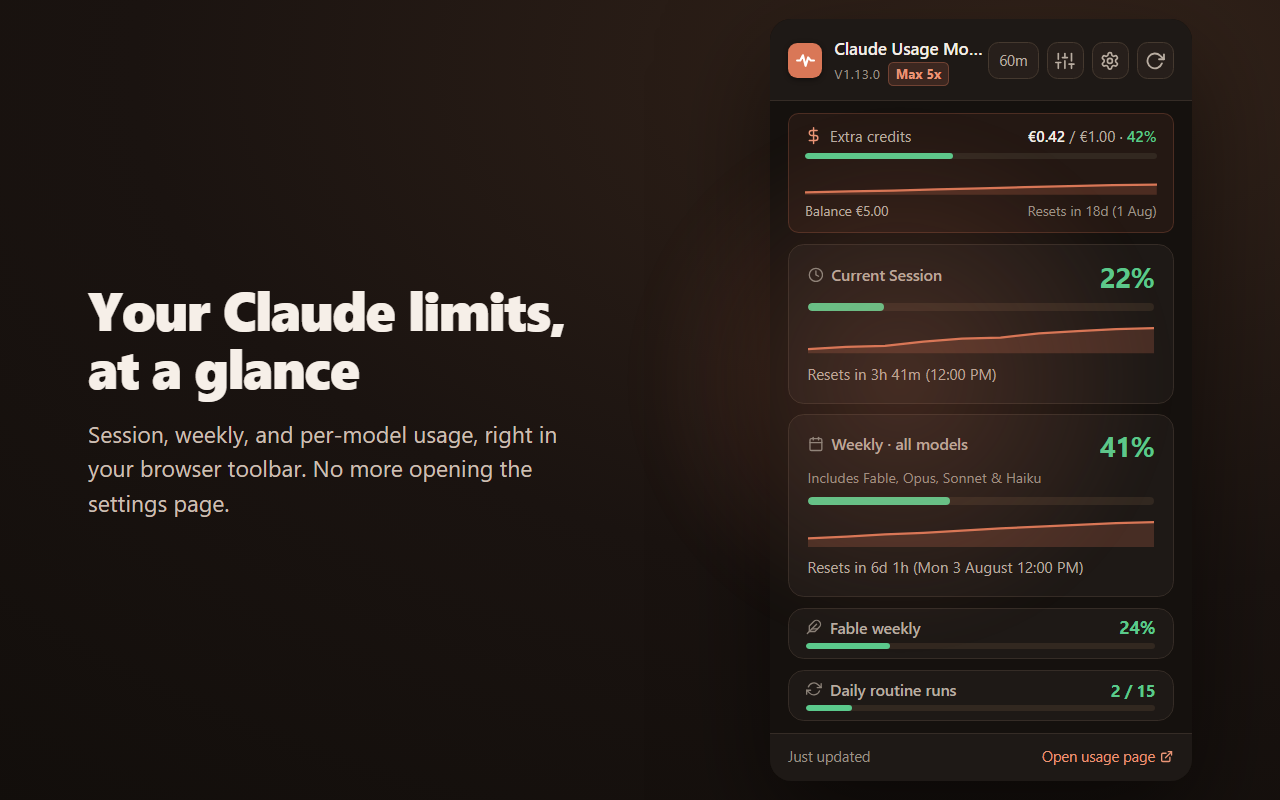
It displays your usage buckets:
- Current Session: the current 5-hour-window Claude usage percentage.
- Weekly limit: the weekly usage percentage across all models.
- Per-model weekly sub-limits: Fable, Opus, Sonnet and Claude Design weekly usage (on paid plans). Show or hide each from the Metrics section of the popup's options menu.
- Daily routine runs: included Claude Code routine runs as a
used / limitcount (on plans that include them). - Paid extra credits: spend against your monthly limit, plus your remaining prepaid balance, when your plan has them enabled.
- Your plan: a badge in the popup header shows your Claude subscription (e.g. Max 5x).
Usage history
Every successful refresh is recorded locally as one sample, so the popup can draw a trend line under each bar: 15% with four hours left stops looking the same as 15% reached in twenty minutes.
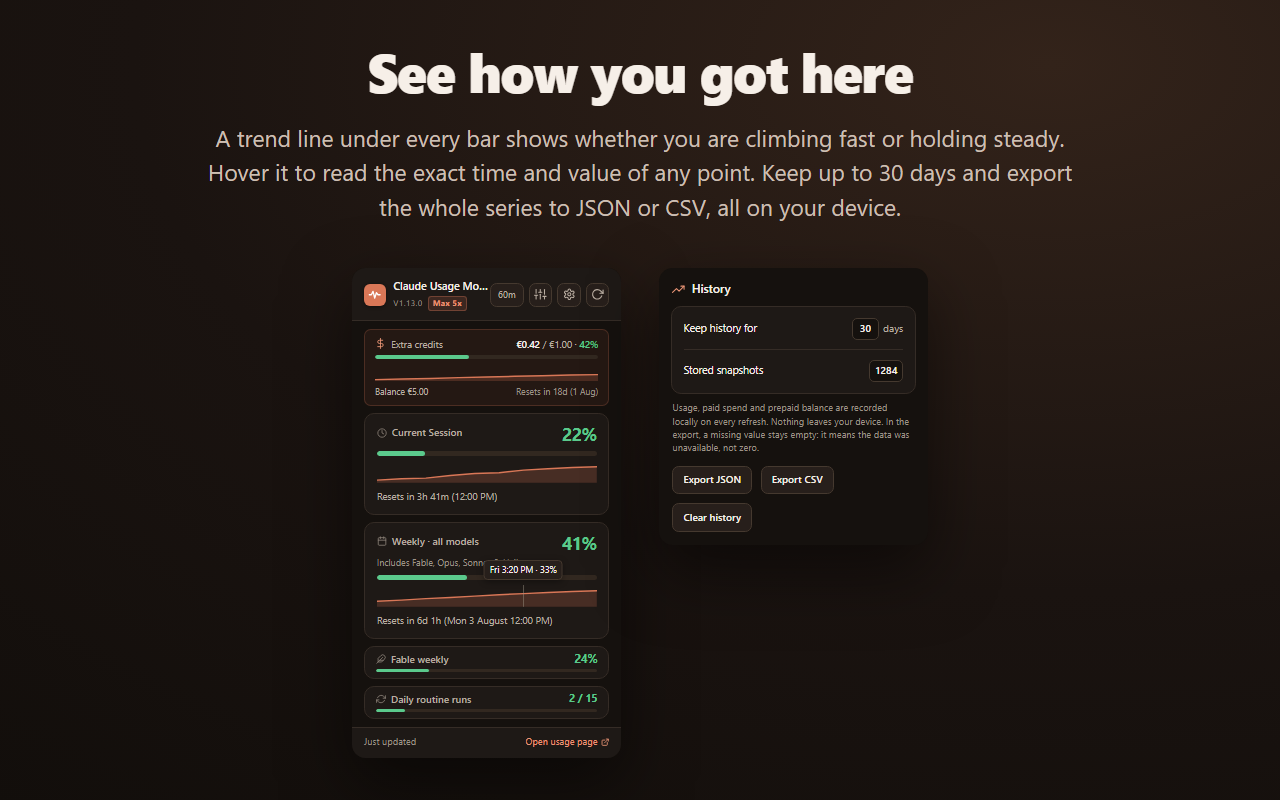
- Hover any curve to read the exact time and value of the sample under the cursor. It snaps to the nearest stored reading and never interpolates.
- The horizontal axis is the live reset window, so a curve never crosses a reset and never stretches a short history across the full width.
- Retention is configurable up to 30 days, with a one-click clear and export to JSON or CSV.
- A refresh that fails writes nothing. A gap in the series means the reading was unavailable, never that usage was zero, and the export keeps that distinction.
- Turn the curve off under Trend line in the view menu.
Notifications
Desktop alerts fire at 80% and 95% for your session, weekly and per-model caps, once per threshold per reset window. Thresholds are configurable in the settings page, and the whole feature can be turned off. The notifications permission is optional and requested at runtime, so the extension never asks for it until you enable alerts.
How it works
The extension refreshes usage through Claude.ai's internal authenticated API.
- Automatic refresh at a configurable interval: 1, 2, 5, 10 or 60 minutes.
- Manual refresh is available from the popup.
- The popup shows the extension version so you can confirm which local build is loaded.
- A badge in the header shows your Claude plan (e.g. Max 5x).
- When your claude.ai session expires, or refreshes keep failing, an inline banner says so, the badge turns gray, and the last known data stays visible, marked as stale, instead of being replaced by zeros.
- Switching claude.ai to another account clears the previous account's data instead of showing it as current.
- On the Free plan, where the usage endpoint returns nothing, the optional page script reads the
message_limitevent from each chat completion stream (5-hour and 7-day windows only; the reply text is never parsed or kept).
Features
- Toolbar badge showing the current session percentage: green under 50%, yellow 50 to 80%, red above 80%.
- Optional usage bar above the claude.ai chat box, following Claude's light or dark theme.
- Free plan support through the usage bar.
- Popup with current session and weekly usage cards.
- Per-model weekly sub-limit cards (Fable, Opus, Sonnet and Claude Design), offered on paid plans.
- Usage history with a trend line under the session, weekly and spend bars, hover readout, configurable retention and JSON/CSV export.
- Desktop notifications at 80% and 95%, with configurable thresholds.
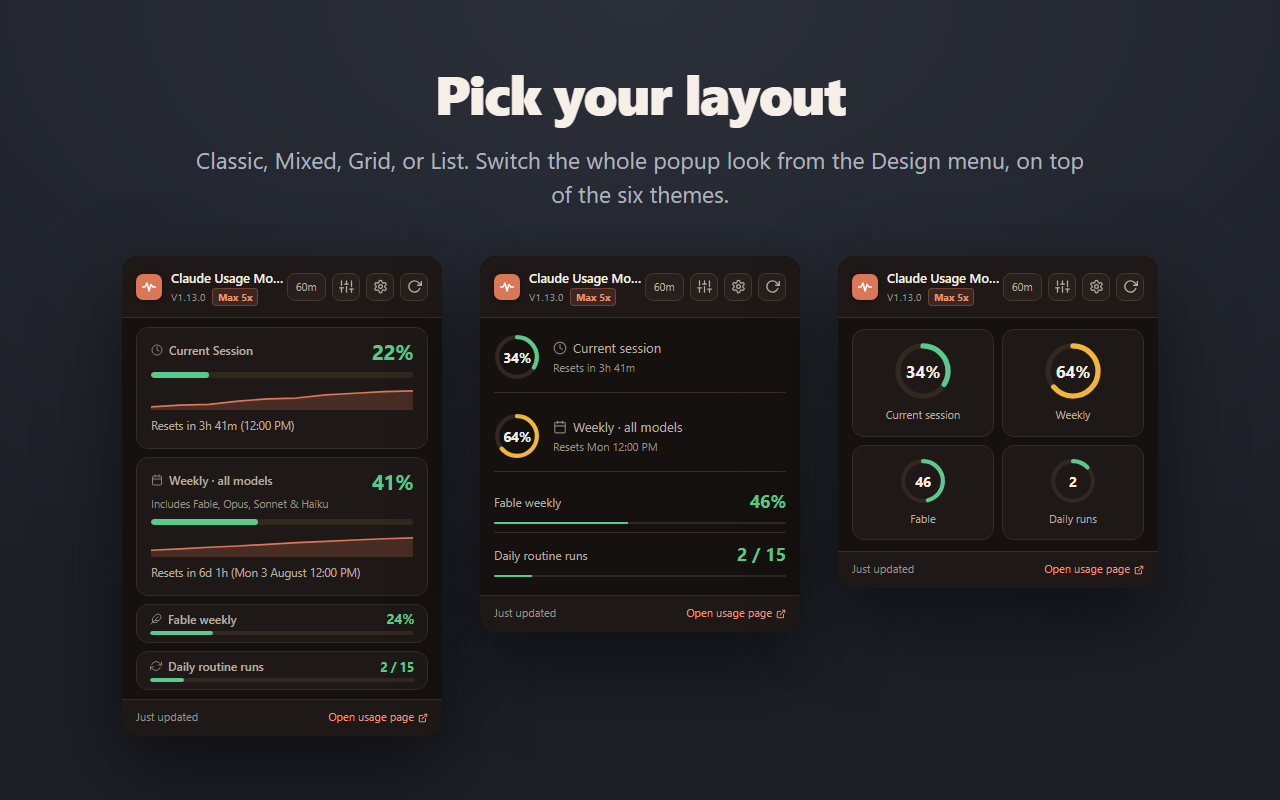
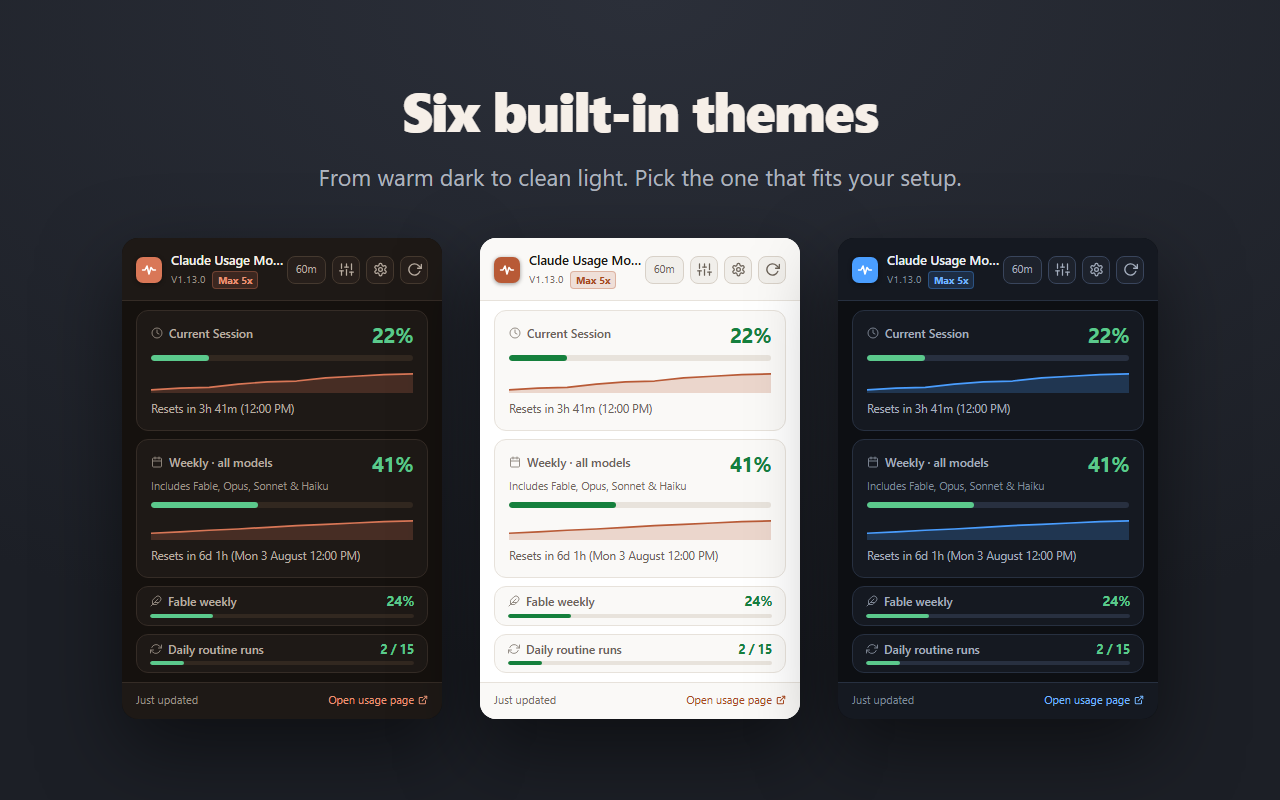
- Display options menu in the popup: a Metrics section to show/hide optional cards (per-model weekly limits, daily routine runs and extra credits, with Select all / Deselect all), a Design section for the four layouts and the trend line, and a Theme section with six color palettes; your choices are remembered.
- Daily routine-runs card (
used / limit), shown only on plans that include routine runs. - Paid extra-credits card with spend, monthly limit and prepaid balance.
- Subscription badge in the header (Max, Pro, Team, etc.).
- Reset countdowns when Claude returns reset timestamps.
- Manual refresh button.
- Quick link to
https://claude.ai/settings/usage. - Local storage caching so the last known value remains visible between refreshes.
| Four layouts: Classic, Mixed, Grid, List | Six color themes |
|---|---|
 |
 |
Browser support
- Google Chrome: Manifest V3, uses
manifest.json. - Mozilla Firefox: Manifest V3, uses
manifest.firefox.json(packaged asmanifest.jsonby the build script). - Microsoft Edge: runs the Chrome package; the Edge Add-ons listing is in review.
The codebase uses the standard chrome.* extension APIs, which Firefox supports via the WebExtensions namespace.
Run locally
Load the unpacked extension from the inner extension/ directory in this repository.
The extension files are here:
extension/manifest.jsonextension/background.jsextension/popup.html
Chrome
- Open
chrome://extensions. - Enable Developer mode.
- Click Load unpacked.
- Select the
extension/folder inside this repo. - Pin the extension if you want fast access from the toolbar.
Firefox
Firefox uses a separate manifest (manifest.firefox.json). To load it temporarily:
- In a copy of the
extension/folder, replacemanifest.jsonwith the contents ofmanifest.firefox.json(Firefox readsmanifest.json). - Open
about:debugging#/runtime/this-firefox. - Click Load Temporary Add-on....
- Select the
manifest.jsoninside that copied folder. - The add-on stays loaded until you restart Firefox.
For a permanent install, use the published add-on at https://addons.mozilla.org/firefox/addon/claude-usage-meter/.
Notes for local testing
- You must already be logged in to
https://claude.ai. - After loading the extension, open the popup and confirm the version shown there matches the current build.
- Automatic refresh should work without manually opening the usage page.
- Usage is read exclusively through Claude.ai's authenticated API in
background.js. If Claude changes that internal API, refresh may stop working until the extension is updated.
Project structure
extension/manifest.json: extension manifest and permissions.extension/background.js: automatic refresh logic, Claude API fetching, storage, usage-history sampling, threshold notifications, and badge updates.extension/popup.html: popup markup.extension/popup.css: popup styling.extension/popup.js: popup rendering, sparklines and their hover readout, manual refresh flow, and storage listeners.extension/options.htmlandextension/options.js: settings page with notification thresholds, the usage-bar toggle, history retention, export and clear.extension/page/bar.js: the optional usage bar on claude.ai (isolated world, closed shadow root, no network requests).extension/page/stream.js: the optional page-world reader for themessage_limitevent in chat completion streams (Free plan support).
Privacy
- All data is stored locally on your device via
chrome.storage.local, including the usage history: no account, no server, no sync. - No analytics, no telemetry, no third parties.
- The extension cannot read your chats, projects, files, or any other Claude.ai content. The optional usage bar reads only the usage figures attached to each reply.
- Required host permissions are scoped to specific Claude.ai API endpoints; access to claude.ai pages is optional and only granted if you turn on the bar. See SECURITY.md for the full permission breakdown.
- Full privacy policy: https://claude-monitor.com/privacy
Contributing
Bug reports and feature requests are welcome via GitHub Issues.
Pull requests are welcome. For non-trivial changes, please open an issue first to discuss the scope.
Security
The full security model, threat model, and vulnerability-reporting process are documented in SECURITY.md.
To report a vulnerability, email [email protected] instead of opening a public issue.
License
MIT © Digital Advanced Solutions
Claude Monitor (formerly Claude Usage Monitor) is an independent project and is not affiliated with Anthropic.
Reviews (0)
Sign in to leave a review.
Leave a reviewNo results found