Daemora
Health Warn
- License — License: AGPL-3.0
- Description — Repository has a description
- Active repo — Last push 0 days ago
- Low visibility — Only 5 GitHub stars
Code Fail
- rm -rf — Recursive force deletion command in config/hooks.json
- process.env — Environment variable access in config/mcp.json
Permissions Pass
- Permissions — No dangerous permissions requested
This tool is a self-hosted, autonomous AI agent platform that allows users to connect multiple LLMs and channels. It performs automated tasks such as writing code, conducting research, running scheduled cron jobs, and sending communications across platforms like Telegram and Slack.
Security Assessment
The tool poses a Medium overall security risk. It is designed to access and process highly sensitive data, including environment variables, and has the capability to execute shell commands autonomously. A critical red flag is the presence of a recursive force deletion command (`rm -rf`) within a configuration hook. While it does not request overtly dangerous permissions and lacks hardcoded secrets, the combination of autonomous code execution, deep system access, and webhook integrations requires strict network and environmental isolation. The system will also send external network requests to various third-party APIs and communication channels by default.
Quality Assessment
The project is actively maintained, with its most recent code push occurring today. It is properly licensed under AGPL-3.0, which is standard for open-source projects. However, community trust and visibility are currently very low, as indicated by only 5 GitHub stars. Because of this minimal public scrutiny, hidden vulnerabilities or bugs are much more likely to exist than in heavily adopted alternatives.
Verdict
Use with caution — isolate strictly in a sandboxed environment until the project gains wider community adoption.
Open-source AI agent - any LLM, any MCP server, any channel. Self-hosted, autonomous, multi-tenant.
Daemora
Self-hosted AI agent platform - autonomous, multi-channel, multi-model.




Deploy once on your machine. Connect your channels. Message the bot - it writes code, does research, sends emails, runs cron jobs, and reports back. You own everything.
59 built-in tools. 20 channels. 14 security layers. 7 AI providers. Multi-agent teams. Production-grade scheduling. Crew system with self-improving learning. MCP integration. All self-hosted - nothing leaves your infrastructure except the tokens you send to model APIs.
What Daemora Can Do
| Capability | Description |
|---|---|
| Code | Write, edit, run, test, and debug code across multiple files. Takes screenshots of UIs to verify output. Fixes failing tests. Ships working software. |
| Research | Search the web, read pages, analyse images, cross-reference sources, write reports. Spawns parallel sub-agents for speed. |
| Goals | Set persistent goals - the agent works toward them autonomously on schedule. No prompting needed. Runs 24/7 with isolated sessions, auto-pauses on repeated failures. |
| Watchers | Named event triggers - "when GitHub issue opens, triage and notify Telegram." Webhook-driven with pattern matching and cooldown. |
| Scheduler | Production-grade scheduling (one-shot, interval, cron expressions) with overlap prevention, retry with backoff, channel delivery, failure alerts, Morning Pulse daily briefing, and run history. |
| Communicate | Send emails, Telegram messages, Slack posts, Discord messages - autonomously. Screenshots, files, and media sent directly back to you via replyWithFile. |
| Crew | Self-contained specialist sub-agents - database queries, smart home control, SSH, notifications, calendars. Build your own crew member in 3 files. Community crew marketplace coming soon. |
| Self-Improving | After complex tasks, a background agent reviews the conversation and auto-creates reusable skills + saves user preferences. The more you use it, the better it gets. |
| Tools | Connect to any MCP server - create Notion pages, open GitHub issues, update Linear tasks, manage Shopify products, query databases. |
| Voice & Meetings | Join any meeting (Google Meet, Zoom, Teams) via phone dial-in. OpenAI Realtime STT + ElevenLabs/OpenAI TTS. Voice cloning. Outbound voice calls. Auto-transcription + meeting summaries. |
| Multi-Agent | Spawn parallel sub-agents (researcher + coder + writer working simultaneously). Create agent teams with shared task lists, dependencies, and inter-agent messaging. |
See It In Action
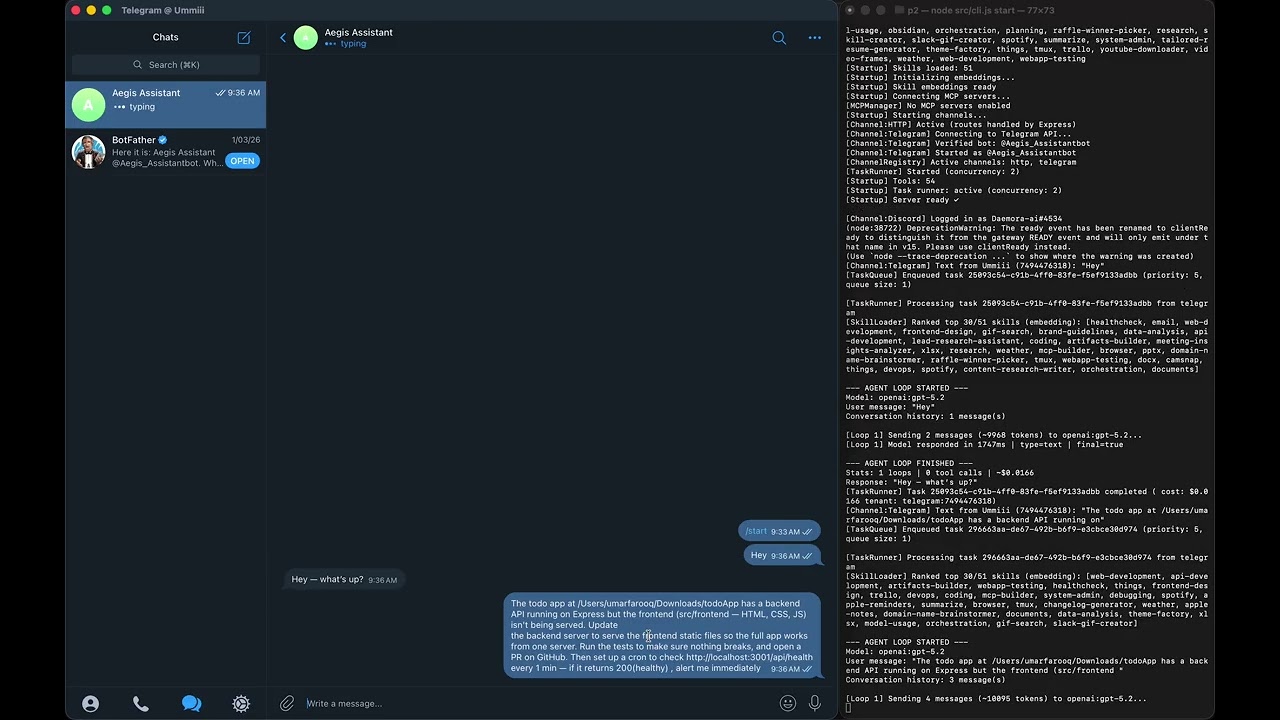
Demo 1 — GitHub PR + Local Tests + Health Monitoring
Daemora fixes a bug in a GitHub repo, opens a PR, runs the test suite
locally, and pings you every minute with a health check — autonomously.
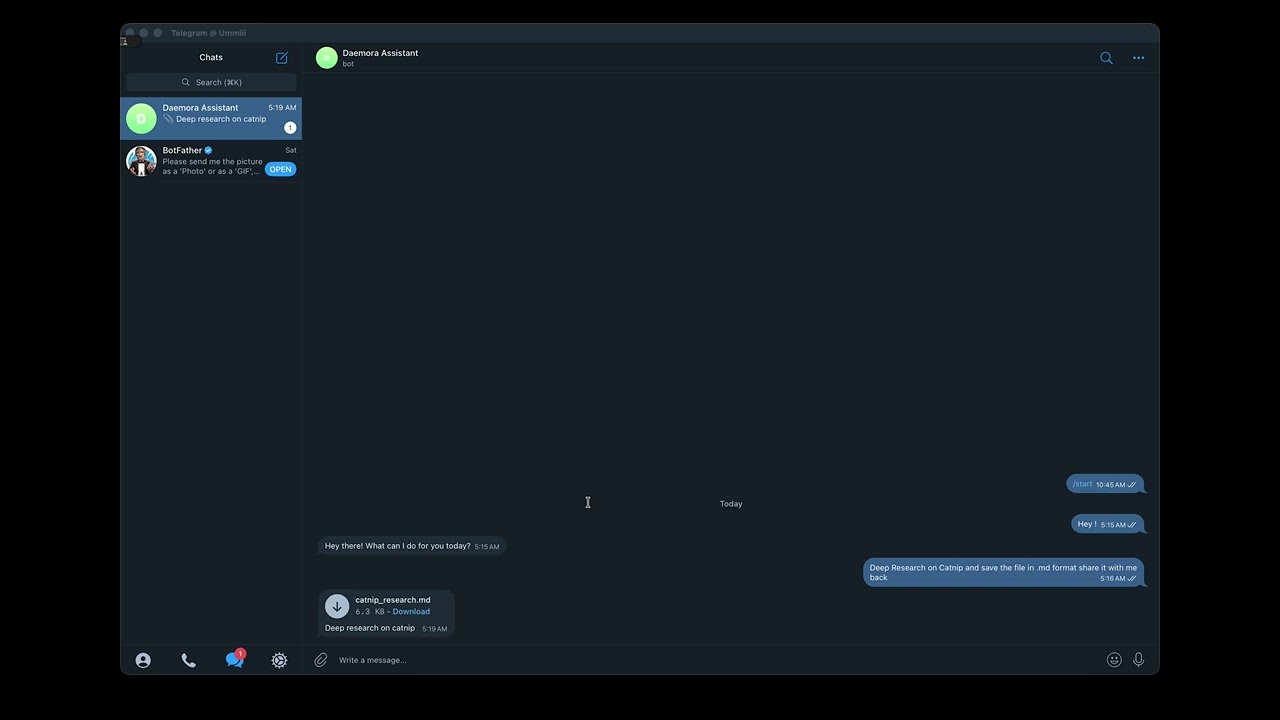
Demo 2 — Research → Save File → Telegram Delivery
Ask Daemora to research catnip. It searches the web, synthesises a report,
saves it to your machine, and sends you the file directly on Telegram.
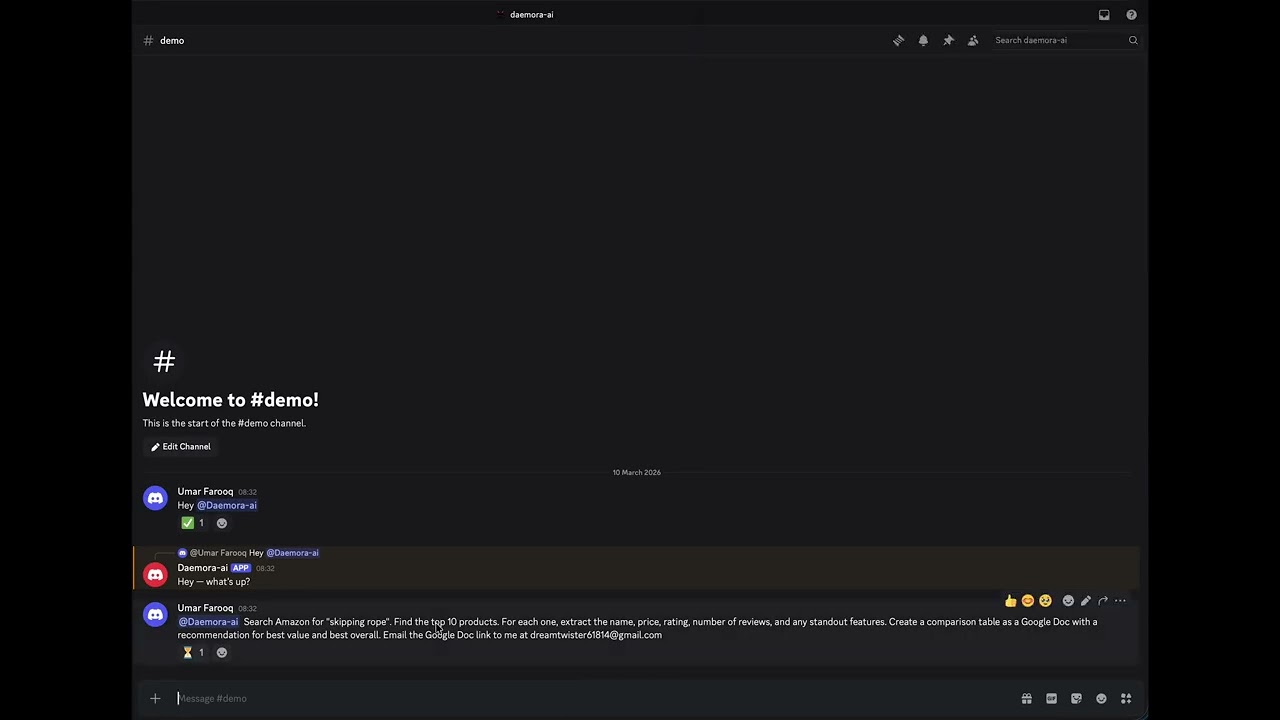
Demo 3 — Amazon Research → Google Doc → Email
"Find the top 10 skipping ropes on Amazon, analyse them, create a Google Doc
with the results, and email it to someone." One message. Fully autonomous.
Architecture
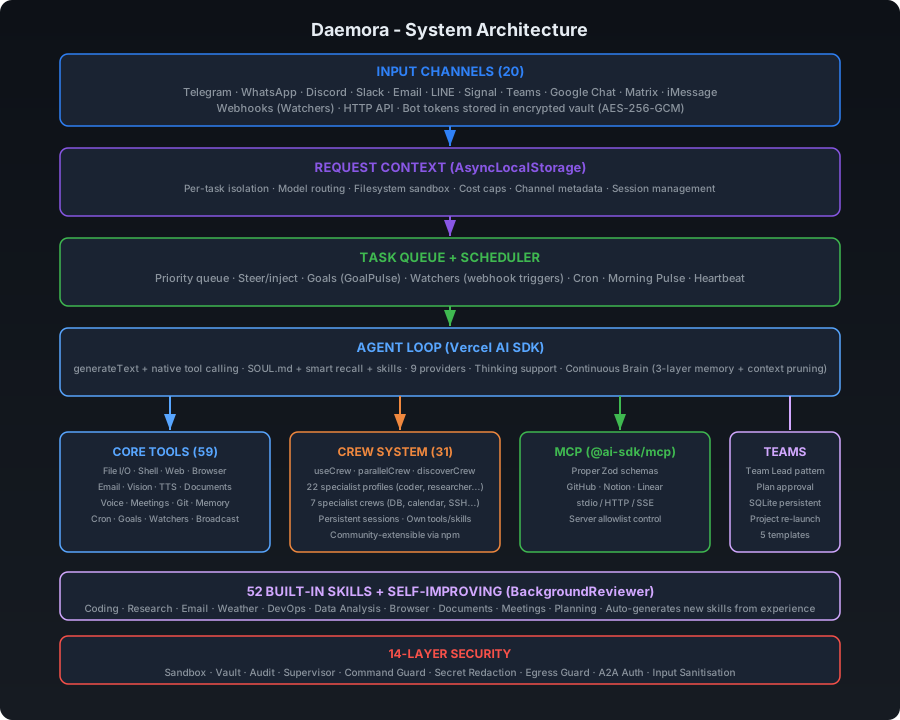
Security Architecture (14 Layers)
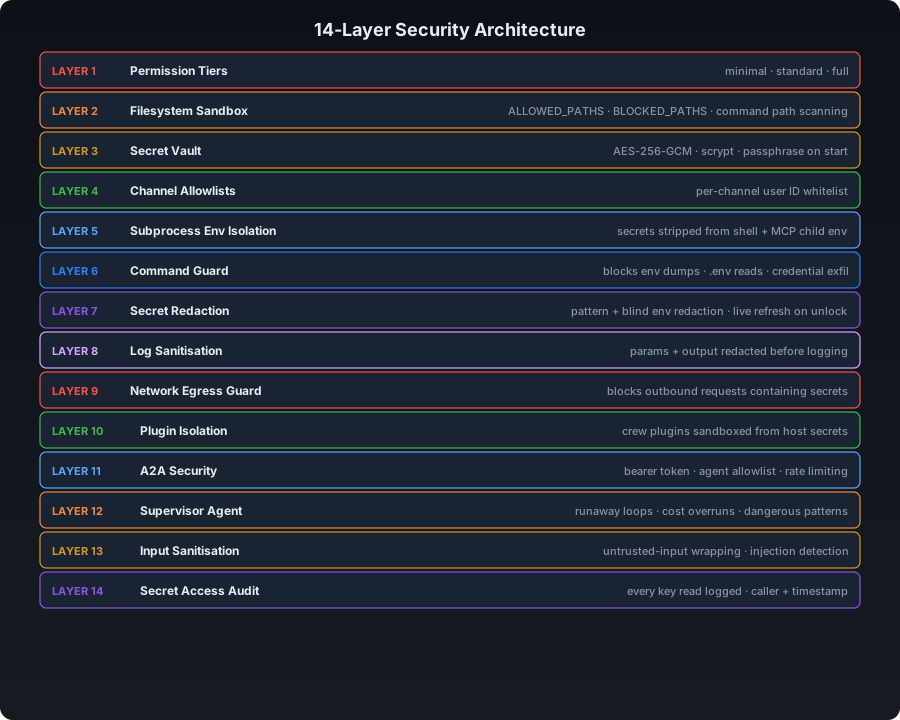
Task Lifecycle - Message to Response
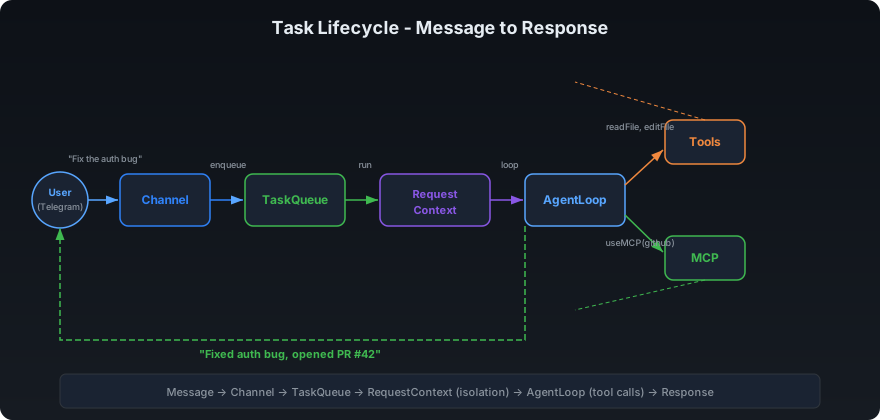
Multi-Agent - Parallel Sub-Agents + Teams
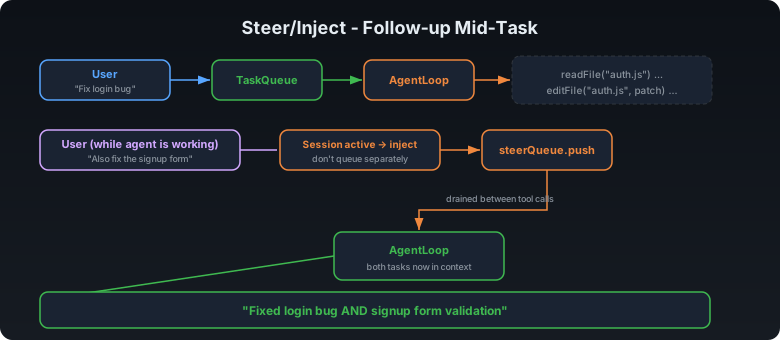
Steer/Inject - Follow-up Mid-Task
Quick Start
npm install -g daemora
daemora setup      # interactive wizard - models, channels, tools, cleanup, vault, MCP
daemora start      # start the agent
Then message your bot. That's it.
Installation
npm (recommended)
npm install -g daemora
daemora setup
daemora start
Clone from source
git clone https://github.com/CodeAndCanvasLabs/Daemora.git
cd daemora-agent
pnpm install
cp .env.example .env
# Add your API keys to .env
daemora setup
daemora start
Run as a system daemon (always on)
daemora daemon install    # Register as a system service (launchctl / systemd / Task Scheduler)
daemora daemon start      # Start in background
daemora daemon status     # Check status
daemora daemon logs       # View logs
daemora daemon stop       # Stop
Configuration
Copy .env.example to .env and fill in what you need.
AI Models
At least one provider is required:
OPENAI_API_KEY=sk-...
ANTHROPIC_API_KEY=sk-ant-...
GOOGLE_AI_API_KEY=...
XAI_API_KEY=...
DEEPSEEK_API_KEY=...
MISTRAL_API_KEY=...

# Default model (used when no model is specified)
DEFAULT_MODEL=openai:gpt-4.1-mini
7 providers, 59+ models - including:
| Provider | Models |
|---|---|
| OpenAI | gpt-5.4, gpt-5.2, gpt-5.1, gpt-5, gpt-4.1, gpt-4.1-mini, gpt-4o, o4-mini, o3, o3-mini, o1, gpt-5.3-codex, gpt-5.1-codex |
| Anthropic | claude-opus-4-6, claude-sonnet-4-6, claude-sonnet-4-5, claude-haiku-4-5 |
gemini-3.1-pro-preview, gemini-3-pro-preview, gemini-2.5-pro, gemini-2.5-flash, gemini-2.0-flash |
|
| xAI | grok-4, grok-3-beta, grok-3-mini-beta |
| DeepSeek | deepseek-chat, deepseek-reasoner |
| Mistral | mistral-large-latest, codestral-latest, mistral-small-latest |
| Ollama | llama3, llama3.1, qwen2.5-coder - local, no API key needed |
Use format provider:model-id (e.g. openai:gpt-5.2, anthropic:claude-sonnet-4-6). Supports dynamic passthrough for any model ID your provider accepts.
Task-Type Model Routing (optional)
Route different task types to the best model automatically:
CODE_MODEL=anthropic:claude-sonnet-4-6
RESEARCH_MODEL=google:gemini-2.5-flash
WRITER_MODEL=openai:gpt-4.1
ANALYST_MODEL=openai:gpt-4.1
SUB_AGENT_MODEL=openai:gpt-4.1-mini    # default model for all sub-agents
When a sub-agent is spawned with profile: "coder", it automatically uses CODE_MODEL. Sub-agents without a profile route fall back to SUB_AGENT_MODEL, then the parent's model, then DEFAULT_MODEL.
Channels (20)
Enable only what you need. Each channel supports {CHANNEL}_ALLOWLIST and {CHANNEL}_MODEL overrides.
| Channel | Required Env Vars |
|---|---|
| Telegram | TELEGRAM_BOT_TOKEN |
TWILIO_ACCOUNT_SID, TWILIO_AUTH_TOKEN |
|
| Discord | DISCORD_BOT_TOKEN |
| Slack | SLACK_BOT_TOKEN, SLACK_APP_TOKEN |
EMAIL_USER, EMAIL_PASSWORD |
|
| LINE | LINE_CHANNEL_ACCESS_TOKEN, LINE_CHANNEL_SECRET |
| Signal | SIGNAL_CLI_URL, SIGNAL_PHONE_NUMBER |
| Microsoft Teams | TEAMS_APP_ID, TEAMS_APP_PASSWORD |
| Google Chat | GOOGLE_CHAT_SERVICE_ACCOUNT |
| Matrix | MATRIX_HOMESERVER_URL, MATRIX_ACCESS_TOKEN |
| Mattermost | MATTERMOST_URL, MATTERMOST_TOKEN |
| Twitch | TWITCH_BOT_USERNAME, TWITCH_OAUTH_TOKEN, TWITCH_CHANNEL |
| IRC | IRC_SERVER, IRC_NICK |
| iMessage | IMESSAGE_ENABLED=true (macOS only) |
| Feishu | FEISHU_APP_ID, FEISHU_APP_SECRET |
| Zalo | ZALO_APP_ID, ZALO_ACCESS_TOKEN |
| Nextcloud | NEXTCLOUD_URL, NEXTCLOUD_USER, NEXTCLOUD_PASSWORD |
| BlueBubbles | BLUEBUBBLES_URL, BLUEBUBBLES_PASSWORD |
| Nostr | NOSTR_PRIVATE_KEY |
daemora channels             # List all channels + setup status
daemora channels add         # Configure a new channel interactively
daemora channels add discord # Configure a specific channel directly
Cost Limits
MAX_COST_PER_TASK=0.50     # Max $ per task (agent stops mid-task if exceeded)
MAX_DAILY_COST=10.00       # Max $ per day across all tasks
Security
PERMISSION_TIER=standard           # minimal | standard | full
ALLOWED_PATHS=/home/user/work      # Sandbox: restrict file access to these directories
BLOCKED_PATHS=/home/user/.secrets  # Always block these, even inside allowed paths
RESTRICT_COMMANDS=true             # Block shell commands referencing paths outside sandbox
MCP Servers
MCP (Model Context Protocol) lets Daemora control external tools. Each connected server gets a specialist sub-agent with focused context.
# Add a server (interactive)
daemora mcp add

# Add a server (command line)
daemora mcp add github npx -y @modelcontextprotocol/server-github
daemora mcp add notion npx -y @notionhq/notion-mcp-server
daemora mcp add myserver https://api.example.com/mcp          # HTTP
daemora mcp add myserver https://api.example.com/sse --sse    # SSE

# Manage servers
daemora mcp list              # Show all configured servers
daemora mcp enable github     # Enable a server
daemora mcp disable github    # Disable without removing
daemora mcp reload github     # Reconnect after config changes
daemora mcp remove github     # Remove permanently
Popular MCP servers:
| Service | Install Command |
|---|---|
| GitHub | npx -y @modelcontextprotocol/server-github |
| Notion | npx -y @notionhq/notion-mcp-server |
| Linear | npx -y @linear/mcp-server |
| Slack | npx -y @modelcontextprotocol/server-slack |
| PostgreSQL | npx -y @modelcontextprotocol/server-postgres |
| Filesystem | npx -y @modelcontextprotocol/server-filesystem |
| Brave Search | npx -y @anthropic-ai/brave-search-mcp-server |
| Puppeteer | npx -y @modelcontextprotocol/server-puppeteer |
Crew System
Crew members are self-contained specialist sub-agents. Each has its own tools, profile, skills, and persistent session. The main agent delegates via useCrew(crewId, task).
Built-in Crew Members
| Crew Member | Tools | Description |
|---|---|---|
| google-services | calendar, contacts, googlePlaces | Google Calendar, Contacts, Places |
| database-connector | database | PostgreSQL, MySQL, SQLite queries |
| smart-home | philipsHue, sonos | Philips Hue lights, Sonos speakers |
| ssh-remote | sshTool | SSH exec, SCP file transfer |
| notifications | notification | Desktop, ntfy, Pushover push notifications |
| imessage | iMessageTool | Send/read iMessages (macOS) |
| system-monitor | systemInfo | CPU, memory, disk, processes, network |
Install from npm
daemora crew install daemora-crew-weather
daemora crew list
daemora crew remove weather
Build Your Own
See crew/README.md for the full guide. Three files:
crew/my-crew/
├── plugin.json       # manifest (id, name, description, profile, skills)
├── index.js          # register tools via api.registerTool()
└── tools/
    └── myTool.js     # tool implementation
CLI
daemora crew list         # Show all crew members + status
daemora crew install <pkg> # Install from npm
daemora crew remove <id>   # Remove a crew member
daemora crew reload        # Hot-reload all crew members
Built-in Tools
57 tools the agent uses autonomously:
| Category | Tools |
|---|---|
| Files | readFile, writeFile, editFile, listDirectory, applyPatch |
| Search | glob, grep |
| Shell | executeCommand (foreground + background) |
| Web | webFetch, webSearch, browserAction (navigate, click, fill, screenshot) |
| Vision | imageAnalysis, screenCapture |
| Communication | sendEmail, messageChannel, sendFile, replyWithFile, replyToUser, makeVoiceCall, meetingAction, transcribeAudio, textToSpeech |
| Documents | createDocument (Markdown, PDF, DOCX), readPDF |
| Memory | readMemory, writeMemory, searchMemory, pruneMemory, readDailyLog, writeDailyLog, listMemoryCategories |
| Delegation | useCrew, parallelCrew, discoverCrew, teamTask, useMCP, manageAgents |
| MCP + Crew | useMCP, manageMCP, useCrew |
| Scheduling | cron, goal, watcher, broadcast (Fleet Command) |
| Tracking | projectTracker, taskManager |
| Dev Tools | gitTool (status, diff, commit, branch, log, stash) |
| Media | generateImage (DALL-E / Stable Diffusion) |
| System | clipboard |
| Admin | reload (config, models, vault, caches) |
Agent Teams
Teams enable coordinated multi-agent collaboration with shared task lists, dependency tracking, and inter-agent messaging. Use teams when agents need to coordinate - use parallelCrew when they don't.
Team Lifecycle
createTeam("feature-sprint")
  → addTeammate({ profile: "coder", instructions: "..." })
  → addTeammate({ profile: "researcher" })
  → addTeammate({ profile: "writer" })
  → addTask({ title: "Research API options", ... })
  → addTask({ title: "Implement chosen API", blockedBy: ["task-1"] })
  → addTask({ title: "Write docs", blockedBy: ["task-2"] })
  → spawnAll()
  → teammates claim tasks, work, complete, message each other
  → disbandTeam()
Capabilities
| Feature | Description |
|---|---|
| Shared Task List | addTask with blockedBy dependency tracking. Teammates claim → complete or fail tasks. |
| Inter-Agent Messaging | sendMessage(to, message) for direct, broadcast(message) for all. Teammates read mail between tool calls. |
| Dependency Tracking | Tasks with unmet blockedBy deps are not claimable. Automatically unblocked when deps complete. |
| Status Monitoring | getTeamStatus returns full state - teammates, tasks, messages. |
When to Use
| Scenario | Use |
|---|---|
| 5 independent web searches | parallelCrew - no coordination needed |
| Research → implement → document pipeline | Team - tasks depend on each other |
| Coder + reviewer need to discuss approach | Team - inter-agent messaging |
| Translate a doc into 3 languages | parallelCrew - independent, no coordination |
Limits
- Max 5 teams active
- Max 10 teammates per team
- Max 7 concurrent sub-agents
- Max nesting depth: 3
Skills
Skills inject behaviour instructions when a task matches certain keywords. Create a .md file in skills/ with a YAML frontmatter:
---
name: deploy
description: Handle deployment tasks for web apps and APIs
triggers: deploy, release, ship, production, go live
---

# Deployment Checklist

Always follow this order when deploying:

1. Run the full test suite - never deploy broken code
2. Check for .env differences between dev and prod
3. Build the production bundle
4. Use zero-downtime deployment if possible (blue/green, rolling)
5. Verify the deployment is healthy before reporting done
6. Notify the user with the live URL
52 built-in skills cover: coding, research, email, weather, Spotify, Obsidian, Apple Notes, Apple Reminders, Things, Trello, Tmux, PDF, image generation, video frames, health checks, GIF search, webcam capture, documents (PDF/DOCX/XLSX/PPTX), data analysis, DevOps, API development, browser automation, meeting attendance, planning, orchestration, and more.
Security
# Run a full security audit
daemora doctor
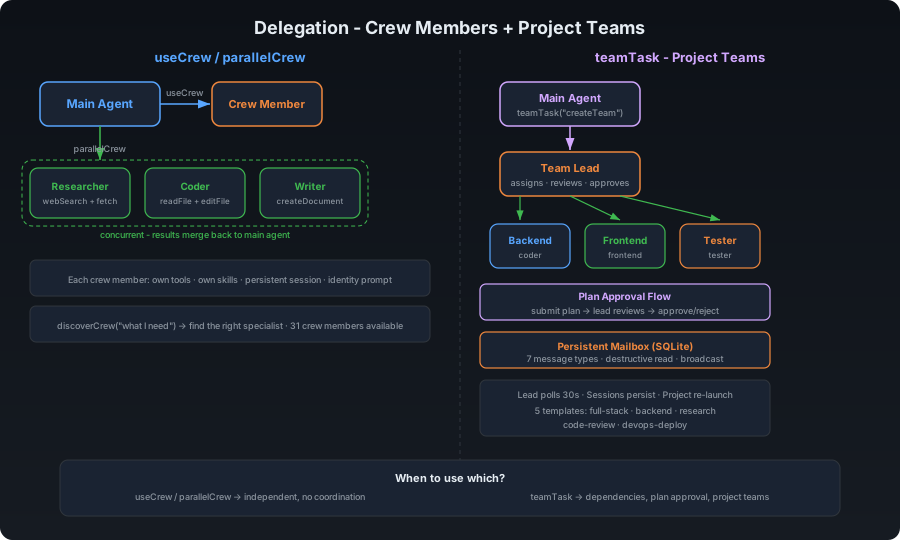
| Layer | Feature | Description |
|---|---|---|
| 1 | Permission tiers | minimal / standard / full - controls which tools the agent can call |
| 2 | Filesystem sandbox | Directory scoping via ALLOWED_PATHS, hardcoded blocks for .ssh, .env, .aws. All 19 file-touching tools enforce FilesystemGuard |
| 3 | Secret vault | AES-256-GCM encrypted secrets in SQLite, scrypt key derivation, passphrase required on start |
| 4 | Channel allowlists | Per-channel user ID whitelist - blocks unknown senders |
| 5 | Subprocess env isolation | Secrets stripped from executeCommand child processes and MCP stdio subprocesses. Agent cannot dump env. |
| 6 | Command guard | Blocks env dumps, .env reads, credential exfiltration, CLI privilege escalation |
| 7 | Comprehensive secret redaction | ALL env secrets tracked (not just 3). Pattern + blind redaction. Live refresh on vault unlock. |
| 8 | Log sanitisation | Tool params and output redacted before console.log - secrets never written to logs |
| 9 | Network egress guard | Outbound HTTP requests and emails scanned for secret values - blocks exfiltration attempts |
| 10 | A2A security | Agent-to-agent protocol: bearer token, agent allowlist, rate limiting |
| 11 | Supervisor agent | Detects runaway loops, cost overruns, rm -rf, `curl |
| 12 | Input sanitisation | User messages wrapped in <untrusted-input> tags; prompt injection patterns flagged |
| 13 | Secret access audit trail | Every resolveKey() call logged to SQLite - caller, key name, timestamp |
| 14 | Tool filesystem guard | All 19 file-touching tools enforce checkRead/checkWrite scoping |
Data Storage
SQLite database (data/daemora.db) stores configuration, sessions, tasks, cron jobs, vault secrets, and channel identities. File-based storage is used for memory, audit logs, and cost tracking.
data/
├── daemora.db      SQLite database (config, sessions, tasks, vault, cron)
├── memory/         MEMORY.md + daily logs + skill embeddings
├── audit/          Append-only JSONL audit logs (secrets stripped)
├── costs/          Per-day cost tracking logs
└── skill-embeddings.json
Data Cleanup
Configurable retention prevents unbounded growth. Set via CLEANUP_AFTER_DAYS env var, CLI, or setup wizard.
daemora cleanup stats            # Show storage usage
daemora cleanup set 30           # Auto-delete files older than 30 days
daemora cleanup set 0            # Never auto-delete
daemora cleanup                  # Run cleanup now
Auto-cleanup runs on startup. Cleans: tasks, audit logs, cost logs, and stale sub-agent sessions. Main user sessions are never auto-deleted.
CLI Reference
daemora start                    Start the agent server
daemora setup                    Interactive setup wizard
daemora doctor                   Security audit - scored report

daemora mcp list                 List all MCP servers
daemora mcp add                  Add an MCP server (interactive)
daemora mcp add <name> <cmd>     Add an MCP server (non-interactive)
daemora mcp remove <name>        Remove an MCP server
daemora mcp enable <name>        Enable a disabled server
daemora mcp disable <name>       Disable without removing
daemora mcp reload <name>        Reconnect a server

daemora daemon install           Install as a system daemon
daemora daemon start             Start the daemon
daemora daemon stop              Stop the daemon
daemora daemon status            Check daemon status
daemora daemon logs              View daemon logs

daemora vault set <key>          Store an encrypted secret
daemora vault get <key>          Retrieve a secret
daemora vault list               List all secret keys
daemora vault unlock             Unlock the vault

daemora sandbox show             Show current sandbox rules
daemora sandbox add <path>       Allow a directory (activates scoped mode)
daemora sandbox remove <path>    Remove from allowed list
daemora sandbox block <path>     Always block a path
daemora sandbox restrict         Enable command restriction
daemora sandbox clear            Back to unrestricted mode

daemora channels                 List all channels + setup status
daemora channels add             Configure a new channel interactively
daemora channels add <name>      Configure a specific channel directly

daemora cleanup                  Run data cleanup now (uses configured retention)
daemora cleanup stats            Show storage usage (tasks, sessions, audit, costs)
daemora cleanup set <days>       Set retention period (0 = never delete)

daemora help                     Show full help
HTTP API
The agent exposes a REST API on http://localhost:8081.
# System health
curl http://localhost:8081/health

# List recent tasks
curl http://localhost:8081/tasks

# Get task status
curl http://localhost:8081/tasks/{taskId}

# Today's API costs
curl http://localhost:8081/costs/today

# List MCP servers
curl http://localhost:8081/mcp
POST /chat and POST /tasks (unauthenticated task submission) are disabled by default - use a channel (Telegram, Slack, etc.) instead.
Self-Hosting
Daemora runs entirely on your own machine. Nothing is sent to any third party beyond the AI model APIs you configure.
Requirements:
- Node.js 20+
- 512 MB RAM minimum
- macOS, Linux, or Windows WSL
Production setup:
npm install -g daemora
daemora setup
daemora daemon install
daemora daemon start
daemora doctor       # verify security configuration
Use nginx or Caddy as a reverse proxy for HTTPS if exposing the API port.
Tech Stack
| Layer | Technology |
|---|---|
| Runtime | Node.js 20+ - ES modules, no build step |
| AI SDK | Vercel AI SDK (ai) - model-agnostic, 25+ providers |
| Models | OpenAI, Anthropic, Google Gemini, xAI, DeepSeek, Mistral, Ollama (local) |
| Testing | Vitest (unit + integration), Playwright (E2E) |
| MCP | @modelcontextprotocol/sdk - stdio, HTTP, SSE |
| Channels | grammy, twilio, discord.js, @slack/bolt, nodemailer/imap, botbuilder, google-auth-library |
| Voice/Meetings | Twilio (phone dial-in + WebSocket media streams), OpenAI Realtime API (STT), ElevenLabs/OpenAI (TTS), cloudflared (auto-tunneling) |
| Scheduling | croner - production-grade cron with overlap prevention, retry, delivery |
| Vault | Node.js crypto built-in - AES-256-GCM + scrypt, no binary deps |
| Sandbox | Node.js tool-level path enforcement - no Docker required |
| Storage | SQLite (node:sqlite) + file-based (Markdown, JSONL) |
Testing
pnpm test                  # Run all tests
pnpm test:watch            # Interactive watch mode
pnpm test:coverage         # Coverage report
pnpm test:unit             # Unit tests only
pnpm test:integration      # Integration tests only
97 tests covering: Task lifecycle, CostTracker (daily budgets), SecretScanner (pattern + blind env-var redaction), FilesystemGuard (blocked patterns, path scoping), ModelRouter (task-type routing, profile resolution), and integration tests.
Contributing
git clone https://github.com/CodeAndCanvasLabs/Daemora.git
cd daemora-agent
pnpm install
cp .env.example .env
# Add your API keys to .env
daemora setup
pnpm test          # Make sure everything passes
daemora start
Contributions are welcome. Please open an issue before submitting large PRs.
License
AGPL-3.0 - Daemora is open source. If you modify Daemora and distribute it, or run it as a network service, you must open-source your changes under AGPL-3.0.
See LICENSE for the full text.
Links
Reviews (0)
Sign in to leave a review.
Leave a reviewNo results found