codecast
Health Warn
- License — License: MIT
- Description — Repository has a description
- Active repo — Last push 0 days ago
- Low visibility — Only 5 GitHub stars
Code Warn
- process.env — Environment variable access in codecast/components/external-link.tsx
Permissions Pass
- Permissions — No dangerous permissions requested
This tool is a sync and collaboration platform for AI coding agents like Claude Code and Cursor. It runs a background daemon that watches your local agent history files, syncing every conversation in real-time to a web dashboard for team access.
Security Assessment
Risk: Medium. The tool inherently accesses sensitive data by reading all your local agent conversation histories, which often include proprietary source code and API keys. It makes network requests to sync this data to external servers (though self-hosting is an option). A minor warning was flagged for environment variable access in one component. While the automated scan found no hardcoded secrets and no explicitly dangerous permissions, the installation method (`curl | sh`) is a common attack vector. Additionally, the privacy controls for redacting secrets are noted as features, but their automatic effectiveness should be independently verified before trusting them with sensitive code.
Quality Assessment
This is a very new project with low community visibility, evidenced by only 5 GitHub stars. However, it is actively maintained (last push was today) and is properly licensed under the permissive MIT license. Because of the low star count, community trust is still establishing, meaning fewer eyes have reviewed the underlying code for vulnerabilities.
Verdict
Use with caution. The low community validation and the inherent risk of syncing your local codebase conversations to third-party servers require you to thoroughly inspect the code or opt for self-hosting before adopting it.
Real-time sync for Claude Code, Codex, Gemini, and Cursor. Watch your agent work from any device, share sessions with your team, and give it memory across every session.

codecast
The operating system for AI coding agents.
Sync, search, orchestrate, and collaborate across every agent conversation — in real time.
Web Dashboard · Install CLI · Features · Self-Hosting · Contributing

Codecast integrates your coding agents (Claude Code, Codex CLI, Cursor, Gemini) into a shared system with global session memory, tasks, plans, documents, and team collaboration. The CLI installs into each agent's config, giving every agent access to the full history of what your team has built — and the ability to create tasks, schedule follow-up work, and orchestrate multi-agent plans.
A background daemon syncs every conversation in real time. You get a web dashboard, a native desktop app, a mobile app, and a CLI that works both from your terminal and from inside agent sessions.
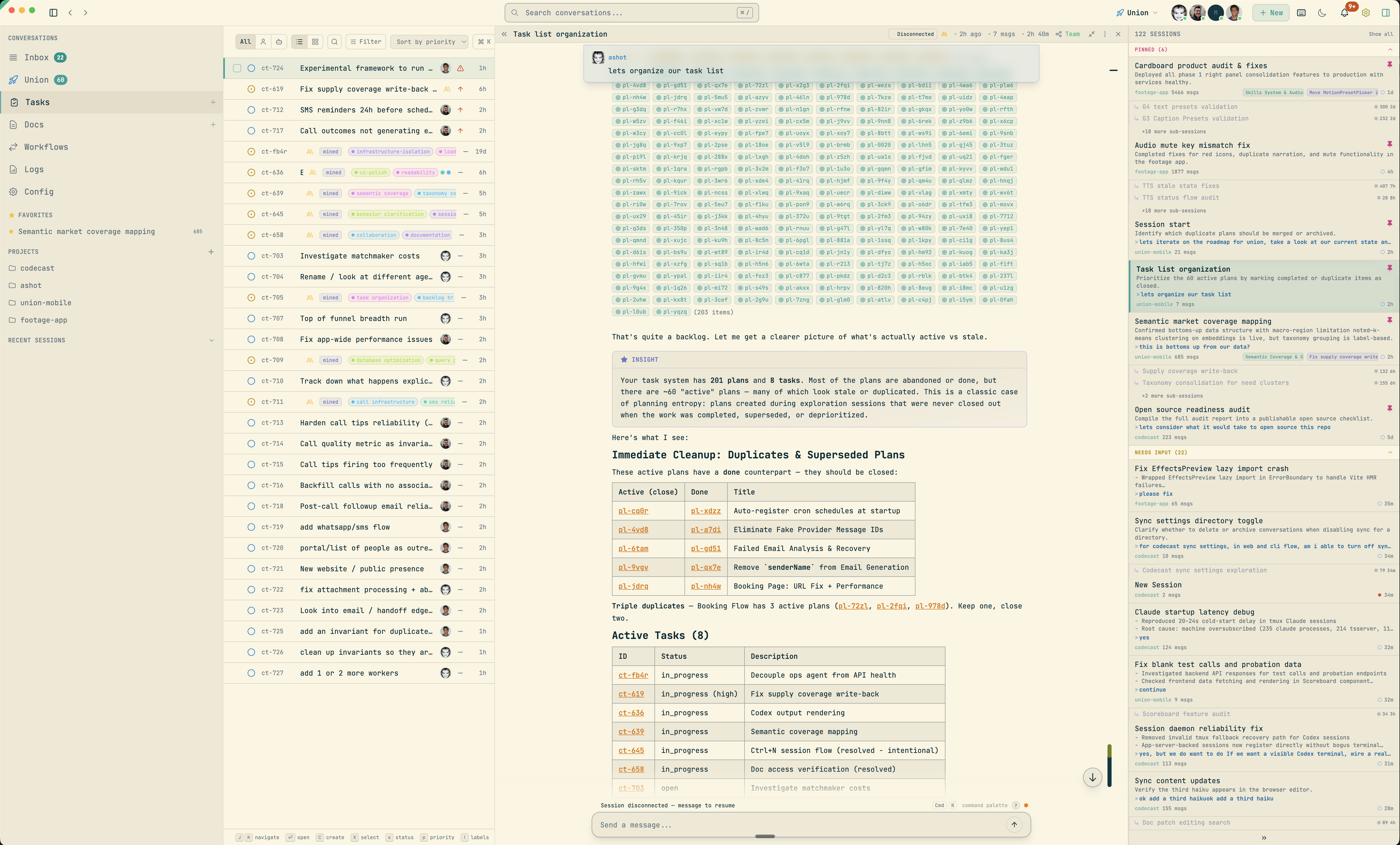
Install
curl -fsSL codecast.sh/install | sh
cast setup
cast start
That's it. The daemon runs in the background, watching your agent history files and syncing conversations as they happen.
Requirements: macOS or Linux, Bun v1.0+
Features
Session Sync & Inbox
Codecast watches your local agent history files and syncs conversations to the server in real time. The inbox is a triage queue — sessions are categorized by status (working, idle, needs input, errored) and sorted by priority. Pin important sessions, defer noisy ones, dismiss what's done.
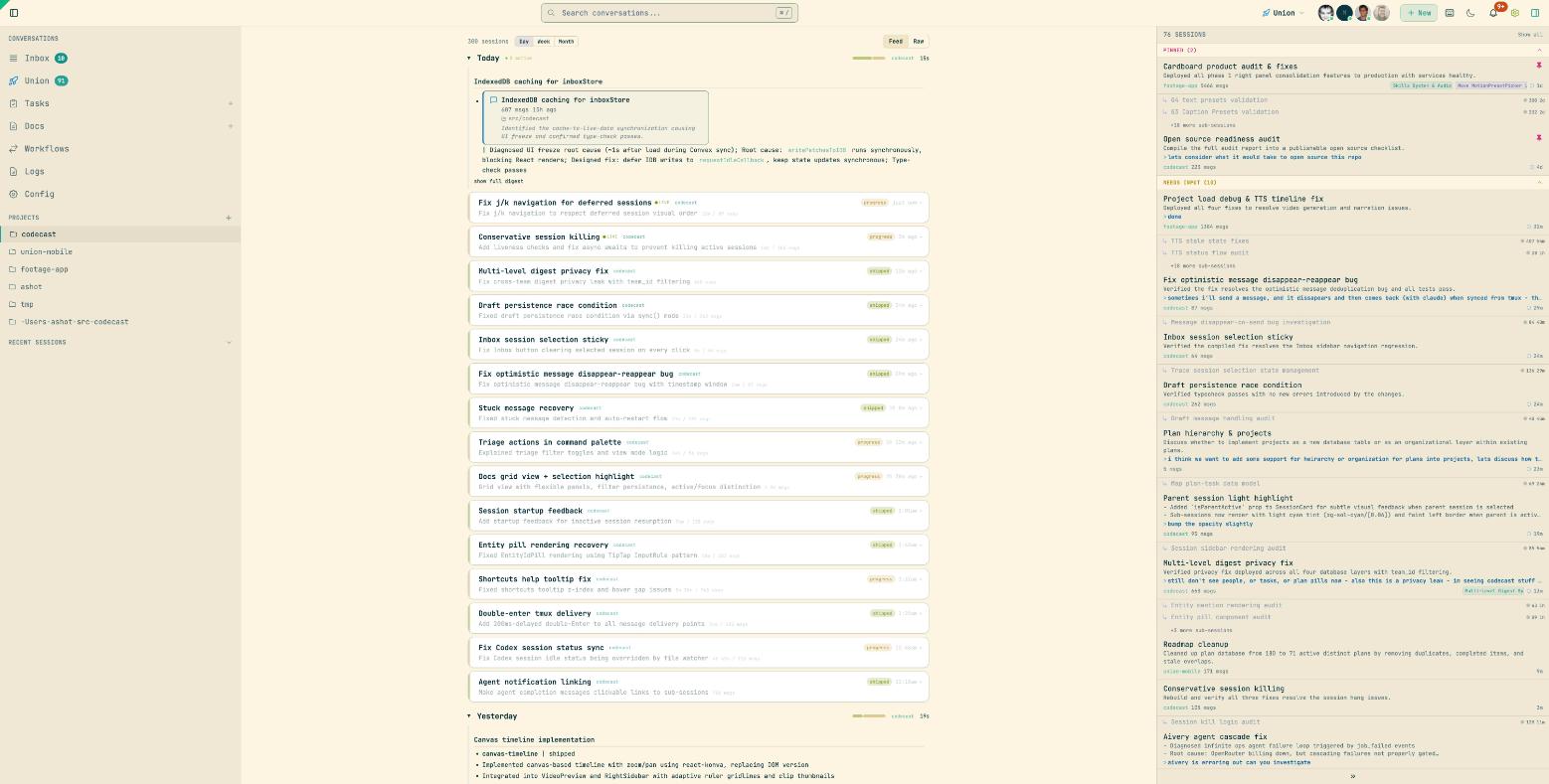
- Multi-agent support — Claude Code, Codex CLI, Cursor, Gemini
- Live status tracking — see which agents are working, idle, waiting for input, or errored
- Session categories — Pinned > Working > Needs Input > Idle > Deferred, with parent/child grouping for sub-sessions
- Activity feed — daily digest view organized by project, with narrative summaries and session cards
- Privacy controls — mark conversations private, redact API keys and secrets automatically
- Encryption — optional end-to-end encryption for sensitive conversations
Conversation Viewer
Every conversation is rendered with syntax-highlighted code blocks, collapsible tool calls, and inline insights. You can send messages to sessions directly from the web UI to resume them in a new terminal.
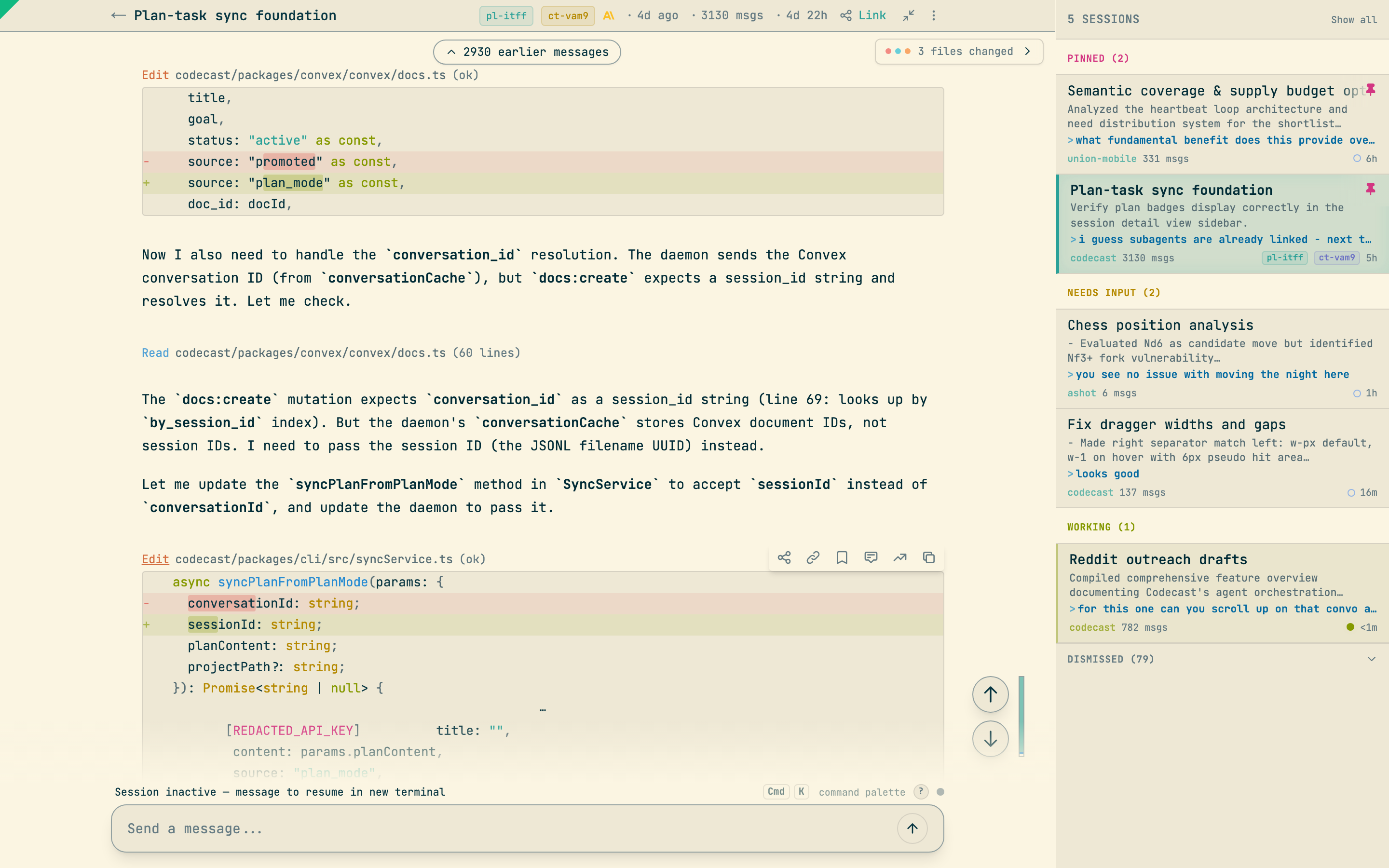
- Tool call rendering — Bash commands, file reads, grep results, and edits shown as compact summaries with expandable detail
- Insight blocks — auto-generated educational explanations from agent sessions
- Message compose — send messages to any session, fork conversations, navigate message history with keyboard shortcuts
- File changes — see which files were touched, with links to diffs
- Sub-session hierarchy — parent sessions show child agent sessions inline
Command Palette
A Linear-style command palette (Cmd+K) for fast navigation across everything — sessions, tasks, plans, docs, and built-in actions.
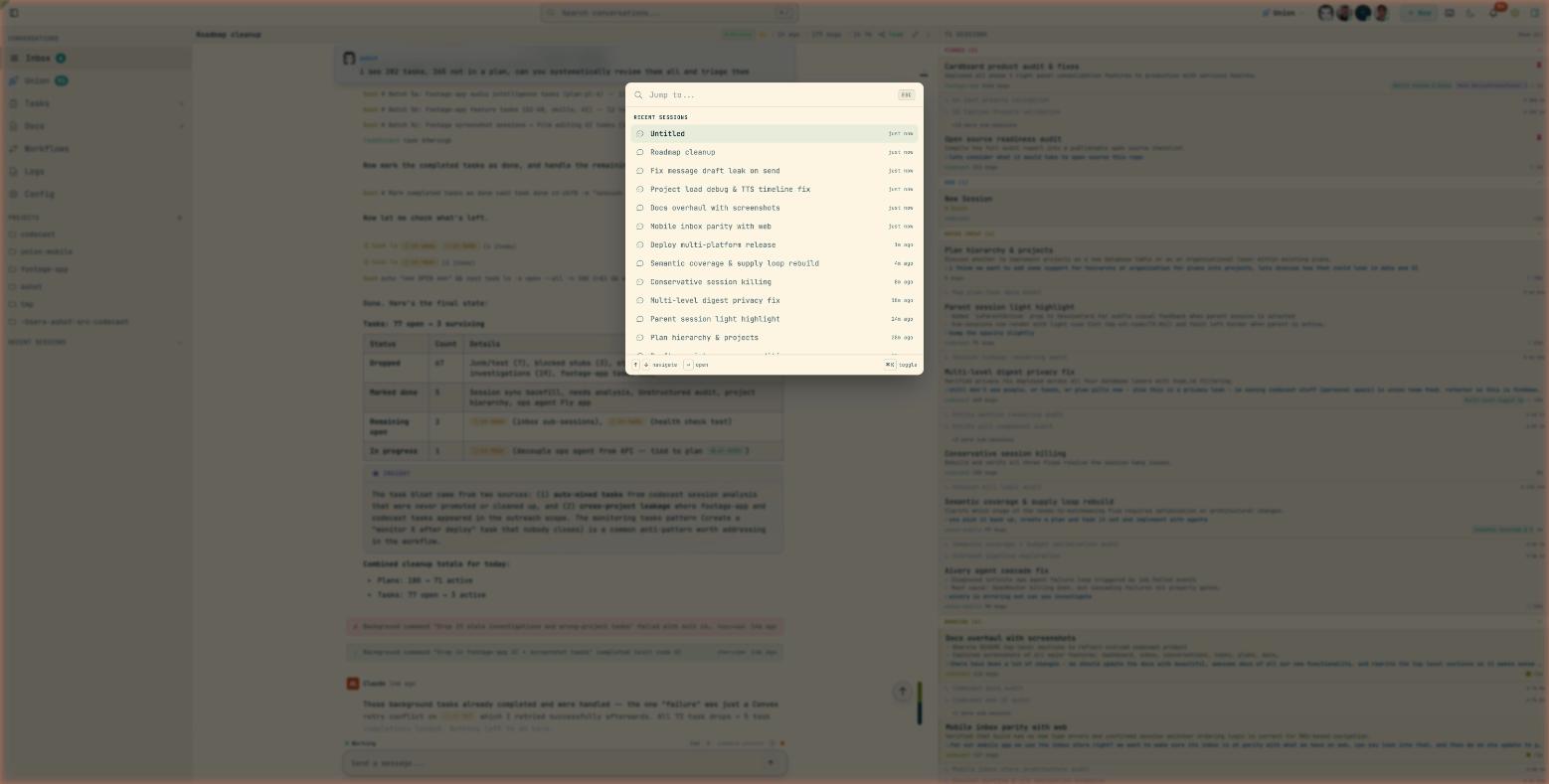
- Full-text search across all sessions and entities
- Quick navigation — jump to inbox, tasks, docs, dashboard, settings
- Session actions — pin, stash, kill, defer, rename directly from the palette
- Keyboard-first — 35+ context-aware shortcuts for power users
Tasks
Tasks are mined automatically from agent sessions or created manually. They support status cycling, priority levels, labels, plan binding, and dependency tracking.
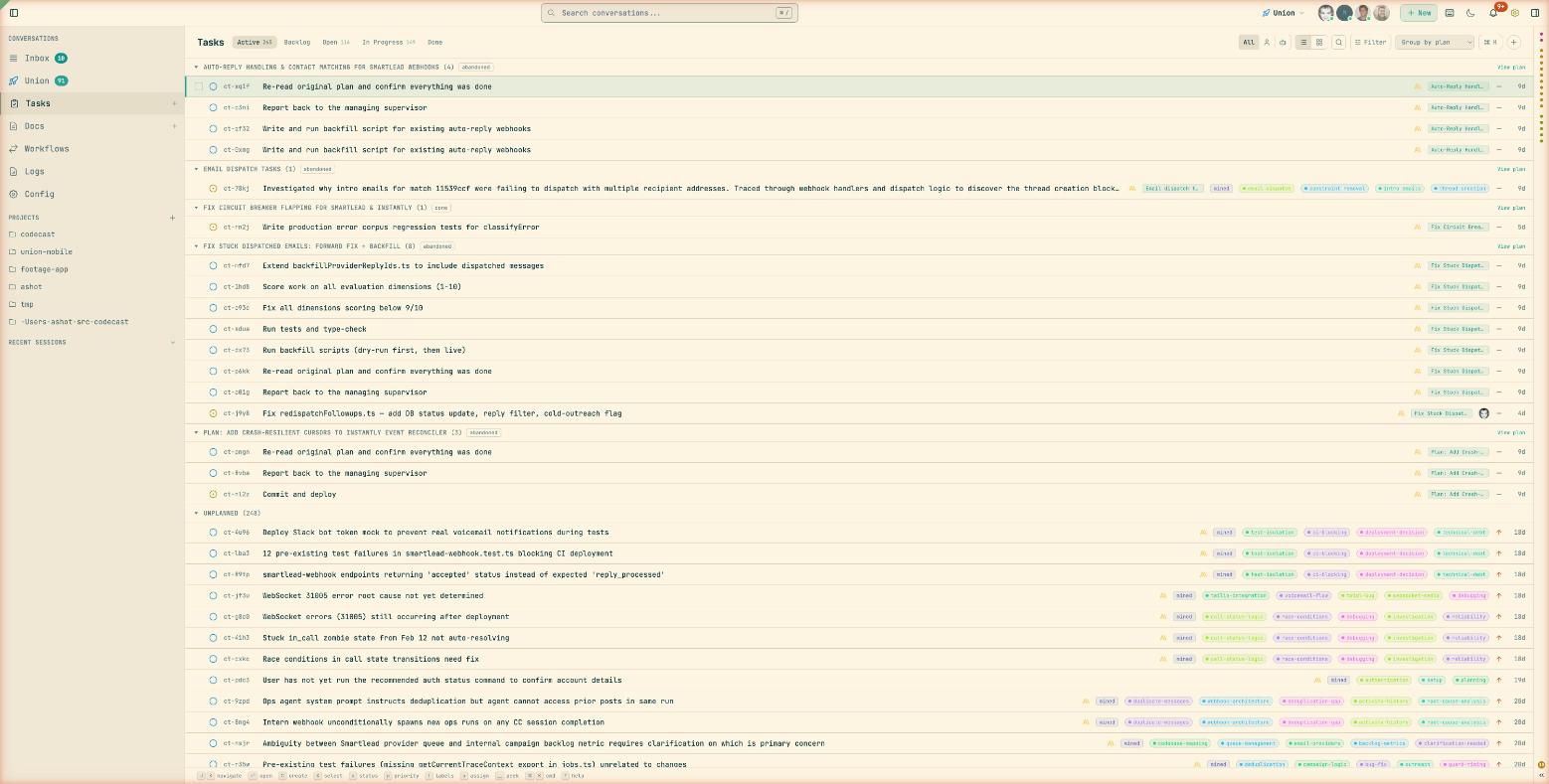
- Auto-mining — tasks are extracted from session insights with confidence scoring
- Triage system — suggested tasks can be accepted, dismissed, or edited before promotion
- Plan grouping — tasks organized under plans with progress tracking
- Status workflow — backlog, open, in_progress, in_review, done, dropped
- Multiple views — list view with status grouping, or kanban board with drag-drop
- Filters — by status, priority, labels, assignee, source agent, project
Plans
Plans are higher-level initiatives that group tasks toward a goal. They contain rich documents, task lists with progress bars, and links to the sessions that worked on them.
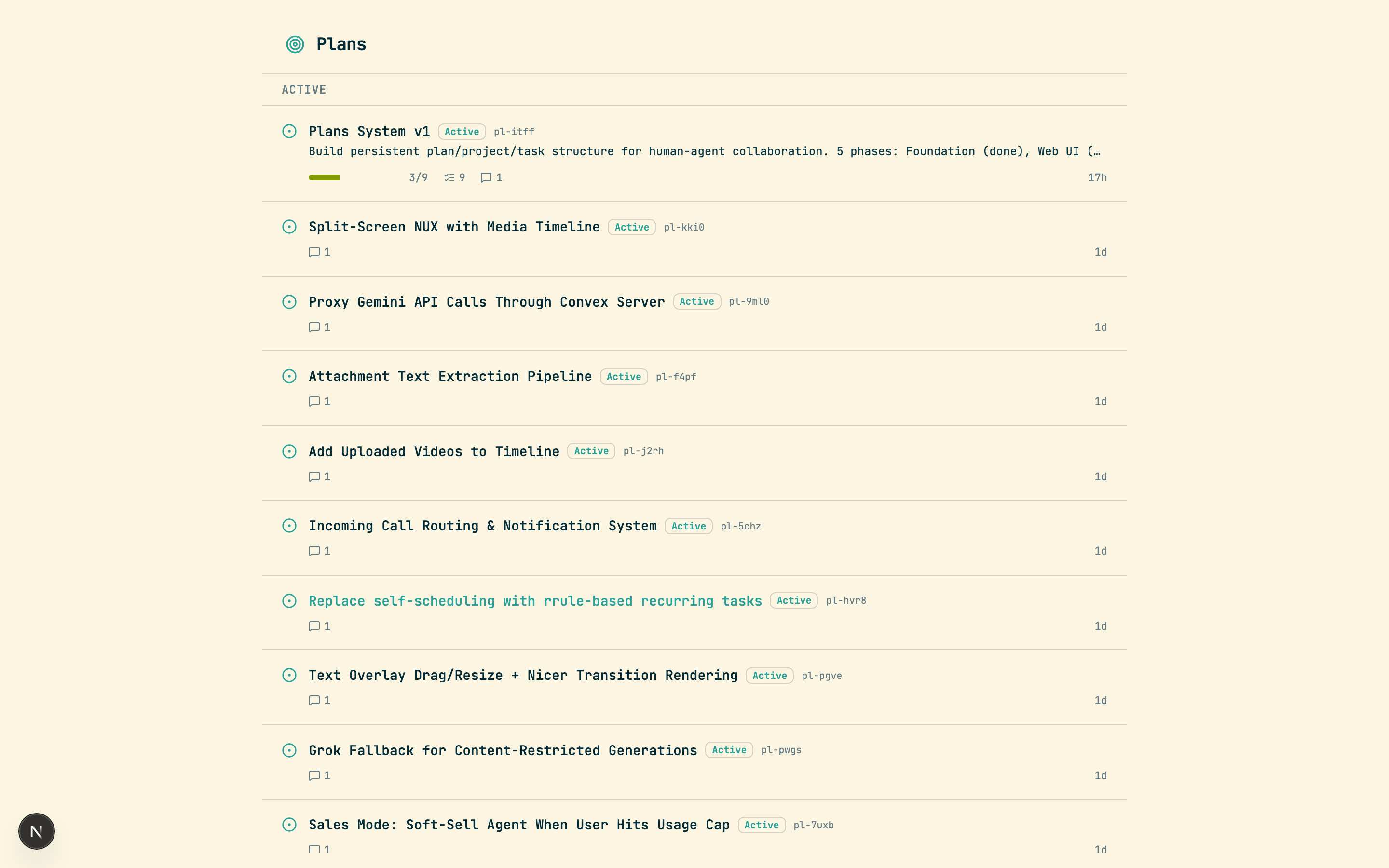
- Rich documents — plans contain TipTap-powered documents with headings, lists, code blocks
- Task decomposition — break plans into tasks from the UI or CLI
- Progress tracking — see done/in_progress/total at a glance
- Session linking — see which agent sessions contributed to a plan
- Orchestration — wave-based parallel execution of plan tasks across multiple agents
- Retrospectives — auto-generated learnings and friction points after plan completion
Documents
A collaborative document editor for specs, designs, investigations, handoffs, and notes. Documents can be linked to plans and sessions, and support entity mentions to cross-reference anything in the system.
- Document types — note, plan, design, spec, investigation, handoff
- Rich editor — TipTap with ProseMirror-based collaborative sync
- Entity mentions —
@mentionsessions, tasks, plans, or docs inline - Slash commands —
/for quick formatting and entity insertion - Markdown export — copy any document as clean markdown
Workflows
Visual workflow definitions with node-based execution. Define agent, prompt, command, human gate, conditional, and parallel nodes — then run them with live progress tracking.
- Node types — agent, prompt, command, human gate, conditional, parallel
- Human gates — pause workflows for human input via the regular message composer
- Live execution — real tmux sessions per node, streamed to the dashboard
- Session integration — workflow runs create primary conversations visible in the inbox
Teams
Share conversations, tasks, and plans across your team with granular privacy controls.
- Directory-based sharing — map project directories to teams for automatic conversation sharing
- Team activity feed — see what your teammates' agents are working on
- Privacy levels — full, summary, or hidden visibility per conversation
- Workspace scoping — switch between personal and team workspaces, each with their own tasks, plans, and docs
Desktop App
A native macOS app with global keyboard shortcuts, notifications, and a floating command palette.
- Global palette —
Cmd+Shift+Spacefrom anywhere to search and jump to sessions - Native notifications — get notified when agents need input or finish work
- Auto-updates — stays current automatically via electron-updater
Mobile App
An iOS app for monitoring agent sessions on the go.
- Session browsing — swipe-to-pin, syntax-highlighted code viewing
- Push notifications — stay informed about agent status
- Inbox parity — same session queue and categorization as the web
CLI
The cast CLI is an agentic interface that integrates your coding agents — Claude Code, Codex, Cursor, Gemini — into a shared system with global session memory, tasks, plans, docs, and team collaboration. It installs lightweight snippets into each agent's config, giving them access to the full Codecast system from within any conversation.
Agent Integration
cast install            # Install snippets into agent configs
cast stable team        # Inject recent team activity into every new session
cast stable solo -g     # Inject your sessions across all projects
cast install writes to ~/.claude/CLAUDE.md, ~/.codex/AGENTS.md, and ~/.cursor/rules/codecast.mdc, teaching each agent how to use cast commands for memory, tasks, plans, and scheduling. After installation, your agents can search past sessions, create and manage tasks, and schedule follow-up work — without any manual copy-paste.
cast stable injects a rolling context window of recent conversations into every new agent session, so agents start with awareness of what's been happening across the project or team.
Session Memory
cast feed               # Browse recent conversations
cast read <id> 15:25    # Read messages 15-25 of a session
cast search "auth bug"  # Full-text search across all sessions
cast search "error" -g -s 7d  # Global search, last 7 days
cast ask "how does X work"     # Query across all sessions
cast context "implement auth"  # Find relevant prior sessions
cast similar <id>       # Find sessions that touched the same files
cast blame <file>       # Which sessions modified this file?
cast summary <id>       # Generate a session summary
cast diff --today       # Aggregate all work done today
cast handoff            # Generate a context transfer document
These commands work both from your terminal and from inside agent sessions. When an agent calls cast search or cast ask, it's querying across every conversation your team has had — giving it long-term memory that persists across sessions.
Task & Plan Orchestration
cast task create "Fix auth bug" -p high
cast task start <id>
cast task done <id> -m "Fixed by adding guard"
cast plan create "Auth Overhaul" -g "Replace old auth middleware"
cast plan decompose <id>          # Break plan into tasks
cast plan orchestrate <id>        # Run tasks in waves across agents
cast plan autopilot <id>          # Continuous orchestration with monitoring
Plans support wave-based parallel execution: autopilot spawns agents for ready tasks, monitors progress, merges completed work, advances to the next wave, and self-reschedules if it hits a runtime limit.
Documents, Decisions & Scheduling
cast doc create "Auth Design" -t design
cast decisions add "Use JWT" --reason "Stateless, works across services"
cast schedule add "Check CI" --in 30m
cast schedule add "Review PRs" --every 4h
cast schedule add "Respond to comments" --on pr_comment
Daemon
cast start              # Start the background sync daemon
cast stop               # Stop the daemon
cast status             # Show daemon status and agent connections
cast setup              # Auto-start on login (launchd/systemd)
Architecture
codecast/
  packages/
    cli/          CLI daemon, commands, and background sync engine
    web/          Vite + React web dashboard
    convex/       Self-hosted Convex backend (schema, queries, mutations)
    electron/     Native macOS desktop app
    mobile/       iOS/Android app (Expo + React Native)
    shared/       Encryption and cross-platform utilities
  scripts/        Deploy, build, and dev server scripts
  docs/           Specs, plans, and design documents
  infra/          Self-hosted Convex infrastructure (Railway)
Supported Agents
| Agent | History Location | Status |
|---|---|---|
| Claude Code | ~/.claude/projects/**/*.jsonl |
Supported |
| Codex CLI | ~/.codex/history/**/*.jsonl |
Supported |
| Cursor | ~/.cursor/ |
In Progress |
| Gemini | ~/.gemini/ |
In Progress |
Tech Stack
| Layer | Technology |
|---|---|
| Frontend | React 19, Vite, TailwindCSS, TipTap, Zustand |
| Backend | Self-hosted Convex (real-time sync, auth, full-text search) |
| CLI | Bun, Commander, Chokidar (file watching) |
| Desktop | Electron 33, electron-updater |
| Mobile | Expo 54, React Native |
Development
Setup
bun install
cp packages/web/.env.example packages/web/.env.local
cp packages/convex/.env.example packages/convex/.env.local
cp packages/cli/.env.example packages/cli/.env.local
Configure your Convex instance URL in each .env.local. See Self-Hosting for full setup.
Run dev servers
./dev.sh          # http://local.codecast.sh
./dev.sh 1        # http://local.1.codecast.sh (parallel instance)
Starts both the Convex backend and Vite web dashboard. The CLI daemon runs separately with cast start.
Type check
bun run typecheck
See CONTRIBUTING.md for code conventions and architecture details.
Documentation
| Guide | Description |
|---|---|
| Self-Hosting | Full setup guide: Convex, web, CLI, auth, mobile, desktop |
| Contributing | Code conventions, architecture, dev setup |
| Releasing Mobile | iOS build, TestFlight, and App Store submission |
| Changelog | Version history and release notes |
Configuration
The CLI stores its config at ~/.codecast/config.json:
{
  "web_url": "https://codecast.sh",
  "convex_url": "https://convex.codecast.sh",
  "auth_token": "...",
  "team_id": "..."
}
Self-hosters: replace the URLs with your own. See Self-Hosting for details.
Privacy & Security
- API keys and secrets are automatically redacted before sync
- Project paths are hashed for privacy
- Optional end-to-end encryption for conversations
- Per-conversation privacy controls (private, summary-only, full)
- Directory-based team sharing with explicit opt-in
- All data stored on self-hosted infrastructure
Keyboard Shortcuts
| Shortcut | Action |
|---|---|
Cmd+K |
Command palette |
Cmd+/ |
Search |
Ctrl+J / K |
Next / previous session |
Ctrl+I |
Jump to idle session |
Ctrl+P |
Jump to pinned session |
Ctrl+Shift+P |
Pin/unpin session |
Ctrl+Backspace |
Stash session |
Ctrl+Shift+Backspace |
Kill session agent |
Shift+Backspace |
Defer and advance |
Ctrl+N |
New session |
Ctrl+Shift+E |
Rename session |
D |
Toggle diff panel (in conversation) |
T |
Toggle file tree (in conversation) |
Alt+J / K |
Next / previous user message |
Alt+F |
Fork from message |
Ctrl+M |
Focus message input |
Ctrl+. |
Zen mode |
Ctrl+[ / ] |
Toggle left / right sidebars |
? |
Toggle shortcuts help |
License
Reviews (0)
Sign in to leave a review.
Leave a reviewNo results found