Everfern
Health Warn
- License — License: MIT
- Description — Repository has a description
- Active repo — Last push 0 days ago
- Low visibility — Only 9 GitHub stars
Code Fail
- os.homedir — User home directory access in cli/src/onboarding.ts
Permissions Pass
- Permissions — No dangerous permissions requested
No AI report is available for this listing yet.
EverFern is a free, local-first AI agent that uses your computer the way you would — clicks buttons, navigates apps, fills forms, runs workflows. No subscription, no cloud, no data leaving your machine. Open source alternative to Claude Cowork and Manas Desktop.

EverFern
The open-source version of Claude Cowork. Free forever, runs on your machine, no subscription required.
Website • Quick Start • Features • Discord • MIT License




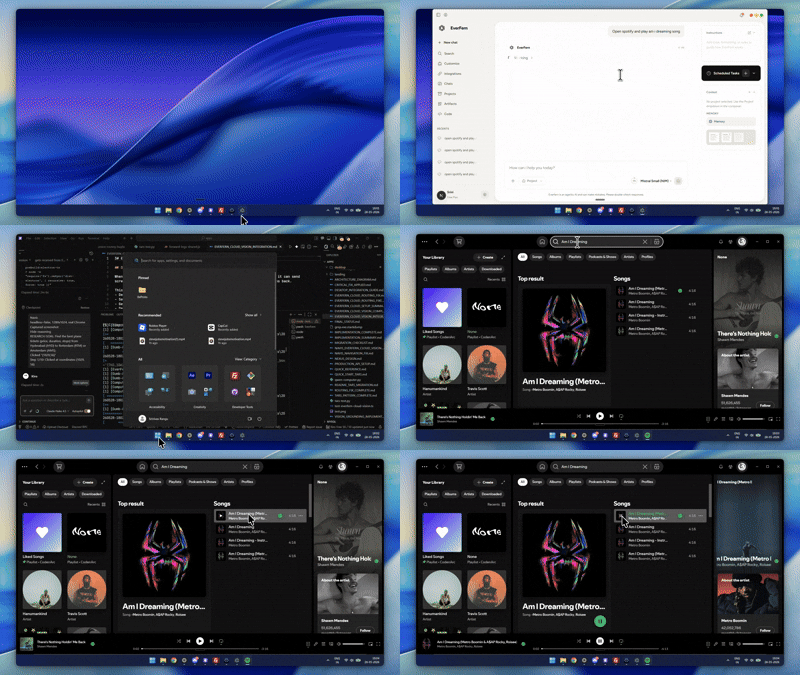
EverFern opening Spotify and playing a song — no scripts, no automation code, just plain English.
What is EverFern?
EverFern is a desktop AI agent that uses your computer the way you would — clicks buttons, navigates apps, fills forms, runs workflows. You describe what you want in plain English. It figures out the steps and does it.
No subscription. No cloud. Nothing leaves your machine.
It's the free, open-source alternative to Claude Cowork, Manus Desktop, and OpenWork.
| EverFern | Claude Cowork | Manus Desktop | OpenWork | |
|---|---|---|---|---|
| Price | Free | $20+/month | $200+/month | Free |
| Runs locally | ✅ Yes | ❌ No | ❌ No | ⚠️ Partial |
| Open source | ✅ Yes (MIT) | ❌ No | ❌ No | ✅ Yes |
| Your data | Stays local | Cloud processed | Cloud processed | Mixed |
| AI providers | 10+ | Anthropic only | Locked | 3–4 only |
| Performance | ✅ Fast | ✅ Fast | ✅ Fast | ⚠️ Known issues |
| Computer use | ✅ Yes | ✅ Yes | ✅ Yes | ❌ No |
| Browser agent | ✅ Navis (built-in) | ⚠️ Limited | ✅ Yes | ❌ No |
Features
🖥️ Computer Use
Sees your screen, moves the mouse, clicks, types, and navigates any app exactly like a human would. Works with any desktop application — no integrations needed.
🌐 Navis — Built-in Browser Agent
Navigate websites, fill forms, scrape data, and interact with web apps in plain English. No Selenium, no Playwright, no code. Navis is EverFern's own browser agent, built from the ground up.
📄 Document Processing
Read, analyze, and create PDFs, Word docs, Excel sheets, PowerPoints, and CSVs. Works with your existing files.
💻 Code Assistant
Write, review, debug, and refactor code with full project context. Works inside your actual editor.
🧩 Skills System
Reusable task modules you can install from the community or build yourself. Each skill teaches EverFern how to handle a specific workflow — shareable, auditable, yours.
⚙️ Workflow Builder
Chain actions together, save them, trigger on a schedule. Automate anything you do repeatedly.
🔒 Linux VM Execution
Shell commands run in an isolated sandbox so nothing can accidentally break your system.
🤝 Peer Agent Debate
For complex tasks, multiple specialized agents debate the best solution before anything gets executed. Each agent challenges the others' reasoning, catches blind spots, and votes on the final approach. The result is a plan that's been stress-tested before it touches your machine — not just the first thing one agent thought of.
🛠️ 20+ Built-in Tools
Everything EverFern needs to work on your machine is built in out of the box:
| Category | Tools |
|---|---|
| Desktop | Computer Use, Screenshot, Mouse Control, Keyboard Input, App Launcher |
| Browser | Navis (built-in browser agent), Web Search, Page Scrape, Form Fill, Tab Manager |
| Files | Read, Write, Edit, Move, Copy, Delete, Grep, Find, Watch |
| Code | Run Script, Terminal, Diff, Patch, Lint |
| Data | PDF Reader, CSV Parser, JSON Tools, Excel Reader |
| System | Linux VM Shell, Process Manager, Clipboard, Notifications |
Plus custom tools via MCP (Model Context Protocol) — connect anything.
🔌 Multi-Provider Support
Use local models (Ollama, LMStudio) for complete privacy, or connect to 10+ cloud providers — OpenAI, Anthropic, DeepSeek, Google Gemini, OpenRouter, Nvidia NIM, Mistral, Groq, and more. Switch providers anytime without changing anything else.
Quick Start
Prerequisites: Node.js v18+, Windows 10/11 or macOS
# Clone the repo
git clone https://github.com/CodenRust/Everfern.git
cd Everfern

# Install dependencies
npm install

# Run in development
npm run dev
Windows installer available on the releases page.
macOS installer coming soon. For now, build from source with the commands above.
Production Build
npm run build
npm run make
How It Works
Just tell EverFern what you need:
"Open Spotify and play my liked songs"

"Summarize all the PDFs in my Downloads folder into one document"

"Open VS Code and refactor the auth module to use JWT tokens"

"Research the top 5 AI coding tools and make a comparison spreadsheet"

"Find all my photos from last year and organize them by month"
EverFern breaks down the request, plans the steps, shows you its thinking in real time, and executes — pausing for confirmation before anything destructive.
Architecture
┌─────────────────────────────────────────────────────┐
│                    EverFern                         │
│  ┌─────────────────┐    ┌─────────────────────────┐ │
│  │   React UI      │◄──►│   Agent Engine          │ │
│  │   (Next.js)     │    │   (LangGraph)           │ │
│  └─────────────────┘    └──────────┬──────────────┘ │
│                                    │                 │
│                         ┌──────────▼──────────┐      │
│                         │  Peer Agent Debate  │      │
│                         │  (multi-agent plan) │      │
│                         └──────────┬──────────┘      │
└────────────────────────────────────┼────────────────┘
                                     │
          ┌──────────────────────────┼──────────────┐
          │                          │              │
     ┌────▼────┐     ┌───────────────▼────────┐   ┌─▼────────────────┐
     │Local AI │     │ 10+ Cloud Providers    │   │ 20+ Tools        │
     │Ollama   │     │ OpenAI • Anthropic     │   │ Computer Use     │
     │LMStudio │     │ DeepSeek • Gemini      │   │ Navis Browser    │
     └─────────┘     │ OpenRouter • Groq      │   │ Web Search       │
                     │ Mistral • Nvidia NIM   │   │ Files • Grep     │
                     │ and more...            │   │ Shell • VM       │
                     └────────────────────────┘   └──────────────────┘
Privacy & Security
- All data, keys, and history stored in
~/.everfern/store— never synced anywhere - API keys encrypted locally
- Shell commands run in an isolated Linux VM
- Full source code available to audit yourself
Project Structure
everfern/
├── src/              # Next.js frontend
│   ├── app/          # Chat interface, settings
│   └── components/   # React components
├── main/             # Electron backend
│   ├── agent/        # Agent orchestration (LangGraph)
│   ├── tools/        # Built-in tools
│   └── acp/          # AI provider clients
├── docs/             # Architecture documentation
└── public/           # Static assets
Contributing
Bug reports, feature requests, and pull requests are all welcome.
- Issues — report bugs or suggest features
- Discussions — join community conversations
- PRs — see CONTRIBUTING.md for guidelines
License
MIT — free for personal and commercial use.
Copyright © 2026 EverFern Community
Built with LangGraph, Next.js, Electron, and TypeScript.
Made with ❤️ by the EverFern Community
Reviews (0)
Sign in to leave a review.
Leave a reviewNo results found