red
Health Pass
- License — License: MIT
- Description — Repository has a description
- Active repo — Last push 0 days ago
- Community trust — 219 GitHub stars
Code Pass
- Code scan — Scanned 12 files during light audit, no dangerous patterns found
Permissions Pass
- Permissions — No dangerous permissions requested
No AI report is available for this listing yet.
:memo: Vimlike Modal Text Editor in Rust
red



The modal editor for the agent era.
Fast, familiar editing with modern code intelligence and a safer way to work
with agents. One self-contained Rust binary. No required configuration. Your
files stay yours.
Website ·
Download ·
Getting started ·
Documentation ·
Community
The current documented release is
v0.6.0.
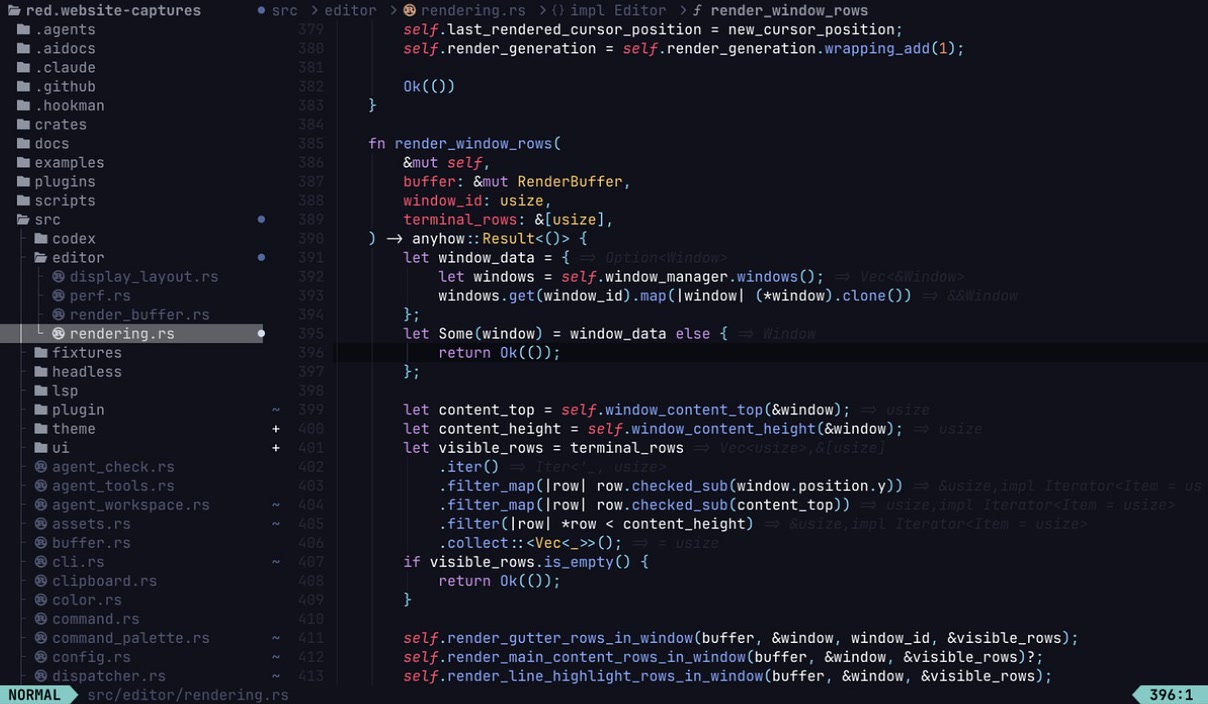
Husk language
The source tree contains the extracted Husk embedding API, standalone CLI, local
package resolver, and portable WebAssembly Component extension runtime. Start
with the language and embedding guide. The
research and implementation plan and
card-by-card status explain the dynamic
Rust-crate design, completed work, and remaining release-hardening tasks.
Install
Homebrew
brew install codersauce/tap/red
macOS and Linux
curl --proto '=https' --tlsv1.2 -fsSL https://getred.dev/install.sh | sh
The installer selects the correct macOS or x86_64 glibc Linux archive, verifies
its published SHA-256 checksum, installs to ~/.local/bin, and runs Red's
built-in self-check.
Windows
irm https://getred.dev/install.ps1 | iex
The PowerShell installer verifies the release checksum, installs to%LOCALAPPDATA%\Programs\Red\bin, and adds that directory to your user PATH.
To pin a release or choose another directory:
RED_VERSION=0.6.0 RED_INSTALL_DIR="$HOME/bin" \
  sh -c "$(curl --proto '=https' --tlsv1.2 -fsSL https://getred.dev/install.sh)"
You can also download a
prebuilt archive or
build from source. Red's editor, default configuration, themes,
and plugins are bundled into the executable.
Agent support is optional. It requires Codex CLI 0.144.1 or newer and a
completed codex login.
Why Red
- Stay in flow. Vim-inspired modes, motions, text objects, splits, and
pickers are paired with tree-sitter highlighting and asynchronous language
tools. - Find the signal. Jump to files, commands, symbols, definitions,
references, diagnostics, or Git changes without leaving the keyboard. - Make it yours. Embedded Husk plugins power the file tree, project search,
Git workspace, and theme browser. Defaults work immediately; configuration
remains optional. - See the work happen. Red gives Codex editor context, including unsaved
buffers, and follows each tool call by revealing the file and edit before it
is applied and saved. - Work reliably. Atomic recovery works across platforms, and Unix
detach/attach sessions preserve buffers, plugins, LSP state, and running
agents across terminal or SSH disconnects.
First five minutes
Open a file:
red path/to/file
The first interactive launch offers a guided tour, release highlights, and an
immediate exit into the editor. The tour uses a disposable practice buffer and
safe Git/agent demonstrations; reopen it with :welcome or :tutorial.
Starter configuration remains optional: embedded defaults, plugins, and themes
are enough to begin editing.
| Key | Action |
|---|---|
Space ? |
Discover commands and their effective keymaps |
Space m |
Browse notifications and recent messages |
Ctrl-p |
Find a file with fuzzy search and live preview |
Ctrl-e, then / |
Open the file tree and search files or directories |
Space G |
Open the Git status workspace |
Space A |
Ask the agent with editor context |
Space i |
Refactor the current line or visual selection inline |
Space t |
Browse themes with live preview |
See Getting started for editing, navigation,
configuration, language servers, Git, CLI, and troubleshooting guidance. The
Vim compatibility matrix is the precise,
versioned behavior contract.
A visible agent workflow
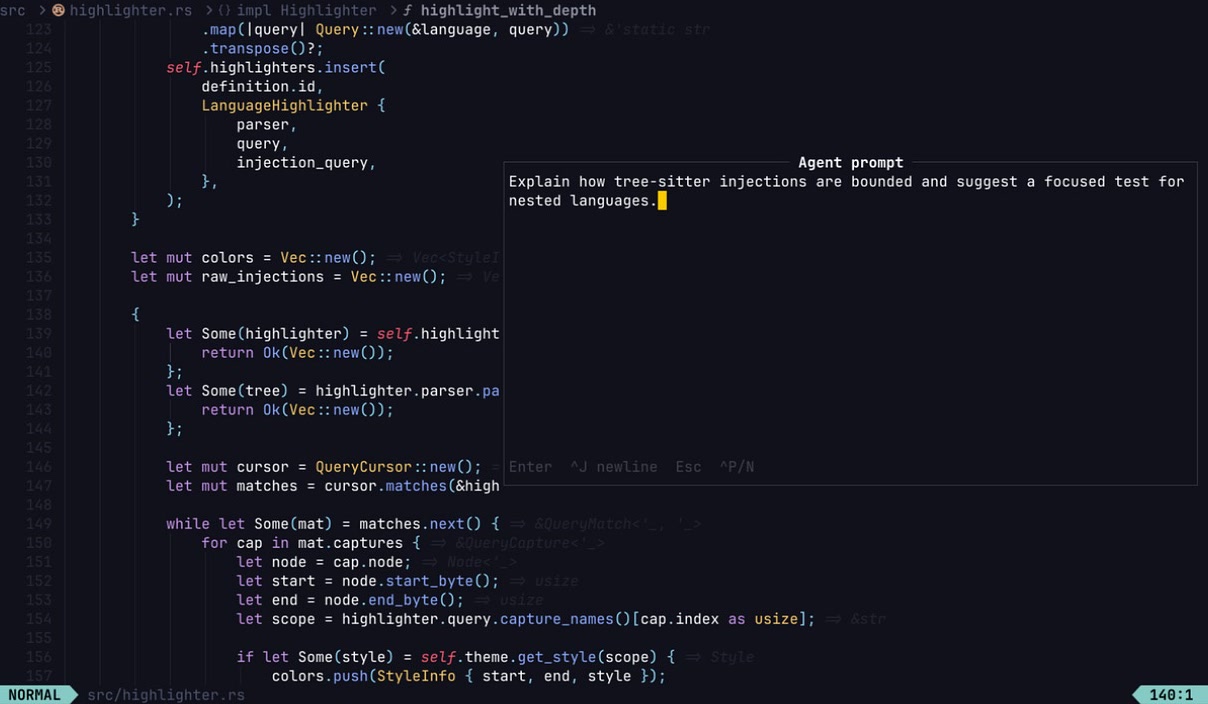
Agent edits happen through Red's editor transaction and save paths while you
follow along in the active buffer.
- Ask. Open the agent with
Space A; Red includes a bounded selection or
cursor excerpt, unsaved contents, and relevant diagnostics. - Follow. Red reveals the target file and cursor before each bounded tool
call, then briefly pauses so the change is readable. - Continue. Revision-checked edits are attributed to the Codex session,
applied to the visible buffer, and saved to disk through Red.
The integration uses the Codex app-server directly and supports persistent
conversation, queued follow-ups, live tool progress, and explicit session
controls. Ignored, out-of-workspace, binary, and common secret files are
excluded from context. Read the
agent workflow and safety contract for prerequisites,
limits, commands, and failure behavior.
For a smaller blast radius, press Space i on a line or visual selection.
Inline assist opens beside the target, gives an ephemeral Codex thread only the
selected text and bounded surroundings, and accepts only one complete
replacement. The result is an unsaved, agent-attributed editor transaction;
keep it, undo it, refine it in the same popup, or escalate the changed range to
the full Agent panel.
What Red ships today
The current release includes:
- Normal, Insert, Visual, Visual Line, Visual Block, and Command modes with
expanding Vim motion and editing compatibility - tree-sitter highlighting for Rust, Markdown, JavaScript, TypeScript/TSX,
JSON, TOML, YAML, Bash, PowerShell, Lua, and Husk - a first-party Husk language server plus built-in LSP defaults for Rust,
TypeScript/JavaScript, Markdown, JSON, TOML, YAML, and Lua - command and keymap discovery, fuzzy files, buffer navigation, symbols,
references, project search, and diagnostics - native Git gutter signs, hunk actions, and a full-screen workspace for
staging, commits, branches, remotes, stashes, logs, and rebases - an embedded Husk runtime with bundled file tree, search, Git, progress,
inlay-hint, symbol, theme, and agent plugins - a branded startup splash, the Red theme, accessible selection and cursor
contrast, and optimized rendering hot paths - atomic crash recovery on every platform and detachable sessions on macOS and
Linux
See the latest release notes
or the complete changelog for details.
After installing a new version, Red opens a themed What’s new panel once.
Reopen it whenever you like with :whats-new, :changelog, or the command
palette. Release notes are bundled for offline use and refreshed from the exact
matching GitHub release in the background.
Configuration
Red layers your settings over embedded defaults, so a configuration file can
contain only the values you want to change:
# ~/.config/red/config.toml
theme = "red.json"
scrolloff = 8
# Disable the automatic release panel or its optional GitHub refresh:
# show_whats_new = false
# fetch_release_notes = false

[search]
ignorecase = true
smartcase = true

[keys.normal]
"Ctrl-s" = "Save"
The commented default_config.toml documents every
setting that ships with Red. Custom themes go in ~/.config/red/themes/, and
custom Husk plugins go in ~/.config/red/plugins/. Run red --runtime-files
to see every visible runtime asset and its source.
Add new highlighting, exact filenames, comment syntax, indentation, and language
servers through a unified [languages.<id>] configuration or an installable
language pack. Native Tree-sitter grammars require explicit digest-bound trust;:languages reload applies validated changes without restarting the editor.
See the language extensions guide.
Plugins and themes
Bundled plugins and themes are embedded in the binary and upgrade with Red.
They are parsed and typechecked against the versioned Husk host contract before
activation; an incompatible plugin is quarantined without preventing editor
startup.
You can disable bundled plugins, configure them in config.toml, or eject a
copy for customization:
red --eject plugins/fidget.hk
red --eject themes/red.json
An ejected asset shadows the bundled copy until you delete it. See the
plugin system guide, host API,
and bundled plugin source for details and examples.
Sessions
On macOS and Linux:
red --detach path/to/file
red --detach=work path/to/project
red --attach work
Leave a detachable session with Ctrl-\. Read
Detachable sessions and
Session recovery for lifecycle, recovery, and
platform details.
Documentation
| Guide | Covers |
|---|---|
| Getting started | Editing, keymaps, LSP, Git, CLI, and troubleshooting |
| Husk language server | Husk editor features, external crates, configuration, and safety boundaries |
| Language extensions | Custom syntax, trusted Tree-sitter grammars, language packs, LSP settings, and live reload |
| Vim compatibility | Supported behavior and intentional differences |
| Agent workflow | Codex prerequisites, review model, commands, and safety |
| Plugin system | Husk lifecycle, runtime architecture, and validation |
| Plugin API | Versioned host API for plugin authors |
| Detach and attach | Persistent Unix sessions |
| Session recovery | Atomic recovery and dirty-buffer restoration |
| Performance | Measurement, budgets, and regression process |
| Debugging | Invariant owners, logs, diagnostic commands, and tracing paths |
| Releasing | Release preparation, publication, and verification |
Status and community
Red is an early, pre-1.0 release and is evolving quickly. Bring curiosity and
keep backups for critical work.
- Follow development on the
CoderSauce YouTube channel. - Join the Discord community.
- Report bugs and request features in
GitHub Issues.
Development
Red requires a recent stable Rust toolchain and Git:
git clone https://github.com/codersauce/red.git
cd red
cargo build
cargo test --all-targets --all-features
cargo clippy --all-targets --all-features -- -D warnings
Use narrower commands while iterating on a specific crate or test:
cargo test -p red --lib editor::tests::
cargo test --workspace --exclude red --all-features --tests
python3 scripts/doctest_packages.py --no-default-features
cargo test is the default runner because Red's many short tests complete
faster in shared test-binary processes. Install cargo-nextest when per-test
isolation, timing, retries, or JUnit reports are useful, then compare both
runners with python3 scripts/test_performance.py --runner both --timings.
Add --package husk-lexer for a short, focused comparison.
The manual Rust Test Performance GitHub Actions workflow provides the same
comparison on Linux, macOS, or Windows and can optionally enable sccache or
the Linux mold linker.
Use RED_RUNTIME=. while iterating on bundled plugins or themes without
rebuilding the executable:
RED_RUNTIME=. cargo run -- path/to/file
Contributions are welcome. For major changes, open an issue before investing in
an implementation. Release maintainers should followdocs/RELEASING.md.
License
Red is available under the MIT License.
Built with love for the Rust community and inspired by Vim, Neovim, and Helix.
Reviews (0)
Sign in to leave a review.
Leave a reviewNo results found