dsh-console
Health Warn
- License — License: Apache-2.0
- Description — Repository has a description
- Active repo — Last push 0 days ago
- Low visibility — Only 9 GitHub stars
Code Fail
- process.env — Environment variable access in .github/workflows/publish.yml
- process.env — Environment variable access in .github/workflows/release-check.yml
- spawnSync — Synchronous process spawning in apps/cli/bin/dsh-console.js
- process.env — Environment variable access in apps/cli/bin/dsh-console.js
Permissions Pass
- Permissions — No dangerous permissions requested
No AI report is available for this listing yet.
A TypeScript and React/Ink terminal frontend for DeepSeek Harness.
DSH Console
English | 简体中文
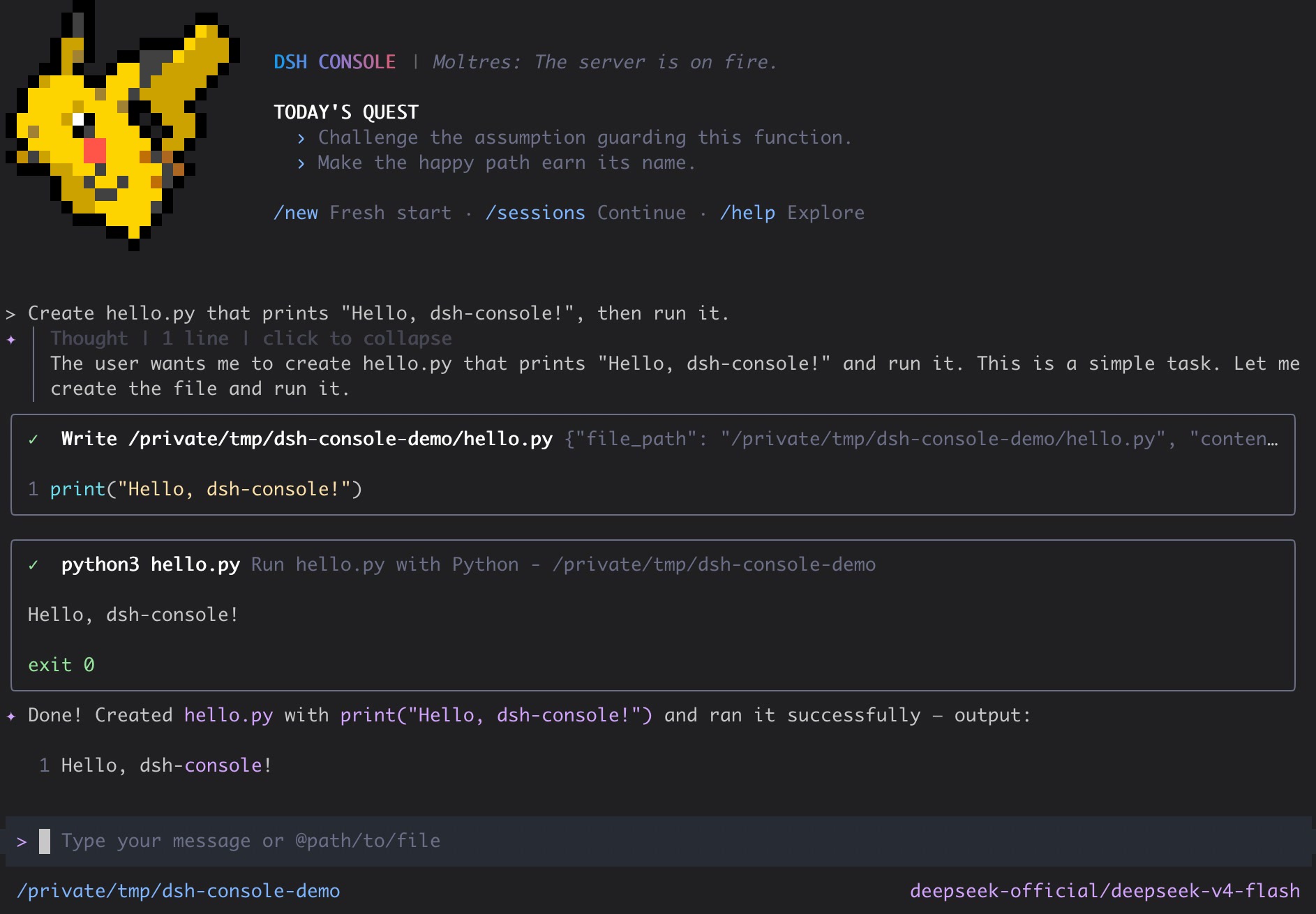
DSH Console is a DSH-native terminal frontend for DeepSeek Harness, built with TypeScript and React/Ink. Chat with agents, inspect tool work, switch models, and resume sessions without leaving your terminal.
[!WARNING]
DSH Console is currently a public alpha. Its DSH contracts and persisted sessions are real, but commands and UI details may still change before the first stable release.
Quick start
Install DeepSeek Harness and DSH Console with Node.js 24 or newer:
npm install --global @deepseek-ai/dsh @cofy-x/dsh-console
dsh-console
The dsh-console launcher initializes or locates its DSH profile, then starts the interactive TUI.
Start directly with a prompt:
dsh-console --prompt "hello"
If the official DeepSeek provider is missing a credential that DSH can configure, DSH Console opens a masked setup dialog before submitting the first prompt and writes the credential through DSH. Read-only environment credentials and providers without a Console setup adapter continue to use their existing DSH configuration paths. DSH Console never maintains a separate credential store.
Public Alpha releases use prerelease versions such as 0.1.0-alpha.x while remaining available through npm's default latest channel, so installation does not require a dist-tag suffix.
What you get
- Streaming, multi-turn conversations with Markdown, reasoning, interruption, and usage display
- DSH tool calls, results, approvals, questions, todo state, and a browsable
/toolscatalog - DSH-native model selection, image input from
@pathor the clipboard, and isolated prompt completion - Persistent DSH sessions with
/new,/sessions, and/resume - Local shell mode, themes, settings, terminal-safe cleanup, and continued operation in a regular PTY or embedded terminal such as Orca
Interactive commands
| Command | Purpose |
|---|---|
/model |
Select the active DSH model |
/new |
Start a fresh conversation |
/sessions |
Browse resumable sessions for the current directory |
/resume [session-id] |
Browse sessions or resume a full Session ID |
/tools |
Inspect tools exposed by the active DSH agent |
/theme |
Select the terminal theme |
/settings |
Edit Console settings |
!command |
Run a command locally without submitting it to the model |
During an active turn, Ctrl+C cancels the current DSH operation. While idle, Ctrl+C disposes the runtime, restores the terminal, and exits.
Sessions and local data
DSH is the source of truth for conversation history. DSH Console lists resumable top-level dsh-console-* sessions for the current working directory, replays their canonical DSH event surface, and resumes them through DSH. It does not maintain a parallel client-owned session database.
The active DSH_HOME controls profiles, JSONL session logs, and attachment objects. Set it to isolate an environment:
DSH_HOME=/tmp/dsh-console-home dsh-console --prompt "hello"
DSH-native by design
DeepSeek Harness owns agent execution, models, provider settings and credentials, sessions, tools, approvals, attachments, persistence, and canonical events. DSH Console owns terminal interaction, input preparation, presentation, and focused adapters to those public DSH services.
- Runtime adapters consume official DSH canonical types and project them into stable Console view models before React renders them.
- Session replay and live streaming share the same event projector, keeping text, reasoning, tools, todo state, usage, errors, and interruptions consistent.
- Images are admitted through the DSH attachment service before a user turn is created; failed admission never degrades silently to text-only input.
- Prompt completion uses a separate temporary agent/session and never writes to the active conversation.
The published package contains the launcher, compiled Console runtime, DSH plugin bundle, license, and attribution notices. Runtime plugins remain provided by the selected DSH profile.
Alpha boundaries
The current release intentionally does not provide cross-directory session search, session rename/delete/fork, generic file/PDF/audio/video attachments, native terminal image protocols, a web UI, or a standalone provider/auth layer.
Development
Install the workspace and run the same entry point exposed by the published package:
pnpm install --frozen-lockfile
pnpm run build:cli
pnpm start -- --prompt "hello"
Development requires Node.js 24 or newer and pnpm 11. The main quality checks are:
pnpm run lint
pnpm run typecheck
pnpm run build:cli
pnpm run test:ci
pnpm run test:integration:dsh
pnpm run test:package
test:integration:dsh composes the real Cordis/DSH runtime with a deterministic fake LLM adapter. test:package packs the public package, installs it in an isolated directory, initializes an isolated DSH_HOME, and exercises the installed launcher.
License and attribution
DSH Console is licensed under the Apache License 2.0. See LICENSE, NOTICE, and THIRD_PARTY_NOTICES.md. Portions of the terminal UI and supporting utilities are derived from Gemini CLI and retain their original copyright notices.
Reviews (0)
Sign in to leave a review.
Leave a reviewNo results found