web-server
Health Pass
- License — License: Apache-2.0
- Description — Repository has a description
- Active repo — Last push 0 days ago
- Community trust — 30 GitHub stars
Code Pass
- Code scan — Scanned 12 files during light audit, no dangerous patterns found
Permissions Pass
- Permissions — No dangerous permissions requested
No AI report is available for this listing yet.
Open-source, self-hosted knowledge base for AI agents: team notes, Kanban boards and agent memory that Claude, Codex and your own agents read and write through MCP. PostgreSQL + pgvector.

Concilium
The open-source, self-hosted knowledge base for AI agents.
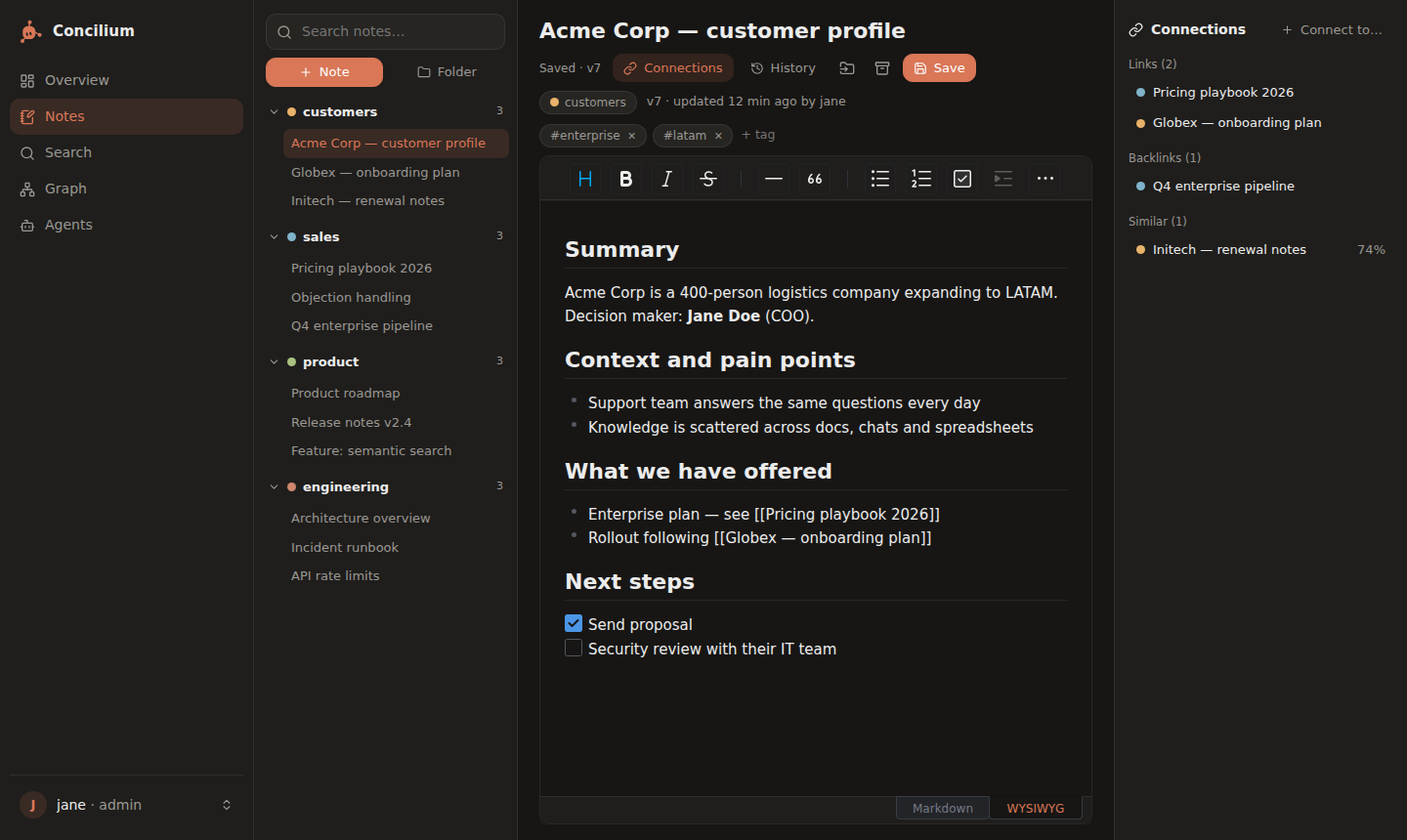
A team notes workspace, like Obsidian or Notion, that Claude and your own agents can search, read and write through MCP.






Why Concilium?
Tools like Obsidian, Notion and Logseq are great for people. AI agents need more than a folder of Markdown files, though. They need search that understands meaning, a way to write back safely, and memory that carries over from one chat to the next.
Concilium is a real RAG backend, not an Obsidian vault with .md files. Your team writes notes in a clean web workspace. Every note is chunked, embedded and indexed on save. Any agent connected through the Model Context Protocol (MCP) or the REST API can then query, insert and update that knowledge, with versioning and duplicate detection built in.
Agents also get a home: a profile (system prompt), persistent memory, session summaries and tasks, all stored in the database. A brand-new chat loads that context and picks up where the last one left off.
What Concilium gives you is the right context, not a smaller bill. In our own test (five real questions about this project, Claude Code with and without Concilium), connecting it added about 1,200 tokens per session and ~9% to the cost. In exchange, the agent followed the current deploy procedure, while the agent without it read an outdated AGENTS.md and got it wrong. When the answer is in the code, reading the file works just as well; Concilium pays off for what the code doesn't say: decisions, history, procedures, the work in progress.
Features
📝 Team notes workspace
- Nested folders with no depth limit (like Notion), a WYSIWYG editor with a Markdown tab, tags and note templates
[[Wikilinks]]and backlinks, Obsidian style. Links to notes that don't exist yet resolve on their own once the note is created- Obsidian vault import: upload the
.zipfrom the dashboard and watch real-time progress — folders become collections, notes become fully embedded documents, and re-importing updates instead of duplicating - File import: drop PDF, Word (
.docx), Markdown or text files into any folder from the dashboard, or send them toPOST /documents/upload. They are converted to Markdown and embedded right away; scanned pages are read with OCR (Tesseract, bundled in the image) - Version history with restore, conflict detection and local drafts, so nothing gets lost
🔎 Real RAG for agents
- Hybrid search (semantic + full-text) on PostgreSQL + pgvector
- Token-lean answers: one short snippet per document by default (~65% fewer tokens per search than returning whole chunks), and big documents are read by section (
outline,section,max_tokens) instead of all at once - Automatic chunking, document versioning and duplicate warnings before insert
- Upsert by external id, so you can sync from a CRM, a docs site or any other system
🤖 Agent registry with memory
- Agent profiles with system prompts, scopes and the collections each agent may access
- Persistent memories, session summaries and tasks:
load_agentrestores everything in a new chat - Human-in-the-loop governance: agents propose profile changes, people approve them, and autonomy is opt-in per agent
🕸️ Knowledge graph
- Interactive graph of explicit links and semantic-similarity edges
- Filter by collection, similarity threshold or document/chunk level, and connect documents by clicking
🔐 Built for teams
- Real session spend on the overview: the Claude Code plugin reports each session's actual token usage (counters only, never prompts or code), per project and per board card, with sessions with and without Concilium side by side
- Context meter: per project and per agent, how much text agents received compared with the whole documents behind those answers (an estimate, labeled as such; only daily counters are stored)
- Dashboard with usage metrics, a RAG search tester, scoped API keys and user roles (viewer, editor, admin)
- Light and dark themes, with the interface in English, Portuguese and Spanish
- An audit log of every write, plus a REST API with interactive OpenAPI docs
🔌 Pluggable embeddings
- Voyage AI, OpenAI, Hugging Face Inference (BAAI/bge-m3) or a fully local model, all at 1024 dimensions
- Switched providers? A single
reindexcommand recomputes every vector
Screenshots
| Overview | Knowledge graph |
|---|---|
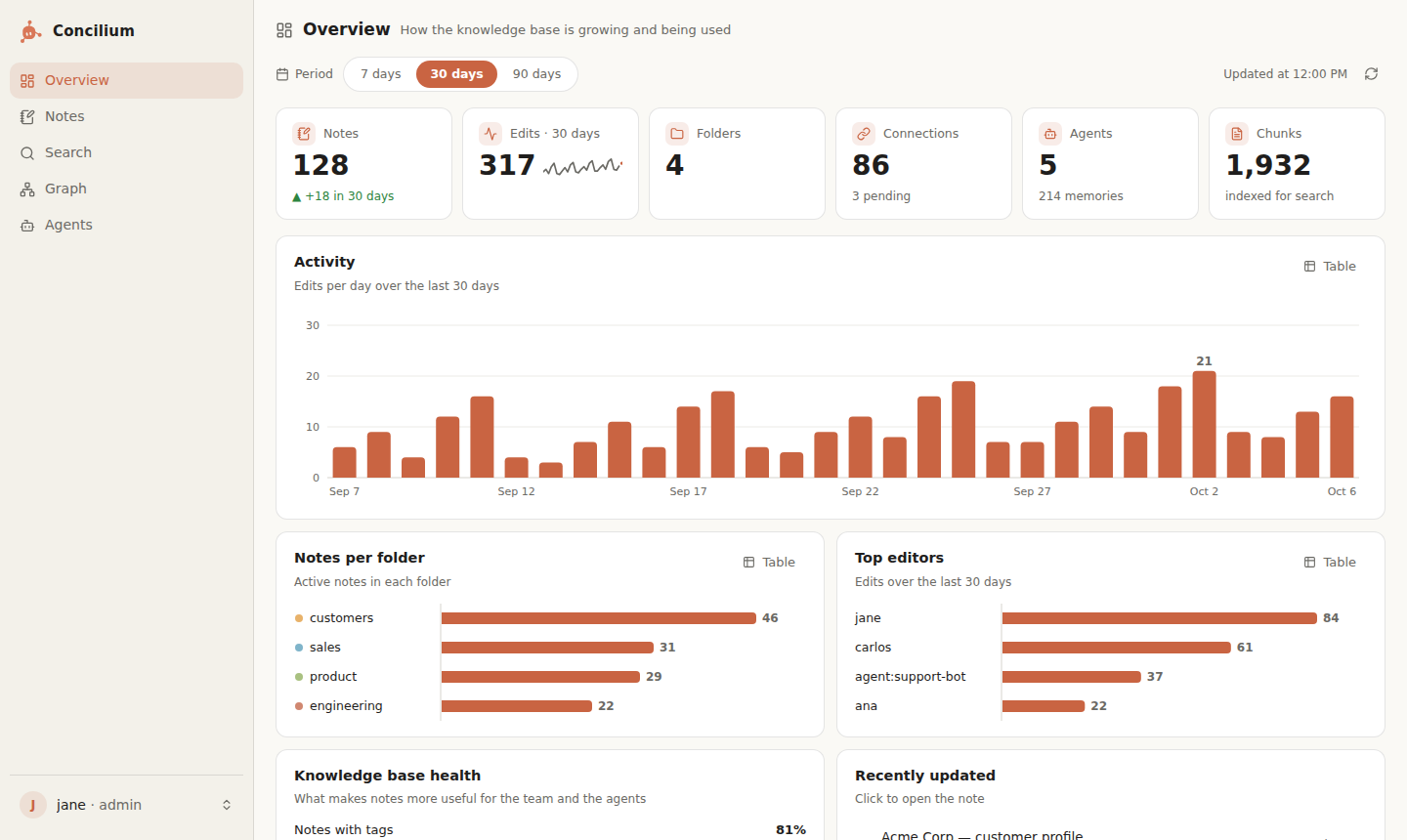 |
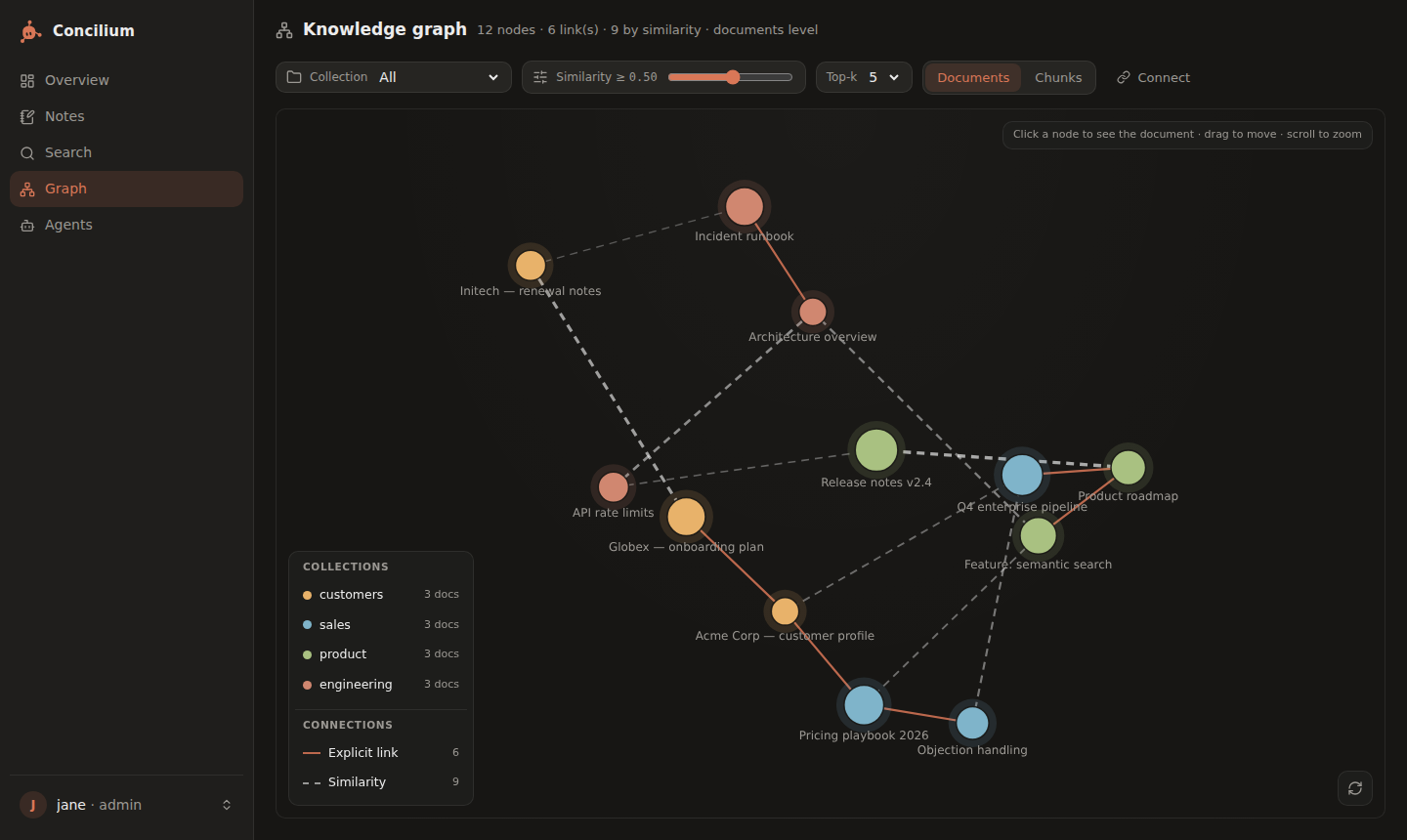 |
Concilium vs. Obsidian, Notion and plain vector databases
| Concilium | Obsidian | Notion | Vector DB only | |
|---|---|---|---|---|
Team notes with Markdown and [[wikilinks]] |
✅ | ✅ | ≈ (links and mentions) | ❌ |
| Built-in hybrid semantic + full-text search | ✅ | ❌ (plugins) | ≈ (Notion AI) | ≈ (semantic only) |
| MCP server for Claude and other agents | ✅ built in | ≈ (community plugins) | ✅ (hosted) | ❌ |
| Agents can write back with versioning and duplicate checks | ✅ | ❌ | ≈ | ❌ |
| Agent memory, sessions and tasks | ✅ | ❌ | ❌ | ❌ |
| Human approval for agent changes | ✅ | ❌ | ❌ | ❌ |
| Self-hosted on your own PostgreSQL | ✅ | ✅ (local files) | ❌ | ✅ |
This comparison reflects built-in features. Plugins and integrations can add more to each tool.
Pick Concilium if your team wants an open-source Obsidian or Notion alternative that is built for AI agents and RAG from day one: one place where people write and agents read, search and learn.
Quick start
Requirements: Python 3.11+, uv, and PostgreSQL 16 with the pgvector extension.
# 1. PostgreSQL with pgvector (skip this if you already have one)
docker run -d --name concilium-db -p 5432:5432 \
  -e POSTGRES_USER=user -e POSTGRES_PASSWORD=change-me -e POSTGRES_DB=kb \
  pgvector/pgvector:pg16

# 2. Install
git clone https://github.com/concilium-mcp/web-server.git concilium
cd concilium
uv sync
cp .env.example .env   # set DATABASE_URL, EMBEDDING_PROVIDER and the provider's API key

# 3. Run (tables are created on first start)
uv run mcp-rag-api serve            # http://localhost:8000

# 4. Create the first dashboard user, then open http://localhost:8000/dashboard
uv run mcp-rag-api create-user --username you --role admin

# 5. Create an admin API key for your agents (shown only once)
uv run mcp-rag-api create-key --label me --scopes admin
Two-factor authentication: each person turns it on in user menu → Security (2FA) with Google Authenticator, Authy, 1Password or any TOTP app, and saves the recovery codes. Lost the phone and the codes? An admin resets it under Users, or from the CLI: uv run mcp-rag-api reset-2fa --username you. To store 2FA secrets encrypted in the database, set DASH_TOTP_ENCRYPTION_KEY (optional; see .env.example).
Prefer Docker? A public image (linux/amd64 and arm64) is published on every change to main: ghcr.io/concilium-mcp/web-server, tags latest and sha-<commit>. Pass the same variables as .env.example with -e or --env-file:
docker run -d --name concilium -p 8000:8000 \
  --add-host=host.docker.internal:host-gateway \
  -e DATABASE_URL=postgresql://user:[email protected]:5432/kb \
  -e EMBEDDING_PROVIDER=voyage -e VOYAGE_API_KEY=your-key \
  ghcr.io/concilium-mcp/web-server:latest
docker exec -it concilium mcp-rag-api create-user --username you --role admin
Coolify, Dokploy, Railway, Kubernetes and more: see the deployment guide. To build it yourself, Dockerfile.coolify is the same production image. docker-compose.yml is an example that runs the API next to an existing Postgres container (external network db_network).
Connect your agents
Claude (claude.ai, Desktop, mobile): Settings → Connectors → Add custom connector with https://your-domain/mcp. Claude opens Concilium's Authorize screen: sign in with your dashboard account, pick what it can do (read, write, manage agents) and which folders it sees, then click Authorize. No key to copy; revoke anytime under Connections in the user menu.
ChatGPT: Plugins → create (developer mode) with server URL https://your-domain/mcp and authentication OAuth; ChatGPT registers itself and opens the same Authorize screen.
Cursor / VS Code: add https://your-domain/mcp as an HTTP MCP server; the editor opens the browser to authorize.
Any client can register itself (dynamic client registration), but only if it sends users back to a trusted address: https on OAUTH_REDIRECT_ALLOWLIST (default claude.ai, claude.com, chatgpt.com, openai.com, vscode.dev, mistral.ai, subdomains included), a native app scheme on OAUTH_REDIRECT_SCHEMES (default cursor, vscode, vscode-insiders) or http://localhost. If a client fails with "configuration rejected", the server log shows oauth: registro recusado (redirect fora da allowlist): [...]: add that host (or scheme) to the variable and restart. Setting the variable replaces the default list, so keep the ones you still need.
Claude Code
# OAuth: opens the browser to authorize (run /mcp inside Claude Code if it doesn't)
claude mcp add --transport http concilium https://your-domain/mcp

# or with an API key
claude mcp add --transport http concilium http://localhost:8000/mcp \
  --header "Authorization: Bearer kb_sk_YOUR_KEY"
Claude Desktop and other local clients can run the server over stdio: uv run mcp-rag-api stdio (the key is read from KB_API_KEY).
Your own agents (Claude Agent SDK or any MCP client) can point to https://your-domain/mcp with an Authorization: Bearer header. Anything else can use the REST API, documented at /dash/docs (requires a dashboard login).
Then just talk to Claude:
Create a collection called "handbook" and add our refund policy: customers can ask for a refund within 30 days.
What is our refund window? Cite the source.
Register a support agent that only uses the "handbook" collection and never promises refunds without checking the policy.
Use less context across projects
Working on several projects? Don't load a big AGENTS.md into every chat. Keep one short note per top-level folder as the project brief, and the Claude Code plugin injects only that brief (~800 tokens at most) when a session starts, based on the repository you are in:
/plugin marketplace add concilium-mcp/web-server
/plugin install concilium@concilium
/concilium-init
| Command | What it does |
|---|---|
/concilium-init |
Connects the repository to a Concilium project: writes .concilium.json (no secrets) and offers a minimal CLAUDE.md. If the project has no brief yet, offers to run /concilium-brief. |
/concilium-brief |
Drafts the brief from the repository (README, CLAUDE.md/AGENTS.md, folder layout, recent commits) and the notes you already have, shows it to you and saves it only after you approve. Run it again when the project changes: it refreshes the same note. |
Who writes the brief? You decide: let /concilium-brief draft it for your approval, or write the note yourself and mark it with the pin button (Use as project brief).
Everything else comes on demand: search_knowledge returns one short snippet per document, and get_document reads big documents by section. Clients without hooks can call the get_project_brief tool, and load_agent already includes the brief of the agent's project. Coding agents can also connect to /mcp?tools=dev, a short list of the 23 tools they use day to day. The overview shows the real token spend of each session.
Boards for agents working in parallel
Each folder can hold Kanban boards (one per project), with columns you name yourself. Agents break the work into cards with a checklist, claim a card for their session (a 2-hour lease renewed on every update, so two sessions never work on the same card), record the worktree, branch, merge request and CI status, tick the checklist and move the card to review or done. A session that stops halfway releases the card with the next step, and the next session picks it up from there. The Claude Code plugin shows your cards for the current repository when a session starts.
Every change is written to an append-only audit log (who, from which client and session, when, and what changed, before → after), readable through the board_log tool. Tools: list_boards, get_board, create_board, my_work, create_card, start_card, update_card, check_item, log_card, release_card, submit_card, finish_card, search_cards and more; REST under /boards and /cards.
Already on Trello? Connect it under Integrations to import a board (columns, labels, due dates and checklists) and mirror card changes back to Trello.
How it works
flowchart LR
    A["Claude Code / Desktop<br/>your own agents"] -- "MCP (HTTP or stdio)" --> S
    B["Scripts and integrations"] -- "REST API" --> S
    T["Your team"] -- "Web dashboard" --> S
    S["Concilium<br/>FastAPI + MCP server"] --> P[("PostgreSQL<br/>+ pgvector")]
    S --> E["Embeddings<br/>Voyage · OpenAI · Hugging Face · local"]
| MCP tool group | Tools |
|---|---|
| Knowledge base | search_knowledge, get_document, list_documents, add_document, update_document, edit_document, upsert_document, archive_document, document_history, collections |
| Links | get_related, link_documents, unlink_documents, plus [[Title]] in content |
| Agent (self) | load_agent, recall, remember, forget, save_session, upsert_task, propose_agent_update, … |
| Management | create_agent, update_agent, set_agent_autonomy, review_agent_update, issue_agent_key, … |
Prompts: design_agent, start_as_agent, answer_with_sources, save_learning.
Documentation
- Deployment guide: public Docker image, Docker Compose with pgvector, Coolify, other platforms and a production checklist
- Full guide (Portuguese for now): setup, every MCP tool, scopes, REST examples, maintenance, troubleshooting and production deployment
- Interactive REST API docs:
http://localhost:8000/dash/docs(behind the dashboard login) - Architecture and design decisions: PLANO.md
FAQ
Is Concilium an Obsidian alternative?
Yes, for teams. You get folders, Markdown, [[wikilinks]], backlinks and a graph view in the browser. Every note is also searchable by AI agents through MCP, with semantic search, versioning and access control. It doesn't replace a personal offline vault; it's a shared knowledge base for people and agents.
Can it replace Notion as our team wiki?
For knowledge that agents need to use, it can: customer profiles, playbooks, runbooks, product docs. Concilium focuses on notes, search, agents and the boards agents work on, rather than databases or real-time co-editing.
Can I import my Obsidian vault, PDFs or Word documents?
Yes. In the dashboard, Notes → Import takes either a zipped Obsidian vault (folders become collections, [[wikilinks]] are kept) or loose PDF, .docx, Markdown and text files sent to a folder of your choice. Integrations can use POST /documents/upload for files or PUT /documents/upsert for text. Scanned PDFs are read with OCR (OCR_PROVIDER).
Does Concilium reduce token usage?
Not by itself, and we measure it instead of promising it. Connecting the MCP server adds a small fixed cost (about 1,200 tokens per Claude Code session with ?tools=dev), and answers stay short: one snippet per search, big documents by section, a project brief of ~800 tokens instead of a large AGENTS.md. What you gain is accuracy and continuity: agents use the current decisions and procedures and pick up the work where the last session stopped. The dashboard shows the real spend so you can check it on your own projects.
Does it work with ChatGPT, Cursor or other LLM tools?
Any client that speaks the Model Context Protocol can connect. Everything else can use the REST API. Embeddings are independent of the chat model.
Is Concilium open source?
Yes. Concilium is released under the Apache License 2.0: you can use, modify and self-host it, including commercially.
Is my data private?
Concilium is self-hosted: notes, vectors and agent memories live in your own PostgreSQL. With the local embeddings provider, no text leaves your server.
Which embedding models are supported?
Voyage AI (voyage-3.5), OpenAI (text-embedding-3-small), Hugging Face Inference (BAAI/bge-m3) and local BAAI/bge-m3 via sentence-transformers. All of them use 1024 dimensions.
License
Concilium is open source under the Apache License 2.0.
Tech stack
Python 3.12 · FastAPI · MCP Python SDK · asyncpg with plain SQL · PostgreSQL 16 + pgvector · a vanilla JavaScript dashboard (no build step) with Toast UI Editor and force-graph · uv · pytest · ruff.
Concilium: an open-source shared knowledge base, second brain and RAG memory for teams and their AI agents.
Reviews (0)
Sign in to leave a review.
Leave a reviewNo results found