confab
Health Warn
- License — License: MIT
- Description — Repository has a description
- Active repo — Last push 0 days ago
- Low visibility — Only 5 GitHub stars
Code Fail
- rm -rf — Recursive force deletion command in install.sh
- network request — Outbound network request in install.sh
- rm -rf — Recursive force deletion command in test/e2e/scenarios/custom-dest.sh
- rm -rf — Recursive force deletion command in test/e2e/scenarios/fresh-install.sh
Permissions Pass
- Permissions — No dangerous permissions requested
No AI report is available for this listing yet.
Open-source CLI for syncing Claude Code session transcripts — backup, search, and share your AI coding sessions. Self-hosted backend support.
confab
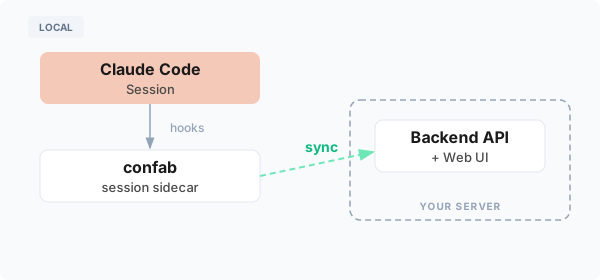
Sync and explore your Claude Code sessions. Connect confab to your Confab backend to capture transcripts in real-time for exploration, sharing, and analysis.
Works seamlessly — your claude workflow stays exactly the same.
Install
Supported on macOS and Linux.
curl -fsSL https://raw.githubusercontent.com/ConfabulousDev/confab/main/install.sh | bash
# Follow the instructions to add confab to your PATH
confab setup --backend-url https://confab.yourcompany.com
After setup, your Claude Code sessions will automatically sync to the configured backend.
Connect to Your Backend
# Initial setup — configures backend, authenticates, and installs hooks
confab setup --backend-url https://confab.yourcompany.com

# Login separately (if already set up)
confab login --backend-url https://confab.yourcompany.com

# Check connection and hook status
confab status

# Logout
confab logout
Self-Hosting the Backend
To deploy your own Confab backend, see confab-web.
Usage
Sync Mode (Default)
Sessions are synced incrementally while you work:
# Install sync hooks (done automatically by setup)
confab hooks add

# View running sync daemons
confab sync status

# Remove hooks
confab hooks remove
The sync daemon uploads transcript data periodically during your session, so data isn't lost if the session ends unexpectedly.
List Sessions
# List all local sessions
confab list

# Filter by duration
confab list -d 5d    # Sessions from last 5 days
confab list -d 12h   # Sessions from last 12 hours
Copy a session ID from the list to use with confab save.
Manual Upload
# Upload specific sessions by ID (use IDs from 'confab list')
confab save abc123de

# Upload multiple sessions
confab save abc123de f9e8d7c6
Redaction
Sensitive data is automatically redacted before uploading. Redaction is enabled by default during confab setup.
Built-in patterns detect common secrets (API keys, private keys, JWT tokens, database passwords, and more) without any configuration.
See Redaction for configuration details.
Configuration
| File | Purpose |
|---|---|
~/.confab/config.json |
Backend URL, API key, and redaction settings |
~/.confab/logs/confab.log |
Operation logs (auto-rotated, 14 day retention) |
Environment Variables
| Variable | Default | Purpose |
|---|---|---|
CONFAB_CLAUDE_DIR |
~/.claude |
Claude Code state directory |
CONFAB_CONFIG_PATH |
~/.confab/config.json |
Config file location |
CONFAB_LOG_DIR |
~/.confab/logs |
Log directory |
Developer Docs
Each package has a README with extension guides, invariants, and design decisions:
See also CLAUDE.md for AI-oriented architecture notes and development practices.
Development
make build
go test ./...
Building from Source
git clone https://github.com/ConfabulousDev/confab.git
cd confab
make build
./confab install
# Follow the instructions to add confab to your PATH
confab setup --backend-url https://confab.yourcompany.com
License
MIT
Reviews (0)
Sign in to leave a review.
Leave a reviewNo results found