CorvinOS
Health Warn
- License — License: Apache-2.0
- Description — Repository has a description
- Active repo — Last push 0 days ago
- Low visibility — Only 5 GitHub stars
Code Warn
- fs module — File system access in .github/workflows/compliance-check.yml
- process.env — Environment variable access in .github/workflows/coverage.yml
- fs module — File system access in .github/workflows/coverage.yml
Permissions Pass
- Permissions — No dangerous permissions requested
No AI report is available for this listing yet.
Self-hosted agentic OS — connects Claude Code, Codex or Hermes Agent to Discord, Telegram, WhatsApp, Slack & Email. EU AI Act 2026 & GDPR compliance by architecture.






Overview · Architecture · Audit & Compliance · A2A Network · Engine Layer · Security · EU AI Act · Learning Objectives
One install. Seven bridges. Any LLM.
CorvinOS is a self-hosted agentic OS that connects Claude Code, Codex, Hermes, Ollama and any OpenRouter model to Discord, Telegram, WhatsApp, Slack, Email, Teams, and Signal — through a single pip package.
# macOS / Linux — no Python or package manager required
curl -fsSL https://corvin-labs.com/install.sh | sh

# Windows (PowerShell)
irm https://corvin-labs.com/install.ps1 | iex
- Local-first — run 100 % offline with Ollama and
--engine hermes. No API key needed. - Agentic — generates sandboxed tools and new skills at runtime; delegates subtasks across five AI engines.
- Compliance by architecture — EU AI Act 2026 (disclosure, consent, house-rules) and GDPR (audit chain, data residency, erasure) are load-bearing code, not policy documents. None can be disabled by a flag.
- Multi-tenant — one instance, multiple users, personas, and teams, all isolated.
- Self-hostable anywhere — Linux, macOS, Windows; Docker-ready; single
pip install.
CorvinOS enforces the EU AI Act in code, not in documentation.
Every compliance requirement — disclosure, consent, audit integrity, data residency, egress control, GDPR erasure — is a structural constraint that cannot be disabled by a flag, env var, or config override. Regulated deployments get verifiable guarantees, not policy promises.
Quick Start
See INSTALLATION.md for the complete setup guide.
Recommended — one line, every platform, zero prerequisites:
# macOS / Linux
curl -fsSL https://corvin-labs.com/install.sh | sh

# Windows (PowerShell)
irm https://corvin-labs.com/install.ps1 | iex
The bootstrap installer brings its own Python (via uv),
so you need no system Python, no pip, and no package manager installed first. It
puts corvinos-serve on your PATH, and it also sets up Hermes — installs Ollama
and pulls a local model (qwen3:8b, or qwen3:1.7b on <6 GB RAM) — so CorvinOS runs
fully offline with --engine hermes from the first start. The Windows one-liner usesirm | iex (no &&), so it works in both PowerShell 5.1 and 7.
Only want cloud engines (Claude/GPT)? Skip the local model with
--no-hermes
(sh -s -- --no-hermes) orCORVIN_SKIP_HERMES=1.
Already have Python 3.10+? A plain pip install works identically on all three OSes:
pip install corvinos
python -m corvinOS        # web console at http://localhost:8765
python -m corvinOS is PATH-independent: it starts the console on the first
try on every OS — including Microsoft Store / system Python, where pip install
falls back to a per-user scripts directory that is not on PATH (the usual reasoncorvin-serve is "not found" on Windows). On Windows you can also use py -m corvinOS.
Want the short corvin-serve command on your PATH? Install with
pipx — it isolates the app and wires up PATH
automatically, on every platform:
pipx install corvinos
corvin-serve              # web console at http://localhost:8765
corvin-servefrom a plainpip installonly works once its scripts directory
is onPATH. Runningpython -m corvinOSonce adds that directory to your PATH,
socorvin-servethen works in a new terminal — butpipx(orpython -m corvinOS) is the reliable cross-platform path.
The base install is pure-Python and cross-platform — it brings the web console
all the way up to setup on Linux, macOS, and Windows, with cloud/edge voice
(OpenAI + Microsoft Edge TTS) working out of the box. For local, offline
speech models add the optional extra:
pip install "corvinos[voice]" # local Piper TTS + faster-whisper STT
The
voiceextra is opt-in because its local-model dependencies (piper-tts,faster-whisper) lack Windows wheels for some Python versions; keeping them
out of the base install meanspip install corvinosreaches setup reliably on
every supported platform.
Requirements: Python 3.10+ · Linux, macOS 12+, or Windows 10/11 · Node.js 20+ required only for bridges
Default engine: Claude Code (Claude Pro or Max subscription required).
For fully local, zero-egress deployment: --engine hermes (Ollama, no API key).
Alternative package managers:
# macOS / Linux — Homebrew
brew tap CorvinLabs/corvinos && brew install corvinos

# Windows — Scoop
scoop bucket add corvinos https://github.com/CorvinLabs/scoop-corvinos && scoop install corvinos

# conda / mamba (pending review)
conda install -c conda-forge corvinos
# Developer install from source
git clone https://github.com/CorvinLabs/CorvinOS.git && cd CorvinOS
pip install -e ".[all]" && corvin-install
Full documentation: docs/overview.md
Uninstall
One command removes everything — services, config, data directories, and the package:
corvin-uninstall --purge   # removes all files without prompting
pip uninstall corvinos -y  # removes the Python package
Without --purge the uninstaller asks before deleting data directories (audit logs, API keys, session history). Use --purge for a fully non-interactive wipe.
What gets removed:
| What | Where |
|---|---|
systemd services (corvin-webui, voice bridge, watchdog) |
~/.config/systemd/user/ |
| Claude Code plugins + cache | ~/.claude/plugins/ |
| Voice config, API keys, service.env | ~/.config/corvin-voice/ |
| Audit logs, sessions, forge tools | ~/.corvin/ |
| Bridge virtual environments | ~/.corvin/bridges/*/venv/ |
| Web console build artifacts (source install only) | <repo>/core/console/.../web-next/dist/ |
After pip uninstall corvinos -y the only thing left is the cloned repo directory (source installs) — delete it with rm -rf <repo> if you no longer need it.
EU AI Act 2026 + GDPR: Structural Enforcement
CorvinOS implements EU AI Act 2026 and GDPR as structural design constraints. Every feature must answer: does this weaken a compliance guarantee?
| Mechanism | Layer | Regulation | Enforcement property |
|---|---|---|---|
| Bot Disclosure | L19 | EU AI Act Art. 50 | One-time per uid · structurally fail-closed · no bypass path |
| Consent Gate | L16 | GDPR Art. 6 & 7 | Deny-by-default · TTL-capped · re-validated at every consume |
| Hash-Chained Audit | L16 | GDPR Art. 30 & 32 | SHA-256 chain · offline-verifiable · daily auto-verify · chain write failure blocks request |
| Audit-at-Rest Encryption | L37 | GDPR Art. 32 | Segment rotation · age/gpg sealing · RFC 3161 TSA timestamping (opt-in) · 7-year retention |
| Data Classification + Flow Guard | L34 | EU AI Act Art. 14 | 4-stage matrix (PUBLIC/INTERNAL/CONFIDENTIAL/SECRET) · fail-closed at every engine-spawn callsite |
| Egress Lockdown | L35 | EU AI Act Art. 14 | Declarative allowed_hosts / forbidden_hosts · default_action=deny EU production preset |
| GDPR Art. 17 Erasure | L36 | GDPR Art. 17 | Cross-layer erasure orchestrator · pseudonymous subject IDs · audit trail de-linked, not deleted |
| Acceptable-Use Gate | L44 | EU AI Act Art. 5 & 50 | SHA-256-anchored house-rules policy · no disable switch · no tenant override |
| Compliance-Zone Routing | ADR-0007 | EU AI Act Art. 14 | allowed_engines / forbid_engines per tenant · data_residency in tenant.corvin.yaml |
Absolute constraints — no env var, flag, or config can disable these:
disclosure is structurally locked · consent gate has no bypass · every audit event traverses the hash chain before any response · L34 blocks non-compliant engine spawns · L38 audit write failure blocks the A2A request · L44 house-rules gate has no kill-flag.
voice-audit verify              # walk the full hash chain; exits 1 on any break
bridge.sh doctor                # boot self-test with audit chain verification
python -m corvin_compliance_reports.cli generate processing-records   # GDPR Art. 30
Full compliance reference: docs/eu-ai-act/README.md · docs/audit-and-compliance.md
Core Features
Swap the LLM Without Touching the Compliance Stack
CorvinOS decouples the AI backend from the compliance runtime via the WorkerEngine protocol (L22). Every engine shares path-gate, audit chain, and artifact registration through the Tool Execution Broker — swap providers without changing your compliance setup.
| Engine | Provider | Key property |
|---|---|---|
| Claude Code | Anthropic Claude (Pro/Max) | Full feature set — hooks, skills, MCP, mid-stream inject |
| Codex CLI | OpenAI | MCP + stream JSON |
| OpenCode | Ollama, OpenRouter, Google | Provider-agnostic |
| Hermes | NousResearch via local Ollama | Zero network egress · L34 CONFIDENTIAL-capable · no API key |
| Copilot CLI | GitHub Copilot Business/Enterprise | Zero incremental cost · worker/delegation only |
Multi-Agent Mesh — CorvinOS Instances Talk to Each Other
Multiple CorvinOS instances form a decentralized agent network. Every cross-instance call carries a cryptographic signature, bidirectional attestation, nonce replay protection, and binary attachment verification. Audit-first invariant: the envelope is written to the hash chain before any response is sent.
39-Layer Security Stack
Path-gate (write-protection) · secret vault with bwrap env-injection · sandboxed Forge tool generation · SkillForge with fail-closed linter · multi-tenant session isolation · conversation recall with PII-redaction · session artifact memory · external data sources with k-anonymised sampling.
Data Never Leaves Without Your Explicit Permission
Three-layer defence: per-tenant engine allowlist → data classification matrix (PUBLIC / INTERNAL / CONFIDENTIAL / SECRET) → egress host allowlist. EU_PRODUCTION presets ship out of the box. Raw data rows never enter the LLM context — only schema + aggregate stats + anonymised sample.
Web Console — Manage Everything From the Browser
Control plane at http://localhost:8765. Manage sessions, personas, bridges, forge tools, and audit logs from a single dashboard. Five-scope tenant model: one instance handles multiple users, projects, and teams in full isolation. Full REST API at /v1/console/.
bridge.sh console     # start web console
bridge.sh doctor      # health check + audit verify
Architecture
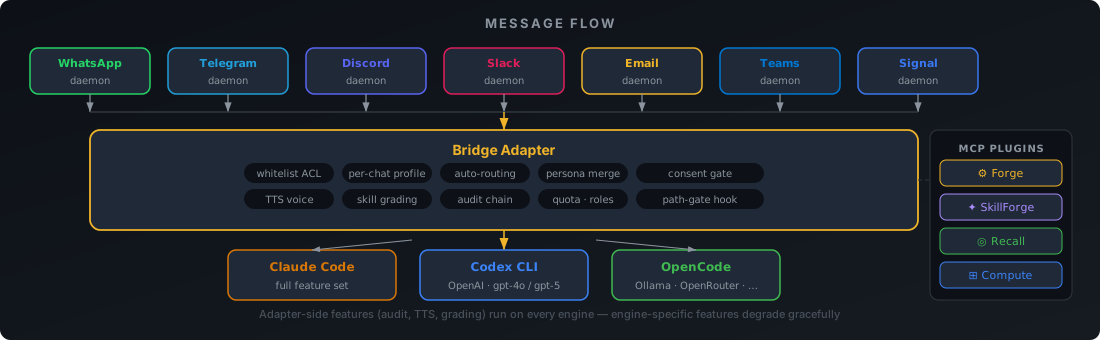
Seven bridge daemons (WhatsApp, Telegram, Discord, Slack, Email, Teams, Signal) funnel messages into a shared inbox. The Bridge Adapter enforces ACL, routes to the right persona, runs the TTS pipeline, and grades skills — per-chat-sequential, cross-chat-parallel. The WorkerEngine abstraction swaps the LLM backend without touching the compliance stack.
Full layer breakdown: docs/layer-model.md · Architecture diagrams: docs/diagrams/ · Full documentation: docs/overview.md
Testing
bash operator/bridges/run-all-tests.sh
Tests span the Python adapter, Node daemon-boot smoke tests, cowork, forge, skill-forge, and all security layers. Tests run hermetically — Claude stubbed via ADAPTER_FAKE_CLAUDE=1, real bwrap where namespace isolation is the subject under test.
Contributing
By opening a pull request you accept CLA.md. Every merged contribution requires a corresponding entry in CLA-SIGNATORIES.md. See CONTRIBUTING.md for the full workflow.
License
Licensed under the Apache License, Version 2.0.
Relicense right (CLA §3): The Maintainer retains the right to release future versions of CorvinOS under a different license — including source-available licenses (Business Source License, Functional Source License, Elastic License v2) or a commercial license — without requiring further consent from contributors. This right is granted by every contributor as a condition of the CLA.md. Already-published Apache-2.0 releases are not affected; they remain Apache-2.0 forever. See CLA.md § 3 for the full terms.
"CorvinOS" and "Corvin" are project identifiers per Apache § 6 — the license does not grant trademark rights.
Reviews (0)
Sign in to leave a review.
Leave a reviewNo results found