Intents
Health Warn
- License — License: MIT
- Description — Repository has a description
- Active repo — Last push 0 days ago
- Low visibility — Only 5 GitHub stars
Code Pass
- Code scan — Scanned 12 files during light audit, no dangerous patterns found
Permissions Pass
- Permissions — No dangerous permissions requested
No AI report is available for this listing yet.
Intents is a native macOS workbench for evaluating Apple's on-device Foundation Models.

Put Apple's Foundation Models to the test.
Build an evaluation. Inspect the evidence. See what changed.





Install · First evaluation · User wiki · Models and tools · Connect an agent · Build from source
Intents is a native macOS workbench for testing Apple's Foundation Models. Create repeatable suites, inspect responses and execution traces, and compare saved runs as you refine prompts, settings, and tools. Its built-in MCP server lets a coding agent use the same evaluation workflow, with every run available to review in the app.
What you can do
| Capability | What it gives you |
|---|---|
| Repeatable evaluations | Test cases with shared instructions, attachments, and multiple repetitions. |
| Flexible scoring | Exact matches, required text, AI rubrics, or response collection without scoring. |
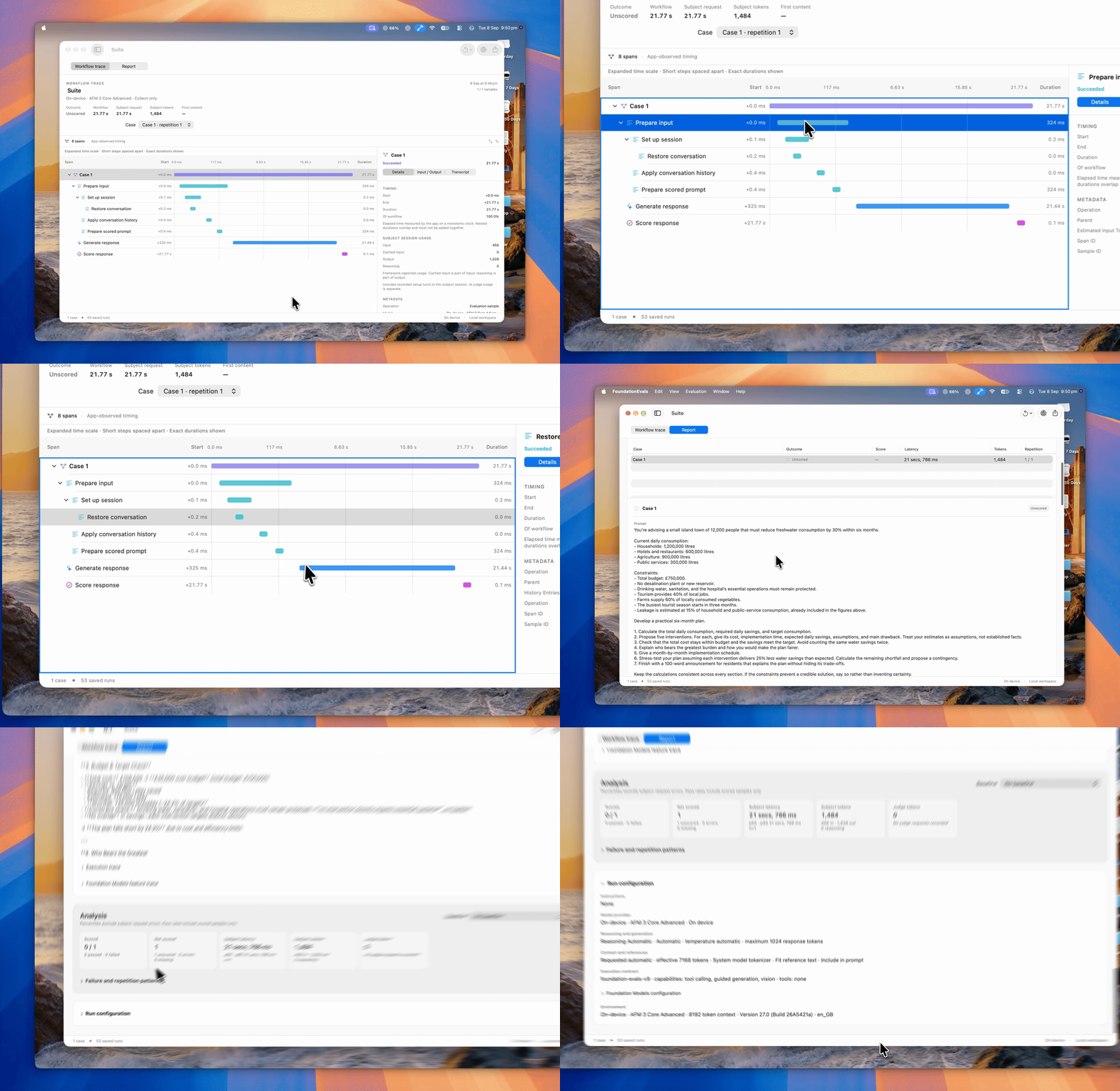
| Execution traces | A nested workflow waterfall with measured native stages, tool activity, token usage and a selected-span inspector. Trace details. |
| Saved comparisons | Run history, baseline comparisons, and JSON reports. |
| Models and tools | Apple's on-device model, compatible Core AI models, custom HTTP providers, and configurable tools. |
| Agent integration | An included MCP server for managing suites, running evaluations, and inspecting results. |
| App feature runners | A public Swift package for evaluating real app closures on a paired iPhone, iPad, or Mac. Integration guide. |
| Intent Lab | Run frozen App Intent and recognised-text Siri scenarios from a developer-owned UI-test target, then inspect separately labelled evidence. Setup guide. |
Install
Requirements:
- macOS 27 or later
- For the default on-device model: a Mac that supports Apple Intelligence, with Apple Intelligence enabled and the model downloaded
- Download and open the latest Intents.dmg.
- Drag Intents onto the Applications shortcut in the window.
- Eject the Intents disk, then open the app from Applications and check that the model is ready.
The app is signed with Developer ID and notarized by Apple.
Xcode is needed to build from source or use Intent Lab. It is not needed for a normal on-device suite.
Run your first evaluation
- In Overview, create a suite. Open Cases and add prompts with an expected response or reference answer where appropriate.
- Use Setup → Instructions for shared instructions and text, JSON, CSV, PDF, or image reference files.
- Use Setup → Scoring to choose a method and number of repetitions.
- Click Run. Open the saved run's Workflow trace or Report to inspect its response, score, explanation, timing, token usage, and tool activity.
- Reopen runs from Results or the sidebar, use Compare for earlier runs, or export a JSON report. See the user wiki for detailed steps.
| Scoring mode | Use it for |
|---|---|
| Exact text | Matching the complete expected response, ignoring surrounding whitespace. |
| Contains text | Checking for required text, ignoring case and accents. |
| AI rubric | Assessing concrete requirements on a 1–4 scale; scores of 3 or 4 pass. |
| Collect only | Saving responses and traces without assigning a score. |
For AI rubrics, write one observable requirement per line and provide a verified reference answer for factual tasks. Inspect the judge's explanation alongside its score. Repetitions help reveal variation; a few runs do not establish statistical significance.
Models and tools
The default provider is Apple's on-device Foundation Model. You can also load a compatible Core AI model or connect a custom local HTTP provider.
Use the suite's Setup pages to configure custom tools, structured output, streaming, and tool workflows. The tools and structured output guide includes a runnable local HTTP example.
To evaluate the production Swift feature inside another app, add theFoundationEvalsDeveloper package product and host its explicitly paired runner.
The developer integration guide covers typed
closures, @Generable results and tools, iPhone/iPad/Mac setup, trust, cancellation,
saved run evidence, and the boundary with Apple's development-only Evaluations framework.
Connect an agent
Intents includes an MCP server so an agent can manage suites and references, run evaluations, inspect traces, and compare saved results.
To connect Codex:
- Open Settings in Intents.
- Choose Connect to Codex.
- Restart Codex and keep Intents open.
The server provides an agent workflow guide during MCP initialization. Its HTTP endpoint is http://127.0.0.1:17873/mcp while the connector is running.
The connector listens only on this Mac. Intents generates a bearer credential, stores it in the login Keychain, and configures Codex to send it. Connected authenticated local clients can read and change evaluation data; keep the managed configuration private.
Your data
Suites, imported attachments, and run history are saved in ~/Library/Application Support/FoundationEvals/. The app does not encrypt these files itself. Saved traces and JSON exports can include prompts, responses, reference content, and tool arguments and outputs; review them before sharing.
On-device evaluations run locally. Custom HTTP providers and tools receive the content needed for their calls, and those separate services control any onward network use. Optional Private Cloud Compute uses Apple's network service when available. Spotlight tools can make matching local file content available to the selected model.
Anonymous usage telemetry is on by default and can be turned off at any time in Settings → Privacy → Share usage statistics. It sends only app-open events, app/macOS versions, and a random installation identifier to PostHog. The identifier is not linked to your name, email, or Apple account. AI evaluations, inputs, outputs, results, and evaluation activity are not tracked. Prompts, responses, suite names, files, provider addresses, credentials, screen recordings, and automatic interaction tracking are excluded. Turning telemetry off clears pending events and resets the analytics identifier; it does not delete events already received by PostHog. See telemetry details.
Build from source
Use Xcode 27 with its command-line tools selected. From the repository root:
./script/build_and_run.sh
This creates and opens a development build at dist/Intents.app. Quit the app before rebuilding. You can also open FoundationEvals/FoundationEvals.xcodeproj directly in Xcode.
Run the native tests on macOS 27 by opening the project in Xcode and choosing Product > Test with development signing configured. You can also use the command line:
xcodebuild -project FoundationEvals/FoundationEvals.xcodeproj \
  -scheme FoundationEvals -configuration Debug \
  -destination 'platform=macOS' test
UI tests require an interactive Mac and a signed test runner. If macOS rejects a command-line UI runner before launch, run the tests directly from Xcode. The optional Core AI inference test requires compatible model resources.
GitHub CI classifies the complete pull request or main push diff, including deletions and both sides of renames. Linux workflow linting, shell checks, and Python example syntax checks remain lightweight and always run; unit tests and macOS jobs follow the affected code.
| Changed files | Unit tests | Native build |
|---|---|---|
| Docs, README artwork, demo media, GitHub funding or ownership metadata | None | Skipped |
| Release workflows and Python/shell tools | Related script modules; signature checks use macOS when affected | Skipped unless build tooling changes |
| Portable scoring, installer, or UI component source | Suites that use the changed source, including shared dependencies | App and unit-test bundle; UI-test bundle when UI is affected |
| Other app source | No unrelated portable suites; this code needs the native macOS 27 test environment | App and unit-test bundle; UI-test bundle when UI is affected |
| Test files | Changed portable/script suites; app-only tests compile in their native target | Relevant native test target, if applicable |
| CI routing, package/project settings, release version files, or unknown paths | Full coverage | Full build |
Manual runs, malformed events, and unavailable Git history select full coverage. Release PR version changes still require the complete source checks used by installer publication. The Route changed files summary lists the selected suites and the reasons for each decision. Empty selections run no unit tests; a selected Swift suite that cannot be discovered fails instead of silently passing with zero tests.
The explicit portable-source dependency map lives in script/ci_routes.py. Update it when adding a suite or a shared dependency; catalog tests check it against Package.swift and the test suite names. The portable package shares production source and existing tests with Xcode without lowering the app’s deployment target. CI uses the hosted xcode-27 macOS 27 runner, runs the core test scheme, and builds (but does not run) the UI-test bundle when UI code changes. Run the interactive UI tests above before releasing. See the release guide for signed releases through Release Me and local packaging.
License
Intents is released under the MIT License. Dependencies retain their own licenses; see third-party notices. Separately supplied model resources have their own terms.
Reviews (0)
Sign in to leave a review.
Leave a reviewNo results found