ha-pi-durable
Health Warn
- License — License: MIT
- Description — Repository has a description
- Active repo — Last push 0 days ago
- Low visibility — Only 9 GitHub stars
Code Warn
- network request — Outbound network request in hearth_pi/package-lock.json
- network request — Outbound network request in hearth_pi/public/app.js
- process.env — Environment variable access in hearth_pi/src/config.ts
Permissions Pass
- Permissions — No dangerous permissions requested
No AI report is available for this listing yet.
Hearth Pi: experimental Home Assistant AI App with durable tasks, scoped reads and human-reviewed light/switch actions.
Hearth Pi
A durable AI agent for Home Assistant

Independent community App · 0.2.0 · experimental. Not an official Home Assistant or Pi product. The pinned Pi 1.0.1 APIs are experimental. This is a technical preview, not a production recommendation or external security audit.

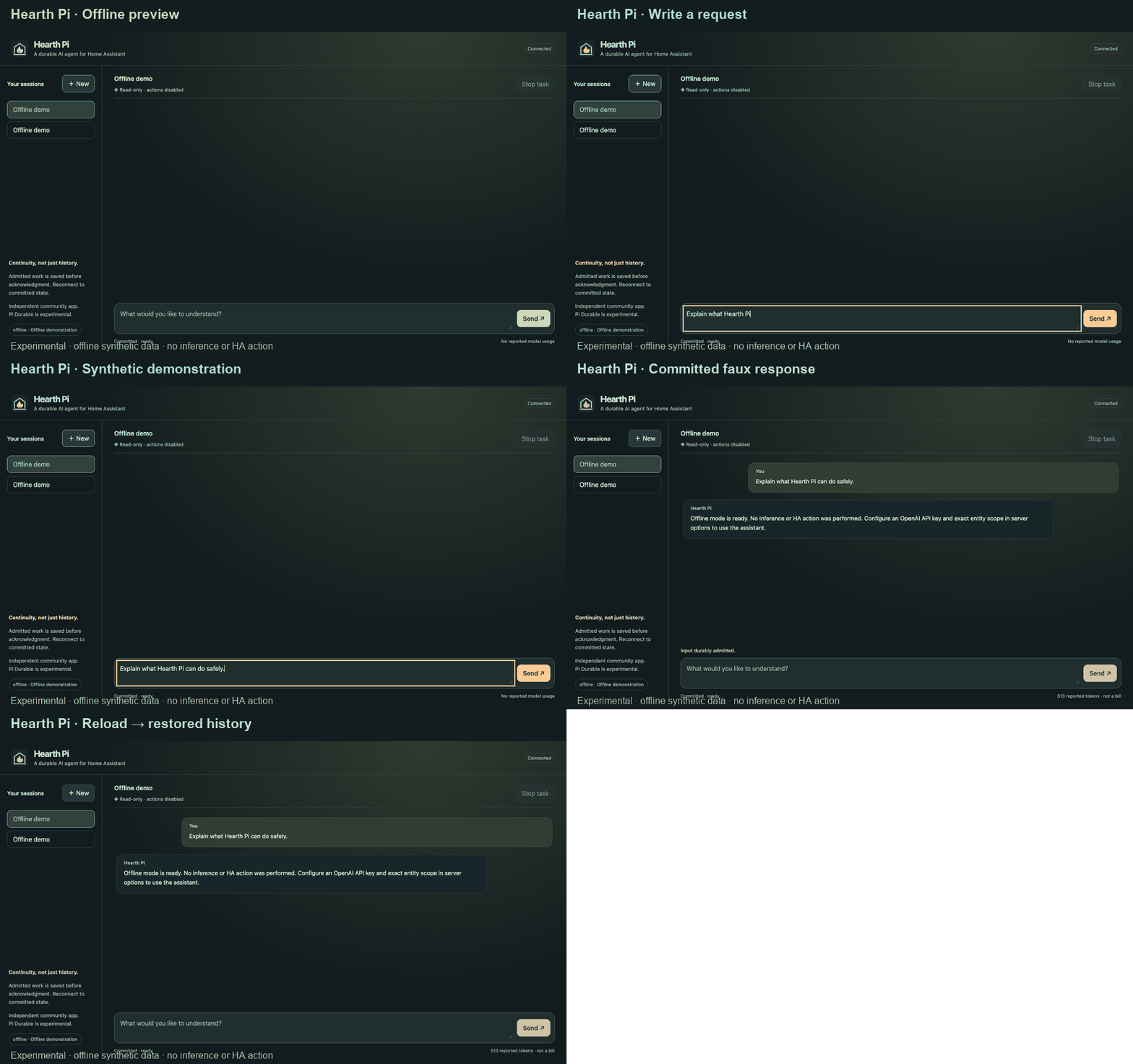
The original 0.1.0 GIF is a real browser capture with synthetic offline data and history restored after reload. No model inference or HA action occurred; it does not depict the newer subscription/workspace features.
- Continuity, not just history. Genuine pinned Pi Durable commits admitted inputs, task checkpoints, transcripts and documents to SQLite with
synchronous=FULL. One writer owns each store. Reconnect to committed state. - Home mode. Explicitly scoped HA reads, service discovery and immutable light/switch proposals. Empty scope denies reads. Actions are disabled by default; enabling them defaults to Ask (exact human approval). Home permissions also offers Read-only and explicitly acknowledged Full access / auto-approve for configured exact light/switch on/off and light brightness only. Full is not host/admin access, does not expand Code, and does not implement other HA services. No Home-mode shell, filesystem, configuration, Docker or Supervisor-admin tools.
- Code mode, separately confined. Genuine Pi coding-agent
read,edit,writeandbashtools run in an optional separate non-root, no-network worker container. It has its own files—not HA configuration, controller/data, SSH/Docker access or HA/provider credentials. Code sessions do not receive HA tools. This preview supports one trusted coding operator. - ChatGPT subscription support. Official Pi
openai-codexOAuth, with headless device-code login and a state-checked browser redirect fallback. Tokens stay in private controller storage. OpenAI API-key mode is separate; a ChatGPT subscription does not make API-key calls free. - Uncertain effects stay uncertain. Interrupted coding calls are not replayed; an interrupted workspace turn requires a fresh human input before more tool execution. HA dispatches persist intent before one attempt; interrupted dispatch is unknown and never automatically retried. A service receipt is not physical-device verification.
Unreleased Home permissions slice in this source: authenticated owner settings persist in the same Pi Durable store, bound to a canonical exact policy fingerprint and revision. Full applies only to newly admitted Home inputs; changing permissions invalidates old proposals. Emergency Read-only promptly prevents/cancels dispatch without waiting for HA, but cannot undo in-flight effects. Unknown/pending dispatch outcomes block all Home writes installation-wide across conversations, owners and restarts until the specific unknown receipt is explicitly reconciled by its human owner. Policy changes invalidate Full permanently until acknowledged again—even if the policy later changes back. No automatic replay or retry. Exact entity lists accept at most 10,000 IDs (no wildcard/all-future scope); discovery returns twenty at a time. This is source-tested, not live device evidence.
Unreleased native companion slice in this source: ask Hearth to build a status view. ha_build_view selects exact approved entity references, obtains values through the controller, and atomically saves a timestamped canvas with a recovery receipt in Pi Durable. The authenticated UI hydrates it beside chat; refresh/follow-up controls draft ordinary Home inputs, not actions. No Muse SDK/account/integration. This is source implementation with offline integration/recovery tests—not a deployed all-home, proactive-memory or voice feature. Companion direction and current limits.
For ordinary voice control, consider official Assist first. Hearth Pi explores durable execution and explicit boundaries, not administrative autonomy. We do not promise exactly-once physical effects, local inference or power-loss proof.
Try without AI credentials
Use Node 24.21.0 LTS, npm and a clean checkout:
npm ci
npm --prefix hearth_pi ci
npm run check
# In Bash; choose a private 24+ character password, not an API key:
read -r -s -p 'Local password: ' HEARTH_LOCAL_PASSWORD; printf '\n'
export HEARTH_LOCAL_PASSWORD
HEARTH_MODE=local HEARTH_PROVIDER=offline npm --prefix hearth_pi start
Open http://127.0.0.1:8099/; username hearth, password as entered. The real durable harness uses an explicitly offline faux provider, not an LLM. Restart and reload to see committed history. Local mode binds loopback, rejects root and never trusts Ingress identity headers. Local state stays in ignored hearth_pi/.local/.
Home Assistant installation
Requires Home Assistant OS, an administrator account and an amd64 or aarch64 host. Use an authorized test installation with a backup; this is an experimental third-party App, not HACS or a Devices & services integration.

- Click the button, select your Home Assistant URL and confirm Add. This adds the repository; it does not install or start the App automatically.
- In Settings → Apps → Install app (App store), find Hearth Pi and select Install. The current preview builds on your HA host, so the initial installation can take several minutes. No Git clone, Node installation, SSH or Docker commands are needed for Home mode.
- Before starting, follow the required configuration example: your HA user ID, exact HTTPS origin, provider and exact entity IDs. Empty
allowed_entitiesmeans no HA entity access, not automatic discovery of your whole home. - Save, Start, enable Show in sidebar, then select Open Web UI. Open ChatGPT login if using the subscription provider, and create a Home session for HA questions.
Manual fallback: Settings → Apps → Install app → ⋮ → Repositories, add https://github.com/cosmyo/ha-pi-durable, then follow steps 2–4. Older HA versions call Apps Add-ons and Install app Add-on store. Home Assistant Container/Core without Supervisor cannot install this App.
The complete App build context is hearth_pi/. It requests Ingress, HA's scoped API proxy and private /data, plus only its own addon_config bridge directory. No public ports, HA Core configuration mounts, Supervisor-admin/auth/Docker APIs or added privileges. The optional coding worker requires a trusted operator to create a separately constrained container; the App/agent cannot create Docker containers. Workspace installation and boundaries.
All authorization/action/entity lists start empty; coding is disabled. Configure exact trusted operator IDs and the HTTPS origin used by your browser. Sidebar admin visibility is not server authorization or proof of current HA role membership. Authorized IDs are trusted App operators, including access to its shared provider setup; don't add untrusted household/guest accounts.
Providers and privacy
offline: demonstration only; no inference.openai: official OpenAI API-key endpoint; separate API billing.openai-codex: ChatGPT subscription OAuth through Pi ModelRuntime. Sign in from ChatGPT login in the App. Account eligibility, model availability and provider limits still apply. Never put tokens or redirect URLs in chat/issues/recordings.
Explicit protected storage replaces Pi's default credential/resource discovery. No personal ~/.pi configuration, extensions or credentials are copied into the App or worker. Custom/local endpoints, voice integration and general Pi extension/MCP loading are not supported in this preview.
When an online provider is used, input, conversation context, tool declarations and selected tool output go to that provider. That includes coding files you explicitly read. Requests use store:false; provider retention/account policies still apply. Reported token counts are not a bill. There is no App telemetry. Security and threat model.
Evidence and limitations
npm run check covers typechecking, real-harness/SIGKILL recovery, request deduplication, API/auth/approval tests, synthetic provider tests, genuine Pi tools over authenticated IPC, DOM rendering, production compilation, package validation and selected secret patterns. Native amd64/aarch64 CI includes separate controller and confined-worker Docker gates. A badge or green smoke test does not prove a real Supervisor deployment, a live subscription login or a mobile iframe.
Validation evidence and remaining gates separates verified paths from unfinished work. Backup restoration, physical power loss, real mobile behavior and broad performance remain separate tests. Model work may be repeated after recovery and consume account allowance/cost; physical and coding mutations do not automatically replay. Workspace files need a separate backup; an App database restore does not undo file/device effects.
See architecture, workspace, research, roadmap, contributing and security reporting. Application code/artwork are original and MIT-licensed; third-party notes describe dependencies.
Reviews (0)
Sign in to leave a review.
Leave a reviewNo results found