viralwave-studio-guide
Health Pass
- License — License: MIT
- Description — Repository has a description
- Active repo — Last push 0 days ago
- Community trust — 59 GitHub stars
Code Pass
- Code scan — Scanned 1 files during light audit, no dangerous patterns found
Permissions Pass
- Permissions — No dangerous permissions requested
No AI report is available for this listing yet.
The complete guide to ViralWave Studio: put your social media content on autopilot. Setup walkthrough, features, brand voice, review workflow, AI agent integrations, plans, and FAQ.
The complete guide to putting your social media content on autopilot.
Setup walkthrough · Features · Brand voice · Review workflow · AI agent integrations · Plans · FAQ




What is ViralWave Studio?
ViralWave Studio is an AI-powered content platform that takes your marketing from manual to autopilot. Instead of generating posts one by one in a dashboard, you paste in your website — and ViralWave builds you a full month of finished social media content with captions and images, ready for your approval.
flowchart LR
    A[🌐 Paste your website] --> B[✨ Get 4 free posts]
    B --> C[🎨 Tune your brand voice]
    C --> D[👀 Review your month]
    D --> E[🔌 Connect your accounts]
    E --> F[🚀 Posting on autopilot]
    style A fill:#8b5cf6,stroke:#6d28d9,color:#fff
    style F fill:#10b981,stroke:#059669,color:#fff
No blank page. No daily "what should I post." Your month of content, done.
→ Start free at viralwavestudio.com
📸 See it in action
Your month, ready for review — approve, skip, or edit with AI:
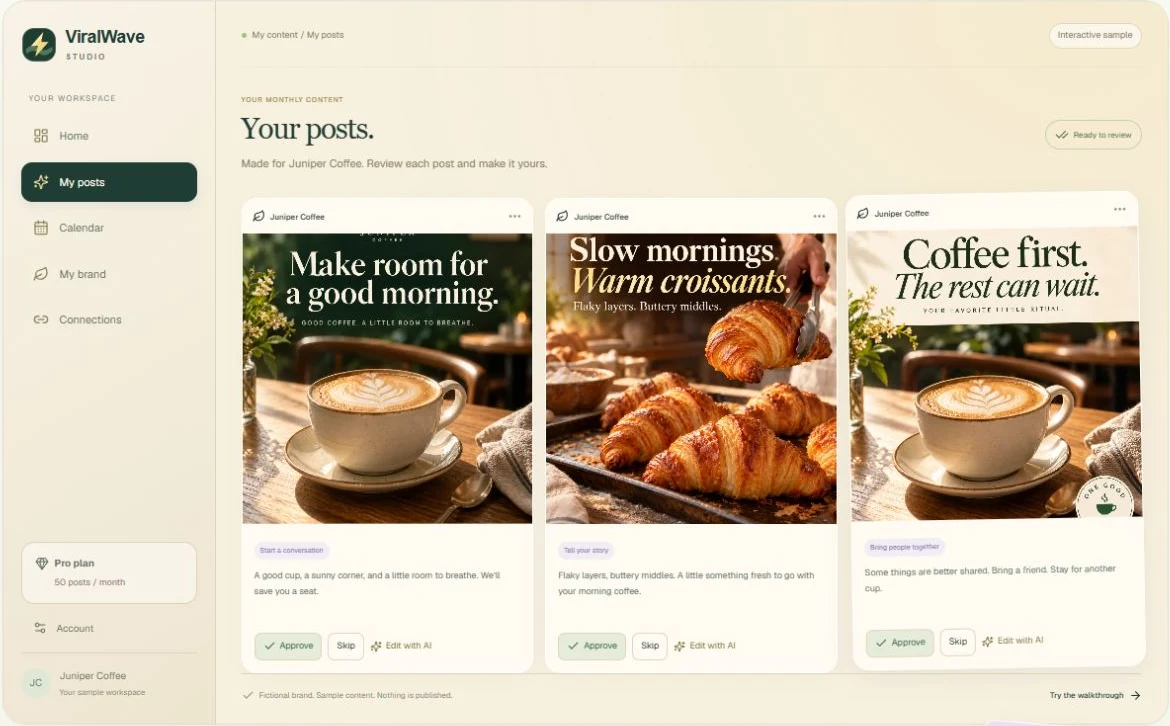
The free preview — swipe through your first four posts:

🎨 Sample output
Real post creatives generated by ViralWave Studio for fictional brands — this is the quality bar your month ships at:




→ Get posts like these for your business — free
📚 What's in this repo
| Guide | What you'll learn |
|---|---|
| 01 — Getting started | The full onboarding flow: website → 4 free posts → your first month |
| 02 — Features | Post generator, video lab, blog generator, AI images, analytics, and more |
| 03 — Brand voice | How ViralWave learns to sound like you (and how to tune it) |
| 04 — Review workflow | Approve, skip, edit: the 10-minute monthly review |
| 05 — Connecting platforms | Facebook, Instagram, LinkedIn, X, Threads, Pinterest, TikTok, YouTube |
| 06 — AI agents & MCP | Connect Codex, ChatGPT, and Claude straight to your ViralWave account |
| 07 — Plans & pricing | Starter, Pro, and Powerhouse — what you get at each tier |
| 08 — FAQ | The questions everyone asks, answered straight |
Plus examples/ with ready-to-use configs for connecting AI assistants.
⚡ The 5-minute tour
🌐 Your website becomes your content engine. ViralWave's crawler reads your site — your services, your tone, your offers — and builds a brand profile from it. No forms to fill out, no brief to write. If you have a website, you're already 80% onboarded.
✨ Four free posts, zero risk. Before you pay anything, you get four finished posts with captions and images. Not samples, not templates — real content for your business, generated from your website. If you don't love them, you walk away having spent nothing.
📅 A month of content, not a post at a time. After you pick a plan, ViralWave generates your full month — around 50 posts with a balanced mix of educational, behind-the-scenes, social proof, story, and promotional content. You review them the way you'd swipe through photos: approve, skip, or ask the AI to revise.
🚀 Publishing on autopilot. Once your month is approved and your accounts are connected, posting runs automatically. Eight platforms, one approval.
→ See it for yourself — free at viralwavestudio.com
🧰 Feature highlights
| ✍️ AI post generator | A month of captions and creative direction from your website |
| 🖼️ AI image generation | On-brand images for every post, matched to your visual identity |
| 🎬 Video lab | AI-generated video for Reels, TikTok, and Shorts |
| 📝 Blog generator | SEO-structured blog posts that feed your social content too |
| 🙂 Face-reference brand authority | Your likeness, consistently on-brand, in generated visuals |
| 🗓️ Smart scheduler | Your approved month queued across 8 platforms |
| 📊 Analytics with AI insights | See what's working without building spreadsheets |
| 🤖 Marketing assistant | An AI chatbot for content strategy questions |
| 📡 RSS-to-posts | Turn your blog or industry feeds into social content automatically |
| 🔌 AI agent integrations (MCP) | Connect Codex, ChatGPT, or Claude directly to your account |
Deep dive: 02 — Features
🎯 Who it's for
- 🏪 Local businesses — plumbers, salons, restaurants, clinics — that need to post consistently but don't have a marketing person
- 🎥 Creators and coaches — who live on content but are tired of the daily grind
- 💼 Agencies and freelancers — managing content for multiple clients from one place
- 🚀 Founders — who know they should be posting and finally want it handled
If you've ever thought "I know I should post more, I just don't have time" — that's the person this was built for.
💳 Plans
| Starter | Pro | Powerhouse | |
|---|---|---|---|
| Price | $15/mo | $29/mo | $49/mo |
| Best for | Solo operators getting consistent | Growing brands posting everywhere | Power users & teams maxing output |
Annual billing saves 20%. Full breakdown: 07 — Plans & pricing

🔌 Connect your AI assistant
ViralWave exposes a secure MCP server at https://viralwavestudio.com/mcp. Connect Codex, ChatGPT, or Claude with OAuth — no API keys to manage — and ask your assistant to check your brand voice, review drafts, or queue posts.
# Codex CLI — ~/.codex/config.toml
<!-- AIWITHCHRIS-BANNER-START -->
<p align="center">
  <a href="https://aiwithchris.com" target="_blank" rel="noopener">
    <img src=".github/assets/ai-toolkit-banner.png" alt="Hey, I'm Chris — Work Smarter, Create Faster, Earn More With AI. Join my AI Playbook at aiwithchris.com, $10/month" width="100%">
  </a>
</p>
<p align="center">
  <a href="https://aiwithchris.com"><strong>🚀 Join my AI Playbook — aiwithchris.com</strong></a><br>
  $10/month · 3,600+ prompts · agent workflows · repo breakdowns · money ideas
</p>
<!-- AIWITHCHRIS-BANNER-END -->

[mcp_servers.viralwave]
url = "https://viralwavestudio.com/mcp"
Full setup for all three assistants: 06 — AI agents & MCP
❓ FAQ (short version)
Do I need a website? It makes onboarding dramatically better, but you can also describe your business manually.
Does it actually post for me? Yes — once you've approved your month and connected your accounts with publishing enabled, posting runs automatically.
Can I edit the AI's posts? Every post is yours to approve, skip, edit, or send back for AI revision before anything goes live.
What if I hate the first 4 free posts? Then you've learned something for free. But most people don't — they're built from your actual website, not a template.
More: 08 — FAQ
🤝 Contributing
Spotted something outdated in the guides? PRs welcome — see CONTRIBUTING.md.
📄 License
MIT — see LICENSE.
Your website in. A month of content out.
viralwavestudio.com
Reviews (0)
Sign in to leave a review.
Leave a reviewNo results found