crawlseo
Health Pass
- License — License: MIT
- Description — Repository has a description
- Active repo — Last push 0 days ago
- Community trust — 31 GitHub stars
Code Pass
- Code scan — Scanned 12 files during light audit, no dangerous patterns found
Permissions Pass
- Permissions — No dangerous permissions requested
No AI report is available for this listing yet.
Open-source SEO monitoring. GSC + Site Crawler + Core Web Vitals in one dashboard.
CrawlSEO
Open-source SEO monitoring for founders, not SEO specialists
Google Search Console + Site Crawler + Core Web Vitals + MCP Server — all in one self-hosted dashboard. Free forever.



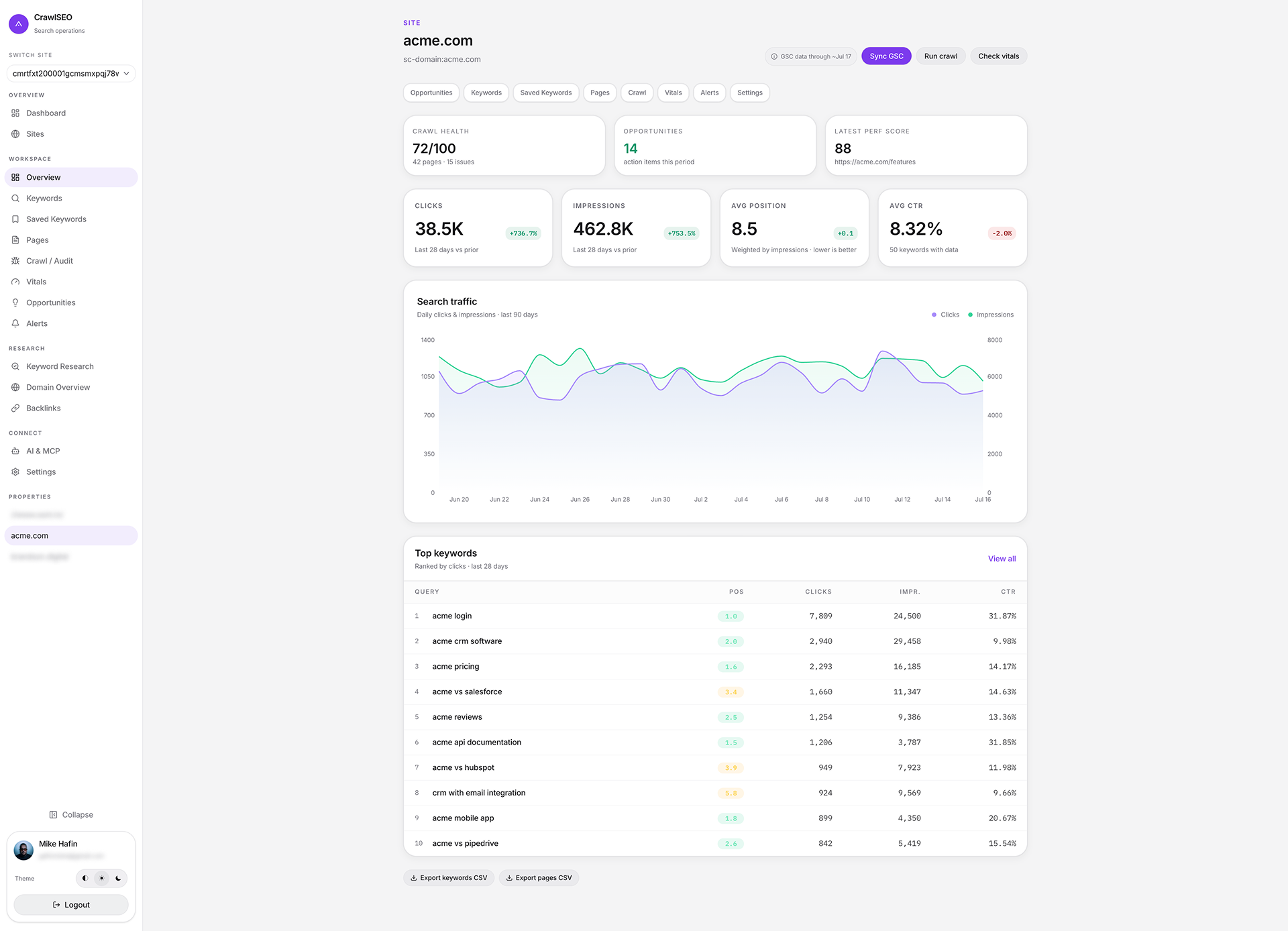
Why CrawlSEO?
| CrawlSEO | OpenSEO | Ahrefs | Semrush | Moz | |
|---|---|---|---|---|---|
| Price | Free | $10/mo | €119/mo | $139/mo | $49/mo |
| Self-hosted | ✅ | ✅ | ❌ | ❌ | ❌ |
| GSC integration | ✅ | ✅ | ✅ | ✅ | ✅ |
| Site crawler | ✅ (2000 pages) | ✅ | ✅ | ✅ | ✅ |
| Core Web Vitals | ✅ | ❌ | ❌ | ✅ | ❌ |
| MCP Server | ✅ (10 tools) | ✅ (24 tools) | ❌ | ❌ | ❌ |
| AI agent ready | ✅ | ✅ | ❌ | ❌ | ❌ |
| Keyword Research | ✅ (BYOK) | ✅ | ✅ | ✅ | ✅ |
| Backlinks | ✅ (BYOK) | ✅ | ✅ | ✅ | ✅ |
| Open source | ✅ MIT | ✅ | ❌ | ❌ | ❌ |
| Your data stays yours | ✅ | ✅ | ❌ | ❌ | ❌ |
BYOK = Bring Your Own Key. Keyword research and backlink data use DataForSEO (optional). Google Autocomplete suggestions work as a free fallback.
Features
🔍 GSC Analytics
Keywords, pages, clicks, impressions, position tracking with 28-day comparison and delta indicators.
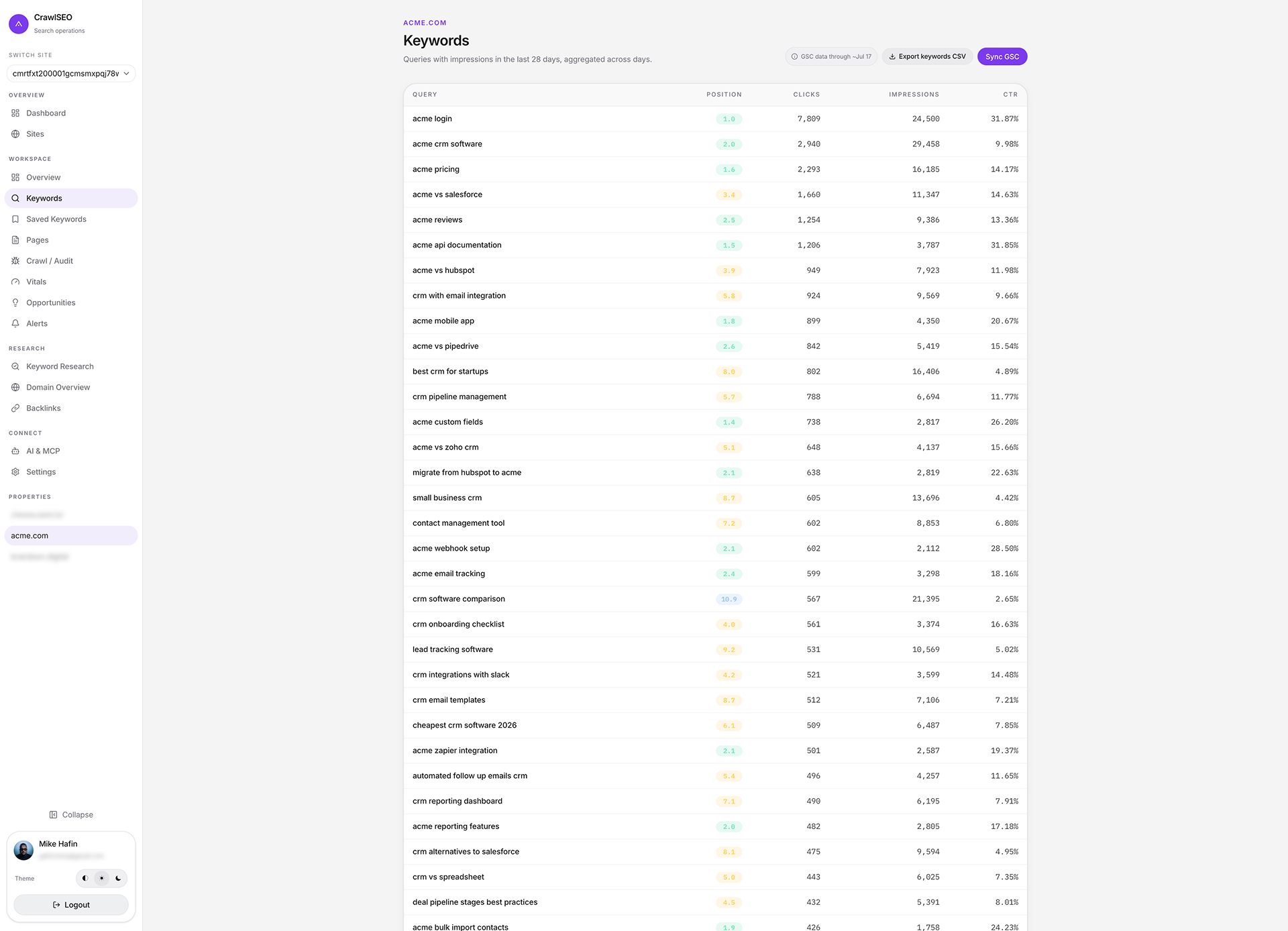
Top keywords with position badges, clicks, impressions, and CTR
🕷️ Site Crawler
Crawl up to 2,000 pages with concurrent fetching. Health score, 16 issue types, content scoring, and remediation guidance.
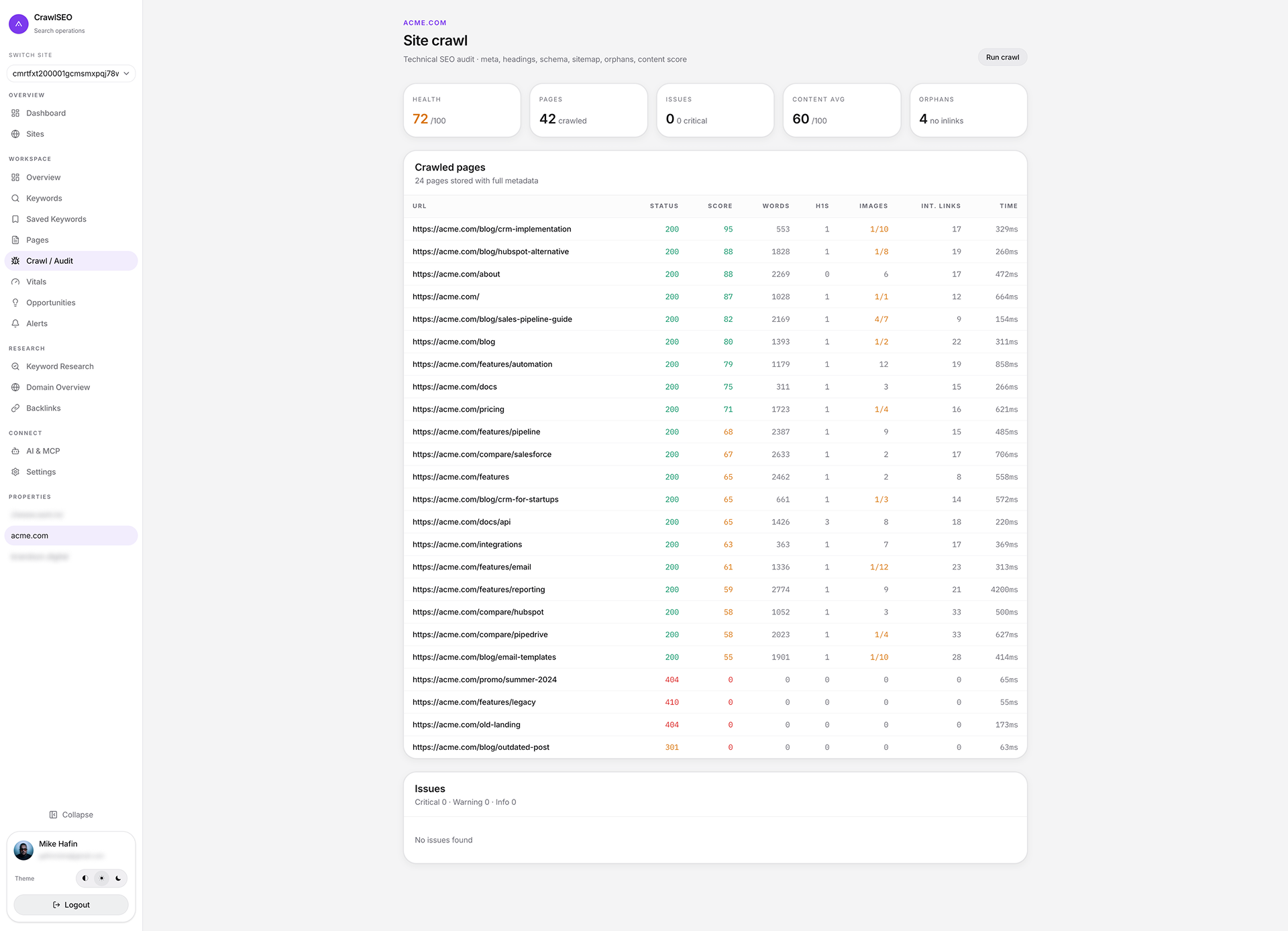
Crawl results with health score, issue breakdown, and per-page audit data
🤖 MCP Server — AI Agent Integration
10 tools for Claude Code, Claude Desktop, and Cursor. Query your SEO data, run crawls, and find opportunities without leaving the terminal.
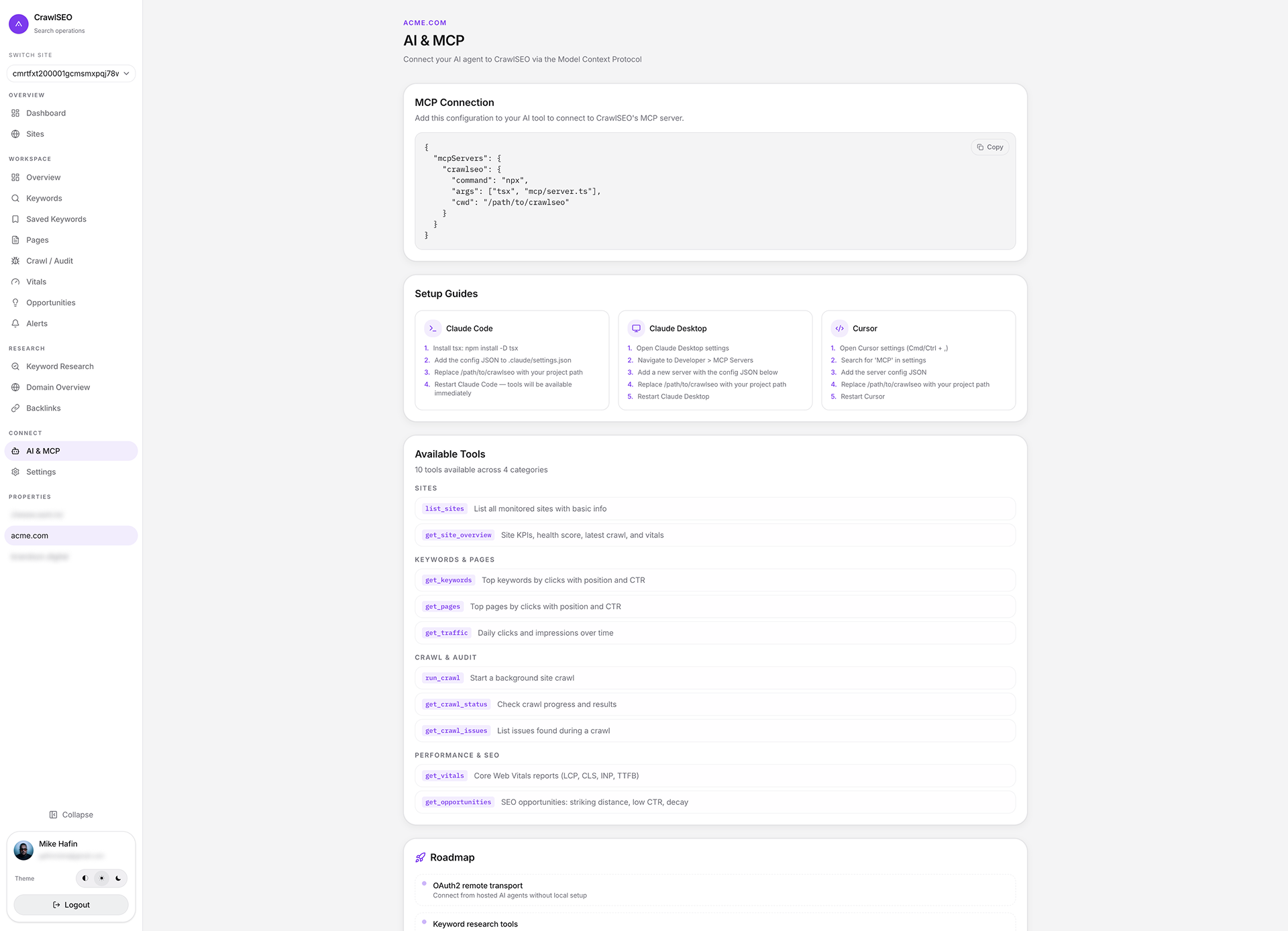
MCP setup page with connection config, setup guides, and available tools
More features
| Feature | Description | |
|---|---|---|
| ⚡ | Core Web Vitals | LCP, CLS, INP, TTFB via PageSpeed Insights with mobile/desktop comparison |
| 🔑 | Keyword Research | DataForSEO-powered keyword ideas with volume, difficulty, CPC. Free Google Autocomplete fallback |
| 🔗 | Backlinks | Backlink profile, referring domains, anchor text, dofollow/nofollow analysis |
| 📊 | Rank Tracking | Historical position snapshots with saved keywords and notes |
| 💡 | SEO Opportunities | Striking distance keywords, low CTR, content decay, cannibalization detection |
| 🔔 | Alerts | Traffic drops, position changes, new 404s, vitals degradation — via email, Slack, Telegram, webhook |
| 📥 | CSV Export | Export keywords and pages data for offline analysis |
| 🌗 | Dark / Light theme | Atomize PRO design system with smooth theme toggle |
Quick Start
git clone https://github.com/crawlseo/crawlseo.git
cd crawlseo
cp .env.example .env.local
# Add your Google OAuth credentials to .env.local
docker compose up -d db
npm install
npx prisma migrate dev --name init
npm run dev
Open http://localhost:3000, sign in with Google, and add your first site.
🔑 Getting Google OAuth credentials- Go to Google Cloud Console
- Create a project (or select existing)
- Enable the Google Search Console API
- Go to Credentials → Create Credentials → OAuth 2.0 Client ID
- Application type: Web application
- Authorized redirect URI:
http://localhost:3000/api/auth/callback/google - Copy Client ID and Client Secret to
.env.local
Required scopes: openid, email, profile, https://www.googleapis.com/auth/webmasters.readonly
MCP Server — AI Agent Integration
CrawlSEO includes a Model Context Protocol server so AI agents can query your SEO data directly.
Add to your Claude Code settings (.claude/settings.json):
{
  "mcpServers": {
    "crawlseo": {
      "command": "npx",
      "args": ["tsx", "mcp/server.ts"],
      "cwd": "/path/to/crawlseo"
    }
  }
}
10 tools available:
| Category | Tools |
|---|---|
| Sites | list_sites, get_site_overview |
| Keywords & Pages | get_keywords, get_pages, get_traffic |
| Crawl & Audit | run_crawl, get_crawl_status, get_crawl_issues |
| Performance | get_vitals, get_opportunities |
Works with Claude Code, Claude Desktop, and Cursor. See mcp/README.md for full setup guide.
Tech Stack
| Layer | Technology |
|---|---|
| Framework | Next.js 16 (App Router) |
| Language | TypeScript |
| Database | PostgreSQL |
| ORM | Prisma |
| Auth | NextAuth.js v5 |
| UI | shadcn/ui + Tailwind CSS v4 |
| Charts | Recharts |
| Icons | Lucide React |
| MCP | @modelcontextprotocol/sdk |
| Deployment | Docker Compose |
Self-Hosting
Docker Compose (recommended)
git clone https://github.com/crawlseo/crawlseo.git
cd crawlseo
cp .env.example .env.local
# Edit .env.local with your credentials
docker compose up --build
The full stack (PostgreSQL + Next.js) starts in ~2 minutes. Migrations run automatically.
Manual
# Prerequisites: Node.js 20+, PostgreSQL

npm install
cp .env.example .env.local
# Configure .env.local

npx prisma migrate deploy
npm run build
npm start
Environment Variables
| Variable | Required | Description |
|---|---|---|
DATABASE_URL |
Yes | PostgreSQL connection string |
NEXTAUTH_SECRET |
Yes | Session encryption key (openssl rand -hex 32) |
GOOGLE_CLIENT_ID |
Yes | Google OAuth client ID |
GOOGLE_CLIENT_SECRET |
Yes | Google OAuth client secret |
NEXTAUTH_URL |
No | Base URL (auto-detected in most environments) |
Contributing
Contributions are welcome! See CONTRIBUTING.md for guidelines.
# Fork the repo, then:
git checkout -b feature/your-feature
# Make your changes
git commit -m "feat: add your feature"
git push origin feature/your-feature
# Open a Pull Request
License
MIT License — see LICENSE for details.
Built by Brandson Digital · Created by Mike
Self-hosted SEO tools should be free. Your data should be yours.
Reviews (0)
Sign in to leave a review.
Leave a reviewNo results found