projmux
Health Warn
- License — License: MIT
- Description — Repository has a description
- Active repo — Last push 0 days ago
- Low visibility — Only 5 GitHub stars
Code Fail
- child_process — Shell command execution capability in npm/projmux.js
- spawnSync — Synchronous process spawning in npm/projmux.js
- process.env — Environment variable access in npm/projmux.js
- fs module — File system access in npm/projmux.js
Permissions Pass
- Permissions — No dangerous permissions requested
No AI report is available for this listing yet.
A tmux-native workspace for multi-agent AI development. First-class Claude Code and Codex integration with hook-driven attention and agent-aware session resume.
projmux
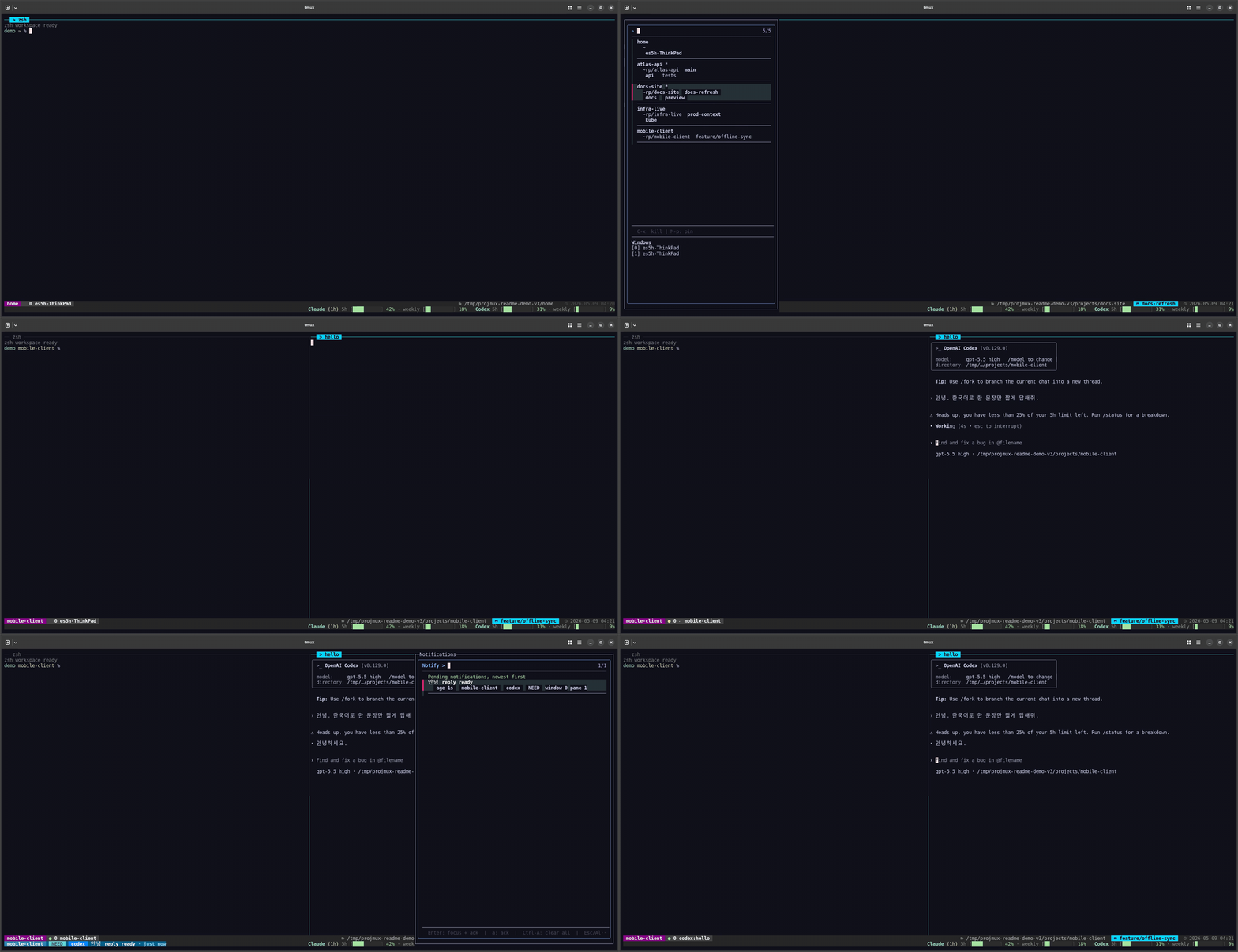
Project-aware tmux workspaces with fast switching, previews, status context,
and AI-pane attention built in.


What It Is
projmux turns project directories into durable tmux sessions. It gives you a
keyboard-first workspace app for switching projects, previewing sessions,
opening AI splits, and keeping useful context visible in tmux.
Use it when you want one command to open your terminal workspace and one set of
keys to move between projects, windows, panes, notifications, and settings.
Requirements
Run projmux doctor after installing to check the local runtime.
Install
npm install -g projmux
projmux version
The npm package installs a small Node.js shim plus the matching projmux binary
for Linux and macOS on x64 or arm64. npm is the primary distribution path for
normal users.
Manual Go, source checkout, GitHub Release, and packaging details live in
Install.
Quick Start
Open the isolated projmux tmux app:
projmux shell
Inside the app:
Alt-1opens the project sidebar.Alt-2opens the notification list.Alt-3opens the existing-session picker.Alt-4opens the AI split picker.Alt-5opens settings.Alt-6opens the project switcher popup.
See Terminal Keybindings for the full key map. If a key
does not fire, run projmux setup outside tmux, then useprojmux init [terminal] --apply for supported terminal fallbacks.
Day-To-Day Use
- Pick a project directory and projmux creates or reuses its tmux session.
- Pin important projects so they stay easy to reach.
- Preview windows, panes, git branch, Kubernetes context, and AI pane state
before switching. - Use Settings > Project Picker to add roots and workdirs without editing env
vars. - Use Settings > About > Update or
projmux update applyto upgrade.
For detailed configuration, including PROJMUX_PROJDIR, managed roots,
notifications, and usage tracking, see Configuration.
For update behavior by installer type, see Upgrading.
More Docs
- Install
- Configuration
- Terminal Keybindings
- CLI Reference
- Statusbar
- Hooks
- Usage tracking
- Agent Workflow
Development
make build
make fmt
make fix
make test
See Testing, Architecture, and
Repo Layout for contributor details.
License
MIT. See LICENSE.
Reviews (0)
Sign in to leave a review.
Leave a reviewNo results found