crewplane
Health Pass
- License — License: Apache-2.0
- Description — Repository has a description
- Active repo — Last push 0 days ago
- Community trust — 11 GitHub stars
Code Fail
- spawnSync — Synchronous process spawning in packaging/npm/bin/crewplane.js
- fs module — File system access in packaging/npm/bin/crewplane.js
- spawnSync — Synchronous process spawning in packaging/npm/scripts/postinstall.js
- os.homedir — User home directory access in packaging/npm/scripts/postinstall.js
- process.env — Environment variable access in packaging/npm/scripts/postinstall.js
- fs module — File system access in packaging/npm/scripts/postinstall.js
Permissions Pass
- Permissions — No dangerous permissions requested
No AI report is available for this listing yet.
A control plane for resumable coding-agent workflows.
Crewplane
A control plane for resumable coding-agent workflows.
Define workflows in Markdown, run each stage through Claude Code, Codex, Gemini, Copilot, or any CLI, and keep the run record on disk.






Why Crewplane?
Teams have spent the last year standardizing how coding agents behave:
repo instructions, skills, MCP servers, provider settings, and internal
conventions. What is still missing is the outer execution layer: how agent work
is sequenced, resumed, reviewed, and inspected after the terminal session ends.
Crewplane turns coding-agent CLI calls into explicit, resumable workflows with
local run records on disk. Write the workflow in Markdown, assign each stage
to Claude Code, Codex, Gemini, Copilot, or any CLI, and Crewplane coordinates
the run without replacing your agents.
| When agent work becomes... | Crewplane gives you... |
|---|---|
| A chain of shell scripts, prompts, and temp files | An explicit Markdown workflow with DAG execution |
| A long terminal session that fails halfway through | Resumable stage boundaries backed by preserved artifacts |
| Multiple agents reviewing, implementing, or synthesizing work | Clear dependencies, parallelism, handoffs, and review loops |
| Debugging by reading terminal scrollback | Rendered inputs, provider logs, intermediate outputs, manifests, and final results on disk |
| Trusting the run only while it happens | A local run record you can inspect later, keep when useful, or delete/archive when not |
No SDK rewrite. No provider lock-in. If your agent can run from the CLI,
Crewplane can coordinate it.
Where Crewplane Fits
Teams already define how agents behave with repo instructions, skills, MCP servers, provider settings, and internal conventions. Crewplane does not replace those pieces. It coordinates the work around them.
| Layer | What it controls |
|---|---|
| Repo instructions / skills | What agents should know and how they should behave |
| MCP / tools | What systems and context agents can access |
| Provider CLIs | The coding agents that do the work |
| Crewplane | How stages are sequenced, parallelized, retried, reviewed, resumed, and inspected |
Why Not Just Use One Agent CLI?
For one-off tasks, you probably should.
Crewplane is for the moment when agent work becomes a workflow:
| Current pattern | Crewplane gives you |
|---|---|
| One long terminal session | Explicit DAG control with sequential and parallel stages |
| Copy-pasted prompts and temp files | Rendered inputs and outputs saved as run artifacts |
| Restarting from scratch after failure | Resumable execution from validated stage boundaries |
| Provider-specific glue | CLI-first orchestration across Claude Code, Codex, Gemini, Copilot, or any command |
| Black-box debugging | Logs, manifests, stage outputs, and final results you can inspect with normal tools |
Crewplane does not try to become your agent. It gives the agents you already use a shared execution plan, a workspace, and a run record.
Installation
Run the following on Mac or Linux to install Crewplane:
uv tool install crewplane
Crewplane can also be installed via the following package managers:
# pip
python -m pip install crewplane

# npm
npm install -g crewplane
Watch the installation flow if you want to see the command-line setup before
running it locally:
⚠️ Note: Crewplane does not install or manage provider CLIs or credentials. Install and authenticate Claude Code, Copilot CLI, etc. separately.
Other install methods (pipx, install script, local checkout) are documented in the installation guide.
First Run (No real agent invocations)
From a project directory:
crewplane init
crewplane validate
crewplane run --no-live
crewplane init creates .crewplane/config.yml, a default workflow, and
additional example templates under .crewplane/workflows/example-templates/.
crewplane run --no-live then runs the workflow with a deterministic mock provider — no provider CLIs, API keys, or config edits required.
Inspect the artifacts:
- Stage Markdown:
.crewplane/execution-stages/ - Final results:
.crewplane/execution-results/
These files are the same shape you will see with real providers: each step has
rendered inputs, outputs, logs, manifests, and final results you can inspect or
diff with normal tools.
Treat run artifacts like build outputs: useful for debugging and review, but
decide separately what, if anything, belongs in version control.
When you are ready to connect real tools, follow provider setup.
Live Dashboard
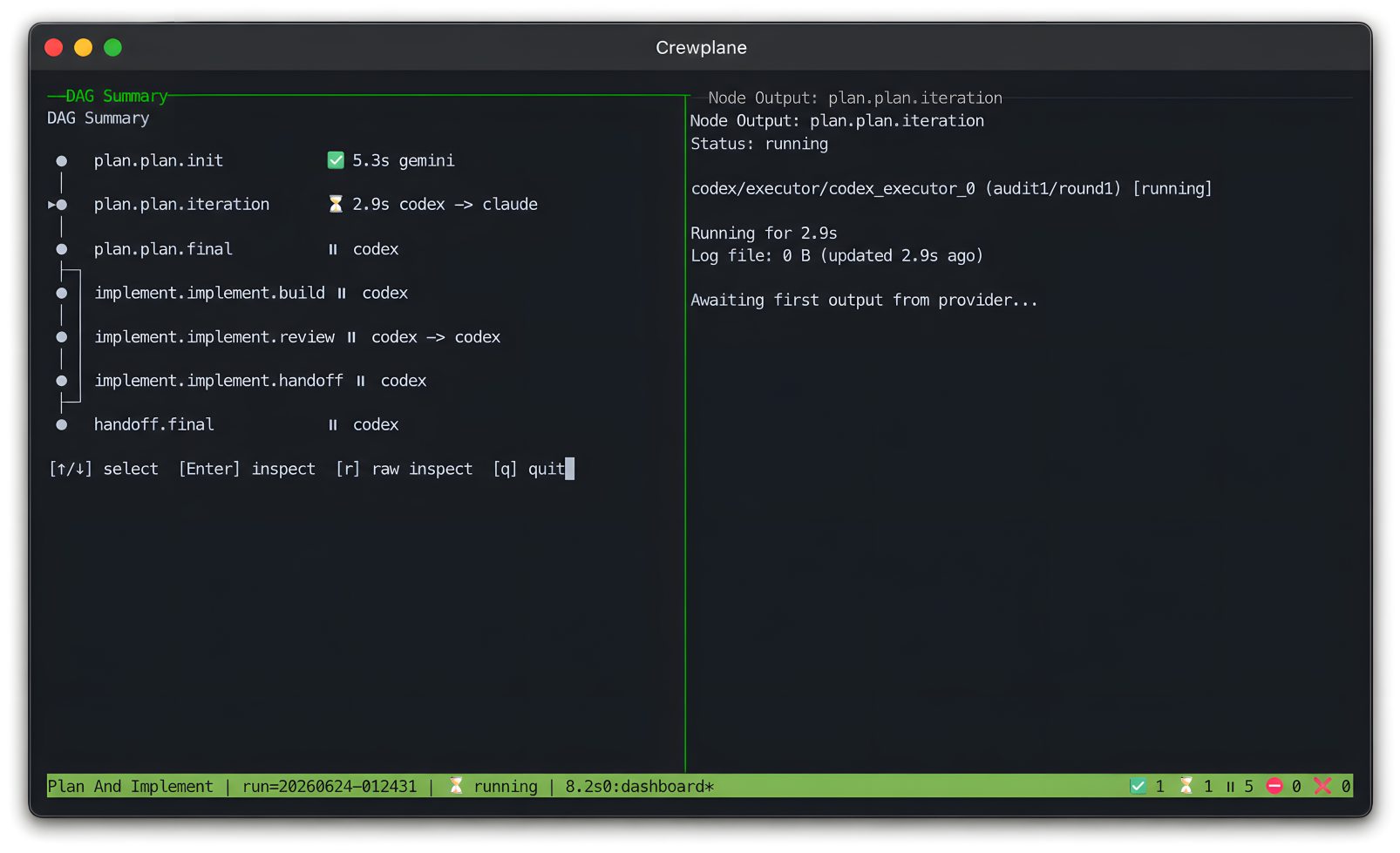
For interactive runs, drop --no-live to open Crewplane’s tmux dashboard (requires tmux, install via brew install tmux on macOS or sudo apt install tmux on Ubuntu/Debian.):
crewplane run --force
Note:
--forceensures a fresh run, ignoring any cached successes.
The dashboard shows the workflow DAG, node status, selected provider output,
and live log tails while the same durable artifacts are written under.crewplane/. See the
observability guide
for dashboard options and log inspection.
Workflow Shape
Workflows are Markdown+frontmatter; for example:
---
schema_version: "<current>"
name: "Quick Review"
nodes:
  - id: review.project
    mode: parallel
    providers: ["mock"]
---

## review.project
Review the current repository and report the highest-risk issues.
Full workflow authoring docs are in the
workflow syntax reference.
First Real Run
After the mock path works, this walkthrough shows the shape of a first real
provider run:
First real provider run
Safety boundary: Crewplane coordinates provider CLIs; it does not sandbox
them, install them, or manage their credentials. Provider filesystem access,
network access, approval mode, and authentication remain controlled by the
provider tools you configure.
Use provider setup
for the complete real-provider configuration path.
What You Get
- 🔄 Explicit DAG Execution – Run independent stages in parallel and dependencies in sequence
- 🧭 Resumable Stage Boundaries – Reuse validated completed stages after duplicate, failed, or cancelled runs
- 📂 Inspectable Run Records – Rendered prompts, outputs, logs, manifests, and results written under
.crewplane/ - 🔌 CLI-First Providers – Coordinate Claude Code, Codex, Gemini, Copilot, Kilo, or generic commands
- 🖥️ Optional Live Dashboard – tmux view for DAG progress, node status, provider output, and log tails
- 🧪 Experimental Workspace Isolation – Git-backed worktrees and writable snapshots for isolating source-tree edits
For safety, security, and isolation details, see Security and trust.
Where Next
Contributing
Interested in contributing? Start with Contributing and local development.
Reviews (0)
Sign in to leave a review.
Leave a reviewNo results found