ctrlnode
Health Warn
- License — License: NOASSERTION
- Description — Repository has a description
- Active repo — Last push 0 days ago
- Low visibility — Only 8 GitHub stars
Code Pass
- Code scan — Scanned 12 files during light audit, no dangerous patterns found
Permissions Pass
- Permissions — No dangerous permissions requested
No AI report is available for this listing yet.
Open-source local agent runtime for CTRL NODE — the CLI bridge that pairs your machine with Claude Code, Copilot, Gemini, Cursor and more, and executes tasks from the CTRL NODE dashboard.



CTRL NODE is a control system for AI agent graphs. Build a graph from agent, task, and control nodes; connect the paths they can take; then run and observe it from one place.
Install the open-source Bridge on your laptop, server, or CI machine. It makes one outbound connection to CtrlNode, so your agents and workspaces stay on your machine—no inbound ports, VPN, or firewall changes.
What changed in v2026.2.6
- OpenRouter — use your own
OPENROUTER_API_KEYand pay only for usage. - Ollama — run local models with no API key.
ctrlnode login— authorize the Bridge in your browser; the pairing token is saved automatically.- Reliable follow-ups — every execution has its own activity log and keeps earlier context.
See the full v2026.2.6 release notes.
How it works
  CtrlNode app
       │
       │  Build and run AI agent graphs
       ▼
  CtrlNode control plane
       ├── Tasks and Kanban
       ├── Routines
       ├── Graph canvas
       └── Team, files, and activity
       │
       │  Outbound WebSocket
       ▼
  Your machine or server
       ├── CtrlNode Bridge
       ├── Your AI providers
       └── Your local workspaces and files
The Bridge only connects out. Your code and workspaces never leave your machine unless an agent explicitly returns output to CtrlNode.
Supported providers
| Provider | Runs through | Setup |
|---|---|---|
claude |
Claude Agent SDK / Claude Code | ANTHROPIC_API_KEY or subscription |
copilot |
GitHub Copilot ACP | Copilot extension |
gemini |
Gemini CLI ACP | GEMINI_API_KEY |
codex |
OpenAI Codex SDK | CODEX_API_KEY |
cursor |
Cursor SDK | CURSOR_API_KEY |
hermes |
Hermes ACP | Hermes CLI |
openclaw |
OpenClaw gateway | OPENCLAW_GATEWAY_TOKEN |
openrouter |
OpenRouter API | OPENROUTER_API_KEY |
ollama |
Local Ollama | Install Ollama and pull a model |
Use more than one provider in the same graph.
Ai Agents Graphs
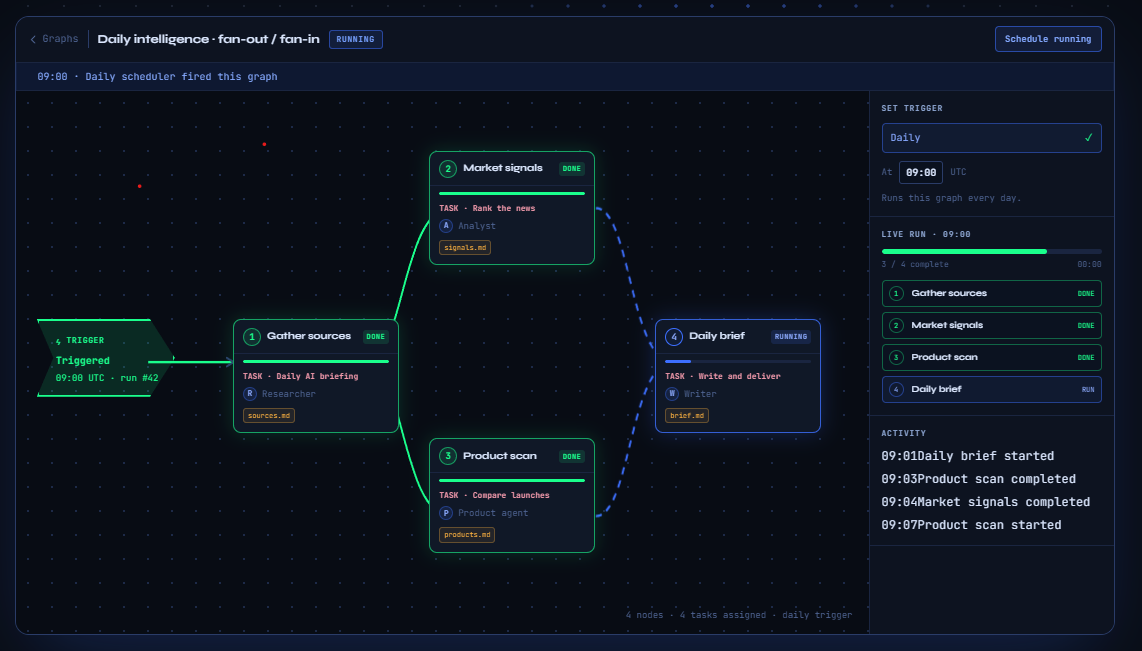
A Graph is the visual execution model in CtrlNode. Add agent nodes, connect their paths, choose a trigger, and deploy. Each node can use the provider and model that fits its job.
- Branch and fan out work
- Mix providers in one graph
- Start from a schedule or event
- Follow every node's activity live
Also included
- Tasks and Kanban — run ad hoc work and track it from backlog to done.
- Routines — schedule recurring agent work.
- Live activity — watch output as each agent runs.
- Files and memory — give agents the local context they need.
Get started
1. Install the Bridge
Linux / macOS
curl -fsSL https://raw.githubusercontent.com/ctrlnode-ai/ctrlnode/main/install.sh | sh
Windows PowerShell
irm https://raw.githubusercontent.com/ctrlnode-ai/ctrlnode/main/install.ps1 | iex
Or download a binary from Releases.
2. Sign in
ctrlnode login
Approve the code in your browser. Bridge stores the pairing token in its .env file.
3. Start the Bridge
ctrlnode
Your agents appear in the app. Create a task or graph and run it on your machine.
Repository
| Component | Path |
|---|---|
| Bridge source | src/ |
| Provider guides | doc/ |
| Release notes | Releases/ |
Contributing
git clone https://github.com/ctrlnode-ai/ctrlnode.git
cd ctrlnode
bun install
bun dev
License
Licensed under the Elastic License 2.0 (ELv2).
Built by CTRL NODE
Reviews (0)
Sign in to leave a review.
Leave a reviewNo results found