mae
Health Warn
- License — License: NOASSERTION
- Description — Repository has a description
- Active repo — Last push 0 days ago
- Low visibility — Only 6 GitHub stars
Code Pass
- Code scan — Scanned 12 files during light audit, no dangerous patterns found
Permissions Pass
- Permissions — No dangerous permissions requested
No AI report is available for this listing yet.
AI-native Emacs successor — Rust core, R7RS Scheme, collaborative editing, LSP/DAP, Babel, 130+ AI tools, GUI + terminal
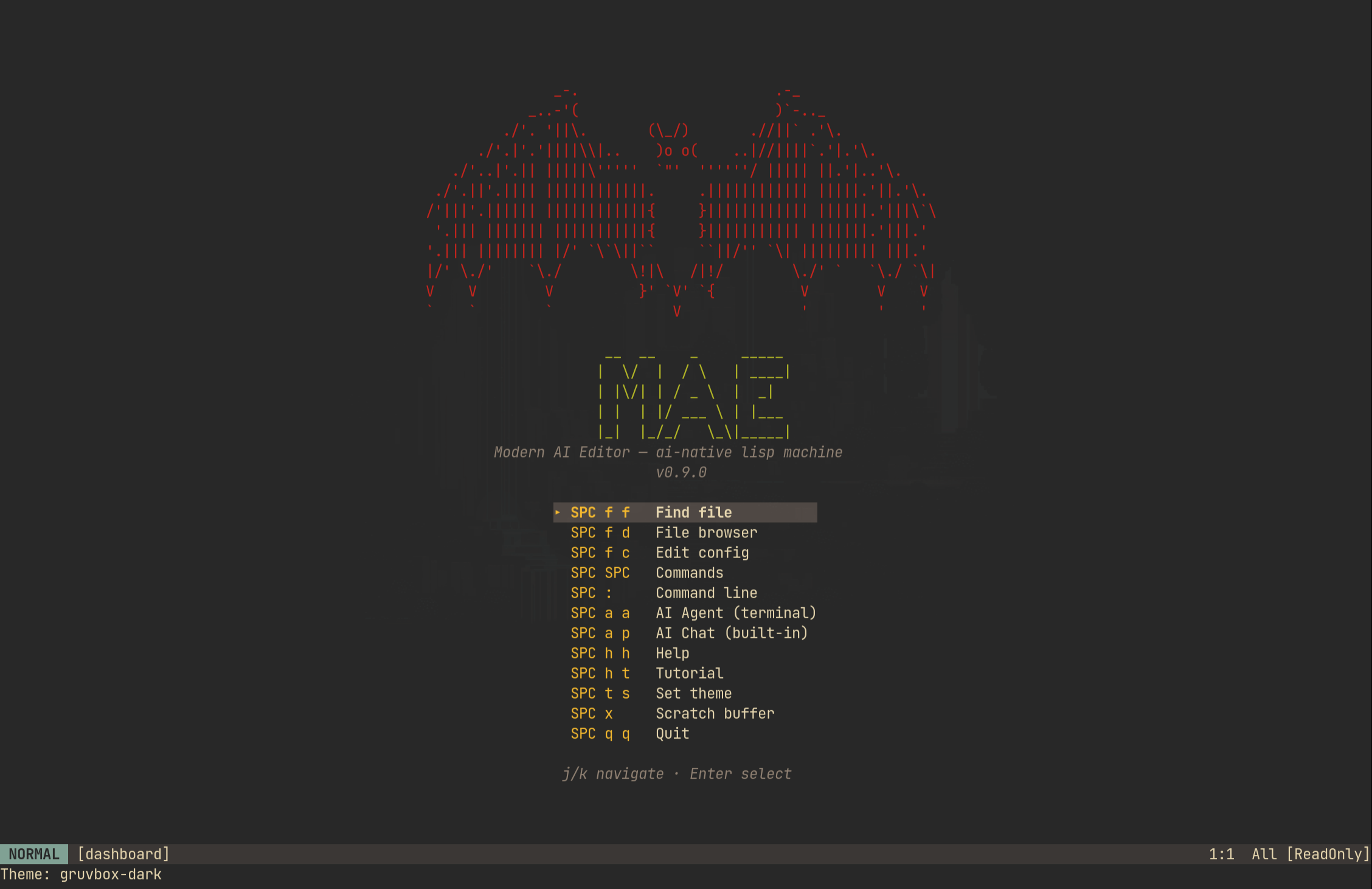
MAE — Modern AI Editor





An AI-native lisp machine IDE — a programmable development environment where the
human and the AI are peer actors calling the same Scheme primitives. Built on a
Rust core with an embedded R7RS-small runtime. GUI + terminal.
Features
- AI as peer actor — every editor command is exposed as an AI tool, and the AI
calls the exact samedispatch_builtin()your keybindings do. No shadow API,
no simulated keystrokes, no "AI mode" with a narrower feature set than yours. - Collaborative editing — CRDT sync engine (yrs/YATA) with daemon,
WAL persistence, per-user undo, awareness protocol, PSK authentication, and
mDNS peer discovery. Collaborative KB sharing enables real-time knowledge base
sync across instances with offline edit + reconnect support. - Org-mode babel — Execute code blocks in 12 languages (Python, Ruby, Perl,
Bash, JS, Lua, R, Rust, Go, C, C++, Scheme), noweb expansion,:tangle
directive,:varcross-references, configurable compilers, safety policies.
Export to HTML and Markdown with TOC, syntax highlighting, tag filtering. - Runtime redefinability — Embedded R7RS Scheme (mae-scheme). Redefine any
function while running, live in the REPL, no restart.init.scmis a real
program, not a settings file. - Full vi modal editing — Motions, operators, text objects, count prefix,
dot repeat, macros, registers, marks, surround, visual block mode, multi-cursor. - LSP first-class — Go-to-definition, references, hover, completion, rename,
format, symbol outline, breadcrumbs, peek references. AI gets structured
semantic data. - DAP first-class — Multi-language debugging (Python, Rust, C/C++).
Breakpoints (conditional, logpoint), watch expressions, exception breakpoints.
AI can set breakpoints and inspect variables. - Multi-provider AI — Claude, OpenAI, Gemini, DeepSeek, and Ollama.
Provider-aware prompt tuning. Tiered prompt system (Full/Compact) with
per-model guardrails. - Curated context, not context-window roulette — architecture decisions, past
bug fixes, and documented invariants live in a queryable knowledge graph the
AI fetches narrow, relevant excerpts from (kb_search, block-levelkb_get
down to a single paragraph) instead of re-grepping your whole codebase or
re-explaining decisions every session. The same graph backs:helpfor the
human — CozoDB (Datalog), agenda queries, node versioning, federated
instances, HNSW vector index. Bugs get checked against existing ADRs before
being patched, so fixes land at the root cause instead of accumulating drift. - Tree-sitter — 17 languages (incl. C, C++, Ruby, Terraform/HCL) with
structural parse trees. AI can query syntax trees for code reasoning. - GUI + Terminal — winit + Skia 2D hardware-accelerated GUI, ratatui
terminal fallback. Inline images (PNG/JPG/SVG), variable-height rendering,
inertial scrolling. Desktop launcher for freedesktop environments. - Embedded terminal — Full VT100/VT500 via
alacritty_terminal. AI can
observe output and send input.Ctrl-\ Ctrl-nexits to normal mode.
Architecture
   Human (keys)      Scheme (eval)      AI / MCP (tool call)
        │                  │                     │
        ▼                  ▼                     ▼
   ┌───────────┐    ┌─────────────┐    ┌────────────────────┐
   │ Keymap    │    │ (run-cmd)   │    │  Tool wrappers     │
   │ Lookup    │    │ (define-    │    │  → same functions  │
   │           │    │  command)   │    │  as keybindings    │
   └─────┬─────┘    └──────┬──────┘    └─────────┬──────────┘
         │                 │                     │
         └────────────┬────┴─────────────────────┘
                      ▼
         ┌───────────────────────────┐
         │     Editor Core API       │
         │  dispatch_builtin()       │
         │  buffer.insert/delete()   │
         │  lsp/dap/kb/shell ops     │
         │                           │
         │  450+ commands · same     │
         │  functions for all actors │
         └─────────────┬─────────────┘
                       ▼
         ┌───────────────────────────┐
         │      Editor State         │
         │  Buffers · LSP · DAP      │
         │  Shell · KB · Themes      │
         └───────────────────────────┘
All three actors converge on the same Editor Core API. The AI's tools are thin
wrappers — buffer_read calls the same buffer.line() the renderer uses;lsp_definition queues the same intent as pressing gd. When a package author
writes (define my/summarize ...), it's immediately available to both the
user's keybinding and the AI's tool palette.
Crate Layout
Three separate compilation units, not one flat tree (ADR-014): the editor
workspace (own Cargo.lock), shared crates (workspace members also
compiled into the daemon), and the daemon workspace (own Cargo.lock,
cozo+sqlite instead of cozo+sled — avoids a rusqlite linker conflict).
Editor workspace (Cargo.toml, crates/)
 ├── mae               Binary crate — CLI entry point, config loading, event loops
 ├── mae-core          Buffer (rope), editor state, commands, keymap, syntax
 ├── mae-renderer      Terminal rendering (ratatui), status bar, popups, shell viewport
 ├── mae-gui           GUI rendering (winit + Skia 2D), mouse input, font config, inline images
 ├── mae-scheme        R7RS-small Scheme runtime, init.scm loading, hook dispatch
 ├── mae-ai            Claude + OpenAI + Gemini + DeepSeek + Ollama providers, tool execution, conversation
 ├── mae-agent-cli     Terminal AI-agent harness (ADR-046) — binary `mae-agent`, the default `SPC a a`/`SPC a p` surface
 ├── mae-lsp           LSP client — connection, navigation, diagnostics, completion, formatting
 ├── mae-dap           DAP client — protocol types, transport, breakpoints, stepping, watches
 ├── mae-shell         Terminal emulator (alacritty_terminal), PTY management
 ├── mae-babel         Org-babel executor — 12 languages, persistent sessions, language backends
 ├── mae-export        Org/Markdown export — HTML, Markdown, TOC, syntax highlighting
 ├── mae-canvas        Visual buffer (diagrams, drawings)
 ├── mae-snippets      YASnippet-style templates — tab-stops, mirrors, transforms
 ├── mae-format        Formatter bridge — prettier, black, rustfmt (complements LSP format)
 ├── mae-make          Build runner — Makefile/Cargo.toml/package.json detection
 ├── mae-lookup        Unified lookup — LSP def + docs URL + man pages
 └── mae-spell         Spellcheck — hunspell/aspell integration, inline markers

Shared crates (shared/, editor-workspace members also used by the daemon)
 ├── mae-kb            Knowledge base — CozoDB graph store, typed relationships, org parser, federation
 ├── mae-sync          Collaborative sync — yrs CRDT, ropey bridge, encoding helpers
 └── mae-mcp           MCP server — Unix socket, JSON-RPC, stdio shim

Daemon workspace (daemon/Cargo.toml — separate Cargo.lock)
 └── mae-daemon        Background daemon — KB persistence, collab sync, WAL persistence
Getting Started
Prerequisites
- Rust stable (1.95+) via rustup
- GUI deps:
clang,fontconfig-devel,freetype-devel(Fedora) /clang,libclang-dev,libfontconfig1-dev,libfreetype6-dev(Debian/Ubuntu) / Xcode CLI Tools (macOS) - TUI-only:
make build-tui— no clang or GUI deps needed - Optional:
make setup-devinstallsclang,lldb,rust-analyzer,clangd,debugpyfor full self-test coverage. A C/C++ compiler (g++/clang++) enables C/C++ babel execution; per-language LSP servers (clangd,ruby-lsp,yaml-language-server,taplo,bash-language-server, …) start automatically when installed - Check deps:
make doctor— reports all prerequisites with install commands
Build & Run
git clone [email protected]:cuttlefisch/mae.git && cd mae
make doctor                     # check prerequisites
make build                      # GUI build (default)
make install                    # install to ~/.local/bin + desktop launcher
mae --init-config               # generate init.scm (+ config.toml bootstrap) + wizard
mae file.rs                     # GUI by default; falls back to terminal over SSH/tty/headless
mae --no-gui file.rs            # force terminal mode (also --tui / -nw)
mae --gui file.rs               # force the GUI backend
make build-tui                  # terminal-only (no clang/skia dependency)
macOS: make install PREFIX=/usr/local/bin or add ~/.local/bin to PATH.
WSL: make install-tui (terminal-only, no X11 needed).
Container Build
No Rust installation needed — everything runs inside Docker:
git clone [email protected]:cuttlefisch/mae.git && cd mae
make docker-ci          # full CI pipeline (fmt + clippy + check + test)
make docker-new-user    # validate first-run experience in clean environment
make docker-dev         # interactive dev shell with Rust toolchain
See CONTRIBUTING.md for the full container development workflow.
AI Setup
[!CAUTION]
MAE is in early Alpha. AI features and cost guardrails are experimental.
Always monitor your API usage and costs directly in your provider dashboards.
The simplest way to enable AI is to export an API key. MAE auto-detects the
provider:
export ANTHROPIC_API_KEY=sk-ant-...    # Claude (default) — https://console.anthropic.com/settings/keys
export OPENAI_API_KEY=sk-...           # OpenAI          — https://platform.openai.com/api-keys
export GEMINI_API_KEY=...              # Gemini           — https://aistudio.google.com/apikey
export DEEPSEEK_API_KEY=...            # DeepSeek         — https://platform.deepseek.com/api_keys
To persist the startup AI bootstrap (provider/model/credentials only — read before
the Scheme runtime starts), add it to ~/.config/mae/config.toml:
[ai]
provider = "claude"                    # claude | openai | gemini | deepseek | ollama
model = "claude-sonnet-4-20250514"     # any supported model name
# api_key_command = "pass show mae/anthropic"  # password manager integration
# auto_approve_tier = "readonly"       # readonly (default) | write | shell | privileged
                                        # the AUTO-APPROVAL ceiling: above it, interactive
                                        # surfaces ask a human, headless ones deny (ADR-090)
# editor = "mae-agent"                 # CLI command for SPC a a / SPC a p (AI agent shell,
                                        # default since ADR-049 — set to "claude"/"aider"/etc.
                                        # to use a different agent CLI instead)
All other AI behavior is configured in init.scm (see Configuration),
not config.toml. Provider-aware prompt tuning is automatic — Gemini gets explicit
JSON examples, DeepSeek gets anti-looping guardrails. The legacy embedded conversation-buffer
chat is available behind ai_chat_enabled (default false, see ADR-049) — with it off,SPC a p launches the same mae-agent terminal harness as SPC a a.
First 10 Minutes
A guided path for a brand-new user — copy-paste in order:
- Generate config —
mae --init-config(runs a short wizard; safe defaults). - Open and edit —
mae README.md, pressito insert, type,Esc, then:wto save. - Make your first AI call —
export ANTHROPIC_API_KEY=sk-ant-..., relaunch, pressSPC a p, and ask "explain the function under my cursor." - Find your way around —
SPC SPCopens the command palette (fuzzy-search every
command); every leader key shows a which-key menu, so just pressSPCand read. - Learn interactively —
:tutorfor the 13-lesson tutorial, orSPC h hfor the
help knowledge base. - (Optional) Share a KB — start a daemon (
mae-daemon), thenSPC C K mopens the*KB Sharing*management buffer. See docs/COLLABORATION.md. - (Optional) Pair with VS Code + Copilot — install the "MAE for VS
Code" extension (its own repo, independent
release cadence) from the Marketplace or a built.vsix; it auto-spawns a headless MAE
instance per workspace and pairs it with Copilot's Agent mode over MCP, zero manual.vscode/mcp.jsonsetup. See
docs/EXTERNAL_EDITOR_MCP_PAIRING.md.
If anything in this list doesn't work as written, that's a bug — please file it.
First Steps (key reference)
:tutor— interactive tutorial (13 lessons: vim, beginner, AI tracks)SPC SPC— command palette (fuzzy search all commands)SPC f f— find file in projectSPC h h— help index (knowledge base)SPC a a— launch AI agent in embedded shellSPC a p— same by default (ai_chat_enabledrestores the legacy embedded chat):self-test— verify AI integration
Drive MAE with Your Coding Agent
MAE's core thesis is that the AI is a peer actor, not a plugin — your external
coding agent (Claude Code, etc.) can drive the editor through the same tools the
built-in agent uses, over MCP. A running MAE exposes 700+ tools (most are 1:1 command
mirrors — see MODEL_SUPPORT.md for how that scale is validated)
on a per-process Unix socket; the mae-mcp-shim binary bridges MCP-over-stdio to that socket:
# Point your agent's MCP config at the shim; it auto-discovers /tmp/mae-{PID}.sock
mae-mcp-shim
Day-one tools worth knowing: introspect (editor state snapshot), execute_command
(run any command), kb_search / lsp_definition (navigate code semantically), andkb_sharing_status (introspect shared-KB membership/roles before managing). The full
tool catalog and selection guidance live in
CLAUDE.md.
This isn't Claude-Code-specific — the same mae-mcp-shim bridge pairs MAE with VS Code +
GitHub Copilot's Agent mode, or any other stdio-capable MCP client (Zed, Cursor, a
hand-rolled client). See
docs/EXTERNAL_EDITOR_MCP_PAIRING.md for setup
steps, a working .vscode/mcp.json example (this repo has one — try it against MAE's own
codebase), and what to expect re: config-format differences across hosts.
Configuration
init.scm is MAE's primary configuration surface — options
((set-option!) / :set / :set-save), keybindings, module selection
((mae!)), and hooks live here, and :set-save writes here. config.toml is a
narrow legacy bootstrap read at startup before the Scheme runtime; it is
being retired — prefer init.scm for new settings:
| File | Role | Format |
|---|---|---|
~/.config/mae/init.scm |
Primary. Modules, keybindings, options, hooks, packages, custom commands | Scheme (programmatic, live-reloadable) |
~/.config/mae/config.toml |
Legacy bootstrap (being retired): AI provider/model, theme/font, LSP server paths, performance, daemon/collab connection — parsed before the Scheme runtime | TOML (static, declarative) |
.mae/init.scm (per-project) |
Project-local overrides, loaded after user config | Scheme |
init.scm is the primary user config. It's a real Scheme program, not a
settings file:
;; Module selection — declare which modules to load
(mae!
  :editor "keymap-doom" "surround" "search" "registers" "macros"
  :ui     "dashboard" "file-tree")

;; Third-party packages — install with `mae sync`
(package! "splash-themes" :source "github:cuttlefisch/mae-splash-themes")

;; Editor options (91+ registered, all Scheme-accessible)
(set-option! "theme" "gruvbox-dark")
(set-option! "relative-line-numbers" "true")
(set-option! "font-size" "14")

;; Custom keybindings
(define-key "normal" "SPC t t" "cycle-theme")

;; Hooks
(add-hook! "before-save" "lsp-format")
config.toml is the legacy startup bootstrap for provider/credential
plumbing that doesn't belong in version-controlled Scheme — and never in
plaintext config.toml either; use api_key_command. It is being retired; prefer
init.scm for new settings. mae --init-config generates both files with a
guided wizard.
Useful commands:
mae --init-config— generate config.toml + init.scm + wizardmae --check-config— validate config + init.scm without launching (CI-friendly)mae --clean/mae -q— pristine launch, skip all config/init/history (likeemacs -q):edit-config— editinit.scmfrom inside the editor:edit-settings— editconfig.tomlfrom inside the editor:describe-configuration— health report (AI, LSP, DAP status)
Module System
MAE uses a Doom Emacs-inspired module system. Each module is a directory withmodule.toml (metadata), autoloads.scm (keybindings), and optionally init.scm
(user config). Modules are loaded at startup and can be live-reloaded.
mae pkg list            # list installed modules with status
mae pkg info surround   # show module details and dependencies
mae pkg doctor          # health check all modules
mae pkg sync            # synchronize module state
mae pkg create mymod    # scaffold a new module from template
26 built-in modules by category:
| Category | Modules |
|---|---|
| Keymap | keymap-doom, keymap-leader, keymap-nonmodal |
| UI | dashboard, file-tree, notifications |
| Editor | surround, marks-jumps, search, registers, macros, multicursor, tables |
| Tools | snippets, format, make, lookup, spell, debug, kb-graph-view |
| Markup | org, markdown, agenda, dailies |
| Collab | git-status, kb-sharing |
Enable modules with +flag syntax in init.scm. See Extension Guide
for authoring custom modules.
Vim-Level Editing
Full vi modal editing with 450+ commands:
| Category | Features |
|---|---|
| Modes | Normal, Insert, Visual (char/line/block), Command, Search, ShellInsert |
| Motions | hjkl, w/b/e/W/B/E, f/F/t/T, %, {/}, 0/$, gg/G, H/M/L, ge/gE |
| Operators | d, c, y — compose with any motion or text object |
| Text objects | iw, aw, i(, a{, i", it (tag), and more |
| Count prefix | 5j, 3dd, 2dw |
| Dot repeat | Full . repeat for change/delete/insert sequences |
| Registers | Named ("a–"z), numbered ("0–"9), system clipboard ("+) |
| Macros | qa record, q stop, @a play, @@ repeat |
| Marks | ma set, 'a jump, `a exact position |
| Search | /pattern, ?pattern, n/N, *, :s///g, :%s |
| Surround | ys{motion}{char}, cs{old}{new}, ds{char} (vim-surround) |
| Multi-cursor | Ctrl-d add next match, Ctrl-Alt-d add all, mc-align |
| Scroll | Ctrl-U/D/F/B, zz/zt/zb, inertial (kinetic) scrolling in GUI |
| Leader | SPC leader system (Doom Emacs style) with which-key popup |
| Code folding | za toggle, zM close all, zR open all (tree-sitter ranges) |
| File tree | SPC f t sidebar with expand/collapse, git markers |
| Git status | SPC g s Magit-style: stage/unstage/discard at hunk level |
| Swap files | Crash recovery via non-destructive swap files |
Key Bindings
| Key | Mode | Action |
|---|---|---|
i, a, A, o, O |
Normal | Enter insert mode |
Esc |
Any | Return to normal mode |
v / V |
Normal | Visual char / line selection |
d, c, y |
Normal/Visual | Delete, change, yank |
. |
Normal | Repeat last edit |
/, ? |
Normal | Search forward / backward |
: |
Normal | Command mode |
gd |
Normal | Go to definition (LSP) |
gr |
Normal | Find references (LSP) |
K |
Normal | Hover docs (LSP) |
SPC SPC |
Normal | Command palette |
SPC f f |
Normal | Fuzzy file picker |
SPC a a |
Normal | AI agent (shell) |
SPC a p |
Normal | AI agent (shell, same as above by default) |
SPC o t |
Normal | Open terminal |
SPC d b |
Normal | Toggle breakpoint |
SPC h h |
Normal | Help index |
Ctrl-\ Ctrl-n |
ShellInsert | Exit terminal → Normal |
Ex Commands
:w              Save
:e path         Open file
:q              Quit
:wq             Save and quit
:s/old/new/g    Substitute (current line)
:%s/old/new/g   Substitute (whole buffer)
:theme name     Switch theme
:eval (expr)    Evaluate Scheme
:help topic     Open help
:terminal       Open terminal
:tutor          Interactive tutorial
:self-test      AI integration test
:set opt=val    Set editor option
:split / :vsplit  Window splitting
:diagnostics    Show LSP diagnostics
:messages       View message log
:describe-configuration  Show config health report
Window Layout & Introspection
Split ratios
New buffer kinds (KB view, messages, shell, debug panel, file tree, notifications, KB graph view,
agent display, AI conversation) land via a DisplayPolicy override table. Nine options feed that
same table, so :set/:set-save and the Scheme power-user primitive(set-display-rule! KIND "reuse-or-split:DIR:RATIO") can never diverge:
| Option | Default | Buffer kind |
|---|---|---|
kb_split_ratio |
0.5 | KB view |
messages_split_ratio |
0.3 | Messages log |
shell_split_ratio |
0.35 | Embedded shell |
debug_panel_split_ratio |
0.4 | DAP debug panel |
file_tree_split_ratio |
0.2 | File tree sidebar |
notifications_split_ratio |
0.4 | Notifications |
kb_graph_split_ratio |
0.6 | KB graph view (3:2 split) |
agent_display_split_ratio |
0.5 | Agent display window |
ai_conversation_split_ratio |
0.85 | AI conversation window |
Render-cache introspection
The introspect MCP tool's frame.caches.window_render field lists, per open window, the
renderer's cached paint state versus the live buffer: window_id, cached_buffer_idx,cached_generation, live_buffer_idx, live_generation, and matches. A matches: false entry
always indicates a real stale-paint bug — use it to diagnose rendering desync without attaching a
debugger.
KB-link hover preview suppression
Dismissing a KB-link hover preview (Esc, or the idle-preview auto-dismiss guard) suppresses
idle-triggered re-show at that exact cursor position until the cursor moves elsewhere — so closing
a popup doesn't immediately reopen it on the next idle tick. Manually requesting a preview via(kb-preview-show ID) or the kb_preview_show MCP tool always bypasses and clears the
suppression.
Stack
| Layer | Technology | Why |
|---|---|---|
| Core | Rust | Eliminates GC problem, ownership model for concurrency |
| Extensions | Scheme R7RS-small (mae-scheme) | Runtime redefinability, hygienic macros, tail calls |
| Terminal UI | ratatui + crossterm | Platform-specific code in the library, not us |
| GUI | winit + skia-safe (+ resvg for SVG) | CPU-raster 2D, mouse, fonts, inline images |
| Terminal emulator | alacritty_terminal | Full VT100/VT500, same engine as Alacritty |
| AI | Claude / OpenAI / Gemini / DeepSeek | Tool-calling maps 1:1 to command API |
| Protocols | LSP + DAP | First-class — exposed to Scheme and AI |
| Knowledge base | CozoDB (Datalog) + SQLite | Graph store, typed relationships, versioning, HNSW vector index |
| Syntax | tree-sitter | 17 languages, structural parse trees |
| Literate programming | Org-babel | 12 execution languages, tangle, noweb, export |
Roadmap
See ROADMAP.md for detailed milestone tracking.
| Phase | Status | Summary |
|---|---|---|
| 1. Core + Renderer | ✅ Complete | Buffer (rope), event loop, terminal renderer, modal editing |
| 2. Scheme Runtime | ✅ Complete | R7RS-small (mae-scheme), config loading, define-key, REPL |
| 3. AI Integration | ✅ Complete | Multi-provider tool-calling, conversation, permissions |
| 4. LSP + DAP + Syntax | ✅ Complete | Full LSP client, DAP client, 17-language tree-sitter |
| 5. Knowledge Base | ✅ Complete | CozoDB graph, org parser, typed relationships, versioning, federation |
| 6. Embedded Shell | ✅ Complete | alacritty_terminal, MCP bridge, file auto-reload |
| 7. Documentation | ✅ Complete | Tutor (13 lessons), :describe-configuration, --check-config |
| 8. GUI Backend | ✅ Complete | winit + Skia, inline images, variable-height, inertial scroll |
| 9. Babel + Export | ✅ Complete | 12-language executor, HTML/Markdown export, KB federation |
| 10. AI Agent Efficiency | ✅ Complete | Tiered prompts, provider-aware hints, target dispatch, frame profiling |
| 11. Module System | ✅ Complete | 19 modules (Doom model), mae pkg CLI, flags, live reload |
| 12. Collaborative Editing | ✅ Complete | CRDT daemon sync, multi-peer sync, WAL persistence, awareness, per-user undo, PSK auth, KB sharing E2E |
| 13. Scheme Runtime | ✅ Complete | mae-scheme R7RS-small VM, Steel fully removed, R7RS-compliant |
| 14. Graph KB | ✅ Complete | CozoDB default, 20 typed rel types, agenda queries, versioning, HNSW index, views |
| Next | 🔧 In progress | AI hygiene, task management, live GraphRAG, GUI views. See ROADMAP.md |
Design Lineage
MAE is informed by analysis of 35 years of Emacs git
history — identifying the structural
decisions that led to its current maintenance burden:
- GC retrofit is intractable — 23,901 commits across 3 branches, still
unmerged. MAE uses Rust ownership (no GC needed). xdisp.cis 38,605 lines — monolithic display engine. MAE uses aRenderertrait with separate terminal and GUI backends.- Fix ratio doubled — from 15% to 32% over 35 years. Rust's type system
structurally prevents this. - Bus factor of ~4 — top 5 contributors = 50.8% of commits. MAE enforces
module boundaries across 20 crates.
Self-Hosting
MAE is used to develop itself. The AI agent runs in an embedded shell, calling
the same tools the human uses. The GUI is the primary development target.
Model Compatibility
MAE supports 33+ model prefixes across 8 providers. Run :model-exam to
validate any model's tool-calling capabilities with a deterministic 12-test
exam (6 categories: navigation, editing, search, tool selection, knowledge base, diagnostics). See MODEL_SUPPORT.md for the full compatibility
matrix and exam instructions.
Data Directories
MAE follows the XDG Base Directory Specification:
| Path | Contents |
|---|---|
~/.config/mae/ |
config.toml, init.scm, help/*.org, packages/ |
~/.local/share/mae/ |
swap/, transcripts/, exam-results/ |
~/.local/share/mae/kb/ |
local/{slug}/primary.cozo (CozoDB graph stores) |
~/.local/state/mae/ |
logs/, history.scm |
.mae/ (per-project) |
session.json, conversation.json, memory/, plans/ |
Contributing
Feature branches + PR workflow. See CONTRIBUTING.md for the
full guide. Report bugs at github.com/cuttlefisch/mae/issues.
Check Known Bugs before filing.
make doctor      # Check build prerequisites
make ci          # Full CI pipeline locally (no GUI)
make verify      # check + test + GUI check with summary
make self-test   # AI-driven end-to-end self-test (headless)
For end-to-end workflow documentation, see docs/USER_STORIES.md.
For feature parity goals, see docs/COMPETITIVE_ANALYSIS.md.
See CLAUDE.md for architecture principles and development guide.
License
GPL-3.0-or-later — see LICENSE for details.
Contributions are owned by their authors. No copyright assignment required.
Reviews (0)
Sign in to leave a review.
Leave a reviewNo results found