lissom-skills
agent
Gecti
Health Gecti
- License — License: MIT
- Description — Repository has a description
- Active repo — Last push 0 days ago
- Community trust — 12 GitHub stars
Code Gecti
- Code scan — Scanned 12 files during light audit, no dangerous patterns found
Permissions Gecti
- Permissions — No dangerous permissions requested
Purpose
This project provides a collection of lightweight skills and prompt dispatchers designed to extend AI coding agents (such as Claude Code, OpenCode, and Gemini CLI) for everyday software development automation and context management.
Security Assessment
Overall Risk: Medium. The lightweight source code itself is clean; a light scan of 12 files found no dangerous patterns, hardcoded secrets, or excessive permissions. However, the recommended installation method pipes a remote shell script directly into bash (`curl ... | bash`). While standard in many developer tools, this practice requires implicitly trusting the repository maintainer and prevents easily reviewing the script before it executes on your local machine.
Quality Assessment
The project is in excellent health. It is actively maintained with recent commits made just today, uses the permissive MIT license, and has passing CI pipelines. It currently has 12 GitHub stars, indicating an early-stage but functional community presence. The documentation is clear, multilingual, and outlines a well-structured, predictable workflow.
Verdict
Safe to use, though developers should always inspect the `install.sh` script via their browser before running the provided curl command.
This project provides a collection of lightweight skills and prompt dispatchers designed to extend AI coding agents (such as Claude Code, OpenCode, and Gemini CLI) for everyday software development automation and context management.
Security Assessment
Overall Risk: Medium. The lightweight source code itself is clean; a light scan of 12 files found no dangerous patterns, hardcoded secrets, or excessive permissions. However, the recommended installation method pipes a remote shell script directly into bash (`curl ... | bash`). While standard in many developer tools, this practice requires implicitly trusting the repository maintainer and prevents easily reviewing the script before it executes on your local machine.
Quality Assessment
The project is in excellent health. It is actively maintained with recent commits made just today, uses the permissive MIT license, and has passing CI pipelines. It currently has 12 GitHub stars, indicating an early-stage but functional community presence. The documentation is clear, multilingual, and outlines a well-structured, predictable workflow.
Verdict
Safe to use, though developers should always inspect the `install.sh` script via their browser before running the provided curl command.
Light weight Claude Skills and Agents for every day tasks.
README.md
Lissom Skills




┌─┐
│L│░ LISSOM  —  Simple, reliable Claude Code skills & agents
└─┘  SKILLS     for daily dev automation and context protection.
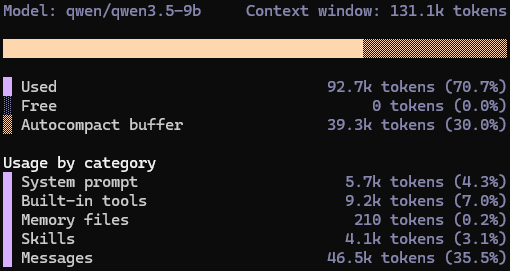
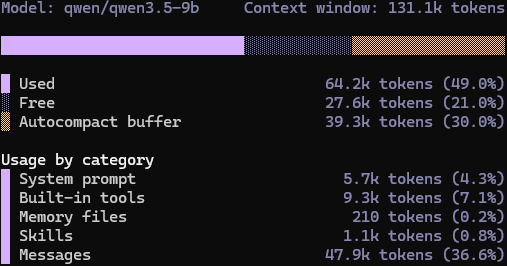
Why? What's the difference from GSD, SuperPower?
- Zero Dependency — just plain files.
- Thin Skill Dispatchers — relentless context protection.
- Idempotency — hussle-free resume with minimal state.
- Hammered Specs — no surprise dev experience.
| /gsd-autonomous | /lissom-auto |
|---|---|
 |
 |
When to use?
- I have an idea, help me refine the specs and automate the implementation.
When not to use?
- Trivial tasks — do it in one agent.
- Exploratory tasks — use
/explore.
Basic Workflow
           ┌─ interview ─┐
           │             /
 research ─┘ auto ──►   +   ──► plan ──► impl ──► review ──► done
  Specs.md    Research.md /    Plan.md         Review.md     │
   ▲                     /                                   │ critical?
   │                     └──────────── fix cycle (max 3)  ◄──┘
   │                                          │
   └──────────────── fix cycles exhausted ────┘
Installation
Install into your project's directory with:
curl -fsSL https://raw.githubusercontent.com/cuzfrog/lissom-skills/main/scripts/install.sh | bash
Supported:
.claude/Claude Code and compatible agents..opencode/OpenCode..qwen/Qwen Code..gemini/Gemini CLI.
Uninstallation
Remove all installed files from both .claude/ and .opencode/ directories in the current project:
curl -fsSL https://raw.githubusercontent.com/cuzfrog/lissom-skills/main/scripts/uninstall.sh | bash
Only files originally installed by this bundle are removed — any custom files you added are left untouched. Empty directories are cleaned up automatically.
Here We Go!
Run /lissom-auto <task_id> — get interviewed and wait for the job done!
- It looks for the task in
.lissom/tasks/<task_id>/Specs.md - If not found, it tries to locate with tools (e.g. JIRA MCP)
Best practices
- Reference to project documentation in your
Specs.md. This saves exploration. - Define test methods clearly (e.g. in
CLAUDE.md)
Configuration
Set preferences in .lissom/settings.local.json to avoid being asked each run:
{
  "user_attention": "default",
  "fix_threshold": "warning",
  "spec_review_required": "yes"
}
| Key | Options |
|---|---|
user_attention |
default — Interview for major concerns; auto — Best effort auto pilot; focused — Exhaustive questioning |
fix_threshold |
warning — Fix critical & warnings; critical — Critical only; suggestion — All issues |
spec_review_required |
yes — Review and refine specs before research; no — Skip spec review |
Links
Author
Cause Chung [email protected]
Yorumlar (0)
Yorum birakmak icin giris yap.
Yorum birakSonuc bulunamadi