har-skills
Health Pass
- License — License: MIT
- Description — Repository has a description
- Active repo — Last push 0 days ago
- Community trust — 15 GitHub stars
Code Pass
- Code scan — Scanned 11 files during light audit, no dangerous patterns found
Permissions Pass
- Permissions — No dangerous permissions requested
No AI report is available for this listing yet.
HAR Skills — AI-native library for HAR file analysis. Access via: Skills (CLAUDE.md), Go SDK, CLI, MCP. 23 commands, 70+ methods, progressive disclosure docs.
HAR Skills


HAR Skills is an AI-native HAR (HTTP Archive) analysis toolkit.
It is designed for AI agents first, then exposed as a Go SDK and CLI. An agent can install one binary, inspect a HAR file, search traffic, audit security issues, score performance, redact secrets, replay requests, transform captures, diff versions, and export results in machine-readable formats.
AI Agent First
HAR files are dense, noisy, and easy to mishandle in chat context. HAR Skills turns them into tool calls that agents can safely compose:
- Skill document: CLAUDE.md is a progressive-disclosure guide written for AI agents.
- CLI tool surface:
harexposes 24 commands with text, JSON, CSV, and YAML output where supported. - Go SDK surface: the root package can be embedded into custom agent tools, workers, CI jobs, and MCP servers.
- Automation-safe behavior: typed errors, nil-safe public APIs, streaming/lazy parsing, redaction, validation, and deterministic export helpers.
- MCP-ready direction: the current CLI and SDK are structured so an MCP server can wrap the same capabilities without inventing a second API.
One-Prompt Agent Bootstrap
Give this to an AI agent when you want it to analyze HAR files with this project:
You can use HAR Skills, an AI-native HAR (HTTP Archive) analysis toolkit.

Install:
  go install github.com/cyberspacesec/har-skills/cmd/har@latest

Core usage:
  har -f <capture.har> <command> [flags]
  cat capture.har | har <command>
  har -f capture.har <command> --format json

Start with:
  har -f capture.har info --format json
  har -f capture.har security --format json
  har -f capture.har performance --format json
  har -f capture.har find --errors --format json
  har -f capture.har find --slow 1000 --format json
  har -f capture.har redact -o clean.har

Full agent skill docs:
  https://github.com/cyberspacesec/har-skills/blob/main/CLAUDE.md
Capability Tree
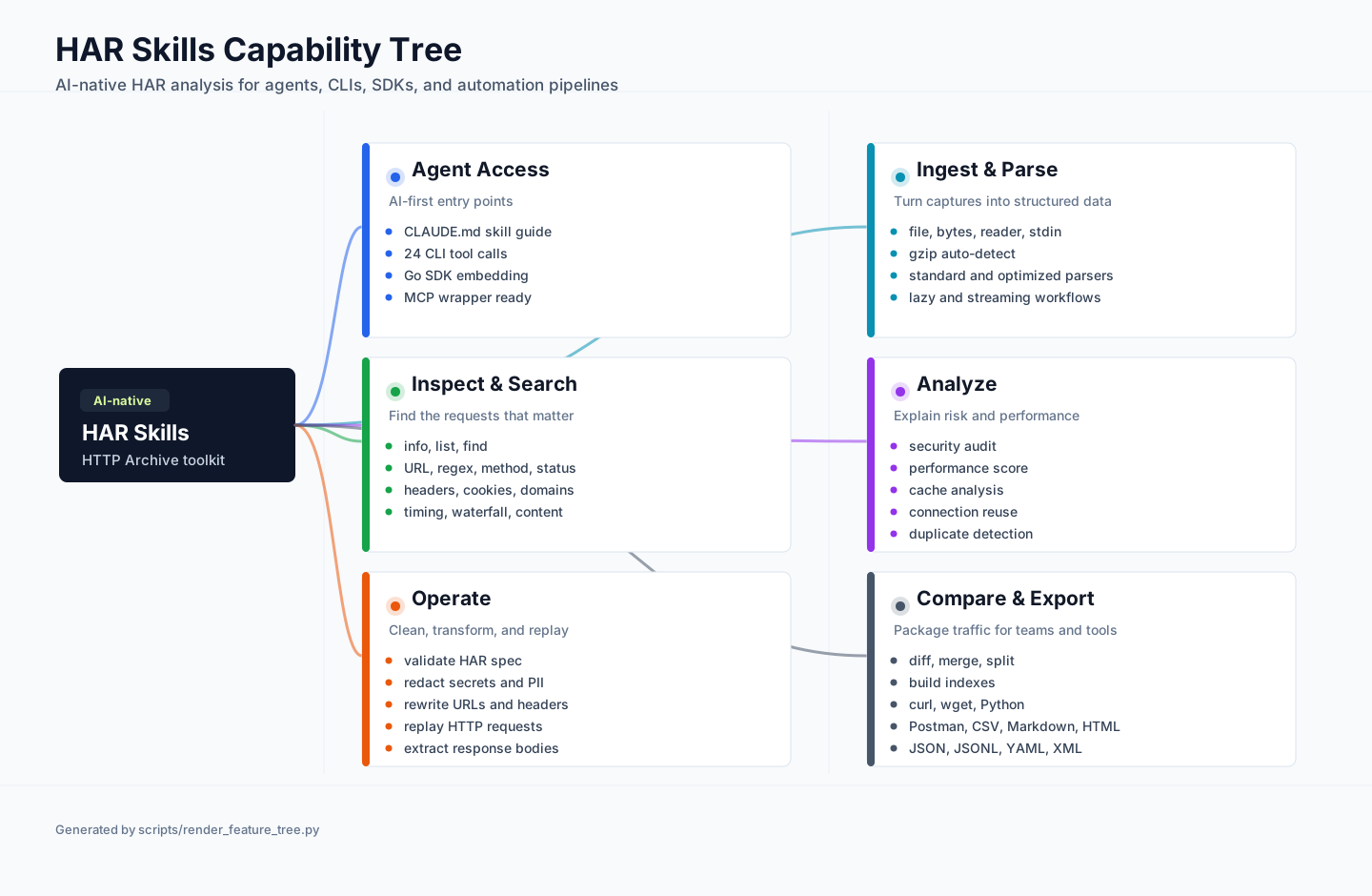
The diagram is generated by scripts/render_feature_tree.py, so capability changes can be reviewed as code and re-rendered deterministically.
Access Methods
| Access | Status | Best For | Entry Point |
|---|---|---|---|
| AI Agent Skill | Ready | Claude, ChatGPT, coding agents, local automation | CLAUDE.md + har CLI |
| CLI | Ready | Terminal, shell scripts, CI, agent tool execution | go install github.com/cyberspacesec/har-skills/cmd/har@latest |
| Go SDK | Ready | Native Go apps and custom agent tool servers | go get github.com/cyberspacesec/har-skills |
| MCP | Planned | MCP-compatible desktops and IDE agents | Wrap the SDK/CLI today; built-in server planned |
What Agents Can Do
| Task | Recommended Tool Call |
|---|---|
| Understand a HAR file | har -f capture.har info --format json |
| Find failing requests | har -f capture.har find --errors --format json |
| Find slow requests | har -f capture.har find --slow 1000 --format json |
| Inspect security posture | har -f capture.har security --format json |
| Score frontend/network performance | har -f capture.har performance --format json |
| Remove secrets before sharing | har -f capture.har redact -o clean.har |
| Compare before/after captures | har diff before.har after.har --format json |
| Export reproduction commands | har -f capture.har export curl |
| Replay captured traffic | har -f capture.har replay --timeout 10s |
| Validate malformed captures | har -f capture.har validate --format json |
Install
Go Install
go install github.com/cyberspacesec/har-skills/cmd/har@latest
har --version
Prebuilt Binary
Download the latest build from GitHub Releases.
Supported release targets include Linux, macOS, Windows, and FreeBSD on common x86 and ARM architectures.
Build From Source
git clone https://github.com/cyberspacesec/har-skills.git
cd har-skills
go build -o har ./cmd/har/
./har --help
CLI Quick Start
har -f capture.har info                              # Overview
har -f capture.har list --limit 20                   # List entries
har -f capture.har find "api/users"                  # Search URL text
har -f capture.har find --errors                     # 4xx/5xx requests
har -f capture.har find --slow 1000                  # Requests slower than 1s
har -f capture.har find --response-header "X-Debug"  # Response header search
har -f capture.har headers --response --name server  # Inspect headers
har -f capture.har timing --summary                  # Timing breakdown
har -f capture.har waterfall                         # Request timeline
har -f capture.har security                          # Security audit
har -f capture.har performance                       # Performance score
har -f capture.har cache                             # Cacheability analysis
har -f capture.har cookie                            # Cookie security analysis
har -f capture.har connections                       # Connection reuse analysis
har -f capture.har content                           # Content type and size analysis
har -f capture.har extract --index 0 -o body.bin     # Extract response body
har -f capture.har redact -o clean.har               # Redact sensitive data
har -f capture.har transform --help                  # Rewrite URLs, headers, schemes
har -f capture.har export curl                       # Export as cURL commands
har -f capture.har export postman -o collection.json # Export Postman collection
har diff before.har after.har                        # Compare captures
har merge a.har b.har -o merged.har                  # Merge captures
har -f capture.har split --by domain                 # Split captures
har -f capture.har dedup --remove -o dedup.har       # Remove duplicate requests
har -f capture.har index --pattern "api"             # Build/query index
har -f capture.har validate                          # Validate HAR spec
har -f capture.har replay                            # Replay HTTP requests
Command Reference
| Command | Capability |
|---|---|
info |
File overview, request counts, status codes, domains, content types |
list |
Entry listing with filters, sorting, and limits |
find |
Search by URL, regex, status, method, domain, headers, cookies, size, speed |
headers |
Request/response header inspection |
timing |
DNS/connect/SSL/send/wait/receive timing analysis |
waterfall |
Timeline and waterfall-style request sequencing |
extract |
Response body extraction and decoding |
content |
MIME type, body size, and content distribution analysis |
domains |
Per-domain request and timing statistics |
connections |
Connection reuse analysis |
security |
Security audit for headers, cookies, CORS, mixed content, leakage |
cookie |
Cookie inventory and security posture |
cache |
Cache-Control and cacheability analysis |
performance |
Lighthouse-style scoring and recommendations |
redact |
Sensitive data redaction for passwords, tokens, API keys, IPs |
transform |
URL, host, scheme, header, query, cookie, and body transformations |
replay |
Re-execute captured HTTP requests |
validate |
HAR format and strict validation |
diff |
Compare two HAR files |
merge |
Merge multiple HAR files |
split |
Split by domain, page, time, size, status, or method |
dedup |
Detect and remove duplicate or near-duplicate requests |
index |
Build an in-memory index for fast lookup |
export |
Export to curl, wget, Python, Postman, CSV, Markdown, HTML, JSON, JSONL, YAML, XML |
Go SDK
package main

import (
	"fmt"
	"log"

	har "github.com/cyberspacesec/har-skills"
)

func main() {
	h, err := har.ParseHarFile("capture.har")
	if err != nil {
		log.Fatal(err)
	}

	stats := h.Statistics()
	fmt.Printf("requests=%d avg=%.1fms\n", stats.TotalRequests, stats.AvgTime)

	security := h.SecurityAudit()
	fmt.Printf("security=%d/100\n", security.Score)

	perf := h.PerformanceScore()
	fmt.Printf("performance=%s %.1f/100\n", perf.Grade(), perf.OverallScore)

	redacted := h.Redact(har.DefaultRedactOptions())
	if err := redacted.SaveToFile("clean.har", true); err != nil {
		log.Fatal(err)
	}
}
SDK Capability Areas
- Parsing: files, bytes, readers, gzip-compressed input, stdin-friendly workflows.
- Large files: standard, optimized, lazy, and streaming parsing models.
- Creation: build HAR files programmatically and save formatted JSON.
- Search/filter: methods, status codes, domains, content types, URL patterns, timing, size.
- Statistics: global summaries, timing percentiles, domains, status codes, content distribution.
- Security: headers, cookies, CORS, mixed content, sensitive data exposure.
- Performance: TTFB, total load time, request count, transfer size, cache, compression.
- Privacy: redaction of credentials, tokens, API keys, cookies, headers, IP addresses.
- Operations: validate, transform, replay, extract, deduplicate, index.
- Interop: diff, merge, split, export to common developer and report formats.
Project Layout
.
├── *.go                 # Root Go SDK package
├── cmd/har/             # Cobra CLI used by humans and agents
├── CLAUDE.md            # Progressive AI Agent Skill documentation
├── docs/assets/         # Generated README diagrams and static assets
├── scripts/             # Documentation generation helpers
├── examples/            # SDK examples
├── testdata/            # HAR fixtures
└── doc/                 # Additional human documentation
For Agent Tool Authors
If you are wrapping HAR Skills for another agent runtime:
- Use the CLI first when you need a stable process boundary.
- Prefer
--format jsonfor model-readable outputs. - Run
redactbefore sending HAR-derived content to external systems. - Use
validatebefore deeper analysis when the capture source is unknown. - Use the Go SDK when you need long-running workers, custom filters, or embedded policy.
Contributing
Contributions are welcome. Please read CONTRIBUTING.md for guidelines.
License
简体中文
HAR Skills 是一个 AI 原生的 HAR(HTTP Archive)分析工具集。
它优先面向 AI Agent 设计,同时提供 CLI 和 Go SDK。Agent 可以通过一个 har 命令完成 HAR 文件的解析、搜索、安全审计、性能评分、脱敏、重放、转换、对比、合并拆分和多格式导出。
AI Agent 接入方式
| 接入方式 | 状态 | 适用场景 | 入口 |
|---|---|---|---|
| AI Agent Skill | 可用 | Claude、ChatGPT、编码 Agent、本地自动化 | CLAUDE.md + har CLI |
| CLI | 可用 | 终端、脚本、CI、Agent 工具调用 | go install github.com/cyberspacesec/har-skills/cmd/har@latest |
| Go SDK | 可用 | Go 应用、自定义 Agent 工具服务 | go get github.com/cyberspacesec/har-skills |
| MCP | 规划中 | MCP 兼容的桌面端和 IDE Agent | 当前可先包装 CLI/SDK |
给 Agent 的一键提示词
你可以使用 HAR Skills 分析 HAR(HTTP Archive)文件。

安装:
  go install github.com/cyberspacesec/har-skills/cmd/har@latest

基础用法:
  har -f <capture.har> <command> [flags]
  cat capture.har | har <command>
  har -f capture.har <command> --format json

优先从这些命令开始:
  har -f capture.har info --format json
  har -f capture.har security --format json
  har -f capture.har performance --format json
  har -f capture.har find --errors --format json
  har -f capture.har find --slow 1000 --format json
  har -f capture.har redact -o clean.har

完整 Skill 文档:
  https://github.com/cyberspacesec/har-skills/blob/main/CLAUDE.md
能力概览
- 读入与解析:文件、字节、Reader、stdin、gzip、标准/优化/懒加载/流式解析。
- 检索与洞察:概要、列表、URL/正则搜索、状态码、Header、Cookie、域名、耗时、瀑布流。
- 安全与隐私:安全响应头、Cookie 安全、CORS、混合内容、敏感信息泄露、数据脱敏。
- 性能分析:TTFB、总加载耗时、请求数量、传输体积、缓存、压缩和优化建议。
- 操作与修复:验证、转换 URL/Header/Scheme、重放请求、提取响应体、去重、索引。
- 协作与导出:diff、merge、split,导出 curl、wget、Python、Postman、CSV、Markdown、HTML、JSON、JSONL、YAML、XML。
常用命令
har -f capture.har info --format json          # 文件概要
har -f capture.har find --errors --format json # 失败请求
har -f capture.har find --slow 1000            # 慢请求
har -f capture.har security                    # 安全审计
har -f capture.har performance                 # 性能评分
har -f capture.har redact -o clean.har         # 脱敏
har -f capture.har export curl                 # 导出复现命令
har diff before.har after.har                  # 对比两个 HAR
har merge a.har b.har -o merged.har            # 合并 HAR
har -f capture.har validate                    # 规范校验
Go SDK 示例
import har "github.com/cyberspacesec/har-skills"

h, err := har.ParseHarFile("capture.har")
if err != nil {
	panic(err)
}

stats := h.Statistics()
security := h.SecurityAudit()
performance := h.PerformanceScore()

_, _, _ = stats, security, performance
Reviews (0)
Sign in to leave a review.
Leave a reviewNo results found