codeck
Health Warn
- License — License: AGPL-3.0
- Description — Repository has a description
- Active repo — Last push 0 days ago
- Low visibility — Only 5 GitHub stars
Code Fail
- rm -rf — Recursive force deletion command in apps/runtime/package.json
- fs module — File system access in apps/runtime/package.json
- process.env — Environment variable access in apps/runtime/src/routes/agents.routes.ts
- process.env — Environment variable access in apps/runtime/src/routes/codeck.routes.ts
- network request — Outbound network request in apps/runtime/src/routes/codeck.routes.ts
- process.env — Environment variable access in apps/runtime/src/routes/console.routes.ts
- process.env — Environment variable access in apps/runtime/src/routes/files.routes.ts
Permissions Pass
- Permissions — No dangerous permissions requested
This self-hosted agent provides an always-on, browser-based cloud workspace for Claude Code. It gives the AI persistent memory, full terminal access, and remote accessibility across multiple devices.
Security Assessment
The overall risk is High. The application is designed to provide full, unrestricted terminal access and environment control to an AI agent. While there are no hardcoded secrets or dangerous broad permissions requested, it relies heavily on accessing environment variables (likely to manage your Anthropic API keys and credentials). It also features outbound network requests.
A major concern is a recursive force deletion command (`rm -rf`) found in the package configuration, which could be dangerous if invoked unexpectedly. Furthermore, because this system exposes a web interface, handles password authentication, and gives underlying terminal control to an AI, it must be rigorously secured and kept away from the public internet to prevent severe unauthorized access to your host machine.
Quality Assessment
The project is licensed under AGPL-3.0 and was updated very recently, indicating active development. However, it currently has extremely low community visibility with only 5 GitHub stars. This means the codebase has not been broadly reviewed by security experts, and you will be relying largely on the original author's implementation.
Verdict
Use with caution—run this tool strictly in an isolated environment due to its high-risk terminal access and low community vetting.
Your own cloud machine for Claude Code — with persistent memory. Self-hosted, open source.
Codeck
Your own cloud machine for Claude Code — with persistent memory.




Quick Start · Features · Docs
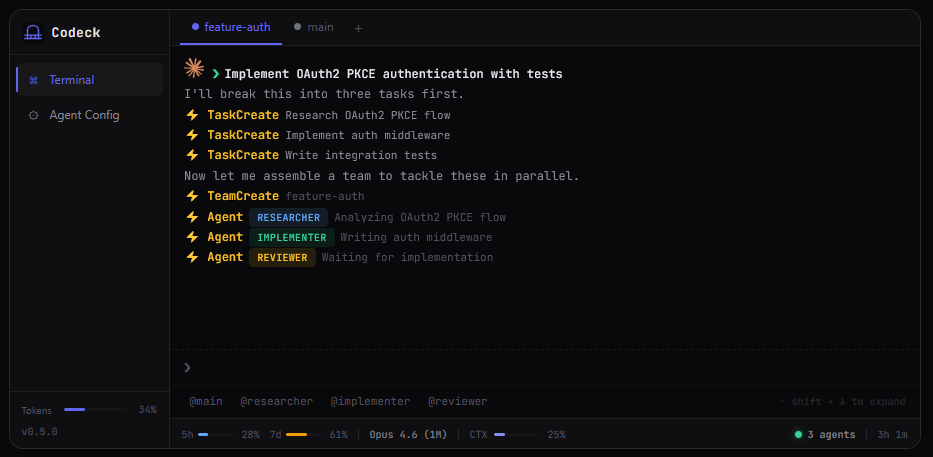
Codeck gives Claude Code its own always-on machine. Persistent workspace, memory that survives across sessions, full terminal access — accessible from any browser on any device. Self-hosted. You bring your own Anthropic account.
Why Codeck
Every time you start Claude Code, it forgets everything. Your projects, your preferences, your context — gone. You rebuild from scratch, every session.
Codeck fixes that:
- Always on. A dedicated machine that never shuts down. Your projects, servers, and files persist between sessions.
- Memory across sessions. Claude remembers who you are, what you're building, and decisions you've made — automatically.
- Access from anywhere. Browser-based. Phone, tablet, laptop — same workspace, same agent.
Features
For the agent
- Up to 5 concurrent PTY terminals (node-pty + xterm.js)
- Persistent memory — FTS5 search, per-project context, daily journals, durable global memory
- Scheduled agents — recurring tasks, cron-style, without you present
- Full environment: git, GitHub CLI, Docker, internet access
For you
- Browser UI from any device (phones, tablets, laptops)
- Claude OAuth PKCE — automatic token refresh, zero manual re-auth
- Password authentication — scrypt-hashed, 7-day sessions
- File browser with inline editor
- GitHub integration — SSH keys + CLI device flow
- Dashboard — CPU, memory, disk, session count, API usage
- LAN access —
codeck.localvia mDNS from any device - Workspace export as
.tar.gz
Quick Start
Pull the image and run. No build step required.
docker pull ghcr.io/cyphercr0w/codeck:latest

docker run -d --name codeck \
  -p 80:80 \
  -v codeck-workspace:/workspace \
  -v codeck-claude:/root/.claude \
  --restart unless-stopped \
  ghcr.io/cyphercr0w/codeck:latest --web
Open http://localhost in your browser. Sign in with your Anthropic account. Done.
VPS install (one-liner):
curl -fsSL https://codeck.xyz/install | bash
How It Works
Codeck runs inside a Docker container with full tool access. The web app serves a browser-based terminal connected to real PTY sessions running Claude Code. OAuth PKCE handles authentication — your Anthropic credentials never touch our servers.
The memory system (SQLite FTS5) indexes per-project context, daily journals, and durable global memory. Claude reads this automatically at session start — no manual context-loading required.
Browser --> Web App (Preact + xterm.js) --> WebSocket --> PTY (node-pty) --> Claude Code CLI
                                                             |
                                                       Memory System (SQLite FTS5)
                                                             |
                                                   /workspace/.codeck/memory/
Documentation
Full technical reference in docs/:
| Doc | Covers |
|---|---|
| Architecture | System design, auth flows, security model |
| API | REST endpoints and WebSocket protocol |
| Services | Backend service layer internals |
| Frontend | Preact SPA, components, signals, CSS |
| Configuration | Env vars, Docker, volumes, presets |
| Deployment | systemd install, VPS setup, troubleshooting |
| Known Issues | Bugs, tech debt, planned improvements |
License
Reviews (0)
Sign in to leave a review.
Leave a reviewNo results found