clipboard-history-mcp
Health Pass
- License — License: MIT
- Description — Repository has a description
- Active repo — Last push 0 days ago
- Community trust — 17 GitHub stars
Code Fail
- rm -rf — Recursive force deletion command in scripts/pack-mcpb.sh
Permissions Pass
- Permissions — No dangerous permissions requested
No AI report is available for this listing yet.
Type-aware, secret-safe clipboard history for Claude via MCP. Rust binary, macOS + Linux. Ships as .mcpb.
clipboard-history-mcp
Your clipboard, but Claude can read it. Type-classified, secret-encrypted, macOS-native.
flowchart LR
  U[You ⌘C something] --> D[Rust daemon<br/>launchd-managed]
  D -->|classify + encrypt| DB[(SQLite + FTS5)]
  C[Claude] -->|MCP stdio| M[15 tools]
  M --> DB
  M -->|Touch ID| V[Vault<br/>AES-256-GCM]
One Rust binary. No Node.js, no Swift toolchain, no other apps to install. Drag a .mcpb into Claude Desktop, done.
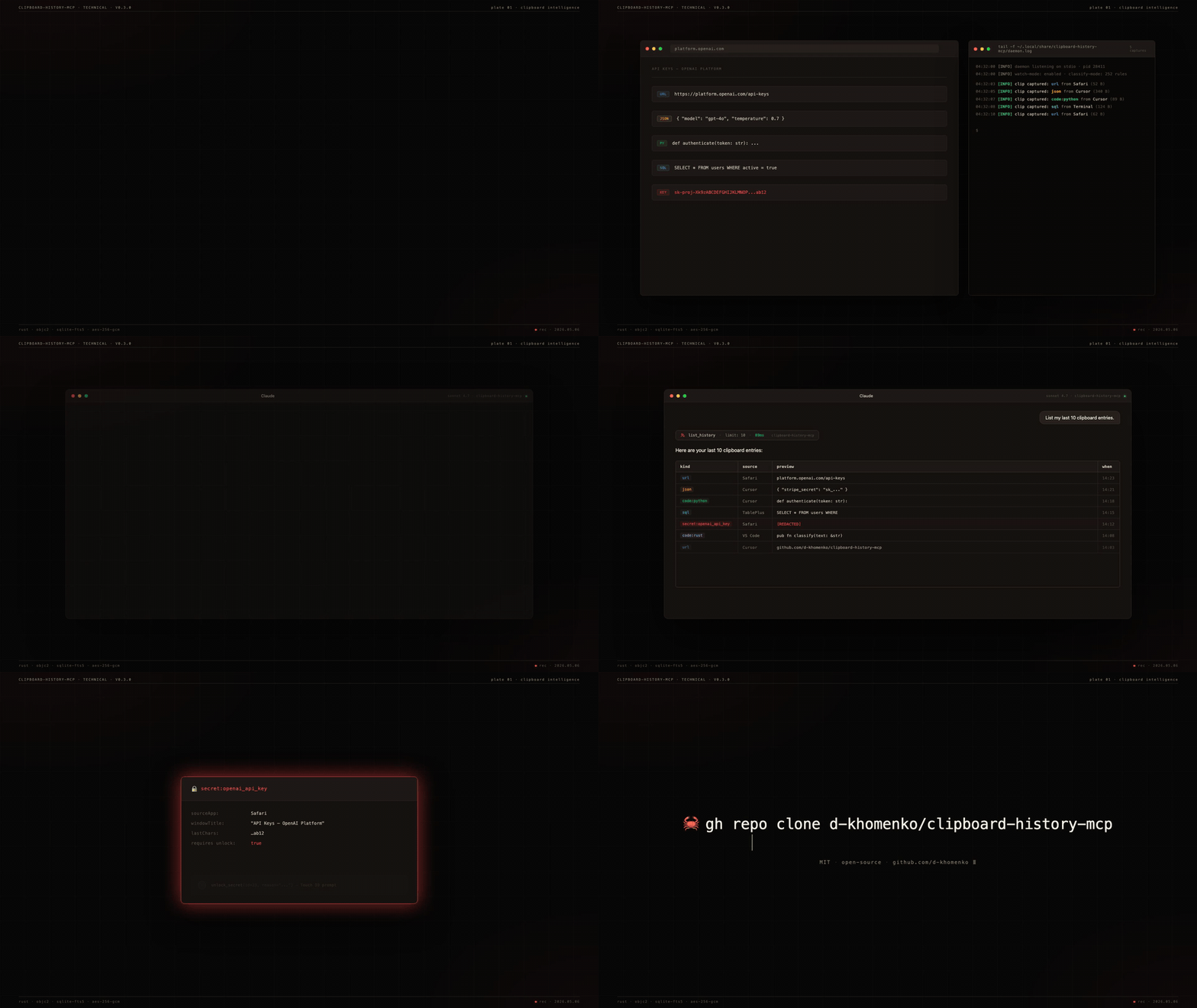
What this gets you
You're working in Claude. You've copied 47 things today — URLs, JSON snippets, an OpenAI key from a dashboard, a SQL query from your DB tool, half a Stripe webhook payload. Now Claude can use any of them:
You: "Find that API key I copied from the OpenAI dashboard yesterday"
Claude: Found 1 secret matching "OpenAI" — kind: openai_api_key,
source: Safari, copied 14h ago. Last 4 chars: ab12.
To reveal, call unlock_secret(id=23, reason="...").

You: "Give me all the GitHub URLs I copied"
Claude: Returns 12 unique GitHub URLs deduplicated by repo,
ranked by how often you pasted them back.

You: "There was a Stripe JSON config in the buffer — restore it to my clipboard"
Claude: Found, restoring. ✓ ready to ⌘V.

You: "What code did I copy from ChatGPT over the last 2 hours?"
Claude: 3 Python snippets, 1 SQL query, 1 shell command.
Search uses SQLite FTS5 + window-title indexing — you find clips by where you copied them, not just by content.
Why nothing else does this
| Maccy | maccy-clipboard-mcp | clipboard-history-mcp | |
|---|---|---|---|
| Captures clipboard | ✓ | (reads Maccy's DB) | ✓ |
| Classifies clip type (URL/JSON/code/SQL/secret) | ✗ | ✗ | ✓ |
| Indexes window titles for context-search | ✗ | ✗ | ✓ |
| Detects secrets at capture (252 gitleaks rules) | ✗ | ✗ | ✓ |
| Encrypts secrets at rest with Touch ID gate | ✗ | ✗ | ✓ |
| Standalone binary (no runtime needed) | n/a | ✗ | ✓ macOS + Linux |
.mcpb one-click install |
n/a | ✗ | ✓ |
The other ~20 clipboard-mcp repos on GitHub only read the current clipboard. None capture history.
Install
One-click — Claude Desktop
- Download
clipboard-history-mcp.mcpbfrom the latest release. - Claude Desktop → Settings → Extensions → "Install from file" → pick the
.mcpb. - Restart Claude Desktop. Ask: "List my recent clipboard URLs."
Manual — Claude Code / CLI
curl -L https://github.com/d-khomenko/clipboard-history-mcp/releases/latest/download/clipboard-history-mcp.mcpb \
  -o clipboard-history-mcp.mcpb
unzip clipboard-history-mcp.mcpb -d ext

# register MCP
claude mcp add -s user clipboard-history -- ./ext/server/clipboard-history-mcp serve

# install background daemon (captures even when Claude is closed)
./ext/server/clipboard-history-mcp install
From source (macOS)
Requirements: Rust 1.95+, macOS 13+.
git clone https://github.com/d-khomenko/clipboard-history-mcp
cd clipboard-history-mcp
cargo build --release
./target/release/clipboard-history-mcp install                                 # start daemon
claude mcp add -s user clipboard-history -- "$(pwd)/target/release/clipboard-history-mcp" serve
Linux (X11; Wayland partial)
Requirements: a working Secret Service implementation (GNOME Keyring or KWallet — comes with most desktop installs), xvfb not required for normal use (only for headless CI).
git clone https://github.com/d-khomenko/clipboard-history-mcp
cd clipboard-history-mcp
cargo build --release

# Set a master password (used to wrap your AES master key)
./target/release/clipboard-history-mcp migrate-v2

# Install systemd user service
./target/release/clipboard-history-mcp install
# Optional: keep daemon running after logout
./target/release/clipboard-history-mcp install --linger

# Register with Claude Code
claude mcp add -s user clipboard-history -- "$(pwd)/target/release/clipboard-history-mcp" serve
Wayland note: clipboard read/write works on Wayland via arboard's portal handling. Window-title capture (opt-in via CLIPBOARD_CAPTURE_WINDOW_TITLE=1) currently only works on X11; Wayland support is deferred to v0.4.x once xdg-desktop-portal window-title APIs are widely shipped.
1Password / Bitwarden: add app names to CLIPBOARD_IGNORE_APPS so password-manager paste events are skipped:
CLIPBOARD_IGNORE_APPS="1Password,Bitwarden,KeePassXC" \
  ./target/release/clipboard-history-mcp install
Auto-mirror to Obsidian vault (optional)
If you also use Obsidian, the daemon can write a sidecar .md for every captured clip plus a daily-note timeline entry. Configure at install time:
clipboard-history-mcp install --vault ~/Documents/Obsidian/MyVault
Result: every non-secret clip lands as <vault>/clipboard/YYYY-MM/<id>-<kind>-<slug>.md with frontmatter (kind, source, captured-at), and a bullet appended to <vault>/daily/YYYY-MM-DD.md linking back to the sidecar. Secrets are never mirrored — they stay encrypted in the SQLite vault.
The daemon owns the ## Clipboard captures H2 section in your daily notes — append-only, idempotent. You can write anything else above or below it.
Try asking Claude
Copy any of these prompts into Claude after install:
List my last 20 clipboard entries.

Show me only the URLs I've copied today.

Search my clipboard history for "anthropic".

Find any code snippets in Python from the last 3 hours.

How many secrets are in my clipboard vault, by kind?

Pin the JSON I just copied — I'll need it again.

What apps did I copy from most this week?

Restore that GitHub PR link to my clipboard.
Claude picks the right tool from 15 available and answers directly.
Configuration
Set env vars in the launchd plist (install writes them) or via claude mcp add --env KEY=val:
| Variable | Default | What it does |
|---|---|---|
CLIPBOARD_POLL_MS |
1500 |
Watcher poll interval (ms) |
CLIPBOARD_HISTORY_MAX |
1000 |
Ring-buffer size |
CLIPBOARD_CAPTURE_WINDOW_TITLE |
0 |
Capture window titles (needs Accessibility permission) |
CLIPBOARD_IGNORE_APPS |
(empty) | Comma-separated app display names to skip |
CLIPBOARD_NEVER_STORE_SECRETS |
0 |
Paranoid mode — metadata only, no ciphertext |
CLIPBOARD_DATA_DIR |
~/Library/Application Support/clipboard-history-mcp |
Override data dir |
CLIPBOARD_VAULT_PATH |
(empty) | Auto-mirror non-secret clips to this Obsidian vault directory (sidecar .md per clip + bullet in daily/YYYY-MM-DD.md). Set via --vault PATH at install time. |
Tools (15)
Read
list_history(limit?, kind?, source_app?, since?, pinned_only?) |
Paginated history, newest first |
get_item(id) |
Single clip by id |
search_history(query, limit?) |
FTS5 BM25 across preview + window title |
get_urls(limit?) |
URL clips, deduped by hostname |
get_code(language?, limit?) |
Code clips, optional language filter |
get_json(limit?) |
JSON clips with parsed structure |
get_secrets_index(kind?) |
Secret metadata — no values |
unlock_secret(id, reason) |
Decrypt one secret — gated by Touch ID |
get_stats |
Counts by kind, oldest/newest, db size |
daemon_status |
PID, running state |
Write
copy_item(id) |
Restore a clip back to system clipboard |
pin_item(id, pinned) |
Pin so it survives clear_history |
tag_item(id, tag, remove?) |
Free-form tagging |
delete_item(id) |
Hard delete |
clear_history(scope) |
'all' | 'older_than_days:N' | 'kind:K' |
CLI
clipboard-history-mcp daemon         # run watcher (managed by launchd)
clipboard-history-mcp serve          # MCP stdio server (Claude spawns this)
clipboard-history-mcp install [--window-titles]
clipboard-history-mcp uninstall [--keep-data]
clipboard-history-mcp status         # JSON: daemon pid, db size, etc.
clipboard-history-mcp vault list     # secret metadata
clipboard-history-mcp vault unlock N # decrypt secret #N (Touch ID)
clipboard-history-mcp doctor         # diagnose perms/Keychain/pasteboard
clipboard-history-mcp migrate-v2     # validate v0.2.x SQLite (no-op import)
Security model
- Secrets detected at capture — 252+ gitleaks regex patterns + RFC 7519 JWT + Luhn-validated cards.
- Encryption at rest — AES-256-GCM with a 32-byte master key in macOS Keychain.
- Touch ID gate —
unlock_secretcallsLAContext.evaluatePolicy(.deviceOwnerAuthenticationWithBiometrics). 5-minute auth cache per session. - LLM-blind by default —
list_historyandsearch_historyreturn secret rows withtext: nullandpreview: "[REDACTED:kind]". The only path that returns plaintext isunlock_secret(id, reason), and thereasonargument is mandatory and audit-logged. - Paranoid mode —
CLIPBOARD_NEVER_STORE_SECRETS=1keeps metadata only; ciphertext never written. - Transient-type respect — clips marked by password managers (1Password, Bitwarden) with
org.nspasteboard.ConcealedTypeare never captured.
Architecture
src/
├── main.rs               # binary entry; clap subcommand dispatch
├── core/
│   ├── db.rs             # SQLite WAL + migrations + FTS5
│   ├── store.rs          # add/list/search/delete clips
│   ├── crypto.rs         # AES-256-GCM + Keychain
│   ├── types.rs          # classifier (url/json/sql/shell/code:lang)
│   ├── secrets.rs        # gitleaks rules + JWT + Luhn
│   ├── pasteboard.rs     # NSPasteboard via objc2
│   └── biometry.rs       # LAContext Touch ID gate
├── daemon/{watcher,context}.rs    # poll loop on pinned thread
├── mcp/tools.rs                   # 15 MCP tools via rmcp
└── cli/{install,uninstall,status,vault,doctor,migrate_v2}.rs
Tech stack: Rust 1.95 · rmcp 1.6 · tokio · objc2 · rusqlite (bundled FTS5) · aes-gcm · security-framework · objc2-local-authentication · clap 4
Performance
Daemon idle footprint, measured on Apple Silicon with default CLIPBOARD_POLL_MS=1500 and vault-mirror enabled:
| Metric | Value | How measured |
|---|---|---|
| CPU steady-state | 0.05 % | ps cumulative CPU-time delta over 60 s (0.03 s / 60 s) |
| Memory (RSS) | ~24 MB | ps -o rss |
| Power draw (avg) | ~1 mW | 0.05 % of an E-core (~1 W full tilt) running continuously |
| Battery impact | ~1 % per 3 weeks | 1 mW × 504 h = 0.5 Wh on a 52 Wh MacBook Air battery, assuming 24/7 continuous run |
For context — every visible bar below is at least 300× the daemon, on a log-10 scale (each y-axis unit = 10× more power):
xychart-beta
    title "Average power draw vs typical background apps — log10(mW)"
    x-axis ["clipboard daemon" "static Chrome tab" "Spotify" "JS-heavy tab" "Slack desktop" "YouTube tab" "Xcode build"]
    y-axis "log10 mW" 0 --> 5
    bar [0, 2.5, 3.2, 3.3, 3.5, 3.9, 4.5]
Reading: 0 = 1 mW (this daemon), 2 = 100 mW, 3 = 1 W, 4.5 = ~30 W. An Xcode build pulls five orders of magnitude more than the clipboard daemon; a single Slack tab pulls about three.
Burst cost on each ⌘C: ~30 ms tick at 1–3 % CPU (secret-classifier regexes + FTS5 index + AES-GCM + optional vault file write), then back to idle. Activity Monitor's Energy Impact column reports ~0 — below its detection threshold.
Linux numbers untested but expected similar order of magnitude (arboard polling + SQLite is portable).
FAQ
Does this run on Linux/Windows?
Not yet. Phase 2. The pasteboard layer is macOS-specific (NSPasteboard); cross-platform abstraction is on the roadmap.
What if I copy a 50MB blob?
Currently captured. A CLIPBOARD_MAX_BYTES guard is on the v0.3.x roadmap.
Can Claude leak my secrets?
Not without you (a) installing this tool, (b) approving Touch ID, (c) the LLM choosing to call unlock_secret with a reason that gets logged. The text field for secret rows is always null in list_history/search_history.
Does it sync across Macs?
No. v0.3 is per-Mac. iCloud/Git E2E sync is Phase 2.
Can I use this with Maccy already running?
Yes. They don't conflict — Maccy provides UI, this provides the MCP layer. Both poll NSPasteboard.changeCount independently.
What about [other clipboard manager]?
Same answer — there's no exclusive lock. Worst case, both store the same clip; storage cost is trivial.
Changelog
See CHANGELOG.md. Latest: v0.3.0-alpha.0.
Contributing
See CONTRIBUTING.md. PRs welcome — issues with macOS 13/14 reproductions especially.
Sponsor
Pre-1.0 alpha. Built solo, in bursts. If clipboard-history-mcp finds you a
leaked key, saves you from typing the same JSON twice, or just makes Claude
slightly more useful at your terminal — consider becoming a backer or
Founding Sponsor on Patreon.
- $3 / month — backer ☕ — name in
SUPPORTERS.md, Discord role - $10 / month — founding sponsor 🥇 — name + avatar in this README, permanently listed if you join before v1.0
Sponsorship is gratitude, not a support contract. It does not buy priority
issue triage, custom features, or response-time SLA — solo OSS doesn't scale
that way. What it buys: visibility, the occasional roadmap vote, and proof
that this kind of tool is worth maintaining past 0.x.
GitHub Sponsors works too — see the Sponsor button at the top of the repo.
License
MIT. vendor/gitleaks.toml is the gitleaks rule catalog (also MIT) — see vendor/README.md.
Reviews (0)
Sign in to leave a review.
Leave a reviewNo results found