open-ptc
Health Warn
- License — License: MIT
- Description — Repository has a description
- Active repo — Last push 0 days ago
- Low visibility — Only 5 GitHub stars
Code Warn
- process.env — Environment variable access in examples/ai-sdk/example.ts
- network request — Outbound network request in examples/api-client.ts
Permissions Pass
- Permissions — No dangerous permissions requested
This tool is an open-source proxy and sandboxed runtime designed to optimize how AI agents interact with tools. It allows models to write and execute their own TypeScript code to orchestrate multiple tools at once via a single interface, rather than relying on slow, token-heavy step-by-step tool calls.
Security Assessment
Overall Risk: Medium. The server utilizes Deno isolates to execute AI-generated code in a sandbox, which is a strong security boundary, though it inherently introduces risk. The rule-based scan did not find any hardcoded secrets or dangerous permission requests. However, the codebase does include environment variable access and makes outbound network requests. Because it acts as a proxy routing data between your LLM and local services, it handles potentially sensitive workflow data and must be properly network-isolated to prevent the sandboxed code from reaching unauthorized external endpoints.
Quality Assessment
The project is very new and currently has low community visibility, holding only 5 GitHub stars. Despite the low adoption rate, it was actively maintained with repository updates pushed as recently as today. It is fully compliant with open-source standards, published under the clear and permissive MIT license, and features comprehensive, high-quality documentation detailing its architecture and goals.
Verdict
Use with caution: The sandbox mechanism and MIT license are positives, but execute-generated code handling requires strict network isolation due to low community testing and inherent proxy risks.
Open source implementation of Anthropic's Programmatic Tool Calling
Open-PTC




Run Open-PTC | Integration Modes | MCP Configuration | Proxy Client Guide | Future Improvements
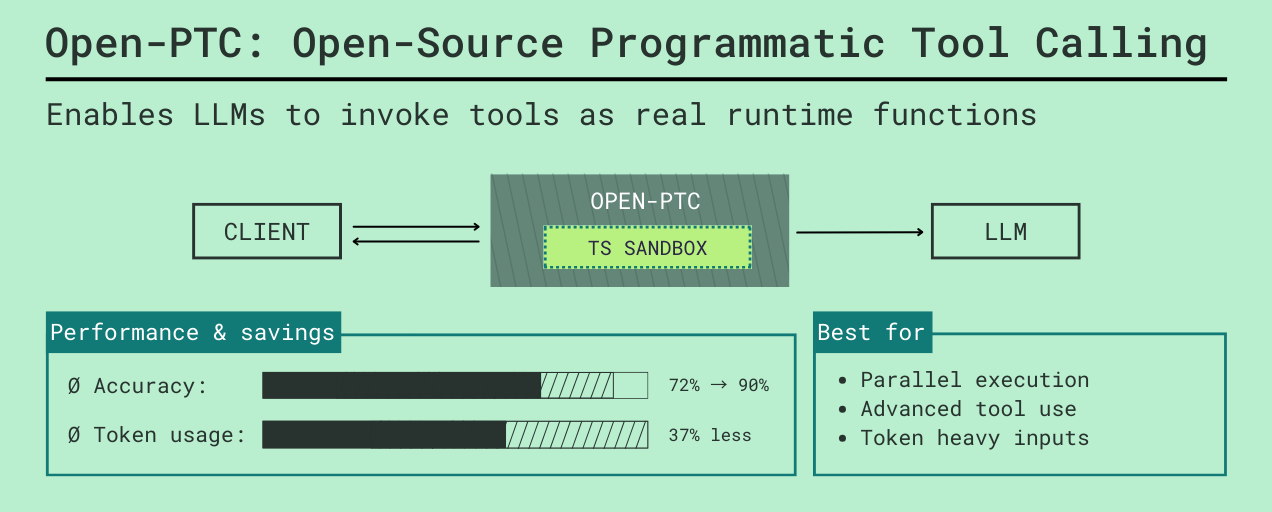
Most LLM agents break down when you give them too many tools. Tool schemas fill up the context window, and multi-step tasks turn into slow loops between the model and your app.
Open-PTC is a proxy and sandboxed runtime built around Programmatic Tool Calling.
It lets the model write code to call tools instead of calling them step by step. Open-PTC connects to your Model Context Protocol (MCP) servers and local functions, exposes everything through a single code_executor, and runs the generated TypeScript in a secure Deno isolate.
This allows the model to handle complex, multi-step logic like loops, conditionals, and data reshaping in a single generation, avoiding the token bloat and latency of traditional tool-calling loops.
Why Open-PTC
Anthropic's research on advanced tool use highlights the exact bottlenecks Open-PTC targets.
- Tool definition bloat is real: Anthropic reports examples where just loading tool definitions can consume 55K to 134K tokens before useful work starts.
- Search-based tool loading helps: they report reducing a 77K-token baseline to about 8.7K for comparable setups, preserving about 95% of context and reducing token usage by about 85%.
- Programmatic tool orchestration helps: they report average token usage dropping from 43,588 to 27,297 (about 37%) on complex research tasks.
- Accuracy can improve with better tool-use patterns: they report gains from tool search, programmatic calls, and examples-based guidance.
Open-PTC applies these ideas in an open runtime:
- Offload deterministic workflow logic (loops, branching, data shaping) into sandboxed TypeScript execution.
- Consolidate multiple tool schemas into a single
code_executortool, saving massive amounts of context window space. - Give the model access to hundreds of tools through a unified, programmatic interface instead of stuffing every schema into the prompt.
How It Works
Open-PTC runs up to four services simultaneously from a unified entrypoint (src/server.ts). Each service plays a specific role in the ecosystem:
- API server (9730): Provides HTTP endpoints to list available tools and manually trigger code sandboxes.
- MCP server (9731): Allows standard MCP clients (like Claude Desktop) to connect to the runtime.
- WebSocket server (9733): Maintains bidirectional connections so the sandbox can trigger local functions residing in your application (Node, Python, etc.).
- Proxy server (9734): Emulates the OpenAI API, allowing you to drop Open-PTC into existing LLM apps while transparently intercepting tool calls for sandbox execution.
High-level runtime flow depending on the integration mode:
1. API / MCP Mode
The client interacts with Open-PTC to discover tools and submit a TypeScript snippet. Open-PTC executes the code in a restricted Deno subprocess, directly invoking external MCP tools, and returns the final result to the client.
2. WebSocket Mode (Local Tool Callbacks)
Similar to the API mode, but the executing code can also call tools registered by the client. When a local tool is invoked, execution pauses, Open-PTC emits a tool_call via WebSocket to your app, your app processes it and returns tool_result, and the sandbox resumes (see AI SDK example guide and LangGraph example guide).
3. Proxy Mode (OpenAI-compatible Orchestration)
Your LLM app sends a standard chat completion request to Open-PTC's proxy. Open-PTC automatically injects a code_executor tool into the request. If the LLM uses the code_executor, Open-PTC intercepts it, runs the sandbox, handles all the tooling (including local function callbacks as normal tool calls), and eventually returns the final LLM response back to your client as if it successfully handled it all in one go.
For a client-first integration walkthrough, see the Proxy client guide.
Integration Modes
Group 1: API / MCP (Simple tool discovery and calling)
REST API mode
- Port: 9730
- Endpoints: /tree, /signatures, /exec
- Use when: you want simple HTTP introspection and manual sandbox execution
- Local tools: no
MCP mode
- Port: 9731
- Exposes MCP tools:
- get_tools_tree
- get_tool_signatures
- execute_typescript_code
- Use when: you want to connect through standard MCP clients directly
- Local tools: no
Group 2: WebSocket (Local tool callbacks)
WebSocket mode
- Port: 9733
- Client registers tools with register_tools
- Sandbox calls those tools via tool_call and receives tool_result
- Use when: your app owns local functions (Node, Python, etc.) and wants them exposed to sandbox execution
- Local tools: yes, namespace-isolated per WebSocket connection
Group 3: Proxy (OpenAI-compatible orchestration)
Proxy mode
- Port: 9734
- Endpoint: POST /v1/responses
- Runtime tools are marked with: "open-ptc-runtime-function": true
- Proxy injects synthetic code_executor with generated signatures
- Use when: you want drop-in OpenAI-compatible client behavior plus transparent sandbox orchestration for any tool calls
- Local tools: yes, treated as normal tools (from the client's perspective) callable from the sandbox
Important:
- Open-PTC currently orchestrates runtime tools via /v1/responses and forwards model requests to LiteLLM by default, for easy integration.
Run Open-PTC
Option A: run directly with Deno
Start everything:
deno run --allow-all src/server.ts
Start selected services:
deno run --allow-all src/server.ts --api --mcp --ws --proxy
deno run --allow-all src/server.ts --proxy
deno run --allow-all src/server.ts --api --mcp
Option B: Docker Compose (with proxy + LiteLLM)
docker compose up -d
This starts:
- Open-PTC (9730, 9731, 9733, 9734)
- LiteLLM (host 4001 -> container 4000)
RPC 9732 remains internal and is not exposed.
Option C: Docker Compose without proxy
docker compose -f docker-compose.no-proxy.yml up -d
This starts API + MCP + WebSocket, and skips having to run LiteLLM.
Quick verification
curl http://localhost:9730/tree
MCP Configuration
Primary file:
- mcp_config.json
Reference example with env placeholders and output_schema overrides:
- mcp_config_example.json
Supported transports
- http
- sse
- stdio
Environment variable substitution
Any string value can use ${VAR_NAME}. Open-PTC resolves these from the process environment when loading config.
Tool-level output schemas
Within each server config, tools can define output_schema.
Why this matters:
- output_schema improves generated TypeScript signatures
- better signatures improve the code_executor API surface for the model
Note on missing output_schema:
Most standard MCP tools do not currently provide an output_schema. You can ask the LLM to generate them for you while connected to the Open-PTC MCP, by using the prompt provided in add_output_schema_prompt.md.
Signature generation
Signatures are auto-generated TypeScript interface definitions derived from a tool's JSON Schema. They form the API surface that the LLM references when writing TypeScript code for the sandbox. Reliable signatures mean fewer hallucinated arguments and higher execution success rates.
Signatures are grouped by namespace:
- MCP tools are grouped by cleaned server name
- WebSocket/local tools are grouped under main (or connection-prefixed internally)
API access:
- GET /signatures
- Optional filters: serverNames, toolNames
Proxy and LiteLLM
Proxy mode depends on LiteLLM for model routing.
- Open-PTC forwards requests to LiteLLM /v1/responses
- LiteLLM model mapping is defined in litellm_config.yaml
Runtime tool marker
In proxy requests, tools marked with:
- "open-ptc-runtime-function": true
are treated as runtime functions callable by sandbox code. Other tools are passed through as normal LLM tools.
Runtime tool typing
Proxy-specific tool field:
- output_schema
This is optional but recommended, because it improves generated function signatures for code_executor.
Example Clients
All examples assume Open-PTC is already running in the required mode.
Detailed guides:
API client (MCP tools only, no local tools)
deno run --allow-all examples/api-client.ts
MCP client (MCP tools only, no local tools)
deno run --allow-all examples/mcp-client.ts
WebSocket clients (local tool callbacks)
Simple WebSocket client that registers a local tool and receives tool_call events when the sandbox invokes it:
deno run --allow-all examples/ws-client.ts
For a more complex example of using WebSocket tools as part of an agentic loop, see the AI SDK and LangGraph examples below:
AI SDK example (local tools)
cd examples/ai-sdk
npm install
tsx example.ts
LangGraph example (local tools)
cd examples/langgraph
pip install -r requirements.txt
python example.py
Proxy client (fetch)
deno run --allow-net --allow-env examples/proxy/proxy-client.ts
Proxy client (OpenAI SDK)
deno run --allow-net --allow-env examples/proxy/proxy-sdk-client.ts
Security and Resource Model
Current behavior:
- Sandbox is a separate Deno isolate per execution
- Restricted permissions by default:
- network only to localhost:RPC_PORT for tool calls
- env access only for RPC_SERVER_URL
- Execution timeout enforced (default 30s)
- WebSocket tool-call timeout is 60s
- Proxy chain depth limit is 10 (this prevents infinite loops by capping the maximum number of consecutive backend LLM requests made during a single orchestrated proxy session)
- Session store cleanup defaults to 5 minutes
Important caveat:
- The system supports concurrent access today, but the current threat model should not be treated as hardened multi-tenant isolation.
Future Improvements
Planned/high-value next steps:
- Implement Chat Completions API orchestration alongside existing Responses API orchestration for the Open-PTC proxy.
- Secure multi-tenant support with a stronger threat model (beyond concurrent-access support).
- Authentication and authorization for production deployments.
- More resource control per connection/session (memory, CPU, quotas, policy controls).
Code Map
- src/server.ts: unified startup and mode flags
- src/mcp/mcp-registry.ts: MCP discovery, grouping, signature retrieval
- src/codegen/signature-generator.ts: JSON schema to TypeScript signatures
- src/bridge/tool-bridge.ts: MCP, WebSocket, and proxy API routing
- src/execution/sandbox-executor.ts: sandbox process lifecycle
- src/servers/ws-server.ts: WebSocket protocol server
- src/proxy/proxy.ts: proxy request routing
- src/proxy/sandbox-orchestrator.ts: proxy session/chaining orchestration
- src/proxy/repl-tool-builder.ts: code_executor construction with signatures
Reviews (0)
Sign in to leave a review.
Leave a reviewNo results found