Nostraxis
Health Warn
- License — License: MIT
- Description — Repository has a description
- Active repo — Last push 0 days ago
- Low visibility — Only 5 GitHub stars
Code Warn
- process.env — Environment variable access in server/api.mjs
Permissions Pass
- Permissions — No dangerous permissions requested
No AI report is available for this listing yet.
Local-first observability dashboard to monitor, compare and analyze Codex, Claude Code and GitHub Copilot CLI sessions
Nostraxis
One local panel to observe, launch and compare work done with coding agents.
ChatGPT/Codex · Claude Code · GitHub Copilot CLI — without sending your history to any external service.










🌐 Language
Nostraxis is a local dashboard to observe, launch and compare work done with coding agents. It brings ChatGPT/Codex, Claude Code and GitHub Copilot CLI sessions into a single view, without sending your history to a Nostraxis service and without replacing each provider's own authentication.
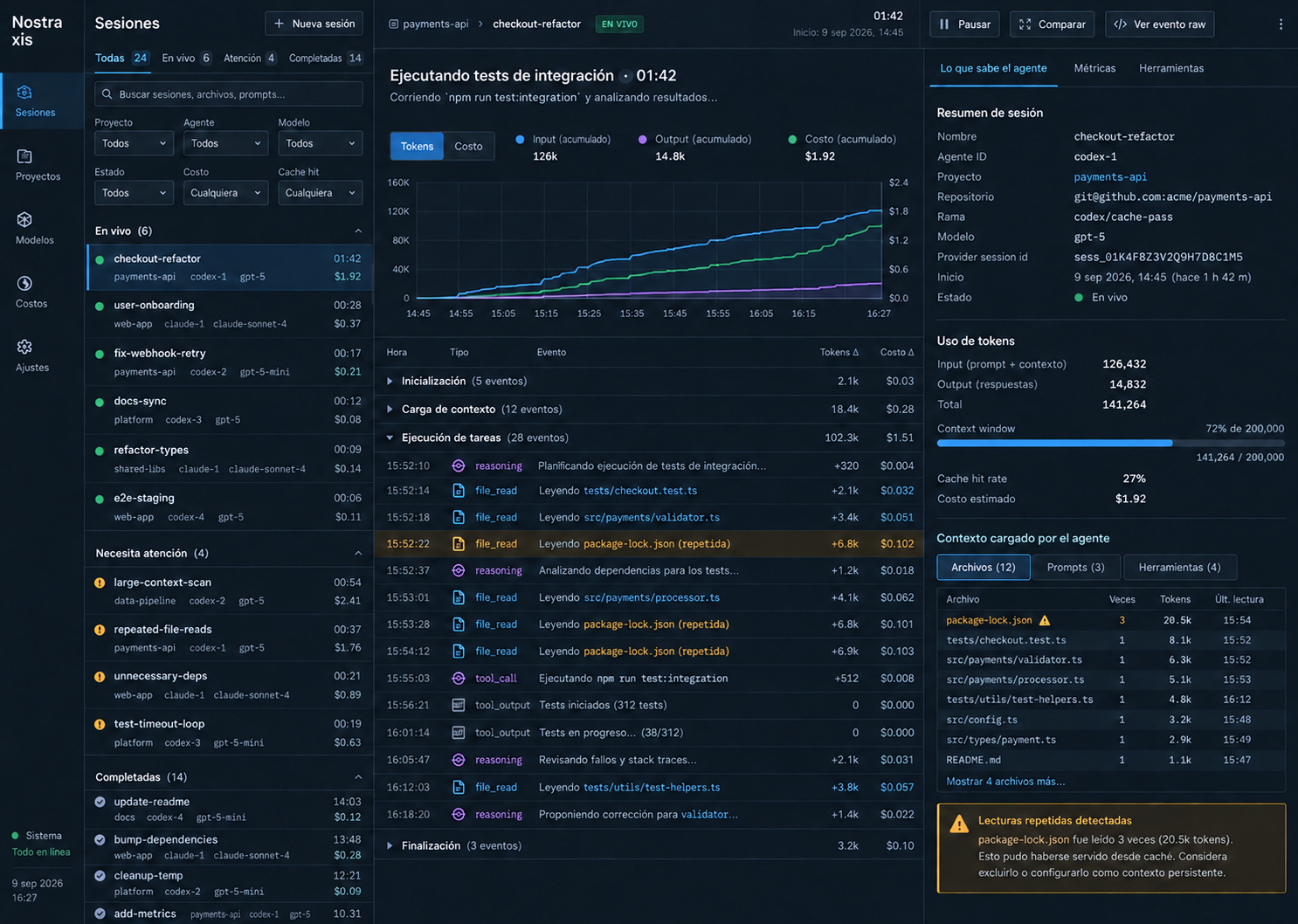
It is designed for two ways of working:
- Reviewing, from a single place, the sessions you already opened with your usual tools.
- Using it as your local work surface: pick a repository, create a session with New session and run the chosen agent from that repository.
✨ What you get
| 🔌 Multi-provider | Codex, Claude Code and Copilot CLI in one view, with their connection status. |
| 🧭 Own and external sessions | Launch sessions from the dashboard or discover the ones already in your local histories. |
| ⚖️ Compare | Contrast up to four real sessions: model, tokens, cost, duration, tools and files. |
| 📊 Analytics | Aggregates by repository, provider, model and date range. |
| 🔒 Local-first | SQLite on your disk, no telemetry of its own and no custody of provider credentials. |
| 🧪 R&D Lab | Reproducible variant matrix with a SHA-256 digest (optional). |
📚 Contents
- Quick install
- Connecting ChatGPT/Codex, Claude and Copilot
- Working with repositories and New session
- What Sessions means
- Comparing prompts, agents and sessions
- Usage, credits and costs
- Privacy and data boundaries
- Advanced configuration
- Troubleshooting
- Local API
- Contributing
- Security
- License
Quick install
Requirements
- Node.js 22.5 or later. Local storage uses
node:sqlite. - One or more agent CLIs installed and authenticated if you want to launch sessions or discover histories: Codex, Claude Code or GitHub Copilot CLI.
- Git is recommended so each repository's branch and commit can be recorded; a readable local folder can also be registered.
Starting the dashboard
From the repository root:
npm install
npm run dev
Open http://localhost:4173. On macOS you can also open start-dashboard.command; it starts in its own Terminal window and stays available as long as that window is open.
Useful commands:
npm test
npm run build
npm start
npm run check
The dashboard starts with no demo data. For isolated visual development you can use:
NOSTRAXIS_SEED=1 npm run dev
Connecting ChatGPT/Codex, Claude and Copilot
There are no passwords or subscription keys to configure inside the interface. Install and sign in to each provider's CLI through its own official flow, and open the dashboard as the same macOS/Linux/Windows user. On start, Nostraxis detects the available executables and the local histories.
| Provider | To launch a session from the dashboard | External history that is discovered | What to check if it does not appear |
|---|---|---|---|
| ChatGPT / Codex | Codex CLI authenticated with your ChatGPT/Codex account | ~/.codex/sessions |
That codex is on PATH and that you created at least one local session. |
| Claude | Claude Code authenticated | ~/.claude/projects |
That claude auth status --json reports a valid session and that claude is on PATH. |
| GitHub Copilot | GitHub Copilot CLI authenticated | Copilot CLI/Agent sessions in ${COPILOT_HOME:-$HOME/.copilot}/session-state, plus local VS Code Stable and Insiders Copilot Chat sessions in workspaceStorage |
Check the matching source separately in Settings; for the account quota, sign in with gh auth login as well. |
Open Settings to check the detected sources and the status of each adapter. In Sessions, use the sync button to force an immediate re-read of the histories. The watcher also refreshes local sources automatically every few seconds.
Copilot being connected only confirms that its executable or account is available; it does not mean every local conversation uses the same store. Nostraxis labels GitHub Copilot CLI / Agent and VS Code Copilot Chat separately. The VS Code adapter rebuilds the editor's local chatSessions journals, imports only visible user/assistant messages and reported tokens or AI credits, and associates them with the folder in the adjacent workspace.json. Histories from another computer are not downloaded from GitHub. Remote SSH, Dev Container, custom --user-data-dir, VSCodium or other installations can store data elsewhere; configure their local workspaceStorage roots with NOSTRAXIS_VSCODE_CHAT_ROOTS_JSON.
If the executable is not on PATH, point to it for the dashboard process only:
export NOSTRAXIS_CODEX_BIN='/absolute/path/to/codex'
export NOSTRAXIS_CLAUDE_BIN='/absolute/path/to/claude'
export NOSTRAXIS_COPILOT_BIN='/absolute/path/to/copilot'
npm run dev
Copilot: account quota
The Copilot card can read the plan, monthly limit, usage, balance and reset date that GitHub exposes to the active GitHub CLI account. It does not reuse or store the gh credential. If that session does not exist on the machine, you can provide a short-lived token to the dashboard process only:
export NOSTRAXIS_COPILOT_TOKEN='github-token-with-copilot-access'
npm run dev
The token is not persisted. In Business or Enterprise organizations, the value shown is the personal budget when GitHub exposes it; organization-wide billing reports still require their own permissions.
Working with repositories and New session
You can use Nostraxis as your local work surface for any of the three agents. The dashboard runs the selected CLI inside the repository folder: it does not clone the code or move the project elsewhere.
- Go to Repos.
- Paste the absolute path of your local folder, for example
/Users/ana/code/my-api, and press Register repository. If it is a Git repository, the current branch andHEADare stored as well. - Go back to Sessions and press + New session.
- Choose the registered repository, the provider and, where applicable, the model.
- Give it a name, write the goal and decide whether to allow commands and file changes.
- Press Create session. The session runs from that folder and is traced in the dashboard.
This lets you work with Codex, Claude or Copilot while keeping a single panel for context, output, commands, touched files and whatever metrics the provider reported. The write-permission option only affects sessions created from Nostraxis; review it before starting a task that will modify your checkout.
What Sessions means
Sessions is the dashboard's operational history. Each row represents a detected run or conversation, labelled by project, provider, model, status and origin.
| Session type | Origin | What you can do |
|---|---|---|
| Dashboard | Created with New session | See the stream, conversation, commands, files, context, metrics, and cancel a run that is still in progress. |
| External | Discovered in the local histories of Codex, Claude or Copilot | Inspect and filter the observed data. It stays read-only: you must continue or cancel that conversation from its original tool. |
Use the tabs to switch between active, recent and all sessions; filters narrow by project, provider, model, status, origin, activity, cost and cache. Grouping by project or status makes it easier to follow several open tasks at once.
When you select a session, the central panel shows its timeline and, when the source exposes it, tokens, cost, credits, duration and events. Duration is the active time: the intervals where the agent was reporting work, measured from the real event timestamps. The time before each user action and any long silence are excluded, so a conversation resumed the next day is not read as a day of execution. The conversation span and the last turn appear beside it, so the latest interaction can still be measured on its own. The side inspector keeps the repository, branch, commit, prompt, tools and related files. A Not reported value means the provider did not deliver it: it never equals zero and is never silently estimated.
Comparing prompts, agents and sessions
The Compare view contrasts up to four real sessions. It is useful both for reviewing different prompts and for running the same prompt several times to evaluate different agents, models or permissions.
Recommended flow for a controlled test
- Register the same repository and fix a stable branch or commit.
- Create one session per variant in New session. To compare agents, use the same goal on Codex, Claude and/or Copilot. To compare prompts, change only the text you want to evaluate.
- Avoid changes to the starting files between runs, or record the difference explicitly.
- Go to Compare, search sessions by project, model or date, and select them.
- Read the results together with the
Context digest, the output and the files/tools used; a difference in context or task can invalidate a cost or speed comparison.
The matrix shows model, input/output tokens, estimated cost, provider credits, duration, cache, reasoning, evaluation, tools, files, context digest and final answer when present. From each column you can open the session detail. Fields the provider did not supply stay as Not reported.
For usage reports, Analytics aggregates sessions by repository, provider, model and date range. It includes a per-model breakdown, cost/token ratio, a time series and access to the detail of each run. This is the right view to answer, for example, which agent consumed most in a repository or how cost evolved over a week.
Reproducible experiments (optional)
The R&D Lab creates a variant matrix with a shared task and keeps the rendered prompt, the context, the repository HEAD and a SHA-256 digest to make repetition easier. Enable it when starting the dashboard:
NOSTRAXIS_EXPERIMENTS_ENABLED=1 npm run dev
The available strategies are raw-repo, knowledge-base and llm-wiki. Unset the variable or use a value other than 1 to hide this feature again.
Usage, credits and costs
At the top right there are three cards: Codex / ChatGPT, Claude and GitHub Copilot. Click a card to open the source detail, the known model, the connection status and the last update. That way you can check from a single place what each provider allows you to observe.
| Provider | Centralized data when available | Correct scope |
|---|---|---|
| Codex / ChatGPT | Usage-limit windows, credits/balance and tokens of the most recent Codex session. | The limits shown are the ones Codex records locally; they are not a consolidated ChatGPT bill. |
| Claude | Authentication status, data from the observed session and tokens/credits Claude reports. | Claude may not expose a total subscription quota in local data; in that case it is shown as unavailable. |
| Copilot | Plan, monthly credits or premium requests, used, available, reset date and usage observed per date range. | The account quota and the sum of local chats are different sources and are not mixed. |
The dashboard distinguishes three concepts that should not be confused:
- Subscription limit or quota: counter and reset date provided by the provider.
- Provider credits: provider-specific units, such as AI credits or Copilot premium requests. They are not dollars and are not comparable across providers.
- Estimated cost: a USD amount computed only when you configure per-model prices and there are enough tokens. It does not replace the provider's bill.
To enable estimated cost, define USD prices per million tokens before starting the server:
export NOSTRAXIS_PRICING_JSON='{"model-id":{"inputPerMillion":1.25,"cachedInputPerMillion":0.25,"outputPerMillion":10}}'
npm run dev
Privacy and data boundaries
Nostraxis is local-first. Its SQLite database lives by default at .nostraxis/dashboard.sqlite inside the dashboard project. You can change that location with NOSTRAXIS_DATA_DIR.
The watcher imports visible prompts and answers, tool metadata and usage the source reported. It does not import system prompts or hidden reasoning. External sessions are observation only; it does not take control of them.
For VS Code Copilot Chat, Nostraxis reads the editor's local journal but excludes hidden transcript entries, agent instructions, tool payloads and reasoning blocks. The journal format is internal to VS Code, so unknown future records are ignored rather than inferred.
Copilot launched from Nostraxis enables the official OpenTelemetry exporter to an isolated JSONL at .nostraxis/copilot-otel, with message-content capture disabled. If you want to enrich external Copilot sessions with telemetry you already have, point to the file or directory:
export NOSTRAXIS_COPILOT_OTEL_PATH='/absolute/path/copilot-otel.jsonl'
For mounted or shared histories, replace the source list and adjust the discovery limits:
export NOSTRAXIS_SESSION_ROOTS_JSON='[{"provider":"codex","root":"/absolute/path/codex-sessions"}]'
export NOSTRAXIS_SESSION_MAX_FILES=200
export NOSTRAXIS_SESSION_MAX_AGE_DAYS=30
Advanced configuration
| Variable | Purpose |
|---|---|
NOSTRAXIS_DATA_DIR |
Directory that will hold the SQLite database and the dashboard's own data. |
NOSTRAXIS_CODEX_BIN |
Path to the Codex executable when it is not on PATH. |
NOSTRAXIS_CLAUDE_BIN |
Path to the Claude executable when it is not on PATH. |
NOSTRAXIS_COPILOT_BIN |
Path to the Copilot executable when it is not on PATH. |
COPILOT_HOME |
Copilot configuration and state directory. Nostraxis reads its session-state child when set. |
NOSTRAXIS_COPILOT_TOKEN |
Short-lived token to query the personal Copilot quota if gh auth login is not used. Not stored. |
NOSTRAXIS_VSCODE_CHAT_ROOTS_JSON |
JSON array of additional or custom VS Code workspaceStorage roots; replaces the platform defaults for this source. |
NOSTRAXIS_PRICING_JSON |
Per-model price table to estimate USD. |
NOSTRAXIS_EXPERIMENTS_ENABLED=1 |
Enables the R&D Lab and its experiments API. |
NOSTRAXIS_SESSION_ROOTS_JSON |
Replaces the history locations that are watched. |
NOSTRAXIS_SESSION_MAX_FILES |
Maximum number of history files inspected. |
NOSTRAXIS_SESSION_MAX_AGE_DAYS |
Maximum age of the discovered histories. |
NOSTRAXIS_COPILOT_OTEL_PATH |
Path to existing Copilot OpenTelemetry data. |
Troubleshooting
| Problem | Check and fix |
|---|---|
| I do not see sessions from a provider | Open Settings, confirm the history path shows as detected, create a session with that CLI and press sync in Sessions. |
| I do not see a VS Code Copilot chat | Check that VS Code Copilot Chat is detected in Settings. Stable and Insiders are automatic; remote, custom user-data and other editor installations require NOSTRAXIS_VSCODE_CHAT_ROOTS_JSON. |
| The provider shows as unavailable | Check that its executable responds in the same Terminal you started the dashboard from. If it lives elsewhere, set the matching *_BIN variable. |
| I cannot create a session | Register a repository in Repos first and select one in New session. The goal cannot be empty. |
| No costs appear | Configure NOSTRAXIS_PRICING_JSON; without prices or reported tokens, cost stays unavailable. |
| I do not see the Copilot quota | Run gh auth login with an account that has Copilot, or provide the temporary token to the process. Visibility depends on what GitHub exposes for your plan. |
| Fields missing in Compare or Analytics | The dashboard does not fill in absent metrics. Check the session detail and compare only dimensions both sources reported. |
Local API
| Method | Path | Purpose |
|---|---|---|
GET |
/api/dashboard |
Initial data: repositories, sessions, analytics, experiments and provider status. |
GET |
/api/runs/:id |
Timeline, context and detail of a run. |
POST |
/api/runs |
Creates a local session with a provider. |
POST |
/api/runs/:id/cancel |
Cancels a dashboard run that is still active. |
POST |
/api/session-sources/sync |
Forces discovery of external sessions. |
GET |
/api/analytics |
Filtered aggregates and time series. |
GET |
/api/compare?ids=... |
Comparable data for the chosen sessions. |
POST |
/api/experiments |
Stores an experiment with its variants and exact context. |
POST |
/api/experiments/:id/run |
Runs the variants of an experiment. |
GET |
/api/stream |
Real-time updates through Server-Sent Events. |
See architecture.md for the architecture, the adapters and the internal data flow.
Contributing
Contributions are welcome: bug reports, provider adapters, translations and documentation improvements are all useful.
Read CONTRIBUTING.md for the development workflow, architecture boundaries and pull-request checklist. Good first contributions include parser fixtures, provider adapters, accessibility improvements and translations.
The English README is canonical. When a user-facing behavior changes, update the relevant translated section when possible.
Security
Nostraxis reads local agent histories and can launch commands in registered repositories, so security reports should not be filed as public issues. See SECURITY.md for the private reporting process and the local trust model.
License
Released under the MIT License. See LICENSE for the full text.
Reviews (0)
Sign in to leave a review.
Leave a reviewNo results found