portals
Health Warn
- License — License: MIT
- Description — Repository has a description
- Active repo — Last push 0 days ago
- Low visibility — Only 6 GitHub stars
Code Pass
- Code scan — Scanned 12 files during light audit, no dangerous patterns found
Permissions Pass
- Permissions — No dangerous permissions requested
No AI report is available for this listing yet.
Native iPhone, iPad and Mac app for your coding agents, running on your own computers.
Portals
Orchestrate your agent fleet across every computer you own, from any device, instantly in sync.
Download for Mac · iPhone and iPad on TestFlight · Getting started · Build from source · Privacy





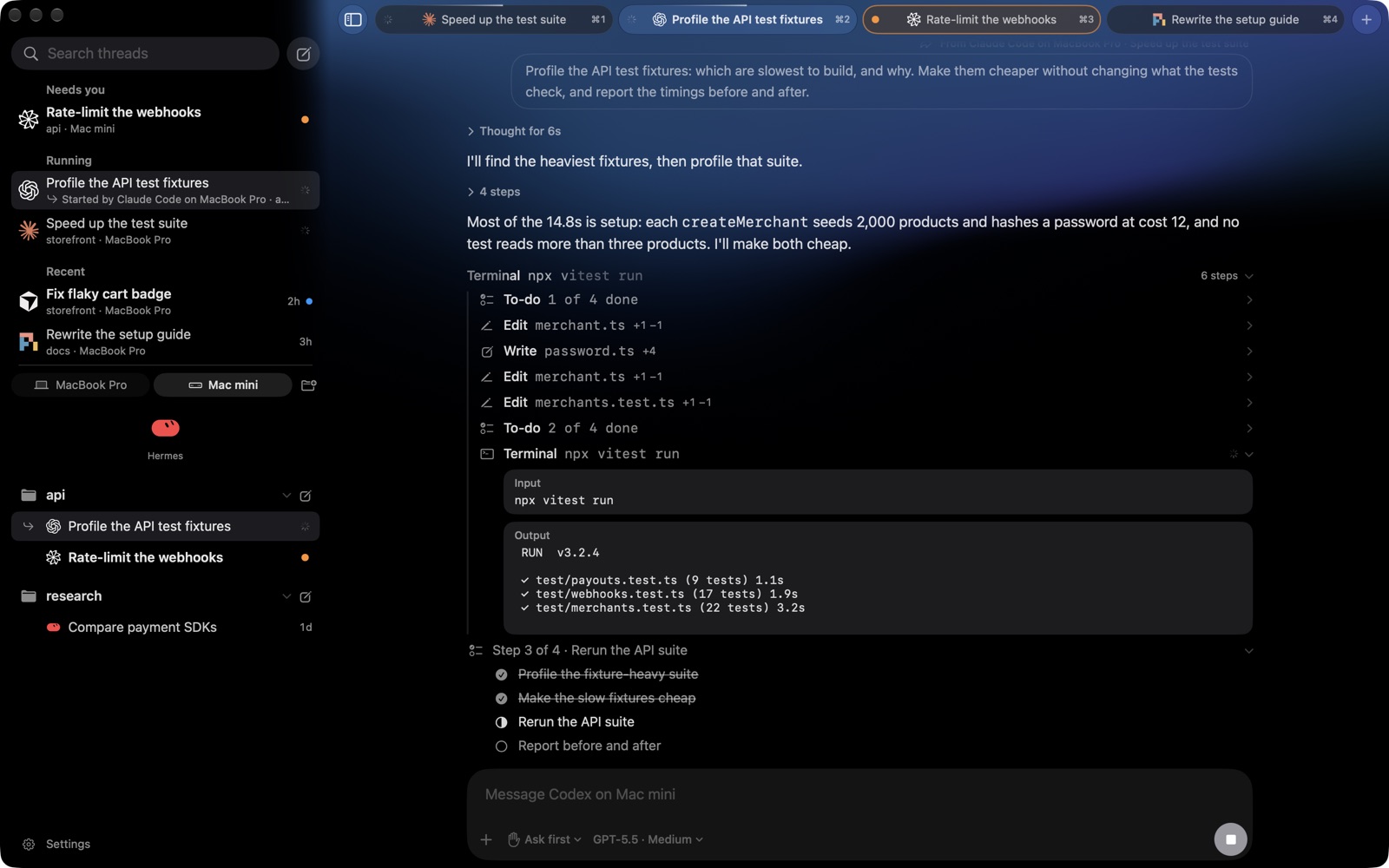
Portals is a native app for iPhone, iPad and Mac for working with Claude Code, Codex, Cursor, Droid, Pi and Hermes. The agents run on your own Mac or Linux computers, with your files, your settings and your logins. Start a thread at your desk, answer its question from your phone, and pick it up on your iPad.
Portals is in alpha. The Mac app is a download here, the iPhone and iPad apps are on TestFlight, and the source and the host are in this repo.
Features
- Every agent in one place. Claude Code, Codex, Cursor, Droid, Pi and Hermes, each with your own account and settings.
- All your computers. Run setup on each Mac or Linux computer, and every device reaches all of them.
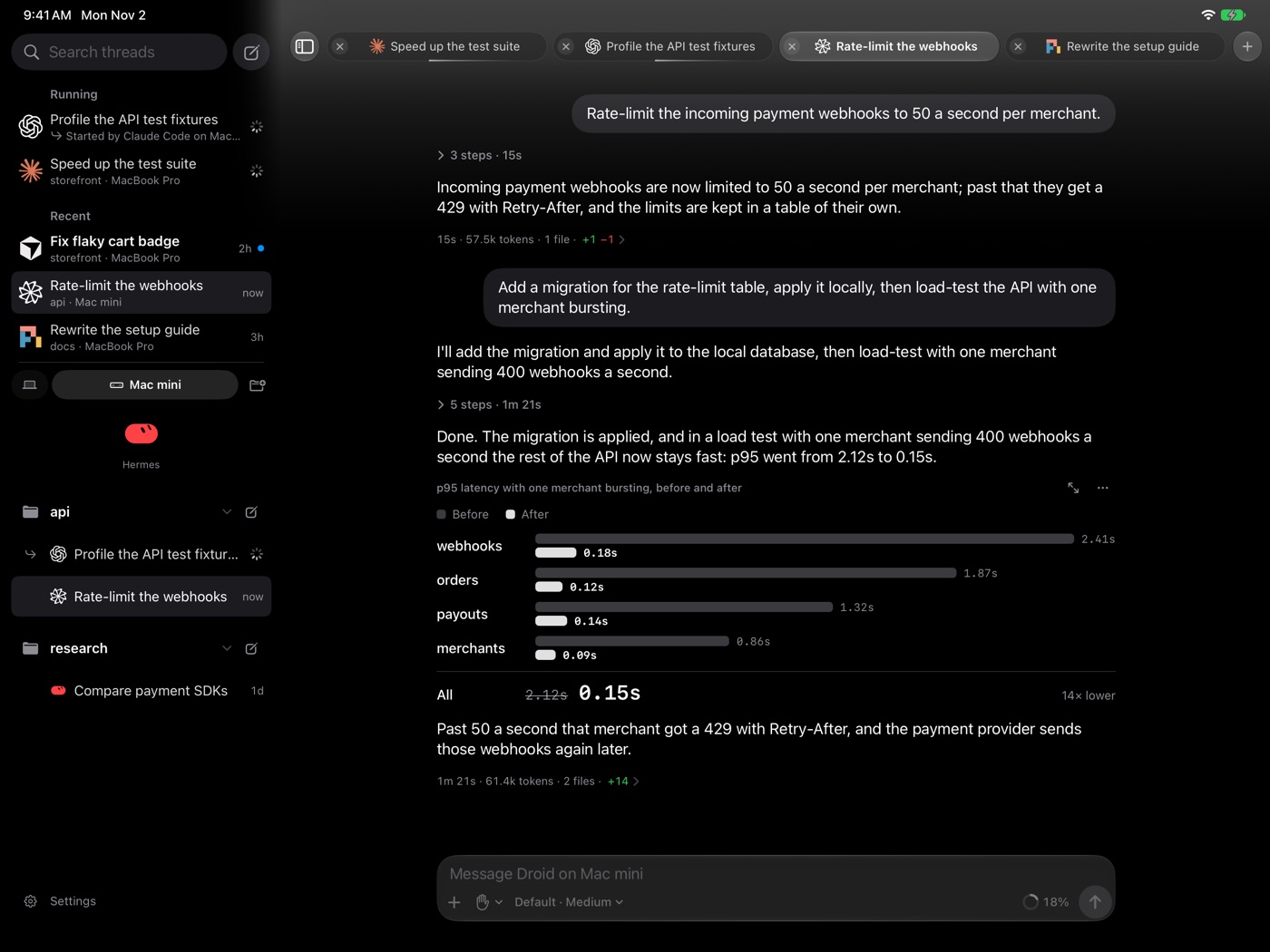
- In sync everywhere. Threads, what you've read, your sidebar's order and queued messages follow you between iPhone, iPad and Mac.
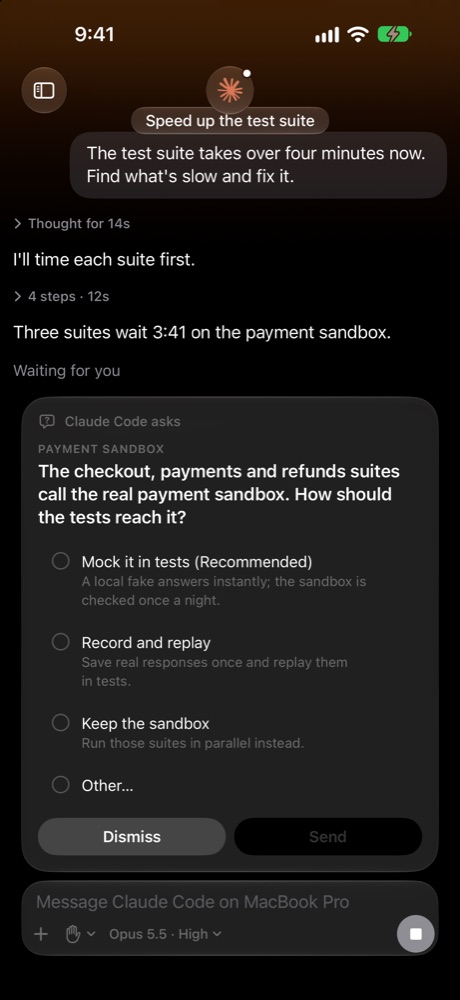
- Approve from anywhere. Commands and edits wait on a card until you allow them, and each thread can run in its own permission mode.
- Steer while it works. Send a message to change course, or queue the next one. Type
/for commands and@for files, and attach pictures. - See what it's doing. Steps, live command output, plans, subagents, workflows and the changes each turn made.
- Agents together. Ask Claude Code to "start a Codex thread to review this", then follow that thread from the one that started it.
- Private notifications. You're told when an agent finishes or needs you. The words are encrypted on your computer and can only be read on your device.
- Visuals in the chat. Agents can draw interactive charts and diagrams in a reply, and formulas are typeset.
Getting started
You need:
- A Mac or Linux computer for your agents, with Node 22.18 or newer and at least one agent installed and signed in.
- Tailscale on that computer and on your devices, signed in to the same account.
- An iPhone, iPad or Mac on iOS or macOS 26.1 or newer.
Then:
Get the app. On a Mac, download the DMG and drag Portals to Applications. It keeps itself up to date. On an iPhone or iPad, join on TestFlight. To look around first, Try a demo on the welcome screen needs no computer.
Set up the host. On the computer your agents run on:
npx portals-host setupSetup finds your agents, makes the computer reachable over Tailscale, and keeps the host running across logins. It asks before changing Tailscale or installing anything.
Add it to the app. Scan the QR code setup shows, or paste the link under it on an iPad or Mac.
Run setup again on any other computer to add it. The host's guide covers every option, Linux and updates, and the tester's guide covers using the app.
How it works
The app doesn't run agents. A small host, portals-host, runs beside them on each computer. It listens only on 127.0.0.1, and your devices reach it through your own Tailscale network. When a device can't reach it directly, the Portals relay can carry the connection, encrypted so that only your device and your computer can read it.
| Folder | What's in it |
|---|---|
Portals/ |
The SwiftUI app for iPhone, iPad and Mac |
PortalsNotifications/ |
The extension that opens encrypted notifications |
Packages/PortalsKit/ |
The app's core: threads, sync and the wire protocol |
bridge/ |
The host, published as portals-host (the folder keeps its old name) |
relay/ |
The Cloudflare Worker behind notifications and the backup connection |
hermes-plugin/ |
A Hermes plugin for notifications |
docs/ |
The protocol, pairing and relay, and design and performance notes |
Privacy
- No account, no analytics, no tracking.
- Your work stays on your computers. Conversations and files stay on the computers you own, and go only to the AI providers you use, under their terms.
- On your device: the computers you've added and your settings, with passwords in the Keychain.
- The relay can't read what it passes. Notifications and relayed connections are encrypted end to end, and it keeps no notifications.
Privacy policy · Report a security issue
Build from source
Build the app with XcodeBuilt with Xcode 27.
git clone https://github.com/DanielOu1208/portals.git
cd portals
open Portals.xcodeproj
Run the Portals scheme on a simulator; that needs no signing, and Try a demo needs no host.
To run on a device, copy Config/Local.example.xcconfig to Config/Local.xcconfig and set your team. Then replace com.danielou.portals on both targets and PORTALS_APP_GROUP in Config/Shared.xcconfig with IDs of your own.
The hosted relay only sends notifications for the official app. For notifications in your own build, deploy your own relay with your own APNs key, then point PORTALS_RELAY_URL in Config/Portals.xcconfig and push.relay and relay.url in the host's config.json at it.
cd bridge
npm ci
npm start
bridge/DEVELOPING.md explains how the host works.
(cd Packages/PortalsKit && swift test)
(cd bridge && npm ci && npm test)
(cd relay && npm ci && npm test)
Support
Open an issue for bugs or focused feature requests. Pull requests are welcome; CONTRIBUTING.md says what they need.
License
Source code and original artwork use the MIT License. The agents' logos belong to their owners, and Portals isn't affiliated with or endorsed by them; see third-party notices.
Reviews (0)
Sign in to leave a review.
Leave a reviewNo results found