skill-flowchart
Health Warn
- License — License: Apache-2.0
- Description — Repository has a description
- Active repo — Last push 95 days ago
- Low visibility — Only 5 GitHub stars
Code Warn
- process.env — Environment variable access in scripts/lint_flowchart_html.js
- fs module — File system access in scripts/lint_flowchart_html.js
Permissions Pass
- Permissions — No dangerous permissions requested
No AI report is available for this listing yet.
Turn a codebase, workflow, or prompt pipeline into a polished, interactive HTML flowchart — a skill for AI coding agents.
Flowchart
Turn a gnarly codebase, workflow, or prompt pipeline into a polished, interactive flowchart you can actually explore.



Flowchart is a skill for AI coding agents — Claude Code, Codex CLI, Kimi CLI, and OpenCode. Point your agent at a
system and ask for a flowchart; it reads the real code, builds a hierarchy, and renders a single self-contained HTML
file that stays simple at the top and lets you drill into detail on demand.
And since you're here for flowcharts, here's the skill's own output — an interactive map of a wholly serious system, rendered by the tool itself:
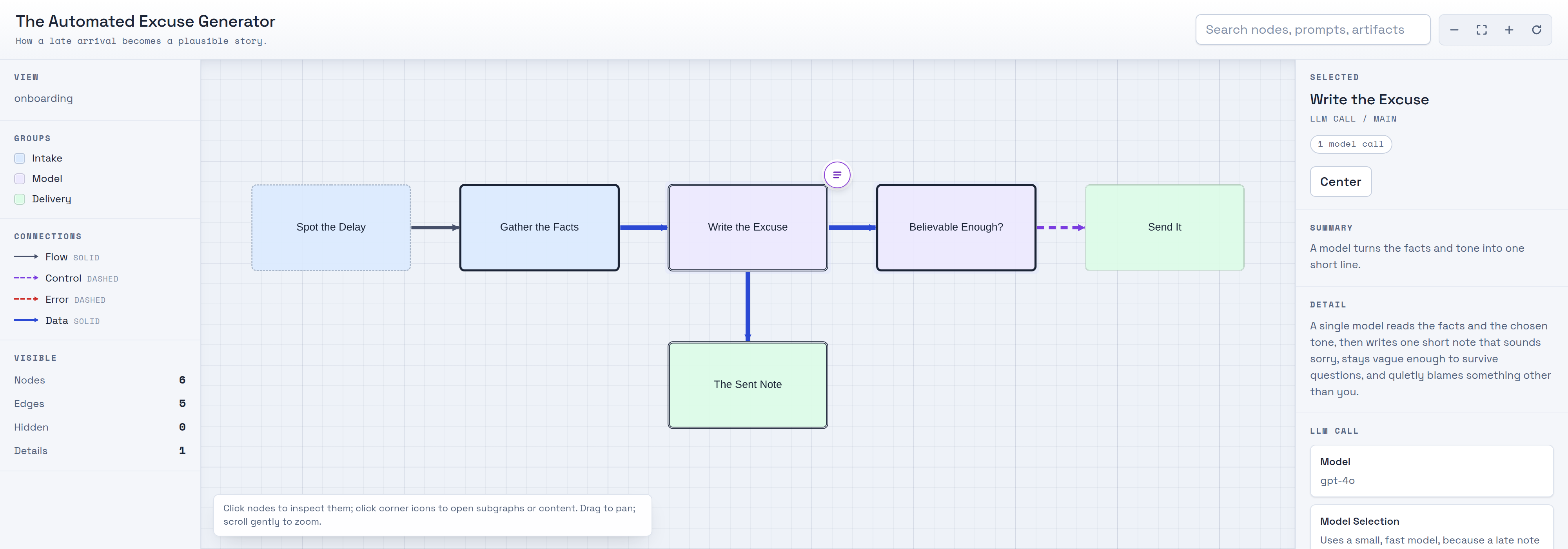
A real screenshot of the generated single-file HTML app: a sparse overview up top, colour-coded groups, an explicit retry loop, and a click-to-inspect panel showing the selected step's model and verbatim prompt. Rendered from assets/demo-excuse-data.json — see What you get.
Getting Started
If you are human
Tell your favorite coding agent:
Read https://raw.githubusercontent.com/danshapiro/skill-flowchart/main/README.md and follow the installation instructions there.
If you've been sent here by your human
Clone this repo into your agent's skills directory. Note the clone target folder is flowchart (the skill name), not the repo name:
- Claude Code:
git clone https://github.com/danshapiro/skill-flowchart.git ~/.claude/skills/flowchart - Codex CLI:
git clone https://github.com/danshapiro/skill-flowchart.git ~/.codex/skills/flowchart - Kimi CLI:
git clone https://github.com/danshapiro/skill-flowchart.git ~/.kimi/skills/flowchart - OpenCode:
git clone https://github.com/danshapiro/skill-flowchart.git ~/.config/opencode/skills/flowchart
Note: OpenCode also discovers skills in
~/.claude/skills/, so if you already installed it for Claude Code, OpenCode can use it too.
After cloning, read SKILL.md so you can explain the workflow and run it when asked.
Requirements
python3— required. The renderer (scripts/render_flowchart.py) uses only the Python standard library; there is nothing topip install.- Node.js + Playwright — optional, only for the QA linter and screenshots (
scripts/lint_flowchart_html.js). Install withnpm i playwright && npx playwright install chromium.
The rendered .html loads Cytoscape.js, Chroma.js, and Prism.js from a CDN. Ask for vendored copies if you need it to work fully offline.
Using it
Just ask, and include the word flowchart:
Make an interactive flowchart of this repo's request pipeline.
The agent decides who the diagram is for (onboarding, debugging, or change planning), maps the real system, lays out a
hierarchy, renders the HTML, lints it, and hands you a single file — with no leftover intermediates.
Under the hood it runs:
python3 scripts/render_flowchart.py flowchart-data.json output-flowchart.html
node    scripts/lint_flowchart_html.js output-flowchart.html --screenshot /tmp/output-flowchart.png
What you get
A single, self-contained .html file that:
- Opens with a sparse 5–9 node overview you can grok in under a minute.
- Expands any node into a modal drilldown — subgraphs, prompts, templates, or artifacts — one layer at a time.
- Shows LLM calls as first-class nodes, with their verbatim prompts (syntax-highlighted) and model details attached.
- Makes loops, branches, and joins explicit, with plain-language notes on why each path exists.
- Uses color only when it means something (actor, subsystem, trust boundary) and hides the legend when it doesn't.
How it works
The agent does the thinking; the scripts just package it. It builds a hierarchical, dotfile-style model of the system,
writes an intermediate flowchart-data.json (data model), and renders it through a bundled
HTML shell. A linter then checks the output for the visual failure classes that make diagrams unreadable — overlapping
shapes, edges routed behind nodes, clipped labels, tiny fonts — and the agent inspects screenshots before delivering.
See SKILL.md for the full workflow and references/composition-guide.md
for the layout heuristics.
Repo layout
SKILL.md                            # the skill: workflow, rules, quality gate
scripts/render_flowchart.py         # JSON -> interactive HTML (stdlib only)
scripts/lint_flowchart_html.js      # visual QA linter + screenshots (Playwright)
assets/flowchart-template.html      # the self-contained HTML shell
assets/example-flowchart-data.json  # smoke-test fixture + shape example
references/data-model.md            # the flowchart-data.json schema
references/composition-guide.md     # extraction & layout heuristics
License
Apache-2.0 © Dan Shapiro
Reviews (0)
Sign in to leave a review.
Leave a reviewNo results found