mcp-fence
Health Pass
- License — License: Apache-2.0
- Description — Repository has a description
- Active repo — Last push 0 days ago
- Community trust — 12 GitHub stars
Code Pass
- Code scan — Scanned 12 files during light audit, no dangerous patterns found
Permissions Pass
- Permissions — No dangerous permissions requested
No AI report is available for this listing yet.
Local-first security scanner, MCP protocol inspector, dynamic fuzzer, Docker sandbox, and report generator for Model Context Protocol servers.
mcp-fence



Local-first security scanner, MCP protocol inspector, dynamic fuzzer,
Docker sandbox, and report generator for Model Context Protocol
servers.
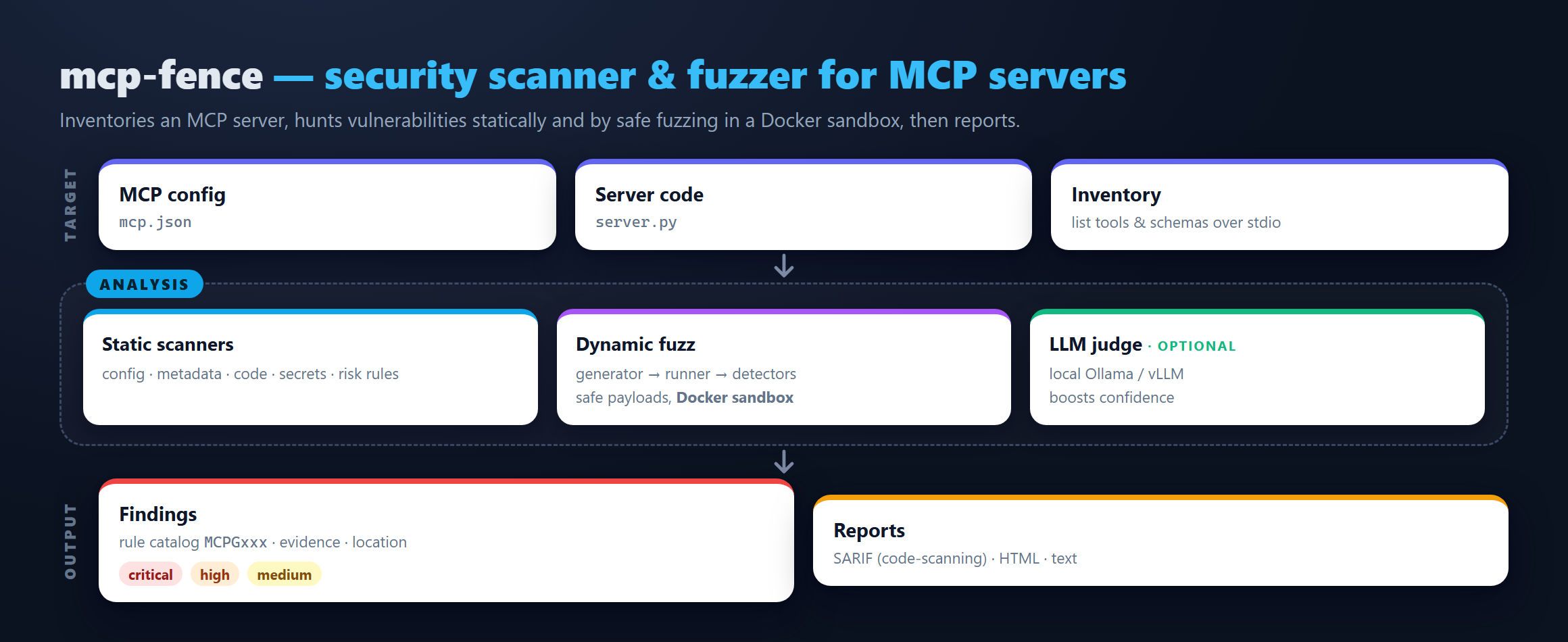
mcp-fence is a developer tool. Point it at your mcp.json (or any
running MCP server you wrote) and it will:
- Statically scan the config and source for tool poisoning,
dangerous startup commands, plaintext secrets, schema gaps, and
unauthenticated HTTP transports. - Inspect the server live over stdio — runs
initialize,tools/list, gathers schemas/annotations. - Fuzz every tool with schema-aware payloads (path traversal,
command injection, SSRF, prompt injection, oversize input, type
confusion). Safe by default; opt in to runtime payloads via--toy-modeor--allow-unsafe. - Sandbox any stdio server in Docker with sensible profiles
(strict,filesystem-readonly,network-deny,dev). - Report findings as a plain-text table, JSON, SARIF 2.1.0 (for
GitHub code scanning), or a fully offline HTML page.
It is non-destructive, local-first, and uses no cloud LLM by
default. An optional local-LLM judge can talk to a local Ollama or
OpenAI-compatible endpoint.
Install
From PyPI:
pip install mcp-fence
From source (for contributors):
git clone https://github.com/DaoyuanLi2816/mcp-fence
cd mcp-fence
python -m venv .venv
source .venv/bin/activate          # Windows: .venv\Scripts\activate
python -m pip install -e ".[dev]"
Requires Python 3.11+.
30-second quickstart
# 1. Bring up the bundled examples in your working directory.
mcp-fence init-example ./mcp-fence-examples

# 2. Static scan the intentionally poisoned metadata server.
mcp-fence scan examples/vulnerable_metadata_server/mcp.json

# 3. Live-inspect the safe baseline.
mcp-fence inspect examples/safe_server/mcp.json

# 4. Fuzz the arbitrary-file-read server.
mcp-fence fuzz examples/vulnerable_filesystem_server/mcp.json

# 5. Generate a `docker run` command that sandboxes any of the above.
mcp-fence sandbox examples/vulnerable_filesystem_server/mcp.json \
    --profile strict --dry-run

# 6. Turn a saved JSON result into an offline HTML report.
mcp-fence scan examples/vulnerable_metadata_server/mcp.json \
    --format json --output /tmp/scan.json
mcp-fence report /tmp/scan.json --format html --output /tmp/scan.html
Example output
mcp-fence 0.1.0 :: scan :: target=examples/vulnerable_metadata_server/mcp.json
  summary: total=1 score=7/100 verdict=FAIL
  by_severity: high=1
  by_category: secrets=1

# Findings
  SEV   RULE     TITLE                    CATEGORY  WHERE                    DETAIL
  HIGH  MCPG006  Plaintext secret in env  secrets   param=OPENAI_API_KEY     Environment variable OPENAI_API_KEY appears to be a plaintext secret.
Supported transports
| Transport | scan | inspect | fuzz | sandbox | Notes |
|---|---|---|---|---|---|
| stdio | ✓ | ✓ | ✓ | ✓ | First-class. |
| streamable-http | ✓ | — | — | — | Static (config) only; live HTTP inspector v0.2. |
| sse / websocket | ✓ | — | — | — | Same. |
Supported risk classes
Full catalog in docs/rule_catalog.md. Highlights:
- Tool poisoning — prompt-injection phrases in tool descriptions,
hidden HTML comments, zero-width characters, confusable tool names
(Unicode + ASCII visual confusables likeIist_filesvslist_files). - Dangerous startup commands —
shell=True,curl | sh,sudo,/var/run/docker.sock,--privileged, references to~/.ssh,~/.aws. - Transport binding —
0.0.0.0+ no auth, HTTP without bearer. - Schema risks — unbounded strings, missing
additionalProperties,
high-risk param names (command,path,url,webhook, …)
without pattern/enum/maxLength. - Dynamic — path traversal hitting a planted fake secret, command
injection marker echoed back, SSRF accepting metadata IPs, malformed
input passing schema validation, sensitive patterns in tool output. - Protocol — server hangs, schema mismatches, non-JSON output on
stdio.
Why MCP servers need their own scanner
MCP server output flows directly into an LLM's context. Anything in a
tool's description, name, or response can be interpreted by the
assistant as instructions:
- Tool metadata is attacker-controllable once you install someone
else's server. - Tool inputs are LLM-controllable and untrusted by default.
- Tool outputs end up in the LLM's prompt and can carry injection
payloads from external content.
General-purpose SAST / npm-audit / pip-audit don't model any of this.
mcp-fence has rules and fuzzers built specifically for it.
Safety boundaries
- Non-destructive payloads. The command-injection marker is
echo MCPG_FUZZ_MARKER_8f2a. Norm,mv,chmod, or destructive
primitives are ever emitted. - Local-first. No code, configuration, or scan result is uploaded
anywhere. - No cloud LLM by default. Optional
--llm-judgetalks to a local
endpoint only. - No public-network scanning. SSRF payloads test the tool's
validation behaviour; we don't initiate outbound requests for you. - Safe path probing. Path-traversal payloads target a planted
fake_secret.txtinside the bundled examples or any explicit--traversal-target. They never aim at/etc/shadowor~/.ssh/.
--allow-unsafe is an explicit safety hatch for use inside themcp-fence sandbox Docker profile. See SECURITY.md anddocs/sandboxing.md.
Optional local-LLM judge (Ollama / vLLM)
For semantic suspiciousness scoring on tool descriptions, enable the
optional judge:
ollama pull qwen3:8b
mcp-fence scan examples/vulnerable_metadata_server/mcp.json \
    --inspect --llm-judge ollama --llm-model qwen3:8b
Sized for a 16 GB GPU (e.g. RTX 4080). Failures are silent: the core
scan completes either way. See docs/local_llm.md.
GitHub Action
Drop .github/workflows/mcp-fence.yml
into any repo with an mcp.json. It scans every config and uploads
SARIF to GitHub's code scanning dashboard.
- name: install mcp-fence
  run: pip install mcp-fence
- name: scan
  run: mcp-fence scan path/to/mcp.json --format sarif --output mcp-fence.sarif
- uses: github/codeql-action/upload-sarif@v3
  with:
    sarif_file: mcp-fence.sarif
    category: mcp-fence
Five most useful commands
mcp-fence scan examples/vulnerable_metadata_server/mcp.json
mcp-fence inspect examples/safe_server/mcp.json
mcp-fence fuzz examples/vulnerable_filesystem_server/mcp.json
mcp-fence sandbox examples/vulnerable_shell_server/mcp.json --profile strict --dry-run
mcp-fence report /tmp/scan.json --format html --output /tmp/scan.html
Roadmap
See docs/roadmap.md. v0.2 adds AST-based source
scanning, HTTP/SSE live inspector, a local SSRF capture server, and a
pre-trained tool-poisoning classifier.
License
Apache-2.0. See LICENSE.
Reviews (0)
Sign in to leave a review.
Leave a reviewNo results found