fcp-mcp-server
Health Pass
- License — License: MIT
- Description — Repository has a description
- Active repo — Last push 0 days ago
- Community trust — 72 GitHub stars
Code Pass
- Code scan — Scanned 12 files during light audit, no dangerous patterns found
Permissions Pass
- Permissions — No dangerous permissions requested
No AI report is available for this listing yet.
🎬 The first AI-powered MCP server for Final Cut Pro XML. Control your edits with natural language.
FCPXML MCP
The bridge between Final Cut Pro and AI. 62 tools that turn timeline XML into structured data Claude can read, edit, and generate.






Hardened for real libraries: 132 adversarial-input security tests, defusedxml everywhere, sandboxed writes, no patched binaries, no private APIs — plus a private disclosure channel with externally reported fixes already credited and merged.
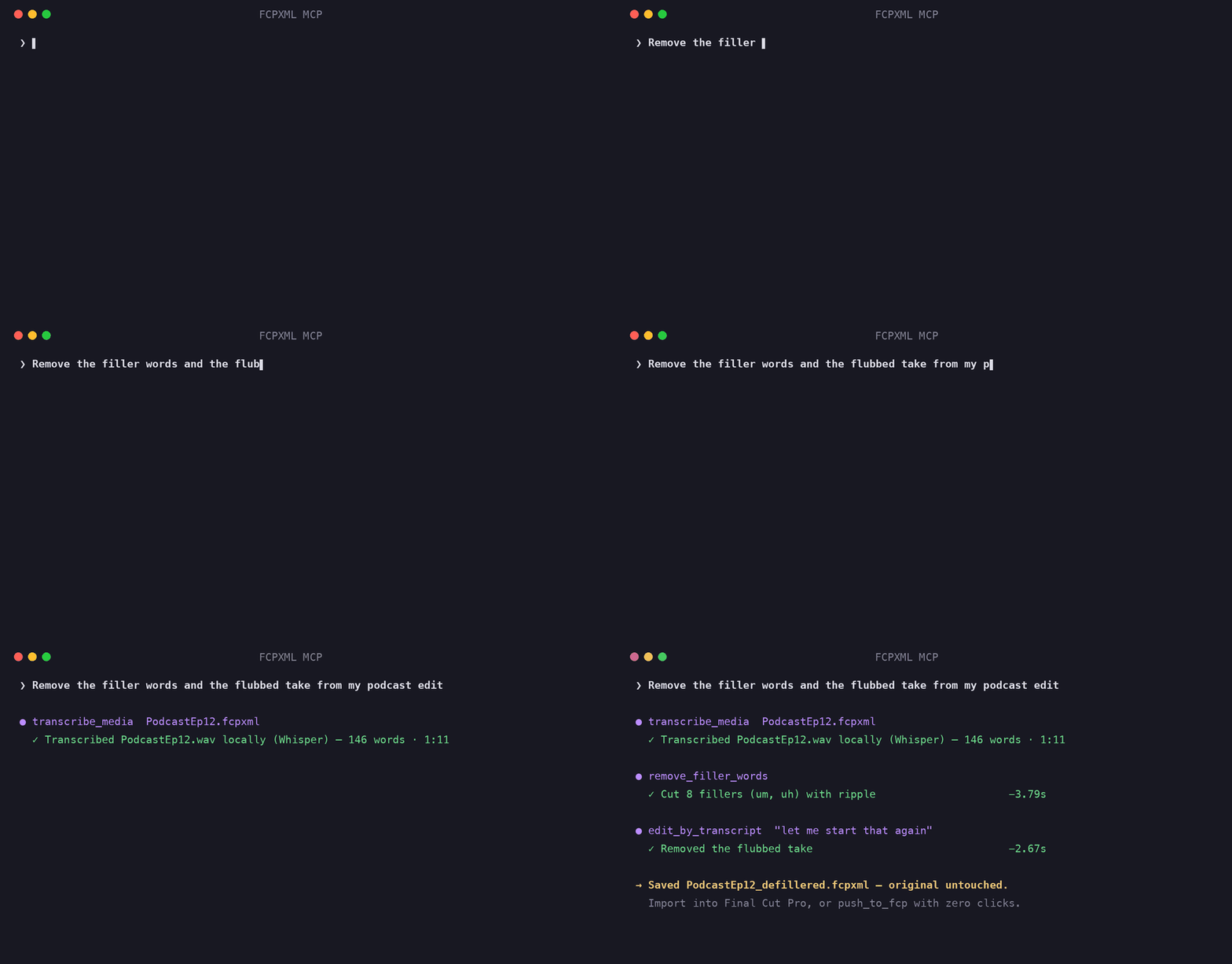
Real v0.13.0 output: local Whisper transcription, filler-word removal, and phrase-based cutting on a podcast timeline.
Why This Exists
After directing 350+ music videos (Chief Keef, Migos, Masicka), I noticed the same editing bottlenecks on every project: counting cuts manually, extracting chapter markers one by one, hunting flash frames by scrubbing, building rough cuts clip by clip.
These are batch operations that don't need visual feedback. Export the XML, let Claude handle the tedium, import the result. That's the entire philosophy.
See It In Action
You:    "Run a health check on my wedding edit"

Claude: ✓ Analyzed WeddingFinal.fcpxml
        ├─ 247 clips · 42:18 total · 24fps · 1920×1080
        ├─ 3 flash frames detected (clips 44, 112, 198)
        ├─ 2 unintentional gaps at 12:04 and 31:47
        ├─ 14 duplicate source clips
        └─ Health score: 72/100

You:    "Fix the flash frames and gaps, then add chapter markers from
         this transcript"

Claude: ✓ Extended adjacent clips to cover 3 flash frames
        ✓ Filled 2 gaps by extending previous clips
        ✓ Added 18 chapter markers from transcript
        → Saved: WeddingFinal_modified.fcpxml
Import the modified XML back into Final Cut Pro. Every change is non-destructive — your original file is never touched.
What Claude Actually Sees
This is the magic trick. When you export XML from Final Cut Pro, your timeline becomes structured data that Claude can reason about:
<!-- What FCP exports -->
<asset-clip ref="r2" offset="342/24s" name="Interview_A"
            start="120s" duration="720/24s" format="r1">
    <marker start="48/24s" duration="1/24s" value="Key quote"/>
    <keyword start="0s" duration="720/24s" value="Interview"/>
</asset-clip>
# What Claude works with (after parsing)
Clip(
    name="Interview_A",
    offset=TimeValue(342, 24),   # timeline position: 14.25s
    start=TimeValue(120, 1),     # source in-point: 2:00
    duration=TimeValue(720, 24), # 30 seconds
    markers=[Marker(value="Key quote", start=TimeValue(48, 24))],
    keywords=["Interview"]
)
Every time value stays as a rational fraction — 720/24s, not 30.0 — so trim, split, and speed operations have zero rounding error across any frame rate. Comparisons use cross-multiplication (a/b < c/d → a*d < c*b) to stay in integer-land end to end. Denominators are always normalized to positive values at construction, so sign lives on the numerator and cross-multiplication is always correct. Addition and subtraction share a single _binop() code path that handles same-denominator fast paths and LCM alignment in one place.
How It Works
  ┌──────────┐      ┌──────────────────────────────┐      ┌──────────┐
  │ Final Cut│      │  parser.py   → Python objects │      │ Final Cut│
  │   Pro    │─XML─>│  writer.py   → Modify & save  │─XML─>│   Pro    │
  │          │      │  rough_cut.py→ Generate new   │      │          │
  └──────────┘      │  diff.py     → Compare        │      └──────────┘
                    │  export.py   → Resolve / FCP7 │
                    └──────────────────────────────┘
                              ▲
                     Claude Desktop / MCP client
- Export from FCP —
File → Export XML... - Ask Claude — analyze, edit, generate, QC, export
- Import back —
File → Import → XML
What This Is NOT
- Not a plugin — it doesn't run inside Final Cut Pro
- Not for creative calls — color, framing, motion still need your eyes
New in v0.9 — Live Mode. The server can now push an FCPXML straight
into the running Final Cut Pro with zero clicks, using Apple's official Open
Document event — no XML re-import step. See Live Mode below.
Live Mode (macOS)
XML mode is offline and portable; Live mode drives a running Final Cut Pro
through Apple's sanctioned surfaces — no patched binary, no private APIs, no
accessibility scripting. Two tools, both verified end-to-end against FCP 12.2:
| Tool | What it does |
|---|---|
push_to_fcp |
Sends an FCPXML file into FCP with zero clicks (Open Document Apple event). Injects <import-options> (library location, copy/link assets, suppress warnings), launches FCP if needed, and never mutates your original — flat files get an options-injected copy. |
list_fcp_libraries |
Enumerates FCP's open libraries → events → projects via the read-only AppleScript dictionary. |
You:    "Build a rough cut from my Interview clips and push it into Final Cut"

Claude: ✓ Generated RoughCut.fcpxml (8 clips, 0:54)
        ✓ Pushed into Final Cut Pro → library "ProjectX", event 2026-06-11
        → Open Final Cut Pro to keep editing
The asymmetry you must know: Apple makes import scriptable but offers no
programmatic export — to pull your current timeline back out for further AI
work, you still run File > Export XML yourself. Live mode pushes; round-trips
come back through the XML tools.
Notes (all live-verified): pass a library_location ending in .fcpbundle for
a true zero-click import (a new path is auto-created); omitting it makes FCP
show a modal library picker that blocks until you answer. First use triggers a
one-time macOS Automation permission prompt for your terminal/MCP host. The
capability audit maps the full surface and
the optional SpliceKit/CommandPost bridges planned for v1.0.
Quick Start
Claude Code (fastest)
claude mcp add fcpxml -e FCP_PROJECTS_DIR=~/Movies -- uvx fcp-mcp-server
Or project-scoped — commit a .mcp.json so your whole team gets it:
{
  "mcpServers": {
    "fcpxml": {
      "command": "uvx",
      "args": ["fcp-mcp-server"],
      "env": { "FCP_PROJECTS_DIR": "/Users/you/Movies" }
    }
  }
}
With media intelligence (beat detection) and transcript editing (local Whisper):
claude mcp add fcpxml -e FCP_PROJECTS_DIR=~/Movies -- uvx --from "fcp-mcp-server[intelligence,transcribe]" fcp-mcp-server
Claude Desktop
Add to ~/Library/Application Support/Claude/claude_desktop_config.json:
{
  "mcpServers": {
    "fcpxml": {
      "command": "uvx",
      "args": ["fcp-mcp-server"],
      "env": { "FCP_PROJECTS_DIR": "/Users/you/Movies" }
    }
  }
}
From source (contributors)
git clone https://github.com/DareDev256/fcp-mcp-server.git
cd fcp-mcp-server
pip install -e .
# then point your MCP client at: python /path/to/fcp-mcp-server/server.py
Use It
Export XML from Final Cut Pro (File → Export XML…), open your MCP client, and ask it to work with your timeline.
When To Use This
| Good For | Not Ideal For |
|---|---|
| Batch marker insertion (100 chapters from a transcript) | Creative editing decisions (no visual feedback) |
| QC before delivery (flash frames, gaps, duplicates) | Real-time adjustments (export/import cycle) |
| Data extraction (EDL, CSV, chapter markers) | Fine-tuning cuts (faster directly in FCP) |
| Template generation (rough cuts from tagged clips) | Anything visual (color, framing, motion) |
| Automated assembly (montages from keywords + pacing) | |
| Timeline health checks (validation, stats, scoring) |
How It Compares
Three projects have connected AI agents to Final Cut Pro. They make different trade-offs:
| FCPXML MCP (this) | SpliceKit | CommandPost | |
|---|---|---|---|
| Approach | Parses/writes FCPXML + official Apple events only | Patches FCP's binary to expose internal APIs | Accessibility scripting + Lua |
| Raw live control | Push-to-FCP, library inspection | Deepest (full internal API) | Deep (UI-level) |
| Survives FCP updates | Yes — no patching | Re-patch per FCP version | Mostly |
| Works on managed/corporate Macs | Yes | No (requires binary patching) | Varies (Accessibility perms) |
| Works without FCP installed | Yes (pure XML mode) | No | No |
| MCP server | Yes, active (this repo) | Yes (last release Apr 2026) | Planned, PR unmerged |
| Requires | Python 3.10+ | Patched FCP binary | CommandPost app |
SpliceKit's runtime depth is genuinely impressive — if you're on your own Mac and comfortable patching FCP, it can do things XML never will. This project stays on the no-patch side so it runs anywhere, survives every FCP update, and can be trusted with client libraries. Full ecosystem analysis: capability audit.
Prompt Cookbook
Copy-paste these into Claude Desktop. Each one maps to a real tool chain under the hood.
Analysis
"Give me a full breakdown of ProjectX.fcpxml — clips, duration, frame rate, markers, everything"
"Show me pacing analysis for my timeline — where are the slow sections?"
"Export an EDL and CSV of all clips with timecodes"
QC & Fixes
"Run a health check on my timeline and fix anything under 2 frames"
"Find all gaps and flash frames, then auto-fix them"
"Are there any duplicate source clips I can consolidate?"
Markers & Chapters
"Add chapter markers from this transcript: [paste transcript]"
"Import markers from my-subtitles.srt onto the timeline"
"List all markers and export them as YouTube chapter timestamps"
Generation
"Build a 60-second rough cut from clips tagged 'Interview' — medium pacing"
"Generate a montage from all B-roll clips with accelerating pacing"
"Create an A/B roll: Interview_A as primary, B-roll cuts every 8 seconds"
Cross-NLE & Reformat
"Export this timeline for DaVinci Resolve"
"Convert to FCP7 XML so I can open it in Premiere"
"Reformat my 16:9 timeline to 9:16 for Instagram Reels"
Under the Hood
When you say "Run a health check on my wedding edit", Claude chains these tools:
analyze_timeline  →  stats, frame rate, resolution
detect_flash_frames  →  clips under threshold duration
detect_gaps  →  unintentional silence/black
detect_duplicates  →  repeated source media
validate_timeline  →  structural health score (0-100)
Each tool returns structured text that Claude synthesizes into the summary you see. No magic — just batch XML queries that would take 20 minutes by hand.
Pre-Built Prompts
Select these from Claude's prompt menu (⌘/) — they chain multiple tools automatically.
| Prompt | What It Does |
|---|---|
| qc-check | Full quality control — flash frames, gaps, duplicates, health score |
| youtube-chapters | Extract chapter markers formatted for YouTube descriptions |
| rough-cut | Guided rough cut — shows clips, suggests structure, generates |
| timeline-summary | Quick overview — stats, pacing, keywords, markers, assessment |
| cleanup | Find and auto-fix flash frames and gaps |
All 62 Tools
| Category | Tools | What It Does |
|---|---|---|
| Analysis | 11 | Stats, clips, markers, keywords, EDL/CSV, pacing |
| Multi-Track | 3 | Connected clips, compound clips, secondary lanes |
| Roles | 4 | List, assign, filter, export stems |
| QC & Validation | 4 | Flash frames, duplicates, gaps, health score |
| Editing | 9 | Markers, trim, reorder, transitions, speed, split |
| Batch Fixes | 3 | Auto-fix flash frames, rapid trim, fill gaps |
| Comparison | 1 | Diff two timelines — added/removed/moved/trimmed |
| Reformat | 1 | Aspect ratio conversion (9:16, 1:1, 4:5, custom) |
| Silence | 2 | Detect and remove silence candidates (XML heuristics) |
| Media Intelligence | 3 | Real silence detection + auto-removal (ffmpeg), musical beat detection (librosa) |
| NLE Export | 2 | DaVinci Resolve v1.9, FCP7 XMEML v5 |
| Generation | 3 | Rough cuts, montages, A/B roll |
| Beat Sync | 2 | Import beat markers, snap cuts to beats |
| Import | 2 | SRT/VTT subtitles, YouTube chapters → markers |
| Audio | 1 | Add audio clips, music beds at any lane |
| Compound | 2 | Create/flatten compound clips |
| Templates | 2 | Pre-built timeline structures (intro/outro, lower thirds, music video) |
| Effects | 1 | List FCP transition effects with UUIDs |
| Media | 1 | Bulk relink moved/renamed media (rewrite media-rep src paths) |
| Live (macOS) | 2 | Push FCPXML into the running FCP (zero-click Apple-event import); list open libraries |
| 59 |
Analysis — 11 tools
list_projects · analyze_timeline · list_clips · list_library_clips · list_markers · find_short_cuts · find_long_clips · list_keywords · export_edl · export_csv · analyze_pacing
Multi-Track — 3 tools
list_connected_clips · add_connected_clip · list_compound_clips
Roles — 4 tools
list_roles · assign_role · filter_by_role · export_role_stems
QC & Validation — 4 tools
detect_flash_frames · detect_duplicates · detect_gaps · validate_timeline
Editing — 9 tools
add_marker · batch_add_markers · insert_clip · trim_clip · reorder_clips · add_transition · change_speed · delete_clips · split_clip
Batch Fixes — 3 tools
fix_flash_frames · rapid_trim · fill_gaps
Comparison · Reformat · Silence
diff_timelines · reformat_timeline · detect_silence_candidates · remove_silence_candidates
NLE Export — 2 tools
export_resolve_xml (DaVinci Resolve FCPXML v1.9) · export_fcp7_xml (Premiere Pro / Resolve / Avid XMEML v5)
Generation — 3 tools
auto_rough_cut · generate_montage · generate_ab_roll
Beat Sync — 2 tools
import_beat_markers · snap_to_beats
Import — 2 tools
import_srt_markers · import_transcript_markers (supports SMPTE HH:MM:SS:FF with frame-accurate placement)
v0.6.0 — Audio, Compound, Templates, Effects — 6 tools
list_effects · add_audio · create_compound_clip · flatten_compound_clip · list_templates · apply_template
v0.8.0 — Media — 1 tool
relink_media (bulk-rewrite asset/media-rep src paths with dry_run preview — relink a moved drive without opening FCP)
v0.10–0.12 — Media Intelligence — 3 tools
detect_media_silence (analyzes each clip's real source audio with ffmpeg silencedetect and maps silence spans into timeline time) · remove_media_silence (cuts detected silence out of the timeline with ripple — clips split around silence, padding keeps edits breathing, non-destructive output) — both require ffmpeg, degrade gracefully without it · detect_beats (musical beat + tempo detection via librosa, writes a beats JSON that chains into import_beat_markers + snap_to_beats; needs the optional [intelligence] extra)
v0.13.0 — Transcript Intelligence — 3 tools
transcribe_media · edit_by_transcript · remove_filler_words
v0.9.0 — Live Mode (macOS + Final Cut Pro) — 2 tools
push_to_fcp (zero-click FCPXML import into the running FCP via Apple event) · list_fcp_libraries (enumerate open libraries/events/projects)
Environment Variables
| Variable | Required | Default | Description |
|---|---|---|---|
FCP_PROJECTS_DIR |
No | ~/Movies |
Root directory for FCPXML file discovery via list_projects |
FCPXML_DTD_DIR |
No | FCP app bundle | Directory of Apple FCPXMLv*_*.dtd files for DTD validation (auto-detected from the installed Final Cut Pro) |
Compatibility
| Component | Supported Versions |
|---|---|
| FCPXML format | reads v1.8 – v1.14 · writes v1.13 (modified files keep their source version) |
| Final Cut Pro | 10.4+ through 12.x · flat .fcpxml and .fcpxmld bundles (sidecars preserved) |
| Python | 3.10, 3.11, 3.12 |
| MCP protocol | 1.0 |
| Export targets | |
| → DaVinci Resolve | FCPXML v1.9 |
| → Premiere Pro / Avid | FCP7 XMEML v5 |
Architecture
fcp-mcp-server/           ~9.4k lines Python
├── server.py              MCP entry point — 62 tools, 5 prompts, resource discovery
│                          _resolve_io_paths() / _setup_modifier() / _setup_generator()
│                          _format_clip_table() / _markdown_table() / _format_batch_result()
│                          _raw_markers_to_batch()
│                          _detect_flash_frames() / _detect_gaps() / _detect_duplicate_groups()
│                          consolidate path validation, QC detection, rendering, handler boilerplate
├── fcpxml/
│   ├── models.py          TimeValue, Timecode, Clip, ConnectedClip, MarkerType, Timeline
│   ├── parser.py          FCPXML → Python (spine, connected clips, roles, markers)
│   ├── writer.py          Modify & write (markers, trim, gaps, transitions, silence)
│   │                       FCPXMLModifier: index-based editing (clips/resources/formats dicts)
│   │                       FCPXMLWriter: generate new FCPXML from Python objects
│   │                       Helpers: _resolve_asset, _absorb_into_neighbor, _ripple_from_index
│   ├── rough_cut.py       Generate timelines (rough cuts, montages, A/B roll)
│   ├── diff.py            Timeline comparison engine (identity matching, threshold docs)
│   ├── export.py          DaVinci Resolve v1.9 + FCP7 XMEML v5 export
│   ├── media_intel.py     Real media analysis — audio silence detection via bounded ffmpeg subprocess
│   ├── safe_xml.py        Centralized defusedxml wrappers (XXE/entity-bomb protection) + serialize_xml()
│   ├── dtd.py             Validate output against Apple's official DTDs (located in the FCP app bundle)
│   └── templates.py       Template system (intro/outro, lower thirds, music video)
├── tests/                 1032 tests across 24 suites
│   ├── test_models.py     TimeValue math, Timecode formatting, MarkerType contracts
│   ├── test_parser.py     FCPXML parsing, connected clips, edge cases
│   ├── test_writer.py     Clip editing, marker writing, speed changes
│   ├── test_fcpxml_writer.py  FCPXMLWriter generation from Python objects
│   ├── test_server.py     MCP tool handlers, dispatch, path validation
│   ├── test_rough_cut.py  Rough cut generation, montage, A/B roll
│   ├── test_diff.py       Moved clips, transitions, markers, clip identity
│   ├── test_export.py     Attribute stripping, compound flattening, audio tracks
│   ├── test_features_v05.py  Multi-track, roles, diff, reformat, export
│   ├── test_features_v06.py  Audio, compound clips, templates, effects, validation
│   ├── test_marker_pipeline.py  Marker builder, batch modes, output format
│   ├── test_speed_cutting.py  Speed cutting, montage config, pacing curves
│   ├── test_security.py   Input validation, XML sanitization, XXE protection
│   ├── test_edge_cases.py Boundary arithmetic, clip collisions, split/diff edges
│   ├── test_diversity.py  Boundary conditions across diff, models, validation
│   ├── test_refactored_helpers.py  _index_elements, _iter_spine_clips, serialize_xml edges
│   ├── test_targeted_gaps.py  Targeted branch coverage for diff, export, models
│   ├── test_bundles.py    .fcpxmld bundles, sidecar preservation, FCPXML 1.13/1.14 tolerance
│   ├── test_relink.py     Bulk media relink (URL + plain paths, dry run, segment matching)
│   ├── test_media_intel.py  silencedetect parsing, timeline mapping, real-WAV integration, handler
│   └── test_dtd_validation.py  Output validated against Apple's shipped DTDs (skips without FCP)
├── docs/
│   ├── WORKFLOWS.md       8 production workflow recipes
│   └── CAPABILITY-AUDIT-2026-06.md  Ecosystem audit + dual-mode (XML + Live) roadmap
└── examples/
    └── sample.fcpxml      9 clips, 24fps — test fixture
Security
Every tool handler is hardened against adversarial input — critical for MCP servers where prompts may be LLM-generated, not human-typed.
Found a vulnerability? Report it privately via the repo's Security → Report a vulnerability tab — see SECURITY.md.
| Layer | Protection |
|---|---|
| File I/O | Path traversal blocked, null bytes rejected, symlinks resolved, 100 MB size limit |
| Output sandbox | All generation, write, export, beat sync, subtitle, and reformat handlers enforce _validate_output_path(anchor_dir=...) — restricts writes to descendants of the source file's directory, blocking LLM-generated path escapes |
| Subprocess bounds | _ensure_video_asset() bounds-checks duration (0 < d ≤ 3600s), fps (1–240), width/height (even, ≤ 7680×4320) before subprocess.run() — blocks inf/NaN, negative values, odd dimensions, string injection, and oversized resolutions that could hang or exhaust ffmpeg |
| Speed validation | handle_change_speed validates speed is positive and ≤100 before any math — prevents ZeroDivisionError crash and nonsensical results |
| Directory listing | Confined to FCP_PROJECTS_DIR when set, 10K file cap on rglob, symlink files skipped during discovery — prevents workspace enumeration and traversal DoS |
| XML parsing | defusedxml with explicit forbid_entities/external=True blocks XXE, billion laughs, entity expansion, remote DTD attacks at all 4 entry points (parser, writer, exporter, rough cut) — minidom pretty-print path also hardened via defusedxml.minidom. Ruff S314/S320 rules enforce safe parsing in CI |
| JSON depth limit | Iterative BFS depth checker rejects payloads nested beyond 50 levels — immune to RecursionError even at ~1000 nesting |
| Batch limits | Marker batch operations capped at 10,000 entries — prevents memory exhaustion from adversarial payloads with millions of markers |
| Inline text limits | Inline transcript arguments capped at ~1 MB — file-based inputs go through _validate_filepath, but inline strings from MCP tool arguments bypass file checks |
| Symlink filtering | find_fcpxml_files skips symlinks during discovery — prevents sandbox escape via symlink chains pointing outside the allowed project directory |
| Marker strings | Sanitized via _sanitize_xml_value() — null bytes, control chars stripped before write |
| Role values | Stripped of control characters before XML attribute assignment |
| URI parsing | MCP resource URIs parsed via urllib.parse.urlparse() — rejects scheme confusion and handles percent-encoded paths correctly |
| Output suffixes | Path separators and special characters stripped — no traversal via suffix injection |
| Marker types | completed attribute strict-matched ('0'/'1' only) — rejects "true", "1 OR 1=1", whitespace-padded values |
132 security-specific tests across test_security.py covering XXE, path traversal, sandbox boundaries, output path anchoring, input validation, subprocess bounds, minidom hardening, JSON depth limits, role sanitization, ffmpeg parameter bounds, symlink filtering, file count caps, and write-handler sandbox enforcement. Ruff S (bandit) rules enforced in CI — S314/S320 block unsafe XML parsing, S105 catches hardcoded passwords, S108 flags insecure temp paths. Security events (null bytes, sandbox escapes, unhandled exceptions) are logged via Python logging for audit trails.
Timestamp Parsing — How Import Tools Place Markers
All subtitle and transcript import tools (import_srt_markers, import_transcript_markers) funnel through a single internal function: _parse_timestamp_parts() in server.py. Understanding it matters when timestamps don't land where you expect.
Supported Formats
| Format | Example | Parts | Result |
|---|---|---|---|
| Minutes:Seconds | 1:30 |
2 | 90.0s |
| H:MM:SS | 1:05:30 |
3 | 3930.0s |
| HH:MM:SS.ms | 00:02:15.500 |
3 | 135.5s |
| SMPTE (HH:MM:SS:FF) | 01:00:10:12 |
4 | 3610.5s @ 24fps |
The SMPTE 4-part format converts the frame component to fractional seconds: frames / frame_rate. The default rate is 24fps — pass frame_rate= to override for 25fps (PAL) or 30fps (NTSC) projects.
The Import Pipeline
SRT / VTT / YouTube chapters / plain transcript
        │
        ▼
  parse_srt()  /  parse_vtt()  /  parse_transcript_timestamps()
        │                │                      │
        └────────────────┴──────────────────────┘
                         │
                    split on ':'
                         │
                         ▼
             _parse_timestamp_parts(parts, frame_rate=24.0)
                         │
                         ▼
                   total seconds (float)
                         │
                         ▼
               marker placed on timeline
Edge Cases
- Unrecognized part counts (1 part, 5+ parts) return
None— the marker is silently skipped, not placed incorrectly - Zero frame rate — falls back to base seconds (frames ignored) rather than dividing by zero
- Milliseconds — only carried in 3-part format via
float()on the seconds component ("15.500"→15.5) - Frame rounding — SMPTE frames are divided exactly (
12/24 = 0.5), not rounded to the nearest frame boundary. The resulting float is converted to FCPXML's rationalTimeValuedownstream, preserving precision
Why This Matters
Before v0.6.20, the 4-part SMPTE parser silently dropped frames — 01:00:10:12 became 3610.0s instead of 3610.5s. At 24fps, that's up to ~0.96 seconds of drift per marker. If you imported a subtitle file with SMPTE timecodes, every marker was slightly off. This was subtle enough to pass QC but visible when scrubbing.
Design Principles
| Principle | Implementation |
|---|---|
| Rational time, never floats | All durations are fractions (600/2400s) matching FCPXML's native format — zero rounding errors across trim, split, speed |
| Non-destructive by default | Modified files get _modified, _chapters suffixes. Originals are never overwritten |
| Single source of truth | MarkerType enum owns serialization: from_string() for input, from_xml_element() for parsing, xml_attrs for writing. INCOMPLETE is canonical; TODO is a backward-compat alias (same object) |
| Security-first | 10-layer defense-in-depth across all 59 handlers — see Security for the full matrix |
| Dispatch, not conditionals | TOOL_HANDLERS dict maps names → async handlers. No 1000-line if/elif |
Documentation
| Guide | What's Inside |
|---|---|
| WORKFLOWS.md | 8 production recipes — QC pipelines, beat-synced assembly, cross-NLE handoffs, documentary A/B roll |
| MCP_ECOSYSTEM.md | How this server composes with GitNexus, filesystem, and memory MCP servers |
| CHANGELOG.md | Full version history from v0.1.0 to present |
Testing
uv run --extra dev pytest tests/ -v    # or: python3 -m pytest tests/ -v
ruff check . --exclude docs/           # lint — must pass before committing
1032 tests across 24 suites covering models, parser, writer, FCPXMLWriter generation, server handlers, rough cut generation, speed cutting & pacing curves, marker pipeline, refactored helper functions, regression fixes, security hardening (XXE, entity expansion, path traversal, sandbox boundaries, minidom defense-in-depth, JSON depth limits, input validation, ffmpeg bounds, write-handler sandboxing), connected clips, roles, diff, export, compound clip flattening, audio track generation, templates, effects, .fcpxmld bundles with sidecar preservation, bulk media relink, real media silence detection (parser, timeline mapping, real-WAV ffmpeg integration), and DTD validation against Apple's official DTDs (auto-skipped on machines without Final Cut Pro).
Requirements
- Python 3.10+ · Final Cut Pro 10.4+ (FCPXML 1.8+) · Claude Desktop or any MCP client
- Dependencies (auto-installed):
mcp,defusedxml - ffmpeg (optional) — needed for silence analysis (
detect_media_silence,remove_media_silence) [intelligence]extra (optional) — adds librosa fordetect_beats; everything else works without it. Install viauvx --from "fcp-mcp-server[intelligence]" fcp-mcp-serverorpip install "fcp-mcp-server[intelligence]"(from source:pip install -e '.[intelligence]').- See Compatibility for full version matrix
Ecosystem — XML Mode Today, Live Mode Next
This server is the safe, offline layer of FCP automation: no patched binaries, no
private APIs, runs on managed Macs, works without Final Cut Pro installed. It composes
with the live-control side of the ecosystem rather than competing with it:
- SpliceKit by @elliotttate
with @latenitefilms — live in-process control of a
patched FCP copy with its own ~200-tool MCP server. The deep edit engine here and the
live hands there are complementary by design; an optional bridge to SpliceKit's local
JSON-RPC endpoint is on this project's roadmap (see below). - CommandPost by @latenitefilms —
nine years of accessibility-layer FCP automation with a built-in WebSocket control
surface; another candidate live backend.
The full ecosystem analysis and the dual-mode architecture plan live in
docs/CAPABILITY-AUDIT-2026-06.md.
Roadmap
- Core FCPXML parsing (reads v1.8–1.14, writes v1.13) — v0.8.0
-
.fcpxmldbundle support with object-tracking/Cinematic sidecar preservation — v0.8.0 - Bulk media relink (
relink_media) — v0.8.0 - DTD validation against Apple's official DTDs — v0.8.0
- Timeline analysis, markers, EDL/CSV export
- Clip editing (trim, reorder, split, speed, transitions)
- QC tools (flash frames, gaps, duplicates, health scoring)
- Generation (rough cuts, montages, A/B roll, beat sync)
- MCP Prompts + Resources (auto-discovery)
- Subtitle & transcript import as markers
- Multi-track (connected clips, compound clips, roles)
- Timeline diff + social media reformat
- Silence detection & cleanup
- Cross-NLE export (DaVinci Resolve, Premiere Pro, Avid)
- Live mode v1 — zero-click push-to-FCP via Apple events, AppleScript library inspection — v0.9.0
- Watch-folder round-trip + backend Protocol refactor (operation layer shared by XML and Live)
- Media intelligence v1 — real silence detection from source audio (
detect_media_silence) — v0.10.0 - Silence auto-removal —
remove_media_silencecuts real silence with ripple — v0.11.0 - Beat detection —
detect_beats(librosa) chains into beat markers + snap-to-beats — v0.12.0 - Transcript-based editing — local Whisper transcription, edit_by_transcript (remove/keep_only), filler-word removal — v0.13.0
- Media intelligence — scene detection, shot understanding, preview-without-FCP
- Live bridges — optional SpliceKit / CommandPost adapters for in-app control when installed
- Audio sync detection
- Premiere Pro native XML support
Known Issues
| Issue | Impact | Workaround |
|---|---|---|
| Still images crash FCP | PNG/JPEG assets referenced directly in FCPXML crash Final Cut Pro on import (addAssetClip null pointer). Confirmed across multiple format configurations, dimension matching, and element types. |
Convert stills to short MOVs before referencing: ffmpeg -loop 1 -i image.png -c:v libx264 -t 2 -pix_fmt yuv420p -r 24 output.mov. This is an FCP limitation, not an FCPXML spec issue. |
| Non-standard timebases | FCP rejects time values with denominators outside its standard set (e.g. 100800/57600s). Cross-denominator arithmetic previously produced these. |
Fixed in v0.5.29 — TimeValue arithmetic now uses LCM, and speed changes snap to frame boundaries in 2400-tick timebase. |
| Malformed frameDuration crash | A frameDuration with zero or negative denominator (e.g. "0/0s") in the writer's _detect_fps would silently produce 0.0 fps, causing downstream ZeroDivisionError in speed/trim operations. The parser already validated this correctly. |
Fixed in v0.6.23 — writer now validates both numerator and denominator, falling back to 30.0 fps. |
| Duplicate clip names corrupt edits | When multiple spine clips share the same name (e.g. Interview_A ×4), operations using the name-indexed dict silently target the wrong clip (last-indexed instead of first). Affected: delete_clip, add_marker_at_timeline, trim_clip, change_speed, split_clip, add_transition, reorder_clips. |
Fixed in v0.6.37–0.6.39 — all methods now resolve clips via _resolve_clip() which walks the spine directly, returning the first match. |
Status & Contributing
Actively maintained — live-verified against FCP 12.2, with external contributions already merged and credited: @mikegrant25 (sandbox security fix, #6) and @jardelapp (audio duration probing, #7).
PRs welcome. If you're a video editor who codes (or a coder who edits), let's build this together.
Credits
Built by @DareDev256 — former music video director (350+ videos), now building AI tools for creators.
License
MIT — see LICENSE.
mcp-name: io.github.DareDev256/fcpxml-mcp-server
Reviews (0)
Sign in to leave a review.
Leave a reviewNo results found