claupet
Health Warn
- License — License: MIT
- Description — Repository has a description
- Active repo — Last push 0 days ago
- Low visibility — Only 6 GitHub stars
Code Fail
- process.env — Environment variable access in docs/extensiones/ejemplos/mcp/server.js
- fs module — File system access in docs/extensiones/ejemplos/mcp/server.js
- exec() — Shell command execution in docs/extensiones/ejemplos/node/main.js
- rm -rf — Recursive force deletion command in herramientas/instalar-linux.sh
- rm -rf — Recursive force deletion command in herramientas/preparar-mac.sh
Permissions Pass
- Permissions — No dangerous permissions requested
No AI report is available for this listing yet.
Your personal AI command center. Monitor sessions across Claude Code, Codex, Gemini and more, track token usage, explore model conversations, run multiple AI models, and get intelligent assistance with persistent memory - all with a pixel-art companion.

Claupet
Your usage, your coding-agent sessions and a little desktop pet, right next to the clock.
English · Español





Download · Meet the pets · Install · User guide · For developers
Claude Code does the work. Claupet keeps you in the loop: how much of your plan is left, which
session needs you and what each one is up to, without opening a terminal. Using Codex, Gemini,
Copilot or OpenCode too? Claupet follows them as well.
What it does
- 📊 Usage at a glance. Your 5-hour session and weekly limits for every account, with reset
times, and six months of use in a calendar. The tray icon shows your session percentage. - 🧭 Live sessions. See which Claude Code sessions are working, waiting for you or done, and
start a new one with the account, folder and model you want. - 🎬 Activity. Follow each session step by step, live. It all comes from local files: zero
tokens. - 🤖 Codex, Gemini, Copilot and OpenCode too. If you also use Codex CLI, Gemini CLI, GitHub Copilot CLI or OpenCode,
their sessions show up in Usage and Activity (with Codex's limits and the tokens of Gemini and OpenCode too), read
from their own files. - 🔔 Friendly heads-ups. A little note, with sound, when a session finishes, asks something,
needs permission, fails, or you're close to a limit. - 🐾 Desktop pets with personality. Chibi, Dokki, Gemma or Ciel (or the classic critter) read,
search, type and build along with your sessions, each with their own gestures, voice and way of
talking. One pet per agent if you like: meet them below. - 💬 Talk to Claupet (Windows). Ask the pet, or the island at the top of your screen, by typing
or out loud, and hear the answer in Claupet's own voice. Drop a file on the pet and get a summary.
It can also change your wallpaper, theme, volume or music, and hands bigger jobs to Claude Code. - 🧰 A hand with Windows (Windows). It takes or crops screenshots (and looks at them, if you
want), adds events to your calendar, saves notes, reminds you of things even with the app closed and
handles windows, brightness, the clipboard, folders and the computer. Each one asks first. - 📶 Built for real networks. Follows your Windows proxy, renews expired sessions on its own
and, offline, still says hi and tells you the time. - 🎨 Make it yours. Color palettes, your own themes made from a prompt, pets, animations and
sound packs. - 🌎 English and Spanish. It starts in your system's language; switch it any time in
Settings › System.
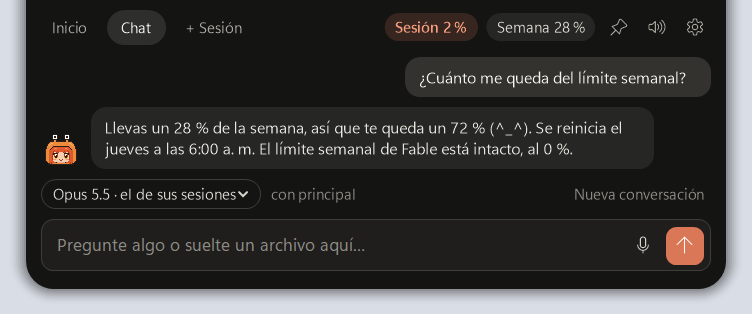
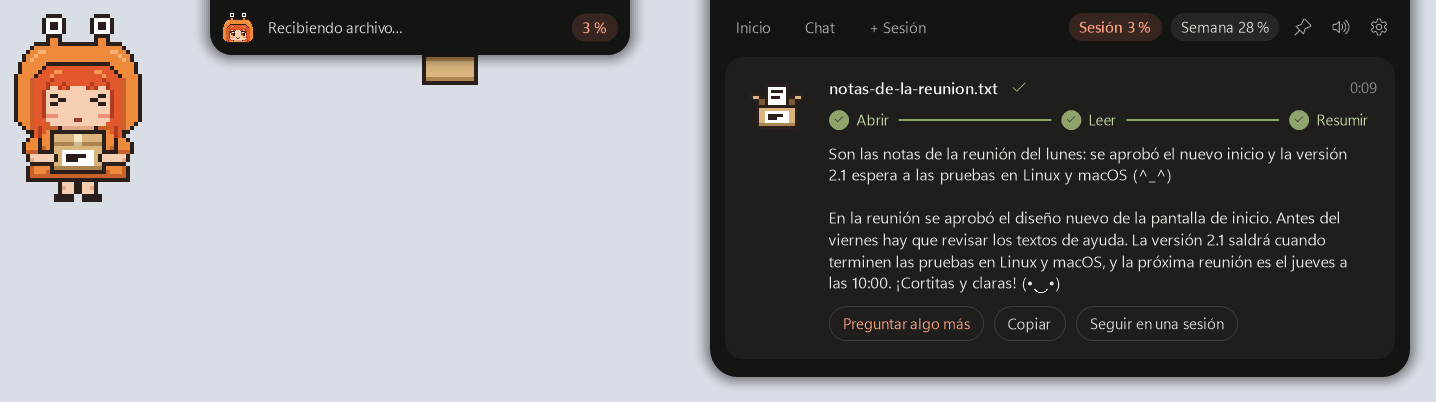
📖 User guide: every feature, step by step, with screenshots.
Meet the pets
 |
 |
 |
 |
| Chibi Claude |
Dokki DeepSeek |
Gemma Gemini |
Ciel Codex |
| Crab hoodie with eyes on stalks. Reads, searches, types and builds a little house along with your sessions, and shakes maracas when a limit resets. | A whale maid with fins for ears and a tail. Curtsies when she says hi, blows a spout when she cheers and dreams in bubbles. Sweet and calm. | Tsundere with high twin tails tied with the Gemini star. Cheers… and quickly pretends she didn't. Hmph! | Short white hair with green tips and an OpenAI hair clip. Thinks in </> and
celebrates with a calm checkmark. |
Each one has their own gestures and voice, and the assistant takes on their personality. Pick yours in
Settings › Appearance › Pet.
Following Codex, Gemini or Copilot as well? Turn on One pet per agent: each agent gets its own pet
next to Claude Code's. It types while that agent is working and naps when it's quiet. Any character
works for any agent.
Download
| System | File |
|---|---|
| Windows 10 and 11 | Claupet-windows-x64.exe |
| macOS, Apple chip (M1, M2, M3…) | Claupet-macos-arm64.zip |
| macOS, Intel | Claupet-macos-x64.zip |
| Linux (x64) | Claupet-linux-x64.tar.gz |
Every file is self-contained. You only need Claude Code
installed and signed in. Older versions are in Releases.
Install
Windows. Double-click the .exe you downloaded. If Windows says it protected your PC, choose
More info › Run anyway (the app isn't signed). The assistant shows the terms and conditions
and installs Claupet in its own folder, like any app: by default%LOCALAPPDATA%\Programs\Claupet (no administrator rights needed), or the one you choose with
Change…. It shows up in the Start menu and in Settings › Apps, where you can uninstall it.
After that you can delete the file you downloaded. Look for the orange icon by the clock, or under
the ^ arrow.
macOS. Unzip, open Terminal, type sh (with a space), drag preparar-mac.sh into the
window and press Enter. Claupet moves to Applications and opens in the menu bar. If macOS asks
to read "Claude Code-credentials", choose Always Allow.
Linux. Run tar -xzf Claupet-linux-x64.tar.gz, then sh instalar.sh inside the folder.
It also shows up in your applications menu. On GNOME, the tray icon needs the AppIndicator
extension (Ubuntu ships with it).
The first time, Claupet asks you to accept its terms and conditions and
offers to set up permission alerts, start with your computer and notifications. Apply takes
them all.
Good to know
- Private by design. Claupet reads what Claude Code already keeps on your computer. It never
stores passwords or your conversations. - Chatting uses your plan. Questions to the pet go through Claude Code with the account you
pick, like any other message. - Something off? Settings › Copy diagnostics gathers what's needed to help you.
For developers
Run it from source
You need the .NET 10 SDK and Claude Code signed
in. Python 3 is only needed to build the release packages.
git clone https://github.com/darrenarauz21/claupet.git
cd claupet
dotnet run --project Claupet.Avalonia              # Windows, Linux and macOS
dotnet test Claupet.Tests                          # tests (on Windows)
python herramientas/empaquetar.py                  # self-contained packages in paquetes/
Project layout
Core/                     shared logic: usage, sessions, activity, notices, assistant, network
Core/Pets/                the characters: Dokki, Gemma and Ciel (Chibi is in Core/ChibiSprite.cs)
Console/                  Claupet Console, the big window
Claupet.Avalonia/         the app on Windows, Linux and macOS: tray, mascot, island, voice
Claupet.Tests/            tests
herramientas/             packaging and install scripts
Every pet is pixel art written in code: half a body, one letter per color, mirrored. They share one
skeleton, so a new character only brings its hair, clothes, colors and gestures. The full notes (in
Spanish) are in DETALLES.md.
Built with
| Runtime | .NET 10 (C#) |
| UI | Avalonia 11, the same on Windows, Linux and macOS |
| Speech to text | Whisper.net (whisper.cpp) |
| Text to speech | ONNX Runtime, plus System.Speech for Windows voices |
| Claude | Claude Code CLI (claude -p), with your own account |
Models
| Model | What for | Where it runs |
|---|---|---|
| Claude Haiku, Sonnet, Opus or Fable | The pet's and the island's answers (the pet uses Haiku by default) | Anthropic, through Claude Code |
Whisper ggml-small |
Microphone, speech to text | Your computer (488 MB, downloaded on first use) |
| Supertonic 3 | Claupet's voice, text to speech | Your computer (about 400 MB, downloaded on first use) |
Useful flags while developing: --preview opens a second window, --mascota <chibi|dokki|gemma|ciel>
shows that pet just for that run, --dump prints a full usage check and --preguntar "<text>" asks
the pet from the console. The full technical notes (in Spanish) are in DETALLES.md.
If you like Claupet, consider giving it a ⭐ to help more people find it!
License
MIT. Bundled libraries and downloaded voice models keep their own licenses: see
THIRD_PARTY_NOTICES.md. Claupet is a personal, unofficial project, not
affiliated with Anthropic, DeepSeek, Google or OpenAI. Claude, Claude Code, DeepSeek, Gemini, Codex,
OpenAI and their logos are trademarks of their respective owners; the pets are fan tributes.
Reviews (0)
Sign in to leave a review.
Leave a reviewNo results found