supex
Health Pass
- License — License: MIT
- Description — Repository has a description
- Active repo — Last push 0 days ago
- Community trust — 45 GitHub stars
Code Fail
- rm -rf — Recursive force deletion command in devtools/docgen/scripts/generate_docs.sh
Permissions Pass
- Permissions — No dangerous permissions requested
No AI report is available for this listing yet.
SketchUp meets AI Agents
Note: Unless you explicitly switched, you are viewing the
mainbranch which contains stable releases. Active development happens on thedevbranch.

Supex: SketchUp Automation for Agentic Coding
An experimental platform that brings agentic coding to SketchUp. Describe what you want to build in natural language, and let AI write and execute scripts against SketchUp. Designed for programmers who want to augment their 3D modeling workflow with AI assistance and direct API access.
Early Stage Project: Supex is in very early development, tested only on macOS with Claude Code and the latest SketchUp version. Programmers with existing agentic coding experience will get the most out of it.
Motivation
I'm Antonin, a programmer who discovered the power of agentic coding. Working with Claude Code on git-versioned projects changed how I think about software development - describing intent in natural language, iterating rapidly, and having full history of every change.
When I started a SketchUp project for my house renovation, I wondered if similar workflow could be used. Not to replace direct modeling in SketchUp's GUI - that's still the best way to sketch ideas and make quick adjustments. But for repetitive tasks, parametric designs, and complex geometry, I wanted to describe what I need and let AI figure out the code.
Supex bridges these two worlds: keep using SketchUp's intuitive interface for direct manipulation, while having AI handle the scripting when you need precision, automation, or just want to say "create a staircase with 15 steps" instead of drawing it manually.
Key Features
- Full SketchUp Ruby API — execute any operation via Ruby code, inline or from project scripts
- Model introspection — entity inspection, screenshots, materials, camera, model statistics
- Project-based workflow — scripts in git, IDE support with syntax highlighting and linting
- Export — SKP, OBJ, STL, PNG, JPG formats
VCAD Integration
VCAD is a BRep (Boundary Representation) kernel that brings parametric CAD modeling to SketchUp. The AI agent writes geometry code in Loon (a Lisp with algebraic data types and type inference), a Rust sidecar evaluates it into solid geometry, and SketchUp imports the resulting mesh as a native component.
.cmp.oo source → Loon → VCAD IR → BRep → mesh → SketchUp
Modeling operations: primitives, booleans (union/difference/intersection), fillet, chamfer, shell, extrude, revolve, sweep, loft, linear and circular patterns. Live preview in a standalone Tauri viewer.
For the full capability list and tooling details, see VCAD Integration.
Architecture Overview
Supex bridges AI agents and CLI tools with SketchUp through a client-server architecture:
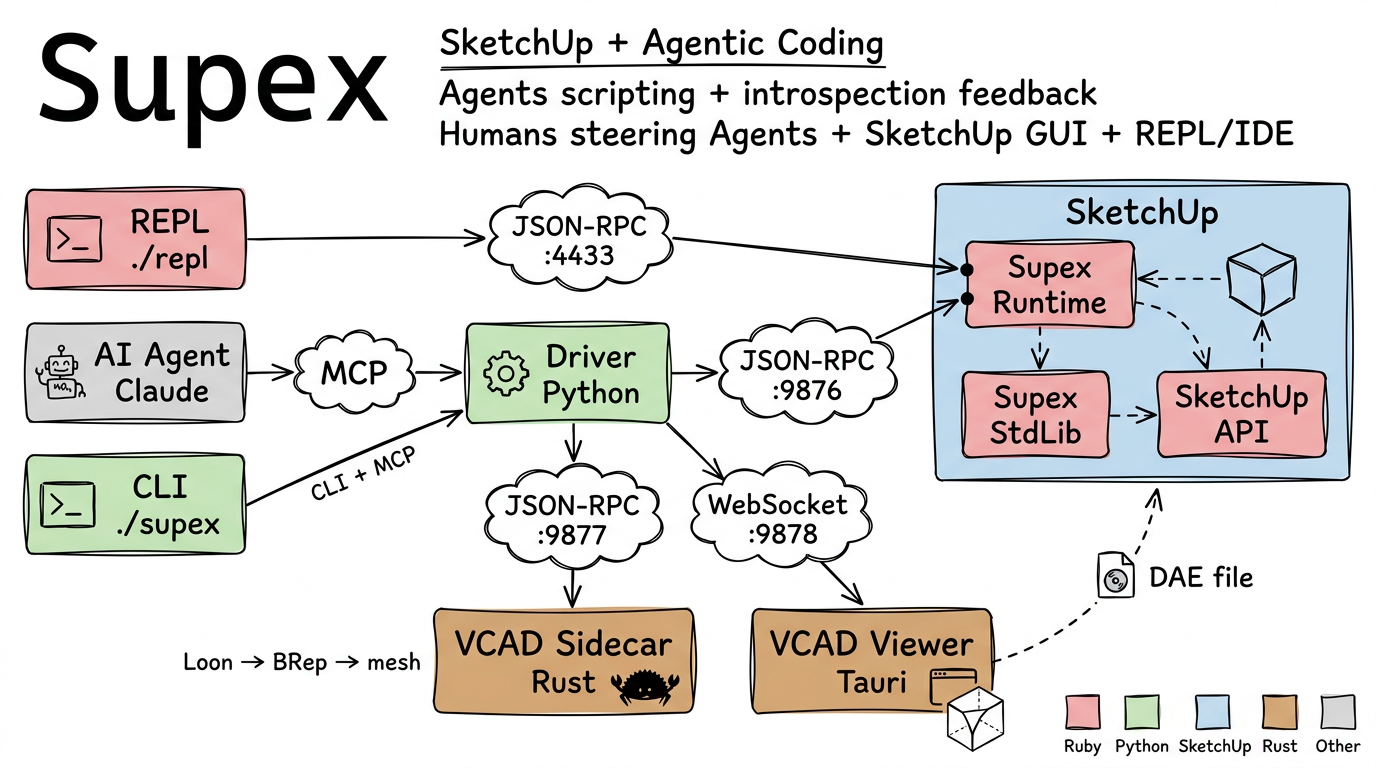
- Python Driver — MCP server (
./mcp) and CLI (./supex) for AI agents and human use - Ruby Runtime — SketchUp extension with bridge server, stdlib, and REPL (
./repl) - VCAD Sidecar — Rust server evaluating Loon code into BRep geometry (
./vcad-sidecar) - VCAD Viewer — Standalone Tauri app for live BRep preview
- Radar — Log aggregator TUI that tails all subsystems in one stream (
./radar)
Communication via JSON-RPC 2.0 over TCP sockets. For more details, see Architecture.
How It Works
Scripts live in your git-versioned project directory. The AI agent writes code, executes it via MCP tools, verifies results with screenshots and introspection, and iterates — all automatically.
your-project/
├── src/
│   ├── create_table.rb    # Ruby scripts for SketchUp API
│   ├── walls.cmp.oo       # Loon/VCAD parametric geometry
│   └── materials.rb
├── models/
│   └── project.skp
└── .mcp.json              # MCP client configuration
Installation & Setup
Requirements
- SketchUp 2026 - Download from sketchup.com
- Only the latest SketchUp version is tested
- Project is experimental - no backward compatibility guarantees
- Claude Code - AI-powered development environment from claude.ai/code
- Only tested with Claude Code (experimental project)
- Other MCP-compatible AI agents might work but are untested
- macOS - Currently the primary supported platform
- Python 3.14+ - For the MCP driver (managed via UV)
- Ruby 3.2.2 - Same as the Ruby version bundled with SketchUp 2025/2026. This Ruby is past upstream end-of-life, but the pin cannot move until SketchUp ships a newer Ruby, because the runtime must run on the interpreter embedded in SketchUp
- Rust toolchain (
cargo) - Only for VCAD: builds the sidecar - Node.js / npm - Only for VCAD: builds the viewer and installs font assets the vendored vcad crate needs at compile time
1. Clone the Repository
git clone --recurse-submodules https://github.com/darwin/supex.git
cd supex
Supex uses git submodules for vendored VCAD dependencies (vcad/vendor/). If you cloned without --recurse-submodules, run:
git submodule update --init --recursive
2. Build the VCAD Sidecar and Viewer (VCAD only)
Skip this step if you do not use VCAD tools. The vendored vcad crate needs font assets from npm at compile time; the pinned lockfiles change after npm install, so tell git to ignore them:
(cd vcad/vendor/vcad && npm install && git update-index --assume-unchanged package-lock.json Cargo.lock)
./scripts/rebuild.sh
./scripts/rebuild.sh sidecar builds only the sidecar (Rust), ./scripts/rebuild.sh viewer only the viewer (Tauri, needs npm).
3. Launch SketchUp with Extension
The development launcher handles extension deployment automatically:
./scripts/launch-sketchup.sh path/to/your/model.skp
This script:
- Launches the installed SketchUp app
- Deploys Ruby extension sources directly (no .rbz building required)
- Enables live reloading during development
- Optionally opens a model given as parameter
4. Configure Claude Code
In your project directory, register the Supex MCP server and link the agent guide:
claude mcp add --scope project --transport stdio supex -- /path/to/supex/mcp
ln -s /path/to/supex/docs/agents/guide supex-guide
The first command writes .mcp.json next to your project. The symlink gives the agent access to the
Supex guide (workflow rules, tool reference, SketchUp API docs); reference supex-guide/README.md
from your project's CLAUDE.md. Add both .mcp.json and supex-guide to .gitignore, since the
paths vary per developer. Replace /path/to/supex with the actual path to your Supex checkout.
5. Verify Connection
./supex status
You should see connection status and SketchUp version information.
Quick Start
For a complete step-by-step tutorial, see the Simple Table Example.
Example projects live in separate orphan branches. To clone an example:
git clone -b example-simple-table https://github.com/darwin/supex.git simple-table
cd simple-table
ln -s /path/to/supex/docs/agents/guide supex-guide
The example covers:
- Project setup and configuration
- Creating geometry with Ruby scripts
- Using introspection tools to verify results
- Iterative development workflow
Development
Run tests and linters from the repository root:
# Run all tests (driver, stdlib, runtime, mock, sidecar, viewer, radar)
./test

# Run selected test suites
./test sidecar viewer

# List available test suites
./test --list

# Run E2E tests only; launches SketchUp and quits it when done unless it was already running
./test --e2e

# Run all linters (RuboCop, ruff, mypy, rustfmt, clippy, tsc, eslint)
./scripts/lint.sh

# Rebuild Rust binaries (VCAD sidecar, viewer)
./scripts/rebuild.sh
./scripts/rebuild.sh sidecar   # rebuild only sidecar

# Run the same Docker image as CI locally (requires Docker)
./scripts/docker-test.sh
Reference
- Documentation Index - Start here for docs navigation
- CLI Reference - Command-line interface for direct SketchUp interaction
- Interactive REPL - Interactive Ruby development in SketchUp
- MCP Reference - Tools available for AI agents (Claude Code)
- Configuration - Environment variables and settings
- Protocol - JSON-RPC communication protocol details
- Security - Authentication, path restrictions, and recommendations
- VCAD Integration - Parametric BRep CAD via Loon language
- Troubleshooting - Common issues and solutions
Reviews (0)
Sign in to leave a review.
Leave a reviewNo results found