claude-code-filetree
Health Pass
- License — License: MIT
- Description — Repository has a description
- Active repo — Last push 0 days ago
- Community trust — 362 GitHub stars
Code Fail
- child_process — Shell command execution capability in .github/workflows/platforms.yml
- spawnSync — Synchronous process spawning in .github/workflows/platforms.yml
- process.env — Environment variable access in .github/workflows/platforms.yml
- fs module — File system access in .github/workflows/platforms.yml
Permissions Pass
- Permissions — No dangerous permissions requested
No AI report is available for this listing yet.
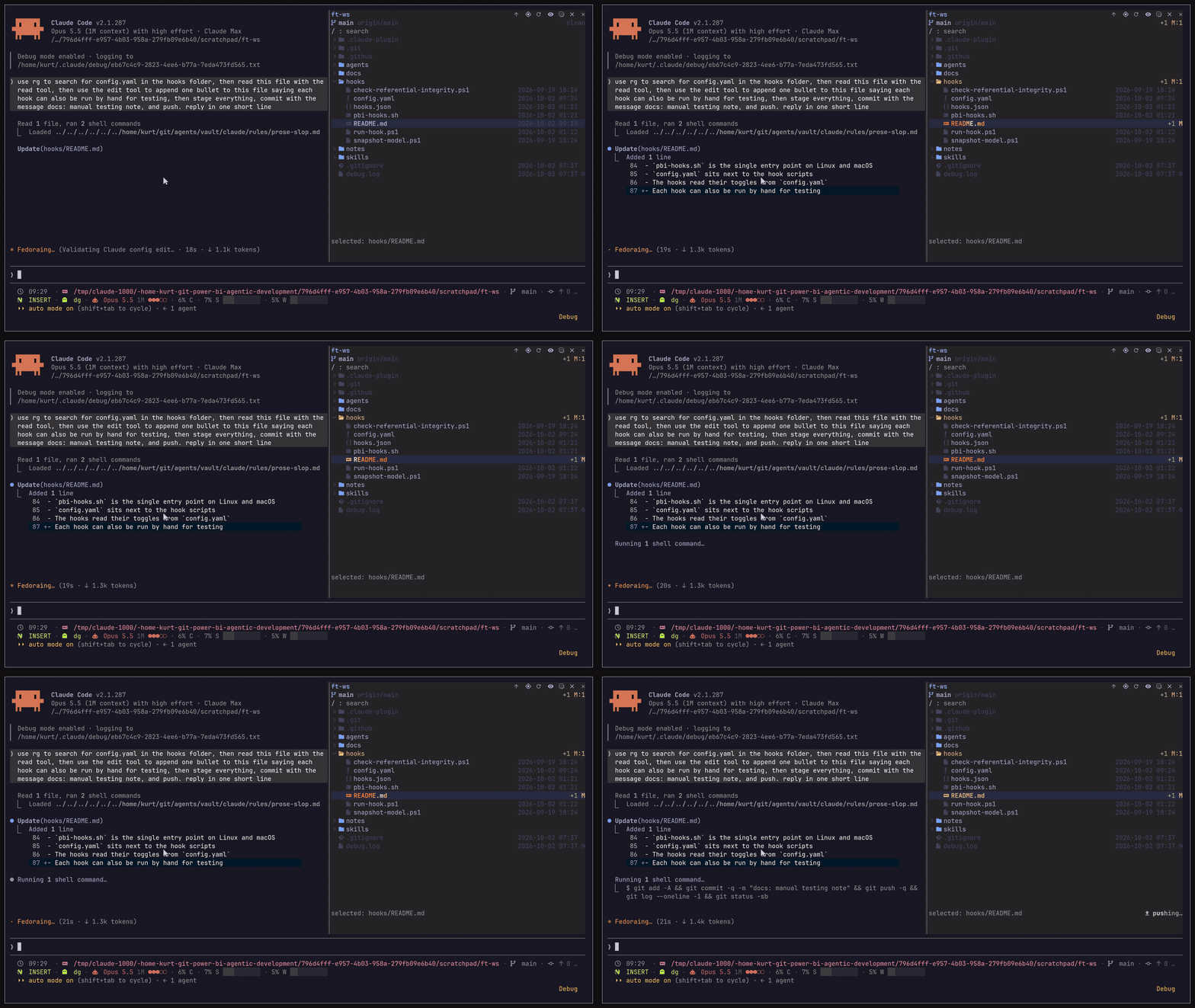
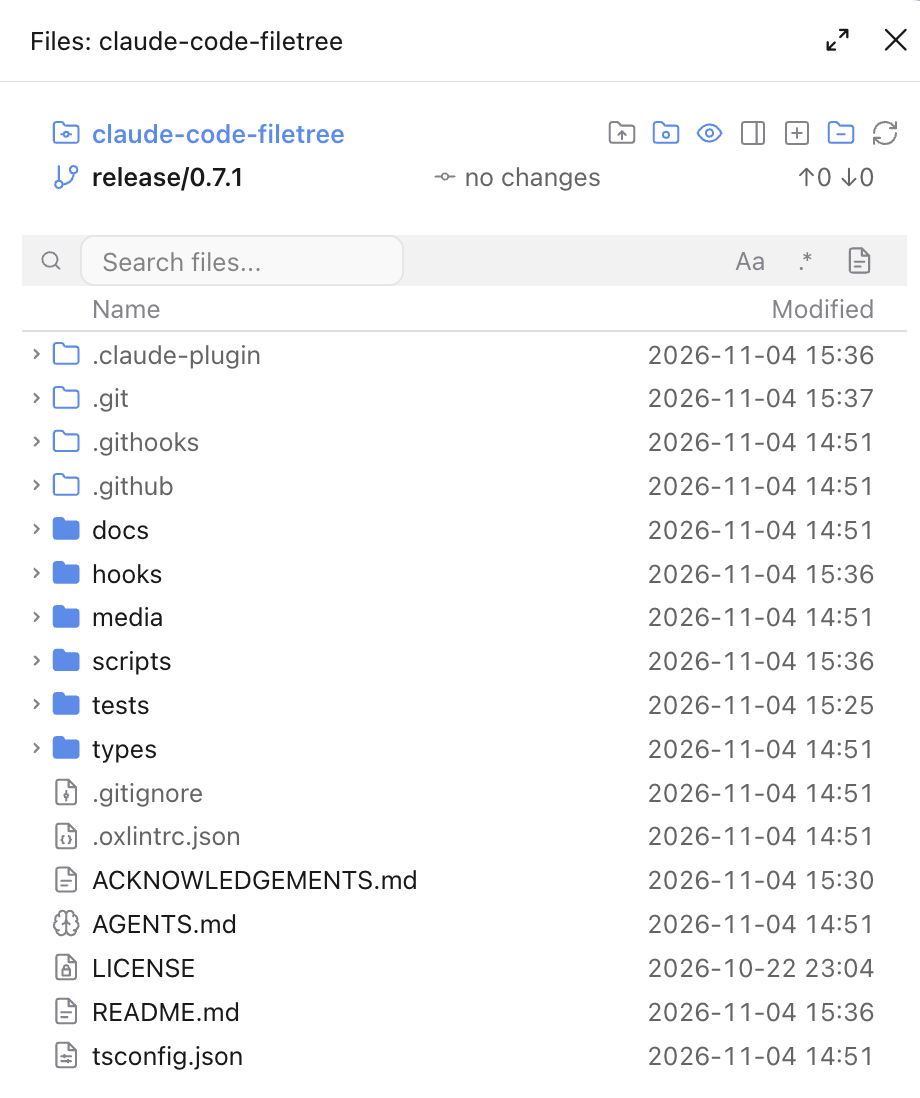
IDE-style file tree for Claude Code: a live pane that shows which files Claude reads and edits, with git status, diffs, content search, file previews and guarded paths, in the terminal and the Claude Desktop app.
Claude Code Filetree
An IDE-style file tree for Claude Code that shows what Claude is doing and where in files



| Preview | Treemap | Diff |
|---|---|---|
 |
 |
 |
[!NOTE]
filetree is a Claude Code mod and needs Claude Code 2.1.306+. It shows in the right sidebar, which in the terminal needs the fullscreen layout (/tui fullscreen) and a terminal at least 110 columns wide; the Desktop app docks it on its own./filetreeshows or hides it, also while Claude is working, and/filetree openopens it, or brings it forward from behind another tab, without hiding it./filetree keysbinds alt+l and alt+h to move the keyboard to and from the tree. Tested on Linux, macOS and Windows; mods don't load in WSL sessions of the Desktop app.
Installation
The repo is its own plugin marketplace. Run this in the terminal:
claude plugin marketplace add data-goblin/claude-code-filetree
claude plugin install filetree@claude-code-filetree
Or inside a Claude Code session:
/plugin marketplace add data-goblin/claude-code-filetree
/plugin install filetree@claude-code-filetree
An install fails with Unrecognized key: "options" on Claude Code older than 2.1.287: run claude update, then install again.
Features
File tree of the cwd, or of a folder pinned with
/filetree <path>, with search across unopened folders, case-sensitive or by regular expression, scoped to one folder, with the matched characters highlighted in each result, and sortable Name, Git and value column headersThe contents toggle in the search row (
qfrom the tree, or a click on it) searches inside files instead of names, withgit grepin a repo andgrep -routside one; matches are grouped per file with line numbers, the first 200 are shown (fewer in the Desktop app when lines are long), and Enter or a click opens the file in the split preview at that line (the full preview in the Desktop app)Git status per file and folder, line counts on changed files, and the branch with ahead/behind in the header (the upstream name with the
Remote branchsetting)The collapse button closes every folder; when every folder is closed it becomes expand all, which opens up to three levels and at most 150 folders, skipping
.gitClaude's reads (purple), writes (orange) and commits (green) shimmer in the tree; collapsed folders open to show the file
A file reference with a line in Claude's reply (
path:12,path:12-20orpath#L12-L20, relative to the cwd or absolute) to a file under the tree root gets a link under the reply; clicking it reveals the file and opens the preview at that lineGit and GitHub commands Claude runs show as a status line at the bottom of the pane
The selected file goes to Claude as context, and
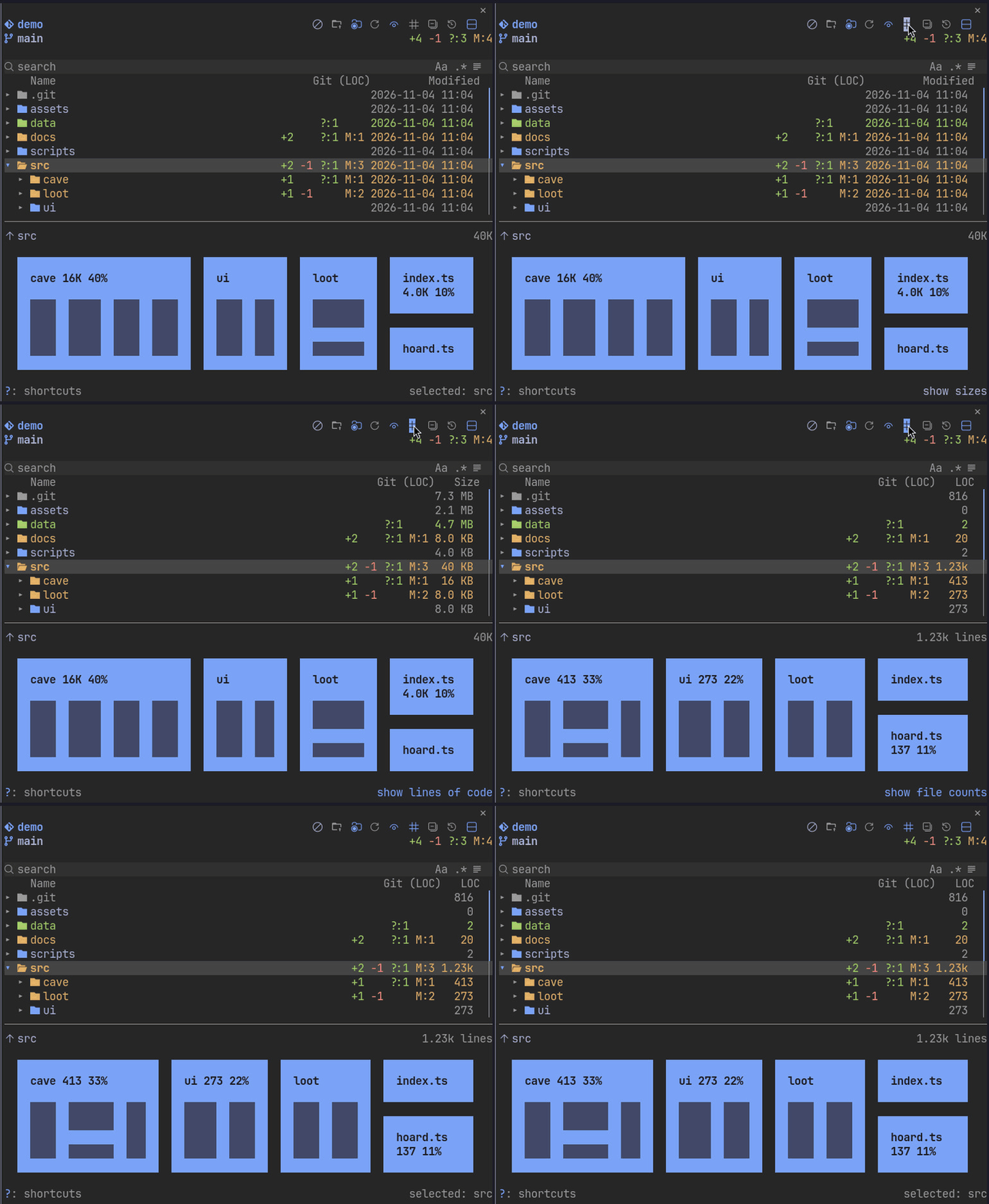
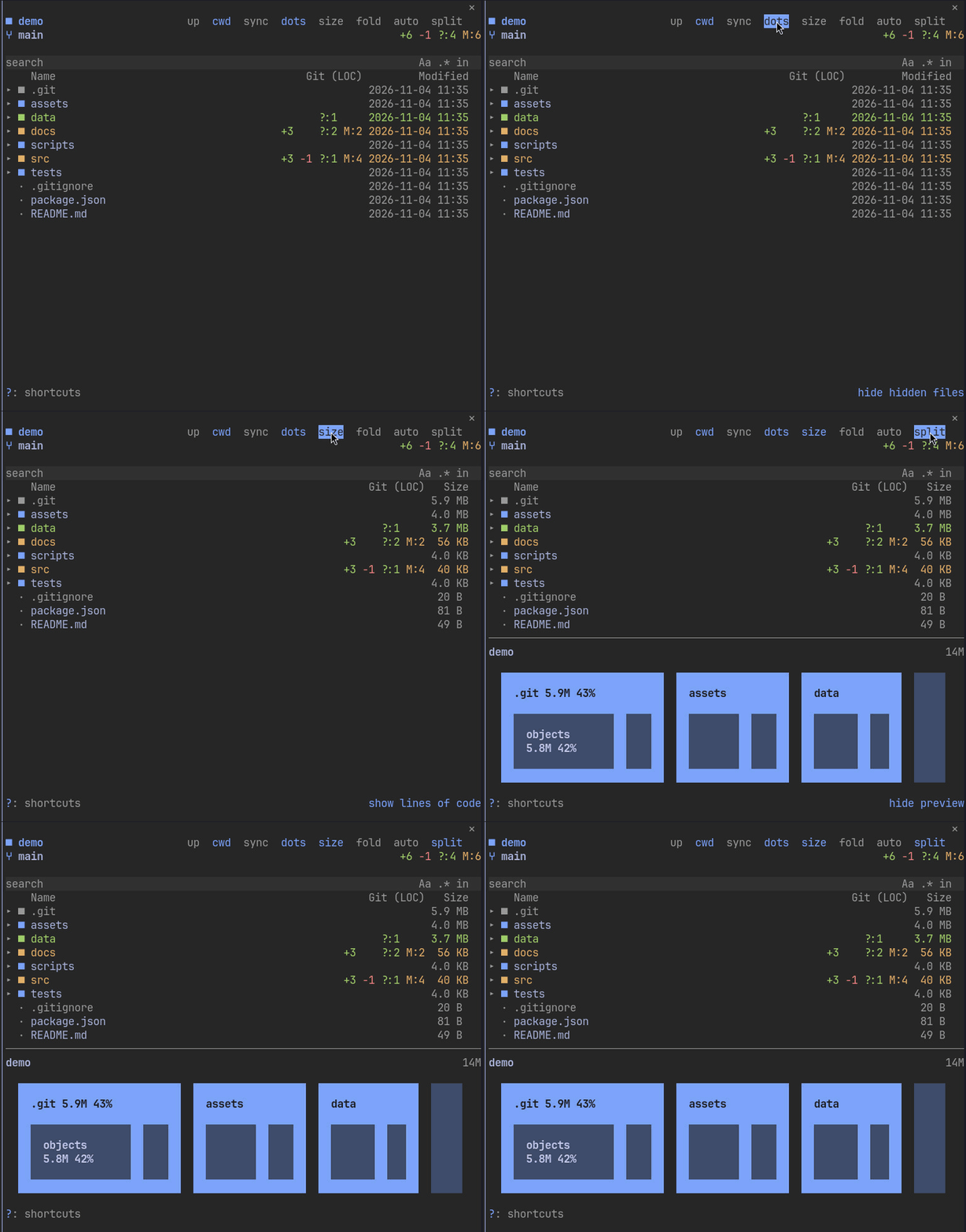
@pathin a prompt reveals that filevmarks up to 100 files and folders: marked rows show a dot,y/Ycopy all their paths,utheir names, and the marked paths go to Claude as contextRight column cycles date, size, lines of code and number of files from the header button, with git counts in their own columns beside it; a folder's date is its newest file
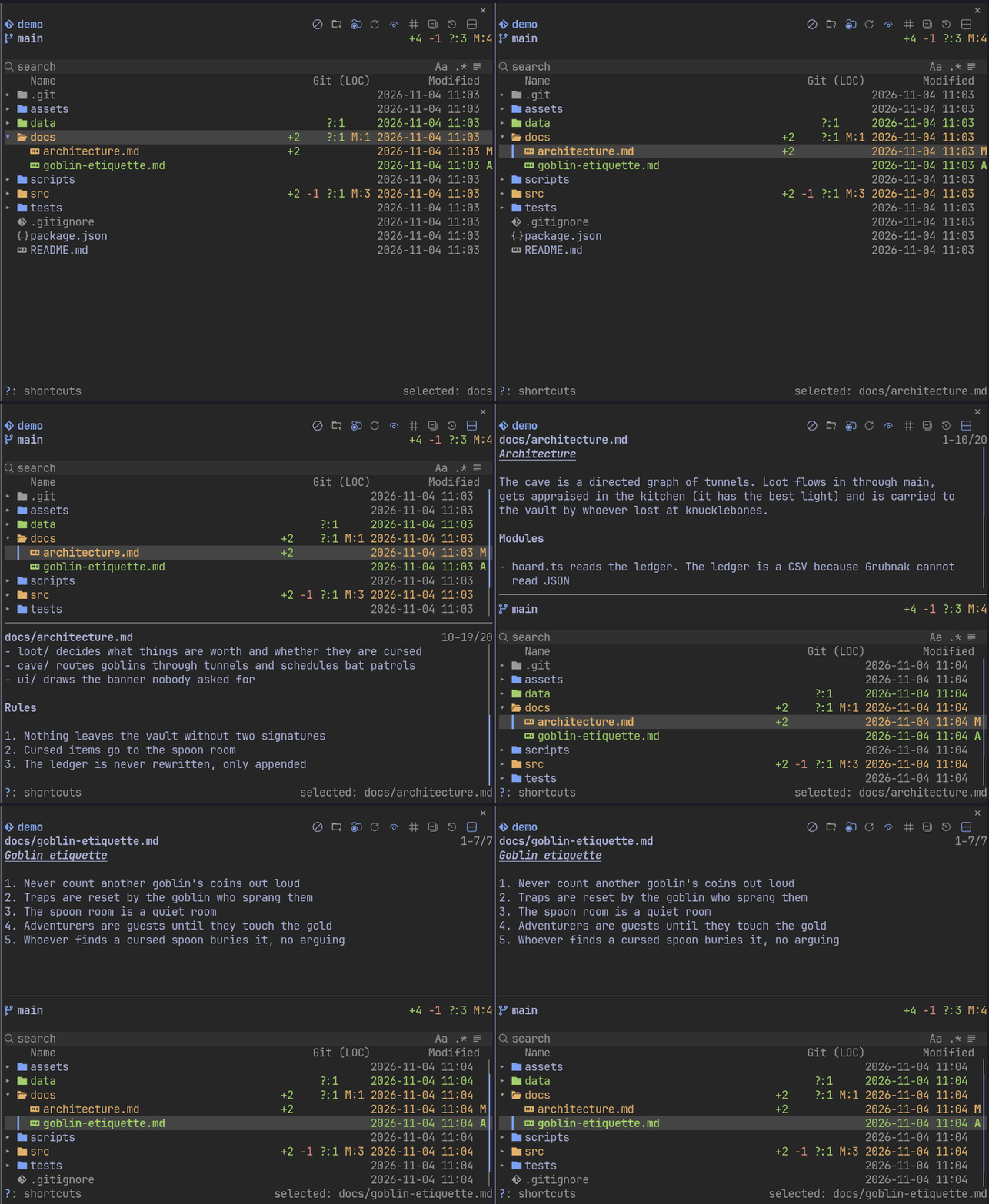
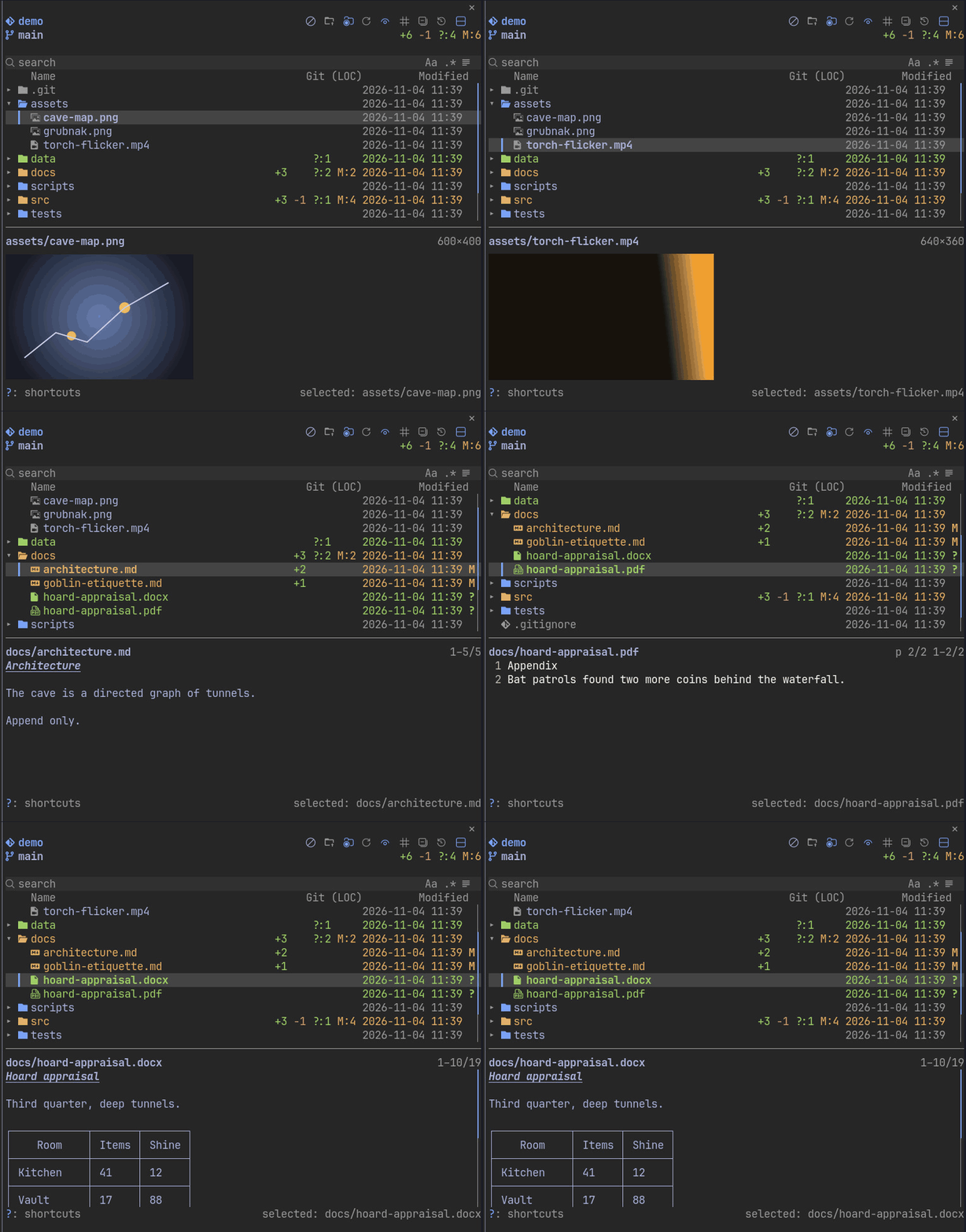
Split preview under or above the tree: highlighted code, rendered Markdown, images, video poster frames, and PDF and Word pages turned with
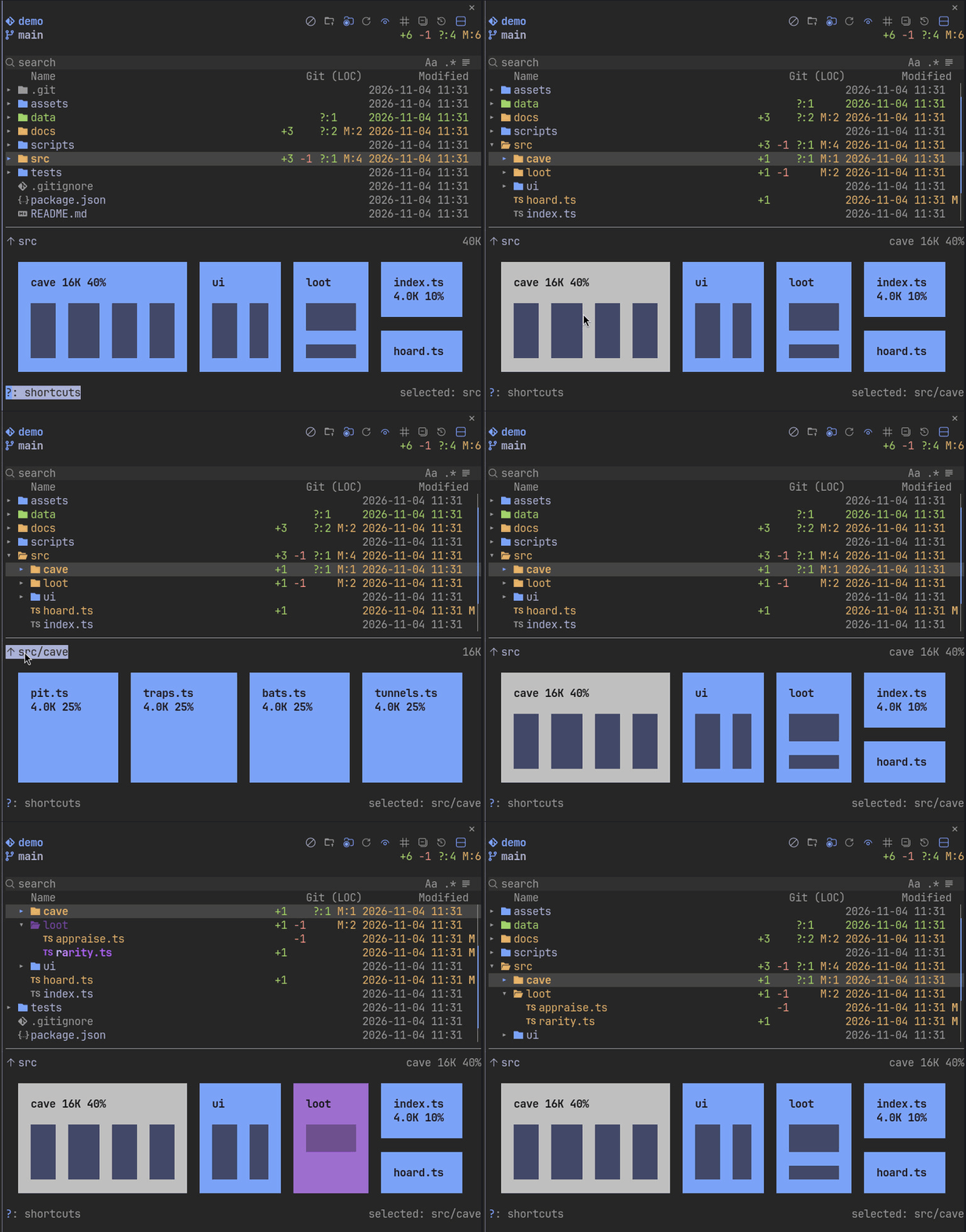
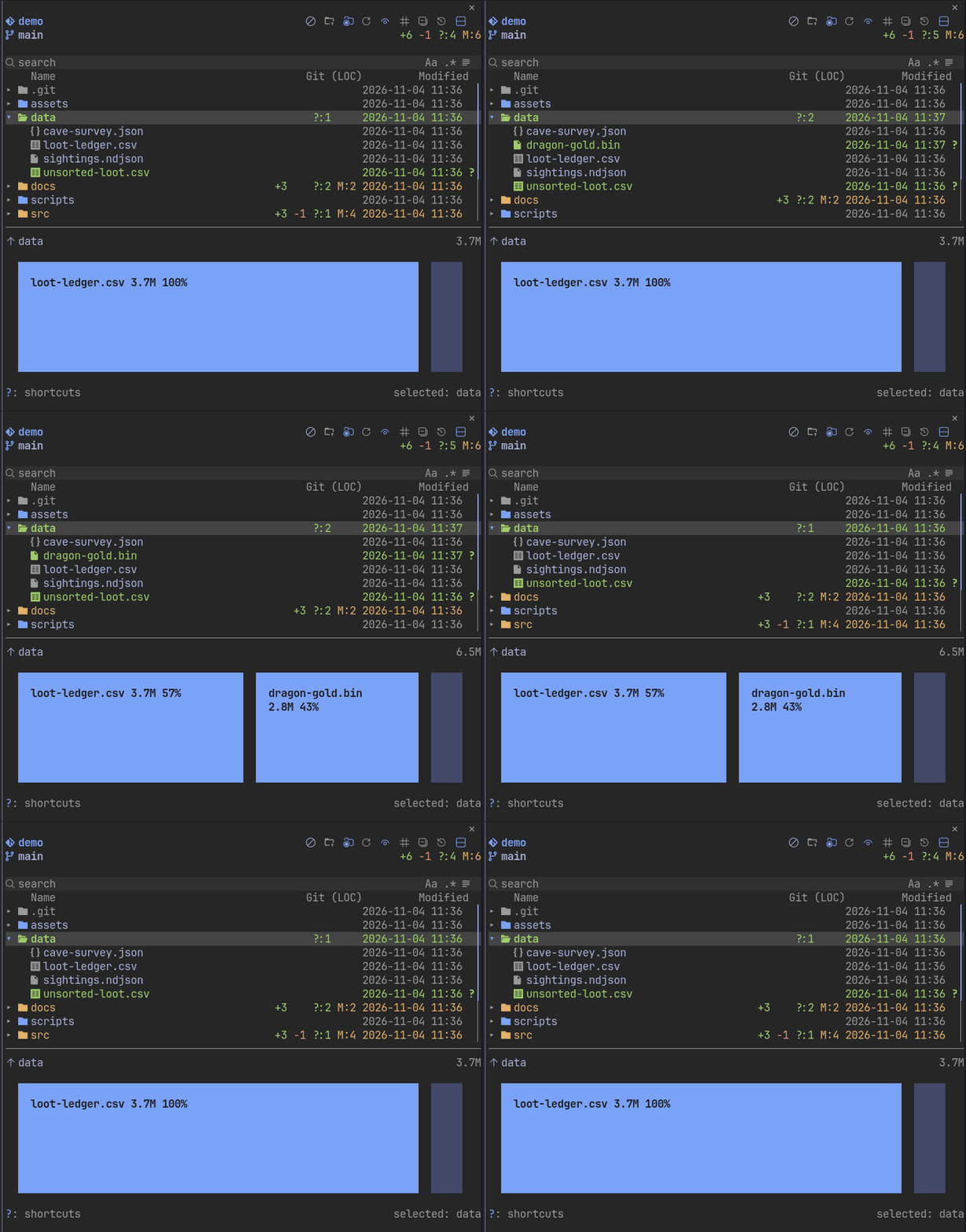
[and]Treemap of the folder under the cursor in the same split, sized by bytes or by lines, with Claude's activity lit
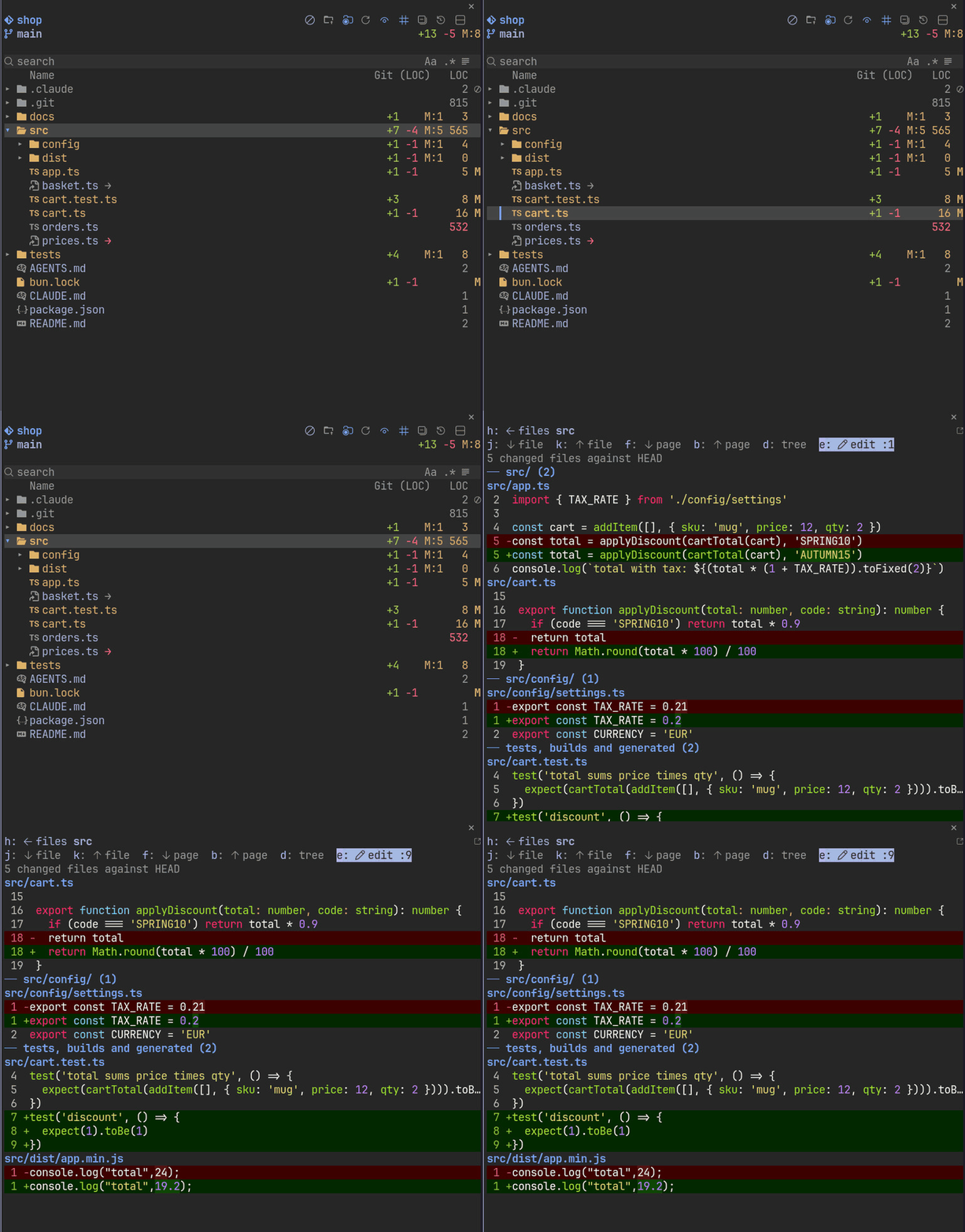
dshows the diff of a file or of every changed file in a folder, in the pane or in a tool you name; a folder's files are grouped by folder, with test, build and generated files (lockfiles,dist,build,out,*.min.*, snapshots, test folders and*.test.*/*_test.*files) in a group of their own after the restOpen files in their default app, an editor in a tmux or herdr pane, or any command, and
topens a shell in a folder in a new tmux or herdr pane (where Terminal target says)Changes made outside Claude show at once on Linux through
inotifywaitDraws in the terminal's own palette, with Nerd Font, plain or text glyphs; in the Desktop app, vector icons for files, folders and the toolbar
Symlinks show an arrow after the name: muted when the target is in the tree, yellow when it is outside, red when it is missing or the link is circular; the footer names the target and which of these it is for the selected row
AGENTS.md,CLAUDE.md, their.local.mdvariants and Markdown files under any.claude/rules/folder draw a brain instead of the Markdown icon (§in plain glyphs)xguards a file or folder: it draws a red x, and Claude's Edit, Write and NotebookEdit calls on it or anything under it are refused with a reason naming the guard. A Bash or PowerShell command whose text names a guarded path asks you first; that check reads only the command text, so it can miss a path the command builds itself. Guards are kept per repo in filetree's own store under your Claude configuration, never in the repoWhen Claude or a subagent writes a file outside the repo (or outside the tree root when there is no repo) with Edit, Write or NotebookEdit, a warning badge with the count shows in the header and a toast says so the first time in a session; the badge or
wlists those files. Writes from Bash are not counted, since a shell command's targets cannot be known for sure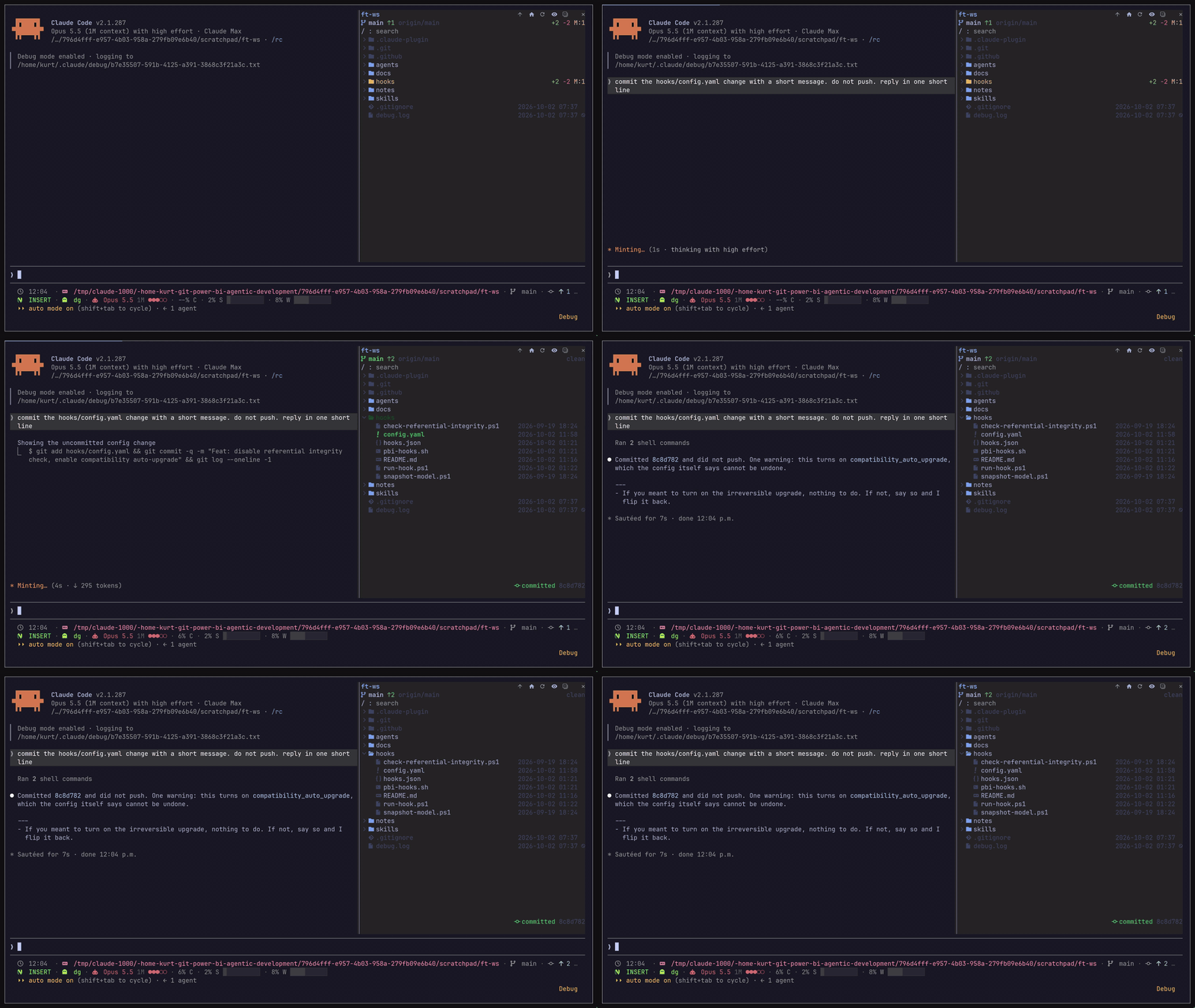
Preview and treemap
p or the header button shows the split. On a file it shows the file; on a folder, the root row or nothing it shows the treemap.
flowchart LR
  C[Cursor] -->|file| P[File preview]
  C -->|folder, root row or nothing| T[Treemap]
  T -->|click a box| S[Select the entry]
  T -->|double-click a folder| D[Map that folder]
  T -->|folder name| U[Map the parent]
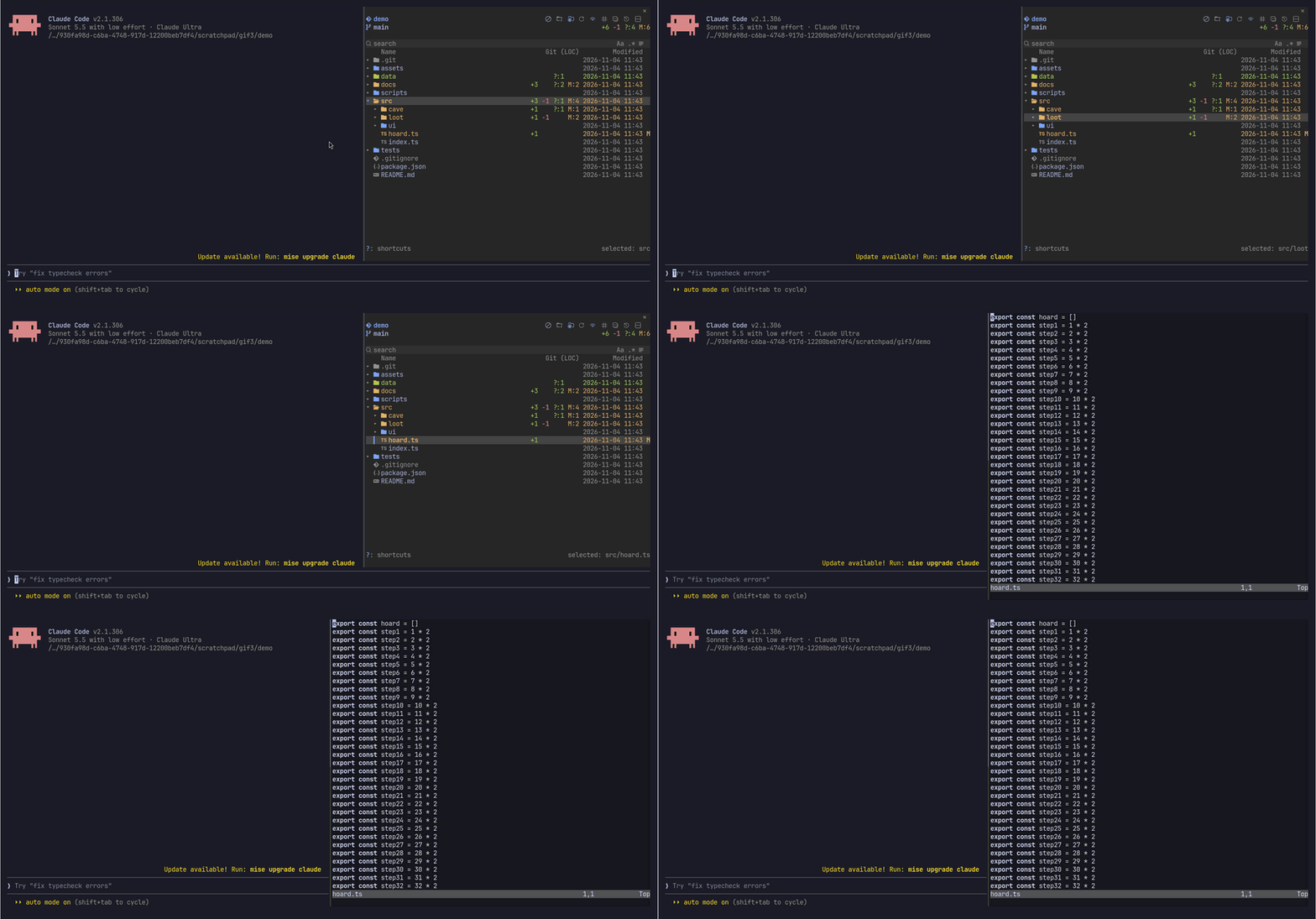
Open in tmux or herdr
Keys
With the tree focused:
j / k:        move down / up; k on the first row selects the root
h / l:        collapse or go to parent / expand
o, Enter:     open a file or toggle a folder
s:            focus search
i:            search in the folder under the cursor (Backspace on an empty query or × drops it)
z:            jump to a folder, zoxide style: type fragments in order (the last one in the folder name), up/down to pick, Enter re-roots and moves Claude there with /cd, Esc cancels
c / r:        search: match case / regular expression (Aa / .* in the search row)
q:            search: file contents instead of names (the contents toggle in the search row); j / k pick a match, Enter opens it
a:            auto-collapse: close folders opened for Claude 10 seconds after its last touch; turning it on also closes the ones it opened while off
n / g / m:    sort by name / git changes / value column: desc, asc, off (or click the header)
p:            show or hide the preview or treemap
f / b:        scroll the preview a page
"[ / ]":      previous / next page of a PDF or Word document
d:            diff of the entry under the cursor
t:            open a shell in the folder under the cursor (or the file's folder) in a new tmux or herdr pane
x:            guard or unguard the entry under the cursor (off limits to Claude's edits)
w:            list the files Claude wrote outside the repo this session (shown once there are any)
y / Y:        copy the relative / absolute path, or of every marked entry, one per line
u:            copy the file name, or the names of every marked entry
v / V:        mark or unmark the entry under the cursor / clear all marks; in the Desktop app V arrives as v, so press the "N marked" count in the footer to clear them
"?":          show or hide every key, grouped, over the tree (the Shortcuts button in the Desktop app); j, k, the arrows, f, b, Page Up/Down, Home and End scroll it, and any other key that acts closes it first (? typed in the search field is just a character)
Space:        Quick Look on macOS
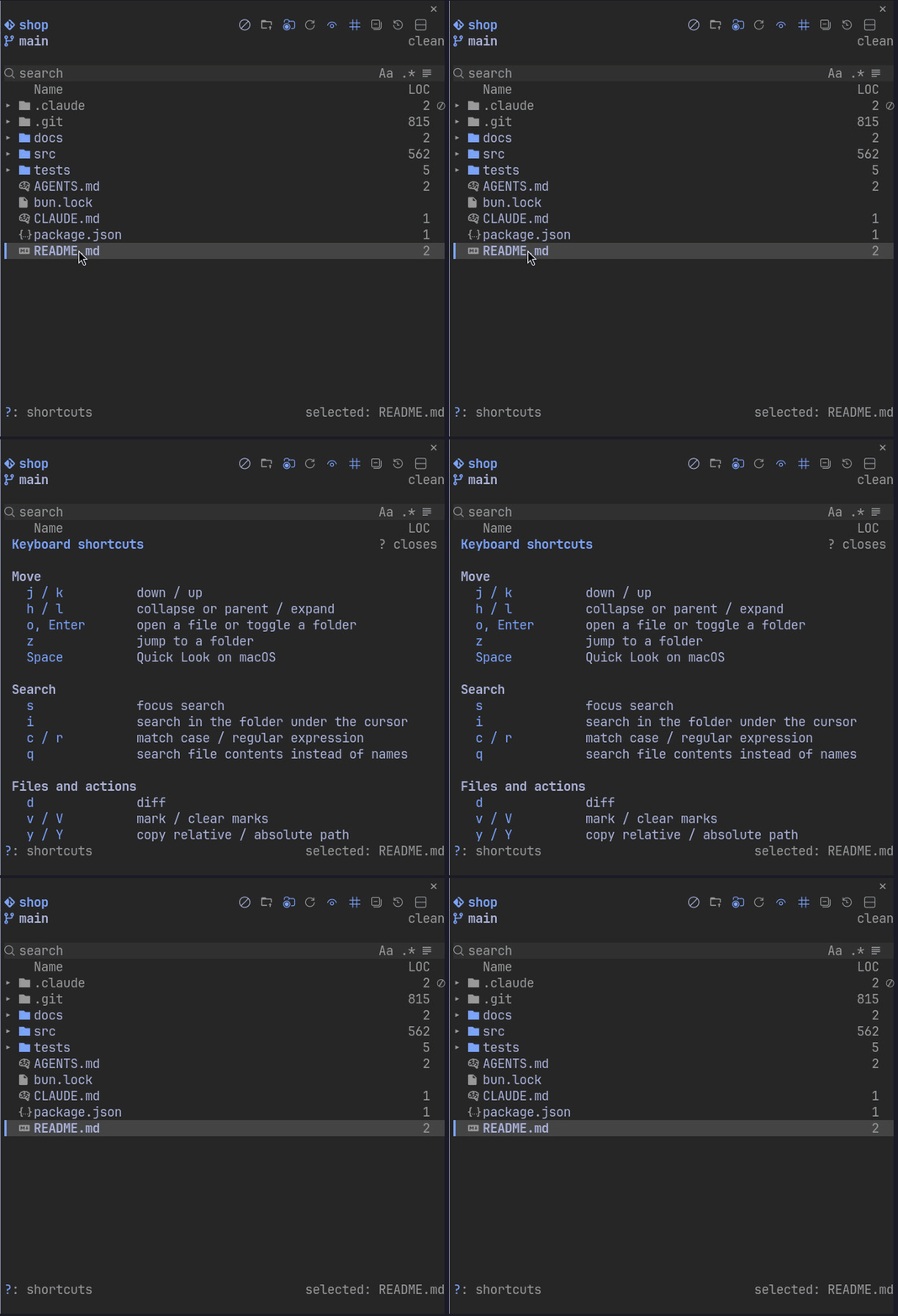
Resize the pane with the mouse or the pane:grow and pane:shrink keybindings.
/filetree keys adds alt+l (keys from the prompt to the tree) and alt+h (keys back to the prompt) to your keybindings.json after asking. They work in the terminal only: the Desktop app does not read keybindings.json. It keeps your other bindings, asks before replacing one of yours on the same key (a Global alt+l counts too), keeps the file's indentation, and leaves a file it cannot parse or write untouched.
Settings
All settings are in /config under filetree, each with its own description there.
Claude activity:  reads and writes | writes | reads | none
Follow Claude:    on | off
Jump moves Claude: tree and Claude | tree
Follow work:      on | off
Open at start:    on | off
Focus on open:    on | off
Right column:     date | age | size | loc | files
Long file:        500 | a line count | off
Remote branch:    off | on
Hints:            on | off
Search spacing:   on | off
Column headers:   on | off
Auto-collapse:    off | on
Shortcuts:        auto | always | off
Open with:        empty | editor | preview | a command with {path} and {dir}
Binary files:     Open with | default app
Edit with:        empty | a command with {path} and {line}
Diff with:        empty | a command such as "hunk diff --" or "lazygit -f"
Diff groups:      folder | kind | off
Terminal target:  auto | pane right | pane below | tab | workspace
Ignore:           names to hide, such as ".cache .tmp"
Preview pane:     bottom | top
Treemap:          auto | image | cells | off
Palette:          key=#hex pairs over the terminal colors
Glyphs:           auto | nerd | plain | text
Follow work moves the session to where the work is. When Claude or its subagents read and write in another git repo for a few minutes (two or more writes there, or four reads with no writes, and clearly more than anywhere else), filetree runs /cd to that repo at the end of the turn, or right away while Claude is idle, and the tree follows. It moves at most once every two minutes, stays put while several repos are equally busy, and skips temp folders, ~/.claude, ~/.config, ~/Library and the agents vault. A z jump counts as a move, so it is not undone straight away.
Requirements
required:  Claude Code 2.1.306 or newer, git
optional:
  inotifywait:            live updates on Linux (inotify-tools)
  magick or ffmpeg:       images other than PNG, video frames
  pdftoppm or gs:         PDF pages
  soffice:                Word and office pages
  pandoc, pdftotext:      document text in tmux, herdr and other terminals
  tmux or herdr:          an editor or diff tool in a new pane
  Nerd Fonts 3.2+:        icons for Glyphs auto, which draws plain Unicode without one or with an older one
pictures:  Ghostty or kitty, outside tmux and herdr, on Linux and macOS
Considerations
- The Desktop app has no split preview or treemap
- GIFs and videos show one still frame
- Windows sizes folders through file listings, and the treemap draws one level
- Row clicks need herdr 0.9.1 or later; run
herdr update
Contributing
Open pull requests against a release branch, not main:
- Fixes: the patch branch, such as
release/0.7.1 - Features: the minor branch, such as
release/0.8.0
Keep the version of that branch.
Turn on the git hooks once per clone. The pre-commit hook runs the fast checks in seconds: grep rules, types, oxlint, and claude plugin validate when the manifests change. The pre-push hook checks the version against the release branch and runs the plugin tests:
git config core.hooksPath .githooks
The same checks run on macOS, Windows and Linux in CI on every push that touches the plugin.
License
MIT. The treemap labels use glyphs from Terminus Font by Dimitar Zhekov (Lat2-Terminus16, SIL Open Font License 1.1).
This project is inspired by my Omarchy app FileBlade
Reviews (0)
Sign in to leave a review.
Leave a reviewNo results found